

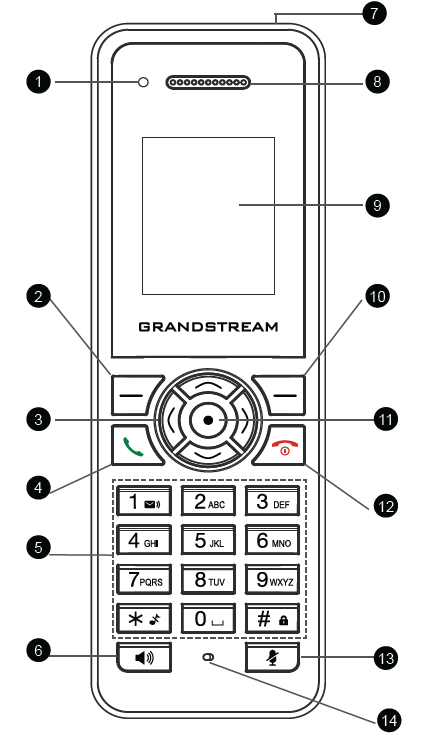
Key | Description | |
1 | Power and Charging Indication Light | Red: Charging. Green: Charge completed. Blinking: Missed call(s) or Voice Mail received. |
2, 10 | Left and right softkeys | Correspond to functions displayed on the LCD. These functions change depending on the current context. |
3 | 4 Arrow key combination | The 4 Arrow Key combination allows navigation through menus, options, and text by moving the cursor up, down, left, or right. |
4 | Off-hook / Dial key | The Off-hook/Dial key is used to initiate or answer calls and redial the last number. |
5 | Alphanumeric Keypad | The Alphanumeric Keypad allows input of numbers, letters, and symbols for dialing, messaging, and text entry. |
6 | Hands-free / Speaker key | The Hands-free/Speaker key activates the device’s speakerphone for hands-free calling and audio playback. |
7 | 3.5mm Headset jack | The 3.5mm headset jack allows you to connect wired headphones or a headset for audio output and microphone input. |
8 | Earphone | The earphone delivers audio output for calls, media, and notifications when connected to the device. |
9 | Color LCD screen | The Color LCD screen displays call information, menus, and settings with a clear, colored interface. |
11 | OK/Selection key | The OK/Selection key confirms selections, activates highlighted options, and navigates through menus. |
12 | On-hook / Power key | The On-hook/Power key ends calls, turns the device on or off, and may reject incoming calls when pressed. |
13 | Mute key | The Mute key disables the microphone during calls or recordings, preventing your voice from being heard. |
14 | Microphone | The microphone captures audio input for calls, voice commands, and recordings, ensuring clear communication. |