

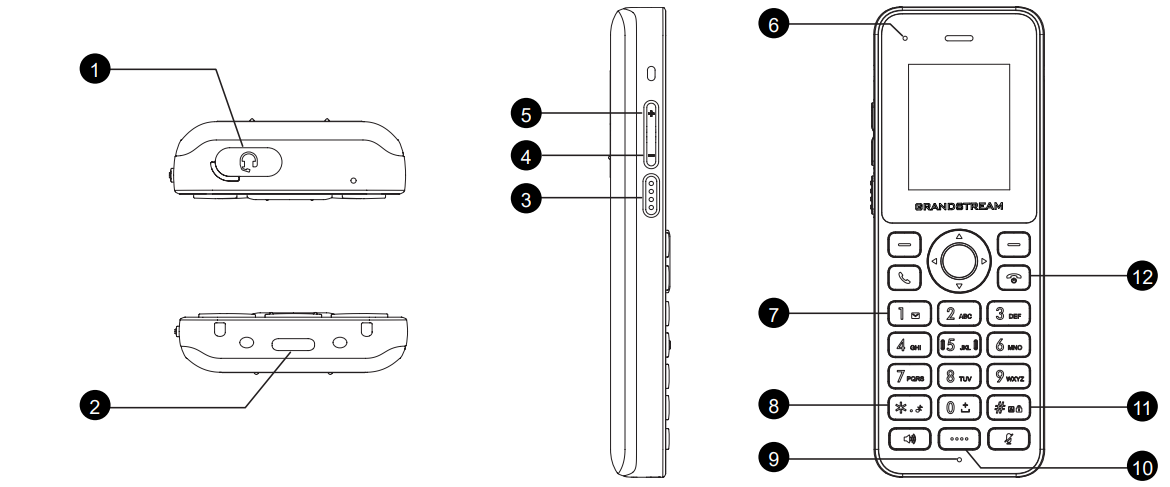
Key | Description | |
1 | 3.5 mm | The 3.5mm headset jack allows you to connect wired headphones or a headset for audio output and microphone input. |
2 | Type-C Charging Port | The Type-C Charging Port is used for charging the handset. |
3 | PTT key | The PTT (Push-to-Talk) key activates voice communication, allowing instant transmission of audio when pressed, typically used in walkie-talkie or radio modes. |
4 | Volume Down Key | The Volume Down key decreases the device’s audio output level, allowing you to lower the volume. |
5 | Volume Up key | The Volume Up key increases the device’s audio output level, allowing you to raise the volume. |
6 | LED indicator | LED indicator provides visual notifications for charging, messages, or system alerts. |
7 | 1 / Voicemail key | The 1/Voicemail key provides quick access to your voicemail inbox when pressed. |
8 | * / Symobolic key / Silent Mode | The * (Symbolic) key is used to enter special characters or symbols and may activate Silent Mode when held down, muting all notifications and sounds. |
9 | Microphone | The microphone captures audio for calls, voice recordings, and other sound input, ensuring clear communication. |
10 | Dedicated function key | The Dedicated Function key provides quick access to a specific feature or application, customizable based on user preferences. |
11 | # / Input method switching / Lock key | The # key switches between different input methods (such as numeric and text) and may also function as the Lock key to secure the device. |
12 | On-hook /Power key | The On-hook/Power key turns the device on or off and ends active calls when pressed. |