

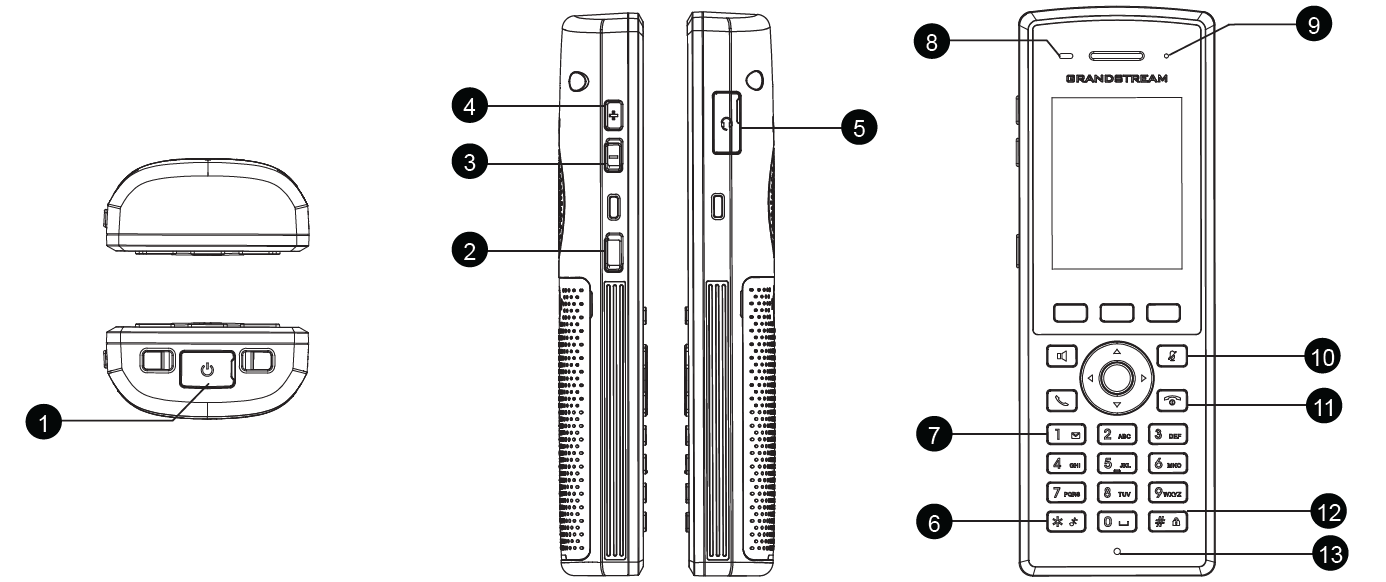
Key | Description | |
1 | Micro USB port | Micro USB port is used for charging and data transfer between devices. |
2 | PTT key | The PTT (Push-to-Talk) key activates voice communication in walkie-talkie or two-way radio mode, allowing instant voice transmission while pressed. |
3,4 | Volume keys | Volume keys increases/decreases the device’s audio output level. |
5 | 3.5 mm | The 3.5mm headset jack allows you to connect wired headphones or earphones for audio output and microphone input. |
6 | Silent key | The Silent key mutes ringtones and alerts, switching the handset to silent mode. |
7 | 1 / Voicemail key | The Voicemail key (1) provides quick access to your voicemail inbox when held down. |
8 | Proximity sensor | The Proximity sensor detects when the handset is near your ear to turn off the screen and prevent accidental touches. |
9 | LED indicator | LED indicator provides visual notifications for charging, messages, or system alerts. |
10 | Mute | The Mute key silences the microphone during calls or recordings, preventing your voice from being heard. |
11 | On-hook /Power key | The On-hook/Power key turns the device on or off and ends active calls when pressed. |
12 | # / Lock key | Locks keypad against unintentional entries when keep pressing #. |
13 | Microphone | The Microphone captures your voice during calls. |