


Introduction
This document details the HTTP API endpoints, commands, and schemas supported by the GDS372X Smart Door System. It is intended for developers integrating the device into custom applications or access control platforms. The API is designed for compatibility with the GDS37XX HTTP API, allowing existing integrations to migrate with minimal changes, while noting cases where Pvalue behavior diverges between the two product lines.
Coverage includes card management, access control and door-open settings, SIP configuration, video and privacy mask settings, alarm and network configuration, user management, firmware upgrade, system diagnostics, and media capture. Each endpoint lists supported methods, parameters, and response schemas, along with authentication/session behavior. A version history tracks API changes across development
1. Authentication & Session Management
To ensure API security, the GDS372X uses a Challenge-Response authentication mechanism. Subsequent requests must verify identity by including the returned Session ID ( sid ) in the request’s HTTP Cookie header.
1.1 Authentication Workflow
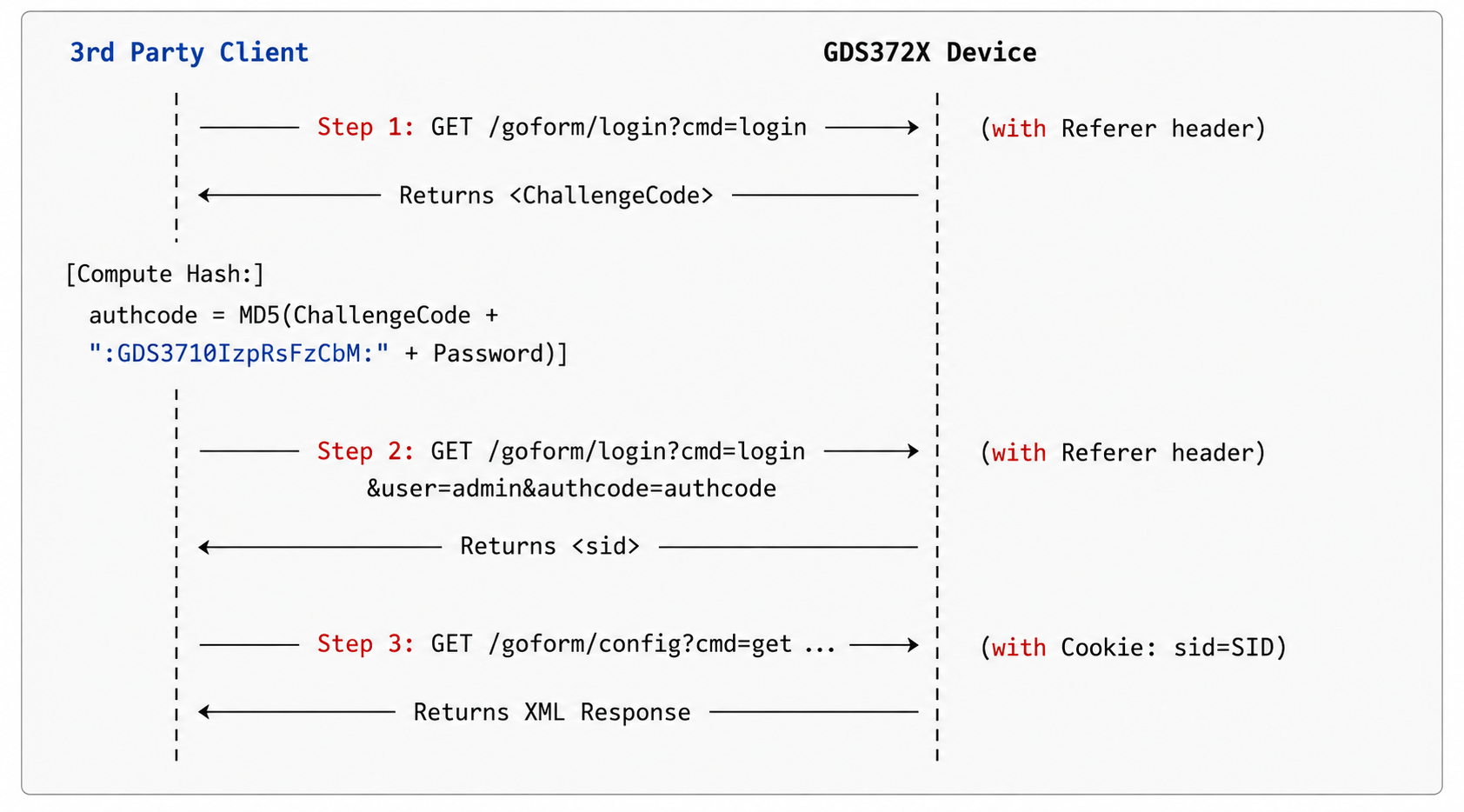
1.2 Step 1: Challenge Code Request
Retrieve a one-time challenge token.
Endpoint: /goform/login
Method: GET
Query Parameters:
| Parameter | Type | Required | Default | Description |
|---|---|---|---|---|
cmd | String | Yes | – | Fixed value: login |
Request Headers:
Referer: https: /<IP>/
Response (XML):
<?xml version="1.0" encoding="UTF-8"?>
<Configuration>
    <ResCode>0</ResCode>
    <ChallengeCode>8d6a7f828ab1dcf0c39f041235abc74e</ChallengeCode>
</Configuration>
1.3 Step 2: Authentication Login
Submit the calculated authcode signature to establish a valid session.
Endpoint: /goform/login
Method: GET
Query Parameters:
| Parameter | Type | Required | Default | Description |
|---|---|---|---|---|
cmd | String | Yes | – | Fixed value: login |
user | String | Yes | – | Username (e.g., admin ) |
authcode | String | Yes | – | Authenticated login signature |
Request Headers:
Referer: https: /<IP>/
Authcode Calculation:
authcode = MD5(ChallengeCode + :GDS3710lZpRsFzCbM: + AdminPassword)
Response (XML):
<?xml version="1.0" encoding="UTF-8"?>
<Configuration>
    <ResCode>0</ResCode>
    <RetMsg>OK</RetMsg>     <sid>bfc479196522f5072bc4d4b04f366814203466e3120ca171196bc732485447c</sid>
</Configuration>
Note: Save the <sid> value to pass in subsequent request cookies ( Cookie: sid=bfc479196522 ... ).
1.4 Quick-Start Bash Example
Here is a reference shell script snippet showing how to implement this flow programmatically using curl and sed :
authcode = MD5(ChallengeCode + :GDS3710lZpRsFzCbM: + AdminPassword)
#!/bin/bash
IP="192.168.1.162"
PASSWORD="admin"

#1.Get Challenge Token
challenge_resp=$(curl -s -L -k -H "Referer: https://$IP/" "https://$IP/goform/login?cmd=login")
token=$(echo "$challenge_resp" | sed -n 's/.*<ChallengeCode>\([^<]*\)<\/ChallengeCode>.*/\1/p' | tr -d '\r')

if [ -z "$token" ]; then
    echo "Failed to retrieve Challenge Code."
    exit 1
fi
echo "Challenge Code: $token"

#2.Compute Authcode MD5
raw_str="$token:GDS3710lZpRsFZCbM:$PASSWORD"
authcode=$(echo -n "$raw_str" | md5sum | cut -d' ' -f1)
echo "Authcode: $authcode"

#3.Log In to Retrieve SID
login_resp=$(curl -s -L -k -H "Referer: https://$IP/" "https://$IP/goform/login?cmd=login&user=admin&authcode=$authcode")
res_code=$(echo "$login_resp" | sed -n 's/.*<ResCode>\([^<]*\)<\/ResCode>.*/\1/p' | tr -d '\r')

if [ "$res_code" = "0" ]; then
    SID=$(echo "$login_resp" | sed -n 's/.*<sid>\([^<]*\)<\/sid>.*/\1/p' | tr -d '\r')
    echo "Login Successful! Session ID (SID): $SID"

    #Example subsequent call using the session ID
    curl -s -L -k \
-H "Accept: application/xml" \
-H "Referer: https://$IP/" \
-H "Cookie: sid=$SID" \
-w "\nHTTP_CODE:%{http_code}" \
"$url"
"https://$IP/goform/config?cmd=get&type=user_list&page=1&page_size=5"
else
    echo "Login Failed."
    exit 1
fi
1.5 Session Expiration & Re-Authentication
When a session expires (e.g., due to inactivity timeout) or becomes invalid (e.g., after a device reboot), subsequent API requests will fail authentication.
1.5.1 Expiration Indicators
- HTTP Status Code: The server will respond with HTTP status
401 Unauthorizedor403 Forbidden. - Response Body: The response body will contain text or tags indicating authentication failure, such as
"Unauthorized"or"session expired".
1.5.2 Recommended Client Re-Authentication Strategy
Clients should wrap API HTTP calls with auto-reauthentication logic. When the indicators above are matched, the client should automatically: 1. Re-initiate the Challenge-Response login sequence to retrieve a new session ID ( sid ). 2. Re-send the failed API request with the updated sid cookie.
2. Card & User Management
2.1 GET User List
Query registered cards and RFID credentials page-by-page.
Endpoint: /goform/config
Method: GET
Query Parameters:
| Parameter | Type | Required | Default | Description |
|---|---|---|---|---|
cmd | String | Yes | – | Fixed value: get |
type | String | Yes | – | Fixed value: user_list |
page | Int | Yes | – | Page index (1-indexed). |
page_size | Int | Yes | – | Number of entries to retrieve per page. |
Request Example:
https: /192.168.1.162/goform/config?cmd=get&type=user_list&page=1&page_size=10
Response (XML):
Success Response:
<?xml version="1.0" encoding="UTF-8"?>
<Configuration>
    <ResCode>0</ResCode>
    <RetMsg>OK</RetMsg>
    <total>16</total>
    <item>
        <uuid>658</uuid>
        <enable_card>1</enable_card>
        <username>test_http_user_5959</username>
        <user_id>5959</user_id>
        <card_num>10007239</card_num>
        <account>0</account>
        <gender>2</gender>
        <group_id>1</group_id>
        <SOD>19700101080000</SOD>
        <EOD>20991231000000</EOD>
        <sch_id>0</sch_id>
        <card_type>0</card_type>
        <app_user>255</app_user>
        <ic_valid>1</ic_valid>
        <door_ctrl_0>1</door_ctrl_0>
        <door_ctrl_1>1</door_ctrl_1>
        <app_door_option_0>1</app_door_option_0>
        <app_door_option_1>1</app_door_option_1>
        <app_door_option_2>1</app_door_option_2>
        <app_door_option_3>1</app_door_option_3>
        <add_time>20260525173743</add_time>
    </item>
</Configuration>
2.2 ADD Card
Add a new RFID card/pin credential.
Endpoint: /goform/config
Method: GET
Query Parameters:
| Parameter | Type | Required | Default | Description |
|---|---|---|---|---|
cmd | String | Yes | – | Fixed value: add |
user_id | String | Conditional | – | Unique User ID of the card owner. Required unless ID is provided. |
username | String | No | – | Username of the card owner. |
card_num | String | No | – | Physical RFID card number. |
enable_card | Int | No | 1 | Card active status. 0 : Disabled, 1 : Enabled. |
card_type | Int | No | 255 | Type of card. 0 : ID card, 1 : IC card, 255 : Unknown. If card_num is set, card_type MUST be 0 or 1, otherwise the card cannot be used. |
group_id | Int | No | 0 | Permission group index. 0 : No group (default). |
door_ctrl_0 | Int | No | – | Relay 1 open permission. 0 : Denied, 1 : Allowed. |
door_ctrl_1 | Int | No | – | Relay 2 open permission. 0 : Denied, 1 : Allowed. |
app_door_option_0 | Int | No | – | Mobile app door 1 option control. |
app_door_option_1 | Int | No | – | Mobile app door 2 option control. |
app_door_option_2 | Int | No | – | Mobile app door 3 option control. |
app_door_option_3 | Int | No | – | Mobile app door 4 option control. |
ID | String | Conditional | – | Legacy compatibility parameter. Required unless user_id is provided. If specified, it will automatically fallback to user_id (if empty) and card_num (if empty). |
Request Example:
https: /192.168.1.162/goform/config?cmd=add&user_id=5959&username=test_http_user&card_num=10007239&enable_card=1&card_type=0&group_id=1&door_ctrl_0=1&door_ctrl_1=1&app_door_option_0=1&app_door_option_1=1&app_door_option_2=1&app_door_option_3=1
Response (XML):
Success Response:
<?xml version="1.0" encoding="UTF-8"?>
<Configuration>
    <ResCode>0</ResCode>
    <RetMsg>OK</RetMsg>
    <uuid>665</uuid>
</Configuration>
2.3 DEL Card
Delete a credential. Multiple IDs or UUIDs can be comma-separated.
Endpoint: /goform/config
Method: GET
Query Parameters:
| Parameter | Type | Required | Default | Description |
|---|---|---|---|---|
cmd | String | Yes | – | Fixed value: del |
uuid | String | Yes (if ID empty) | – | Database UUID of the card to delete (supports comma-separated list). |
ID | String | No | – | Legacy compatibility fallback for uuid (supports comma-separated list). |
Batch Delete Constraint: A maximum of 20 card credentials can be deleted in a single batch request via comma-separated list. Any IDs exceeding this limit are ignored/truncated.
Request Example:
Delete Single Card by UUID:
https: /192.168.1.162/goform/config?cmd=del&uuid=665
Batch Delete Cards by Legacy ID:
https: /192.168.1.162/goform/config?cmd=del&ID=99991,99992,99993
Response (XML):
Success Response:
<?xml version="1.0" encoding="UTF-8"?>
<Configuration>
    <ResCode>0</ResCode>
    <RetMsg>OK</RetMsg>
</Configuration>
2.4 SET/Modify Card
Modify an existing card credential.
Endpoint: /goform/config
Method: GET
Query Parameters:
| Parameter | Type | Required | Default | Description |
|---|---|---|---|---|
cmd | String | Yes | – | Fixed value: set |
uuid | String | Yes (if ID is empty) | – | Database UUID of the card to modify. |
ID | String | No | – | Legacy compatibility fallback for uuid. |
username | String | No | – | Updated username of the card owner. |
Request Example:
https: /192.168.1.162/goform/config?cmd=set&uuid=665&username=updated_http_user
Response (XML):
Success Response:
<?xml version="1.0" encoding="UTF-8"?>
<Configuration>
    <ResCode>0</ResCode>
    <RetMsg>OK</RetMsg>
</Configuration>
2.5 Card & User Field Reference
The table below describes all user and card credential fields returned in the <item> list or query details:
| XML Tag Name | Type | Description | Range / Format |
|---|---|---|---|
uuid | String | Unique database identifier for the card/credential. | e.g. "659" |
ID | String | Input compatibility query parameter fallback. Note: Not returned in responses. | e.g. "258974" |
enable_card | String (Numeric) | Active status of the card. | "0" : Disabled, "1" : Enabled |
username | String | Username of the card owner. | Max length 32 characters |
user_id | String | Unique User ID of the card owner. | Max length 32 characters |
card_num | String | RFID Card Number (physical card ID). | Max length 32 characters |
passwd | String | Local private door PIN code. | Max length 8 digits |
gender | String (Numeric) | Gender of the user. | "0" : Male, "1" : Female, "2" : Other/Secret |
identify_num | String | National ID or Social Security Number. | Max length 32 characters |
room_num | String | Room or apartment number. | Max length 16 characters |
sip_num | String | SIP extension number associated with the user. | Max length 32 characters |
account | String (Numeric) | SIP account index used for call routing. | "0" to "4" |
group_id | String (Numeric) | Permission group index. | "0" (Default, no group), "1", etc. |
sch_id | String (Numeric) | Time schedule ID associated with the card. | "0" (No schedule), etc. |
card_type | String (Numeric) | Type of card credential. | "0" : ID card, "1" : IC card, "255" : Unknown (default) |
app_user | String (Numeric) | Application type identifier. | "255" : Normal user, "2" : App admin, "0" : App user, "1" : App visitor |
ic_valid | String (Numeric) | Card verification validity. | "0" : Invalid, "1" : Valid |
SOD | String | Start of Date (validation start timestamp). | YYYYMMDDhhmmss (e.g. 19700101080000 ) |
EOD | String | End of Date (validation expiration timestamp). | YYYYMMDDhhmmss (e.g. 20991231000000 ) |
door_ctrl_0 / door_ctrl_1 | Array / Flat Tags | Relay open permission list. | Flat elements <door_ctrl_X>1 /door_ctrl_X> inside XML |
app_door_option_0 ... _3 | Array / Flat Tags | App doors option list. | Flat elements <app_door_option_X>1 /app_door_option_X> inside XML |
add_time | String | Timestamp when the card was created. | YYYYMMDDhhmmss |
3. Card Data Import/Export
3.1 Export User File
Export user credentials, access records, or alarm histories.
Endpoint: /goform/config
Method: GET (for single-step direct download)
When requested via GET without a request body, the API directly performs a synchronous export and returns the raw CSV file as binary data. This path bypasses client Accept headers (e.g., application/xml ) to prevent returning wrapped payloads.
Query Parameters:
| Parameter | Type | Required | Default | Description |
|---|---|---|---|---|
cmd | String | Yes | – | Fixed value: export |
type | String | Yes | – | The type of data to export:1 : Card Data (Downloads card.csv )door_record : Door Logs (Downloads door_record.csv )alarm_record : Alarm Logs (Downloads alarm.csv )card_issuing_failed : Failed Card Issuance Records (Downloads issuing_failed.csv ) |
data_type | Int | No | – | Format/Data type indicator. Set to 1 (CSV format). |
Request Examples:
Export Card Data:
GET /goform/config?cmd=export&type=1&data_type=1 HTTP/1.1
Cookie: sid=<session_id>
Accept: */*
Export Door Logs:
GET /goform/config?cmd=export&type=door_record&data_type=1 HTTP/1.1
Cookie: sid=<session_id>
Accept: */*
Export Alarm Logs:
GET /goform/config?cmd=export&type=alarm_record&data_type=1 HTTP/1.1
Cookie: sid=<session_id>
Accept: */*
Response Headers:
Content-Type: application/octet-stream
Content-Disposition: attachment; filename="<filename>.csv"
Response Content:
Raw CSV file content.
3.2 Import User File
Import/Upload card list back to the GDS device.
Endpoint: /goform/config
Method: POST (Multipart file upload)
Query Parameters:
| Parameter | Type | Required | Default | Description |
|---|---|---|---|---|
cmd | String | Yes | – | Fixed value: upload |
type | Int | Yes | – | Fixed value: 0 (indicates card data import) |
dupopt | Int | Yes | – | How to handle duplicate entries:0 : Keep existing records (Skip duplicates)1 : Replace existing records with imported ones |
data_type | Int | No | 1 | Format/Data type indicator. Set to 1 (CSV format). |
Request Payload: Multipart form-data with the CSV file attached under the field name file.
Response (XML):
<?xml version="1.0" encoding="UTF-8"?>
<Configuration>
    <ResCode>0</ResCode>
    <RetMsg>OK</RetMsg>
</Configuration>
4. Door Settings & Access Control
4.1 Remote Open Door (Challenge+Response)
Trigger door strike via authenticated challenge.
4.1.1 Get Open Door Challenge (GET)
Retrieve the one-time challenge token ( ChallengeCode ) and IDCode required for the door command.
Endpoint: /goform/apicmd
Method: GET
Query Parameters:
| Parameter | Type | Required | Default | Description |
|---|---|---|---|---|
cmd | Int | Yes | – | Fixed value: 0 |
Response (XML):
<?xml version="1.0" encoding="UTF-8"?>
<Configuration>
    <ResCode>0</ResCode>
    <ChallengeCode>8d6a7f828ab1dcf0c39f041235abc74e</ChallengeCode>
    <IDCode>1</IDCode>
</Configuration>
4.1.2 Send Door Open Command (GET)
Initiate the open/close command using the authenticated signature.
Endpoint: /goform/apicmd
Method: GET
Query Parameters:
| Parameter | Type | Required | Default | Description |
|---|---|---|---|---|
cmd | Int | Yes | – | Fixed value: 1 |
authcode | String | Yes | – | Authenticated signature calculated using remote PIN and admin password |
idcode | String | Yes | – | One-time ID code retrieved from challenge request |
type | String | Yes | – | Action to perform: open or close |
Authcode Calculation:
authcode = MD5(ChallengeCode + ":" + RemotePIN + ":" + AdminPassword)
Response (XML):
<?xml version="1.0" encoding="UTF-8"?>
<Configuration>
    <ResCode>0</ResCode>
    <RetMsg>OK</RetMsg>
</Configuration>
4.2 Door Basic Settings
Configure door locks, Wiegand, RS485 OSDP, snapshots, remote unlock credentials, and doorbell targets using NVRAM P-values.
Endpoint: /goform/config
Method: GET
Parameters: cmd=set&P<P-VALUE>=<VALUE>& .
authcode = MD5(ChallengeCode + ":" + RemotePIN + ":" + AdminPassword)
4.2.1 Door Access Basic Settings
| P-value | Alias / Config Path | Type | Description | Default / Range |
|---|---|---|---|---|
| P15440 | doorAccess.doorRelay.type | Number | Local Lock/Relay Type selection | 0 : Internal Lock, 1 : Wiegand Lock, 2 : Web Relay |
| P15453 | doorAccess.relayOut1.type | Number | Relay Out 1 Working Mode | 1 : Lock Control, 2 : Alarm Output, 3 : Doorbell Output, etc. |
| P15454 | doorAccess.relayOut1.status | Number | Relay Out 1 Status configuration | 0 : Normal Open, 1 : Normal Close |
| P15465 | doorAccess.relayOut1.delayBeforeUnlock | Number | Relay Out 1 Delay before unlock / open | 0 to 20 (seconds) |
| P15466 | doorAccess.relayOut1.unlockHoldTime | Number | Relay Out 1 Unlock Hold Time / open duration | 1 to 1800 (seconds) |
| P15450 | doorAccess.relayOut2.type | Number | Relay Out 2 Working Mode | 0 : Electric Strike, 1 : Alarm Output, 2 : Doorbell Output, etc. |
| P15470 | doorAccess.relayOut2.status | Number | Relay Out 2 Status configuration | 0 : Normal Open, 1 : Normal Close |
| P14100 | doorAccess.relayOut2.delayBeforeUnlock | Number | Relay Out 1 Delay before unlock/open | 0 to 20 (seconds) |
| P14101 | doorAccess.relayOut2.unlockHoldTime | Number | Relay Out 2 Unlock Hold Time / open duration | 1 to 1800 (seconds) |
| P15680 | doorAccess.relayOut1.name | String | Custom display name for Relay Out 1 | Max 32 chars |
| P15681 | doorAccess.relayOut2.name | String | Custom display name for Relay Out 2 | Max 32 chars |
| P14120 | doorAccess.wiegand.input.enable | Number | Wiegand Port Input/Output Mode | 0 : Wiegand Output, 1 : Wiegand Input |
| P14121 | doorAccess.wiegand.outputMode | Number | Wiegand Control Mode | 0 : Disabled, 1 : Relay & Local Auth, 2 : Relay & Bypass Local |
| P15468 | doorAccess.wiegand.controlOptions | Number | Wiegand Control Options mode | e.g. 2 |
| P15607 | doorAccess.wiegand.outputBits | Number | Wiegand Output Bit Format | 26 (bits), 34 (bits), etc. |
| P16001 | doorAccess.wiegand.outputPinMode | Number | Wiegand Output Pin Mode | e.g. 0 |
| P14341 | alarm.digitalOutput2.holdTime | Number | Digital Output 2 (DO2) Hold Time | 1 to 1800 (seconds) |
| P14342 | alarm.digitalOutput1.holdTime | Number | Digital Output 1 (DO1) Hold Time | 1 to 1800 (seconds) |
| P15301 | doorAccess.gdsManager.enable | Number | Enable Central GDS Manager software control | 0 : Disabled, 1 : Enabled |
| P15409 | doorAccess.snapshot.doorbell.email.enable | Number | Enable email snapshot on doorbell ring | 0 : Disabled, 1 : Enabled |
| P15471 | doorAccess.snapshot.doorOpened.email.enable | Number | Enable email snapshot when door is opened | 0 : Disabled, 1 : Enabled |
| P15474 | doorAccess.snapshot.door1Opened.number | Number | Number of snapshots to take on door opened | 1 to 10 |
| P15511 | doorAccess.snapshot.doorbell.delay | Number | Snapshot delay time on doorbell event | 0 to 10 (seconds) |
| P15513 | doorAccess.snapshot.doorOpened.app.enable | Number | Enable mobile App snapshot on door opened | 0 : Disabled, 1 : Enabled |
| P15517 | doorAccess.snapshot.doorbell.app.enable | Number | Enable mobile App snapshot on doorbell ring | 0 : Disabled, 1 : Enabled |
| P15583 | doorAccess.snapshot.doorOpened.delay | Number | Snapshot delay time on door opened | 0 to 10 (seconds) |
| P15971 | doorAccess.snapshot.openDoor.enable | Number | Enable snapshot when door is unlocked | 0 : Disabled, 1 : Enabled |
4.2.2 Open Door Settings
| P-value | Alias / Config Path | Type | Description | Default / Range |
|---|---|---|---|---|
| P10457 | doorAccess.openDoor1.remotePin | String | Remote PIN to unlock Door 1 (SIP DTMF command) | Max 8 digits |
| P15460 | doorAccess.openDoor2.remotePin | String | Remote PIN to unlock Door 2 (SIP DTMF command) | Max 8 digits |
| P14829 | doorAccess.swipingCard.interval | Number | Minimum interval delay between successive card swipes | 0 to 2000 (ms, default 300 ) |
| P14858 | doorAccess.openDoor.remoteDtmf.enable | Number | Enable remote door open by DTMF keys during calls | 0 : Disabled, 1 : Enabled |
| P14859 | doorAccess.openDoor.remoteSip.enable | Number | Enable remote door open via SIP MESSAGE | 0 : Disabled, 1 : Enabled |
| P15424 | doorAccess.openDoor.httpApi.enable | Number | Remote HTTP API Door Open authorization mode | 0 : Disabled, 1 : Challenge-Response, 2 : Basic Auth |
| P15573 | doorAccess.openDoor.httpApi.compatibility.enable | Number | Enable legacy GDS HTTP API compatibility mode ( ID parameter) | 0 : Disabled, 1 : Enabled |
| P15479 | doorAccess.openDoor.nfc.enable | Number | Enable NFC smart open door via mobile credentials | 0 : Disabled, 1 : Enabled |
| P15632 | doorAccess.openDoor.nfc.timeout | Number | NFC detection card read timeout | 50 to 2000 (milliseconds) |
| P15484 | doorAccess.openDoor.appbtn.enable | Number | Enable remote open door via mobile App control buttons | 0 : Disabled, 1 : Enabled |
| P15485 | doorAccess.openDoor.qrcode.enable | Number | Enable scanning dynamic access QR codes to unlock | 0 : Disabled, 1 : Enabled |
| P15691 | doorAccess.openDoor.staticQrcode.enable | Number | Enable scanning static access QR codes to unlock | 0 : Disabled, 1 : Enabled |
| P15486 | doorAccess.openDoor.ble.enable | Number | Enable Bluetooth Low Energy (BLE) open door | 0 : Disabled, 1 : Enabled |
| P15487 | doorAccess.openDoor.ble.sensitivity | Number | Bluetooth BLE signal detection sensitivity level | 1 (High) to 5 (Low) |
| P15488 | doorAccess.openDoor.ble.interval | Number | Bluetooth BLE scanning broadcast interval | 1 to 60 (seconds) |
| P15489 | doorAccess.openDoor.iccard.enable | Number | Enable RFID RFID/IC card swiping open door | 0 : Disabled, 1 : Enabled |
| P15605 | doorAccess.openDoor.iccard.compatibilityMode.enable | Number | Enable RFID IC card compatibility mode (reads wider chip range) | 0 : Disabled, 1 : Enabled |
| P15615 | doorAccess.openDoor.idcard.enable | Number | Enable ID Card swiping open door | 0 : Disabled, 1 : Enabled |
| P15543 | doorAccess.oneWayInterlock.enable | Number | Enable One-Way Interlock door safety control mode | 0 : Disabled, 1 : Enabled |
| P15981 | doorAccess.doorLinkage.mode | Number | Door Linkage safety linkage mode | e.g. 0 |
| P15982 | doorAccess.doorLinkage.safeRoom.mode | Number | Safe Room door linkage operation mode | e.g. 0 |
| P15983 | doorAccess.doorLinkage.safeRoom.relay | Number | Safe Room door linkage relay assignment | e.g. 0 |
| P16070 | doorAccess.openDoor.hookAfterUnlock.enable | Number | Enable automatic call hang up after remote unlock | 0 : Disabled, 1 : Enabled |
| P16071 | doorAccess.openDoor.hookAfterUnlock.time | Number | Delay time before automatic call hang up after unlock | 1 to 20 (seconds) |
4.2.3 Doorbell Basic Settings
| P-value | Alias / Config Path | Type | Description | Default / Range |
|---|---|---|---|---|
| P10462 | doorAccess.doorbell.number1 | String | Target SIP phone extension or IP target for Doorbell 1 | Max 256 chars |
| P15556 | doorAccess.doorbell.number2 | String | Target SIP phone extension or IP target for Doorbell 2 | Max 256 chars |
| P15558 | doorAccess.doorbell.number3 | String | Target SIP phone extension or IP target for Doorbell 3 | Max 256 chars |
| P15560 | doorAccess.doorbell.number4 | String | Target SIP phone extension or IP target for Doorbell 4 | Max 256 chars |
| P15587 | doorAccess.doorbell.cloudNumber1 | String | Cloud Doorbell ring destination target 1 | Max 256 chars |
| P15588 | doorAccess.doorbell.cloudNumber2 | String | Cloud Doorbell ring destination target 2 | Max 256 chars |
| P15589 | doorAccess.doorbell.cloudNumber3 | String | Cloud Doorbell ring destination target 3 | Max 256 chars |
| P15590 | doorAccess.doorbell.cloudNumber4 | String | Cloud Doorbell ring destination target 4 | Max 256 chars |
| P15418 | doorAccess.doorbell.schedule1 | String | Doorbell Call 1 Time Schedule index constraint | e.g. "100" (always allow) |
| P15557 | doorAccess.doorbell.schedule2 | String | Doorbell Call 2 Time Schedule index constraint | Max 16 chars |
| P15559 | doorAccess.doorbell.schedule3 | String | Doorbell Call 3 Time Schedule index constraint | Max 16 chars |
| P15561 | doorAccess.doorbell.schedule4 | String | Doorbell Call 4 Time Schedule index constraint | Max 16 chars |
| P10470 | doorAccess.doorbell.account | Number | SIP Account index used to dial doorbell button calls | 0 to 4 |
| P14827 | doorAccess.doorbell.mode | Number | Doorbell Button trigger action mode | 0 : Call doorbell number, 1 : Control doorbell relay, 2 : Both |
| P14582 | doorAccess.doorbell.hangup.enable | Number | Automatically end doorbell call when door is unlocked | 0 : Disabled, 1 : Enabled |
| P15434 | doorAccess.doorbell.callMode | Number | Ringing call mode for doorbell target targets | 0 : Serial (sequential), 1 : Parallel |
| P15630 | doorAccess.doorbell.callingTimeout | Number | Doorbell ring call timeout limit | 10 to 300 (seconds, default 60 ) |
5. Keep Door Open Settings
Configure the schedules and parameters for keeping doors open automatically or immediately using NVRAM P-values.
Endpoint: /goform/config
Method: GET
Query Parameters:
| Parameter | Type | Required | Default | Description |
|---|---|---|---|---|
cmd | String | Yes | – | Fixed value: get |
type | String | Yes | – | Fixed value: sch_open_door |
Response (XML):
<?xml version="1.0" encoding="UTF-8"?>
<Configuration>
    <ResCode>0</ResCode>
    <RetMsg>OK</RetMsg>
    <P15429>1</P15429>
    <P15430>5</P15430>
    <P15211>20251023000000</P15211>
    <P15212>20260131235959</P15212>
    <P15213>door_sch,</P15213>
    <P15571>100</P15571>
    <P15506>0</P15506>
    <P15455>2</P15455>
    <P15456>5</P15456>
    <P15457>20260526000000</P15457>
    <P15458>20260826000000</P15458>
    <P15459>door_sch,</P15459>
    <P15572>105</P15572>
    <P15507>0</P15507>
</Configuration>
5.1 Keep Open Door 1 Settings
| P-value | Alias / Config Path | Type | Description | Default / Range |
|---|---|---|---|---|
| P15429 | doorAccess.keepOpenDoor1.mode | Number | Keep Door 1 Open Mode | 0 : Disable, 1 : Immediate Open, 2 : Schedule Open |
| P15430 | doorAccess.keepOpenDoor1.holdTime | Number | Duration to Keep Door 1 Open | 5 to 480 (minutes) |
| P15211 | doorAccess.keepOpenDoor1.schedule.startTime | String | Keep Door 1 Open schedule start time | YYYYMMDDhhmmss |
| P15212 | doorAccess.keepOpenDoor1.schedule.endTime | String | Keep Door 1 Open schedule expiration end time | YYYYMMDDhhmmss |
| P15571 | doorAccess.keepOpenDoor1.schedule | Number | Keep Door 1 Open schedule profile ID | 0 to 10, or 100 to 149 |
| P15506 | doorAccess.keepOpenDoor1.holiday | Number | Keep Door 1 Open holiday profile ID | 0 to 10 |
| P15213 | doorAccess.keepOpenDoor1.customSchedule | String | Custom schedule string configuration | e.g. door_sch, |
| P15435 | doorAccess.keepOpenDoor1.disable.emergencyPin | String | Emergency PIN to disable keep open door 1 | Max 8 digits |
| P15585 | doorAccess.keepOpenDoor1.enable.emergencyPin | String | Emergency PIN to re-enable keep open door 1 | Max 8 digits |
5.2 Keep Open Door 2 Settings
| P-value | Alias / Config Path | Type | Description | Default / Range |
|---|---|---|---|---|
| P15455 | doorAccess.keepOpenDoor2.mode | Number | Keep Door 2 Open Mode | 0 : Disable, 1 : Immediate Open, 2 : Schedule Open |
| P15456 | doorAccess.keepOpenDoor2.holdTime | Number | Duration to Keep Door 2 Open | 5 to 480 (minutes) |
| P15457 | doorAccess.keepOpenDoor2.schedule.startTime | String | Keep Door 2 Open schedule start time | YYYYMMDDhhmmss |
| P15458 | doorAccess.keepOpenDoor2.schedule.endTime | String | Keep Door 2 Open schedule expiration end time | YYYYMMDDhhmmss |
| P15572 | doorAccess.keepOpenDoor2.schedule | Number | Keep Door 2 Open schedule profile ID | 0 to 10, or 100 to 149 |
| P15507 | doorAccess.keepOpenDoor2.holiday | Number | Keep Door 2 Open holiday profile ID (For second door) | 0 to 10 |
| P15459 | doorAccess.keepOpenDoor2.customSchedule | String | Custom schedule string configuration (Door 2) | e.g. door_sch, |
| P15472 | doorAccess.keepOpenDoor2.disable.emergencyPin | String | Emergency PIN to disable keep open door 2 | Max 8 digits |
| P15586 | doorAccess.keepOpenDoor2.enable.emergencyPin | String | Emergency PIN to re-enable keep open door 2 | Max 8 digits |
6. SIP Settings
GDS372X supports up to 3 SIP accounts. When retrieving configuration parameters using type=sip , route the queries using the account parameter.
6.1 GET SIPConfiguration
Endpoint: goform/config
Method: GET
Query Parameters:
| Parameter | Type | Required | Default | Description |
|---|---|---|---|---|
cmd | String | Yes | – | Fixed value: get |
type | String | Yes | – | Fixed value: sip |
account | Int | No | 1 | SIP Account Index: 1, 2, or 3. If omitted, defaults to account 1. |
Account P-value Range Mapping:
Account 1: P271 (SIP Account Enable), P47 (SIP Server 1 Address), P35 (SIP User ID), P40 (SIP Local Port), etc.
Account 2: P401 (SIP Account Enable), P402 (SIP Server 1 Address), P404 (SIP User ID), P413 (SIP Local Port), etc.
Account 3: P501 (SIP Account Enable), P502 (SIP Server 1 Address), P504 (SIP User ID), P513 (SIP Local Port), etc.
Response (XML):
<?xml version="1.0" encoding="UTF-8"?>
<Configuration>
    <ResCode>0</ResCode>
    <RetMsg>OK</RetMsg>
    <P402>1</P402>
    <P413>5062</P413>
    <P481>*</P481>
</Configuration>
6.2 SET SIPConfiguration
Modify specific account configurations directly via NVRAM P-values.
Example Request:
GET https: /<IP>/goform/config?cmd=set&P402=1
6.3 SIPAccounts P-value Reference Table
The following table lists the complete SIP configurations for the 3 active accounts on GDS372X:
| Account 1 | Account 2 | Account 3 | Values | Description |
|---|---|---|---|---|
| P2363 | P2463 | P2563 | 1: Yes, 0: No | Configure Audio Crypto Life Time. Default: No. (Alias: audio.cryptoLifeTime ) |
| P26073 | P26173 | P26273 | 1: Yes, 0: No | Configure Audio FEC Enable. Default: Yes. (Alias: audio.fec.enable ) |
| P50 | P485 | P585 | 1: Yes, 0: No | Configure Audio Silence Suppression. Default: No. (Alias: audio.silenceSuppression ) |
| P2383 | P2483 | P2583 | 0: AES128 And 256Bit, 1: AES128 Bit, 2: AES256 Bit | Configure Audio SRTP Key Length. Default: AES128 And 256Bit. (Alias: audio.srtpKeyLength ) |
| P183 | P443 | P543 | 0: Disabled, 1: Enabled But Not Forced, 2: Enabled And Forced, 3: Optional | Configure Audio SRTP Mode. Default: Disabled. (Alias: audio.srtpMode ) |
| P291 | P460 | P560 | 1: Yes, 0: No | Configure Audio Symmetric RTP. Default: No. (Alias: audio.symmetricRTP ) |
| P37 | P486 | P586 | 1-6 | Configure Audio Voice Frame Per Tx. Default: 2. (Alias: audio.voiceFramePerTX ) |
| P90 | P425 | P525 | 0: No, 1: Yes, 2: EnableIntercom/Paging | Configure Call Auto Answer. Default: Yes. (Alias: call.autoAnswer ) |
| P182 | P442 | P542 | 0: All, 1: Incoming And Outgoing, 2: Disable | Configure Call Call Log. Default: All. (Alias: call.callLog ) |
| P129 | P446 | P546 | 1: Yes, 0: No | Configure Call Reject Anonymous Call. Default: No. (Alias: call.rejectAnonymousCall ) |
| P65 | P421 | P521 | 1: Yes, 0: No | Configure Call Send Anonymous. Default: No. (Alias: call.sendAnonymous ) |
| P60077 | P60177 | P60277 | 0-65535 | Configure Call Timeout. Default: 0. (Alias: call.timeout ) |
| P95025 | P95125 | P95225 | 10-300 | Configure Calling Timeout. Default: 90. (Alias: calling.timeout ) |
| P2362 | P2462 | P2562 | 0: Baseline, 1: Main, 2: High, 3: BPMPHP | Configure Codec H.264 Profile Type. Default: BPMPHP. (Alias: codec.H264ProfileType ) |
| P2360 | P2460 | P2560 | 0: Standard, 1: MediaLevel, 2: SessionLevel, 3: None | Configure Codec SDP Bandwidth Attr. Default: MediaLevel. (Alias: codec.SDPBandwidthAttr ) |
| P57 | P451 | P551 | 8: PCMA, 0: PCMU, 9: G.722, 2: G726-32, 18: G.729A/B | Configure Codec Choice 1. Default: G.722. (Alias: codec.choice.1 ) |
6.3 SIP Accounts P-value Reference Table
The following table lists the complete SIP configurations for the 3 active accounts on GDS372X:
| Account 1 | Account 2 | Account 3 | Values | Description |
|---|---|---|---|---|
| P2363 | P2463 | P2563 | 1: Yes, 0: No | Configure Audio FEC Enable. Default: Yes. (Alias: audio. fec.enable ) |
| P26073 | P26173 | P26273 | 1: Yes, 0: No | Configure Audio SRTP Key Length. Default: AES128 and 256 Bit. (Alias: audio.srtpKeyLength ) |
| P50 | P485 | P585 | 1: Yes, 0: No | Configure Audio Silence Suppression. Default: No. (Alias: audio.silenceSuppression ) |
| P2383 | P2483 | P2583 | 0: AES128 And 256Bit, 1: AES128 Bit, 2: AES256 Bit | Configure Audio SRTP Key Length. Default: AES128 And 256Bit. (Alias: audio.srtpKeyLength ) |
| P183 | P443 | P543 | 0: Disabled, 1: Enabled But Not Forced, 2: Enabled And Forced, 3: Optional | Configure Audio SRTP Mode. Default: Disabled. (Alias: audio.srtpMode ) |
| P291 | P460 | P560 | 1: Yes, 0: No | Configure Audio Symmetric RTP. Default: No. (Alias: audio.symmetricRTP ) |
| P37 | P486 | P586 | 1-6 | Configure Audio Voice Frame Per Tx. Default: 2. (Alias: audio.voiceFramePerTX ) |
| P90 | P425 | P525 | 0: No, 1: Yes, 2: EnableIntercom/Paging | Configure Call Auto Answer. Default: Yes. (Alias: call.autoAnswer ) |
| P182 | P442 | P542 | 0: All, 1: Incoming And Outgoing, 2: Disable | Configure Call Call Log. Default: All. (Alias: call.callLog ) |
| P129 | P446 | P546 | 1: Yes, 0: No | Configure Call Reject Anonymous Call. Default: No. (Alias: call.rejectAnonymousCall ) |
| P65 | P421 | P521 | 1: Yes, 0: No | Configure Call Send Anonymous. Default: No. (Alias: call.sendAnonymous ) |
| P60077 | P60177 | P60277 | 0-65535 | Configure Call Timeout. Default: 0. (Alias: call.timeout ) |
| P95025 | P95125 | P95225 | 10-300 | Configure Calling Timeout. Default: 90. (Alias: calling.timeout ) |
| P2362 | P2462 | P2562 | 0: Baseline, 1: Main, 2: High, 3: BPMPHP | Configure Codec H.264 Profile Type. Default: BPMPHP. (Alias: codec.H264ProfileType ) |
| P2360 | P2460 | P2560 | 0: Standard, 1: MediaLevel, 2: SessionLevel, 3: None | Configure Codec SDP Bandwidth Attr. Default: MediaLevel. (Alias: codec.SDPBandwidthAttr ) |
| P57 | P451 | P551 | 8: PCMA, 0: PCMU, 9: G.722, 2: G726-32, 18: G.729A/B | Configure Codec Choice 1. Default: G.722. (Alias: codec.choice.1 ) |
| P58 | P452 | P552 | 8: PCMA, 0: PCMU, 9: G.722, 2: G726-32, 18: G.729A/B | Configure Codec Choice 2. Default: PCMU. (Alias: codec.choice.2 ) |
| P59 | P453 | P553 | 8: PCMA, 0: PCMU, 9: G.722, 2: G726-32, 18: G.729A/B | Configure Codec Choice 3. Default: PCMA. (Alias: codec.choice.3 ) |
| P60 | P454 | P554 | 8: PCMA, 0: PCMU, 9: G.722, 2: G726-32, 18: G.729A/B | Configure Codec Choice 4. Default: G726-32. (Alias: codec.choice.4 ) |
| P61 | P455 | P555 | 8: PCMA, 0: PCMU, 9: G.722, 2: G726-32, 18: G.729A/B | Configure Codec Choice 5. Default: G.729A/B. (Alias: codec.choice.5 ) |
| P62 | P456 | P556 | 8: PCMA, 0: PCMU, 9: G.722, 2: G726-32, 18: G.729A/B | Configure Codec Choice 6. Default: G.729A/B. (Alias: codec.choice.6 ) |
| P46 | P457 | P557 | 8: PCMA, 0: PCMU, 9: G.722, 2: G726-32, 18: G.729A/B | Configure Codec Choice 7. Default: G.729A/B. (Alias: codec.choice.7 ) |
| P98 | P458 | P558 | 8: PCMA, 0: PCMU, 9: G.722, 2: G726-32, 18: G.729A/B | Configure Codec Choice 8. Default: G.729A/B. (Alias: codec.choice.8 ) |
| P2323 | P2423 | P2523 | 0: ITU, 1: IETF | Configure Codec G723 32 Packing Mode. Default: ITU. (Alias: codec.g723.32.packingMode ) |
| P26045 | P26145 | P26245 | 1: Yes, 0: No | Configure Codec H.264 CBP Enable. Default: Yes. (Alias: codec.h264.CBP.enable ) |
| Account 1 | Account 2 | Account 3 | Values | Description |
|---|---|---|---|---|
| P267 | P433 | P533 | 1: UAC, 2: UAS | Configure SIP Session Timer Refresher UAS Specify. Default: UAC. (Alias: sip.sessionTimer.refresher.uasSpecify ) |
| P263 | P429 | P529 | 1: Yes, 0: No | Configure SIP Session Timer Request Timer Callee. Default: No. (Alias: sip.sessionTimer.requestTimer.callee ) |
| P262 | P428 | P528 | 1: Yes, 0: No | Configure SIP Session Timer Request Timer Caller. Default: No. (Alias: sip.sessionTimer.requestTimer.caller ) |
| P26051 | P26151 | P26251 | 1-64800 | Configure SIP Subscribe Expiration. Default: 60. (Alias: sip.subscribe.expiration ) |
| P2319 | P2419 | P2519 | 1: Yes, 0: No | Configure SIP Subscribe For Registration. Default: No. (Alias: sip.subscribe.forRegistration ) |
| P3 | P407 | P507 | String (max 256 chars) | Configure SIP Subscriber Name. (Alias: sip.subscriber.name ) |
| P34 | P406 | P506 | String (max 512 chars) | Configure SIP Subscriber Password. (Alias: sip.subscriber.password ) |
| P36 | P405 | P505 | String (max 512 chars) | Configure SIP Subscriber User ID. (Alias: sip.subscriber.userid ) |
| P288 | P489 | P589 | 1: Yes, 0: No | Configure SIP Support Instance Id. Default: Yes. (Alias: sip.supportInstanceId ) |
| P63 | P409 | P509 | 0: Disabled, 1: UserIsPhone, 2: Enabled | Configure SIP Tel URI. Default: Disabled. (Alias: sip.telUri ) |
| P209 | P440 | P540 | 50: 0.5sec, 100: 1sec, 200: 2sec | Configure SIP Timer T1. Default: 0.5sec. (Alias: sip.timer.t1 ) |
| P250 | P441 | P541 | 200: 2sec, 400: 4sec, 800: 8sec | Configure SIP Timer T2. Default: 4sec. (Alias: sip.timer.t2 ) |
| P2387 | P2487 | P2587 | 32-64 | Configure SIP Timerd Interval. Default: 32. (Alias: sip.timerd.interval ) |
| P130 | P448 | P548 | 0: UDP, 1: TCP, 2: Tls Or Tcp | Configure SIP Transport. Default: UDP. (Alias: sip.transport ) |
| P81 | P411 | P511 | 0: No, 1: Yes, 2: Instance | Configure SIP Unregister On Reboot. Default: Instance. (Alias: sip.unregisterOnReboot ) |
| P2329 | P2429 | P2529 | 0: sip, 1: sips | Configure SIP URI Scheme When Using TLS. Default: sips. (Alias: sip.uriSchemeWhenUsingTls ) |
| P2331 | P2431 | P2531 | 1: Yes, 0: No | Configure SIP Use Actual Ephemeral Port In Contact With TCP TLS. Default: No. (Alias: sip.useActualEphemeralPortInContactWithTcpTls ) |
| P35 | P404 | P504 | String (max 512 chars) | Configure SIP User ID. (Alias: sip.userid ) |
| P2315 | P2415 | P2515 | 512: 512Kbps, 1024: 1024Kbps, 1280: 1280Kbps, 1536: 1536Kbps, 2048: 2048Kbps, 768: 768Kbps, 640: 640Kbps | Configure Video Bit Rate. Default: 2048Kbps. (Alias: video.bitRate ) |
| P95031 | P95131 | P95231 | 0-3 | Configure Video Capability. Default: 1. (Alias: video.capability ) |
| P2393 | P2493 | P2593 | 1: Yes, 0: No | Configure Video FEC Enable. Default: Yes. (Alias: video.fec.enable ) |
| P2307 | P2407 | P2507 | 10: 1080P, 9: 720P, 4: 4CIF, 1: VGA | Configure Video H.264 Imagesize. Default: 1080P. (Alias: video.h264.imagesize ) |
| P295 | P464 | P564 | 99: H264 | Configure Video Preferred Video Decoder Choice 1. Default: H264. (Alias: video.preferredVideoDecoder.choice.1 ) |
| P296 | P465 | P565 | 99: H264 | Configure Video Preferred Video Decoder Choice 2. Default: H264. (Alias: video.preferredVideoDecoder.choice.2 ) |
7. HTTPS IP DIAL
Make or cancel SIP voice calls via HTTP API. Authentication is required.
Refer to the GDS37xx HTTP API – HTTP SIP DIAL upstream specification for the original interface definition.
Endpoint: /goform/config
Method: GET
Authentication: Session cookie sid=<session_id> required
7.1 Initiate Call ( cmd=call&call_type=1 )
Trigger an outgoing SIP call to the specified number or IP
address.
Request
GET /goform/config?cmd=call&call_type=1&call_num=<SIP_NUMBER> HTTP/1.1
Cookie: sid=<session_id>
Accept: application/xml
Parameters
| Parameter | Type | Required | Default | Description |
|---|---|---|---|---|
cmd | String | Yes | – | Fixed value: call |
call_type | Number | Yes | – | Fixed value: 1 (Initiate call) |
call_num | String | Yes | – | SIP extension number, E.164 number, or IP address (e.g., 1001, +861380001234, 192.168.1.100) |
Response (XML)
<?xml version="1.0" encoding="UTF-8"?>
<Configuration>
    <ResCode>0</ResCode>
    <RetMsg>OK</RetMsg>
</Configuration>
7.2 Cancel/ Hang-up Call ( cmd=call&call_type=0 )
Hang up the current outgoing call.
Request
GET /goform/config?cmd=call&call_type=0 HTTP/1.1
Cookie: sid=<session_id>
Accept: application/xml
Parameters
| Parameter | Type | Required | Default | Description |
|---|---|---|---|---|
cmd | String | Yes | – | Fixed value: call |
call_type | Number | Yes | – | Fixed value: 0 (Hang up / cancel) |
Response (XML)
<?xml version="1.0" encoding="UTF-8"?>
<Configuration>
    <ResCode>0</ResCode>
    <RetMsg>OK</RetMsg>
</Configuration>
7.3 Compatibility Dial ( cmd=set&phone_dial )
Legacy interface that triggers SIP dialing by setting the phone_dial P-value string. Equivalent in effect to cmd=call&call_type=1 but uses the cmd=set path.
Prefer
cmd=call&call_type=1&call_num=<number>for new integrations. This phone_dial form is retained for backward compatibility with older GDS37xx firmware.
Request
GET /goform/config?cmd=set&phone_dial=<SIP_NUMBER> HTTP/1.1
Cookie: sid=<session_id>
Accept: application/xml
Parameters
| Parameter | Type | Required | Default | Description |
|---|---|---|---|---|
cmd | String | Yes | – | Fixed value: set |
phone_dial | String | Yes | – | SIP extension or number to dial |
Response (XML)
<?xml version="1.0" encoding="UTF-8"?>
<Configuration>
    <ResCode>0</ResCode>
    <RetMsg>OK</RetMsg>
</Configuration>
7.4 Response Codes
| ResCode | RetMsg | Meaning |
|---|---|---|
| 0 | OK | Command accepted; call is being initiated or hung up |
| 1 | Auth failed | Session has expired; re-authenticate and retry |
| 2 | Invalid Param | Missing or invalid call_num / call_type |
| 20 | Unknown | Command not supported by this hardware/firmware version |
7.5 Call Flow Example

8. Video Settings
Retrieve or update video stream settings for Stream 1 (Primary) and Stream 2 (Secondary).
8.1 Query Video Settings
Query the video configuration block from the device. This retrieves all camera and encoding parameters.
Endpoint: /goform/config
Method: GET
Query Parameters: cmd=get&type=video
8.2 Video Settings
The video configuration includes the video encoding and stream parameters associated with the device.
Video P-value Reference
| P-value | Alias Name | Type | Options / Range | Default | Description |
|---|---|---|---|---|---|
| P2315 | video.bitRate | Number | 512: 512Kbps, 1024: 1024Kbps, 1280: 1280Kbps, 1536: 1536Kbps, 2048: 2048Kbps, 768: 768Kbps, 640: 640Kbps | 2048Kbps | Configure Video Bit Rate. |
| P95031 | video.capability | Number | 0-3 | 1 | Configure Video Capability. |
| P2393 | video.fec.enable | Number | 1: Yes, 0: No | 1 | Configure Video FEC Enable. |
| P2307 | video.h264.imagesize | Number | 10: 1080P, 9: 720P, 4: 4CIF, 1: VGA | 10 | Configure Video H.264 Imagesize. |
| P295 | video.preferredVideoDecoder.choice.1 | Number | 99: H264 | 99 | Configure Video Preferred Video Decoder Choice 1. |
| P296 | video.preferredVideoDecoder.choice.2 | Number | 99: H264 | 99 | Configure Video Preferred Video Decoder Choice 2. |
9. Privacy Masks
9.1 Query Privacy Mask Configuration (GET)
Endpoint: /goform/config
Method: GET
Query Parameters: cmd=get&type=privacy
Request Example:
GET /goform/config?cmd=get&type=privacy HTTP/1.1
Cookie: sid=<session_id>
Accept: application/xml
Response Example (XML):
<?xml version="1.0" encoding="UTF-8"?>
<Configuration>
    <ResCode>0</ResCode>
    <RetMsg>OK</RetMsg>
    <P14225>0@0,0,0,0;0@0,0,0,0;0@0,0,0,0;0@0,0,0,0</P14225>
</Configuration>
9.2 Set Privacy Mask Configuration (SET)
Endpoint: /goform/config
Method: GET (query string parameters)
Query Parameters: cmd=set&P14225=<value>
Request Example (Enable Zone 1 with Coordinates):
GET /goform/config?cmd=set&P14225=1@100,200,300,400;0@0,0,0,0;0@0,0,0,0;0@0,0,0,0 HTTP/1.1
Cookie: sid=<session_id>
Response Example (XML):
<?xml version="1.0" encoding="UTF-8"?>
<Configuration>
    <ResCode>0</ResCode>
    <RetMsg>OK</RetMsg>
</Configuration>
9.3 Field Reference Table
| P-value | Alias Name | Type | Options / Range | Default | Description |
|---|---|---|---|---|---|
| P14225 | video.privacyMask | String | Max 128 chars | 0@0,0,0,0;0@0,0,0,0;0@0,0,0,0;0@0,0,0,0 | Privacy mask zones layout. Formatted as active@x,y,w,h; . for up to 4 regions. |
10. Alarm Configurations
Configure SIP phone numbers, actions, and event mappings for system alarms.
10.1 Alarm Phone List
Configure SIP phone numbers that will be called when an alarm event is triggered. The GDS372X supports up to 4 SIP alarm phone groups (each with a configurable SIP account and a multi-line phone number list), plus one cloud notification list.
This section is compatible with the GDS37xx HTTP API – Alarm Phone List specification. The GDS372X extends the original single-group (P10459 / P10471) definition with 3 additional groups (P15575–P15580) and a cloud list (P15608).
10.1.1 Query Alarm Phone List(GET)
Endpoint: /goform/config
Method: GET
Query Parameters: cmd=get&type=alarm_phone
Request Example:
GET /goform/config?cmd=get&type=alarm_phone HTTP/1.1
Cookie: sid=<session_id>
Accept: application/xml
Response Example (XML):
<?xml version="1.0" encoding="UTF-8"?>
<Configuration>
<ResCode>0</ResCode>
<RetMsg>OK</RetMsg>
<P10459>12345 45645</P10459>
<P10471>0</P10471>
<P15575>1</P15575>
<P15576>12134 43882</P15576>
<P15577>3</P15577>
<P15578>44433</P15578>
<P15579>2</P15579>
<P15580>121232 454546</P15580>
<P15608></P15608>
</Configuration>
Phone number lists are newline-separated (
\n/ in XML). Each P-value for a phoneList may contain multiple phone numbers, one per line. Max total length: 256 characters.
10.1.2 Set Alarm Phone List(SET)
Endpoint: /goform/config
Method: GET (query string parameters)
Query Parameters: cmd=set&P<pvalue>=<value>& .
Request Example (Set Group 1):
GET /goform/config?cmd=set&P10459=1001%0A1002&P10471=0 HTTP/1.1
Cookie: sid=<session_id>
10.1.3 Field Reference Table
| P-value | Alias Name | Type | Options / Range | Default | Description |
|---|---|---|---|---|---|
| P10459 | alarm.notify.sipAlarm.phoneList1 | String | Max 256 chars, newline-separated | "" | Group 1: SIP phone numbers to dial on alarm. One number per line. |
| P10471 | alarm.notify.sipAlarm.account1 | Number | 0 : Auto, 1 : Account 1, 2 : Account 2, 3 : Account 3 | 0 | Group 1: SIP account used to dial the phone list. |
| P15575 | alarm.notify.sipAlarm.account2 | Number | 0 : Auto, 1 : Account 1, 2 : Account 2, 3 : Account 3 | 0 | Group 2: SIP account used to dial the phone list. |
| P15576 | alarm.notify.sipAlarm.phoneList2 | String | Max 256 chars, newline-separated | "" | Group 2: SIP phone numbers to dial on alarm. |
| P15577 | alarm.notify.sipAlarm.account3 | Number | 0 : Auto, 1 : Account 1, 2 : Account 2, 3 : Account 3 | 0 | Group 3: SIP account used to dial the phone list. |
| P15578 | alarm.notify.sipAlarm.phoneList3 | String | Max 256 chars, newline-separated | "" | Group 3: SIP phone numbers to dial on alarm. |
| P15579 | alarm.notify.sipAlarm.account4 | Number | 0 : Auto, 1 : Account 1, 2 : Account 2, 3 : Account 3 | 0 | Group 4: SIP account used to dial the phone list. |
| P15580 | alarm.notify.sipAlarm.phoneList4 | String | Max 256 chars, newline-separated | "" | Group 4: SIP phone numbers to dial on alarm. |
| P15608 | alarm.notify.sipAlarm.cloudList1 | String | Max 256 chars | "" | Cloud notification target list (e.g., UCM extension or cloud platform number). |
10.2 Alarm Action Configuration
Configure actions to be performed when an alarm event is triggered. The GDS372X supports up to 10 Alarm Action Profiles. Each profile has 12 settings including profile name and enable flags for various actions (such as sending sound, dialing a SIP call, triggering digital output, email notification, uploading JPEG to FTP/Cloud/Local, or calling via app, cloud video call, and Home Assistant).
10.2.1 Query Alarm Action Configuration (GET)
Endpoint: /goform/config
Method: GET
Query Parameters: cmd=get&type=alarm_profile
Request Example:
GET /goform/config?cmd=get&type=alarm_profile HTTP/1.1
Cookie: sid=<session_id>
Accept: application/xml
Response Example (XML):
<?xml version="1.0" encoding="UTF-8"?>
<Configuration>
    <ResCode>0</ResCode>
    <RetMsg>OK</RetMsg>
</Configuration>
10.2.4 Alarm Action Profile P-value Mapping
Using the offsets defined above, the P-values for each profile are mapped as follows:
| Profile Number | Base P-value | P-value Range | Alias Prefix |
|---|---|---|---|
| Profile 1 | 15760 | 15760 – 15771 | alarm.action.profile1 |
| Profile 2 | 15780 | 15780 – 15791 | alarm.action.profile2 |
| Profile 3 | 15800 | 15800 – 15811 | alarm.action.profile3 |
| Profile 4 | 15820 | 15820 – 15831 | alarm.action.profile4 |
| Profile 5 | 15840 | 15840 – 15851 | alarm.action.profile5 |
| Profile 6 | 15860 | 15860 – 15871 | alarm.action.profile6 |
| Profile 7 | 15880 | 15880 – 15891 | alarm.action.profile7 |
| Profile 8 | 15900 | 15900 – 15911 | alarm.action.profile8 |
| Profile 9 | 15920 | 15920 – 15931 | alarm.action.profile9 |
| Profile 10 | 15940 | 15940 – 15951 | alarm.action.profile10 |
10.3 Alarm Event Configuration
Configure alarm events, digital input settings, silent alarms, and custom audio notifications for different trigger conditions. The GDS372X supports configuring various event types including Invasion Detection, High Temperature, Tamper, Unauthorized Card, Remote Open Door Password Error, SD Card exceptions, Safe Room events, and Relay Open Timeout.
10.3.1 Query Alarm Event Configuration (GET)
Endpoint: /goform/config
Method: GET
Query Parameters: cmd=get&type=event
Request Example:
GET /goform/config?cmd=get&type=event
HTTP/1.1Cookie: sid=<session_id>
Accept: application/xml
Alarm Digital Input Parameters
| Parameter | DI 1 | DI 2 | DI 3 | Options / Range |
|---|---|---|---|---|
alarm.digitalInputN.mode | P14320 | P14325 | P14328 | 0 : Disable, 1 : Open, 2 : Close, 3 : Normal Open, 4 : Normal Close |
alarm.digitalInputN.schedule | P14321 | P14326 | P14331 | Active schedule index |
alarm.digitalInputN.profile | P14322 | P14327 | P14332 | Trigger action profile index |
alarm.digitalInputN.status | P15431 | P15432 | P14330 | Active status (0: Normal, 1: Triggered) |
alarm.digitalInputN.openDoorCtrl | P15451 | P15452 | P14329 | Open door action control mode |
alarm.digitalInputN.customSound.enable | P15664 | P15669 | P15674 | 0 : Disable, 1 : Enable |
alarm.digitalInputN.customSound.file | P15665 | P15670 | P15675 | Audio notification file index |
alarm.digitalInputN.customSound.playMode | P15666 | P15671 | P15676 | Playback mode |
alarm.digitalInputN.customSound.playDuration | P15667 | P15672 | P15677 | Playback duration (in seconds) |
alarm.digitalInputN.customSound.playLoopCnt | P15668 | P15673 | P15678 | Playback loop count |
11. Creation QR Code Management
The GDS372X supports managing temporary visitors and generating associated QR Codes for door opening access.
11.1 ADD Visitor (Create QR Code)
Add new visitor information. Supports configuring visitor QR Code door opening limits, validity periods, and repetition cycles.
Endpoint: /goform/config
Method: GET
Query Parameters:
| Parameter | Type | Required | Default | Description |
|---|---|---|---|---|
cmd | String | Yes | – | Fixed value: add |
visitor_name | String | Yes | – | Visitor name, max 64 characters, cannot be empty. |
visitor_uid | String | Yes | – | Unique visitor identifier (alphanumeric), cannot be empty. |
door_ctrl | String | Yes | – | Allowed door relays, comma-separated.0 : relay11 : relay2 |
visitor_creater_id | String | Yes | – | creator’s username. |
visitor_valid_begin_time | String | Yes | – | Validity start time (UTC), format: YYYYMMDDHHMMSS . |
visitor_valid_end_time | String | Yes | – | Validity end time (UTC), format: YYYYMMDDHHMMSS . |
visitor_open_door_cnt | Int | Yes | – | Allowed door opening counts, -1 for unlimited. |
visitor_cycle_time | String | Yes | – | Repetition cycle, -1 for no repetition.0 : Daily1-7 : Selected weekdays (Monday to Sunday). |
visitor_period_begin_time | String | No | – | Daily active window start time ( HHMMSS ). Required if cycle != -1. |
visitor_period_end_time | String | No | – | Daily active window end time ( HHMMSS ). Required if cycle != -1. |
Request Example:
Specify Validity Period:
https: /192.168.1.162/goform/config?cmd=add&door_ctrl=0,1&visitor_creater_id=258974&visitor_name=QR1&visitor_uid=216416&visitor_valid_begin_time=20260608024152&visitor_valid_end_time=20260608025652&visitor_open_door_cnt=5&visitor_cycle_time=-1
Response (XML):
Success Response:
<?xml version="1.0" encoding="utf-8"?>
<Configuration>
    <ResCode>0</ResCode>
    <RetMsg>OK</RetMsg>
    <qrcode>Base64EncodedPNGData</qrcode> - Base64-encoded PNG image data of the dynamic QR Code -->
</Configuration>
11.2 GET Visitor List
Query visitor records page-by-page from the device.
Endpoint: /goform/config
Method: GET
Query Parameters:
| Parameter | Type | Required | Default | Description |
|---|---|---|---|---|
cmd | String | Yes | – | Fixed value: get |
type | String | Yes | – | Fixed value: visitor_list |
page | Int | Yes | – | Page index |
page_size | Int | Yes | – | Number of entries per page |
Response XML Elements:
| Element | Type | Required | Default | Description |
|---|---|---|---|---|
open_door_permission | String | Yes | – | Door open permission:0 : None1 : relay12 : relay23 : relay1 and relay2 |
total_open_door_times | String | Yes | – | Total door opening limit ( -1 for unlimited). |
enable_open_door_times | String | Yes | – | Remaining door opening count ( -1 for unlimited). |
SOD | String | Yes | – | Validity start time ( YYYYMMDDHHMMSS ). |
EOD | String | Yes | – | Validity end time ( YYYYMMDDHHMMSS ). |
visit_begin_time_period | String | Yes | – | Daily active start time ( HHMMSS ). |
visit_end_time_period | String | Yes | – | Daily active end time ( HHMMSS ). |
visitor_state | String | Yes | – | Visitor status:1 : Active0 : Expired/Inactive |
Request Example:
https: /192.168.1.162/goform/config?cmd=get&type=visitor_list&page=1&page_size=10
Response (XML):
Success Response:
<?xml version="1.0" encoding="utf-8"?>
<Configuration>
    <ResCode>0</ResCode>
    <RetMsg>OK</RetMsg>
    <total>17</total> - Total record count -->
    <item>
        <visitor_id>216416</visitor_id>
        <visitor_name>QR1</visitor_name>
        <visitor_creater_name>Someone</visitor_creater_name>
        <open_door_permission>3</open_door_permission>
        <total_open_door_times>-1</total_open_door_times>
        <enable_open_door_times>-1</enable_open_door_times>
        <visit_begin_time_period>
        <visit_end_time_period>
        <SOD>
        <EOD>20260705000000</EOD>
        <visitor_state>1</visitor_state>
    </item>
</Configuration>
11.3 DELETE Visitor
Delete visitor information (supports single or batch deletion).
Endpoint: /goform/config
Method: GET
Query Parameters:
| Parameter | Type | Required | Default | Description |
|---|---|---|---|---|
cmd | String | Yes | – | Fixed value: del |
visitorIds | String | Yes | – | Visitor UID(s) to delete; supports comma-separated list for batch operation (e.g. 123456,654321 ). |
Request Example:
Delete Single Visitor:
https: /192.168.1.162/goform/config?cmd=del&visitorIds=123456
Batch Delete Visitors:
https: /192.168.1.162/goform/config?cmd=del&visitorIds=123456,654321,789012
Response (XML):
Success Response:
<?xml version="1.0" encoding="utf-8"?><Configuration><ResCode>0 /ResCode><RetMsg>OK /RetMsg>/Configuration>
12. MJPEG Video & JPEG Snapshot Integration
For integration with third-party systems (such as NVRs, Home Assistant, or custom video management software), the GDS372X provides HTTP endpoints to access live MJPEG video streams and retrieve static JPEG snapshots.
Accessing media endpoints using Basic Authentication credentials embedded in the URL query string (e.g.,
admin:password@<ip_address>) transmits credentials in cleartext over HTTP. It is highly recommended to use HTTPS (https: /) to secure credentials during transmission.
12.1 HTTP Endpoints
All media requests use the GET method. The following tables describe the endpoints for video streams and static images:
MJPEG Video Streams
| Endpoint | Target Stream | Description |
|---|---|---|
http(s): /<ip_address>/jpeg/stream | Stream 1 (Primary) | High-resolution primary MJPEG video stream. |
http(s): /<ip_address>/jpeg/stream=0 | Stream 1 (Primary) | Alias for the primary MJPEG video stream. |
http(s): /<ip_address>/jpeg/stream=1 | Stream 2 (Secondary) | Sub-stream MJPEG video stream (typically lower resolution/bitrate). |
JPEG Snapshots
| Endpoint | Description |
|---|---|
http(s): /<ip_address>/snapshot/view0.jpg | Captures and returns a single static JPEG snapshot from the camera. |
12.2 Request Examples
To authenticate, you can pass credentials using standard HTTP Basic Authentication (e.g., in the request headers) or by embedding credentials directly in the URL:
Example 1: Accessing Primary Video Stream (Basic Auth in URL)
https: /admin:admin123@192.168.1.162/jpeg/stream
Example 2: Accessing Camera Snapshot(Basic Auth in URL)
https: /admin:admin123@192.168.1.162/snapshot/view0.jpg
13. Card Group & Management Logs
13.1 ADD Card Group
Endpoint: /goform/config
Query Parameters:
| Parameter | Type | Required | Default | Description |
|---|---|---|---|---|
cmd | String | Yes | – | Fixed value: add |
groupname | String | Yes | – | Name of the card group |
schid | String | Yes | – | Active schedule identifier (e.g., door_sch ) |
Response (XML):
<?xml version="1.0" encoding="UTF-8"?>
<Configuration>
    <ResCode>0</ResCode>
    <RetMsg>OK</RetMsg>
    <groupid>2</groupid>
</Configuration>
13.2 GET Card Groups
Query Parameters:
| Parameter | Type | Required | Default | Description |
|---|---|---|---|---|
cmd | String | Yes | – | Fixed value: get |
type | String | Yes | – | Fixed value: group |
page | Int | Yes | – | Page index |
page_size | Int | Yes | – | Number of entries per page |
Response (XML):
<?xml version="1.0" encoding="UTF-8"?>
<Configuration>
    <ResCode>0</ResCode>
    <RetMsg>OK</RetMsg>
    <total>2</total>
    <group>
        <groupid>1</groupid>
        <groupname>Always Allow Access to All Doors</groupname>
        <schid>1</schid>
    </group>
</Configuration>
13.3 DEL Card Group
Query Parameters:
| Parameter | Type | Required | Default | Description |
|---|---|---|---|---|
cmd | String | Yes | – | Fixed value: del |
groupid | Int | Yes | – | Unique Card Group ID to delete |
13.4 GET Management Logs
Retrieve door access and audit log history.
Query Parameters:
| Parameter | Type | Required | Default | Description |
|---|---|---|---|---|
cmd | String | Yes | – | Fixed value: get |
type | String | Yes | – | Fixed value: mgr_log |
id_begin | Int | Yes | – | Start index for log query |
Response (XML):
<?xml version="1.0" encoding="UTF-8"?>
<Configuration>
    <ResCode>0</ResCode>
    <RetMsg>OK</RetMsg>
    <log>
        <id>1</id>
        <time>20250925165051</time>
        <type>1101</type>
    </log>
</Configuration>
14. On-Screen Display (OSD) Configurations
Configure display settings such as OSD date format, time format, OSD custom text, OSD text position, and enabling/disabling OSD display components.
14.1 Query OSD Settings (GET)
Endpoint: /goform/config
Method: GET
Query Parameters: cmd=get&type=osd
Request Example:
GET /goform/config?cmd=get&type=osd HTTP/1.1
Cookie: sid=<session_id>
Accept: application/xml
Response Example (XML):
<?xml version="1.0" encoding="UTF-8"?>
<Configuration>
    <ResCode>0</ResCode>
    <RetMsg>OK</RetMsg>
    <P10044>1</P10044>
    <P10045>1</P10045>
    <P10001>1</P10001>
    <P10007>0</P10007>
    <P10040>OfficeOSD</P10040>
    <P10041>0</P10041>
    <P10046>2</P10046>
</Configuration>
14.2 Set OSD Settings (SET)
Endpoint: /goform/config
Method: GET
Query Parameters: cmd=set&P<P-value>=<value>
Request Example:
GET /goform/config?cmd=set&P10040=OfficeOSD HTTP/1.1
Response Example (XML):
<?xml version="1.0" encoding="UTF-8"?>
<Configuration>
    <ResCode>0</ResCode>
    <RetMsg>OK</RetMsg>
</Configuration>
14.3 Field Reference Table
| P-value | Alias Name | Type | Options / Range | Default | Description |
|---|---|---|---|---|---|
| P10044 | osd.displayTime.enable | Number | 0 : Disable, 1 : Enable | 1 | Enable or disable displaying time on screen. |
| P10045 | osd.displayText.enable | Number | 0 : Disable, 1 : Enable | 1 | Enable or disable displaying custom text on screen. |
| P10001 | osd.dataFormat | Number | 0 : YYYY-MM-DD, 1 : MM-DD-YYYY, 2 : DD-MM-YYYY | 1 | Date format displayed in OSD. |
| P10007 | osd.timeFormat | Number | 0 : 24-Hour, 1 : 12-Hour | 0 | Time format displayed in OSD. |
| P10040 | osd.text | String | Max length: 25 characters | "" | Custom text to display in OSD. |
| P10041 | osd.timePosition | Number | 0 : Top Left, 1 : Bottom Left, 2 : Top Right, 3 : Bottom Right | 0 | Position of time on screen. |
| P10046 | osd.textPosition | Number | 0 : Top Left, 1 : Bottom Left, 2 : Top Right, 3 : Bottom Right | 2 | Position of custom text on screen. |
15. CMOS Configurations
Configure CMOS camera modes (Wide Dynamic Range – WDR), power frequency filter, and WDR schedules.
15.1 Query CMOS Settings (GET)
Endpoint: /goform/config
Method: GET
Query Parameters: cmd=get&type=cmos
Request Example:
GET /goform/config?cmd=get&type=cmos HTTP/1.1
Cookie: sid=<session_id>
Accept: application/xml
Response Example (XML):
<?xml version="1.0" encoding="UTF-8"?>
<Configuration>
    <ResCode>0</ResCode>
    <RetMsg>OK</RetMsg>
    <P10572>1</P10572>
    <P12314>1</P12314>
    <P15707>0</P15707>
</Configuration>
15.2 Set CMOS Settings (SET)
Endpoint: /goform/config
Method: GET
Query Parameters: cmd=set&P<P-value>=<value>
Request Example:
GET /goform/config?cmd=set&P12314=1 HTTP/1.1
Response Example (XML):
<?xml version="1.0" encoding="UTF-8"?>
<Configuration>
    <ResCode>0</ResCode>
    <RetMsg>OK</RetMsg>
</Configuration>
15.3 Field Reference Table
| P-value | Alias Name | Type | Options / Range | Default | Description |
|---|---|---|---|---|---|
| P10572 | cmos.mode | Number | 1 : Disabled, 3 : WDR (Wide Dynamic Range) | 1 | CMOS mode. Enables Wide Dynamic Range (WDR) to optimize contrast. |
| P12314 | cmos.powerFrequency | Number | 0 : 50Hz, 1 : 60Hz | 1 | Power frequency selection to prevent flicker from lighting. |
| P15707 | cmos.wdr.schedule | Number | 0 (Always Off), 10 (Always On), 100 - 149 (Active Schedule Index) | 0 | CMOS WDR Schedule configuration. |
16. Audio Configurations
Configure device audio settings such as volume levels, doorbell sound options, ringtones for door unlock operations, keypress feedback, and IP address announcement schedules.
16.1 Query Audio Settings (GET)
Endpoint: /goform/config
Method: GET
Query Parameters: cmd=get&type=audio
Request Example:
GET /goform/config?cmd=get&type=audio HTTP/1.1
Cookie: sid=<session_id>
Accept: application/xml
Response Example (XML):
<?xml version="1.0" encoding="UTF-8"?>
<Configuration>
    <ResCode>0</ResCode>
    <RetMsg>OK</RetMsg>
    <P14340>0</P14340>
    <P15518>8</P15518>
    <P15519>15</P15519>
    <P15523>60</P15523>
    <P15524>1</P15524>
    <P15537>113</P15537>
    <P15538>112</P15538>
    <P15539>114</P15539>
    <P15622>6</P15622>
    <P15663>8</P15663>
    <P22317>1</P22317>
    <P22332>8</P22332>
    <P43025>8</P43025>
</Configuration>
16.2 Set Audio Settings (SET)
Endpoint: /goform/config
Method: GET
Query Parameters: cmd=set&P<P-value>=<value>
Request Example:
GET /goform/config?cmd=set&P15622=6 HTTP/1.1
Response Example (XML):
<?xml version="1.0" encoding="UTF-8"?>
<Configuration>
    <ResCode>0</ResCode>
    <RetMsg>OK</RetMsg>
</Configuration>
16.3 Field Reference Table
| P-value | Alias Name | Type | Options / Range | Default | Description |
|---|---|---|---|---|---|
| P14340 | audio.keyTone.mode | Number | 0 : Default, 1 : DTMF, 2 : Mute | 0 | Key Tone operating mode. |
| P15518 | audio.volume.openDoor | Number | 0 – 15 | 8 | Volume level when playing door opening tone. |
| P15519 | audio.volume.tamper | Number | 0 – 15 | 15 | Volume level for physical tamper protection alarm speaker output. |
| P15523 | ipAnnouncement.startTime | Number | 60 – 300 (seconds) | 60 | Delay before the device announces its IP address. |
| P15524 | ipAnnouncement.loopCount | Number | 1 – 3 | 1 | Number of times the device announces its IP address. |
| P15537 | audio.ringtone.internalOpenDoor | Number | 0 – 2147483647 (sound file index) | 113 | Sound file selection for internal open door ringtone. |
| P15538 | audio.ringtone.externalOpenDoor | Number | 0 – 2147483647 (sound file index) | 112 | Sound file selection for external open door ringtone. |
| P15539 | audio.ringtone.openDoorFailed | Number | 0 – 2147483647 (sound file index) | 114 | Sound file selection for door opening failed tone. |
| P15622 | audio.ringtone.doorbell | Number | 0 – 2147483647 (sound file index) | 6 | Sound file selection for doorbell ringtone. |
| P15663 | audio.volume.doorbell | Number | 0 – 15 | 8 | Speaker volume for doorbell feedback tone. |
| P22317 | audio.volume.call | Number | 1 – 8 | 8 | Volume level during active SIP audio calls. |
| P22332 | audio.volume.alarm | Number | 0 – 15 | 8 | Volume level for generic system alarms. |
| P43025 | audio.volume.media | Number | 0 – 15 | 8 | Volume level for playing local media files/prompts. |
17. System Information
Retrieve general device system information, model name, software versions (firmware, bootloader, recovery), active timezone rules, and security levels. All parameters in this configuration block are read-only.
17.1 Query System Info Settings (GET)
Endpoint: /goform/config
Method: GET
Query Parameters: cmd=get&type=sysinfo
Request Example:
GET /goform/config?cmd=get&type=sysinfo HTTP/1.1
Cookie: sid=<session_id>
Accept: application/xml
Response Example (XML):
<?xml version="1.0" encoding="UTF-8"?>
<Configuration>
    <ResCode>0</ResCode>
    <RetMsg>OK</RetMsg>
    <Pphone_model>GDS3726</Pphone_model>
    <P1397>9650002211B</P1397>
    <P69>1.0.3.0</P69>
    <P70>1.0.3.1</P70>
    <P45>1.0.3.4</P45>
    <P7030></P7030>
    <P7034>1.0.3.4</P7034>
    <P7033>none</P7033>
    <P7038>1.0.3.1</P7038>
    <PautoTimezone>TZY-8</PautoTimezone>
    <PTZ>TZY-8</PTZ>
    <P:security_ver>GS010.001.001</P:security_ver>
</Configuration>
17.2 Field Reference Table
All system info parameters are Read-Only.
| P-value / Key | Type | Description | Example / Range |
|---|---|---|---|
Pphone_model | String | Device hardware model name. | GDS3726 / GDS3725 |
P1397 | String | Device part number or hardware revision identifier. | 9650002211B |
P69 | String | Bootloader version. | 1.0.3.0 |
P70 | String | Core system kernel version. | 1.0.3.1 |
P45 | String | Main application firmware version. | 1.0.3.4 |
P7030 | String | Active resource profile version. | “” |
P7034 | String | Active software bundle release version. | 1.0.3.4 |
P7033 | String | Active system recovery tool version. | none |
P7038 | String | Active root filesystem bundle version. | 1.0.3.1 |
PautoTimezone | String | Timezone rule detected automatically (e.g. from DHCP option 2). | TZY-8 |
PTZ | String | Configured active system timezone descriptor. | TZY-8 |
P:security_ver | String | Internal device security and vulnerability policy version. | GS010.001.001 |
18. Network Settings & Status
Retrieve and configure Ethernet settings, VLAN configurations, PPPoE credentials, IPv6 configurations, 802.1X network authentication, LLDP and CDP parameters, QoS DSCP priority values, and HTTP/SIP user-agent string overrides. This section also supports query-only real-time network link status values.
18.1 Query Network Settings &Status (GET)
Endpoint: /goform/config
Method: GET
Query Parameters: cmd=get&type=net
Request Example:
GET /goform/config?cmd=get&type=net HTTP/1.1
Cookie: sid=<session_id>
Accept: application/xml
Response Example (XML):
<?xml version="1.0" encoding="UTF-8"?>
<Configuration>
    <ResCode>0</ResCode>
    <RetMsg>OK</RetMsg>
    ...
    <P:netstat.ethernet.eth0.ipv4.gateway></P:netstat.ethernet.eth0.ipv4.gateway>
    <P:netstat.ethernet.eth0.ipv4.nat.type>None</P:netstat.ethernet.eth0.ipv4.nat.type>
    <P:netstat.ethernet.eth0.ipv6.mode>Auto</P:netstat.ethernet.eth0.ipv6.mode>
    <P:netstat.ethernet.eth0.ipv6.duid>000100012bc4d4b04f3668142034</P:netstat.ethernet.eth0.ipv6.duid>
    <P:netstat.ethernet.eth0.ipv6.addr.global>2001:db8 :100</P:netstat.ethernet.eth0.ipv6.addr.global>
    <P:netstat.ethernet.eth0.ipv6.addr.link>fe80 :20b:82ff:fe11:2233</P:netstat.ethernet.eth0.ipv6.addr.link>
    <P:netstat.ethernet.eth0.ipv6.gateway>fe80 :1</P:netstat.ethernet.eth0.ipv6.gateway>
    <P:netstat.ethernet.eth0.ipv6.nat.type>None</P:netstat.ethernet.eth0.ipv6.nat.type>
    <P:netstat.ethernet.eth0.vlan.id>0</P:netstat.ethernet.eth0.vlan.id>
    <P:netstat.ethernet.eth0.vlan.type>0</P:netstat.ethernet.eth0.vlan.type>
    <P:netstat.dns.lists>192.168.1.1,8.8.8.8</P:netstat.dns.lists>
    <P:lldp_active>1</P:lldp_active>
    <P:lldp_vlan_id>0</P:lldp_vlan_id>
    <P:lldp_qos_priority>0</P:lldp_qos_priority>
    <P1415>2</P1415>
    <P8>0</P8>
    <P8300>0</P8300>
    <P146>gds3726</P146>
    <P148>Grandstream GDS3726</P148>
    <P9>192</P9>
    <P10>168</P10>
    <P11>1</P11>
    <P12>100</P12>
    <P13>255</P13>
    <P14>255</P14>
    <P15>255</P15>
    <P16>0</P16>
    <P1684>1</P1684>
    <P22122>60</P22122>
    - Other settings follow in same format -->
</Configuration>
18.2 Set Network Settings (SET)
Endpoint: /goform/config
Method: GET
Query Parameters: cmd=set&P1684=<0|1>&P22122=<seconds> .
Request Example:
GET /goform/config?cmd=set&P1684=1&P22122=60 HTTP/1.1
Cookie: sid=<session_id>
Response Example (XML):
<?xml version="1.0" encoding="UTF-8"?>
<Configuration>
    <ResCode>0</ResCode>
    <RetMsg>OK</RetMsg>
</Configuration>
18.3 Field Reference Table
LLDP Real-Time Status Parameters (Read-Only)
| P-value / Key | Type | Description |
|---|---|---|
:lldp_active | String | Active LLDP status flag ( 0 or 1 ). |
:lldp_vlan_id | Number | Dynamically negotiated LLDP VLAN ID. |
:lldp_qos_priority | Number | Dynamically negotiated LLDP priority index. |
Real-Time Ethernet &Link Status Parameters (Read-Only)
| P-value / Key | Type | Description | Example / Range |
|---|---|---|---|
P211 | String | Ethernet Port / WAN mode. | Disabled / Enabled |
P:netstat.lan.connected | Boolean | LAN connection status. | 0 (Disconnected), 1 (Connected) |
P:netstat.lan.speed | String | LAN link speed. | 0M , 10M , 100M , 1000M |
P:netstat.lan.duplex | String | LAN duplex mode. | Half , Full |
P:netstat.pc.connected | Boolean | PC port connection status. | 0 (Disconnected), 1 (Connected) |
P:netstat.pc.speed | String | PC port link speed. | 0M , 10M , 100M |
P:netstat.pc.duplex | String | PC port duplex mode. | Half , Full |
P:netstat.ethernet.eth0.mac | String | MAC address of the device interface. | 00:0b:82:11:22:33 |
P:netstat.ethernet.eth0.ipv4.mode | String | IPv4 address allocation mode. | DHCP , Static , PPPoE |
P:netstat.ethernet.eth0.ipv4.addr | String | Configured/assigned IPv4 address. | 192.168.1.100 |
P:netstat.ethernet.eth0.ipv4.gateway | String | Gateway IPv4 address. | 192.168.1.1 |
P:netstat.ethernet.eth0.ipv4.nat.type | String | NAT traversal type detected for IPv4. | STUN , Turn , Symmetric , None |
P:netstat.ethernet.eth0.ipv6.mode | String | IPv6 address allocation mode. | Auto , Static , DHCP |
P:netstat.ethernet.eth0.ipv6.duid | String | DHCPv6 Unique Identifier (DUID). | 000100012bc4d4b04f3668142034 |
P:netstat.ethernet.eth0.ipv6.addr.global | String | Assigned global IPv6 address. | 2001:db8 :100 |
P:netstat.ethernet.eth0.ipv6.addr.link | String | Link-local IPv6 address. | fe80 :20b:82ff:fe11:2233 |
P:netstat.ethernet.eth0.ipv6.gateway | String | Gateway IPv6 address. | fe80 :1 |
P:netstat.ethernet.eth0.ipv6.nat.type | String | NAT traversal type detected for IPv6. | None |
P:netstat.ethernet.eth0.vlan.id | Number | VLAN ID configured on eth0. | 0 – 4094 |
P:netstat.ethernet.eth0.vlan.type | Number | VLAN tag type / priority. | 0 – 7 |
P:netstat.dns.lists | String | List of active DNS servers (comma separated). | 192.168.1.1,8.8.8.8 |
Ethernet Settings Parameters (GET / SET)
| P-value | Alias Name | Type | Options / Range | Default | Description |
|---|---|---|---|---|---|
| P1415 | network.internetProtocol | Number | 0 : IPv4, 1 : IPv6, 2 : Both | 2 | Configured Internet Protocol Mode. |
| P8 | network.port.eth.1.type | Number | 0 : DHCP, 1 : Static IP, 2 : PPPoE | 0 | IPv4 address allocation mode. |
| P8300 | network.dhcp.enableVlan | Number | 0 : No, 1 : Yes | 0 | Enable DHCP VLAN override. |
| P146 | network.dhcp.hostName | String | Max 64 chars | “” | Optional hostname requested via DHCP. |
| P148 | network.dhcp.vendorID | String | Max 64 chars | “” | Optional DHCP Vendor Class ID (Option 60). |
| P9 – P12 | network.port.eth.1.address.1 to .4 | Number | 0 – 255 | 192.168.0.160 | IPv4 Static Address segments. |
| P13 – P16 | network.port.eth.1.mask.1 to .4 | Number | 0 – 255 | 255.255.255.0 | IPv4 Static Subnet Mask segments. |
| P17 – P20 | network.port.eth.1.gateway.1 to .4 | Number | 0 – 255 | 0.0.0.0 | IPv4 Default Gateway segments. |
| P21 – P24 | network.dns.1.ip.1 to .4 | Number | 0 – 255 | 0.0.0.0 | DNS Server 1 IP segments. |
| P25 – P28 | network.dns.2.ip.1 to .4 | Number | 0 – 255 | 0.0.0.0 | DNS Server 2 IP segments. |
| P92 – P95 | network.dns.preferred.ip.1 to .4 | Number | 0 – 255 | 0.0.0.0 | Preferred DNS Server IP segments. |
| P51 | network.port.eth.1.vlan.tag | Number | 0 – 4094 | 0 | Layer 2 QoS 802.1Q/VLAN Tag for eth0. |
| P87 | network.port.eth.1.vlan.priority | Number | 0 – 7 | 0 | Layer 2 QoS 802.1p Priority Value for eth0. |
| P82 | network.port.eth.1.pppoe.account | String | Max 64 chars | “” | PPPoE Account Username. |
| P83 | network.port.eth.1.pppoe.password | String | Max 64 chars (masked on GET) | “” | PPPoE Account Password. Returns "******" . |
| P269 | network.pppoe.serviceName | String | Max 64 chars | “” | PPPoE Service Name. |
| P1419 | network.port.eth.1.ipv6.type | Number | 0 : DHCP, 1 : Static IP | 0 | IPv6 Address Allocation Mode. |
| P1420 | network.port.eth.1.ipv6.static.address | String | Valid IPv6 Address | “” | IPv6 Static IP Address. |
| P1421 | network.port.eth.1.ipv6.static.prefixLength | Number | 0 – 128 | “” | IPv6 Static Prefix Length. |
| P1422 | network.port.eth.1.ipv6.static.prefix | String | Valid IPv6 Prefix | “” | IPv6 Static Prefix. |
| P22366 | network.port.eth.1.ipv6.static.gateway | String | Valid IPv6 Gateway | “” | IPv6 Default Gateway. |
| P1423 | network.dns.preferred.ipv6 | String | Valid IPv6 DNS Address | “” | Preferred DNS Server (IPv6). |
| P1424 | network.dns.1.ipv6 | String | Valid IPv6 DNS Address | “” | DNS Server 1 (IPv6). |
| P1425 | network.dns.2.ipv6 | String | Valid IPv6 DNS Address | “” | DNS Server 2 (IPv6). |
| P1426 | network.port.eth.1.ipv6.static.mode | Number | 0 – 2 | 0 | IPv6 Static Routing mode. |
19. Event Notification
Configure Action URLs that are triggered automatically when specific system events or state transitions occur (e.g. card entry, relay changes, call status, registration transitions).
19.1 Query Event Notification Settings (GET)
Endpoint: /goform/config
Method: GET
Query Parameters: cmd=get&type=log
Request Example:
GET /goform/config?cmd=get&type=log HTTP/1.1
Cookie: sid=<session_id>
Accept: application/xml
Response Example (XML):
<?xml version="1.0" encoding="UTF-8"?>
<Configuration>
    <ResCode>0</ResCode>
    <RetMsg>OK</RetMsg>
    <P8304></P8304>
    <P8305>http: /192.168.1.50/registered</P8305>
    <P8306></P8306>
    <P8330></P8330>
    <P8331></P8331>
    <P15525></P15525>
    <P15526></P15526>
    <P15527>http: /192.168.1.50/card_valid</P15527>
    <P15528></P15528>
    <P15531></P15531>
    <P15532></P15532>
    <P8310></P8310>
    <P8311></P8311>
    <P8312></P8312>
    <P8313></P8313>
    <P8314></P8314>
</Configuration>
19.2 Set Event Notification Settings (SET)
Endpoint: /goform/config
Method: GET
Query Parameters: cmd=set&P15527=http%3A%2F%2F192.168.1.50%2Fcard_valid
Request Example:
GET /goform/config?cmd=set&P15527=http%3A%2F%2F192.168.1.50%2Fcard_valid HTTP/1.1
Cookie: sid=<session_id>
Response Example (XML):
<?xml version="1.0" encoding="UTF-8"?>
<Configuration>
    <ResCode>0</ResCode>
    <RetMsg>OK</RetMsg>
</Configuration>
19.3 Field Reference Table
All event notification settings are string parameters.
| P-value | Alias Name | Type | Options / Range | Default | Description |
|---|---|---|---|---|---|
| P8304 | ons.actionUrl.setupCompleted | String | Max 512 chars | "" | Action URL triggered when device boot and setup is completed. |
| P8305 | ons.actionUrl.registered | String | Max 512 chars | "" | Action URL triggered when a SIP account registers successfully. |
| P8306 | ons.actionUrl.unregistered | String | Max 512 chars | "" | Action URL triggered when a SIP account becomes unregistered. |
| P8330 | ons.actionUrl.openSyslog | String | Max 512 chars | "" | Action URL triggered when syslog output is started/opened. |
| P8331 | ons.actionUrl.closeSyslog | String | Max 512 chars | "" | Action URL triggered when syslog output is stopped/closed. |
| P15525 | ons.actionUrl.relayTriggered | String | Max 512 chars | "" | Action URL triggered when a door relay is energized/opened. |
| P15526 | ons.actionUrl.relayClosed | String | Max 512 chars | "" | Action URL triggered when a door relay returns to normal/closed. |
| P15527 | ons.actionUrl.validCardEntered | String | Max 512 chars | "" | Action URL triggered when a valid RFID card is swiped or PIN entered. |
| P15528 | ons.actionUrl.invalidCardEntered | String | Max 512 chars | "" | Action URL triggered when an invalid card is swiped or PIN fails. |
| P15531 | ons.actionUrl.inputTriggered | String | Max 512 chars | "" | Action URL triggered when an alarm input interface is tripped. |
| P15532 | ons.actionUrl.inputClosed | String | Max 512 chars | "" | Action URL triggered when an alarm input interface returns to normal. |
| P8310 | ons.actionUrl.incomingCall | String | Max 512 chars | "" | Action URL triggered when an incoming call is received by the device. |
| P8311 | ons.actionUrl.outgoingCall | String | Max 512 chars | "" | Action URL triggered when the device originates an outgoing call. |
| P8312 | ons.actionUrl.missedCall | String | Max 512 chars | "" | Action URL triggered when an incoming call goes unanswered. |
| P8313 | ons.actionUrl.establishedCall | String | Max 512 chars | "" | Action URL triggered when a call is answered and media starts. |
| P8314 | ons.actionUrl.terminatedCall | String | Max 512 chars | "" | Action URL triggered when a call is hung up/ended. |
20. TR069 Settings
Configure TR-069 (CWMP) client settings on the device, including ACS connection URL, authentication credentials, periodic inform properties, and connection request parameters.
20.1 Query TR069 Settings (GET)
Endpoint: /goform/config
Method: GET
Query Parameters: cmd=get&type=tr069
Request Example:
GET /goform/config?cmd=get&type=tr069 HTTP/1.1
Cookie: sid=<session_id>
Accept: application/xml
Response Example (XML):
<?xml version="1.0" encoding="UTF-8"?>
<Configuration>
    <ResCode>0</ResCode>
    <RetMsg>OK</RetMsg>
    <P1409>1</P1409>
    <P4503>http: /acsguestb.gdms.cloud</P4503>
    <P4504>admin</P4504>
    <P4505>******</P4505>
    <P4506>1</P4506>
    <P4507>86400</P4507>
    <P4511>EC74D7619BE1</P4511>
    <P4512>******</P4512>
    <P4518>7547</P4518>
    <P8487>0</P8487>
</Configuration>
20.2 Set TR069 Settings (SET)
Endpoint: /goform/config
Method: GET
Query Parameters: cmd=set&P4518=7547
Request Example:
GET /goform/config?cmd=set&P4518=7547 HTTP/1.1Cookie: sid=<session_id>
Response Example (XML):
<?xml version="1.0" encoding="UTF-8"?>
<Configuration>
    <ResCode>0</ResCode>
    <RetMsg>OK</RetMsg>
</Configuration>
20.3 Field Reference Table
| P-value | Alias Name | Type | Options / Range | Default | Description |
|---|---|---|---|---|---|
| P1409 | tr069.enable | Number | 0 : No, 1 : Yes | 1 | Enable TR-069 client support on the device. |
| P4503 | tr069.url | String | Max 256 chars | "" | ACS connection server URL. |
| P4504 | tr069.username | String | Max 64 chars | "" | ACS server authentication username. |
| P4505 | tr069.password | String | Max 64 chars (masked on query) | "" | ACS server authentication password. Returns "******" on query. |
| P4506 | tr069.periodicInform | Number | 0 : No, 1 : Yes | 1 | Enable/disable sending periodic inform messages to ACS. |
| P4507 | tr069.periodicInformInterval | Number | 10 – 4294967295 (seconds) | 86400 | Periodic inform transmission interval. |
| P4511 | tr069.connectionRequestUsername | String | Max 64 chars | "" | Connection request authentication username. |
| P4512 | tr069.connectionRequestPassword | String | Max 64 chars (masked on query) | "" | Connection request authentication password. Returns "******" on query. |
| P4518 | tr069.connectionRequestPort | Number | 1 – 65535 | 7547 | Port used for receiving ACS connection requests. |
| P8487 | tr069.randomStart.enable | Number | 0 : No, 1 : Yes | 0 | Enable random delay before executing inform requests. |
21. OpenVPN Settings
Configure OpenVPN client connection parameters, select cipher methods, and upload/delete cryptographic credentials (CA certificate, Client certificate, and Client key).
21.1 Query OpenVPN Settings (GET)
Endpoint: /goform/config
Method: GET
Query Parameters: cmd=get&type=openvpn
Request Example:
GET /goform/config?cmd=get&type=openvpn HTTP/1.1
Cookie: sid=<session_id>
Accept: application/xml
Response Example (XML):
<?xml version="1.0" encoding="UTF-8"?>
<Configuration>
    <ResCode>0</ResCode>
    <RetMsg>OK</RetMsg>
    <P7050>0</P7050>
    <P7051>vpn.example.com</P7051>
    <P7052>1194</P7052>
    <P2912>0</P2912>
    <P22457>0</P22457>
    <P8396>1</P8396>
    <P8394>vpnuser</P8394>
    <P8395>******</P8395>
    <P8508>0</P8508>
    <P8460>comp-lzo</P8460>
    <P9902>1</P9902>
    <P9903>1</P9903>
    <P9904>1</P9904>
</Configuration>
21.2 Set OpenVPN Settings (SET)
Configure OpenVPN general options. (Note: Certificate/Key parameters P9902 , P9903 , P9904 cannot be updated via the SET interface; they must be managed via the UPLOAD/DEL interfaces below.)
Endpoint: /goform/config
Method: GET
Query Parameters: cmd=set&P7052=1194
Request Example:
GET /goform/config?cmd=set&P7052=1194 HTTP/1.1Cookie: sid=<session_id>
Response Example (XML):
<?xml version="1.0" encoding="UTF-8"?>
<Configuration>
    <ResCode>0</ResCode>
    <RetMsg>OK</RetMsg>
</Configuration>
21.3 Upload OpenVPN Credentials (UPLOAD)
Upload a CA certificate, Client certificate, or Client private key to the GDS device.
Endpoint: /goform/config
Method: POST (Multipart form-data)
Query Parameters:
cmd=upload (Required)
type=4 (Required, specifies OpenVPN credential type)
index=<value> (Required)
0 : CA Certificate
1 : Client Certificate
2 : Client Key
fname=<filename> (Optional, filename for validation)
Request Payload: Multipart form-data with the certificate/key file attached (field name file ).
Response (JSON):
{"response": "success","body": "0"}
Response Body Values:
0 : Success.
1 : File upload failed or certificate validation failed.
2 : Certificate/key already exists.
21.4 Delete OpenVPN Credentials (DEL)
Delete the uploaded CA certificate, Client certificate, or Client key from the device.
Endpoint: /goform/config
Method: GET
Query Parameters:
cmd=del (Required)
openvpn=<value> (Required)
0 : Delete CA Certificate
1 : Delete Client Certificate
2 : Delete Client Key
Request Example:
GET /goform/config?cmd=del&openvpn=0 HTTP/1.1Cookie: sid=<session_id>
Response Example (XML):
<?xml version="1.0" encoding="UTF-8"?>
<Configuration>
    <ResCode>0</ResCode>
    <RetMsg>OK</RetMsg>
    <body>true</body>
</Configuration>
Response Body Values:
true : Deletion succeeded.false : Deletion failed (e.g. credential was not present).
21.5 Field Reference Table
| P-value | Alias Name | Type | Options / Range | Default | Description |
|---|---|---|---|---|---|
| P7050 | openvpn.enable | Number | 0 : No, 1 : Yes | 0 | Enable OpenVPN client support. |
| P7051 | openvpn.server | String | Max 256 chars | "" | OpenVPN server IP or domain name. |
| P7052 | openvpn.port | Number | 0 – 65535 | 1194 | OpenVPN server port number. |
| P2912 | openvpn.transport | Number | 0 : UDP, 1 : TCP | 0 | Network protocol used for OpenVPN tunnel. |
| P22457 | openvpn.tlsKeyType | Number | 0 : None, 1 : TLS-Auth, 2 : TLS-Crypt | 0 | TLS key type for authentication/encryption. |
| P8396 | openvpn.cipher | Number | 0 : Blowfish, 1 : AES-128, 2 : AES-256, 3 : Triple-DES | 1 | Encryption cipher method. |
| P8394 | openvpn.username | String | Max 256 chars | "" | Username for OpenVPN server authentication. |
| P8395 | openvpn.password | String | Max 256 chars (masked on query) | "" | Password for OpenVPN server authentication. Returns "******" on query. |
| P8508 | openvpn.compLzo | Number | 0 : No, 1 : Yes | 0 | Enable LZO compression. |
| P8460 | openvpn.additionalOptions | String | Max 1024 chars | "" | Custom OpenVPN parameters and options. |
| P9902 | openvpn.caCert | String | Read-only | "" | CA certificate content status indicator. |
| P9903 | openvpn.clientCert | String | Read-only | "" | Client certificate content status indicator. |
| P9904 | openvpn.clientKey | String | Read-only | "" | Client key content status indicator. |
22. FTP Server Settings
Configure the FTP server address, port, credentials, and upload path used for snapshot or alarm JPEG uploads.
22.1 Query FTP Settings (GET)
Endpoint: /goform/config
Method: GET
Query Parameters: cmd=get&type=ftp
Request Example:
GET /goform/config?cmd=get&type=ftp HTTP/1.1Cookie: sid=<session_id>
Response Example (XML):
<?xml version="1.0" encoding="UTF-8"?>
<Configuration>
    <ResCode>0</ResCode>
    <RetMsg>OK</RetMsg>
    <P14114>ftp.example.com</P14114>
    <P14115>21</P14115>
    <P14116>ftpuser</P14116>
    <P14118>/upload/snapshots</P14118>
</Configuration>
Note: P14117 ( ftp.userPassword ) is write-only and will never appear in a GET response.
22.2 Set FTP Settings (SET)
Endpoint: /goform/config
Method: GET
Query Parameters: cmd=set&P<ID>=<VALUE>& .
Request Example:
GET /goform/config?cmd=set&P14114=ftp.example.com&P14115=21&P14116=ftpuser&P14117=s3cr3t&P14118=/upload HTTP/1.1
Cookie: sid=<session_id>
Response Example (XML):
<?xml version="1.0" encoding="UTF-8"?>
<Configuration>
    <ResCode>0</ResCode>
    <RetMsg>OK</RetMsg>
</Configuration>
22.3 Field Reference Table
| P-value | Alias Name | Type | Options / Range | Default | Description |
|---|---|---|---|---|---|
| P14114 | ftp.serverAddress | String | Max 1024 chars | "" | FTP server IP address or hostname. |
| P14115 | ftp.serverPort | Number | 0 – 65535 | 21 | FTP server port number. |
| P14116 | ftp.userName | String | Max 64 chars | "" | FTP login username. |
| P14117 | ftp.userPassword | String | Max 64 chars (write-only) | "" | FTP login password. Cannot be read back via GET. |
| P14118 | ftp.path | String | Max 1024 chars | / | Remote directory path on the FTP server for file uploads. |
23. Whitelist Settings
Manages the device-level whitelist: phone numbers that are always allowed through the door. The enable flag ( P10410 ) is stored in NVRAM. The whitelist contact list is configured via P22313 as a JSON array (write-only).
23.1 Query Whitelist Settings (GET)
Request
GET /goform/config?cmd=get&type=whitelist
Accept: application/xml
Cookie: sid=<SID>
Response (XML)
<Response>
    <ResCode>0</ResCode>
    <P10410>1</P10410> - Whitelist enabled (0/1) -->
    <whitelist>
        <item>
            <id>121</id>
            <number>1233435</number>
            <note>user004</note>
        </item>
        <item>
            <id>120</id>
            <number>121213454</number>
            <note>user003</note>
        </item>
    </whitelist>
</Response>
23.2 Set Whitelist Settings (SET)
Sets the full whitelist configuration. To set the whitelist list of contacts, configure P22313 with a JSON array string containing [number, note] pairs. Setting P22313 to [] clears the entire whitelist. The enable flag P10410 can be included in the same request.
Request
GET /goform/config?cmd=set&P10410=1&P22313=%5B%5B%2217765551001%22%2C%22user001%22%2C%2217765551002%22%2C%22user002%22%5D%5D
Accept: application/xml
Cookie: sid=<SID>
Parameter Description
| Parameter | Description |
|---|---|
| P10410 | Enable whitelist ( 0 / 1 ) |
| P22313 | Whitelist contacts JSON array (e.g. [["number", "note"], .] ). Write-only, cannot be read. |
Response (XML)
<Response>
    <ResCode>0</ResCode>
</Response>
23.3 Field Reference Table
| P-value | Alias Name | Type | Options / Range | Default | Description |
|---|---|---|---|---|---|
| P10410 | call.allowlist.enable | Number ( 0 / 1 ) | 1 : Yes, 0 : No | 0 | Enable whitelist |
| P22313 | call.incomingcall.whitelist | JSON array string | – | "" | Whitelist contacts JSON array |
Note: P22313 is write-only. Querying it via GET will not return the raw JSON string; instead, the list of contacts is queried using cmd=get&type=whitelist inside the <whitelist> node.
24. Trusted CA Certificates
Configure trusted CA certificate load mode, and upload/delete trusted CA certificates via ApiGDS.
24.1 Query Trusted CA Settings (GET)
Retrieve the load mode and info of all 16 CA certificate slots.
Query Parameters: cmd=get&type=trustedca
Request Example (XML):
GET /goform/config?cmd=get&type=trustedca HTTP/1.1
Accept: application/xml
Cookie: sid=<SID>
Response (XML):
<?xml version="1.0" encoding="UTF-8"?>
<Configuration>
<ResCode>0</ResCode>
<RetMsg>OK</RetMsg>
<P8502>0</P8502>
<CA0>id=1&origin=grandstream-WIN-QIBK16CBAR7-CA&expire=May 9 07:45:29 2034 GMT&</CA0>
<PCA0>id=1&origin=grandstream-WIN-QIBK16CBAR7-CA&expire=May 9 07:45:29 2034 GMT&</PCA0>
<CA1></CA1>
<PCA1></PCA1>
.
<CA15></CA15>
<PCA15></PCA15>
</Configuration>
24.2 Set Trusted CA Load Mode (SET)
Configure load mode.
Query Parameters: cmd=set&P8502=<mode>
Request Example (XML):
GET /goform/config?cmd=set&P8502=2 HTTP/1.1
Accept: application/xml
Cookie: sid=<SID>
Response (XML):
<?xml version="1.0" encoding="UTF-8"?>
<Configuration>
    <ResCode>0</ResCode>
    <RetMsg>OK</RetMsg>
</Configuration>
24.3 Upload Trusted CA Certificate (UPLOAD)
Upload a trusted CA certificate to a specific slot.
Query Parameters:
cmd=upload
type=5 (Required, specifies Trusted CA)
index=<0-15> (Required, CA slot index)
fname=<filename> (Optional, certificate file name)
POST Payload: Multipart form-data containing the file binary data.
Request Example:
POST /goform/config?cmd=upload&type=5&index=1&fname=ca.crt HTTP/1.1
Content-Type: multipart/form-data; boundary=----Boundary
Cookie: sid=<SID>

------Boundary
Content-Disposition: form-data; name="file"; filename="ca.crt"
Content-Type: application/x-x509-ca-cert

<binary data>
------Boundary--
Response (XML):
<Response>
    <ResCode>0</ResCode>
    <body>0</body>
    <issuer>EC74D7619CF0</issuer>
    <expire>Aug 12 04:19:41 2050 GMT</expire>
</Response>
(Note: body value “0” indicates success, “1” indicates failure, “2” indicates slot already occupied)
24.4 Delete Trusted CA Certificate (DEL)
Delete certificate in a specific slot.
Query Parameters:
cmd=deltrustedca=<0-15> (Required, CA slot index)
Request Example:
GET /goform/config?cmd=del&trustedca=0 HTTP/1.1
Accept: application/xml
Cookie: sid=<SID>
Response (XML):
<Response><ResCode>0 /ResCode><body>true /body>/Response>
25. Date and Time
Configure device date and time format, override DHCP options, custom time zone rules, and NTP servers.
25.1 Query Date and Time Settings (GET)
Retrieve current date, time, NTP, and time zone settings.
Query Parameters: cmd=get&type=date
Request Example (XML):
GET /goform/config?cmd=get&type=date HTTP/1.1
Accept: application/xml
Cookie: sid=<SID>
Response Example (XML):
<?xml version="1.0" encoding="UTF-8"?>
<Configuration>
    <ResCode>0</ResCode>
    <RetMsg>OK</RetMsg>
    <P30>pool.ntp.org</P30>
    <P22309>0</P22309>
    <P22310>1</P22310>
    <P144>1</P144>
    <P143>1</P143>
    <P64>auto</P64>
    <P246>MTZ+6MDT+5,M4.1.0,M11.1.0</P246>
    <P102>0</P102>
    <P122>1</P122>
</Configuration>
25.2 Set Date and Time Settings (SET)
Modify Date and Time settings.
Query Parameters: cmd=set&<parameter>=<value> .
Request Example (XML):
GET /goform/config?cmd=set&P30=pool.ntp.org&P64=auto HTTP/1.1
Accept: application/xml
Cookie: sid=<SID>
Response Example (XML):
<?xml version="1.0" encoding="UTF-8"?>
<Configuration>
    <ResCode>0</ResCode>
    <RetMsg>OK</RetMsg>
</Configuration>
25.3 Field Reference Table
| P-value | Alias Name | Type | Options / Range | Default | Description |
|---|---|---|---|---|---|
| P30 | dateTime.ntp.server.1 | String | – | pool.ntp.org | NTP server address |
| P22309 | dateTime.ntp.enableAuth | Number ( 0 : No, 1 : Yes) | 1 : Yes, 0 : No | 0 | NTP authentication enable |
| P22310 | dateTime.ntp.symmetricKeysID | Number ( 1 – 65535 ) | 1-65535 | 1 | NTP symmetric key ID |
| P144 | dateTime.override.dhcp.allowOption42 | Number ( 0 : No, 1 : Yes) | 1 : Yes, 0 : No | 1 | Allow DHCP Option 42 to override NTP |
| P143 | dateTime.override.dhcp.allowOption2 | Number ( 0 : No, 1 : Yes) | 1 : Yes, 0 : No | 1 | Allow DHCP Option 2 to override Time Zone |
| P64 | dateTime.timezone | String / Number | See Timezone Value List below | auto | Time zone selection |
| P246 | dateTime.timezone.custom | String | Max 64 chars | MTZ+6MDT+5,M4.1.0,M11.1.0 | Custom Time Zone rule |
| P102 | dateTime.format.date | Number | 0 : yyyy-mm-dd, 1 : mm-dd-yyyy, 2 : dd-mm-yyyy, 3 : local format | 0 | Date format |
| P122 | dateTime.format.time | Number | 0 : 12Hour, 1 : 24Hour | 1 | Time format |
Timezone Value List
| Value | Timezone Name | Value | Timezone Name | Value | Timezone Name |
|---|---|---|---|---|---|
| 0 | Automatic | 1 | Eastern Time (no DST) | 2 | Arizona |
| 3 | America (no DST) | 4 | Yerevan | 5 | Central Africa Time |
| 6 | Central America | 7 | US Hawaiian Time | 8 | Moscow |
| 9 | Russia | 10 | Singapore | 11 | Caracas |
| 12 | San Juan | 13 | Greenland | 14 | Mid-Atlantic |
| 15 | Cape Verdi Is | 16 | Edinburgh | 17 | Monrovia |
| 18 | Casablanca | 19 | Morocco | 20 | Monrovia |
| 21 | Liberia | 22 | Cairo | 23 | Istanbul |
| 24 | Turkey | 25 | Kuwait | 26 | Baghdad |
| 27 | Iraq | 28 | Nairobi | 29 | Kenya |
| 30 | Abu Dhabi | 31 | UAE | 32 | Baku |
| 33 | Azerbaijan | 34 | Islamabad | 35 | Pakistan |
| 36 | Ekaterinburg | 37 | Russia | 38 | Karachi |
| 39 | Pakistan | 40 | Tashkent | 41 | Uzbekistan |
| 42 | Almaty | 43 | Kazakhstan | 44 | Astana |
| 45 | Kazakhstan | 46 | Dhaka | 47 | Bangladesh |
| 48 | Novosibirsk | 49 | Russia | 50 | Bangkok |
| 51 | Thailand | 52 | Hanoi | 53 | Vietnam |
| 54 | Krasnoyarsk | 55 | Russia | 56 | Beijing |
| 57 | China | 58 | Taipei | 59 | Taiwan |
| 60 | Kuala Lumpur | 61 | Malaysia | 62 | Irkutsk |
| 63 | Russia | 64 | Tokyo | 65 | Japan |
| 66 | Seoul | 67 | South Korea | 68 | Yakutsk |
| 69 | Russia | 70 | Argentina | 71 | Jakarta |
| 72 | Indonesia | 73 | Perth | 74 | Australia |
| 75 | Sao Paulo | 76 | Brazil | 77 | Brisbane |
| 78 | Australia | 79 | International Date Line West | 80 | Midway |
| 81 | America | 82 | American Samoa | 83 | Guam |
| 84 | Magadan | 85 | Russia | 86 | Solomon Islands |
| 87 | New Caledonia | 88 | Nukualofa | 89 | Tonga |
| 90 | Ulaanbaatar | 91 | Mongolia | 92 | Atlantic Time |
| 93 | Central Time | 94 | Eastern Time | 95 | US Mountain Time |
| 96 | Denver | 97 | America | 98 | Los Angeles |
| 99 | America | 100 | Darwin | 101 | Australia |
| 102 | Chennai | 103 | India | 104 | New Delhi |
| 105 | India | 106 | Mumbai | 107 | India |
| 108 | Kathmandu | 109 | Nepal | 110 | Rangoon |
| 111 | Burma | 112 | US Alaska Time | 113 | Self-Defined Time Zone |
| 114 | Atlantic Time (New Brunswick) | 115 | Paris | 116 | France |
| 117 | Vienna | 118 | Austria | 119 | Warsaw |
| 120 | Poland | 121 | Rome | 122 | Italy |
| 123 | Madrid | 124 | Spain | 125 | Prague |
| 126 | Czech | 127 | Berlin | 128 | Germany |
| 129 | Budapest | 130 | Hungary | 131 | Amsterdam |
| 132 | Netherlands | 133 | Brussels | 134 | Belgium |
| 135 | Santiago | 136 | Chile | 137 | Adelaide |
| 138 | Australia | 139 | Guadalajara | 140 | Mexico |
| 141 | Mexico City | 142 | Mexico | 143 | Monterrey |
| 144 | Mexico | 145 | Kyiv | 146 | Ukraine |
| 147 | Beirut | 148 | Lebanon | 149 | Bucharest |
| 150 | Romania | 151 | Jerusalem | 152 | Israel |
| 153 | Helsinki | 154 | Finland | 155 | Athens |
| 156 | Greece | 157 | Tallinn | 158 | Estonia |
| 159 | Hobart | 160 | Australia | 161 | Sydney |
| 162 | Australia | 163 | Melbourne | 164 | Australia |
| 165 | Canberra | 166 | Australia | 167 | Fiji |
| 168 | London | 169 | UK | 170 | Dublin |
| 171 | Ireland | 172 | Tehran | 173 | Iran |
| 174 | Chihuahua | 175 | Mexico | 176 | Mazatlan |
| 177 | Mexico | 178 | Newfoundland Time | 179 | Auckland |
| 180 | New Zealand | 181 | Wellington | 182 | New Zealand |
| 183 | Baja California | 184 | Mexico | 185 | Azores |
| 186 | Portugal | 187 | Lisbon | 188 | Portugal |
| 189 | Casablanca |
26. Holiday Settings
Configure holiday timetables on the GDS device. Up to 10 holiday schedules are supported.
26.1 Query Holiday Settings (GET)
Endpoint: /goform/config
Method: GET
Query Parameters: cmd=get&type=holiday
Request Example (XML):
GET /goform/config?cmd=get&type=holiday HTTP/1.1
Cookie: sid=<session_id>
Accept: application/xml
Response Example (XML):
<?xml version="1.0" encoding="UTF-8"?>
<Configuration>
    <ResCode>0</ResCode>
    <RetMsg>OK</RetMsg>
    ...
</Configuration>
26.2 Set Holiday Settings (SET)
Endpoint: /goform/config
Method: GET
Query Parameters: cmd=set&P<P-value>=<value>
Request Example:
GET /goform/config?cmd=set&P15250=holiday1,20260101@20260101 HTTP/1.1
Cookie: sid=<session_id>
26.3 Field Reference Table
| P-value | Alias Name | Type | Options / Range | Default | Description |
|---|---|---|---|---|---|
| P15301 | doorAccess.gdsManager.enable | Number | 1 : Yes, 0 : No | 0 | Enable overall door access scheduler manager. |
| P15250 | doorAccess.timetable.holiday1 | String | Max 1024 chars | holiday1, | Holiday 1 name and date range(s) (Format: name,startdate@enddate,startdate@enddate . ). |
| P15251 | doorAccess.timetable.holiday2 | String | Max 1024 chars | holiday2, | Holiday 2 name and date range(s). |
| P15252 | doorAccess.timetable.holiday3 | String | Max 1024 chars | holiday3, | Holiday 3 name and date range(s). |
| P15253 | doorAccess.timetable.holiday4 | String | Max 1024 chars | holiday4, | Holiday 4 name and date range(s). |
| P15254 | doorAccess.timetable.holiday5 | String | Max 1024 chars | holiday5, | Holiday 5 name and date range(s). |
| P15255 | doorAccess.timetable.holiday6 | String | Max 1024 chars | holiday6, | Holiday 6 name and date range(s). |
| P15256 | doorAccess.timetable.holiday7 | String | Max 1024 chars | holiday7, | Holiday 7 name and date range(s). |
| P15257 | doorAccess.timetable.holiday8 | String | Max 1024 chars | holiday8, | Holiday 8 name and date range(s). |
| P15258 | doorAccess.timetable.holiday9 | String | Max 1024 chars | holiday9, | Holiday 9 name and date range(s). |
| P15259 | doorAccess.timetable.holiday10 | String | Max 1024 chars | holiday10, | Holiday 10 name and date range(s). |
27. Schedule Settings (door_schedule/alarm_schedule)
Configure weekly timetables on the GDS device. Up to 50 schedules are supported. Query type door_schedule and alarm_schedule share the same set of timetables and P-values (timetables are unified across all GDS functions).
27.1 Query Schedule Settings (GET)
Endpoint: /goform/config
Method: GET
Query Parameters: cmd=get&type=door_schedule or cmd=get&type=alarm_schedule
Request Example (XML):
GET /goform/config?cmd=get&type=door_schedule HTTP/1.1
Cookie: sid=<session_id>
Accept: application/xml
Response Example (XML):
<?xml version="1.0" encoding="UTF-8"?>
<Configuration>
    <ResCode>0</ResCode>
    <RetMsg>OK</RetMsg>
    ...
</Configuration>
28. Security & Access Settings
Configure SSH access, web access ports and modes, session timeout, user privilege access, and server certificate validation.
28.1 Query Access Settings (GET)
Endpoint: /goform/config
Method: GET
Query Parameters: cmd=get&type=security
Response Example (XML):
<?xml version="1.0" encoding="UTF-8"?>
<Configuration>
    <ResCode>0</ResCode>
    <RetMsg>OK</RetMsg>
    <P276>0</P276>
    <P27006>22</P27006>
    <P22120>80</P22120>
    <P22121>443</P22121>
    <P1650>0</P1650>
    <P28116>15</P28116>
    <P8469>0</P8469>
    <P8463>1</P8463>
</Configuration>
28.2 Set Access Settings (SET)
Endpoint: /goform/config
Method: GET
Query Parameters: cmd=set&P28116=30
Request Example (XML):
GET /goform/config?cmd=set&P28116=30 HTTP/1.1Cookie: sid=<session_id>
Response Example (XML):
<?xml version="1.0" encoding="UTF-8"?>
<Configuration>
    <ResCode>0</ResCode>
    <RetMsg>OK</RetMsg>
</Configuration>
28.3 Field Reference Table
| P-value | Alias Name | Type | Options / Range | Default | Description |
|---|---|---|---|---|---|
| P276 | security.ssh | Number | 0 : Yes, 1 : No | 0 | SSH Access: 0 : Enable, 1 : Disable. |
| P27006 | security.ssh.port | Number | 1-65535 | 22 | SSH Port. Range: 1 – 65535. |
| P22120 | network.web.port.http | Number | 80-65500 | 80 | Web HTTP Port. Range: 1 – 65535. |
| P22121 | network.web.port.https | Number | 80-65500 | 443 | Web HTTPS Port. Range: 1 – 65535. |
| P1650 | security.webAccessMode | Number | 0 : HTTPS, 1 : HTTP, 2 : Disabled, 3 : Both HTTP and HTTPS | 0 | Web Access Mode: 0 : HTTPS, 1 : HTTP, 2 : Disable. |
| P28116 | security.webAccess.session.timeout | Number | 1-60 | 15 | Session Timeout (Minutes). Range: 1 – 60. |
| P8469 | security.webAccess.user.enable | Number | 1 : Yes, 0 : No | 0 | Enable User privilege access (Web): 0 : No, 1 : Yes. |
| P8463 | security.validate.serverCertificate | Number | 1 : Yes, 0 : No | 1 | Validate Server Certificate: 0 : No, 1 : Yes. |
29.Syslog or Debug Settings
Configure system logging (Syslog) server, log levels, protocol, SIP logging flags, and keyword filtering.
29.1 Query Syslog/Debug Settings (GET)
Endpoint: /goform/config
Method: GET
Query Parameters: cmd=get&type=debug
Request Example (XML):
GET /goform/config?cmd=get&type=debug HTTP/1.1
Cookie: sid=<session_id>
Accept: application/xml
Response Example (XML):
<?xml version="1.0" encoding="UTF-8"?>
<Configuration>
    <ResCode>0</ResCode>
    <RetMsg>OK</RetMsg>
    <P1387>0</P1387>
    <P207>192.168.124.61</P207>
    <P208>1</P208>
    <P22129>WEB</P22129>
    <P8402>0</P8402>
</Configuration>
29.2 Set Syslog/Debug Settings (SET)
Endpoint: /goform/config
Method: GET
Query Parameters: cmd=set&P208=2
Request Example (XML):
GET /goform/config?cmd=set&P208=2 HTTP/1.1
Cookie: sid=<session_id>
Content-Type: application/x-www-form-urlencoded

P208=2
Response Example (XML):
<?xml version="1.0" encoding="UTF-8"?>
<Configuration>
    <ResCode>0</ResCode>
    <RetMsg>OK</RetMsg>
</Configuration>
29.3 Field Reference Table
| P-value | Alias Name | Type | Options / Range | Default | Description |
|---|---|---|---|---|---|
| P1387 | maintain.syslog.sendSipLog | Number | 1 : Yes, 0 : No | 0 | Send SIP Log: 0 : No, 1 : Yes. |
| P207 | maintain.syslog.server | String | – | Syslog Server address (IP or domain name). | |
| P208 | maintain.syslog.level | Number | 0 : None, 1 : Debug, 2 : Info, 3 : Warning, 4 : Error | 1 | Syslog Level: 0 : NONE, 1 : DEBUG, 2 : INFO, 3 : WARNING, 4 : ERROR. |
| P22129 | maintain.syslog.keywordFiltering | String | Max 256 chars | Keyword filtering for system logging. | |
| P8402 | maintain.syslog.protocol | Number | 0 : UDP, 1 : SSL/TLS | 0 | Syslog Protocol: 0 : UDP, 1 : TCP. |
30. Reboot & Reset
Trigger a system reboot or trigger a factory reset.
30.1 Reboot Device (reboot)
Triggers a device reboot. Admin and User role privileges are allowed.
Endpoint: /goform/config
Method: GET
Query Parameters: cmd=reboot
Response Example (XML):
<?xml version="1.0" encoding="UTF-8"?>
<Configuration>
    <ResCode>0</ResCode>
    <RetMsg>OK</RetMsg>
    <body>savereboot</body>
</Configuration>
30.2 Factory Reset Device
Triggers a factory reset on the device. Administrator role privileges are strictly required.
Endpoint: /goform/config
Method: GET
Query Parameters: cmd=reset
Response Example (XML):
<?xml version="1.0" encoding="UTF-8"?>
<Configuration>
    <ResCode>0</ResCode>
    <RetMsg>OK</RetMsg>
    <body>reset</body>
</Configuration>
31.Packet Capture Settings
Configure packet capture options on the device.
31.1 Query Packet Capture Settings (GET)
Endpoint: /goform/config
Method: GET
Query Parameters: cmd=get&type=capture
Request Example (XML):
GET /goform/config?cmd=get&type=capture HTTP/1.1
Cookie: sid=<session_id>
Accept: application/xml
Response Example (XML):
<?xml version="1.0" encoding="UTF-8"?>
<Configuration>
    <ResCode>0</ResCode>
    <RetMsg>OK</RetMsg>
    <P6007>1</P6007>
    <P22419>0</P22419>
</Configuration>
31.2 Set Packet Capture Settings (SET)
Endpoint: /goform/config
Method: GET
Query Parameters: cmd=set&P6007=1&P22419=0
Response Example (XML):
<?xml version="1.0" encoding="UTF-8"?>
<Configuration>
    <ResCode>0</ResCode>
    <RetMsg>OK</RetMsg>
</Configuration>
31.3 Field Reference Table
| P-value | Alias Name | Type | Options / Range | Default | Description |
|---|---|---|---|---|---|
| P6007 | maintain.packetCapture.includeRtp | Number | 1 : Yes, 0 : No | 0 | Include RTP: 0 : No, 1 : Yes. |
| P22419 | maintain.packetCapture.withSecretKeyInformation | Number | 1 : Yes, 0 : No | 0 | Capture Secret Key Info: 0 : No, 1 : Yes. |
31.4 Start Packet Capture (START)
Endpoint: /goform/config
Method: GET
Query Parameters: cmd=start&type=capture&method=0&rtp=1&ssl=1
Request Example (XML):
GET /goform/config?cmd=start&type=capture&method=0&rtp=1&ssl=1 HTTP/1.1
Cookie: sid=<session_id>
Accept: application/xml
Response Example (XML):
<?xml version="1.0" encoding="UTF-8"?>
<Configuration>
    <ResCode>0</ResCode>
    <RetMsg>OK</RetMsg>
    <body>flash</body>
</Configuration>
31.5 Stop Packet Capture (STOP)
Endpoint: /goform/config
Method: GET
Query Parameters: cmd=stop&type=capture
Request Example (XML):
GET /goform/config?cmd=stop&type=capture HTTP/1.1
Cookie: sid=<session_id>
Accept: application/xml
Response Example (XML):
<?xml version="1.0" encoding="UTF-8"?>
<Configuration>
    <ResCode>0</ResCode>
    <RetMsg>OK</RetMsg>
    <body>stop</body>
</Configuration>
31.6 Download Packet Capture (EXPORT)
Retrieve the captured packet files from the device as a binary tarball archive ( captures.tar ).
Endpoint: /goform/config
Method: GET
Query Parameters: cmd=export&type=capture
Request Example:
GET /goform/config?cmd=export&type=capture HTTP/1.1
Cookie: sid=<session_id>
Response Example (Success – Binary File Transfer):
Returns the binary content of the captures.tar file with the Content-Type: application/octet-stream header.
Response Example (Error – Capture Is Still Running):
If the capture process is still running, the request will fail with HTTP status code 503 Service Unavailable.
31.7 Delete Packet Capture Files (DEL)
Clear all captured packet files stored on the device.
Endpoint: /goform/config
Method: GET
Query Parameters: cmd=del&type=capture
Request Example (XML):
GET /goform/config?cmd=del&type=capture HTTP/1.1
Cookie: sid=<session_id>
Accept: application/xml
Response Example (XML):
<?xml version="1.0" encoding="UTF-8"?>
<Configuration>
    <ResCode>0</ResCode>
    <RetMsg>OK</RetMsg>
    <body>true</body>
</Configuration>
Response Example (Error – Capture Is Still Running):
If the capture process is still running, the deletion will fail and return a Busy response:
<?xml version="1.0" encoding="UTF-8"?>
<Configuration>
    <ResCode>23</ResCode>
    <RetMsg>Busy</RetMsg>
</Configuration>
32.Upgrade Settings
Configure firmware upgrade, provisioning, configuration file servers, DHCP override options, and advanced security settings.
32.1 Query Upgrade Settings (GET)
Endpoint: /goform/config
Method: GET
Query Parameters: cmd=get&type=upgrade
Request Example (XML):
GET /goform/config?cmd=get&type=upgrade HTTP/1.1
Cookie: sid=<session_id>
Accept: application/xml
Response Example (XML):
<?xml version="1.0" encoding="UTF-8"?>
<Configuration>
    <ResCode>0</ResCode>
    <RetMsg>OK</RetMsg>
    <P6767>2</P6767>
    <P192>fm.grandstream.com/gs</P192>
    <P6768>myuser</P6768>
    <P232></P232>
    <P233></P233>
    <P212>2</P212>
    <P237>fm.grandstream.com/gs</P237>
    <P1360>myuser</P1360>
    <P234></P234>
    <P235></P235>
    <P240>0</P240>
    <P194>0</P194>
    <P193>10080</P193>
    <P286>1</P286>
    <P285>1</P285>
    <P8459>-1</P8459>
    <P8458>0</P8458>
    <P238>0</P238>
    <P145>1</P145>
    <P1411>0</P1411>
    <P8337>1</P8337>
    <P22053>0</P22053>
    <P8501>cfg$mac,cfg$mac.xml,cfg$product.xml,cfg.xml</P8501>
    <P8467>0</P8467>
    <P1414>1</P1414>
    <P20713>0</P20713>
    <P4428>0</P4428>
    <P22030>0</P22030>
    <P7070>1</P7070>
</Configuration>
32.2 Set Upgrade Settings (SET)
Endpoint: /goform/config
Method: GET
Query Parameters: cmd=set&P192=fm.grandstream.com/gs&P1361=mynewpassword
Response Example (XML):
<?xml version="1.0" encoding="UTF-8"?>
<Configuration>
    <ResCode>0</ResCode>
    <RetMsg>OK</RetMsg>
</Configuration>
32.3 Field Reference Table
| P-value | Alias Name | Type | Options / Range | Default | Description |
|---|---|---|---|---|---|
| P6767 | provisioning.firmware.protocol | Number | 0 : TFTP, 1 : HTTP, 2 : HTTPS, 3 : FTP, 4 : FTPS | 2 | Firmware Upgrade Protocol: 0 : TFTP, 1 : HTTP, 2 : HTTPS, 3 : FTP, 4 : FTPS. |
| P192 | provisioning.firmware.serverPath | String | Max 512 chars | fm.grandstream.com/gs | Firmware Server Path. |
| P6768 | provisioning.firmware.username | String | Max 256 chars | “” | Firmware HTTP/FTP/TFTP Server Username. |
| P6769 | provisioning.firmware.password | String | Max 256 chars | “” | Firmware HTTP/FTP/TFTP Server Password. (SET only) |
| P232 | provisioning.firmware.filePrefix | String | Max 512 chars | “” | Firmware File Prefix. |
| P233 | provisioning.firmware.filePostfix | String | Max 512 chars | “” | Firmware File Postfix. |
| P212 | provisioning.config.protocol | Number | 0 : TFTP, 1 : HTTP, 2 : HTTPS, 3 : FTP, 4 : FTPS | 2 | Config Upgrade Protocol: 0 : TFTP, 1 : HTTP, 2 : HTTPS, 3 : FTP, 4 : FTPS. |
| P237 | provisioning.config.serverPath | String | Max 512 chars | fm.grandstream.com/gs | Config Server Path. |
| P1360 | provisioning.config.username | String | Max 512 chars | “” | Config HTTP/FTP/TFTP Server Username. |
| P1361 | provisioning.config.password | String | Max 512 chars | “” | Config HTTP/FTP/TFTP Server Password. (SET only) |
| P234 | provisioning.config.filePrefix | String | Max 512 chars | “” | Config File Prefix. |
| P235 | provisioning.config.filePostfix | String | Max 512 chars | “” | Config File Postfix. |
| P240 | provisioning.config.authenticateFile | Number | 1 : Yes, 0 : No | 0 | Authenticate Config File: 0 : No, 1 : Yes. |
| P1359 | provisioning.config.filePassword | String | Max 512 chars | “” | Config XML File Password / Key. (SET only) |
| P194 | provisioning.auto.mode | Number | 0 : No, 1 : YesUpgradeMin, 2 : YesUpgradeHourOfDay, 3 : YesUpgradeDayOfWeek | 0 | Automatic Upgrade Mode: 0 : No, 1 : Yes, check daily; 2 : Yes, check weekly; 3 : Yes, check at period interval. |
| P193 | provisioning.auto.minute | Number | 60-86400 | 10080 | Check Interval in minutes (for mode 3). |
| P286 | provisioning.auto.day | Number | – | 1 | Check Weekly Day: 0 : Sunday, 1 : Monday, 2 : Tuesday, 3 : Wednesday, 4 : Thursday, 5 : Friday, 6 : Saturday. |
| P285 | provisioning.auto.hour | Number | 0-23 | 1 | Check Hour of the day (0-23). |
| P8458 | provisioning.auto.randomTime.enable | Number | 1 : Yes, 0 : No | 0 | Random Time Autoprovision. |
| P8459 | provisioning.auto.randomTime | Number | – | -1 | Random time value. |
| P238 | provisioning.downloadDeviceConfig | Number | 0 : No, 1 : Yes | 0 | Download device configuration. |
| P145 | provisioning.configFileEncryption | Number | 0 : No, 1 : Yes | 1 | Configuration file encryption. |
| P1411 | provisioning.configFileEncryptionType | Number | – | 0 | Configuration file encryption type. |
| P8337 | provisioning.configFileEncryptionMode | Number | – | 1 | Configuration file encryption mode. |
| P22053 | provisioning.configFileEncryptionKey | String | – | 0 | Configuration file encryption key. |
| P8501 | provisioning.configFileNames | String | Max 1024 chars | cfg$mac,cfg$mac.xml,cfg$product.xml,cfg.xml | Configuration file names. |
| P8467 | provisioning.config.processAll.enable | Number | 1 : Yes, 0 : No | 0 | Process All Config Files: 0 : No, 1 : Yes. |
| P1414 | provisioning.3cxAutoProvision | Number | 1 : Yes, 0 : No | 1 | 3CX Auto Provisioning: 0 : No, 1 : Yes. |
| P20713 | provisioning.alwaysAuthenticateBeforeChallenge | Number | 1 : Yes, 0 : No | 0 | Always Authenticate Before Challenge: 0 : No, 1 : Yes. |
| P4428 | sip.notify.challenge | Number | 0 : Yes, 1 : No | 0 | SIP NOTIFY Challenge: 0 : No, 1 : Yes. |
| P22030 | provisioning.validateCertificationChain.enable | Number | 1 : Yes, 0 : No | 0 | Validate Certification Chain: 0 : No, 1 : Yes. |
| P7070 | services.autoLocation.enable | Number | 1 : Yes, 0 : No | 1 | Services Auto Location: 0 : No, 1 : Yes. |
32.4 Firmware Available Version Check (fw_upgrade)
Endpoint: /goform/config
Method: GET
33. Configuration Import Export
The document provides configuration import functionality through the HTTP API.
Configuration Import
Endpoint: /goform/config
Method: POST
Query Parameters:
| Parameter | Type | Required | Default | Description |
|---|---|---|---|---|
cmd | String | Yes | – | Fixed value: upload |
type | String | Yes | – | Fixed value: 1 (indicates system configuration import) |
format | String | No | xml | Format of status response:xml : XML status responsejson : JSON status response |
Request Payload: Multipart form-data payload with the configuration file attached under the field name file.
Request Example (XML response format):
POST /goform/config?cmd=upload&type=1&format=xml HTTP/1.1
Cookie: sid=<session_id>
Content-Type: multipart/form-data; boundary=----WebKitFormBoundary

------WebKitFormBoundary
Content-Disposition: form-data; name="file"; filename="config.txt"
Content-Type: text/plain

P2=admin
P250=1

------WebKitFormBoundary--
Response Example (Success – XML):
<?xml version="1.0" encoding="UTF-8"?>
<Configuration>
    <ResCode>0</ResCode>
    <RetMsg>OK</RetMsg>
</Configuration>
Response Example (Busy – XML):
If the device is currently applying another configuration import, the server will return a Busy response:
<?xml version="1.0" encoding="UTF-8"?>
<Configuration>
    <ResCode>23</ResCode>
    <RetMsg>Busy</RetMsg>
</Configuration>
34. SNMP Settings
Unsupported.
35. System Health Alert
Unsupported.
Supported Devices
| Model | Minimum Required Firmware |
|---|---|
| GDS3725 | 1.0.3.9+ |
| GDS3726 | 1.0.3.9+ |
| GDS3727 | 1.0.3.9+ |
Change Log
This section documents significant changes from previous versions of the user manual for HTTP API features on the GDS372x. Only major new features or major document updates are listed here. Minor updates for corrections or editing are not documented here.
Version 1.1
- This is the initial version.