This Frequently Asked Questions (FAQ) document provides concise answers and guidance for using the GDS372xx Series. It is intended to assist administrators and users in resolving common issues and understanding key features.
Product Overview & Specifications
The GDS372x series is a line of IP video door systems designed for access control, intercom, and security applications. It integrates video surveillance, SIP-based communication, and multiple authentication methods into a single outdoor-rated device.
The GDS372x models share the same core IP video door system platform, but differ in physical hardware interfaces, including Wiegand support, relay outputs, and alarm inputs:
- GDS3725:
- Includes a built-in keypad for PIN-based access
- Supports Wiegand input/output
- Provides 2 relay outputs
- Supports 3 alarm input interfaces
- GDS3726:
- Includes a single doorbell button
- Supports Wiegand input/output
- Provides 2 relay outputs
- Supports 3 alarm input interfaces
- GDS3727:
- Includes a single doorbell button
- Does not support Wiegand input/output
- Provides 1 relay output
- Supports 2 alarm input interfaces
The GDS372x series supports multiple access methods, including PIN codes (for GDS3725), RFID cards, NFC cards, BLE, QR codes, and SIP-based remote door opening, depending on the model and configuration.
Yes. The GDS372x can operate in peer-to-peer mode without a SIP server, allowing direct IP calls to compatible endpoints for intercom and door control functionality.
Yes. The GDS372x series is designed for outdoor installation and meets the following protection standards, depending on the model:
- All GDS372x models are rated IP66, protecting against dust ingress and powerful water jets.
- GDS3725 and GDS3726 are rated IK10, offering high resistance to impact and vandalism.
- GDS3727 is rated IK07, providing moderate impact resistance suitable for outdoor environments with lower vandalism risk.
Installation & Hardware Interfaces
The GDS372x series supports power via PoE (Power over Ethernet) as well as DC power input. Administrators should use the power method specified in the user manual and ensure the power source meets the device’s electrical requirements.
The GDS372x can be wall-mounted using standard mounting brackets and electrical boxes. The user manual provides guidance for surface mounting and compatibility with common gang box standards.
Door locks are connected using the device’s relay outputs. The GDS372x supports wiring for common door lock types, including fail-safe and fail-secure configurations, as described in the wiring diagrams in the GDS372x – User Manual.
Yes. Depending on the model, the GDS372x supports external devices such as Wiegand card readers and sensors. Supported interfaces and wiring requirements are documented in the GDS372x – User Manual.
Yes. Proper grounding is recommended during installation to improve electrical safety and device stability.
Initial Setup & Device Access
The GDS372x uses a unique administrator password per device. The default administrator username is admin, and the initial password is printed on the label attached to the device. For security reasons, the device requires the administrator to change this password upon first login.
To access the GDS372x Web UI, follow these steps:
- Power on the GDS372x and connect it to the network using Ethernet (PoE or DC power).
- Obtain the device’s IP address using one of the following methods:
- Use the GDS Search tool or the GDS Manager utility to scan the local network.
- Check the DHCP client list on the router or DHCP server.
- Enter the device’s IP address into a web browser.
- Log in using the admin username and the unique password printed on the device label.
No. The GDS372x can operate without a SIP server by using peer-to-peer mode, allowing direct IP calls to compatible Grandstream endpoints for intercom and door control. A SIP server is only required for PBX-based calling or centralized call routing.
To register the GDS372x to an IP PBX, configure a SIP account in the Web UI by entering the SIP server address, extension number, authentication ID, and password. Once saved, the registration status can be verified on the SIP account status page.
Yes. The GDS372x can be centrally managed using Grandstream GDS Manager or GDMS for provisioning, monitoring, and firmware management, depending on the deployment model and firmware support.
Intercom & Door Control Features
When the doorbell button is pressed, the GDS372x places a SIP call to one or more predefined destinations. These destinations can be SIP extensions, IP phones, video phones, Wave clients, or paging groups, depending on the configuration.
The GDS372x can call SIP-compatible endpoints such as Grandstream IP phones, video phones, IP PBXs, Wave desktop and mobile clients, and other SIP-compliant devices that support audio and video calls.
Yes. The GDS372x supports two-way audio communication using its built-in microphone and speaker. It also streams video from the GDS372x to the receiving endpoint, but it does not support receiving video from the remote party.
During an active call, authorized users can unlock connected doors by sending configured DTMF digits or by using supported on-screen controls on compatible endpoints. The GDS372x then triggers the appropriate relay output.
Yes. Depending on the model, the GDS372x provides one or more relay outputs that can be configured to control different doors or access points independently.
If a call is not answered, the GDS372x follows the configured call routing behavior, which may include calling additional destinations, timing out, or triggering predefined actions as configured in the Web UI.
The GDS372x supports multiple access control methods, including PIN codes (GDS3725), RFID cards and key fobs, SIP-based remote door opening, SecureAccess App, and HTTP/API-triggered door control. Supported methods depend on configuration and connected peripherals.
RFID cards and key fobs are enrolled and managed through the GDS372x Web UI or supported management tools. Each credential can be assigned access permissions, door relay behavior, and validity rules.
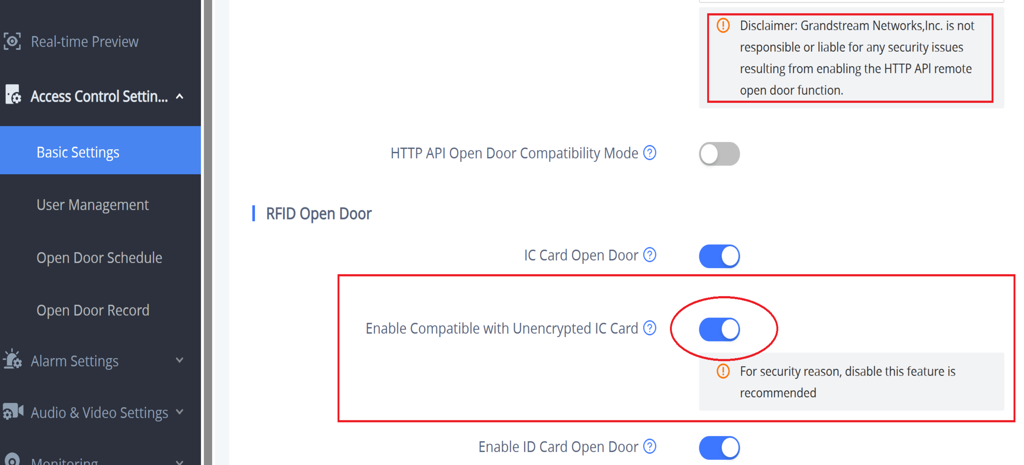
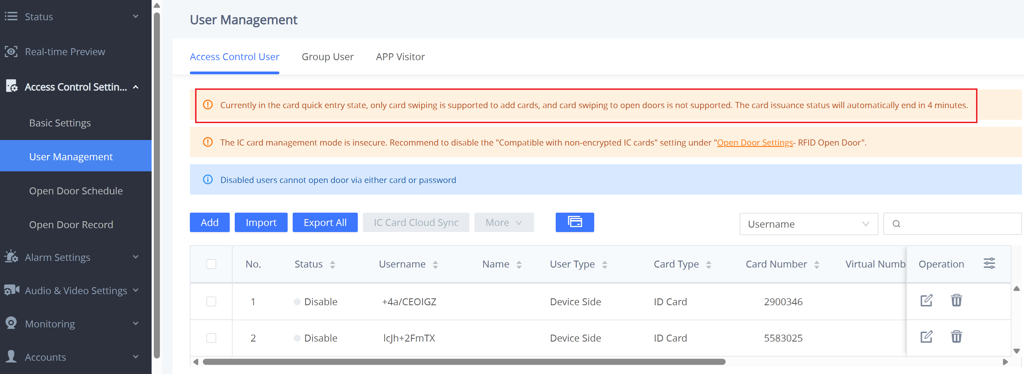
By default GDS372X shipped with IC card support only. If customers want to use 125KHz ID card (insecure), customers need to manually enable it in “RFID Open Door” settings and scan/input the RFID card, configure/enable it before the GDS372X be able to read the ID card and open door accordingly. See below screenshots for reference:
- Go to Access Control Settings > Basic Settings
- The card can be viewed and edited under Access Control Settings > User Management
Yes. The GDS372x supports time schedules that define when access credentials or door control actions are permitted. Schedules can be configured to allow or deny access based on time of day and day of the week.
Yes. When multiple relay outputs are available, each relay can be configured with independent access rules, schedules, and credential assignments.
Yes. Authorized users can unlock doors remotely using SIP DTMF commands, HTTP API calls, or supported management applications, depending on configuration.
Yes. The GDS372x records access events such as card usage, door unlock actions, and access denials. These logs can be reviewed through the Web UI or exported for audit purposes.
Alarms & Event Handling
The GDS372x supports physical alarm input interfaces that can be connected to external devices such as door sensors, motion detectors, emergency buttons, or other dry-contact sensors. The number of available inputs depends on the specific model.
The GDS372x supports the following alarm trigger types:
- Intrusion / Loitering Alarm
- Repeated Password Error Alarm (GDS3725 only)
- Hostage Code Alarm (GDS3725 only)
- Exceeded Access Time Limit Alarm
- High Temperature Alarm
- Digital Input
- Tamper Alarm
- Remote Unlock Wrong Password Alarm
- Unauthorized RFID Card / QR Code Access Alarm
When an alarm event is triggered, the GDS372x can perform actions such as initiating SIP calls, triggering relay outputs, sending HTTP notifications, or generating system logs, depending on configuration.
Yes. The GDS372x can be configured to automatically place SIP calls to predefined destinations when specific alarm conditions are met, enabling immediate notification of security events.
Yes. The GDS372x records alarm events, access attempts, door actions, and system events in its event logs. These logs can be viewed and exported through the Web UI for review or auditing.
Yes. Each alarm input can be individually configured with its own trigger conditions, actions, and schedules, allowing flexible event handling tailored to specific deployment requirements.
Configuration Provisioning & Firmware
The GDS372x allows administrators to back up and restore configuration files through the Web UI. Configuration files can be exported locally and restored later to the same device or another GDS372x running compatible firmware.
Yes. The GDS372x supports automatic provisioning using HTTP, HTTPS, FTP, TFTP, and TR-069. Provisioning parameters can be configured manually in the Web UI or delivered from a provisioning server.
Yes. The GDS372x can be centrally managed using Grandstream management platforms such as GDMS or GDS Manager for provisioning, monitoring, and firmware management, depending on firmware support.
Firmware can be upgraded through the Web UI by uploading the firmware file manually or by configuring an upgrade server. Firmware upgrades can also be managed centrally through supported management platforms.
Yes. The GDS372x supports scheduled firmware upgrades when using automatic provisioning or centralized management platforms, allowing upgrades to be performed during maintenance windows.
In general, configuration settings are preserved during firmware upgrades. However, administrators are strongly recommended to back up the configuration before upgrading in case a factory reset or rollback is required.
Troubleshooting & Maintenance
If the door unlocks during calls and when triggered from the Web UI, the relay wiring, lock power, and relay assignment are functioning correctly. Card access failures are typically caused by access control configuration.
Verify that RFID Open Door is functional, and that either IC Card Open Door or ID Card Open Door is enabled, depending on the card type being used. Also, confirm that the RFID card is authorized, assigned to a valid access user with door open permission, and that the access schedule is active. If unencrypted IC cards are used, ensure Enable Compatible with Unencrypted IC Card is enabled.
Verify that the Doorbell Mode is set to “Call the Specified Number”, and check that at least one call destination is configured for the doorbell button.
In SIP mode, confirm the account registration status. In direct IP mode, ensure that direct IP call settings are active and that the target IP address is reachable.
This issue is usually caused by the device not being in BLE management mode or the pairing window expiring.
- Ensure the GDS372x is powered on.
- Press and hold the doorbell button for more than 10 seconds until a continuous beeping sound is heard, indicating BLE management mode is active.
- Open the SecureAccess app and complete device discovery within 5 minutes, as the device will automatically exit BLE mode after this period.
- If the beeping stops, repeat the process to re-enter BLE mode.
This issue is usually caused by using an incorrect PIN entry sequence for the configured Local PIN Type. When “PrivatePIN” is selected, users must enter their virtual number, then press the star (*) key, followed by their private PIN. When “Card & Private PIN” is selected, users must first swipe a valid card, then enter the star (*) key followed by their private PIN.
In addition, verify on the GDS3725 web UI that the user or access group is assigned to an active schedule that allows door access at the current time, and ensure RFID Open Door is enabled if card-based access is required.
This behavior is usually caused by access or security rules rather than a hardware issue. One common cause is the Exceeded Access Time Limit Alarm, which is triggered when a user presents a valid card but attempts to open the door outside their assigned access schedule.
Another possible cause, on the GDS3725 only, is the Hostage Code Alarm. When a configured hostage password is entered on the keypad, the door opens normally while an alarm is triggered according to the assigned alarm action profile.
Please ensure to review access schedules, alarm event settings, and hostage code configuration to determine which condition applies.
The GDS372x uses a mechanical tamper detection button located on the back of the device. A tamper alarm is triggered when this button is pressed.
If the device is mounted in a way that continuously presses the tamper button, such as over-tightened mounting screws or misaligned backplates, the tamper alarm may be triggered even though the unit appears securely installed.
Verify that the mounting surface is flat, the backplate is properly aligned, and the tamper button is not being unintentionally pressed.
This behavior is usually caused by alarm configuration settings. Even if an alarm action profile includes an audible prompt, no sound will be played if the corresponding event is selected under Silent Alarm in the Alarm Event Settings.
In addition, the alarm action profile itself may not have an audible prompt configured. Verify that the alarm event is not marked as silent and that the assigned alarm action profile includes an audio prompt option. Both conditions must be satisfied for an audible alarm to play.