

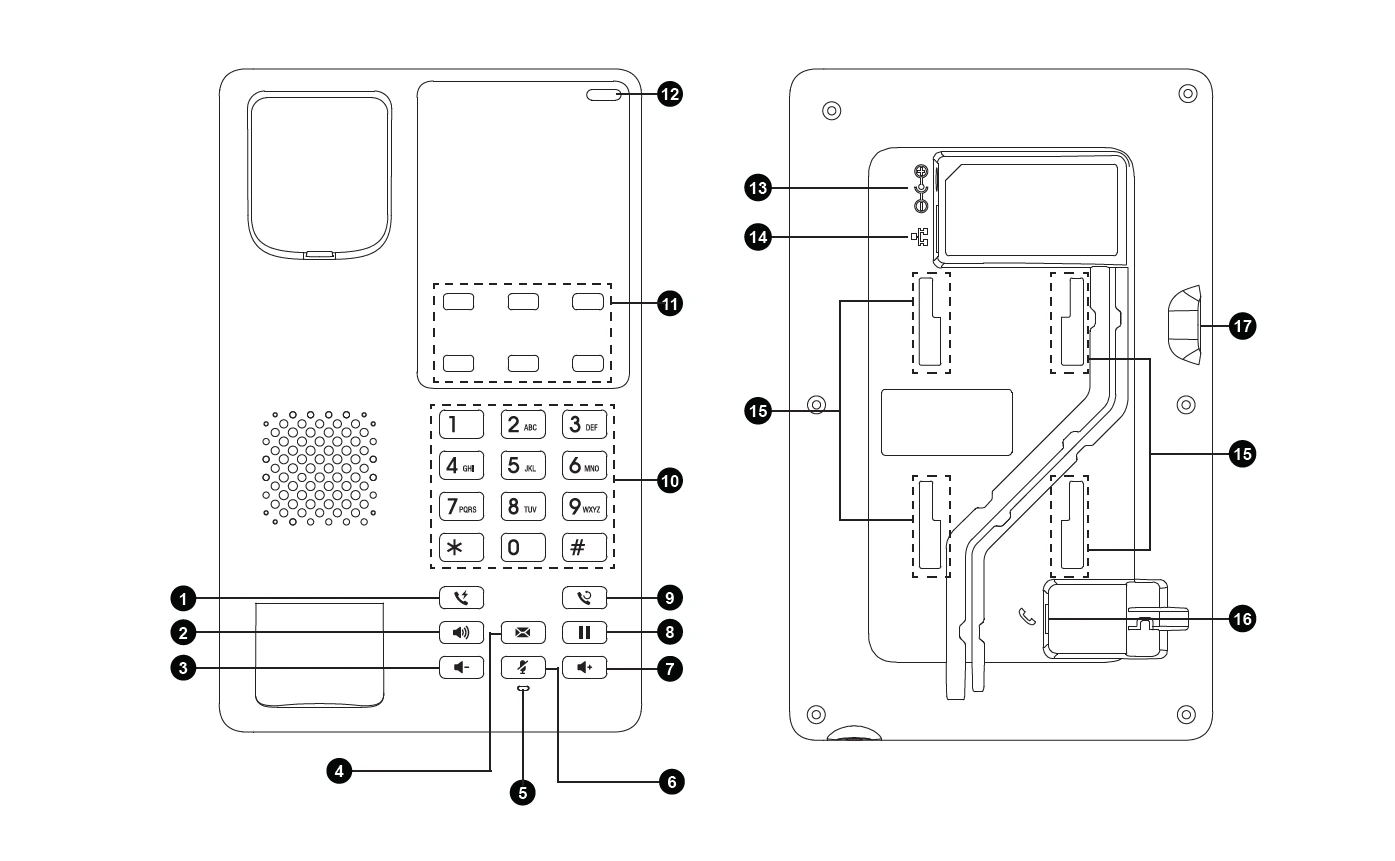
Port | Description | |
1 | Handset Speaker | Outputs the audio during a call when the handset is in use. |
2 | Hookswitch Key | Used to answer or terminate calls. |
3 | Handset Mute Key | Disables the handset microphone. |
4 | Handset Programmable Key | Configurable function key depending on system configuration. |
5 | Handset Microphone | Captures voice during handset calls. |
6 | Handset Volume Down Key | Decreases the handset speaker volume during a call. |
7 | Handset Volume Up Key | Increases the handset speaker volume during a call. |
8 | Status Indicator light | Provides visual status information (e.g., ringing, in-use, or system status) via LED indications. |
9 | Flash | Used to switch between calls or activate call waiting services. |
10 | Speaker | Enables hands-free audio output for speakerphone calls. |
11 | Volume Down Key | Lowers the handset, speaker, or ringer volume. |
12 | Message | Shortcut button to access voicemail or message center. |
13 | Mute Indicator | Light or icon that confirms when mute is active. |
14 | Mute | Mutes the microphone so the caller cannot hear you. |
15 | Volume Up Key | Raises the handset, speaker, or ringer volume. |
16 | Hold | Places the current call on hold. |
17 | Redial | Redials the last dialed number with one press. |
18 | Alphanumeric Keypad | Standard dial pad for entering numbers, letters, or menu inputs. |
19 | Softkeys | Context-sensitive buttons that change function depending on the configuration. |
20 | Message Waiting Indicator | LED light that alerts when new voicemail messages are received. |
21 | Power | Port where the power adapter is connected. |
22 | LAN Port | Ethernet port to connect the IP phone to the network. |
23 | Wall Mount Stand Slots | Mounting slots on the back for wall installation of the phone. |
24 | USB Type-C Port | Used for charging devices, gives external power to connected devices |