
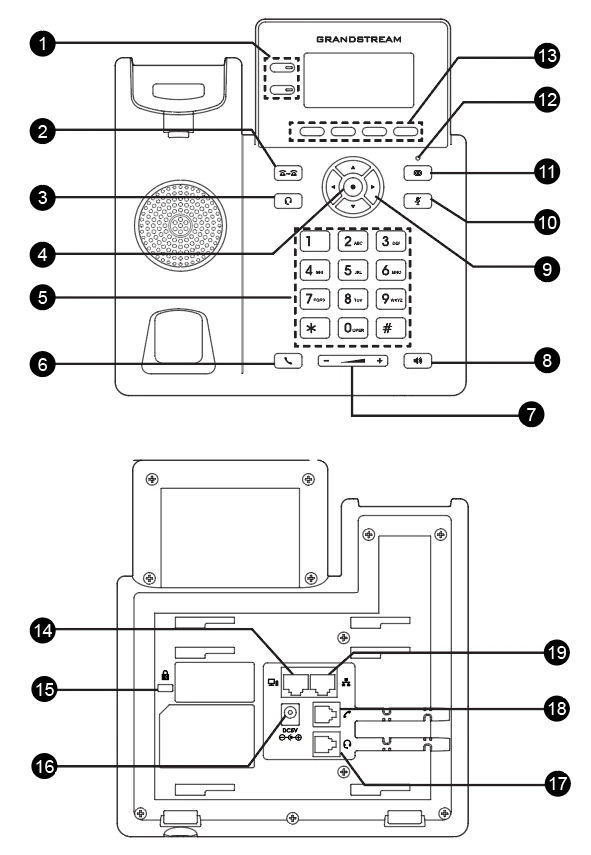
GRP2602LP/LG Keys and Ports
Port | Description | |
1 | Line Keys | Used to manage multiple vpks buttons, the VPKs can be configured to perform a certain action, like speed dial, BLF key… |
2 | Transfer | Transfers an ongoing call to another extension or number. |
3 | Headset | Switches audio to a connected headset when in use. |
4 | MENU/OK Key | Opens the main menu or confirms selections and settings. |
5 | Standard keypad | Traditional dial pad used to enter phone numbers and navigate menus. |
6 | Send | Dials the entered number or redials the last called number. when in idle mode, pressing the send key opens the dialing screen. |
7 | Volume | Adjusts the volume for the ringer, call audio, speaker, or headset. |
8 | Speaker | Activates speakerphone mode for hands-free calling. |
9 | Navigation keys | Allow you to scroll through menus, lists, and call records. |
10 | Mute | Mutes the active call; when pressed in idle mode, it enables Do Not Disturb (DND). |
11 | Message | Accesses voicemail and stored messages. |
12 | Message Waiting Indicator | LED indicator lights up when you have a new unread message/voicemail. |
13 | Soft keys | Dynamic buttons that change function based on what’s displayed on screen. |
14 | PC Port | Ethernet pass-through port to connect a PC using the same network cable. |
15 | Keingston lock | Anti-theft port for hardware electronics |
16 | Power | Connects a 5V DC power adapter when PoE is not used. A power adapter is included with the GRP2602LG only. |
17 | Headset Port | Connects a wired headset for hands-free operation. |
18 | Handset Port | Connects the physical handset to the phone. |
19 | LAN Port | Connects the phone to the network via Ethernet. The GRP2602LP supports 10/100 Mbps auto-negotiation and PoE, while the GRP2602LG supports 10/100/1000 Mbps auto-negotiation. |
GRP2602LP/LG Keys and Ports Description