

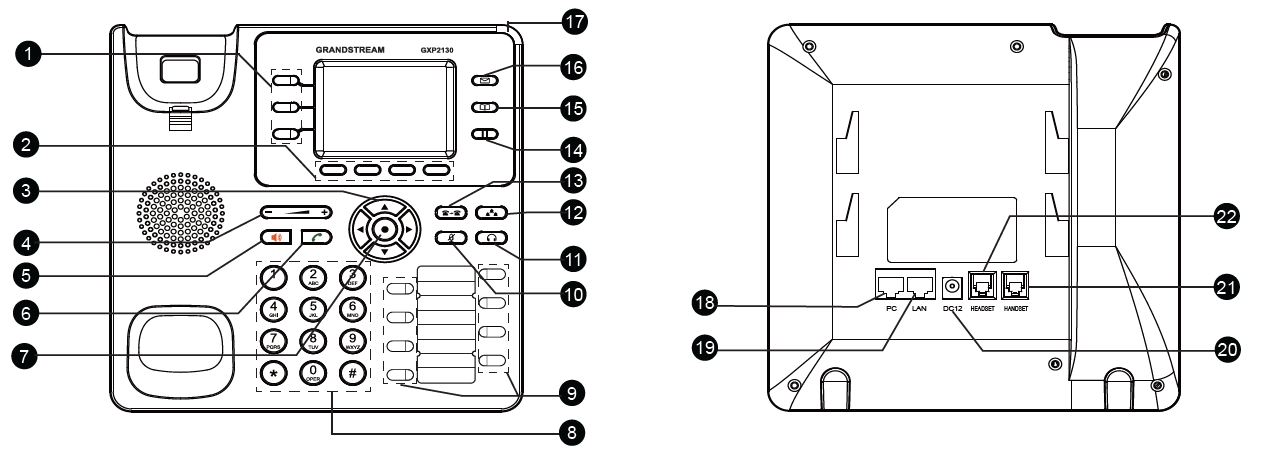
Port | Description | |
1 | Line Keys | Used to initiate and configure VPKs. |
2 | Soft Keys | Context-sensitive buttons; their functions change based on what’s displayed on the screen. |
3 | Navigation Keys | Directional arrows for menu navigation and screen control. |
4 | Volume | Adjusts ringer, call, or media volume. |
5 | Speaker | Activates speakerphone mode for hands-free calling. |
6 | Send | Initiates a call after dialing a number. |
7 | MENU/OK Key | Accesses the menu and confirms selections. |
8 | Standard Keypad | Traditional number pad for dialing and input. |
9 | Multi-purpose Keys | Programmable keys for functions like speed dial, BLF, or call park. |
10 | Mute | Temporarily disables your microphone during a call. When pressed in idle mode, it activates Do Not Disturb (DND). |
11 | Headset | Switches audio to a connected headset when in use. |
12 | Conference | Starts a conference call with multiple participants. |
13 | Transfer | Transfers the active call to another number or extension. |
14 | Hold | Places the current call on hold. |
15 | Contacts | Opens your saved phonebook or directory. |
16 | Message | Access voicemail or messages. |
17 | Message Waiting Indicator | LED indicator lights up when you have unread voicemail/message. |
18 | PC Port | Ethernet pass-through port to connect a PC using the same network cable. |
19 | LAN Port | Connects the phone to the office network via Ethernet. |
20 | Power | Port for connecting a 12V DC power adapter if PoE is not used. |
21 | Handset Port | Connects the physical handset to the phone. |
22 | Headset Port | Connects a wired headset for hands-free operation. |