

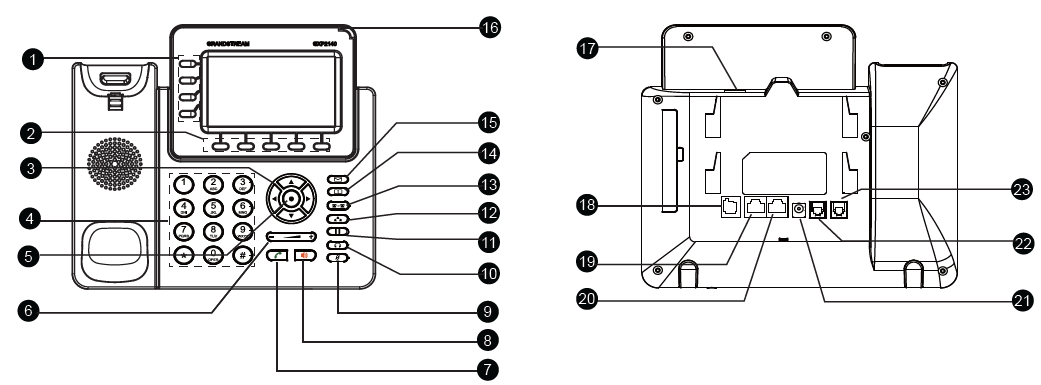
Port | Description | |
1 | Line Keys | Used to manage multiple vpks buttons, the VPKs ca be configured to perform a certain action, like speed dial, BLF key… |
2 | Soft Keys | Dynamic buttons that change function based on what’s displayed on screen. |
3 | Navigation Keys | Allow you to scroll through menus, lists, and call records. |
4 | Standard Keypad | Traditional dial pad used to enter phone numbers and navigate menus. |
5 | MENU/OK Key | Opens the main menu or confirms selections and settings. |
6 | Volume | Adjusts the volume for the ringer, call audio, speaker, or headset. |
7 | Send | Dials the entered number or redials the last called number. |
8 | Speaker | Activates speakerphone mode for hands-free calling. |
9 | Mute | Temporarily disables your microphone during a call. When pressed in idle mode, it activates Do Not Disturb (DND). |
10 | Headset | Switches audio to a connected headset when in use. |
11 | Hold | Places the current call on hold; press again to resume. |
12 | Conference | Initiates a conference call with multiple participants. |
13 | Transfer | Transfers an ongoing call to another extension or number. |
14 | Contacts | Opens the address book to browse or dial saved numbers. |
15 | Message | Accesses voicemail and stored messages. |
16 | Message Waiting Indicator | LED indicator lights up when you have unread voicemail. |
17 | USB Port | Connects USB accessories like flash drives or Bluetooth adapters. |
18 | Extension Module Port | Used to attach external Extension modules for additional line/function keys (GXP2200EXT). |
19 | PC Port | Ethernet pass-through port to connect a PC using the same network cable. |
20 | LAN Port | Connects the phone to the office network via Ethernet. |
21 | Power | Port for connecting a 12V DC power adapter if PoE is not used. |
22 | Headset Port | Connects a wired headset for hands-free calls. |
23 | Handset Port | Connects the physical handset to the phone. |