

Overview
The GXV34x0 IP Video Phone series for Android provides an external, HTTP-based Application Programming Interface (API) that enables applications and external systems to interact with and control supported phone functions.
The implemented Web APIs are based on RESTful API principles and support GET and POST HTTP request methods. These APIs provide programmatic access to supported phone data and functions without requiring interaction through the phone’s Web UI.
Each API request must use the appropriate HTTP method, endpoint, parameters, and request format defined in this guide. The phone processes valid requests and returns an HTTP response containing the requested data or the result of the operation.
The available API functions and parameters are firmware dependent and may vary between firmware versions.
Operations
The Web API provides access to various phone functions through HTTP requests. Each operation is accessed using a specific API URL based on the Web API Base URL and supports the HTTP method and parameters defined for that operation.
The following sections describe the available API operations in detail, including their URLs, supported HTTP methods, parameters, request formats, and response information.
Web API Base URL:
In the Base URL, [http/https] represents the protocol supported by the phone, and {ipaddress} represents the IP address of the phone.
[http/https]://{ipaddress}/cgi-bin/Authentication
The Web API authentication process consists of two steps. First, the phone provides the values required to generate the login secret. The generated secret is then used together with the username to authenticate with the phone.
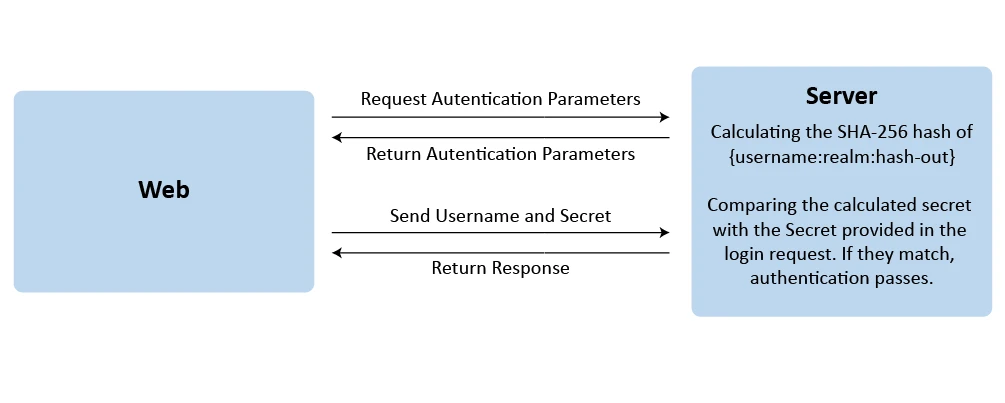
Step 1: Retrieve Authentication Parameters
Request Format
To retrieve the authentication parameters required to generate the login secret, send a request to the following URL:
[http/https]://{ipaddress}/cgi-bin/loginrealmExample
For this guide, the phone has the IP address 192.168.5.52. The authentication parameters request is:
https://192.168.5.52/cgi-bin/loginrealmResponse
This request returns the realm, rand, and mac values required to generate the login secret in the next step.
{
  "realm": "xxxxxxxxxxxxxxxx",
  "rand": "xxxxxxxxxxxxxxxx",
  "mac": "xx:xx:xx:xx:xx:xx"
}
Step 2: Authenticate
Request Format
To authenticate to the phone, generate the login secret using the password and the parameters returned in Step 1. The generated secret is then included in the login request together with the username.
Query Parameter | Description |
Username | The username used for authentication. The default username is gmiadmin. |
Secret | The login secret generated using the following steps:
|
The following Python 3 code can be used to generate the login secret. The code uses the built-in hashlib and hmac modules.
import hashlib
import hmac

# ENTER THE AUTHENTICATION PARAMETERS HERE

password = "xxxxxxxx"
rand = "xxxxxxxxxxxxxxxx"
mac = "xx:xx:xx:xx:xx:xx"
realm = "xxxxxxxxxxxxxxxx"

# HASHING PROCESS

# 1. PBKDF2-HMAC-SHA256
dk = hashlib.pbkdf2_hmac(
    "sha256",
    password.encode("utf-8"),
    bytes.fromhex(rand),
    10000
)

# 2. SHA256 hash of MAC
mac_hash = hashlib.sha256(mac.encode("utf-8")).hexdigest()

# 3. HMAC-SHA256
hash_out = hmac.new(
    bytes.fromhex(mac_hash),
    dk,
    hashlib.sha256
).hexdigest()

# 4. SHA256(username:realm:hash_out)
username = "gmiadmin"
secret_str = username + ":" + realm + ":" + hash_out

secret = hashlib.sha256(secret_str.encode("utf-8")).hexdigest()

# OUTPUT

print("The secret:")
print(secret)
After the secret is generated, send the following request to authenticate with the phone:
[http/https]://{ipaddress}/cgi-bin/login?Username={username}&Secret={generated-secret}Example
For this guide, the phone has the IP address 192.168.5.52. The authentication request is:
https://192.168.5.52/cgi-bin/login?Username=gmiadmin&Secret=6a8........Response Format
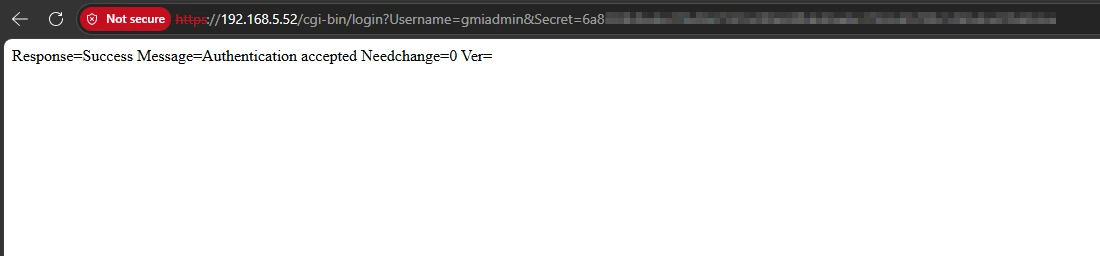
If the authentication is successful, the phone accepts the request and returns the corresponding success response, as shown in the image below.
Return Values Request
Request Format
To retrieve stored values or status information from the phone using a GET request. Multiple request values can be specified by separating the value names with a colon (:). This request requires authentication.
Query Parameter | Description |
Request Values | The request values for the stored values or status information on the phone. |
[http/https]://{ipaddress}/cgi-bin/api-values.get?request={request-value1}:{request-value2}:...Example
The following request retrieves the System Version, Language, Vendor Name and Hardware Version:
https://192.168.5.52/cgi-bin/api-values.get?request=68:vendor_name:hw_rev:1362Response Format
On a successful request, the phone returns an HTTP 200 OK status code in the response header and the requested values in JSON format. For the example above, the response is:
{
  "response": "success",
  "body": {
    "68": "1.0.5.35",
    "1362": "en",
    "vendor_name": "Grandstream",
    "hw_rev": "V1.2A"
  }
}
Post Values Request
Request Format
To configure P-values on the phone using a POST request. Multiple P-values can be set in a single request by separating them with an ampersand (&). This request requires authentication.
Query Parameter | Description |
P-value | The unique identifier used to reference specific configuration parameters within a phone’s settings. |
[http/https]://{ipaddress}/cgi-bin/api-values.post?Pvalue1={value1}&Pvalue2={value2}...Example
The following request sets the Account Name of Account 1 to John:
https://192.168.5.52/cgi-bin/api-values.post?P270=JohnResponse Format
On a successful request, the phone returns an HTTP 200 OK status code in the response header and a JSON response indicating the result of the operation. For the example above, the response is:
{
  "response": "success",
  "body": {
    "status": "right"
  }
}Change Password
Request Format
To change the administrator and user passwords on the phone. This request requires authentication.
Query Parameter | Description |
oldadmin | The current administrator password. |
P2 | The new administrator password. A valid oldadmin password must be provided to change the administrator password. |
olduser | The current user password. |
P196 | The new user password. A valid olduser password must be provided to change the user password. |
[http/https]://{ipaddress}/cgi-bin/api-change_password?oldadmin={oldpassword}&P2={newpassword}&olduser={olduserpassword}&P196={newuserpassword}Example
The following request changes the administrator password from admin123 to newadmin456 :
https://192.168.5.52/cgi-bin/api-change_password?oldadmin=admin123&P2=newadmin456Response Format
On a successful request, the phone returns an HTTP 200 OK status code in the response header and a JSON response indicating the result of the operation. For the example above, the response is:
{
  "response": "success",
  "body": {
    "status": "right"
  }
}
Get Contact
Request Format
To retrieve contacts from the phone using a GET request. Use the basic request to retrieve all contacts or specify parameters for more specific contact retrieval. This request requires authentication.
Query Parameter | Description |
contactid | The contact ID. If an existing ID is specified, the corresponding contact details are returned. |
contactname | The contact name used to search for contacts. Contacts with matching names are returned. |
groupid | The group ID. The contacts in the corresponding group are returned. |
[http/https]://{ipaddress}/cgi-bin/api-get_contacts?contactid={cid}
[http/https]://{ipaddress}/cgi-bin/api-get_contacts?contactname={name}
[http/https]://{ipaddress}/cgi-bin/api-get_contacts?groupid={gid}
[http/https]://{ipaddress}/cgi-bin/api-get_contacts
Example
The following request returns the contact named Mark:
https://192.168.5.52/cgi-bin/api-get_contacts?contactname=markResponse Format
On a successful request, the phone returns an HTTP 200 OK status code in the response header and a JSON response containing the contact information. For the example above, the response is:
{
  "res": "success",
  "msg": [
    {
      "contactID": "1",
      "contactName": "Mark Jones",
      "groupID": "1",
      "email": "",
      "mobile": "1212",
      "home": "",
      "work": "",
      "fax": ""
    }
  ]
}
Save/Edit Contact
Request Format
To Save/Edit contacts on the phone. This request requires authentication.
Query Parameter | Description |
id | The contact ID number. Leave ID blank to add a new contact record, or specify an existing contact ID to edit the corresponding contact information. The contact ID can be obtained from the Get Contact request. This parameter is optional. |
firstname | The contact’s first name. |
lastname | The contact’s last name. |
group | The group assigned to the contact. This parameter is optional. |
newphone1 | The contact’s first phone number. This parameter is optional. |
newphone2 | The contact’s second phone number. This parameter is optional. |
newphone3 | The contact’s third phone number. This parameter is optional. |
newphone4 | The contact’s fourth phone number. This parameter is optional. |
The contact’s email address. This parameter is optional. |
[http/https]://{ipaddress}/cgi-bin/api-save_edit_contact?id={id}&group={groupid}&firstname={firstname}&lastname={lastname}...Example
The following request saves two phone numbers, 1010 and 1414, to an existing contact:
https://192.168.5.52/cgi-bin/api-save_edit_contact?id=1&firstname=Mark&lastname=Jones&newphone1=1010&newphone2=1414Response Format
On a successful request, the phone returns an HTTP 200 OK status code in the response header and a JSON response indicating the result of the operation. For the example above, the response is:
{
  "response": "success",
  "body": "true"
}
Delete All Contacts
Request Format
To delete all contacts saved on the phone. This request requires authentication.
[http/https]://{ipaddress}/cgi-bin/api-delete_all_contactExample
The following request deletes all the contacts saved on the phone:
https://192.168.5.52/cgi-bin/api-delete_all_contactResponse Format
On a successful request, the phone returns an HTTP 200 OK status code in the response header and a JSON response indicating the result of the operation. For the example above, the response is:
{
  "response": "success",
  "body": "true"
}
Delete Contact
Request Format
To delete a specific contact saved on the phone using the contact ID. This request requires authentication.
Query Parameter | Description |
id | The contact ID number, which can be obtained from the Get Contact request. |
[http/https]://{ipaddress}/cgi-bin/api-delete_contact?id={id}Example
The following request deletes the contact with the contact ID 2:
https://192.168.5.52/cgi-bin/api-delete_contact?id=2Response Format
On a successful request, the phone returns an HTTP 200 OK status code in the response header and a JSON response indicating the result of the operation. For the example above, the response is:
{
  "response": "success",
  "body": "true"
}
Add Contact Group
Request Format
To add a new contact group on the phone. This request requires authentication.
Query Parameter | Description |
name | The name of the new contact group. |
[http/https]://{ipaddress}/cgi-bin/api-add_group?&name={groupname}Example
The following request adds a contact group named whitelist:
https://192.168.5.52/cgi-bin/api-add_group?name=whitelistResponse Format
On a successful request, the phone returns an HTTP 200 OK status code in the response header and a JSON response indicating the result of the operation. For the example above, the response is:
{
  "response": "success",
  "body": "true"
}
Get Contact Group
Request Format
To retrieve the saved contact groups from the phone using a GET request. This request requires authentication.
Query Parameter | Description |
id | The Contact Group ID. Leaving ID blank retrieves all group records. Specifying an existing ID retrieves the corresponding group details. This parameter is optional. |
[http/https]://{ipaddress}/cgi-bin/api-get_groups?id={groupid}Example
The following request retrieves all the saved contact groups:
https://192.168.5.52/cgi-bin/api-get_groupsResponse Format
On a successful request, the phone returns an HTTP 200 OK status code in the response header and the requested contact groups in JSON format. For the example above, the response is:
{
  "res": "success",
  "msg": [
    {
      "groupID": "2",
      "groupName": "whitelist"
    }
    {
      "groupID": "1",
      "groupName": "blacklist"
    },
    {
      "groupID": "0",
      "groupName": "Default"
    }
  ]
}
Edit/Delete Contact Group
Request Format
To edit or delete a contact group. This request requires authentication.
Query Parameter | Description |
id | The group ID, which can be obtained from the Get Contact Group request. |
name | The new group name. Leaving the name blank deletes the group. Note: This function does not work. |
[http/https]://{ipaddress}/cgi-bin/api-edit_delete_group?id={id}Example
The following request deletes the contact group with the Contact Group ID 2:
https://192.168.5.52/cgi-bin/api-edit_delete_group?id=2Response Format
On a successful request, the phone returns an HTTP 200 OK status code in the response header and a JSON response indicating the result of the operation. For the example above, the response is:
{
  "response": "success",
  "body": "true"
}
Get Account Status
Request Format
To retrieve the account status from the phone using a GET request. This request requires authentication.
Query Parameter | Description |
registered | Filters the results based on account registration status. This parameter is optional.
|
[http/https]://{ipaddress}/cgi-bin/api-get_accounts?registered={filter}Example
The following request retrieves all the registered account:
https://192.168.5.52/cgi-bin/api-get_accounts?registered=1Response Format
On a successful request, the phone returns an HTTP 200 OK status code in the response header and the requested account information in JSON format. For the example above, the response is:
{
  "result": "success",
  "body": [
    {
      "id": 1,
      "sip_server": "192.168.6.76",
      "sip_id": "1000",
      "name": "gxv",
      "reg": 1
    }
  ]
}
Get Line Status
Request Format
To retrieve the line status from the phone using a GET request. This request requires authentication.
Query Parameter | Description |
line | Filters the results to return the status of the specified line. Set to a line number from 0 to the maximum available line number to return the status of the specified line indicated by state.
|
[http/https]://{ipaddress}/cgi-bin/api-get_line_status?line={filter}Example
The following request retrieves the status of line 0 while dialing extension 1010:
https://192.168.5.52/cgi-bin/api-get_line_status?line=0Response Format
On a successful request, the phone returns an HTTP 200 OK status code in the response header and the status of line 0 in JSON format. For the example above, the response is:
{
  "response": "success",
  "body": {
    "line": "0",
    "state": "",
    "acct": "0",
    "name": "Mark Jones",
    "number": "1010",
    "active": "1"
  }
}
Get Phone Status
Request Format
To retrieve the phone status from the phone using a GET request. This request requires authentication.
[http/https]://{ipaddress}/cgi-bin/api-get_phone_statusExample
The following request retrieves all the registered account:
https://192.168.5.52/cgi-bin/api-get_phone_statusResponse Format
On a successful request, the phone returns an HTTP 200 OK status code in the response header and the phone status in JSON format. For the example above, the response is:
{
  "response": "success",
  "body": "available",
  "misc": "1"
}
Get System Time
Request Format
To retrieve the system time from the phone using a GET request. This request requires authentication.
[http/https]://{ipaddress}/cgi-bin/api-get_timeExample
The following request retrieves the system time:
https://192.168.5.52/cgi-bin/api-get_timeResponse Format
On a successful request, the phone returns an HTTP 200 OK status code in the response header and the date, time, and uptime information in JSON format. For the example above, the response is:
{
  "data": "Mon 14/09/2026",
  "time": " 02:59:00 PM",
  "uptime": " 0 day, 4 hours, 51 minutes, 6 seconds"
}
Make Call
Request Format
To initiate a call using the parameters to define the destination number and the account used for the call. This request requires authentication.
Query Parameter | Description |
phonenumber | The destination number to be dialed. |
account | The account used to initiate the call. |
[http/https]://{ipaddress}/cgi-bin/api-make_call?phonenumber={number}&account={accountnumber}Example
The following request initiates a call to 1010 using Account 1:
https://192.168.5.52/cgi-bin/api-make_call?phonenumber=1010&account=1Response Format
On a successful request, the phone returns an HTTP 200 OK status code in the response header and a JSON response indicating the result of the operation. For the example above, the response is:
{
  "response": "success",
  "body": "true"
}
Phone/Call Operations
Request Format
To perform call operations on the phone, such as ending, holding, accepting, or rejecting a call. This request requires authentication.
Query Parameter | Description |
cmd | The call operation command to be preformed:
|
Line | The line on which the operation is performed. |
[http/https]://{ipaddress}/cgi-bin/api-phone_operation?cmd={callcmd}&line={line}Example
The following request puts the call on line 0 on hold:
https://192.168.5.52/cgi-bin/api-phone_operation?cmd=holdcall&line=0Response Format
On a successful request, the phone returns an HTTP 200 OK status code in the response header and a JSON response indicating the result of the operation. For the example above, the response is:
{
  "response": "success",
  "body": "true"
}
System Operations
Request Format
To perform system operations on the phone, such as rebooting or provisioning the device. This request requires authentication.
Query Parameter | Description |
request | The system operation to be performed:
|
[http/https]://{ipaddress}/cgi-bin/api-sys_operation?request={operation}Example
The following request provisions the phone:
https://192.168.5.52/cgi-bin/api-sys_operation?request=PROVResponse Format
On a successful request, the phone returns an HTTP 200 OK status code in the response header and a JSON response indicating the result of the operation. For the example above, the response is:
{
  "response": "success",
  "body": "provision"
}
Phonebook Download
Request Format
To retrieve the phonebook from the phone. This request requires authentication.
[http/https]://{ipaddress}/cgi-bin/phonebook_downloadExample
The following request retrieves the phonebook:
https://192.168.5.52/cgi-bin/phonebook_downloadResponse Format
On a successful request, the phone returns an HTTP 200 OK status code in the response header and the phonebook in XML format. For the example above, the response is:
<AddressBook>
  <version>1</version>
  <pbgroup>
    <id>4</id>
    <name>whitelist</name>
    <ringtones/>
  </pbgroup>
  <Contact>
    <FirstName>Mark</FirstName>
    <LastName>Jones</LastName>
    <IsPrimary>false</IsPrimary>
    <Primary>0</Primary>
    <Frequent>0</Frequent>
    <PhotoUrl/>
    <Phone type="Home">
      <phonenumber>1414</phonenumber>
      <accountindex>-1</accountindex>
    </Phone>
    <Phone type="Mobile">
      <phonenumber>1010</phonenumber>
      <accountindex>-1</accountindex>
    </Phone>
    <Mail type="Home"/>
  </Contact>
</AddressBook>
Supported Devices
Supported Devies | Firmware Version |
GXV3480 | 1.0.5.35+ |
GXV3470 | |
GXV3450 |