
Introduction
IVR Webhook is a feature designed to notify a system of the call events done on the IVR. This feature supports initiating calls through the IVR webhooks.
IVR Webhook IPPBX Configuration
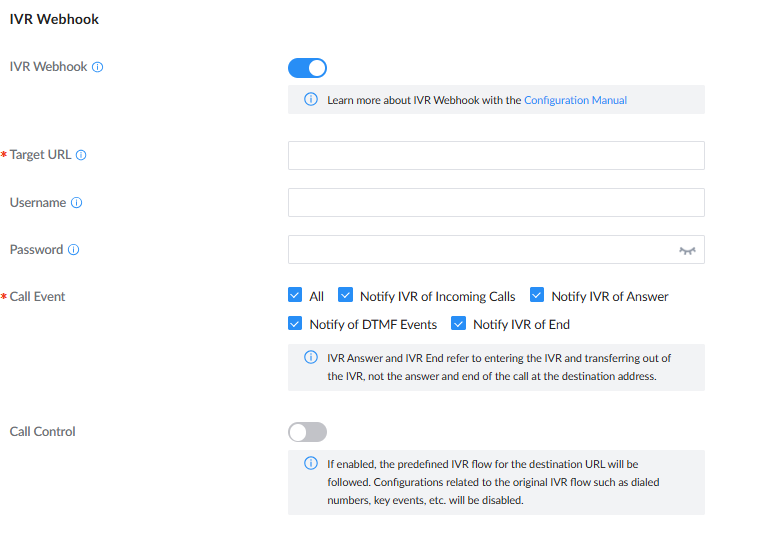
- IVR Webhook: Enable IVR Webhook.
- Target URL: Configure the URL of the server to post the events to. This field is required.
- Username: Configure the authentication username. This field is optional.
- Password: Configure the authentication password. This field is optional.
- Call Event: Select the events to notify about.
- Call Control: Enable call control.
IVR Webhook Interface
Optional webhook trigger times (3 tentatively planned)
- When IVR calls in
- When DTMF is triggered
- When IVR ends
IVR Process Description
- Triggered when IVR is enabled, an InComingCall request is pushed when IVR is triggered. If not enabled, the configured IVR process is followed.
- Enables DTMF triggering. When a button is pressed, a SendDTMF request is pushed. If not enabled, the configured IVR process is followed.
- When enabled, a CallEnd request is sent when the IVR call ends. If disabled, no action is taken.
- After sending the corresponding HTTP/HTTPS (POST only) request, wait for the HTTP server to respond (based on the body carried in the 200 OK response).
- When the status in the received response body is 0, execute the corresponding operation according to the action directive carried in the response. After completion, proceed to the next operation.
- Received operation instructions will only take effect after call control is enabled. Processing is performed after each HTTP response.
Webhook process
Supported Commands
Notification instructions sent
- callIncoming: notification indicates an incoming call.
- callAnswer: notifies you that the call has been answered.
- callDTMF: to notify DTMF events
- callEnd: notifies the call has ended.
Received operation instructions
- play: plays the specified prompt sound
- playAndRead: plays the specified prompt tone and waits for DTMF.
- makeCall: calls a specified extension.
- hangup: disconnects the current call
Corresponding Sending Instruction Description
Description of Request Fields
The main instructions are distinguished by action and event, and the corresponding information is contained in the eventBody.
callInfo contains detailed information about the call. deviceInfo contains information about the current device.
Sending the operation command callIncoming
The following is a reference request:
{
#Request type
    "action":"callNotify",
    "event":"callIncoming",
#Details of this call
    "callInfo": {
        #session ID
        "session": "1553593780808410-6002",
#Channel identifier
        "uniqueid": "1553593780.0",
#Caller Name
        "caller_name": "6002",
#Caller's Number
"caller_num":"6002",
#Dial Type
        "action_type": "IVR[7000]",
#Original name
        "src_trunk_name" : "",
#Target relay name
        "dst_trunk_name" : "",
#Dialing Time
        "duration": "5",
#Call duration
        "billsec" : "5",
#Start Time
        "start": "2019-03-26 17:49:40",
#End Time
        "end": "2019-03-26 17:49:45",
    },
#The current device information allows users to distinguish between devices.
    "deviceInfo" : {
        "deviceMac" : "C0:74:AD:99:99:00"
    }
#Description information of the current request
    "description": "incoming IVR call"
}
Sending the operation command callDTMF
{
#Request type
    "action":"callNotify",
    "event":"callDTMF",
    "eventBody":"1",
    "clientActionID": "ClientID",
#Details of this call
    "callInfo": {
        #session ID
        "session": "1553593780808410-6002",
#Channel identifier
        "uniqueid": "1553593780.0",
#Caller Name
        "caller_name": "6002",
#Caller's Number
"caller_num":"6002",
#Dial Type
        "action_type": "IVR[7000]",
#Original name
        "src_trunk_name" : "",
#Target relay name
        "dst_trunk_name" : "",
#Dialing Time
        "duration": "5",
#Call duration
        "billsec" : "5",
#Start Time
        "start": "2019-03-26 17:49:40",
#End Time
        "end": "2019-03-26 17:49:45",
    },
#The current device information allows users to distinguish between devices.
    "deviceInfo" : {
        "deviceMac" : "C0:74:AD:99:99:00"
    }
#Description information of the current request
    "description": "Action request of a call"
}
Send the command callAnswer
{
#Request type
    "action":"callNotify",
    "event":"callAnswer",
#Details of this call
    "callInfo": {
        #session ID
        "session": "1553593780808410-6002",
#Channel identifier
        "uniqueid": "1553593780.0",
#Caller Name
        "caller_name": "6002",
#Caller's Number
"caller_num":"6002",
#Dial Type
        "action_type": "IVR[7000]",
#Original name
        "src_trunk_name" : "",
#Target relay name
        "dst_trunk_name" : "",
#Dialing Time
        "duration": "5",
#Call duration
        "billsec" : "5",
#Start Time
        "start": "2019-03-26 17:49:40",
#End Time
        "end": "2019-03-26 17:49:45",
    },
#The current device information allows users to distinguish between devices.
    "deviceInfo" : {
        "deviceMac" : "C0:74:AD:99:99:00"
    }
#Description information of the current request
    "description": "answer a IVR call"
}
Sending the instruction callEnd
    {
#Request type
    "action":"callNotify",
    "event":"callEnd",
    "clientActionID": "ClientID",
#Details of this call
    "callInfo": {
        #session ID
        "session": "1553593780808410-6002",
#Channel identifier
        "uniqueid": "1553593780.0",
#Caller Name
        "caller_name": "6002",
#Caller's Number
"caller_num":"6002",
#Dial Type
        "action_type": "IVR[7000]",
#Original name
        "src_trunk_name" : "",
#Target relay name
        "dst_trunk_name" : "",
#Dialing Time
        "duration": "5",
#Call duration
        "billsec" : "5",
#Start Time
        "start": "2019-03-26 17:49:40",
#End Time
        "end": "2019-03-26 17:49:45",
    },
#The current device information allows users to distinguish between devices.
    "deviceInfo" : {
        "deviceMac" : "C0:74:AD:99:99:00"
    }
#Description information of the current request
    "description": "Action request of a call"
}
Instruction for receiving instructions
Currently, only the responses to startCall and sendDTMF are processed. The combineAction is only processed when the response status is 0.
After the callEnd event, only the play operation command is received.
The combineAction function can support carrying multiple actions simultaneously.
Play the specified prompt sound command play
{
    "action" : "play",
"fileName":"" # You need to upload the notification sound in advance
    "description": "play a voice"
}
Specifying the call command makeCall
{
    "action": "makeCall",
#Destination type, defaults to internal extension without a specified destination; the selectable range is consistent with the destination options for basic IVR buttons. Custom Prompt destination suggests users use play request.
    "DestType": "extension", #options: Multimedia Meeting/ Voicemail/Voicemail Group/IVR/Ring Group/Queues/ "Paging/Intercom Group" /Fax / Disa / Dial By Name / External Number/ Callback/Announcement
"DestNumber": "1000", # The value corresponding to the destination, consistent with the destination specified in the IVR basic button.
    "description": "make a call to 1000"
}
Optional Destination Type (Default: extension) | Description |
extension | Extension number |
Multimedia Meeting | Multimedia meeting room |
Voicemail | Voicemail |
Voicemail Group | Voicemail group |
IVR | IVR |
Ring Group | Ring group |
Tails | Queue |
Paging/Intercom Group | Paging/Intercom Group |
Fax | Fax |
DISA | DISA |
Dial By Name | Dial by name |
External Number | External Number |
Callback | Callback |
Announcement | Announcement |
Play and wait for a new DTMF command: playAndRead
{
    "action" : "playAndRead",
"fileName":""#A notification sound needs to be uploaded in advance"
    "description": "play a voice and wait a dtmf"
}
Hang up the current call command
{
    "action" : "hangup ",
    "description": "hangup call"
}
Refer to HTTP Response
Single request
{
# If status is non-zero, it is considered an exception, and no further action will be processed.
    "status" : 0,
#The actionID of the current operation. This is not included by default. The platform sends this, and subsequent requests will include it to help the platform distinguish between different operations.
    ”clientActionID“ : “ClientID”,
    {
    "action" : "play",
"fileName":"" #Optional,
    "description": "play a voice"
    }
}
Combined request
{
# If status is non-zero, it is considered an exception, and no further action will be processed.
    "status" : 0,
#The actionID of the current operation. This is not included by default. The platform sends this, and subsequent requests will include it to help the platform distinguish between operations.
    ”clientActionID“ : “ClientID”,
#combineAction is a set of operation commands, which can include multiple operation commands simultaneously.
    "combineAction" : [
        {
            "action" : "play",
"fileName":"" #Optional,
            "description": "play a voice"
        },
        {
            "action" : "makeCall",
#Destination type, without a specified option, defaults to internal extension.
            "DestType" : "extension", // extension, voicemail,ringgroup,queue,external_number
            "DestNumber" : "1000",
            "description": "make a call to 1000"
        },
        {
            "action" : "playAndRead",
"fileName":"" #Optional,
            "description": "play a voice and wait a dtmf"
        },
        {
            "action" : "hangup ",
            "description": "hangup call"
        }
    ]
}
Supported Devices
Product Series | Minimum Firmware Version |
UCM6300 Series | 1.0.29.11 |
UCM6300 Audio Series | 1.0.29.11 |