


API allows the user to manage instances of SoftwareUCM by sending HTTPS queries. This can make automating the process of creating, terminating, and monitoring the instance possible.
ENABLE API
To be able to send queries to manage SoftwareUCM instances, the user should first enable the API.
To enable the API, please follow the steps below.
- Login to the SoftwareUCM environment, then log in using the account “support”, along with the configured password. If no password has been created before, the system will prompt you to configure a password.
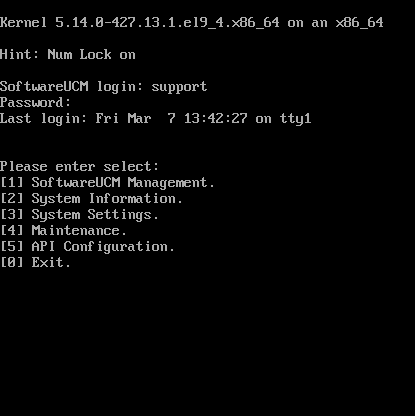
- Enter “5” to access the menu related to API configuration.
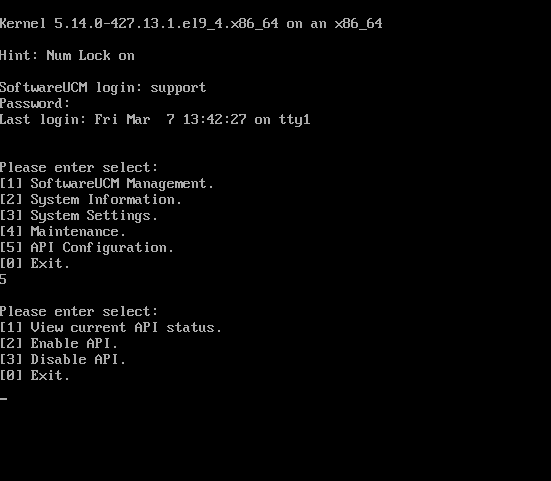
- Enter “2” to enable the API.
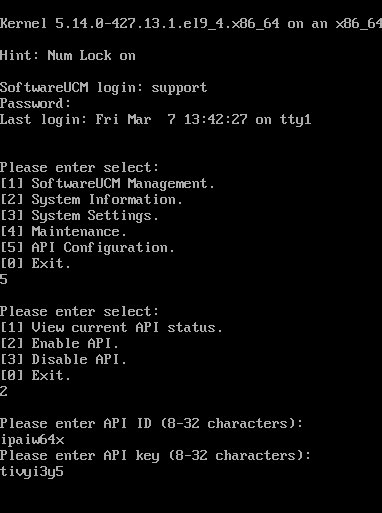
- Once the API ID and API Key are enabled, the following information will be displayed as a reminder.
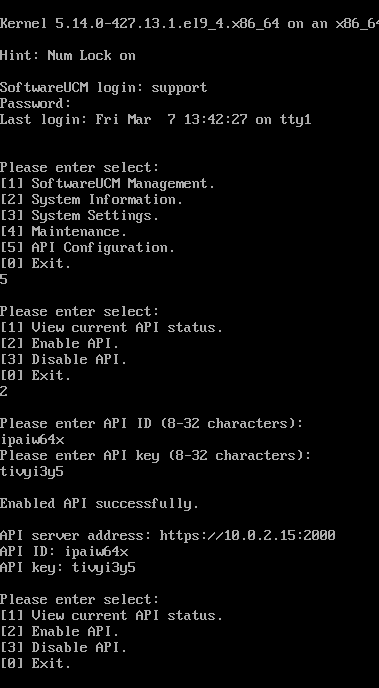
The user can then use the API ID and API key to send the queries.
HTTP REQUEST-RESPONSE
Taking the query interface softucm_list as an example, the request-response is as follows:
The request body is in JSON format, where appId is the ID configured when the API call is enabled, timestamp is the second timestamp of the request. The difference between the timestamp and the host for one request must not exceed 300 seconds, tid is the session ID for this time, and it only needs to be unique, signature is the signature of this request, which is used to verify whether the request is legal. For signature calculation, refer to [SIGNATURE CALCULATION RULES].
The above four parameters are common parameters in the interface. Different interfaces will carry different parameters.
POST /cm/softucm_list HTTP/1.1
Host: 192.168.130.154:2000
User-Agent:  curl/7.29.0
Content-Length: 150
Content-Type: application/json
Accept: */*

{"appId":"testID123","signature":"3d37e26f099f86358f81f2b9985b9a96491af3e3fbf3973ed59977f4895eb786","tid":"1739771798685216","timestamp":"1740108437"}
The body of the response is also in JSON format, where the msg field is used to describe the detailed content of the response, and retCode reflects the error code of the response. If it is 0, it means the request is successful, and if it is not 0, it means failure. Different error codes represent different error reasons. For a detailed list of error codes, see [ERROR CODE LIST]
HTTP/1.1 200 OK
Content-Type: application/json; charset=utf-8
Date: Tue, 07 Jan 2025 07:03:03 GMT
Content-Length: 514

{"msg":"{\"action\":\"softUCMList\",\"containerList\":[{\"adminPassword\":\"OlVK5YJoOc\",\"adminPort\":\"8089\",\"adminUserName\":\"admin\",\"ip\":\"192.168.130.203\",\"mode\":\"macvlan-static\",\"name\":\"ucm137\",\"remark\":\"hhhh\",\"status\":\"1\",\"version\":\"1.0.27.18\"},{\"adminPassword\":\"CoyrR9KiX6\",\"adminPort\":\"8089\",\"adminUserName\":\"admin\",\"ip\":\"192.168.130.202\",\"mode\":\"macvlan-static\",\"name\":\"ucm136\",\"remark\":\"\",\"status\":\"1\",\"version\":\"1.0.27.18\"}]}","retCode":0}
SIGNATURE CALCULATION RULES
The signature is an authentication factor that is important to authenticate the user and protect the integrity of the information exchanged through the API.
The example below shows how the signature is included in the request body.
{
    "appId": "testID123",
    "signature": "88ccbd4307413165481ef2d95e271f98e354a11bd6e919d395a193e8fe0ab081",
    "tid": "1739771798685216",
    "timestamp": "1739959387"
}
Take this request body as an example, remove the signature parameter, and sort the remaining parameters in ascending order according to the parameter name. After sorting, concatenate them according to &key=value. Then add the Key configured when opening the API call to the end. The format is &Key and ends with &. Calculate the hexadecimal hash value of the above string based on SHA-256, which is the value of the signature. The steps are as follows:
    1. &appId=testID123&tid=1739771798685216&
    timestamp=1739959387&testKEY123&
    2. echo -n "&appId=testID123&tid=1739771798685216&
    timestamp=1739959387&testKEY123&" | sha256sum | cut -d ' ' -f 1
    3. 88ccbd4307413165481ef2d95e271f98e354a11bd6e919d395a193e8fe0ab081
API QUERIES
softucm_create
Brief Description
- Create a SoftwareUCM; Configure network parameters to meet network specifications; memory size, at least 1G, CPU at least 1 core, and disk space at least 4G, which is the minimum configuration of UCM.
Request URL
https://ip:2000/cm/softucm_create
Request Method
- POST
Parameter
Parameter Name | Required | Type | Description |
DNS1 | No | string | DNS1, corresponding to the configuration on UCM, do not carry, do not configure |
DNS2 | No | string | DNS2, corresponding to the configuration on UCM, do not carry, do not configure |
appId | Yes | string | Configuration ID |
cpu | No | string | The specified number of CPU cores,macvlan mode must carry |
disk | No | string | The specified disk size is in G,macvlan mode must carry |
firmwareName | Yes | string | UCM image version |
gateway | No | string | gateway, static IP must be carried |
ip | No | string | ip, static IP must be carried |
memory | No | string | The specified memory size, in M units,macvlan mode must carry |
mode | Yes | string | There are currently three container modes: macvlan-static, macvlan-auto, and host |
ipMode | Yes | string | Select whether to obtain a static IP or DHCP, and pass the parameter manual or auto respectively |
name | Yes | string | The name of the container. The format is ucmxxx, where xxx is a number |
netWorkName | Yes | string | The name of the network card. The current image defaults to eth0. Other formats are not supported |
netmask | No | string | Subnet Mask, static IP must be carried |
preferDNS | No | string | Preferred DNS, when auto, corresponds to the UCM prefer DNS configuration, when static, corresponds to the DNS1 configuration, do not carry, do not configure |
signature | Yes | string | signature |
tid | Yes | string | Session ID |
remark | Yes | string | The remark of the container. The maximum value is 128 characters. Only support letters, numbers, English characters |
timestamp | Yes | string | current timestamp |
Request Example:
{
    "DNS1": "192.168.121.100",
    "DNS2": "",
    "appId": "containerManager001",
    "cpu": "1",
    "disk": "5",
    "firmwareName": "softucm_1_0_27_4.tar.gz",
    "gateway": "192.168.130.1",
    "ip": "192.168.130.168",
    "memory": "1991",
    "mode": "macvlan-static",
    "ipMode": "manual",
    "name": "ucm1",
    "netWorkName": "eth0",
    "netmask": "255.255.255.0",
    "preferDNS": "",
    "signature": "c16f205653db1837c1f0ee6978a564414795c410be89e0370c1ea9e1bd3972f8",
    "tid": "1730540407754847",
    "timestamp": "1730540407"
}
Response Example:
{
    "msg": "{\"action\":\"softUCMCreate\",\"ip\":\"192.168.130.168\",\"name\":\"ucm1\",\"ucmAdminPwd\":\"LVpQKwnUPa\"}",
    "retCode": 0
}
Response Parameter Description
Parameter Name | Type | Description |
msg | string | Returned details |
retCode | int | Returned error code |
softucm_destroy
Brief Description
- Destroy the specified SoftwareUCM instance.
Request URL
https://ip:2000/cm/softucm_destroy
Request method
- POST
Parameter
Parameter name | Required | Type | Description |
appId | Yes | string | Configuration ID |
name | Yes | string | The name of the container. The format is ucmxxx, where xxx is a number |
signature | Yes | string | signature |
tid | Yes | string | Session ID |
timestamp | Yes | string | current timestamp |
Request Example
{
    "appId": "containerManager001",
    "name": "ucm1",
    "signature": "f77e1cf2540b9416791c653d40f769d598ef68f691a054742cf554071fea475b",
    "tid": "1730540786574100",
    "timestamp": "1730540786"
}
Response Example
{
    "msg":"container ucm1 is removed",
    "retCode":0
}
Response Parameter Description
Parameter Name | Type | Description |
msg | string | Returned details |
retCode | int | Retruned error code |
softucm_info
Brief Description
- Obtaining SoftwareUCM resource usage.
Request URL
https://ip:2000/cm/softucm_infoRequest method
- POST
Parameter
Parameter Name | Required | Type | Description |
appId | Yes | String | Configuration ID |
names | No | String | The name of the cotnainer. It supports single, multiple, and all. If this parameter is not included, it means all. |
signature | Yes | String | signature |
tid | Yes | String | Session ID |
timestamp | Yes | String | current timestamp |
Request Example
{
    "appId": "containerManager001",
    "names": "ucm1",
    "signature": "f77e1cf2540b9416791c653d40f769d598ef68f691a054742cf554071fea475b",
    "tid": "1730540786574100",
    "timestamp": "1730540786"
}
Response Example
{
    "msg":"{\"action\":\"softUCMInfo\",\"containerList\":[{\"cpuLimit\":1,\"cpuPer\":14.012756099828888,\"diskLimit\":2147483648,\"diskUsage\":0,\"memLimit\":2017460224,\"memPerc\":30.137612071205822,\"memUsage\":608014336,\"mode\":\"macvlan-static\",\"name\":\"ucm1\"}",
    "retCode":0
}
Remark
- cpuLimit: the number of cores that the container is limited to use.
- cpuPer: the percentage of CPU usage.
- diskLimit: the disk limit usage size, in bytes.
- diskUsage: disk usage, in bytes.
- memLimit: the memory limit usage size, in bytes.
- memPerc: the memory usage percentage.
- memUsage: the current memory usage, in bytes.
- mode: the current container mode.
softucm_list
Brief Description
- Get SoftwareUCM status and configuration information.
Request URL
https://ip:2000/cm/softucm_list
Request Method
- POST
Parameter
Parameter name | Required | Type | Description |
appId | Yes | string | Configuration ID |
names | Yes | string | The name of the container. It supports single, multiple, and all. If this parameter is not included, it means all. |
signature | Yes | string | signature |
tid | Yes | string | Session ID |
timestamp | Yes | string | current timestamp |
Request Example
{
    "appId": "containerManager001",
    "names": "ucm1",
    "signature": "f77e1cf2540b9416791c653d40f769d598ef68f691a054742cf554071fea475b",
    "tid": "1730540786574100",
    "timestamp": "1730540786"
}
Response Example
{
    "msg": "{\"action\":\"softUCMList\",\"containerList\":[{\"adminPassword\":\"SoftUCM@admin\",\"adminPort\":\"8089\",\"adminUserName\":\"admin\",\"ip\":\"\",\"remark\":\"123456\",\"mode\":\"host\",\"name\":\"ucm1\",\"status\":\"1\",\"version\":\"1.0.27.4\"}]}",
    "retCode": 0
}
Remark
- adminPassword: the initial password of the container.
- adminPort: the login port of the container.
- adminUserName: the admin account name of the container.
- remark: the remark of the container.
- status: the status of the container. There are currently the following status states: 0: indicates that the container does not exist, 1: indicates that ucm is successfully started and can be used, 2: indicates that ucm is being initialized and cannot be used for the time being, 3: indicates that ucm is being modified and cannot be used for the time being, 4: indicates that the container is in a stopped state (softUCM project, currently unavailable), 5: indicates that the container is in an abnormal state.
- mode: the current mode of the container.
- version: the current image version of the container.
softucm_mode_change
Brief Description
- Switch the mode of the SoftwareUCM. In the current application scenario, it can only be switched from host mode to macvlan mode.
Request URL
https://ip:2000/cm/softucm_mode_change
Request Method
- POST
Parameter
Parameter Name | Required | Type | Description |
DNS1 | No | string | DNS1, corresponding to the configuration on UCM, do not carry, do not configure |
DNS2 | No | string | DNS2, corresponding to the configuration on UCM, do not carry, do not configure |
appId | Yes | string | Configuration ID |
cpu | Yes | string | The specified number of CPU cores |
disk | Yes | string | gateway, static IP must be carried |
gateway | No | string | The specified memory size, in M units |
ip | Yes | string | There are currently three container modes: macvlan-static, macvlan-auto, and host |
memory | Yes | string | The specified memory size, in M units |
mode | Yes | string | There are currently three container modes: macvlan-static, macvlan-auto, and host |
ipMode | Yes | string | Select whether to obtain a static IP or DHCP, and pass the parameter manual or auto respectively |
name | Yes | string | The name of the container. The format is "ucmxxx", where xxx is a number. |
netWorkName | Yes | string | The name of the network card. The current image default to eth0. Other formats are not supported. |
netmask | No | string | Subnet Mask, static IP must be carried. |
preferDNS | No | string | Preferred DNS, when auto, corresponds to the UCM prefer DNS configuration, when static, corresponds to the DNS1 configuration, do not carry, do not configure. |
signature | Yes | string | Signature |
tid | Yes | string | Session ID |
timestamp | Yes | string | Current timestamp |
Request Example
{
    "DNS1": "192.168.121.69",
    "DNS2": "",
    "appId": "containerManager001",
    "cpu": "1",
    "disk": "2",
    "gateway": "192.168.130.1",
    "ip": "192.168.130.166",
    "memory": "1024",
    "mode": "macvlan-static",
    "name": "ucm1",
    "netWorkName": "eth0",
    "netmask": "255.255.255.0",
    "preferDNS": "",
    "signature": "a9cd18a8449bb4ca485b00138d66641af6246bacab8af18ccbbbdd3ea9898ae3",
    "tid": "1730451341369772",
    "timestamp": "1730451341"
}
Response Example
{
    "msg": "{\"action\":\"softUCMModeChange\",\"ip\":\"192.168.130.166\",\"name\":\"ucm1\"}]",
    "retCode": 0
}
Response Parameter Description
Parameter Name | Type | Description |
msg | string | Returned Details |
retCode | int | Return error code |
softucm_network_setting
Brief Description
- Modify the SoftwareUCM’s network settings.
Request URL
https://ip:2000/cm/softucm_network_setting
Request Method
- POST
Parameter
Parameter Name | Required | Type | Description |
DNS1 | No | string | DNS1, corresponding to the configuration on UCM, do not carry, do not configure |
DNS2 | No | string | DNS2, corresponding to the configuration on UCM, do not carry, do not configure |
appId | Yes | string | Configuration ID |
gateway | No | string | The specified memory size, in M units |
ip | Yes | string | There are currently three container modes: macvlan-static, macvlan-auto, and host |
ipMode | Yes | string | Select whether to obtain a static IP or DHCP, and pass the parameter manual or auto respectively |
name | Yes | string | The name of the container. The format is "ucmxxx", where xxx is a number. |
netWorkName | Yes | string | The name of the network card. The current image default to eth0. Other formats are not supported. |
netmask | No | string | Subnet Mask, static IP must be carried. |
preferDNS | No | string | Preferred DNS, when auto, corresponds to the UCM prefer DNS configuration, when static, corresponds to the DNS1 configuration, do not carry, do not configure. |
signature | Yes | string | Signature |
tid | Yes | string | Session ID |
timestamp | Yes | string | Current timestamp |
Request Example
{
    "DNS1": "192.168.121.69",
    "DNS2": "",
    "appId": "containerManager001",
    "gateway": "192.168.130.1",
    "ip": "192.168.130.166",
    "ipMode": "manual",
    "name": "ucm1",
    "netmask": "255.255.255.0",
    "preferDNS": "",
    "signature": "f935d92f033ff1d59534d2441b927de0c1f8205b31446642bdbd69a23ccc15d6",
    "tid": "1730424581166794",
    "timestamp": "1730424581"
}
Response Example
{
    "msg":"{\"action\":\"softUCMNetworkSetting\",\"ip\":\"192.168.130.166\",\"name\":\"ucm1\"}",
    "retCode":0
}
Response Parameter Description
Parameter Name | Type | Description |
msg | string | Returned details |
retCode | int | Returned error code |
softucm_update_config
Brief Description
- Update SoftwareUCM resource configuration, the host mode container cannot be updated, and requires full system resources.
Request URL
https://ip:2000/cm/softucm_update_config
Parameter
Parameter Name | Required | Type | Description |
cpu | Yes | string | The specified number of CPU cores |
disk | Yes | string | the specified disk size in GB units |
memory | Yes | string | the specified memory size, uin MB units |
appId | Yes | string | Configuration ID |
name | Yes | string | The name of the container. The format is ucmxxx, where xxx is a number |
signature | Yes | string | signature |
tid | Yes | string | Session ID |
timestamp | Yes | string | current timestamp |
Request Example
{
    "appId": "containerManager001",
    "cpu": "2",
    "disk": "3",
    "memory": "1024",
    "name": "ucm1",
    "signature": "e77ebd4887265f87a945a386fc0048a272d4f075b6d66d1b468e144c5ff66619",
    "tid": "1730453666479225",
    "timestamp": "1730453666"
}
Response Example
{
    "msg": "container ucm1 has updated the config",
    "retCode": 0
}
Response Parameter Description
Parameter Name | Type | Description |
msg | string | Returned details |
retCode | int | Returned code error |
softucm_reset_factory_password
Brief Description
- Recover the initial password of SoftwareUCM.
Request URL
https://ip:2000/cm/softucm_reset_factory_password
Request Method
- POST
Parameters
Parameter Name | Required | Type | Description |
appId | Yes | string | Configuration ID |
name | Yes | string | The name of the container. The format is ucmxxx, where xxx is a number. |
signature | Yes | string | signature |
tid | Yes | string | Session ID |
timestamp | Yes | string | current timestamp |
Request Example
{
    "appId": "containerManager001",
    "name": "ucm1",
    "signature": "f77e1cf2540b9416791c653d40f769d598ef68f691a054742cf554071fea475b",
    "tid": "1730540786574100",
    "timestamp": "1730540786"
}
Response Example
{
    "msg": "{\"action\":\"softUCMResetFactoryPassword\",\"factoryPassword\":\"112efdf\",\"name\":\"ucm1\"}",
    "retCode": 0
}
Response Parameter Description
Parameter Name | Type | Description |
msg | string | Returned details |
retCode | int | Returned error code |
softucm_factory_reset
Brief Description
- Restoring SoftwareUCM to factory settings.
Request URL
https://ip:2000/cm/softucm_factory_reset
Request Method
- POST
Parameter
Parameter Name | Required | Type | Description |
appId | Yes | string | Configuration ID |
name | Yes | string | The name of the container. The format is ucmxxx, where xxx is a number. |
signature | Yes | string | signature |
tid | Yes | string | Session ID |
timestamp | Yes | string | current timestamp |
Request Example
{
    "appId": "containerManager001",
    "name": "ucm1",
    "signature": "f77e1cf2540b9416791c653d40f769d598ef68f691a054742cf554071fea475b",
    "tid": "1730540786574100",
    "timestamp": "1730540786"
}
Response Example
{
    "msg": "{\"action\":\"softUCMFactoryReset\",\"factoryPassword\":\"112efdf\",\"name\":\"ucm1\",\"ip\":\"192.168.130.168\"}",
    "retCode": 0
}
Response Parameter Description
Parameter Name | Type | Description |
msg | string | Returned details |
retCode | int | Returned error code |
softucm_restart
Brief Description
- Restart SoftwareUCM.
Request method
- POST
Parameter
Parameter Name | Required | Type | Description |
appId | Yes | string | Configuration ID |
name | Yes | string | The name of the container. The format ucmxxx, where xxx is a number. |
signature | Yes | string | signature |
tid | Yes | string | Session ID |
timestamp | Yes | string | current timestamp |
Request Example
{
    "appId": "containerManager001",
    "name": "ucm1",
    "signature": "f77e1cf2540b9416791c653d40f769d598ef68f691a054742cf554071fea475b",
    "tid": "1730540786574100",
    "timestamp": "1730540786"
}
Response Example
{
    "msg": "container ucm1 is restartted",
    "retCode": 0
}
Response Parameter Description
Parameter Name | Type | Description |
msg | string | Returned details |
retCode | int | Returned error code |
softucm_update_info
Brief Description
- Update the remark of SoftwareUCM.
Request URL
https://ip:2000/cm/softucm_update_info
Request Method
- POST
Parameter
Parameter Name | Required | Type | Description |
appId | Yes | string | Configuration ID |
name | Yes | string | The name of the container. The format is ucmxxx, where xxx is a number. |
signature | Yes | string | signature |
tid | Yes | string | Session ID |
remark | Yes | string | The remark if the container. The maximum value is 128 characters. Only support letters, numbers, English characters. |
timestamp | Yes | string | current timestamp |
Request Example
{
    "appId": "containerManager001",
    "remark": "12345678",
    "name": "c22",
    "signature": "e77ebd4887265f87a945a386fc0048a272d4f075b6d66d1b468e144c5ff66619",
    "tid": "1730453666479225",
    "timestamp": "1730453666"
}
Response Example
{
    "msg": "container c22 has updated the info",
    "retCode": 0
}
Response Parameter Description
Parameter Name | Type | Description |
msg | string | Returned details |
retCode | int | Returned error code |
softucm_image_list
Brief Description
- Obtain the image information on the host.
Request URL
https://ip:2000/cm/softucm_image_list
Request Method
- POST
Parameter
Parameter Name | Required | Type | Description |
appId | Yes | string | Configuration ID |
singature | Yes | string | signature |
tid | Yes | string | Session ID |
timestamp | Yes | string | current timestamp |
Request Example
{
    "appId": "DevOps",
    "signature": "365178290c9afa66467d60d13296970ad3051124c430c53b327a2a3869bda2e4",
    "tid": "1739771798685216",
    "timestamp": "1739771798"
}
Response Example
{
    "msg": "{\"action\":\"softUCMImageList\",\"imageList\":[{\"image\":\"softucm_1_0_27_18\",\"version\":\"1.0.27.18\"},{\"image\":\"softucm_1_0_27_17\",\"version\":\"1.0.27.17\"},{\"image\":\"softucm_0_1_27_17\",\"version\":\"0.1.27.17\"},{\"image\":\"softucm_1_0_27_16\",\"version\":\"1.0.27.16\"}]}",
    "retCode": 0
}
Response Parameter Description
Parameter Name | Type | Description |
msg | string | Returned details |
reCode | int | Returned error code |
ERROR CODE LIST
In case when a query is not processed successfully, the system will return an error code. Use the following list for code interpretation.
- 400 Bad Request
- 401 Create Json Error
- 402 Parse Json Error
- 403 Parameter Info Error
- 404 User Permission Denied
- 406 Request Not Found
- 408 Container Already Exist
- 409 Please Try Again Later
- 410 Container Not Exist
- 411 Request Time Out
- 412 Request APP ID Error
- 413 Signature Error
- 500 Internal Server Error
- 503 Insufficient Disk Space
- 504 Container Initialization
- 507 Script Failed
- 508 GSBoard Init Error
- 510 Container Create Error
- 513 Podman Cmd Error
- 517 Image Version Error
- 534 DHCP Failed
- 535 No Suitable Device Found
- 536 CMD Exec Timeout
- 537 A Container Already Exists