DP735 – Quick Installation Guide

  • Updated on January 3, 2025

Overview

The DP735 is a DECT cordless IP phone that allows users to mobilize their VoIP network throughout any business, warehouse, retail store, or residential environment. It is supported by Grandstream’s DP750, DP752, and DP755 DECT VoIP base stations and delivers a combination of mobility and top-notch telephony performance. Up to ten DP735 handsets can be registered to the DP755 base station, and up to five DP735 handsets can be registered to the DP750 and DP752 base stations, while each DP735 supports a range of up to 400 meters outdoors and 50 meters indoors from the base station. It touts a suite of robust telephony features including support for up to 20 SIP accounts per handset, full HD audio, a 3.5mm headset jack, push-to-talk, a speakerphone, and more. When paired with Grandstream’s DECT Base Stations, the DP735 offers a powerful cordless DECT solution for any business or residential user.

  • Do not attempt to open, disassemble, or modify the device.
  • Do not use a third-party power adapter.
  • Do not expose the device to temperatures outside the range of -10 °C to 45 °C (14 °F to 113 °F) in operation, 0 °C to 45°C (32 °F to 113 °F) in charging and -20 °C to 60 °C (-4 °F to 140 °F) in storage.
  • Do not expose the DP735 at environments outside of the humidity range of 10-90% RH (non-condensing).

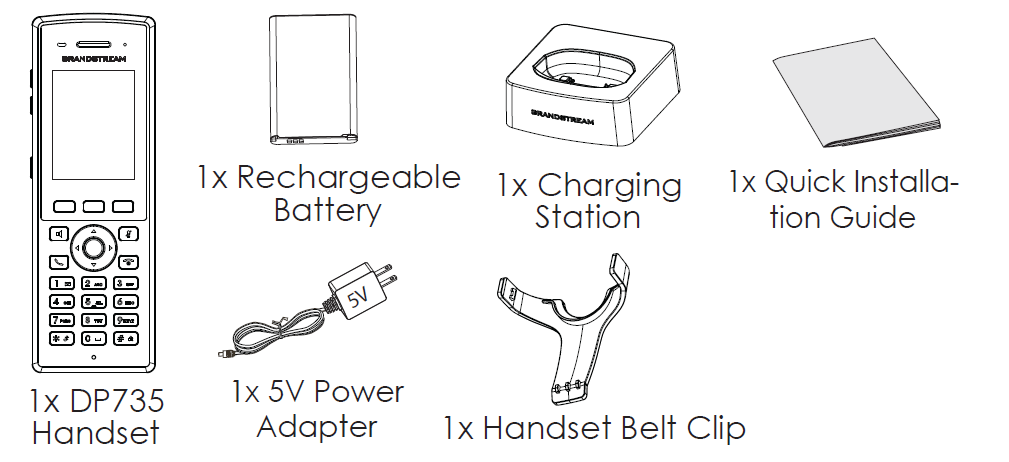
DP735 Package Contents

DP735 Package Content

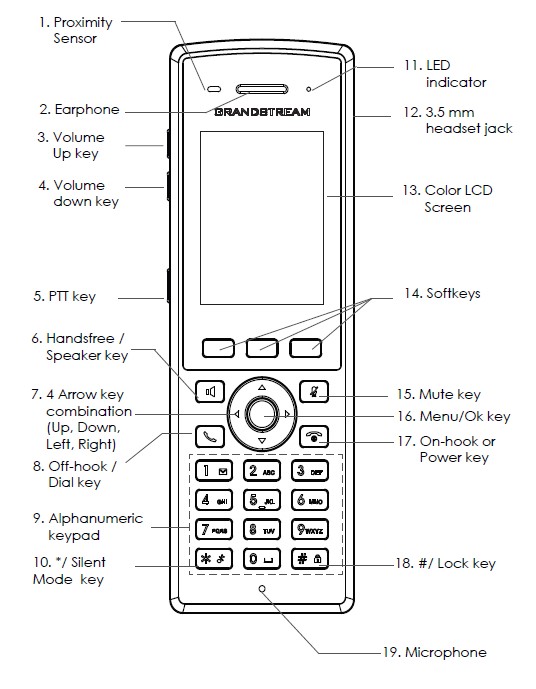
DP735 Handset Description

DP735 Handset Description

Setting Up DP735

Charging Station

Plug the power adapter into a power source socket to start using the charging station.
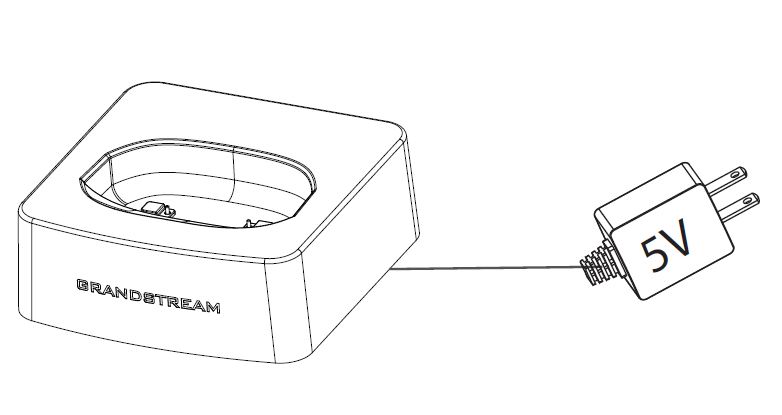
Charging Station

Handset

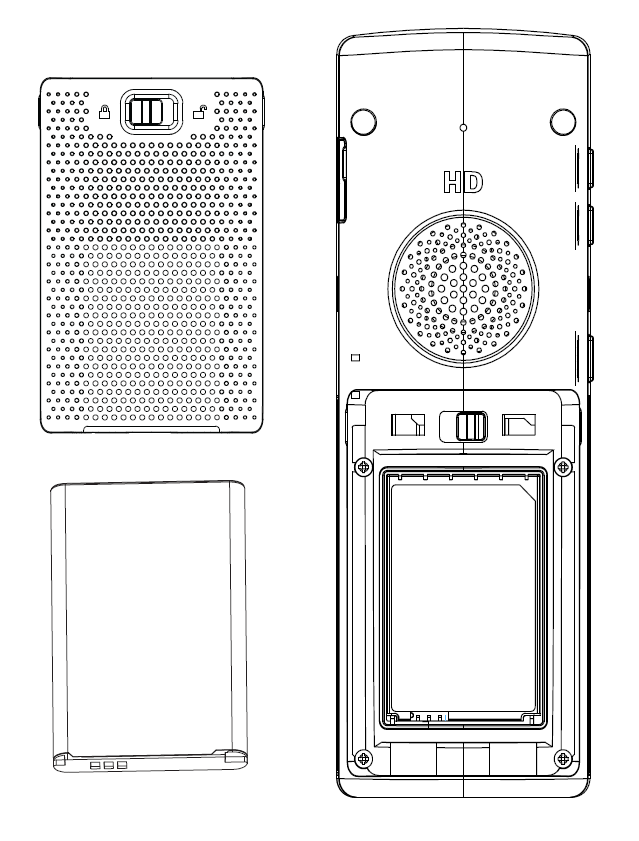
  • Open the battery cover.
  • Insert the Li-ion battery with the electrodes in the top right corner.
  • Close the battery cover.
Battery Installation
Note:

Please charge the battery fully before using the handset for the first time.

Subscribe DP735 Handset to DP750/752/755 Base Station

1. Open Subscription

  • Access DP750/752/755 Web GUI and press the subscribe button.
  • Or, Press the Subscribe/Page button on the DP750/DP752/755 base station.

2. Handset Registration

  1. Access to DP735 menu → Registration → Register.
  2. Select “Base 1” and press “Subscribe” softkey.
  3. DP735 will search for nearby base stations and will display the RFPI code and base station name of the discovered DP750/752/755.
  4. Press “Subscribe” to pair with displayed DP750/752/755.
The DP735 is not pre-configured to support or make emergency calls to any type of hospital, law enforcement agency, medical care unit (“Emergency Service(s)”) or any other kind of Emergency Service. You must make additional arrangements to access Emergency Services. It is your responsibility to purchase SIP-compliant Internet telephone service, properly configure the DP735 to use that service, and periodically test your configuration to confirm that it works as you expect. It is also your responsibility to purchase traditional wireless or landline telephone services to access Emergency Services.

GRANDSTREAM DOES NOT PROVIDE CONNECTIONS TO EMERGENCY SERVICES VIA THE DP735. NEITHER GRANDSTREAM NOR ITS OFFICES, EMPLOYEES OR AFFILIATES MAY BE HELD LIABLE FOR ANY CLAIM, DAMAGE, OR LOSS, AND YOU HEREBY WAIVE ANY AND ALL SUCH CLAIMS OR CAUSES OF ACTION ARISING FROM OR RELATING TO YOUR INABILITY TO USE THE DP735 TO CONTACT EMERGENCY SERVICES, AND YOUR FAILURE TO MAKE ADDITIONAL ARRANGEMENTS TO ACCESS EMERGENCY SERVICES IN ACCORDANCE WITH THE IMMEDIATELY PRECEDING PARAGRAPH.

FCC Warning: This device complies with Part 15 of the FCC Rules. Operation is subject to the following two conditions: (1) This device may not cause harmful interference, and (2) this device must accept any interference received, including interference that may cause undesired operation. Any Changes or modifications not expressly approved by the party responsible for compliance could void the user’s authority to operate the equipment.

FCC ID YZZDP735

Refer to online documents and FAQ for more detailed information: https://www.grandstream.com/our-products


Was this article helpful?

Related Articles

Need Support?
Can’t find the answer you’re looking for? Don’t worry we’re here to help!
Contact Support

Leave a Comment