

INTRODUCTION
The GWN78xx series switches can be managed locally or remotely, through Web access or via Command Line, offering more flexibility along with secured login sessions. The various features and operations on the GWN78xx switches can now be managed either through Web GUI offering a friendly user interface, or via Command Line through SSH/Telnet access.
SSH is a secure protocol used for the connection to a remote host, through command lines and text-based interface. Once authenticated and connected, all typed commands on the terminal are sent to the remote device and executed there.
This guide will describe the usage of Command Line to manage the GWN78xx switches, and will be illustrated using Putty tool, as SSH client Console.
CONNECTING TO THE SWITCH
Connect using SSH
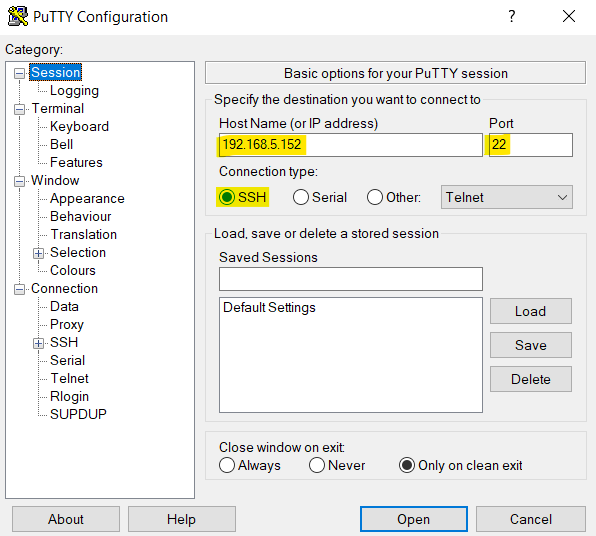
Secure Shell (SSH) provides both secure authentication and secure communications to the CLI. First step to do is to run the SSH client application (PuTTY in our case) and set the following:
- Host Name or IP Address: GWN78xx’s IP Address, (ex: 192.168.5.152).
- Port: 22, this is the by default port for SSH protocol.
- Connection type: Set this to SSH
The settings should be similar to the following figure:
Once done, you can press Open to start the SSH session and open the console.
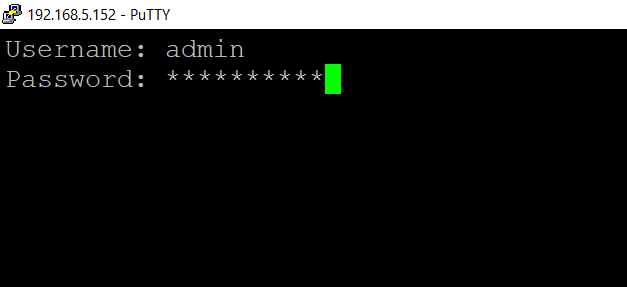
Once pressing Open to start the session, the login prompt will appear on the CLI, enter the Username and the Password to login.
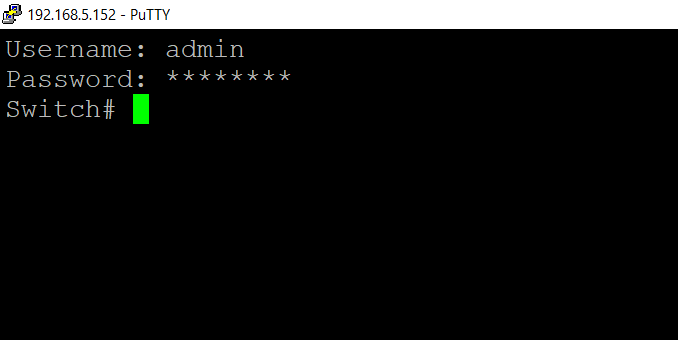
After clicking “Enter”, the user should now have access to the switch.
Connect using Console port
First, connect the GWN switch with the computer using the console port on the switch, then in device manager (ex: windows) under ports check what Serial line (ex: COM3, COM7 …) has been used. Please refer to the figure below:
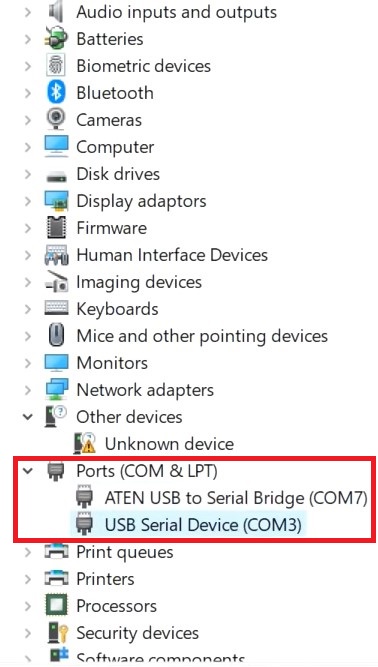
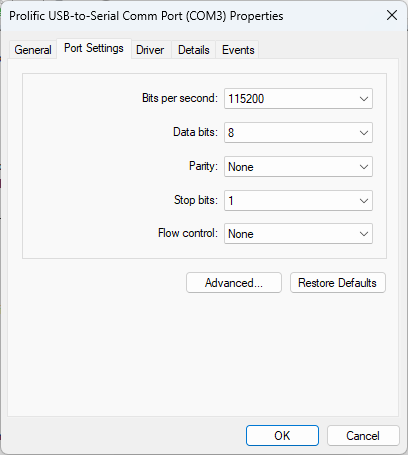
Then, left click on the port used (USB Serial Device (COM3)) → Properties → Port Settings and make sure to match the port settings as shown below:
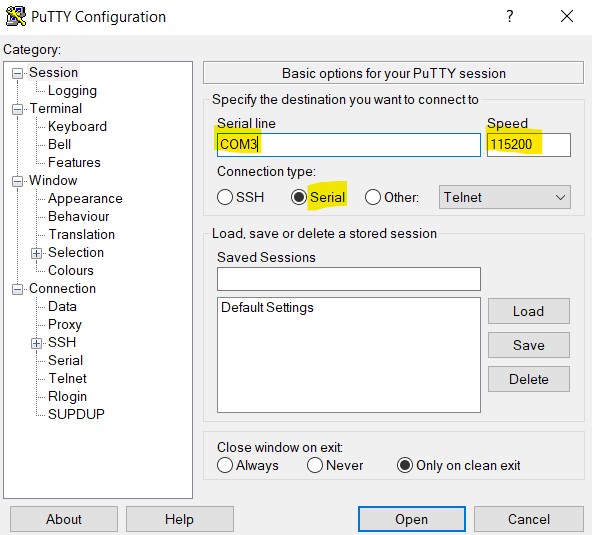
We can use PuTTY again to connect to the GWN switch, please use the following configuration below:
- Serial line: use the same serial line previously checked on the device manager.
- Connection type: select Serial
- Speed: 115200
Once finished, click on “Open” button at the bottom to open the CLI.
OVERVIEW
Configure
Command: configure
Mode: Privileged Exec Mode
Parameter: none
Description: Enter global configuration mode
Example:
Switch # configure
Switch(config)#
Interface
Command:
- interface IF_PORTS
- interface range IF_PORTS
- interface group [1-32]
Mode: interface configuration mode
Parameter:
| Parameter | Description |
| IF_PORTS | Interfaces, including Ethernet ports , optical ports, and aggregation ports. |
| [1-32] | Port Group ID. |
Description:
- Interface IF_PORTS: Enter interface configuration mode.
- Interface range IF_PORTS: Enter interface configuration mode.
- Interface group [1-32]: Enter port group configuration mode.
Example:
Enter the configuration of port 1
Switch# configure
Switch(config)# interface Ethernet 1/0/1
Switch(config-if)#

Enter the configuration of ports 1–5
Switch# configure
Switch(config)# interface range Ethernet 1/0/1-1/0/5
Switch(config-if-range)#

Enter the configuration of port 2/0/3
Switch# configure
Switch(config)# interface Ethernet 2/0/3
Switch(config-if)#

Enter the configuration of port group 2
Switch# configure
Switch(config)# interface group 2
Switch(config-if-group)#
End
Command: end
Mode: none
Parameter: none
Description: Return directly to privileged EXEC mode in other configuration modes except user mode
Example:
Switch # configure
Switch(config)# interface Ethernet 1/0/1
Switch(config-if)# end
Switch#
Exit
Command: exit
Mode: none
Parameter: none
Description: return to parent schema In user mode, the current CLI session will be closed directly
Example:
Switch # configure
Switch(config)# exit
Switch#
System Information
View basic switch information
Command: show info
Mode: Privileged Exec Mode
Parameter:
| Parameter | Description |
| System Name | device name |
| System Location | device location |
| System Contact | Equipment contact information |
| MAC Address | MAC address |
| Mgmt Intf | Managing VLANs |
| IP Address | IP address |
| Subnet Mask | subnet mask |
| Loader Version | bootloader version |
| Loader Date | bootstrap date |
| Firmware Version | Software version/system version |
| Firmware Date | software date |
| Hardware Version | hardware version |
| PN Series number | PN serial number |
| SN Series number | SN serial number |
| System Object ID | System OIDs |
| System Up Time | run time |
| Power On Time | Total power-on duration |
Description: Displays basic system information and the current operational status of the switch.
Example:
GWN7806PH_Pro# show info

System Name      : GWN7806PH_Pro
System Location  : Default
System Contact   : Default
Device Model     : GWN7806PH Pro
MAC Address      : EC:74:D7:A0:E1:98
Mgmt Intf        : VLAN 1
IP Address       : 192.168.0.254
Subnet Mask      : 255.255.255.0
Loader Version   : 1.0.0.4
Loader Date      : Nov 07 2025 - 09:11:12
Firmware Version : 1.0.16.36
Firmware Date    : Mar 19 2026 - 09:27:45
Hardware Version : V1.0B
PN Series Number : 9640018910B
SN Series Number : 35506G6B63
System Object ID : 1.3.6.1.4.1.42397
System Up Time   : 0 day(s), 0 hour(s), 8 min(s), 25 sec(s)
Power On Time    : 171 day(s), 20 hour(s), 24 min(s), 19 sec(s)s
Configure basic switch information
- Configure switch name
Command:
- system name NAME
- show info
Mode: global configuration mode
Parameter:
| Parameter | Description |
| name | Character range: 1-32 If the string is empty, use “” to quote it. |
Description: Modify the switch name
Example:
Set the switch name to MySwitch and check
Switch# configure
Switch (config) #system name MySwitch
MySw itch (config) # do show info

System Name : MySwitch
System Location : Default
System Contact : Default
MAC Address : C0:74:AD:B9:3B:44
IP Address : 192.168.80.202
Subnet Mask : 255.255.255.0
Loader Version: 3.6.9.55156
Loader Date : Sep 09 2022 - 16:06:39
Firmware Version: 1.0.1.11
Firmware Date : Nov 01 2022 - 05:07:20
Hardware Version : V1.2A
PN Series number : 9640004612A
SN Series number : 20VXU28N90B93B44
System Object ID : 1.3.6.1.4.1.27282.3.2.10
System Up Time: 1 days, 22 hours, 45 mins, 6 secs- Configure switch location
Command: system location LOCATION
Mode: global configuration mode
Parameter:
| Parameter | Description |
| LOCATION | switch location If the string is empty, use “” to quote it |
Description: Modify switch location
Example:
Modify the location of the switch to shenzhen and check
Switch # configure
Switch(config)#system location shenzhen
Switch(config)#do show info

System Name : MySwitch
System Location: shenzhen
System Contact : Default
MAC Address : C0:74:AD:B9:3B:44
IP Address : 192.168.80.202
Subnet Mask : 255.255.255.0
Loader Version: 3.6.9.55156
Loader Date : Sep 09 2022 - 16:06:39
Firmware Version: 1.0.1.11
Firmware Date : Nov 01 2022 - 05:07:20
Hardware Version : V1.2A
PN Series number : 9640004612A
SN Series number : 20VXU28N90B93B44
System Object ID : 1.3.6.1.4.1.27282.3.2.10
System Up Time: 1 days, 22 hours, 47 mins, 55 secs- Configure switch contact information
Command: system contact CONTACT
Mode: global configuration mode
Parameter:
| Parameter | Description |
| CONTACT | switch contact If the string is empty, use “” to quote it. |
Description: Modify the switch contact information
Example:
Modify the switch contact information to 13546879513 and check
Switch # configure
Switch(config)#system contact 13546879513
Switch(config)#do show info

System Name : MySwitch
System Location: shenzhen
System Contact : 13546879513
MAC Address : C0:74:AD:B9:3B:44
IP Address : 192.168.80.202
Subnet Mask : 255.255.255.0
Loader Version: 3.6.9.55156
Loader Date : Sep 09 2022 - 16:06:39
Firmware Version: 1.0.1.11
Firmware Date : Nov 01 2022 - 05:07:20
Hardware Version : V1.2A
PN Series number : 9640004612A
SN Series number : 20VXU28N90B93B44
System Object ID : 1.3.6.1.4.1.27282.3.2.10
System Up Time: 1 days, 22 hours, 48 mins, 1 secs
View the switch CPU information
- View the input frame rate of the CPU
Command: show cpu input rate
Mode: Privileged Exec Mode
Parameter: none
Description: View the rate of CPU input frames
Example:
Switch# show cpu input rate
Input Rate to CPU is 1 pps- View CPU usage
Command: show cpu utilization
Mode: Privileged Exec Mode
Parameter: none
Description: Show CPU usage
Example:
Switch# show cpu utilization

CPU utilization
---------------
Current: 0%
View CPU port MIB information
Command: show cpu mib-counters
Mode: Privileged Exec Mode
Parameter: none
Description: Displays MIB (Management Information Base) counter statistics for the CPU port.
Example:
Plaintext
GWN7806PH_Pro# show cpu mib-counters
==============================================================
 CPU Port
        ------------- Bridge/Interface MIB -----------
        dot1dTpPortInDiscards : 0
        ifInOctets : 34500
        ifHCInOctets : 34500
        ifInUcastPkts : 0
        ifHCInUcastPkts : 0
        ifInMulticastPkts : 125
        ifHCInMulticastPkts : 125
        ifInBroadcastPkts : 0
        ifHCInBroadcastPkts : 0
        ifOutOctets : 39069
        ifHCOutOctets : 39069
        ifOutUcastPkts : 0
        ifHCOutUcastPkts : 0
        ifOutMulticastPkts : 129
        ifHCOutMulticastPkts : 129
        ifOutBroadcastPkts : 0
        ifHCOutBroadcastPkts : 0
        ifOutDiscards : 0
View Memory Information
Command:show memory statistics
Mode:
Privileged EXEC Mode
Parameter:
| Parameter | Description |
|---|---|
total | Total memory |
avail | Available memory |
used | Used memory |
free | Free memory |
shared | Shared memory |
buffer | Buffer memory |
cache | Cache memory |
Description:
Displays memory statistics in kilobytes (KB), including total, available, used, free, shared, buffer, and cache.
Example:
Switch# show memory statistics

total(KB)  avail(KB)  used(KB)  free(KB)  shared(KB)  buffer(KB)  cache(KB)
----------+-----------+----------+----------+------------+------------+-----------
Mem:       254840     134400     162268     92572        0         2176        61352
-/+ buffers/cache:     98740     156100
Swap:      0           0         0
View switch version information
Command: show version
Mode: Privileged Exec Mode
Parameter:
| Parameter | description |
| Loader Version | bootloader version |
| Loader Date | bootstrap date |
| Firmware Version | Software version/system version |
| Firmware Date | software date |
Description: Displays version information, including bootloader version, date and software version, date
Example:
Switch # show version

Loader Version: 3.6.9.55156
Loader Date : Sep 09 2022 - 16:06:39
Firmware Version: 1.0.1.11
Firmware Date : Nov 01 2022 - 05:07:20
Check the Switch Fan Running Status
Supported Models:
GWN7803P / GWN7806 / GWN7806P / GWN12P / GWN7813P / GWN16 / GWN7816P / GWN7832 / GWN7831 / GWN7821P / GWN7822P / GWN7802P Pro / GWN7803PL Pro / GWN7803PH Pro / GWN7806PL Pro / GWN7806PH Pro
Command:
show fanshow fan members <1–4>
Mode:
Privileged EXEC mode
Parameter:
| Parameter | Description |
|---|---|
<1–4> | The device ID for GWN7803P/GWN7806/GWN7806P/GWN7812P/GWN7813P/GWN7816/GWN7816P/GWN7832/GWN7831/GWN7821P/GWN7822P/GWN7802P Pro/GWN7803PL Pro/GWN7803PH Pro ranges from 1 to 4, while the value range for GWN7806P L Pro/GWN7806PH Pro ranges from 1 to 8. |
Description:
show fan: Displays the operating status of the switch’s fan(s). The number and speed of fans may vary depending on the model.show fan members <1–4>: Displays the fan status of a specified device ID in a stacking system.
Example:
Switch# show fan
STACK member 1
fan mode: auto control
FanId   Status   Speed
1       NORMAL   LOW
2       NORMAL   LOW
Check Switch Temperature
Command:
show temperatureshow temperature member <1–4>
Mode:
Privileged EXEC mode
Parameter:
| Parameter | Description |
|---|---|
<1–4> | The device ID, GWN7801/GWN7801P/GWN7802/GWN7802P/GWN7803/GWN7803P/GWN7806/GWN7806P/GWN7811/GWN7811P/GWN7812P/GWN7813/GWN7813P/GWN7816/GWN7816P/GWN7832/GWN7831/GWN7830/GWN7821P/GWN7822P/GWN7803PL Pro/GWN7803PH Pro, has a value range of 1-4 , while GWN7806PL Pro/GWN7806PH Pro has a value range of 1-8. |
Description:
Checks the current operating temperature of the switch.
Example:
Switch# show temperature
STACK Member 2
System Temperature: 48 °C
Check Power Supply Status (RPS/PSU)
Supported Models:
GWN7813 / GWN7813P / GWN7831 / GWN7832 / GWN7816 / GWN7816P / GWN7822P / GWN7803 Pro / GWN7803PH Pro / GWN7806PL Pro / GWN7806PH Pro
Command:
show rpsshow rps member <1–4>
Mode:
Privileged EXEC mode
Parameter:
| Parameter | Description |
|---|---|
<1–4> | The device ID for GWN7813/GWN7813P/GWN7831/GWN7832/GWN7816/GWN7816P/GWN7822P/GWN7803 Pro/GWN7803PH Pro ranges from 1 to 4, while the value for GWN7806P L Pro/GWN7806PH Pro ranges from 1 to 8. |
Description:
Checks the power supply (PSU or RPS) status of the device.
Example:
Check PSU status on a device such as the GWN7816P:

GWN7816P# show rps

Power Status: PSU1_INUSE_PSU2_UNCONNECTED
Internal Power Status: in use
External Power Status: unconnected

---

Check RPS status on a device such as the GWN7806PL Pro:

GWN7806PL Pro# show rps
STACK member 1

Power Status: INTER_12V_SUPPLY
Internal Power Status: in use
External Power Status: unused
View Port/Interface Status, Bandwidth, and Error Information
Command:
show interfaces brief
show interfaces Ethernet <IF_PORTS> brief
show interfaces vlan <IF_VLANS> brief
Mode: Privileged EXEC mode
Parameter:
| Parameter | Description |
|---|---|
| IF_PORTS | Ethernet port number |
| IF_VLANS | VLAN interface ID (range: 1 to 4094) |
Description:
Displays the physical status, protocol status, input/output bandwidth utilization, and number of received/transmitted error packets for a specified port or interface.
Note: VLAN interfaces do not support bandwidth and error packet statistics.
Example:
Switch# show interfaces brief

PHY: Physical status
shutdown: administratively down
(l): Loopback Detection down       (stp): Spanning Tree down
(acl): User Defined ACL down       (stm): Storm Control down
(d): DHCP rate limit down          (p): Port Security down
(arp): ARP rate limit down

Protocol: Protocol status
(lacp): Trunk protocol LACP down   (stp): Spanning Tree down

InUti/OutUti: Input/Output bandwidth utilization

Interface      PHY   Protocol   InUti   OutUti   inErrors  outErrors
eth1/0/1       up    up         0.000%  0.000%   0         0
eth1/0/2       down  down       0.000%  0.000%   0         0
eth1/0/3       down  down       0.000%  0.000%   0         0
eth1/0/4       down  down       0.000%  0.000%   0         0
eth1/0/5       down  down       0.000%  0.000%   0         0
eth1/0/6       down  down       0.000%  0.000%   0         0
eth1/0/7       down  down       0.000%  0.000%   0         0
eth1/0/8       down  down       0.000%  0.000%   0         0
eth1/0/9       down  down       0.000%  0.000%   0         0
eth1/0/10      down  down       0.000%  0.000%   0         0
eth1/0/11      down  down       0.000%  0.000%   0         0
eth1/0/12      down  down       0.000%  0.000%   0         0
eth1/0/13      down  down       0.000%  0.000%   0         0
eth1/0/14      down  down       0.000%  0.000%   0         0

Switch# show interfaces Ethernet 1/0/1 brief

Interface      PHY   Protocol   InUti   OutUti   inErrors  outErrors
eth1/0/1       up    up         0.000%  0.000%   0         0

Switch# show interfaces vlan 1 brief

Interface   PHY   Protocol   InUti   OutUti   inErrors  outErrors
VLAN 1      up    up         --      --       0         0
Note: VLAN interfaces do not support InUti, OutUti, inErrors, or outErrors.
View Port/Interface Description Information
Command:
show interfaces description
show interfaces Ethernet <IF_PORTS> description
show interfaces vlan <IF_VLANS> description
Mode:
Privileged EXEC mode
Parameter:
| Parameter | Description |
|---|---|
| IF_PORTS | Ethernet port number |
| IF_VLANS | VLAN interface ID (range: 1 to 4094) |
Description:
Displays the description configured for the specified port or interface.
Example:
Switch# show interfaces description

PHY: Physical status
shutdown: administratively down
(l): Loopback Detection down       (stp): Spanning Tree down
(acl): User Defined ACL down       (stm): Storm Control down
(d): DHCP rate limit down          (p): Port Security down
(arp): ARP rate limit down

Protocol: Protocol status
(lacp): Trunk protocol LACP down   (stp): Spanning Tree down

Interface        PHY   Protocol   Description
eth1/0/1         up    up
eth1/0/2         down  down
eth1/0/3         down  down
eth1/0/4         down  down
eth1/0/5         down  down
eth1/0/6         down  down
eth1/0/7         down  down
eth1/0/8         down  down
eth1/0/9         down  down
eth1/0/10        down  down
eth1/0/11        down  down
eth1/0/12        down  down
eth1/0/13        down  down
eth1/0/14        down  down
eth1/0/15        down  down
eth1/0/16        down  down
eth1/0/17        down  down
eth1/0/18        down  down
eth1/0/19        down  down
eth1/0/20        down  down
eth1/0/21        down  down
eth1/0/22        down  down
eth1/0/23        down  down
eth1/0/24        down  down
eth1/0/25        down  down
eth1/0/26        down  down
eth1/0/27        down  down
eth1/0/28        down  down
lag1             down  down
lag2             down  down
lag3             down  down
lag4             down  down
lag5             down  down
lag6             down  down
lag7             down  down
lag8             down  down
lag9             down  down
lag10            down  down
lag11            down  down
lag12            down  down
lag13            down  down
lag14            down  down
lag15            down  down
lag16            down  down
lag17            down  down
lag18            down  down
lag19            down  down
lag20            down  down
lag21            down  down
lag22            down  down
lag23            down  down
lag24            down  down
lag25            down  down
lag26            down  down
lag27            down  down
lag28            down  down
lag29            down  down
lag30            down  down
lag31            down  down
lag32            down  down
Loopback1        up    up
VLAN 1           up    up
VLAN 2           down  down

Switch# show interfaces Ethernet 1/0/1 description

Interface      PHY   Protocol   Description
eth1/0/1       up    up

Switch# show interfaces vlan 1 description

Interface   PHY   Protocol   Description
VLAN 1      up    up
View Current Port Rate, Current Traffic/Actual Bandwidth, and Port Usage
Command:
show interfaces Ethernet <IF_PORTS>
show interfaces Ethernet <IF_PORTS> brief
Mode:
Privileged EXEC mode
Parameter:
| Parameter | Description |
|---|---|
| IF_PORTS | Ethernet port number |
Description:
Use the show interfaces Ethernet <IF_PORTS> command to view the current port rate, real-time traffic, and actual bandwidth.
Use the show interfaces Ethernet <IF_PORTS> brief command to check port usage including bandwidth utilization and error statistics.
Example:
Switch# show interfaces Ethernet 1/0/1

Ethernet1/0/1 is up
  Hardware is Gigabit Ethernet
  Auto-duplex, Auto-speed, media type is Copper
  flow-control is off
  back-pressure is enabled
  selfloop-detection is disabled
  selfloop-detection running is false
  real time input rate  2669 bits/sec, 3 packets/sec
  real time output rate 1281 bits/sec, 1 packets/sec
     687766 packets input, 67775661 bytes, 0 throttles
     Received 55200 broadcasts (512929 multicasts)
     0 runts, 0 giants, 0 throttles
     0 input errors, 0 CRC, 0 frame
     512929 multicast, 0 pause input
     0 input packets over size
     188786 packets output, 25281691 bytes, 0 underrun
     0 output errors, 0 collisions
     0 babbles, 0 late collision, 0 deferred
     0 PAUSE output

Switch# show interfaces Ethernet 1/0/1 brief

PHY: Physical status
shutdown: administratively down
(l): Loopback Detection down       (stp): Spanning Tree down
(acl): User Defined ACL down       (stm): Storm Control down
(d): DHCP rate limit down          (p): Port Security down
(arp): ARP rate limit down

Protocol: Protocol status
(lacp): Trunk protocol LACP down   (stp): Spanning Tree down

InUti/OutUti: Input/Output bandwidth utilization

Interface      PHY   Protocol   InUti   OutUti   inErrors  outErrors
eth1/0/1       up    up         0.000%  0.000%   0         0
ETHERNET SERVICE
Basic port configuration
Open/close port
Command:
- no shutdown
- shutdown
- schedule id <1-32>
- no schedule id <1-32>
Mode: interface configuration mode
Parameter:
| Parameter | Description |
| <1-32> | Time policy ID , used to enable the port within a specified time range. |
Description: Open/close port
Example:
close port 1/0/1
Switch#config
Switch (config) # interface Ethernet 1/0/1
Switch (config-if) #shutdown

open port 1/0/1
Switch (config-if) #no shutdown
Configure port description
Command: description DESCRIPTION
Mode: interface configuration mode
Parameter:
| Parameter | Description |
| DESCRIPTION | Character range: 1-128, used to describe the port, “\?/, characters are not supported. |
Description: Configure the description information of the interface
Example:
Configure the description of port 1/0/2 as port - 2
Switch # configure
Switch(config)# interface Ethernet 1/0/2
Switch(config-if)# description port-2
Modify port description
Command: description WORD<1-128>
Mode: interface configuration mode
Parameter:
| Parameter | Description |
| WORD<1-128> | Character range: 1-128, used to describe the port. “\?/, characters are not supported. |
Description: Modify port description
Example:
Modify the description of port 1/0/1 to 111111
Switch#config
Switch (config) # interface Ethernet 1/0/1
Switch (config-if) # description 111111
Clear port description
Command: no description
Mode: interface configuration mode
Parameter: none
Description: clear port description
Example:
Switch#config
Switch (config) # interface Ethernet 1/0/1
Switch (config-if) #no description
Configuring Combo port working mode
Command:
- media-type (auto-select|rj45|sfp)
- no media-type
Mode: interface configuration mode
Parameter:
| Parameter | Description |
| auto-select | The auto-negotiation working mode will determine whether to use the electrical port or the optical port based on the actual access. If both have access, the optical port mode will be given priority. |
| rj45 | Electrical port working mode |
| sfp | Optical port working mode |
Description: Configure the working mode of the Combo port.
Example:
Enable port 1/0/1 to work in optical port mode.
Switch# config
Switch (config) # interface Ethernet 1/0/1
Switch (config-if) # media-type sfp
Configure port automatic detection
Command:
- auto-detect
- no auto-detect
Mode: interface configuration mode
Parameter: none
Description: Configure whether to enable automatic detection of the SFP+ port. Automatically adjust the port rate according to the connected optical module.
Example:
Enable auto- detection of port 1/0/50 .
Switch#config
Switch (config) # interface Ethernet 1/0/50
Switch (config-if) # auto-detect

Disable the automatic detection function on ports 1/0/50 .
Switch (config-if) # no auto-detect
Configure Port Speed
Command:
speed [10|100|1000|2500|10000]speed auto [(10|100|1000|10/100)]
Mode: Interface configuration mode
Parameter:
| Parameter | Description |
|---|---|
10 | Force 10 Mbps operation , enforce a port speed of 10 Mbps. |
100 | Force 100 Mbps operation , enforce a port speed of 100 Mbps. |
1000 | Force 1000 Mbps operation , enforce a port speed of 1000 Mbps. |
2500 | Force 2500 Mbps operation, enforce a port speed of 2500 Mbps. Note: GWN7821P/GWN7822P supports 2.5G Ethernet port, GWN7801P Pro supports 2.5G SFP port, and GWN7802P Pro/GWN7803(PL/PH) Pro /GWN7806PL Pro/GWN7806PG Pro supports SFP+ port. |
10000 | Force 10Gbps operation , enforce a port speed of 10 Gbps. Note: Only GWN7806(P)/11(P)/12P/13(P)/30/31/32/16(P)/GWN7821P/GWN7822PGWN7802P Pro/GWN7803(PL/PH)P / GWN7806PL Pro / GWN7806PH Pro SFP+ ports are supported. |
auto | self-negotiation rate has the following four specific cases: • 10: Include 10 Mbps in auto-negotiation advertisement. • 10/100 : Include 10 Mbps and 100Mbps in auto-negotiation advertisement. • 100 : Include 100 Mbps in auto-negotiation advertisement. • 1000 : Include 1000 Mbps in auto-negotiation advertisement. |
Description:
Configure port speed.
- Gigabit Ethernet ports support: Auto, 10 Mbps, 100 Mbps, and 1000 Mbps.
- 2.5G Gigabit Ethernet ports support: Auto, 10 Mbps, 100 Mbps, 1000 Mbps, and 2.5 Gbps.
- Gigabit optical ports support: Auto, 10 Mbps, and 1000 Mbps.
- 2.5G SFP optical ports support: 100 Mbps, 1000 Mbps, and 2.5 Gbps.
- 10G optical ports support: 100 Mbps, 1000 Mbps, and 10 Gbps and 2.5 Gbps.
Example:
Configure port 1/0/1 to use 1000 Mbps speed:

Switch# configure
Switch(config)# interface Ethernet 1/0/1
Switch(config-if)# speed 1000
Configure port duplex mode
Command: duplex auto|full|half
Mode: interface configuration mode
Parameter:
| Parameter | Description |
| auto | Enable AUTO duplex configuration , automatic configuration mode |
| full _ | Force full duplex operation , full duplex mode |
| half | Force half-duplex operation , half-duplex mode |
Description: Configure port duplex mode
Example:
Configure the duplex mode of port 1/0/1 to auto.
Switch#config
Switch (config) # interface Ethernet 1/0/1
Switch (config-if) # duplex auto
Configure port flow control
Command: flowcontrol auto|off|on
Mode: interface configuration mode
Parameter:
| Parameter | Description |
| auto | Enable AUTO flow-control configuration , automatic configuration |
| off | Force flow-control as disabled , close |
| on | Force flow-control as enabled , open |
Description: Configure port flow control
Example:
Configure the flow control of port 1/0/1 to auto.
Switch#config
Switch (config) # interface Ethernet 1/0/1
Switch (config-if) # flowcontrol auto
Disable port flow control
Command: no flowcontrol
Mode: interface configuration mode
Parameter: none
Description: Turn off port flow control
Example:
Disable flow control on port 1/0/1 .
Switch#config
Switch (config) # interface Ethernet 1/0/1
Switch (config-if) #no flowcontrol
Configure Jumbo Frames
Supported Models: GWN7801(P) / GWN7802(P) / GWN7803(P)
Command: jumbo-frame <1518–10240>
Mode: Global configuration mode
Parameter:
| Parameter | Description |
|---|---|
<1518–10240> | Configures jumbo frame size. Default is 9216. |
Description:
Configures jumbo frames.
Jumbo frame configuration is applied globally for GWN7801(P), GWN7802(P), and GWN7803(P) series switches.
Example:
Configure the jumbo frame size for port 1/0/1 to 10000:

Switch# config
Switch(config)# interface Ethernet 1/0/1
Switch(config-if)# jumbo-frame 10000
Disable jumbo frame on port 1/0/1 and restore default value (9216):
Switch(config-if)# no jumbo-frame
Configuring Jumbo Frames
Supported Models: GWN7806(P)/GWN7811(P)/GWN7812P/GWN7813(P)/GWN7816(P)/GWN7830/GWN7831/GWN7832/GWN7821P/GWN7822P/GWN7801P Pro/GWN7802P Pro/GWN7803(PL/PH) Pro/GWN7806PL Pro/GWN7806PH Pro
Command: jumbo-frame <1518-12288>
Mode: Interface Configuration Mode
Parameter:
| Parameter | Description |
|---|---|
| <1518-12288> | Configures jumbo frames. The default value is 9216. |
Description:
Configure jumbo frames. GWN7806(P)/GWN7811(P)/GWN7812P/GWN7813(P)/GWN7816(P)/GWN7830/GWN7831/GWN7832 /GWN7821P/GWN7822P/GWN7801P Pro/GWN7802P Pro/GWN7803(PL/PH) Pro/GWN7806PL Pro/GWN7806PH Pro for interface configuration.
Example:
Configure jumbo frames on port 1/0/1 to 10000:
Switch#config
Switch (config) # interface Ethernet 1/0/1
Switch (config-if) # jumbo-frame 10000

Disable jumbo frames on port 1/0/1 , and restore the default value of 9216:
Switch (config-if) # no jumbo-frame
Viewing Jumbo Frames
Command: show tech-support jumbo
Mode: Privileged Exec Mode
Parameter: None
Description: Displays the current configuration value of jumbo frames.
Example:
Switch# show tech-support jumboView Port Information or Status
Command:
show interfaces IF_PORTSshow interfaces IF_PORTS status
Mode: Privileged EXEC Mode
Parameter:
| Parameter | Description |
|---|---|
IF_PORTS | Switch port numbers, including Ethernet ports and aggregation interfaces. |
status | Displays detailed port status including: • Port: Port number • Name: Port name • Status: Port status • VLAN: VLAN ID of the port • Duplex: Duplex mode • Speed: Port speed • Type: Port type |
Description: Displays port information or status for a specified Ethernet port or aggregation group.
Example:
View information about port 1/0/1:
Switch# show interface Ethernet 1/0/1

View information for aggregation group 1:
Switch# show interfaces lag 1

Check the status of port 1/0/1:
Switch# show int Ethernet 1/0/1 status

Check the status of aggregation group 1:
Switch# show int lag 1 status
Clear Port Statistics Counter
Command: clear interfaces IF_PORTS counters
Mode: Privileged EXEC mode
Parameter:
| Parameter | Description |
|---|---|
IF_PORTS | Switch port numbers, including Ethernet ports and aggregation interfaces. |
Description: Clears the statistics counters for the specified port.
Example:
Clear the statistics counters on port 1/0/1:
Switch# clear interfaces Ethernet 1/0/1 counters
SFP+ Rate Mode Configuration
Command: tge-port Ethernet IF_PORTS ability {10g_1g | 10g_2_5g}
Mode: Global Configuration Mode
Parameter:
| Parameter | Description |
IF_PORTS | SFP+ port |
10g_1g | Sets the speed mode to 10Gbps/1Gbps (supported speed options include 10Gbps, 1Gbps, and 100Mbps). |
10g_2_5g | Sets the speed mode to 10Gbps/2.5Gbps (supported speed options include 10Gbps and 2.5Gbps). |
Description: Configures the SFP+ rate mode.
Note: Modifying the SFP+ rate mode of any port in a group via the CLI will synchronously modify the rate mode for the entire group. The configuration must be saved and the device restarted for the changes to take effect. The number of SFP+ groups is determined by dividing the total number of SFP+ ports on the model by 2. For example:
- GWN7811(P)/21P has 1 group.
- GWN7812P/13(P)/22P/30/31 has 2 groups.
- GWN7806(P)/16(P)/06PL Pro/06PH Pro has 3 groups.
- GWN7832 has 6 groups.
Example:
Plaintext
GWN7806P# configure
GWN7806P(config)# tge-port Ethernet 1/0/49 ability 10g_
Traffic statistics
View API Statistics
Command:
show interfaces IF_PORTSshow interfaces Ethernet IF_PORTS mib-counters
Mode: Privileged EXEC mode
Parameter:
| Parameter | Description |
|---|---|
IF_PORTS | Switch port numbers, including Ethernet ports and aggregation interfaces. |
Description:
Displays MIB (Management Information Base) statistics for a specified interface.
Example:
View statistics for port 1/0/1:

Switch# show interfaces Ethernet 1/0/1
Switch# show interfaces Ethernet 1/0/1 mib-counters
View interface traffic information
Command: show tech-support mib-counters
Mode: privileged EXEC mode
Parameter: none
Description: View interface traffic information
Example:
Switch# show tech-support mib-countersLoop detection
Enable/disable global loop detection
Command:
- Selfloop-detection enable
- selfloop-detection disable
Mode: global configuration mode
Parameter: none
Description: Enable/disable global loop detection
Example:
Enable global loop detection
Switch(config)# selfloop-detection enable
Disable global loop detection
GWN7811P(config)# selfloop-detection disable
Detection message type
Command:
- selfloop-detection pdu-etherType <0x0000-0xffff>
- no selfloop-detection pdu-etherType
Mode: global configuration mode
Parameter:
| Parameter | Description |
| pdu-etherType | Message type range <0x0000-0xffff> |
Note: The following ranges and values do not support input: 0x0000-0x05FF, 0x0600-0x0601, 0x0800-0x0806, 0x0808, 0x6559, 0x8035, 0x8037, 0x809B, 0x80D5, 0x80F3, 0x8100, 0x8137, 0x814C, 0x86DD, 0x880B, 0x880C, 0x8847, 0x8848, 0x8863, 0x8864, 0x88BB, 0x88CC, 0x8E88, 0x9000, 0x9100, 0x9200.
Description: Configure the type of detection message
Example:
Configure the detection message type to 0x8988
GWN7811P(config)# selfloop-detection pdu-etherType 0x8988
Detection interval
Command:
- selfloop-detection interval <1-1000>
- no selfloop-detection interval
Mode: global configuration mode
Parameter:
| Parameter | Description |
| <1-1000> | The detection interval time is an integer ranging from 0 to 1000 , and the default value is 300 seconds |
Description: Configuring the detection interval
Example:
GWN7811P(config)# selfloop-detection interval 15
GWN7811P(config)# no selfloop-detection interval
Enable/disable interface loop detection
Command:
- selfloop-detection
- no selfloop-detection
Mode: Interface Configuration Mode
Parameter: none
Description: Enable/disable loop detection on an interface
Example:
Switch (config)# int Ethernet 1/0/1
Switch (config-if)# selfloop-detection
Switch (config-if)# no selfloop-detection
Port auto recovery
Configure port recovery
Command:
errdisable recovery interval seconds
errdisable recovery cause {all | acl | arp-inspection | bpduguard | dhcp-rate-limit | selfloop | udld | psecure-violation | broadcast-flood | unicast-flood | unknown-multicast-flood | selfloop-detection | dhcpv6-rate-limit}
Mode: Global Configuration Mode
Parameter:
| Parameter | Description |
seconds | Port recovery time, ranging from 30 to 86400 seconds. |
cause {all | acl | arp-inspection | bpduguard | dhcp-rate-limit | selfloop | udld | psecure-violation | broadcast-flood | unicast-flood | unknown-multicast-flood | selfloop-detection | dhcpv6-rate-limit} | Port recovery triggering mechanism. |
Description: Configures port auto-recovery, allowing the switch to automatically recover a port from specified error-disabled states.
Example:
Plaintext
Configure the port recovery trigger mechanism to unicast flooding and the recovery time to 30 seconds:

Switch# configure
Switch(config)# errdisable recovery cause unicast-flood
Switch(config)# errdisable recovery interval 30
View the port restoration table
Command: show errdisable recovery
Mode: privileged EXEC mode
Parameter: none
Description: View port recovery entries
Example:
Switch# show errdisable recoveryLink aggregation
Add/delete Link Aggregation Group
Command:
lag <1–8> mode (static | active | passive)no lag
Mode: Interface configuration mode
Parameter:
| Parameter | Description |
|---|---|
<1–8> | Aggregate group ID (range: 1–8) Note: GWN7801(P), GWN7802(P), GWN7803(P), GWN7801P Pro, GWN7802P Pro, and GWN7803(PL/PH) Pro support up to 8 link aggregation groups. Other models support up to 32. |
static | Static aggregation mode |
active | LACP (Link Aggregation Control Protocol) active mode |
passive | LACP passive mode |
Description:
Creates a link aggregation group in the specified mode.
Use the no lag command to remove a port from aggregation.
Example:
Add static LAG 1 to ports 1/0/1 and 1/0/2:

Switch# configure
Switch(config)# interface Ethernet 1/0/1
Switch(config-if)# lag 1 mode static
Switch(config)# interface Ethernet 1/0/2
Switch(config-if)# lag 1 mode static

Switch# show lag
Load balancing
Command: lag load-balance { src-dst-mac | src-dst-mac-ip }
Mode: global configuration mode
Parameter:
| Parameter | Description |
| src-dst-mac | Load sharing based on src-mac|dst-mac |
| src-dst-mac-ip | Load sharing based on src-mac|dst-mac|src-ip|dst-ip |
Description: Setting Link Aggregation Load Balancing Mode
Example:
Switch # configure
Switch(config)# lag load-balance src-dst-mac
LACP Configuration
- LACP system priority
Command: lacp system-priority <1-65535>
Mode: global configuration mode
Parameter:
| Parameter | Description |
| <1-65535> | LACP system priority range, the value range is an integer from 1 to 65535 , and the default is 32768 |
Description: Set the system priority of LACP
Example:
Set the global LACP system priority to 1
Switch(config-if)# lacp system-priority 1- LACP port priority
Command: lacp port-priority <1-65535>
Mode: interface configuration mode
Parameter:
| Parameter | Description |
| <1-65535> | The range of LACP port priority, the value range is an integer from 1 to 65535 , the default is 1 |
Description: Configure LACP port priority, the default value is 1, the smaller the port priority value, the higher the LACP priority
Example:
Set the LACP priority of port 1/0/1 to 2 .
Switch# configure
Switch(config)# interface Ethernet 1/0/1
Switch(config-if)# lacp port-priority 2- LACP port timeout mechanism
Command: lacp timeout {long|short}
Mode: interface configuration mode
Parameter:
| Parameter | Description |
| short | The timeout period for receiving LACP protocol packets is 3 seconds |
| long | The timeout period for receiving LACP protocol packets is 90 seconds |
Description: Set the timeout time for receiving LACP packets, the default is short
Example:
Set the timeout period for receiving LACP packets on port 1/0/1 to long .
Switch # configure
Switch(config)# interface Ethernet 1/0/1
Switch(config-if)# lacp timeout long- Show LACP
Command:
- show lacp { <1-8> | counters |internal|neighbor|sys-id}
- show lag
Mode: privileged EXEC mode
Parameter:
| Parameter | Description |
| <1-8> | Aggregation group ID , range <1-8> Note: The number of aggregation groups for GWN7801/GWN7801P/GWN7802/GWN7802P/GWN7803/GWN7803P/GWN7801P Pro/GWN7802P Pro/GWN7803 Pro/GWN7803PL Pro/GWN7803PH Pro is 8, and the number of aggregation groups for GWN7806/GWN7806P/GWN7811/GWN7811P/GWN7812P/GWN7813/GWN7813P/GWN7832/GWN7831/GWN7830/GWN7816/GWN7816P/GWN7821P/GWN7822P/GWN7806PL Pro/GWN7806PH Pro is 32. |
Description: View LAG/LACP entries
Example:
Switch # show lag
Switch# show lacp sys-id
Switch# show lacp counters
Switch # show lacp internal
Switch# show lacp neighbor
Local Priority Forwarding of LAG Interface Traffic
Command: lag local-first
Mode: Global configuration mode
Parameter: None
Description: In a stacked environment, when the outgoing interface is a link aggregation group, enabling local priority forwarding ensures that traffic from the local device is prioritized.
This prevents traffic from being forwarded through other devices in the stack.
Disabling local priority allows traffic to be forwarded across all devices.
Example:
Switch# configure
Switch(config)# lag local-first
MAC address table
Set MAC Aging Time
Command: mac address-table aging-time
Mode: global configuration mode
Parameter:
| Parameter | Description |
| aging-time | Dynamic address aging time, the value range is 0 or an integer from 60 to 1000000, 0 means no aging . Default 300 seconds |
Description: Set the aging time of dynamic MAC
Example:
Switch#conf
Switch(config)# mac address-table aging-time 60
Set MAC static address
Command:
- mac address-table static MAC-address vlan vlan-id interface interface-id
- no mac address-table static MAC-address vlan vlan-id interface interface-id
Mode: global configuration mode
Parameter:
| Parameter | Description |
| MAC-address | MAC address: format A:B:C:D:E:F, such as 00:00:00:00:00:01 |
| vlan vlan-id | vlan id value range <1-4094> |
| interface interface-id | There are 2 interface modes {Ethernet|LAG } |
Description:
- mac address-table static command sets a static MAC address and binds the user device to an interface, thereby preventing illegal users from fraudulently obtaining data
- The no mac address-table static command deletes the specified static MAC address
Example:
Switch # configure
Switch(config)# mac address-table static 00:00:00:00:00:01 vlan 1 interfaces Ethernet 1/0/1
Switch(config)#mac address-table static 00:00:00:00:00:02 vlan 2 interfaces LAG 1
Switch(config)# no mac address-table static 00:00:00:00:00:01 vlan 1
Set black hole MAC address
Command:
- mac address-table static MAC-address vlan vlan-id drop
- no mac address-table static MAC-address vlan vlan-id drop
Mode: global configuration mode
Parameter:
| Parameter | Description |
| MAC-address | mac address: format A:B:C:D:E:F, such as 00:00:00:00:00:01 |
| vlan-id | vlan id value range <1-4094> |
Description:
- mac address-table static command sets a blackhole MAC address. When the device receives a packet with a destination or source MAC address that is a blackhole MAC address, it discards it directly
- The no mac address-table static command deletes the specified blackhole MAC address
Example:
Switch# configure
Switch(config)# mac address-table static 00:00:00:00:00:01 vlan 3 drop
Switch(config)# no mac address-table static 00:00:00:00:00:01 vlan 3
Clearing dynamic MAC address entries
Command:
- clear mac address-table dynamic
- clear mac address-table dynamic interface interface-id
- clear mac address-table dynamic vlan vlan-id
Mode: privileged EXEC mode
Parameter:
| Parameter | Description |
| vlan-id | vlan id value range <1-4094> |
| interface-id | There are 2 interface modes {Ethernet|LAG} |
Description: Clear dynamic address entries
Example:
Switch# clear mac address-table dynamic
Switch# clear mac address-table dynamic interfaces Ethernet 1/0/1
Switch# clear mac address-table dynamic vlan 1
View MAC address entries
Command:
- show mac address-table aging-time
- show mac address-table counters
- show mac address-table
- show mac address-table mac-address
- show mac address-table interfaces interface-id
- show mac address-table vlan vlan-id
- show mac address-table dynamic
- show mac address-table dynamic interfaces interface-id
- show mac address-table dynamic vlan vlan-id
- show mac address-table static interfaces interface-id
- show mac address-table static vlan vlan-id
Mode: privileged EXEC mode
Parameter:
| Parameter | Description |
| mac-address | mac address: format A:B:C:D:E:F, such as 00:00:00:00:00:01 |
| vlan-id | vlan id value range <1-4094> |
| interface-id | There are 2 interface modes {Ethernet|LAG } |
Description:
- show mac address-table aging-time : Check the aging time of dynamic mac address entries
- show mac address-table counters : Check the number of all MAC entries of the switch
- show mac address-table : Check the MAC address table entries
- show mac address-table mac-address : Check the entry of the specified MAC address
- show mac address-table interfaces interface-id : Check the interface entry of the mac address table entry
- show mac address-table vlan vlan-id : Check the MAC address entry of the vlan in the mac address entry
- Switch# show mac address-table dynamic : Check dynamic MAC address table entries
- show mac address-table dynamic interfaces interface-id : Check the interface entries of the dynamic mac address table entries
- show mac address-table dynamic vlan vlan-id : Check the M AC address entry of the vlan of the dynamic mac address entry
- show mac address-table static interfaces interface-id : Check the interface entries of the static mac address table entries
- show mac address-table static vlan vlan-id : Check the MAC address entry of the vlan of the static mac address entry
Example:
Switch# show mac address-table aging-time
Switch# show mac address-table counters
Switch# show mac address-table
Switch# show mac address-table 00:00:00:00:00:01
Switch# show mac address-table vlan 1
Switch# show mac address-table static
Switch# show mac address-table dynamic
Switch# show mac address-table interfaces Ethernet 1/0/1
Setting the MAC address hash algorithm
Command: mac address-table hash-mode {mode1 | mode2 | mode3 | mode4}
Mode: Global Configuration Mode
Parameter:
| Parameter | Description |
mode1 | The upper half of the hash table uses the hash key generated by sequentially combining the VID and MAC values, while the lower half uses the hash key generated by randomly combining the VID and MAC values. |
mode2 | Both the upper and lower halves of the hash table use the hash key generated by randomly combining the VID and MAC values. |
mode3 | Both the upper and lower halves of the hash table use the hash key generated by sequentially combining the VID and MAC values. |
mode4 | The upper half of the hash table uses the hash key generated by randomly combining the VID and MAC values, while the lower half uses the hash key generated by sequentially combining the VID and MAC values. |
Description: Configures the hash algorithm mode for the MAC address table.
Note: A device restart is required for the new MAC address hash algorithm to take effect. All GWN78xx models support mode1 and mode2. Only the GWN7806(P), GWN7811(P), GWN7812P, GWN7813(P), GWN7816(P), GWN7821P, GWN7822P, GWN7830, GWN7831, GWN7832, GWN7806PL Pro, and GWN7806PH Pro models support mode3 and mode4.
Example:
Configure the MAC address hash algorithm to mode2.

Switch# configure
Switch(config)# mac address-table hash-mode mode2
View the MAC address hash algorithm mode
Command: show mac address-table hash-mode
Mode: Privileged Exec Mode
Parameter: none
Description: Displays the current hash algorithm mode configured for the MAC address table.
Example:
Plaintext
View the hash algorithm pattern of the MAC address

Switch# show mac address-table hash-mode
View MAC address flapping records
Command: show mac address-table flapping record
Mode: Privileged Exec Mode
Parameter: none
Description: Displays the MAC address flapping (migration) history records on the switch. This helps identify network loops or issues where a MAC address is rapidly moving between different ports.
Example:
View MAC address migration history

Switch# show mac address-table flapping record
Clear MAC address flapping records
Command: clear mac address-table flapping record
Mode: Privileged Exec Mode
Parameter: none
Description: Clears the MAC address flapping (migration) history records from the switch.
Example:
Clear MAC address migration records

Switch# clear mac address-table flapping record
VLAN
VLAN Basics
- Configure access mode VLAN
Command:
- switchport mode { access/ hybrid/ trunk }
- switchport access vlan <1-4094>
- switchport access acceptable-frame-type {all/ untagged-only}
Mode: interface configuration mode
Parameter:
| Parameter | Description |
|---|---|
| access / hybrid / trunk | Configures the port link type as access, hybrid, or trunk |
| <1–4094> | Configures the port to join a VLAN; valid VLAN IDs range from 1 to 4094 |
| all | Allows both tagged and untagged frames to be received |
| untagged-only | Allows only untagged frames to be received |
Description: Set the port link type to Access, and add the port to the specified VLAN
Example:
Set the port link type to Access, and add port GE1 to VLAN 1
Switch#
Switch # configure
Switch(config)# vlan 2
Switch(config-vlan)# exit
Switch(config)# interface Ethernet 1/0/1
Switch(config-if)# switchport mode access
Switch(config-if)# switchport access vlan 1
Switch(config-if)# exit
Switch(config)# exit
Switch# copy running-config startup-config
Success
Switch#- Configure hybrid mode VLAN
Command:
- switchport mode { access/ hybrid/ trunk }
- switchport hybrid allowed vlan {add/ remove} VLAN-LIST {untagged/tagged}
- switchport hybrid pvid <1-4094>
- switchport hybrid acceptable-frame-type {all/tagged-only/untagged-only}
- switchport hybrid ingress-filtering
Mode: interface configuration mode
Parameter:
| Parameter | Description |
| access/ hybrid/ trunk | Configure the link type access/hybrid/trunk of the port |
| add/remove | Configure the port link type as hybrid to add /remove vlan |
| VLAN-LIST | The range of the vlan list is 1-4094 |
| untagged/tagged | Configure the port to receive this VLAN frame as untagged/tagged |
| <1-4094> | Configure the PVID of the port |
| all/tagged-only/untagged-only | Configure the type of frame received by the port as all/only tagged/only untagged |
Description:
- The switchport mode command configures the port link type as hybrid
- switchport hybrid allowed vlan command configures the VLAN added /removed by the hybrid port, and the received frame type of this vlan is tagged/untagged
- switchport hybrid pvid command configures the PVID of the hybrid port
- switchport hybrid acceptable-frame-type command configures the frame type received by the hybrid port to be all
- switchport hybrid ingress-filtering command to enable inbound filtering
Example:
Switch#
Switch # configure
Switch(config)# vlan 3
Switch(config-vlan)# exit
Switch(config)# interface Ethernet 1/0/1
Switch(config-if)# switchport mode hybrid
Switch(config-if)# switchport hybrid allowed vlan add 2 tagged
Switch(config-if)# switchport hybrid allowed vlan add 3 untagged
Switch(config-if)# switchport hybrid allowed vlan remove 1
Switch(config-if)# switchport hybrid pvid 3
Switch(config-if)# switchport hybrid acceptable-frame-type all
Switch(config-if)# switchport hybrid ingress-filtering
Switch(config-if)# exit
Switch(config)# exit
Switch# copy running-config startup-config
Success- Configure Trunk mode VLAN
Command:
- switchport mode { access/ hybrid/ / trunk}
- switchport trunk allowed vlan {add/ remove} { VLAN-LIST/all }
- switchport trunk acceptable-frame-type {all | tagged-only}
- switchport trunk native vlan <1-4094>
Mode: interface configuration mode
Parameter:
| Parameter | Description |
|---|---|
| access / hybrid / trunk | Configures the port link type as access, hybrid, or trunk |
| add / remove | Adds or removes VLANs on a port configured as trunk |
| VLAN-LIST / all | VLAN list range: 1–4094 or all VLANs |
| <1–4094> | Configures the port’s PVID (Port VLAN ID); valid range is 1–4094 |
| all | Allows both tagged and untagged frames to be received |
| tagged-only | Allows only tagged frames to be received |
Description:
- The switchport mode command configures the port link type as trunk
- switchport trunk allowed vlan command configures the VLAN added /removed by the trunk port
- switchport trunk native vlan command configures the PVID of the trunk port
Example:
Switch#
Switch # configure
Switch(config)# vlan 2-4
Switch(config-vlan)# exit
Switch(config)# interface Ethernet 1/0/1
Switch(config-if)# switchport mode trunk
Switch(config-if)# switchport trunk allowed vlan add 3-4
Switch(config-if)# switchport trunk allowed vlan remove 1
Switch(config-if)# switchport trunk native vlan 4
Switch(config-if)# exit
Switch(config)# exit
Switch#- Set port to QinQ (Dot1q-tunnel) mode
Command: switchport mode tunnel
no switchport mode
Mode: Interface Configuration Mode
Parameter: none
Description: Configures the port to operate in QinQ (Dot1q-tunnel) mode. The no form of the command removes the QinQ configuration and restores the port to its default operating mode.
Example:
# Configure the port to operate in QinQ (Dot1q-tunnel) mode

Switch(config)# interface Ethernet 1/0/1
Switch(config-if)# switchport mode tunnel
Switch(config-if)# no switchport mode- Configuring Dot1q-tunne l- port VLAN/ default VLAN
Command:
- switchport mode tunnel
- switchport tunnel vlan <1-4094>
- no switchport tunnel vlan
Mode: Interface Configuration Mode
Parameter:
| Parameter | Description |
| <1-4094> | VLAN ID , an integer ranging from 1 to 4094 |
Description: Configure Dot1q-tunnel port VLAN / default VLAN
Example:
Switch( config-if )# switchport tunnel vlan 20
Switch( config-if )# no switchport tunnel vlan- Configuring TPID
Command:
switchport mode trunk
qinq protocol tpid tpid-id
Mode: Interface Configuration Mode
Parameter:
| Parameter | Description |
|---|---|
| tpid-id | Tag protocol identifier. Default is 0x8100. Options include 0x88a8, 0x9100, 0x9200, etc. |
Description:
Configures the TPID (Tag Protocol Identifier) for a port.
Note: The port link address type is not Dot1q-tunnel supports configuration.
Example:
Switch(config)# interface eth1/0/1
Switch(config-if)# switchport mode trunk
Switch(config-if)# qinq protocol tpid 0x9100- Display and Maintain VLANs
Command:
show vlanshow vlan VLAN-LIST
Mode: None
Parameter:
| Parameter | Description |
|---|---|
VLAN-LIST | VLAN ID list (range: 1–4094) |
Ethernet/LAG | Select Ethernet port or link aggregation port |
<interface-id> | For example, on GWN7803P: Ethernet ports 1–28 |
<1–8> | For example, on GWN7803P: Aggregated ports 1–8 |
Description:
show vlan— Displays information about all VLANs.show vlan VLAN-LIST— Displays information about a specific VLAN.
Example:
Switch# show vlan

VID: 1
VLAN Name: Default LAN
Untagged Ports: eth1/0/2, eth1/0/4–1/0/48, eth1/0/49, eth1/0/51–1/0/54, lag1–32
Tagged Ports: eth1/0/1, eth1/0/50
Type: Default

VID: 3
VLAN Name: 3
Untagged Ports: ---
Tagged Ports: ---
Type: Static
MAC VLAN
- Add/delete MAC VLAN mapping table
Command:
- vlan mac-vlan group A:B:C:D:E:F mask <9-48> vlan <1-4094> [ priority <0-7> ]
- no vlan mac-vlan group A:B:C:D:E:F mask <9-48>
Mode: global configuration mode
Parameter:
| Parameter | Description |
| A:B:C:D:E:F | Source MAC address of the client . Only unicast addresses are supported. |
| <9-48> | The mask of the client MAC address . The value range is an integer from 9 to 48 . |
| <1-4094> | the MAC address is mapped. The value range is an integer from 1 to 4094 . |
| <0-7> | 802.1p priority, an integer ranging from 0 to 7 |
Description: Add/delete MAC VLAN mapping table
Example:
Switch# configure
Switch(config)# vlan mac-vlan group 00:00:00:00:00:01 mask 48 vlan 10 priority 0
Switch(config)# no vlan mac-vlan group 00:00:00:00:00:01 mask 48- Enabling/Disabling MAC VLAN on a Port
Command:
switchport hybrid mac-vlan
no switchport hybrid mac-vlan
Mode: Interface Configuration Mode
Parameter: None
Description: Enables or disables MAC VLAN on a port. This configuration is only supported on Hybrid port types.
Example:
Switch# configure
Switch(config)# interface Ethernet 1/0/1
Switch(config-if)# switchport mode hybrid
Switch(config-if)# switchport hybrid mac-vlan
Switch(config-if)#no switchport hybrid mac-vlan- Check the MAC VLAN configuration
Command: show vlan mac-vlan groups
Mode: Privileged EXEC mode
Parameter: none
Description: View the configured MAC-VLAN mapping table
Example:
Switch# show vlan mac-vlan groups

Mac Address Mask Vlan 802.1p
------------------ ------ -------- ------
00:00:00:00:00:01 48 1 0

Total 1 Entry- Check the port MAC VLAN configuration
Command: show running-config interface Ethernet {interface-id}
Mode: Privileged EXEC mode
Parameter:
| Parameter | Description |
| interface-id | Switch port ID |
Description: View the MAC VLAN mapping table of the specified port.
Example:
Switch# show running-config interface Ethernet 1 /0/1
interface eth1/0/1
switchport mode hybrid
switchport hybrid mac-vlan
Protocol VLAN
- Add/delete protocol VLAN group
Command:
- vlan protocol-vlan group {group-index } frame-type (ethernet_ii|snap_1042) protocol-value {value}
- vlan protocol-vlan group { group -index} frame-type {llc_other} dsap { Dsap_value} ssap { Ssap_value}
- no vlan protocol-vlan group {group-index}
Mode: global configuration mode
Parameter:
| Parameter | Description |
| group-index | Protocol index value , the value range is an integer from 0 to 7 |
| ethernet_ii|snap_1042 | Frame type . When you select this frame type, you can set the protocol value. |
| llc_other | Frame type . When you select this frame type, you can set the DSAP/SSAP value. |
| value | Protocol value , range is 0x0600-0xFFFF |
| Dsap_value/Ssap_value | The value range is 0x00-0xFF , and they cannot be 0xaa , 0xe0 and 0xff at the same time. |
Description: Add/delete protocol VLAN group
Example:
Switch# configure
Switch(config)# vlan protocol-vlan group 0 frame-type ethernet_ii protocol-value 0x0800
Switch(config)# vlan protocol-vlan group 1 frame-type snap_1042 prptocol-value 0x86dd
Switch(config)# vlan protocol-vlan group 2 frame-type llc_other dsap 0x10 ssap 0xe0
Switch(config)# no vlan protocol-vlan group 1- View the protocol VLAN group
Command: show vlan protocol-vlan
Mode: Privileged EXEC mode
Parameter: none
Description: View the protocol VLAN group
Example:
show vlan protocol-vlan

Group ID | Status | Type | value
---------------+---------------+----------------+- ------------------
0 | Enabled | Ethernet | 0x0800
1 | Enabled | SNAP_1024 | 0x86DD
2 | Enabled | LLC other | 0x10E0- Port Binding/Unbinding Protocol VLAN
Command:
vlan protocol-vlan group <group-index> vlan <1-4094> [priority <0-7>]
no vlan protocol-vlan group <group-index>
Mode: Interface Configuration Mode
Parameter:
| Parameter | Description |
|---|---|
| group-index | An integer ranging from 0 to 7. |
| vlan-id | Bound VLAN ID, an integer ranging from 1 to 4094. |
| 802.1p_Range | Configure the 802.1p priority, an integer ranging from 0 to 7. |
Description: Port binds a protocol VLAN group.
Example:
Note: You need to create a protocol VLAN rule for group 0 before binding it to the hybrid port.

Switch# configure
Switch(config)# interface Ethernet 1/0/1
Switch(config-if)# switchport mode hybrid
Switch(config-if)# vlan protocol-vlan group 0 vlan 10 priority 0
Switch(config-if)#no vlan protocol-vlan group 0- Check the port protocol VLAN configuration
Command: show running-config interface Ethernet {interface-id}
Mode: Privileged EXEC mode
Parameter:
| Parameter | Description |
| interface-id | Switch port ID |
Description: Check the protocol VLAN binding group of the specified port
Example:
Switch# show running-config interface Ethernet 1/0/1
interface eth 1/0/1
switchport mode hybrid
switchport hybrid protocol-vlan
vlan protocol-vlan group 0 vlan 10
speed 100
VLAN Switching
- Enable/disable VLAN switching
Command:
- switchport vlan-translation enable
- no switchport vlan-translation enable
Mode: Interface Configuration Mode
Parameter: none
Description: Enable/disable VLAN switching function , which is only effective for Trunk or Hybrid ports.
Example:
Switch( config ) #interface Ethernet 1/0/1
Switch(config-if)# switchport mode trunk
Switch(config-if)# switchport vlan-translation enable
Switch(config-if ) # no switchport vlan0-translation enable- Configure VLAN Mapping (outer layer)
Command:
vlan-mapping vlan <1–4094> [to <1–4094>] remark-vlan <1–4094>no vlan-mapping vlan <1–4094> [to <1–4094>] remark-vlan <1–4094>
Mode: Interface configuration mode
Parameter:
| Parameter | Description |
|---|---|
<1–4094> | Outer VLAN or VLAN mapped from the outer layer |
<1–4094> [to <1–4094>] | Outer VLAN range |
Description:
Configures VLAN mapping (1:1, N:1, 2:2).
- 1:1 or N:1:
vlan-mapping vlan <vlan|vlan-range> remark-vlan <vlan> - 2:1 (1:1 and N:1 included):
vlan-mapping vlan <vlan|vlan-range> inner-vlan <vlan> remark-vlan <vlan> - 2:2:
vlan-mapping vlan <vlan> inner-vlan <vlan> remark-vlan <vlan> remark-inner-vlan <vlan>
Note: Multiple VLAN mappings can be configured on a single port.
VLAN Mapping Limits by Device
| Equipment Model | Max Mapping Groups per Device | Max Mapping Groups per Port | Max VLAN Ranges per Device | Max VLAN Ranges per Port |
|---|---|---|---|---|
| GWN7801(P), GWN7802(P), GWN7803(P), GWN7801P Pro, GWN7802P Pro, GWN7803(PL/PH) Pro | 256 | 128 | 16 | 16 |
| GWN7811(P), GWN7812P, GWN7813(P), GWN7821P, GWN7822P, GWN7830, GWN7830 | 512 | 128 | 64 | 32 |
| GWN7806(P), GWN7816(P), GWN7832, GWN7806PL Pro, GWN7806PH Pro | 1024 | 128 | 128 | 32 |
Example:
Switch(config)# interface Ethernet 1/0/1
Switch(config-if)# switchport mode trunk
Switch(config-if)# switchport vlan-translation enable
Switch(config-if)# vlan-mapping vlan 20 remark-vlan 30
Switch(config-if)# vlan-mapping vlan 40 to 50 remark-vlan 60- Configuring VLAN Mapping (Inner Layer and Outer Layer)
Command: vlan-mapping vlan <1-4094> inner-vlan <1-4094> [to <1-4094>] remark-vlan <1-4094> remark-inner-vlan <1-4094>
no vlan-mapping vlan <1-4094> inner-vlan <1-4094> remark-vlan <1-4094> remark-inner-vlan <1-4094>
Mode: Interface Configuration Mode
Parameter:
| Parameter | Description |
vlan <1-4094> | Outer VLAN or the VLAN mapped from the outer layer. |
<1-4094> [to <1-4094>] | Inner or outer VLAN range. (Note: The range feature can only be applied to either the outer or inner layer, not both simultaneously). |
inner-vlan <1-4094> | Inner VLAN. |
remark-inner-vlan <1-4094> | Inner mapped (remarked) VLAN. |
Description: Configures VLAN mapping (VLAN Translation) for inner and outer VLAN tags. Multiple VLAN mappings can be configured on a single port.
Supported mapping types include:
- 1:1 and N:1 Mapping:
vlan-mapping vlan {vlan|vlan-range} remark-vlan <vlan> - 2:1 Mapping (including 1:1 and N:1 inner mapping):
vlan-mapping vlan {vlan|vlan-range} inner-vlan <vlan> remark-vlan <vlan> - 2:2 Mapping:
vlan-mapping vlan <vlan> inner-vlan <vlan> remark-vlan <vlan> remark-inner-vlan <vlan>
Note: Link Aggregation Groups (LAGs) on the GWN7801(P), GWN7802(P), GWN7803(P), GWN7801P Pro, GWN7802P Pro, and GWN7803(PL/PH) Pro models do not support VLAN switching/mapping.
VLAN Mapping Limits by Device:
| Equipment Model | Max Mapping Groups (Per Device) | Max Mapping Groups (Per Port) | Max VLAN Ranges (Per Device) | Max VLAN Ranges (Per Port) |
| GWN7801(P) / 02(P) / 03(P) / 01P Pro / 02P Pro / 03(PL/PH) Pro | 256 | 128 | 16 | 16 |
| GWN7811(P) / 12P / 13(P) / 21P / 22P / 30 / 31 | 512 | 128 | 64 | 32 |
| GWN7806(P) / 16(P) / 32 / 06PL Pro / 06PH Pro | 1024 | 128 | 128 | 32 |
Example:
# Enter configuration mode for port 1/0/1
Switch(config)# interface Ethernet 1/0/1

# Configure the port as a trunk port and enable VLAN translation
Switch(config-if)# switchport mode trunk
Switch(config-if)# switchport vlan-translation enable

# Configure 2:2 VLAN mapping: Map outer VLAN 10 and inner VLAN 20 to outer VLAN 30 and inner VLAN 40
Switch(config-if)# vlan-mapping vlan 10 inner-vlan 20 remark-vlan 30 remark-inner-vlan 40

# Configure N:1 inner mapping: Map outer VLAN 11 with inner VLAN range 21-25 to outer VLAN 31 and inner VLAN 41
Switch(config-if)# vlan-mapping vlan 11 inner-vlan 21 to 25 remark-vlan 31 remark-inner-vlan 41- Enable/disable inbound direction
Command:
- vlan-mapping ingress
- no vlan-mapping ingress
Mode: Interface Configuration Mode
Parameter: none
Description: Whether the port VLAN mapping is enabled only for the inbound direction.
Example:
Switch( config ) #interface Ethernet 1/0/1
Switch(config-if)# switchport mode trunk
Switch(config-if)# switchport vlan-translation enable
Switch(config-if)# vlan-mapping ingress
Switch(config-if ) # no vlan-mapping ingress- Viewing Port Mapping Configuration
Command:
show running-config interface Ethernet {interface-id}
Mode: Privileged EXEC mode
Parameter:
| Parameter | Description |
|---|---|
| interface-id | Switch port ID |
Description:
Displays the VLAN mapping configuration of the specified port.
Example:
Switch# show running-config interface Ethernet 1/0/1
interface eth1/0/1
 switchport vlan-translation enable
 vlan-mapping vlan 20 remark-vlan 30
 vlan-mapping vlan 40 to 50 remark-vlan 60
VLAN Stacking
- Configure VLAN Stacking
Command: vlan-stacking vlan <1-4094> stack-vlan <1-4094>
Mode: Interface Configuration Mode
Parameter:
| Parameter | Description |
vlan <1-4094> | The original outer VLAN ID (range: 1 to 4094). |
stack-vlan <1-4094> | The new outer VLAN ID applied after stacking (Service Provider VLAN). |
Description: Configures VLAN stacking (Q-in-Q) on the interface by mapping an original outer VLAN to a new stacked VLAN.
Example:
# Enter interface configuration mode for port 2/0/10
GWN7806PH_Pro(config)# interface Ethernet 2/0/10

# Enable VLAN translation on the port
GWN7806PH_Pro(config-if)# switchport vlan-translation enable

# Configure VLAN stacking to map original outer VLAN 11 to stacked VLAN 20
GWN7806PH_Pro(config-if)# vlan-stacking vlan 11 stack-vlan 20- Configure VLAN Stacking Range
Command: vlan-stacking vlan <1-4094> to <1-4094> stack-vlan <1-4094>
Mode: Interface Configuration Mode
Parameter:
| Parameter | Description |
vlan <1-4094> to <1-4094> | The range of original outer VLAN IDs to be stacked. |
stack-vlan <1-4094> | The new outer VLAN ID applied after stacking (Service Provider VLAN). |
Description: Configures VLAN stacking (Q-in-Q) on the interface by mapping a specified range of original outer VLANs to a single new stacked VLAN.
Example:
# Enter interface configuration mode for port 2/0/10
GWN7806PH_Pro(config)# interface Ethernet 2/0/10

# Enable VLAN translation on the port
GWN7806PH_Pro(config-if)# switchport vlan-translation enable

# Configure VLAN stacking to map original outer VLANs 11 through 15 to stacked VLAN 20
GWN7806PH_Pro(config-if)# vlan-stacking vlan 11 to 15 stack-vlan 20- Configure VLAN Stacking with Priority
Command: vlan-stacking vlan <1-4094> stack-vlan <1-4094> outer-pri <0-7>
Mode: Interface Configuration Mode
Parameter:
| Parameter | Description |
vlan <1-4094> | The original outer VLAN ID (range: 1 to 4094). |
stack-vlan <1-4094> | The new outer VLAN ID applied after stacking (Service Provider VLAN). |
outer-pri <0-7> | The 802.1p priority value assigned to the newly stacked outer VLAN tag (range: 0 to 7). |
Description: Configures VLAN stacking (Q-in-Q) on the interface by mapping an original outer VLAN to a new stacked VLAN, and assigns a specific 802.1p priority value to the new outer tag.
Example:
# Enter interface configuration mode for port 2/0/10
GWN7806PH_Pro(config)# interface Ethernet 2/0/10

# Enable VLAN translation on the port
GWN7806PH_Pro(config-if)# switchport vlan-translation enable

# Configure VLAN stacking to map original outer VLAN 30 to stacked VLAN 40 with an 802.1p priority of 5
GWN7806PH_Pro(config-if)# vlan-stacking vlan 30 stack-vlan 40 outer-pri 5- Check port VLAN stacking configuration
Command: show running-config interface Ethernet <interface-id>
Mode: Privileged Exec Mode
Parameter:
| Parameter | Description |
<interface-id> | Switch port ID (e.g., 2/0/10). |
Description: Displays the current running configuration for the specified port, including any VLAN stacking (Q-in-Q) settings applied to it.
Example:
# View the running configuration for port 2/0/10 to check VLAN stacking settings
GWN7806PH_Pro# show running-config interface Ethernet 2/0/10
interface eth2/0/10
 switchport vlan-translation enable
 vlan-stacking vlan 30 stack-vlan 40 outer-pri 5
Voice VLAN
- Configure Global Voice VLAN
Command: voice-vlan
no voice-vlan
voice-vlan state (oui-mode | auto-mode | untagged-oui-mode)
voice-vlan vlan <2-4094>
voice-vlan aging-time <30-65536>
voice-vlan cos <0-7> [remark]
voice-vlan dscp <0-63>
voice-vlan oui-table A:B:C A:B:C description DESCRIPTION
Mode: Global Configuration Mode
Parameter:
| Parameter | Description |
oui-mode | Tagged OUI mode; the port is added to the voice VLAN as a tagged port. |
auto-mode | Automatic voice VLAN mode. |
untagged-oui-mode | Untagged OUI mode; the port is added to the voice VLAN as an untagged port. |
<2-4094> | Specifies the voice VLAN ID (range: 2 to 4094). |
<30-65536> | Specifies the aging time in minutes (range: 30 to 65536). |
<0-7> | Specifies the Class of Service (CoS) priority (range: 0 to 7). |
[remark] | Specifies whether to remark the CoS value. |
<0-63> | Specifies the DSCP priority for the automatic voice VLAN (default is 46). |
A:B:C (first) | Configures the OUI address (MAC prefix). |
A:B:C (second) | Configures the OUI mask. |
DESCRIPTION | A description for the OUI entry. |
Description: * voice-vlan: Enables the global voice VLAN function.
no voice-vlan: Disables the global voice VLAN function.voice-vlan state: Selects the operating mode for the voice VLAN.voice-vlan vlan: Configures the ID of the voice VLAN.voice-vlan aging-time: Configures the aging time for voice VLAN entries.voice-vlan cos: Configures the CoS priority for voice traffic.voice-vlan cos remark: Enables CoS remarking for voice traffic.voice-vlan dscp: Configures the DSCP priority for the automatic voice VLAN.voice-vlan oui-table: Configures the OUI address, mask, and description to identify voice devices.
Example:
# Enter global configuration mode
Switch# configure

# Enable the global voice VLAN function
Switch(config)# voice-vlan

# Set the voice VLAN mode to OUI mode
Switch(config)# voice-vlan state oui-mode

# Set the voice VLAN ID to 4
Switch(config)# voice-vlan vlan 4

# Set the voice VLAN aging time to 30 minutes
Switch(config)# voice-vlan aging-time 30

# Set the voice VLAN CoS priority to 5
Switch(config)# voice-vlan cos 5

# Configure an OUI table entry for Grandstream devices
Switch(config)# voice-vlan oui-table c0:74:ad ff:ff:ff Grandstream

# Exit configuration mode
Switch(config)# exit
Switch#- Configure port voice VLAN
Command:
- voice-vlan
- no voice-vlan
- voice-vlan mode {auto/manual}
Mode: interface configuration mode
Parameter:
| Parameter | Description |
| auto | Specify port voice VLAN as automatic mode |
| manual | Specify port voice VLAN as manual mode |
Description:
- The voice-vlan command configures the port to enable the voice VLAN
- The no voice-vlan command configures and disables the port voice VLAN function
- The voice-vlan mode command configures the port voice as vlan in automatic /manual mode
Example:
Switch#
Switch # configure
Switch(config)# interface Ethernet 1/0/1
Switch(config-if)# voice-vlan
Switch(config-if)# voice-vlan mode auto
Switch(config-if)# voice-vlan mode manual
Switch(config-if)# exit
Switch(config)# exit
Switch#- Display voice VLAN information
Command:
- show voice-vlan
- show voice-vlan interfaces {Ethernet/ LAG} <interface-id>/<1-8>
Mode: none
Parameter:
| Parameter | Description |
| Ethernet/ LAG | Select Ethernet Port or Aggregated Port |
| <interface-id> | Take GWN 7803P as an example, Ethernet port 1-28 |
| <1-8> | Take GWN7803P as an example, aggregation port 1-8 |
Description:
- show voice-vlan command displays voice VLAN information
- show voice-vlan interfaces command displays port voice VLAN information
Example:
Switch# show voice-vlan
Administrate Voice VLAN state : disabled
Voice VLAN ID: none (disable)
Voice VLAN Aging : 1440 minutes
Voice VLAN CoS : 6
Voice VLAN 1p Remark: disabled

Switch# show voice-vlan interface Ethernet 1/0/1
Voice VLAN Aging : 1440 minutes
Voice VLAN CoS : 6
Voice VLAN 1p Remark: disabled

OUI table
OUI MAC | OUI MASK | Description
-----------+-------------+-----------------
00:0B:82 | FF:FF:FF | Grandstream
C0:74:AD | FF:FF:FF | Grandstream
EC:74:D7 | FF:FF:FF | Grandstream
00:E0:BB | FF:FF:FF | 3COM
00:03:6B | FF:FF:FF | Cisco
00:E0:75 | FF:FF:FF | Veritel
00:D0:1E | FF:FF:FF | Pingtel
00:01:E3 | FF:FF:FF | Siemens
00:60:B9 | FF:FF:FF | NEC/Philips
00:0F:E2 | FF:FF:FF | H3C
00:09:6E | FF:FF:FF | Avaya

Port | State | Port Mode | Cos Mode
-----+---------+-------------+-----------
eth1/0/1 | Disabled | Manual | Src
PVLAN
Supported models: GWN7806/GWN7806P/GWN7811/GWN7811P/GWN7812P/GWN7813/GWN7813P/GWN7832/GWN7831/GWN7830/GWN7816/GWN7816P/GWN7821P/GWN7822P/GWN7806PL Pro/GWN7806PH Pro
Set the VLAN Type to Primary
Command: private-vlan primary
Mode: VLAN Configuration Mode
Parameter: None
Description: Sets the current VLAN as a Primary VLAN for Private VLAN (PVLAN) configuration.
Example
Switch(config)# vlan 20-30
Switch(config-vlan)# private-vlan primary
Set the VLAN Type to Community
Command: private-vlan community
Mode: VLAN Configuration Mode
Parameter: None
Description: Sets the current VLAN as a Community VLAN for Private VLAN (PVLAN) configuration.
Example:
Switch(config)# vlan 20-30
Switch(config-vlan)# private-vlan community
Set the VLAN Type to Isolated
Command: private-vlan isolated
Mode: VLAN Configuration Mode
Parameter: None
Description: Sets the current VLAN as an Isolated VLAN for Private VLAN (PVLAN) configuration.
Example:
Switch(config)# vlan 20-30
Switch(config-vlan)# private-vlan isolated
Set the VLAN Type to Normal
Command: no private-vlan
Mode: VLAN Configuration Mode
Parameter: None
Description: Removes any Private VLAN type and sets the VLAN to a Normal type.
Example:
Switch(config)# vlan 20-30
Switch(config-vlan)# no private-vlan
Add / Remove VLAN Association
Command: private-vlan <2-4094> association [(add | remove)] VLAN-LIST
Command: no private-vlan <2-4094> association
Mode: Global Configuration Mode
Parameter:
| Parameter | Description |
|---|---|
<2-4094> | Primary VLAN ID (range: 2–4094) |
| add | remove | Add or delete the association between the primary VLAN and secondary VLANs |
| VLAN-LIST | Auxiliary VLAN(s) to associate. Can be a single VLAN or a list/range. |
Description:
Adds or removes the association between a Primary VLAN and one or more Secondary VLANs.
Example:
Switch(config)# private-vlan 10 association 520-530
Switch(config)# private-vlan 10 association add 601, 602
Switch(config)# no private-vlan 10 association

Switch(config)# private-vlan 20 association 540, 541
Switch(config)# private-vlan 20 association remove 540
Switch(config)# no private-vlan 20 association
View VLAN Types and Their Associated VLANs
Command: show private-vlan vlan [VLAN-LIST]
Mode: Privileged EXEC mode
Parameter:
| Parameter | Description |
|---|---|
| VLAN-LIST | One or more VLANs to display (single or multiple) |
Description:
Displays the VLAN type (Primary, Community, Isolated, or Normal) and any associated VLANs.
Example:
Switch# show private-vlan vlan
Switch# show private-vlan vlan 100,200
Configuring the Port Working Mode
Command: switchport private-vlan mode (host | promiscuous | trunk-promiscuous | host-trunk)
Command: no switchport private-vlan mode
Mode: Port Configuration Mode
Parameter:
| Parameter | Description |
|---|---|
| host | promiscuous | trunk-promiscuous | host-trunk | Port working mode |
Description:
Configures the Private VLAN working mode for a port.
Example:
Switch(config)# interface Ethernet 1/0/1
Switch(config-if)# switchport private-vlan mode host
Configuring Port Binding VLAN Association
Command: switchport private-vlan association <2-4094> <VLAN-LIST>
Command: no switchport private-vlan association <2-4094>
Mode: Port Configuration Mode
Parameter:
| Parameter | Description |
|---|---|
<2-4094> | Primary VLAN ID |
<VLAN-LIST> | Secondary VLAN(s). Can be a single VLAN, list, or range. |
Description:
Binds a port to a primary VLAN and one or more associated secondary VLANs.
- Host ports: One-to-one association (one primary, one secondary).
- Host-Trunk ports: Multiple associations allowed, but each primary VLAN can only bind to one secondary VLAN.
- Promiscuous ports: One VLAN association per command, but one primary VLAN can bind to multiple secondary VLANs.
- Trunk-Promiscuous ports: Multiple associations supported, one primary VLAN can bind to multiple secondary VLANs.
Example:
Switch(config)# interface Ethernet 1/0/1
Switch(config-if)# switchport private-vlan mode host
Switch(config-if)# switchport private-vlan association 2 12

Switch(config)# interface Ethernet 1/0/2
Switch(config-if)# switchport private-vlan mode host-trunk
Switch(config-if)# switchport private-vlan association 514 524
Switch(config-if)# switchport private-vlan association 513 523
Switch(config-if)# switchport private-vlan association 512 522

Switch(config)# interface Ethernet 1/0/3
Switch(config-if)# switchport private-vlan mode promiscuous
Switch(config-if)# switchport private-vlan mapping 3 13,23

Switch(config)# interface Ethernet 1/0/4
Switch(config-if)# switchport private-vlan mode trunk-promiscuous
Switch(config-if)# switchport private-vlan mapping 511 521
Switch(config-if)# switchport private-vlan mapping 512 522
Switch(config-if)# switchport private-vlan mapping 506 516-517
Switch(config-if)# switchport private-vlan mapping 657 536,646,648,650,652,654
PVLAN Configuration of All Ports
Command: show private-vlan interfaces
Mode: Privileged EXEC mode
Parameter: None
Description: Displays the PVLAN configuration status of all interfaces on the switch.
Example:
Switch# show private-vlan interfacesPVLAN Configuration Bound to the Specified Port
Command: show private-vlan interfaces [IF_PORTS]
Mode: Privileged EXEC mode
Parameter: None
Description: Displays the PVLAN configuration bound to a specific Ethernet or LAG interface.
Example:
Switch# show private-vlan interfaces Ethernet 1/0/1
Switch# show private-vlan interfaces LAG 1
GVRP
Global Settings – GVRP
- Enable/Disable GVRP (Global)
Command: gvrp
no gvrp
Mode: Global Configuration Mode
Parameter: none
Description: Enables or disables the GARP VLAN Registration Protocol (GVRP) globally on the switch. The no form of the command disables the GVRP function.
Example:
# Enable GVRP globally
Switch(config)# gvrp

# Disable GVRP globally
Switch(config)# no gvrp- Configure GVRP LeaveAll Timer
Command: gvrp timer leaveall <leaveall>
no gvrp timer leaveall
Mode: Global Configuration Mode
Parameter:
| Parameter | Description |
<leaveall> | The LeaveAll timer value in centiseconds (hundredths of a second). It must be an integer between 65 and 32765, and it must be a multiple of 5. |
Description: Configures the GVRP LeaveAll timer. The LeaveAll timer determines the frequency at which LeaveAll messages are sent to unregister all attributes. The no form of the command resets the LeaveAll timer to its default value.
(Note: The original text mentioned “centimeters and seconds,” which is a translation error for “centiseconds.”)
Example:
# Configure the GVRP LeaveAll timer to 10000 centiseconds
Switch(config)# gvrp timer leaveall 10000

# Reset the GVRP LeaveAll timer to its default value
Switch(config)# no gvrp timer leaveall
Port Settings – GVRP
- Enable/Disable GVRP on a Port
Command: gvrp
no gvrp
Mode: Interface Configuration Mode
Parameter: none
Description: Enables or disables the GARP VLAN Registration Protocol (GVRP) on a specified interface. The no form of the command disables the GVRP function on the port.
Example:
# Enter interface configuration mode for port 1/0/1
Switch(config)# interface Ethernet 1/0/1

# Enable GVRP on the port
Switch(config-if)# gvrp

# Disable GVRP on the port
Switch(config-if)# no gvrp- Dynamic VLAN Creation
Command: gvrp dynamic-vlan-creation
no gvrp dynamic-vlan-creation
Mode: Interface Configuration Mode
Parameter: none
Description: Enables or disables the dynamic creation of VLANs via GVRP on the specified interface. The no form of the command disables this feature, preventing GVRP from dynamically creating new VLANs on the port.
Example:
# Enter interface configuration mode for port 1/0/1
Switch(config)# interface Ethernet 1/0/1

# Enable dynamic VLAN creation via GVRP on the port
Switch(config-if)# gvrp dynamic-vlan-creation

# Disable dynamic VLAN creation via GVRP on the port
Switch(config-if)# no gvrp dynamic-vlan-creation- Configure GVRP Registration Mode
Command: gvrp registration-mode {fixed | forbidden | normal}
Mode: Interface Configuration Mode
Parameter:
| Parameter | Description |
fixed | Prevents dynamic VLAN registration on the port. Only declaration messages for statically configured VLANs are sent. |
forbidden | Prevents dynamic VLAN registration on the port. Unregisters all VLANs except VLAN 1, and only sends declaration messages for VLAN 1. |
normal | Allows dynamic VLAN registration on the port. Sends declaration messages for both static and dynamic VLANs. |
Description: Configures the GVRP registration mode for the specified interface.
Example:
# Enter interface configuration mode for port 1/0/1
Switch(config)# interface Ethernet 1/0/1

# Configure the GVRP registration mode to fixed
Switch(config-if)# gvrp registration-mode fixed
Configure GVRP Leave Timer
Command: gvrp timer leave <leave>
no gvrp timer leave
Mode: Interface Configuration Mode
Parameter:
| Parameter | Description |
<leave> | The Leave timer value in centiseconds (hundredths of a second). It must be an integer ranging from 45 to (LeaveAll – 5), and it must be a multiple of 5. |
Description: Configures the GVRP Leave timer on the specified interface. The Leave timer determines how long the switch waits after receiving a Leave message before unregistering a VLAN attribute. The no form of the command resets the Leave timer to its default value.
(Note: The original text mentioned “centimeters,” which is a translation error for “centiseconds.”)
Example:
# Enter interface configuration mode for port 1/0/1
Switch(config)# interface Ethernet 1/0/1

# Configure the GVRP Leave timer to 50 centiseconds
Switch(config-if)# gvrp timer leave 50

# Reset the GVRP Leave timer to its default value
Switch(config-if)# no gvrp timer leave- Configure GVRP Leave Timer
Command: gvrp timer leave <leave>
no gvrp timer leave
Mode: Interface Configuration Mode
Parameter:
| Parameter | Description |
<leave> | The Leave timer value in centiseconds. It must be an integer ranging from 45 to (LeaveAll – 5), and it must be a multiple of 5. |
Description: Configures the GVRP Leave timer on the specified interface. The no form of the command resets the Leave timer to its default value.
Example:
# Enter interface configuration mode for port 1/0/1
Switch(config)# interface Ethernet 1/0/1

# Configure the GVRP Leave timer to 50 centiseconds
Switch(config-if)# gvrp timer leave 50

# Reset the GVRP Leave timer to its default value
Switch(config-if)# no gvrp timer leave- Configure GVRP Join Timer
Command: gvrp timer join <join>
no gvrp timer join
Mode: Interface Configuration Mode
Parameter:
| Parameter | Description |
<join> | The Join timer value in centiseconds. It must be an integer ranging from 20 to (leave / 2), and it must be a multiple of 5. |
Description: Configures the GVRP Join timer on the specified interface. The no form of the command resets the Join timer to its default value.
Example:
# Enter interface configuration mode for port 1/0/1
Switch(config)# interface Ethernet 1/0/1

# Configure the GVRP Join timer to 25 centiseconds
Switch(config-if)# gvrp timer join 25

# Reset the GVRP Join timer to its default value
Switch(config-if)# no gvrp timer join- Configure GVRP Hold Timer
Command: gvrp timer hold <hold>
no gvrp timer hold
Mode: Interface Configuration Mode
Parameter:
| Parameter | Description |
<hold> | The Hold timer value in centiseconds. It must be an integer ranging from 10 to (join / 2), and it must be a multiple of 5. |
Description: Configures the GVRP Hold timer on the specified interface. The no form of the command resets the Hold timer to its default value.
Example:
# Enter interface configuration mode for port 1/0/1
Switch(config)# interface Ethernet 1/0/1

# Configure the GVRP Hold timer to 10 centiseconds
Switch(config-if)# gvrp timer hold 10

# Reset the GVRP Hold timer to its default value
Switch(config-if)# no gvrp timer hold- View GVRP configuration
Command: show gvrp configuration [interfaces <IF_PORTS>]
Mode: Privileged Exec Mode
Parameter:
| Parameter | Description |
<IF_PORTS> | Optional: Specifies a port or a range of ports. |
Description: Displays the GVRP configuration. If no port is specified, it displays the global GVRP configuration. If a port or port range is specified, it displays the GVRP configuration for those specific interfaces.
Example:
# View the global GVRP configuration
Switch# show gvrp configuration

# View the GVRP configuration for a specific port
Switch# show gvrp configuration interfaces Ethernet 1/0/1- Check GVRP Port VLAN Status
Command: show gvrp state interfaces <IF_PORTS> vlan <vlan>
Mode: Privileged Exec Mode
Parameter:
| Parameter | Description |
<IF_PORTS> | Specifies a port or a range of ports. |
<vlan> | Specifies the VLAN ID (range: 1 to 4094). |
Description: Displays the GVRP registration status for a specific VLAN on the specified interface(s).
Example:
# Check the GVRP status of VLAN 2 on port 1/0/1
Switch# show gvrp state interfaces Ethernet 1/0/1 vlan 2- View GVRP port data statistics
Command: show gvrp statistics [interfaces <IF_PORTS>]
Mode: Privileged Exec Mode
Parameter:
| Parameter | Description |
<IF_PORTS> | Optional: Specifies a port or a range of ports. |
Description: Displays the GVRP data statistics. If no port is specified, it displays the global GVRP statistics. If a port or port range is specified, it displays the statistics for those specific interfaces.
Example:
# View global GVRP data statistics
Switch# show gvrp statistics

# View GVRP data statistics for a specific port
Switch# show gvrp statistics interfaces Ethernet 1/0/1
Spanning tree
Global Settings
- Turn on/off spanning tree
Command:
- spanning-tree
- no spanning-tree
Mode: global configuration mode
Parameter: none
Description: Enable/ disable spanning tree function
Example:
Switch(config)# no spanning-tree
Switch(config)# spanning-tree- BPDU processing method
Command: spanning-tree bpdu {filtering|flooding}
Mode: global configuration mode
Parameter:
| Parameter | Description |
| filtering | When spanning tree is disabled, filter DU packets |
| flooding | Flood BPDU packets when spanning tree is disabled |
Description: Set the processing mode of BPDU packets when the spanning tree is disabled
Example:
Switch(config)# no spanning-tree
Switch(config)# spanning-tree bpdu filtering- Set Spanning Tree Mode
Command: spanning-tree mode {stp | rstp | mstp | pvst | rpvst}
Mode: Global Configuration Mode
Parameter:
| Parameter | Description |
|---|---|
| stp | Standard Spanning Tree Protocol |
| rstp | Rapid Spanning Tree Protocol (default) |
| mstp | Multiple Spanning Tree Protocol |
| pvst | Per-VLAN Spanning Tree Protocol |
| rpvst | Rapid Per-VLAN Spanning Tree Protocol |
Description:
Configures the Spanning Tree operating mode. Default mode is RSTP.
Example:
Switch(config)# spanning-tree mode rstp- Ignoring BPDU VLAN
Command:
spanning-tree bpdu vlan-ignore
no spanning-tree bpdu vlan-ignore
Mode: Global Configuration Mode
Parameter: none
Description: configures the switch to ignore BPDU VLAN messages.
Example:
Switch(config)# spanning-tree bpdu vlan-ignore
Switch(config)# no spanning-tree bpdu vlan-ignore- Path Cost
Command:spanning-tree pathcost method {long | short | legacy}
Mode:
Global configuration mode
Parameter:
| Parameter | Description |
|---|---|
long | Specifies a global path cost using long format. Range: 1 to 200,000,000. |
short | Specifies a global path cost using short format. Range: 1 to 65535. |
legacy | Specifies the legacy global path cost algorithm (traditional). Range: 1 to 200,000. |
Description:
Sets the global Spanning Tree path cost method.
The default value is short.
Example:
Switch(config)# spanning-tree pathcost method long- Bridge Priority
Command:
spanning-tree priority <priority>no spanning-tree priority
Mode:
Global configuration mode
Parameter:
| Parameter | Description |
|---|---|
priority | Global bridge priority value. Range: 0 to 61440, in increments of 4096. |
Description:
Sets the global bridge priority for Spanning Tree Protocol (STP).
Default value: 32768.
Example:
Switch(config)# spanning-tree priority 0
Switch(config)# no spanning-tree priority- BPDU Contact Time
Command:
spanning-tree hello-time <seconds>no spanning-tree hello-time
Mode: Global configuration mode
Parameter:
| Parameter | Description |
|---|---|
seconds | Sets the BPDU (Bridge Protocol Data Unit) hello time. Range: 1–10 seconds.Must satisfy: (Hello Time + 1) × 2 ≤ Max Age ≤ (Forward Delay - 1) × 2 |
Description:
Sets the BPDU contact interval (hello time).
Default value: 2 seconds.
Example:
Switch(config)# spanning-tree hello-time 2
Switch(config)# no spanning-tree hello-time- Maximum Aging Time
Command:
spanning-tree maximum-age <seconds>no spanning-tree maximum-age
Mode: Global configuration mode
Parameter:
| Parameter | Description |
|---|---|
seconds | Sets the maximum aging time. Range: 6–40 seconds.Must satisfy: (Hello Time + 1) × 2 ≤ Max Age ≤ (Forward Delay - 1) × 2 |
Description:
Sets the maximum aging time for Spanning Tree Protocol.
Default value: 20 seconds.
Example:
Switch(config)# spanning-tree maximum-age 20
Switch(config)# no spanning-tree maximum-age- Forwarding Delay Time
Command:
spanning-tree forward-delay <seconds>no spanning-tree forward-delay
Mode: Global configuration mode
Parameter:
| Parameter | Description |
|---|---|
seconds | Sets the Spanning Tree forwarding delay time. Range: 4–30 seconds.Must satisfy: (Hello Time + 1) × 2 ≤ Max Age ≤ (Forward Delay - 1) × 2 |
Description:
Sets the STP forwarding delay time.
Default value: 15 seconds.
Example:
Switch(config)# spanning-tree forward-delay 15
Switch(config)# no spanning-tree forward-delay- Maximum Number of Jumps
Command:
spanning-tree max-hops <hop>no spanning-tree max-hops
Mode: Global configuration mode
Parameter:
| Parameter | Description |
|---|---|
hop | Sets the maximum number of hops. Range: 1–40 (integer). |
Description:
Sets the maximum number of STP hops (jumps).
Default value: 20.
Example:
Switch(config)# spanning-tree max-hops 20
Switch(config)# no spanning-tree max-hops- Show spanning tree
Command: show spanning tree
Mode: privileged EXEC mode
Parameter: none
Description: View spanning tree information
Example:
Switch # show spanning treePort settings
- Port selection
Command:
- interface Ethernet id/LAG id
- interface range Ethernet/LAG <nm>
Mode: Interface configuration mode
Parameter:
| Parameter | Description |
| Ethernet id/LAG id | Select switch ports, including common interfaces and aggregated interfaces. |
| Ethernet/LAG <nm> | Select the switch port range , including common interfaces and aggregated interfaces. |
Description: Select ports for spanning tree related configuration
Example:
Switch(config)# interface range Ethernet 1/0/2-1/0/10- Port Open/Close Spanning Tree
Command:
spanning-treeno spanning-tree
Mode: Interface configuration mode
Parameter: none
Description:
spanning-tree: Enable the port spanning tree function.no spanning-tree: Disable the port spanning tree function.
Example:
Switch(config)# interface Ethernet 1/0/1
Switch(config-if)# spanning-tree
Switch(config-if)# no spanning-tree- Configure Spanning-Tree Port Path Cost
Command: spanning-tree cost <cost>
no spanning-tree cost
Mode: Interface Configuration Mode
Parameter:
| Parameter | Description |
<cost> | The spanning-tree path cost value. The allowed range depends on the global path cost configuration: • long: 0 to 200,000,000 • short: 0 to 65,535 • legacy: 0 to 200,000 • 0: Automatically calculates the cost based on the real-time port rate and the cost algorithm. |
Description: Configures the spanning-tree path cost for the specified interface. A lower path cost represents a preferred path. The no form of the command resets the port path cost to its default automatic calculation (equivalent to setting the cost to 0).
Example:
# Enter interface configuration mode for port 1/0/1
Switch(config)# interface Ethernet 1/0/1

# Manually configure the spanning-tree path cost to 100
Switch(config-if)# spanning-tree cost 100

# Restore the spanning-tree path cost to its default automatic calculation
Switch(config-if)# no spanning-tree cost- Port Priority
Command:
spanning-tree port-priority <priority>no spanning-tree port-priority
Mode: Interface configuration mode
Parameter:
| Parameter | Description |
|---|---|
priority | Port priority a value between 0 and 240, must be a multiple of 16. |
Description: Configure the Spanning Tree priority value for the selected port.
Example:
Switch(config-if-range)# spanning-tree port-priority 0
Switch(config-if-range)# no spanning-tree port-priority- Configure Edge Port
Command: spanning-tree edge {auto|true|false}
Mode: Interface configuration mode
Parameter:
| Parameter | Description |
|---|---|
auto | Automatically negotiates edge port mode. |
true | Enables edge port mode. |
false | Disables edge port mode. |
Description: Configure the edge port function for the interface.
Example:
Switch(config)# interface Ethernet 1/0/1
Switch(config-if)# spanning-tree edge auto- Enable/Disable BPDU Filtering
Command:
spanning-tree bpdu-filterno spanning-tree bpdu-filter
Mode: Interface configuration mode
Parameter: none
Description: Enable or disable BPDU filtering on the interface.
Example:
Switch(config)# interface e1/0/1
Switch(config-if)# spanning-tree bpdu-filter
Switch(config-if)# no spanning-tree bpdu-filter- Enable/Disable BPDU Protection
Command:
spanning-tree bpdu-guardno spanning-tree bpdu-guard
Mode: Interface configuration mode
Parameter: none
Description: Enable or disable the BPDU protection function on the port.
Example:
Switch(config)# interface e1/0/1
Switch(config-if)# spanning-tree bpdu-guard
Switch(config-if)# no spanning-tree bpdu-guard- Enable/Disable Root Protection
Command:
spanning-tree root-protectionno spanning-tree root-protection
Mode: Interface configuration mode
Parameter: none
Description: Enable or disable root protection on the port.
Note: Root protection and loop protection are mutually exclusive.
Example:
Switch(config)# interface e1/0/1
Switch(config-if)# spanning-tree root-protection
Switch(config-if)# no spanning-tree root-protection- Enable/Disable Loop Protection
Command:
spanning-tree loop-protectionno spanning-tree loop-protection
Mode:
Interface configuration mode
Parameter:
none
Description:
Enable or disable loop protection on the port.
Note: Root protection and loop protection are mutually exclusive.
Example:
Switch(config)# interface e1/0/1
Switch(config-if)# spanning-tree loop-protection
Switch(config-if)# no spanning-tree loop-protection- Point-to-point Link
Command:spanning-tree link-type (auto | point-to-point | shared)no spanning-tree link-type
Mode: Interface configuration mode
Parameter:
| Parameter | Description |
|---|---|
auto | Point-to-point links are auto-negotiated. |
point-to-point | Forces peer-to-peer link mode. |
shared | Disables point-to-point and enables shared link mode. |
Description:
Configure the point-to-point link function for the port.no spanning-tree link-type: Restores the port link type to the default configuration (auto).
Example:
Switch(config)# interface e1/0/1
Switch(config-if)# spanning-tree link-type point-to-point
Switch(config-if)# no spanning-tree link-type- Show port
Command: show spanning-tree interfaces IF_PORTS [statistic]
Mode: privileged EXEC mode
Parameter:
| parameter | describe |
| interfaces IF_PORTS | Port ID or range of port IDs |
| statistic | Display the spanning tree data information of the port |
Description: View port spanning tree information
Example:
Switch# show spanning-tree interfaces Ethernet 1/0/2

Port eth1/0/2 enabled
State: forwarding
Role: root
Port id: 12 8.2
Port cost: 4
Type: P2P (STP)
Edge Port: No
Designated bridge Priority : 32767
Address: c0:74:ad:98:d5:10
Designated port id: 128.2
Designated path cost: 0
BPDU Filter: Disabled
BPDU guard: Disabled
BPDU: sent 6, received 692
Protection: NONE
MST instance
- Enter MST configuration
Command: spanning-tree mst configuration
Mode: global configuration mode
Parameter: none
Description: MST configuration to enter MSTP mode
Example:
Switch(config)# spanning-tree mst configuration- MST Domain Name
Command:
name <name>no name
Mode: MST Configuration Mode
Parameter:
| Parameter | Description |
|---|---|
name | MST (Multiple Spanning Tree) domain name, up to 32 characters |
Description: Assign or remove the MST domain name, which identifies the Multiple Spanning Tree instance on the switch.
Example:
Switch(config-mst)# name 123
Switch(config-mst)# no name- MSTP Revision
Command:
revision <revision>no revision
Mode: MST Configuration Mode
Parameter:
| Parameter | Description |
|---|---|
revision | MSTP revision number, from 0 to 65535 |
Description: Set the MSTP revision number for the domain.
The default value is 0.
Example:
Switch(config-mst)# revision 123
Switch(config-mst)# no revision- MST Instance to VLAN Mapping
Command:instance <instance-id> vlan <vlan-list>
no instance instance-id [vlan] vlan-list
Mode: MST Configuration Mode
Parameter:
| Parameter | Description |
|---|---|
instance-id | Instance ID (0-15 /31/63 ) GWN7801(P)/GWN7802(P)/GWN703(P)/GWN7801P Pro/GWN7802P Pro/GWN7803(PL/PH) Pro has 16 instances, GWN7811(P)/GWN7812P/GWN7813(P)/GWN7830/GWN7831/GWN7821P/GWN7822P has 32 instances, and GWN7806(P)/GWN7816(P)/GWN7832/GWN7806PL Pro/GWN7806PH Pro has 64 instances. |
| vlan-list | The VLAN range for instance mapping can be specified by entering only one VLAN or a range. If left blank, the default range is 1-4094. |
Description: Configure which VLANs are associated with each MST instance.
Example:
Switch(config-mst)# instance 2 vlan 50-100
Switch(config-mst)# no instance 2 vlan 50-10- MST Instance Bridge Priority
Command: spanning-tree mst instance-id priority priority
no spanning-tree mst instance-id priority
Mode: Global configuration mode
Parameter:
| Parameter | Description |
|---|---|
instance-id | MST instance ID (0–15 / 31 / 63) Supported values vary by device model: – GWN7801(P), GWN7802(P), GWN703(P), GWN7801P Pro, GWN7802P Pro, GWN7803(PL/PH) Pro support up to 16 instances – GWN7811(P), GWN7812P, GWN7813(P), GWN7830, GWN7831, GWN7821P, GWN7822P support up to 32 instances – GWN7806(P), GWN7816(P), GWN7832, GWN7806PL Pro, GWN7806PH Pro support up to 64 instances |
priority | Bridge priority for the specified MST instance. Must be a multiple of 4096. Valid range: 0 to 61440. Lower values have higher priority in root bridge selection. |
Description: Configure the bridge priority of a specified MST (Multiple Spanning Tree) instance. The priority value influences which switch becomes the root bridge for that instance.
Example:
Switch(config)# spanning-tree mst 2 priority 0
Switch(config)#no spanning-tree mst 2 priority- View MST configuration
Command: show spanning-tree mst configuration
Mode: privileged EXEC mode
Parameter: none
Description: View MST configuration
Example:
Switch# show spanning-tree mst configurationMST port settings
- Port selection
Command:
- interface Ethernet id/LAG id
- interface range Ethernet/LAG <nm>
Mode: global configuration mode
Parameter:
| Parameter | Description |
| Ethernet id/LAG id | Select switch ports, including common interfaces and aggregated interfaces |
| Ethernet/LAG <nm> | Select the switch port range , including common interfaces and aggregated interfaces |
Description: Select port for MST port configuration
Example:
Switch(config)# interface range Ethernet 1/0/2-1/0/10- Port path cost
Command: spanning-tree mst instance-id cost cost
no spanning-tree mst instance-id cost
Mode: interface configuration mode
Parameter:
| Parameter | Description |
| instance-id | Instance ID |
| cost | Path cost , an integer ranging from 0 to 200000000 |
Description: Set the path cost of the specified port in the MST instance
Example:
Switch(config-if-range)# spanning-tree mst 2 cost 100
Switch(config-if-range)# no spanning-tree mst 2 cost- MST Port Priority
Command:spanning-tree mst instance-id port-priority priorityno spanning-tree mst instance-id port-priority
Mode: Interface configuration mode
Parameter:
| Parameter | Description |
|---|---|
instance-id | MST instance ID (0–15 / 31 / 63) Supported per model: – GWN7801(P), GWN7802(P), GWN703(P), GWN7801P Pro, GWN7802P Pro, GWN7803(PL/PH) Pro support 16 instances – GWN7811(P), GWN7812P, GWN7813(P), GWN7830, GWN7831, GWN7821P, GWN7822P support 32 instances – GWN7806(P), GWN7816(P), GWN7832, GWN7806PL Pro, GWN7806PH Pro support 64 instances |
priority | Port priority value. Must be a multiple of 16. Valid range: 0 to 240. |
Description: Set the priority of a specified port for a given MST (Multiple Spanning Tree) instance. Higher priority affects how the port is selected during the path selection process.
Example:
Switch(config-if-range)# spanning-tree mst 2 port-priority 0
Switch(config-if-range)# no spanning-tree mst 2 port-priority- View MST Instance Configuration
Command: show spanning-tree mst instance-id interface IF_PORTS
Mode: Privileged EXEC mode
Parameter:
| Parameter | Description |
|---|---|
instance-id | MST instance ID (0–15 / 31 / 63) Supported per model: – GWN7801(P), GWN7802(P), GWN703(P), GWN7801P Pro, GWN7802P Pro, GWN7803(PL/PH) Pro: 16 instances – GWN7811(P), GWN7812P, GWN7813(P), GWN7830, GWN7831, GWN7821P, GWN7822P: 32 instances – GWN7806(P), GWN7816(P), GWN7832, GWN7806PL Pro, GWN7806PH Pro: 64 instances |
IF_PORTS | Port or port range to display MST configuration on. |
Description: View the configuration details of a specific MST (Multiple Spanning Tree) instance on the specified port.
Example:
Switch# show spanning-tree mst 2VLAN settings (PVST(+)/RPVST(+))
- Create a VLAN instance
Command: spanning-tree VLAN -LIST
Mode: global configuration mode
Parameter:
| Parameter | Description |
| VLAN-LIST | VLAN ID, enter an integer from 1 to 4094 , multiple choices |
Description: Create a VLAN instance
Example:
Switch(config)# spanning-tree vlan 1- Delete a VLAN instance
Command: no spanning-tree VLAN -LIST
Mode: global configuration mode
Parameter:
| Parameter | Description |
| VLAN-LIST | VLAN ID, enter an integer from 1 to 4094 , multiple choices |
Description: Delete a VLAN instance
Example:
Switch(config)# no spanning-tree vlan 1- Contact time
Command: spanning-tree vlan VLAN-LIST hello-time <1-10>
Mode: global configuration mode
Parameter:
| Parameter | Description |
| VLAN-LIST | VLAN ID, enter an integer from 1 to 4094 , multiple choices |
| <1-10> | Contact time , an integer ranging from 1 to 10 , the default is 2 , and it needs to satisfy (Hello Time+1)*2≤Max Age≤(Forward Delay-1)*2 |
Description: Set contact time for VLAN instance
Example:
Switch(config)# spanning-tree VLAN 1 hello-time 2- Reset Contact Hours
Command: no spanning-tree vlan VLAN-LIST hello-time
Mode: global configuration mode
Parameter:
| Parameter | Description |
| VLAN-LIST | VLAN ID, enter an integer from 1 to 4094 , multiple choices |
Description: Reset the contact time of the VLAN instance to the default value of 2 seconds
Example:
Switch(config)# no spanning-tree vlan 1 hello-time- Forwarding delay time
Command: spanning-tree vlan VLAN-LIST forward-delay <4-30>
Mode: global configuration mode
Parameter:
| Parameter | Description |
| VLAN-LIST | VLAN ID, the input range is an integer from 1 to 4094 , multiple choices are possible |
| <4-30> | Forwarding delay time , the value range is an integer from 4 to 30 , the default is 15 seconds , and it needs to satisfy (Hello Time+1)*2≤Max Age≤(Forward Delay-1)*2 |
Description: Set the forwarding delay time of the VLAN instance
Example:
Switch(config)# spanning-tree vlan 1 forward-delay 15- Reset forwarding delay time
Command: no spanning-tree vlan VLAN-LIST forward-delay
Mode: global configuration mode
Parameter:
| Parameter | Description |
| VLAN-LIST | VLAN ID, the input range is an integer from 1 to 4094 , multiple choices are possible |
Description: Reset the forwarding delay time of the VLAN instance to the default value of 15 seconds
Example:
Switch(config)# no spanning-tree vlan 1 forward-delay- Maximum Aging time
Command: spanning-tree vlan VLAN-LIST maximum-age <6-40>
Mode: global configuration mode
Parameter:
| Parameter | Description |
| VLAN-LIST | VLAN ID, the input range is an integer from 1 to 4094 , multiple choices are possible |
| <6-40> | The maximum presbyopia time , an integer ranging from 6 to 40 , the default is 20 seconds , and it needs to satisfy (Hello Time+1)*2≤Max Age≤(Forward Delay-1)*2. |
Description: Set the maximum aging time of a VLAN instance
Example:
Switch(config)# spanning-tree vlan 1 maximum-age 20- Reset max aging time
Command: no spanning-tree vlan VLAN-LIST forward-delay
Mode: global configuration mode
Parameter:
| Parameter | Description |
| VLAN-LIST | VLAN ID, the input range is an integer from 1 to 4094 , multiple choices are possible |
Description: time of VLAN instances to the default value of 20 seconds
Example:
Switch(config)# no spanning-tree vlan 1 maximum-age- Priority
Command: spanning-tree vlan VLAN-LIST priority <0-61440>
Mode: global configuration mode
Parameter:
| Parameter | Description |
| VLAN-LIST | VLAN ID, the input range is an integer from 1 to 4094 , multiple choices are possible |
| <0-61440> | Priority , the value range is an integer from 0 to 61440 , and it is a multiple of 4096 , the default is 32768 |
Description:
- set priority
- Note: In PVST mode, the actual priority of each instance is the sum of priority and VLAN ID
Example:
Switch(config)# spanning-tree vlan 1 priority 32768- Reset priority
Command: no spanning-tree vlan VLAN-LIST priority
Mode: global configuration mode
Parameter:
| Parameter | Description |
| VLAN-LIST | VLAN ID, the input range is an integer from 1 to 4094 , multiple choices are possible |
Description: Reset priority to default 32768
Example:
Switch(config)# no spanning-tree vlan 1 priority- View VLAN instance
Command: show spanning-tree VLAN-LIST
Mode: global configuration mode
Parameter:
| Parameter | Description |
| VLAN-LIST | VLAN ID, enter an integer from 1 to 4094 , multiple choices |
Description: View VLAN instance
Example:
Switch(config)# show spanning-tree 1PVST(+)/RPVST(+) port settings
- Port selection
Command:
- interface Ethernet id/LAG id
- interface range Ethernet/LAG <nm>
Mode: global configuration mode
Parameter:
| Parameter | Description |
| Ethernet id/LAG id | Select switch ports, including common interfaces and aggregated interfaces |
| Ethernet/LAG <nm> | Select the switch port range , including common interfaces and aggregated interfaces |
Description: Select port for PVST port configuration
Example:
Switch(config)# interface range Ethernet 1/0/2-1/0/10- Port priority
Command: spanning-tree vlan <1-4094> port- priority <0-240>
Mode: interface configuration mode
Parameter:
| Parameter | Description |
| <1-4094> | VLAN ID, the input range is an integer from 1 to 4094 , multiple choices are possible. |
| <0-240> | Port priority , the value range is an integer from 0 to 240 , and it is a multiple of 16 , and the default is 128. |
Description: Set port priority
Example:
Switch(config-if-range)# spanning-tree vlan 1 port-priority 128- Reset port priority
Command: no spanning-tree vlan <1-4094> port- priority
Mode: interface configuration mode
Parameter:
| Parameter | Description |
| <1-4094> | VLAN ID, the input range is an integer from 1 to 4094 , multiple choices are possible |
Description: Reset port priority to default 128
Example:
Switch(config-if-range)# no spanning-tree vlan 1 port-priority- Port path cost
Command: spanning-tree vlan <1-4094> port-cost cost
Mode: interface configuration mode
Parameter:
| Parameter | Description |
| <1-4094> | VLAN ID, the input range is an integer from 1 to 4094 , multiple choices are possible |
| cost | Port path overhead. The value range is determined according to the setting of the global path cost. If the global path cost is “long”, the value range is an integer from 0 to 200000000 ; if the global path cost is “short”, the value range is an integer from 0 to 65535 . 0 indicates that the path cost calculation is performed automatically. |
Description: Set the path cost of the port
Example:
Switch(config-if-range)# spanning-tree vlan 1 port-cost 4096- Reset port path cost
Command: no spanning-tree vlan <1-4094> port-cost
Mode: interface configuration mode
Parameter:
| Parameter | Description |
| <1-4094> | VLAN ID, the input range is an integer from 1 to 4094 , multiple choices are possible. |
Description: Reset the path cost of the port
Example:
Switch(config-if-range)# no spanning-tree vlan 1 port-costPort Group
Port Group – Global Settings
Command:
- interface group [ 1-32 ]
- no interface group [ 1-32 ]
Mode: global configuration mode
Parameter:
| Parameter | Description |
| [ 1-32 ] | Port group ID, range 1-32 |
Description: [no]interface group [ 1-32 ] : Add/remove interface group [ 1-32 ]
Example:
Switch(config)# interface group 1
Switch(config)# no interface group 1
Port Group Settings
- Adding/removing port group members
Command:
- group-member [interface]
- no group-member [interface]
Mode: Interface Configuration Mode
Parameter:
| Parameter | Description |
| [interface] | Added switch ports, including electrical ports, optical ports, and aggregated ports. |
Description: [no] group-member [interface]: Add/remove port group members.
Example:
Switch (config-if-group)# group-member Ethernet 1/0/1
Switch (config-if-group)# no group-member Ethernet 1/0/1- Configure the description of the port group
Command: group description [WORD<1-128>]
Mode: Interface Configuration Mode
Parameter:
| Parameter | Description |
| [WORD<1-128>] | Port group description, supports 1-128 characters, supported characters are ASCII 0x20~0x7E, but does not include “\?/, these 5 items. |
Description: group description [WORD<1-128>] : Description of the configured port group.
Example:
Switch (config-if-group)# group-member Ethernet 1/0/1
Switch (config-if-group)# group description group1- View Port Group Members
Command:show interfaces groupshow interfaces group [1–32]
Mode: Privileged EXEC mode
Parameter:
| Parameter | Description |
|---|---|
[1–32] | Port group ID (1 to 32) |
Description: Display the description, members, and configuration details of the specified port group.
Example:
Switch# show interfaces group         // View configuration details for all port groups
Switch# show interfaces group 1       // View configuration details for port group 1
IP
Manage VLAN and gateway settings
Set the VLAN interface as the management VLAN interface
Command: management-vlan
Mode: Interface Configuration Mode
Parameter: none
Description: Set the interface as the management VLAN interface.
Example:
Set VLAN 101 interface as the management VLAN interface
Switch#config
Switch(config)#interface vlan 101
Switch(config-if)#management-vlan
Viewing Device Management VLAN
Command: show management-vlan
Mode: Interface Configuration Mode
Parameter: None
Description: Checks the device management VLAN.
Example:
Switch# show management-vlan
Management VLAN-ID: default(1)
Setting the Management IPv4 Address
Command:ip dhcp clientno ip dhcp clientip address ABCD [mask ABCD]no ip address [ABCD]
Mode: Global configuration mode
Parameter:
| Parameter | Description |
|---|---|
ABCD | Static IPv4 address for the management IP interface, in dotted decimal format. |
mask ABCD | Subnet mask for the management IP interface, in dotted decimal format. |
Description: Configure the management IPv4 address. You can either assign a static IP address or enable DHCP for dynamic assignment.
Example:
Switch# configure
Switch(config)# ip address 192.168.10.122 255.255.255.255
Switch(config)# ip dhcp client
Set the Default IPv4 Gateway
Command:ip default-gateway XXXXno ip default-gateway
Mode: Interface configuration mode
Parameter:
| Parameter | Description |
|---|---|
XXXX | IPv4 default gateway address |
Description: Configure the default IPv4 gateway address for the device.
Example:
Switch# configure
Switch(config)# ip default-gateway 192.168.10.1
Switch(config)# no ip default-gateway
View IPv4 default gateway
Command: show ip default-gateway
Mode: privileged EXEC mode
Parameter: none
Description: Check the IPv4 default gateway address.
Example:
Switch# show ip default-gatewaySetting the Management IPv6 Address
Command:
ip ipv6 address X:X::X:X link-local
no ipv6 address X:X::X:X link-local
ipv6 address X:X::X:X/<1-128>
no ipv6 address X:X::X:X/<1-128>
ipv6 dhcp client stateless
no ipv6 dhcp client stateless
ipv6 address autoconfig
no ipv6 address autoconfig
ipv6 dhcp client
no ipv6 dhcp client
ipv6 dhcp gateway priority <2-255>
no ipv6 dhcp gateway priority
Mode: Interface Configuration Mode
Parameter:
| Parameter | Description |
|---|---|
| X:X::X:X | Link-local address of the management IP interface. |
| <1-128> | If the IPv6 gateway address is a link-local address, specify a VLAN outbound interface. |
Description: sets the management IPv6 link-local address.
Example:
Switch# config
Switch(config)# ipv6 default-gateway 2409:8754:3020:53::1
Switch(config)# ip default-gateway fe80::10 interface vlan 10
Set the Default Gateway for IPv6
Command:ipv6 default-gateway X:X::X:Xipv6 default-gateway X:X::X:X interface vlan <1–4094>no ipv6 default-gateway
Mode: Global configuration mode
Parameter:
| Parameter | Description |
|---|---|
X:X::X:X | IPv6 default gateway address |
<1–4094> | If the IPv6 gateway is a link-local address, the VLAN interface used for outbound traffic must be specified. |
Description: Configure the default gateway address used for IPv6 traffic. If using a link-local address, an outgoing VLAN interface must be specified.
Example:
Switch# configure
Switch(config)# ipv6 default-gateway 2409:8754:3020:53::1
Switch(config)# ipv6 default-gateway fe80::10 interface vlan 10
Switch(config)# no ipv6 default-gateway
View IPv6 default gateway
Command: show ipv6 gateway
Mode: Privileged EXEC mode
Parameter: none
Description: Check the IPv6 default gateway address.
Example:
Switch# show ipv6 gatewayVLAN IPv4 interface
View all VLAN IPv4 interfaces
Command: show ip interface
Mode: privileged EXEC mode
Parameter: none
Description: View all IPv4 interfaces
Example:
Switch# show ip interfaceView the IPv4 Interfaces of the Specified VLAN
Command:show ip interface loopback1show ip interface vlan <1–4094>
Mode: Privileged EXEC mode
Parameter:
| Parameter | Description |
|---|---|
vlan <1–4094> | VLAN ID. Valid range: 1 to 4094. |
Description: Display the IPv4 interface configuration of a specified VLAN or loopback interface.
Example:
Check the IPv4 interfaces of loopback1, VLAN 1, and VLAN 1000.
Switch# show ip interface loopback1
Switch# show ip interface vlan 1
Switch# show ip interface vlan 1000
Configure static type VLAN IPv4 interface
Command:
- ip address ip/masklength
- ip address ip netmask
Mode: interface configuration mode
Parameter:
| Parameter | Description |
| ip | IPv4 address |
| mask length | mask length |
| netmask | subnet mask |
Description: Configure static type VLAN IPv4 interface
Example:
Configure the static IPv4 address of VLAN 100 as 192.168.70.111 and the subnet mask as 255.255.255.0
Switch#config
Switch(config)#interface vlan 100
Switch(config-if)#ip address 192.168.70.111/24
Switch(config-if)#ip address 192.168.70.111 255.255.255.0
Configure DHCP type VLAN IPv4 interface
Command: ip dhcp client
Mode: interface configuration mode
Parameter: none
Description: Configure DHCP-type VLAN IPv4 interface
Example:
Configure a dynamic IPv4 interface address for VLAN 101
Switch#config
Switch(config)#interface vlan 101
Switch(config-if)#ip dhcp client
Configure the DHCP gateway priority of IPv4 interface
Command: ip dhcp gateway priority <2-255>
Mode: interface configuration mode
Parameter:
| Parameter | Description |
| <2-255> | Gateway priority, the value range is 2-255 , the default is 2. The smaller the value , the higher the priority. |
Description: Configuring the DHCP Gateway Priority of an IPv4 Interface.
Example:
Configure the DHCP gateway priority of VLAN 101 as 10
Switch#config
Switch(config)#interface vlan 101
Switch(config-if)#ip dhcp client
Switch(config-if)#ip dhcp gateway priority 10
Clear the static address configuration of the VLAN IPv4 interface
Command:
- no ip address
- no ip address ABCD
Mode: interface configuration mode
Parameter:
| Parameter | Description |
| ABCD | IPv4 address |
Description: Clear the static address configuration of the VLAN IPv4 interface
Example:
Switch#config
Switch(config)#interface vlan 101
Switch(config-if)#no ip address
Switch(config-if)#no ip address 192.168.10.10
Clear the DHCP address configuration of the VLAN IPv4 interface
Command: no ip dhcp client
Mode: interface configuration mode
Parameter: none
Description: Clear the DHCP address configuration of the VLAN IPv4 interface
Example:
Clear the IPv4 DHCP address configuration of VLAN 101
Switch#config
Switch(config)#interface vlan 101
Switch(config-if)#no ip dhcp client
Refresh IPv4 Address
Command: ip address refresh
Mode: Interface Configuration Mode
Parameter: none
Description: Refreshes the IPv4 address on the specified interface. This command is typically used to renew the IP address lease when the interface is configured to obtain its address via DHCP.
Example:
# Enter global configuration mode
Switch# configure

# Enter interface configuration mode for VLAN 101
Switch(config)# interface vlan 101

# Configure the interface to obtain an IP address via DHCP
Switch(config-if)# ip dhcp client

# Refresh the IPv4 address to renew the DHCP lease
Switch(config-if)# ip address refresh
VLAN IPv6 interface
View all VLAN IPv6 interfaces
Command: show ip v6 interface
Mode: privileged EXEC mode
Parameter: none
Description: View all IPv6 interfaces
Example:
Switch# show ip v6 interfaceView the specified VLAN IPv6 interface
Command:
- show ip v6 interface loopback1
- Show ip v6 interface vlanxxx
Mode: privileged EXEC mode
Parameter:
| Parameter | Description |
| vlanxxx | VLAN ID , the value range is 1-4094 |
Description: View the specified VLAN IPv6 interface
Example:
View the IPv6 interfaces of loopback1 , VLAN 1 and VLAN 1000
Switch# show ipv6 interface Loopback1
Switch# show ipv6 interface vlan1
Switch# show ipv6 interface vlan1000
Enabling the IPv6 function on a VLAN interface
Command: ip v6 enable
Mode: interface configuration mode
Parameter: none
Description: Enabling the IPv6 function on a VLAN interface it is enabled , the link-local address automatic generation function is enabled by default.
Example:
Enable the IPv6 function on VLAN 100 interface
Switch#config
Switch(config)#interface vlan 100
Switch(config-if)#ipv6 enable
Disable the IPv6 function of the VLAN interface
Command: no ip v6 enable
Mode: interface configuration mode
Parameter: none
Description: Disable the IPv6 function of the VLAN interface
Example:
Disable the IPv6 function of VLAN 100 interface
Switch#config
Switch(config)#interface vlan 100
Switch(config-if)#no ipv6 enable
Statically configuring the IPv6 link-local address of a VLAN interface
Command: ip v6 address X:X::X:X link-local
Mode: interface configuration mode
Parameter:
| Parameter | Description |
| X:X::X:X | link local address |
Description: Statically configuring the IPv6 link-local address of a VLAN interface.
Example:
Configure the IPv6 link-local address of VLAN 101 interface as fe80::1111
Switch#config
Switch(config)#interface vlan 101
Switch(config-if)#ipv6 enable
Switch(config-if)#ipv6 address fe80::1111 link-local
Statically configuring the IPv6 global unicast address of a VLAN interface
Command: ip v6 address X:X::X:X/<1-128>
Mode: interface configuration mode
Parameter:
| Parameter | Description |
| X:X::X:X/<1-128> | global unicast address |
Description: Configuring an IPv6 global unicast address for a VLAN interface
Example:
Configure the IPv6 global unicast address of VLAN 101 interface as 2002: : 1111/64
Switch#config
Switch(config)#interface vlan 101
Switch(config-if)#ipv6 enable
Switch(config-if)#ipv6 address 2002::1111/64
Configure the IPv6 global unicast address of the VLAN interface as stateful DHCPv6
Command: ip v6 dhcp client
Mode: interface configuration mode
Parameter: none
Description: Configure the IPv6 global unicast address of the VLAN interface as stateful DHCPv6
Example:
Configure the IPv6 global unicast address of VLAN 1 0 1 interface as stateful DHCPv6
Switch#config
Switch(config)#interface vlan 101
Switch(config-if)#ipv6 enable
Switch(config-if)#ipv6 dhcp client
Configure the IPv6 global unicast address of the VLAN interface as stateless DHCPv6
Command: ip v6 dhcp client stateless
Mode: interface configuration mode
Parameter: none
Description: Configure the IPv6 global unicast address of the VLAN interface as stateless DHCPv6
Example:
Configure the IPv6 global unicast address of VLAN 101 interface as stateless DHCPv6
Switch#config
Switch(config)#interface vlan 101
Switch(config-if)#ipv6 enable
Switch(config-if)#ipv6 dhcp client stateless
Configure the IPv6 global unicast address of the VLAN interface as stateless auto-configuration
Command: ip v6 address autoconfig
Mode: interface configuration mode
Parameter: none
Description: Configure the IPv6 global unicast address of the VLAN interface as stateless auto-configuration
Example:
Configure the IPv6 global unicast address of VLAN 101 interface as stateless automatic configuration
Switch#config
Switch(config)#interface vlan 101
Switch(config-if)#ipv6 enable
Switch(config-if)#ipv6 address autoconfig
Configure the automatic configuration gateway priority of the IPv6 interface global unicast address
Command: ipv6 dhcp gateway priority <2-255>
Mode: interface configuration mode
Parameter:
| Parameter | Description |
| <2-255> | Gateway priority, the value range is 2-255 , the default is 2. The smaller the value , the higher the priority |
Description: Configure the gateway priority for stateful DHCPv6, stateless DHCPv6, or stateless auto-configuration of the IPv6 interface global unicast address.
Example:
Configure the IPv6 global unicast address of VLAN 101 with a stateful DHCPv6 gateway priority of 10
Switch#config
Switch(config)#interface vlan 101
Switch(config)#ipv6 enable
Switch(config-if)#ip v6 dhcp client
Switch(config-if)#ip v6 dhcp gateway priority 10
Reset IPv6 DHCP Gateway Priority
Command: no ipv6 dhcp gateway priority
Mode: Interface configuration mode
Parameter: None
Description: Restore the global unicast address for the IPv6 interface. The gateway priority for stateful DHCPv6, stateless DHCPv6, or stateless autoconfiguration is reset to its default value.
Example:
Restore the IPv6 global unicast address of VLAN 101. The stateful DHCPv6 gateway priority will be reset to the default value of 2.

Switch# configure
Switch(config)# interface vlan 101
Switch(config-if)# ipv6 enable
Switch(config-if)# ip v6 dhcp client
Switch(config-if)# no ip v6 DHCP gateway priority
Clear the address configuration of the VLAN IPv6 interface
Command:
- no ip v6 address
- no ipv6 address X:X::X:X/<1-128>
- no ipv6 address autoconfig
- no ipv6 dhcp client
- no ipv6 dhcp client stateless
Mode: interface configuration mode
Parameter:
| Parameter | Description |
| X:X::X:X/<1-128> | global unicast address |
Description:
- no ip v6 address : Clear the IPv6 manually configured address of the VLAN interface, including link- local addresses and global unicast addresses.
- no ipv6 address X:X::X:X/<1-128> : Clear the specified IPv6 manually configured address , link-local address or global unicast address of the VLAN interface.
- no ipv6 address autoconfig : Clear the IPv6 global unicast stateless autoconfig address of the VLAN interface.
- no ipv6 dhcp client : Clear the IPv6 global unicast stateful DHCPv6 address of the VLAN interface.
- no ipv6 dhcp client stateless : Clear the IPv6 global unicast stateless DHCPv6 address of the VLAN interface.
Example:
Switch#config
Switch(config)#interface vlan 101
Switch(config-if)#no ipv6 address
Switch(config-if)#no ipv6 address 2002 ::1111 /64
Switch(config-if)#no ipv6 address autoconfig
Switch(config-if)#no ipv6 dhcp client
Switch(config-if)#no ipv6 dhcp client stateless
Disable VLAN interface
Command: shutdown
Mode: interface configuration mode
Parameter: none
Description: Disable VLAN interface
Example:
Disable VLAN 101 interface
Switch#config
Switch(config)#interface vlan 101
Switch(config-if)#shutdown
Enable VLAN Interface
Command: no shutdown
Mode: Interface configuration mode
Parameter: None
Description: Enables a VLAN interface that was previously disabled by the shutdown command.
Example: Enable VLAN interface 101:
Switch# configure
Switch(config)# interface vlan 101
Switch(config-if)# no shutdown
Refresh IPv6 Address
Command: ipv6 address refresh
Mode: Interface configuration mode
Parameter: None
Description: Refreshes the IPv6 address on the VLAN interface.
Example: Refresh the IPv6 address of VLAN interface 101:
Switch# configure
Switch(config)# interface vlan 101
Switch(config-if)# ipv6 dhcp client
Switch(config-if)# ipv6 address refresh
Configuring the MTU of VLAN IP Interfaces
Supported Models: GWN7801(P), GWN7802(P), GWN7803(P), GWN7806(P), GWN7811(P), GWN7812P, GWN7813(P), GWN7816(P), GWN7830, GWN7831, GWN7832, GWN7821P, GWN7822P, GWN7806PL Pro, GWN7806PH Pro
Command:mtu <1280–9216>no mtu
Mode: Interface configuration mode
Parameter:
| Parameter | Description |
|---|---|
<1280–9216> | MTU (Maximum Transmission Unit) value for the VLAN IP interface |
Description: Configure the MTU (Maximum Transmission Unit) of the VLAN IP interface.
The no mtu command resets the MTU to the default value of 1500.
Example:
Configure the MTU of VLAN 8 to 1800:
Switch# configure
Switch(config)# interface vlan 8
Switch(config-if)# mtu 1800

Restore the MTU of VLAN 8 to the default value of 1500:
Switch(config-if)# no mtu
Configuring the MTU of VLAN IP Interfaces
Supported Models: GWN7801P Pro, GWN7802P Pro, GWN7803(PL/PH) Pro
Command:mtu <1280–9216>no mtu
Mode: Global configuration mode
Parameter:
| Parameter | Description |
|---|---|
<1280–9216> | MTU (Maximum Transmission Unit) value for the VLAN IP interface |
Description: Configure the MTU of the VLAN IP interface.
The no mtu command restores the MTU to the default value of 1500.
Example:
The GWN7803PL Pro is configured with an MTU of 1800 for VLAN 8.

GWN7803PL Pro# configure
GWN7803PL Pro(config)# interface vlan 8
GWN7803PL Pro(config-if)# mtu 1800
All L3 VLAN interfaces will be affected.

To restore the default MTU value of 1500:
GWN7803PL Pro(config-if)# no mtu
VLAN IPv6 interface route advertisement
Enable the VLAN interface route advertisement function
Command: Ipv6 nd ra enable
Mode: Interface VLAN configuration mode
Parameter: none
Description: Enable the VLAN interface route advertisement function
Example:
Enable the route advertisement function of VLAN 101
Switch # config
Switch(config)# interface vlan101
Switch(config-if ) # ipv6 enable
Switch(config-if)# ipv6 nd ra enable
Disable the VLAN interface route advertisement function
Command: no ipv 6 nd ra enable
Mode: Interface VLAN configuration mode
Parameter: none
Description: Disable interface route advertisement function
Example:
Switch(config-if)# no ipv6 nd ra enableTurn on option information
Command: ipv6 nd ra adv-interval-option
Mode: Interface VLAN configuration mode
Parameter: none
Description: Open option information
Example:
Enable route advertisement option information for VLAN 101
Switch # config
Switch(config)# interface vlan101
Switch(config-if)# ipv6 enable
Switch(config-if)# ipv6 nd ra enable
Switch(config-if)# ipv6 nd ra adv-interval-option
Close option information
Command: no ipv6 nd ra adv-interval-option
Mode: Interface VLAN configuration mode
Parameter: none
Description: Close option information
Example:
Switch(config-if)# no ipv6 nd ra adv-interval-optionRoute Advertisement Interval
Command: ipv6 nd ra interval <1-1800>
Mode: Interface VLAN configuration mode
Parameter:
| Parameter | Description |
| <1-1800> | Route advertisement interval time, an integer ranging from 1 to 1800 , the default is 600 seconds. |
Description: Set the route advertisement interval.
Example:
Set the route advertisement interval of VLAN 101 to 900 seconds
Switch # config
Switch (config)# interface vlan101
Switch(config-if)# ipv6 enable
Switch(config-if)# ipv6 nd ra enable
Switch(config-if)# ipv6 nd ra interval 900
Survival time
Command: ipv6 nd ra lifetime <0-9000>
Mode: Interface VLAN configuration mode
Parameter:
| Parameter | Description |
| <0-9000> | Set the life time of IP v6 routing advertisement, the value range is an integer from 0 to 9000, and the default is 1800 seconds. |
Description: Set the VLAN interface route advertisement lifetime.
Example:
Set the route advertisement lifetime of VLAN 101 to 1200 seconds
Switch # config
Switch(config)# interface vlan101
Switch(config-if)# ipv6 enable
Switch(config-if)# ipv6 nd ra enable
Switch(config-if)# ipv6 nd ra lifetime 1200
Turn on the flag bit M Flag
Command: ipv6 nd ra managed-config-flag
Mode: Interface VLAN configuration mode
Parameter: none
Description: Turn on the flag bit M Flag
Example:
Switch # config
Switch(config)# interface vlan101
Switch(config-if)# ipv6 enable
Switch(config-if)# ipv6 nd ra enable
Switch (config-if)# ipv6 nd ra managed-config-flag
Close the flag bit M Flag
Command: no ipv6 ra managed-config-flag
Mode: Interface VLAN configuration mode
Parameter: none
Description: Close the flag bit M Flag
Example:
Switch (config-if)# no ipv6 nd ra managed-config-flagTurn on the flag O Flag
Command: ipv6 nd ra other-config-flag
Mode: Interface VLAN configuration mode
Parameter: none
Description: Turn on the flag O Flag
Example:
Switch # config
Switch(config)# interface vlan101
Switch(config-if)# ipv6 enable
Switch(config-if)# ipv6 nd ra enable
Switch(config-if)# ipv6 nd ra other-config-flag
Close the flag O Flag
Command: no ipv6 nd ra other-config-flag
Mode: Interface VLAN configuration mode
Parameter: none
Description: Close the flag O Flag
Example:
Switch(config-if)# no ipv6 nd ra other-config-flagDefault route priority
Command: ipv6 nd ra router-preference { high / low / medium }
Mode: Interface VLAN configuration mode
Parameter:
| Parameter | Description |
| high / low / medium | Set the default route priority to high/low/medium |
Description: Set default route priority
Example:
Set the default route priority of VLAN 101 to high
Switch # config
Switch(config)# interface vlan101
Switch(config-if)# ipv6 enable
Switch(config-if)# ipv6 nd ra enable
Switch (config-if)# no ipv6 nd ra router-preference high
IPv6 addresses and prefixes
Command: ipv6 nd ra prefix X:X::X:X/<1-127>
Mode: Interface VLAN configuration mode
Parameter:
| Parameter | Description |
| X:X::X:X/<1-127> | Set IPv6 address/prefix |
Description: Set IPv6 address /prefix
Example:
Switch # config
Switch(config)# interface vlan101
Switch(config-if)# ipv6 enable
Switch(config-if)# ipv6 nd ra enable
Switch(config-if)# ipv6 nd ra prefix 2001::1/64
Survival time
Command: ipv6 nd ra prefix X:X::X:X/<1-127> <0-4294967295> <0-4294967295>
Mode: Interface VLAN configuration mode
Parameter:
| Parameter | Description |
| X:X::X:X/<1-127> | Set IPv6 address/prefix |
| <0-4294967295> | Set the effective survival time and preferred survival time, the value range is an integer from 0 to 4294967295 , the default effective survival time is 2592000 seconds , and the preferred survival time is 604800 seconds |
Description: the effective lifetime and preferred lifetime for IPv6 addresses /prefixes
Example:
Set the effective lifetime and preferred lifetime of the 2001::1/64 address of the VLAN 101 interface to 3000 seconds and 1200 seconds respectively
Switch # config
Switch(config)# interface vlan101
Switch(config-if)# ipv6 enable
Switch(config-if)# ipv6 nd ra enable
Switch(config-if)# ipv6 nd ra prefix 2001::1/64
Switch(config-if)# ipv6 nd ra prefix 2001::1/64 3000 1200
Enable/disable flag A Flag, O Flag, R Flag
Command:
- ipv6 nd ra prefix X:X::X:X/<1-127>
- ipv6 nd ra prefix X:X::X:X/<1-127> router-address
- ipv6 nd ra prefix X:X::X:X/<1-127> no-autoconfig
- ipv6 nd ra prefix X:X::X:X/<1-127> off-link
Mode: Interface VLAN configuration mode
Parameter:
| Parameter | Description |
| X:X::X:X/<1-127> | Set IPv6 address/prefix |
| router-address | Enable A Flag , O Flag and R Flag |
| no-autoconfig | Turn off A Flag and R Flag |
| off-link | Close O Flag |
Description: Enable/disable flag A Flag, O Flag and R Flag
Example:
Switch # config
Switch(config)# interface vlan101
Switch(config-if)# ipv6 enable
Switch(config-if)# ipv6 nd ra enable
Switch(config-if)# ipv6 nd ra prefix 2001::1/64
Switch(config-if)# ipv6 nd ra prefix 2001::1/64 router-address
Switch(config-if)# ipv6 nd ra prefix 2001::1/64 no-autoconfig
Switch(config-if)# ipv6 nd ra prefix 2001::1/64 off-link
DHCP Server
Enable/disable DHCP Server
Command:
- ip dhcp server
- no ip dhcp server
Mode: global configuration mode
Parameter: none
Description: Enable/ disable DHCP server
Example:
Switch(config)# ip dhcp server
Switch(config)# no ip dhcp server
Disable DHCP Address Pool
Command: ip dhcp server pool LISTNAME disable
Mode: Global configuration mode
Parameter:
| Parameter | Description |
|---|---|
| LISTNAME | Address pool name. Length: 1 to 64 bytes. |
Description: Disables the specified DHCP address pool.
Example: Disable DHCP address pool A:
Switch(config)# ip dhcp server pool A disableEnable DHCP Address Pool
Command: no ip dhcp server pool LISTNAME disable
Mode: Global configuration mode
Parameter:
| Parameter | Description |
|---|---|
| LISTNAME | Address pool name. Length: 1 to 64 bytes. |
Description: Enables the specified DHCP address pool.
Example: Enable DHCP address pool A:
Switch(config)# no ip dhcp server pool A disableAdd Global Address Pool
Command: ip dhcp server global pool LISTNAME ABCD a .bcd lease <1–11520>
Mode: Global configuration mode
Parameter:
| Parameter | Description |
|---|---|
LISTNAME | Address pool name. Length must be between 1–64 bytes. |
ABCD | Subnet IP address. |
abcd | Subnet mask. |
<1–11520> | Lease duration in minutes. Valid range: 1 to 11520. |
Description: Configure a global DHCP address pool with a specified subnet, mask, and lease duration.
Example:
Switch# configure
Switch(config)# ip dhcp server global pool 1 192.168.3.0 255.255.255.0 lease 60
Delete Global Address Pool
Command: no ip dhcp server pool LISTNAME
Mode: Global configuration mode
Parameter:
| Parameter | Description |
|---|---|
LISTNAME | Address pool name. Length must be between 1–64 bytes. Special characters \ / ? are not supported. |
Description: Delete an existing global DHCP address pool by specifying its name.
Example:
Switch# configure
Switch(config)# no ip dhcp server pool 1
Add Interface Address Pool
Command: ip dhcp server interface pool LISTNAME ABCD abcd lease <1–11520>
Mode: Global configuration mode
Parameter:
| Parameter | Description |
|---|---|
LISTNAME | Address pool name. Length must be between 1–64 bytes. |
ABCD | Start IP address. |
abcd | End IP address. |
<1–11520> | Lease duration in minutes. Valid range: 1 to 11520. |
Description: Configure an interface-based DHCP address pool by specifying the pool name, start/end IP, and lease duration.
Example:
Switch(config)# ip dhcp server interface pool 1 192.168.4.2 192.168.4.254 lease 90Delete interface address pool
Command: no IP DHCP server pool LISTNAME
Mode: global configuration mode
Parameter:
| Parameter | Description |
| LISTNAME | Address pool name, the length is limited to 1-64 bytes |
Description: Delete interface address pool
Example:
Switch(config)# ip dhcp server pool 1Configure DHCP Pool Gateway Address
Command: ip dhcp server pool <LISTNAME> gateway <ABCD>
Mode: Global Configuration Mode
Parameter:
| Parameter | Description |
<LISTNAME> | DHCP address pool name (range: 1 to 64 characters). |
<ABCD> | Gateway IP address. Supports configuring up to 8 gateway IP addresses separated by spaces (e.g., ABCD ABCD). |
Description: Configures the default gateway IP address or addresses for a specified DHCP server address pool.
Example:
# Enter global configuration mode
Switch# configure

# Configure the default gateway IP address for DHCP pool "A"
Switch(config)# ip dhcp server pool A gateway 192.168.10.1
Delete DHCP Pool Gateway Address
Command: no ip dhcp server pool <LISTNAME> gateway <ABCD>
Mode: Global Configuration Mode
Parameter:
| Parameter | Description |
<LISTNAME> | DHCP address pool name (range: 1 to 64 characters). |
<ABCD> | Gateway IP address. Supports specifying up to 8 gateway IP addresses separated by spaces to remove them. |
Description: Deletes one or more configured default gateway IP addresses from a specified DHCP server address pool.
Example:
# Enter global configuration mode
Switch# configure

# Delete the default gateway IP address from DHCP pool "A"
Switch(config)# no ip dhcp server pool A gateway 192.168.10.1
Configuring the Address Pool Lease
Command: ip dhcp server pool LISTNAME lease <1-11520>
Mode: Global Configuration Mode
Parameter:
| Parameter | Description |
|---|---|
| LISTNAME | Pool name, with a length limit of 1-64 bytes. |
| <1-11520> | Lease time in minutes, an integer ranging from 1 to 11520. |
Description: configures the address pool lease.
Example:
Switch(config)# ip dhcp server pool 1 lease 120Add/Delete Address Pool DNS
Command: [no] ip dhcp server pool LISTNAME dns A.B.C.D [A.B.C.D] [A.B.C.D] [A.B.C.D] [A.B.C.D] [A.B.C.D] [A.B.C.D] [A.B.C.D]
Mode: global configuration mode
Parameter:
| Parameter | Description |
| LISTNAME | Address pool name, the length is limited to 1-64 bytes |
| A.B.C.D | DNS server, configure up to 8 |
Description: Add/Delete Address Pool DNS
Example:
Add DNS server address 8.8.8.8 of address pool 1
Switch(config)# ip dhcp server pool 1 dns 8.8.8.8

Delete the DNS server address 8.8.8.8 of address pool 1
Switch(config)# no ip dhcp server pool 1 dns 8.8.8.8
Add address pool Netbios node type
Command: ip dhcp server pool LISTNAME netbios {b/h/m/p}
Mode: global configuration mode
Parameter:
| Parameter | Description |
| LISTNAME | Address pool name, the length is limited to 1-64 bytes |
| b/h/m/p | Netbios node type |
Description: Configure Netbios node type
Example:
Switch(config)# ip dhcp server pool 1 netbios bDelete the address pool Netbios node type
Command: no ip dhcp server pool LISTNAME netbios
Mode: global configuration mode
Parameter:
| Parameter | Description |
| LISTNAME | Address pool name, the length is limited to 1-64 bytes |
Description: Delete Netbios node type
Example:
Switch(config)# no ip dhcp server pool 1 netbiosAdd DHCP Options
Command: ip dhcp server pool LISTNAME option <2-254> type { ascii /ip/hex} WORD
Mode: global configuration mode
Parameter:
| Parameter | Description |
| LISTNAME | Address pool name, the length is limited to 1-64 bytes |
| <2-254> | DHCP options , integers ranging from 2 to 254 , excluding 50 to 54 , 56, 58, 59, 61 and 82 |
| { ascii /ip/hex} | DHCP option type, including ASCII, IP and Hex |
| WORD | DHCP option content, according to the option type, enter the content that conforms to the format. ASCII : string of 0-255 _ IP : IPv4 address format , up to 8 H ex: 0-256 characters , the number of digits must be even |
Description: Add DHCP Option
Example:
Switch(config)# ip dhcp server pool 1 option 3 type ip 192.168.1.1Delete DHCP Option
Command: no ip dhcp server pool LISTNAME option <2-254>
Mode: global configuration mode
Parameter:
| Parameter | Description |
| LISTNAME | Address pool name, the length is limited to 1-64 bytes |
| <2-254> | DHCP options , integers ranging from 2 to 254 , excluding 50 to 54 , 56, 58, 59, 61 and 82 |
Description: Delete DHCP Option
Example:
Switch(config)# no ip dhcp server pool 1 option 3Add/Remove WINS Servers
Command: [no] ip dhcp server pool LISTNAME wins A.B.C.D [A.B.C.D] [A.B.C.D] [A.B.C.D] [A.B.C.D] [A.B.C.D] [A.B.C.D] [A.B.C.D]
Mode: global configuration mode
Parameter:
| Parameter | Description |
| LISTNAME | Address pool name, the length is limited to 1-64 bytes |
| A.B.C.D | WINS server, configure up to 8 |
Description: Add/remove WINS server addresses
Example:
Add WINS server 192.168.3.2 of address pool 1
Switch(config)# ip dhcp server pool 1 wins 192.168.3.2

Delete the WINS server 192.168.3.2 of address pool 1
Switch(config)# no ip dhcp server pool 1 wins 192.168.3.2
Delete address pool
Command: no ip dhcp server pool LISTNAME
Mode: global configuration mode
Parameter:
| Parameter | Description |
| LISTNAME | Address pool name, the length is limited to 1-64 bytes |
Description: delete address pool
Example:
Switch(config)# no ip dhcp server pool 1Add static binding table
Command:
- ip dhcp server pool LISTNAME bind A.B.C.D A:B:C:D:E:F (ethnet|ieee802)
- ip dhcp server pool LISTNAME bind A.B.C.D A:B:C:D:E:F (ethnet|ieee802) cName NAME
- ip dhcp server pool LISTNAME bind A.B.C.D A:B:C:D:E:F (ethnet|ieee802) cId Id
- ip dhcp server pool LISTNAME bind A.B.C.D A:B:C:D:E:F (ethnet|ieee802) cName NAME cId Id
Mode: global configuration mode
Parameter:
| Parameter | Description |
| LISTNAME | Address pool name, the length is limited to 1-64 bytes |
| A.B.C.D | IPv4 address to which the client is bound |
| A:B:C:D:E:F | Client MAC address |
| ethnet|ieee802 | Client hardware address type |
| name | Client name, up to 64 characters, “\?/, characters are not supported. |
| ID | Client ID |
Description: Add static binding table
Example:
Switch(config)# ip dhcp server pool 1 bind 192.168.1.2 00:0b:82:90:78:02 ethnet cName 2222 cId 4444Delete static binding table
Command: no ip dhcp server pool LISTNAME bind ABCD A:B:C:D:E:F
Mode: global configuration mode
Parameter:
| Parameter | Description |
| LISTNAME | Address pool name, the length is limited to 1-64 bytes |
| ABCD | IPv4 address to which the client is bound |
| A:B:C:D:E:F | Client MAC address |
Description: delete static binding table
Example:
Switch(config)# no ip dhcp server pool 1 bind 192.168.1.2 00:0b:82:90:78:02View DHCP Server Global Address Pools
Command: show ip dhcp server pool
Mode: Privileged EXEC Mode
Parameter: none
Description: Displays detailed information and status configuration for all globally configured DHCP server address pools.
Example:
# View the configuration and statistics of all DHCP server address pools
Switch# show ip dhcp server pool
View DHCP Server Interface Address Pool
Command: show ip dhcp server pool interface vlan <1-4094>
Mode: Privileged EXEC Mode
Parameter:
| Parameter | Description |
<1-4094> | The specific VLAN interface ID. |
Description: Displays the configuration and runtime statistics for the DHCP server address pool assigned to a specific VLAN interface.
Example:
# View the DHCP server address pool status for VLAN interface 10
Switch# show ip dhcp server pool interface vlan 10
DHCP Relay
Enable/disable DHCP relay
Command: [no] ip dhcp relay enable
Mode: global configuration mode
Parameter: none
Description: Enable/disable DHCP relay
Example:
Switch # config
Switch(config)# ip dhcp relay enable
Switch(config)# no ip dhcp relay enable
Enabling/Disabling DHCP Polling
Command: [no] ip dhcp relay cycle
Mode: Global Configuration Mode
Parameter: None
Description: Enables or disables DHCP polling.
Example:
Switch(config)# ip dhcp relay cycle
Switch(config)# no ip dhcp relay cycle
Configure TTL
Command: ip dhcp relay ttl <1-16>
Mode: global configuration mode
Parameter:
| Parameter | Description |
| 1-16 | TTL, an integer ranging from 1 to 16 |
Description: Configure TTL
Example:
Switch(config)# ip dhcp relay ttl 6Configure DHCP Relay Next-Hop Server
Command: ip dhcp relay nexthop <ABCD> [<ABCD> ...]
Mode: Interface Configuration Mode (VLAN Interface)
Parameter:
| Parameter | Description |
<ABCD> | The IP address of the destination DHCP server. You can configure up to 8 next-hop DHCP server addresses separated by spaces. |
Description: Configures the next-hop DHCP server IP addresses for the DHCP relay agent on a specific interface. When the switch receives DHCP broadcast requests from clients on this interface, it forwards them to the configured next-hop server addresses.
Example:
# Enter interface configuration mode for VLAN 2
Switch(config)# interface vlan 2

# Configure a DHCP relay next-hop server IP address
Switch(config-if)# ip dhcp relay nexthop 192.168.3.1
Delete DHCP Relay Next-Hop Configuration
Command: no ip dhcp relay nexthop
Mode: Interface Configuration Mode (VLAN Interface)
Parameter: none
Description: Removes all configured DHCP relay next-hop server IP addresses from the specified VLAN interface.
Example:
# Enter interface configuration mode for VLAN 2
Switch(config)# interface vlan 2

# Delete all DHCP relay next-hop server addresses from this interface
Switch(config-if)# no ip dhcp relay nexthop
View DHCP Relay Configuration on VLAN Interface
Command: show ip dhcp relay interface vlan <1-4094>
Mode: Privileged EXEC Mode
Parameter:
| Parameter | Description |
<1-4094> | Specifies the VLAN interface ID to query. |
Description: Displays the configured DHCP relay next-hop server IP addresses associated with the specified VLAN interface.
Example:
# View the DHCP relay server configuration for VLAN interface 2
Switch# show ip dhcp relay interface vlan 2
ARP
Set the ARP aging time
Command: arp timeout seconds
Mode: global configuration mode
Parameter:
| Parameter | Description |
| seconds | ARP address aging time, with a value range of 60-21600 seconds , and a default of 1200 seconds. |
Description: Set the ARP aging time
Example:
Set the ARP aging time to 600 seconds
Switch # configure
Switch(config)# arp timeout 600
Configure Strict ARP Learning
Supported Models: GWN7801P Pro, GWN7802P Pro, GWN7803(PL/PH) Pro, GWN7806PL Pro, GWN7806PH Pro
Command: arp learning strict (no arp learning strict)
Mode: Global Configuration Mode
Parameter: none
Description: Enables strict (rigorous) ARP learning globally on the switch. When strict ARP learning is enabled, the switch only learns ARP entries from ARP reply packets that match ARP request packets sent by the switch itself. This feature helps prevent ARP spoofing and poisoning attacks. The no form of the command disables strict ARP learning.
Example:
# Enter global configuration mode
Switch# configure

# Enable strict ARP learning
Switch(config)# arp learning strict

# Disable strict ARP learning (restore to default)
Switch(config)# no arp learning strict
Configure Static ARP Entry
Command:
arp <ABCD> <A:B:C:D:E:F>arp <ABCD> <A:B:C:D:E:F> vlan <vlan-id>arp <ABCD> <A:B:C:D:E:F> interface <IF-PORT>
Mode: Global Configuration Mode
Parameter:
| Parameter | Description |
<ABCD> | The IPv4 address of the target device (e.g., 192.168.1.100). |
<A:B:C:D:E:F> | The hardware MAC address corresponding to the IP address (e.g., 00:11:22:33:44:55). |
<vlan-id> | Specifies the VLAN ID (range: 1 to 4094). |
<IF-PORT> | Specifies the Layer 3 interface/port number. |
Description: Manually configures a static binding between an IPv4 address and a MAC address in the ARP cache.
- Running the command without modifiers adds the mapping to the corresponding VLAN interface matching the IP subnet by default.
- Using the
vlan <vlan-id>modifier binds the static ARP entry to a specific VLAN. - Using the
interface <IF-PORT>modifier binds the static ARP entry to a specific Layer 3 routed port.
Example:
# Enter global configuration mode
Switch# configure

# Add a static ARP entry mapped automatically by subnet
Switch(config)# arp 192.168.60.100 00:00:00:00:00:18

# Add a static ARP entry specifically for VLAN 10
Switch(config)# arp 10.1.1.10 00:00:00:00:00:10 vlan 10

# Add a static ARP entry specifically for a Layer 3 interface
Switch(config)# arp 10.1.1.10 00:00:00:00:00:10 interface Ethernet 1/0/1
Delete Static ARP Entry
Command:
no arp <ABCD>no arp <ABCD> vlan <vlan-id>no arp <ABCD> interface <IF-PORT>
Mode: Global Configuration Mode
Parameter:
| Parameter | Description |
<ABCD> | The IPv4 address of the static ARP entry to be deleted (e.g., 192.168.1.100). |
<vlan-id> | Specifies the VLAN ID (range: 1 to 4094) from which to delete the ARP entry. |
<IF-PORT> | Specifies the Layer 3 interface/port number from which to delete the ARP entry. |
Description: Deletes a manually configured static ARP entry from the ARP cache.
- Running
no arp <ABCD>deletes the specified ARP entry globally. - Running
no arp <ABCD> vlan <vlan-id>deletes the entry bound to a specific VLAN. - Running
no arp <ABCD> interface <IF-PORT>deletes the entry bound to a specific Layer 3 routed port.
Example:
# Enter global configuration mode
Switch# configure

# Delete a global static ARP entry
Switch(config)# no arp 192.168.60.10

# Delete a static ARP entry from VLAN 10
Switch(config)# no arp 10.1.1.10 vlan 10

# Delete a static ARP entry from a specific Layer 3 interface
Switch(config)# no arp 10.1.1.10 interface Ethernet 1/0/1
View ARP Entries
Command:
show arpshow arp configurationshow arp ip-address <ABCD>show arp mac-address <A:B:C:D:E:F>show arp vlan <vlan-id>show arp interface <IF-PORT>
Mode: Privileged EXEC Mode
Parameter:
| Parameter | Description |
<ABCD> | Specifies a target IPv4 address to filter the ARP table. |
<A:B:C:D:E:F> | Specifies a target hardware MAC address to filter the ARP table. |
<vlan-id> | Specifies a VLAN ID (range: 1 to 4094) to filter the ARP table. |
<IF-PORT> | Specifies a port or interface name to filter the ARP table. |
Description: Displays entries within the switch’s Address Resolution Protocol (ARP) table or outputs the global ARP configuration settings. Filters can be applied to narrow down the table entries by IP address, MAC address, VLAN, or specific interface.
Example:
# View all learned and static ARP entries
Switch# show arp

# View the current global ARP configuration settings
Switch# show arp configuration

# View ARP entries filtered by a specific IP address
Switch# show arp ip-address 10.1.1.1

# View ARP entries filtered by a specific MAC address
Switch# show arp mac-address 00:00:00:00:00:01

# View ARP entries associated with a specific VLAN
Switch# show arp vlan 1

# View ARP entries learned on a specific interface
Switch# show arp interface Ethernet 1/0/1
The neighbor discovered
View IPv6 Neighbor Table
Command:
show ipv6 neighborsshow ipv6 neighbors interface <IF-PORT>show ipv6 neighbors ipv6-address <X:X::X:X>show ipv6 neighbors mac-address <A:B:C:D:E:F>show ipv6 neighbors vlan <vlan-id>
Mode: Privileged EXEC Mode
Parameter:
| Parameter | Description |
<IF-PORT> | Specifies a port or interface name to filter the neighbor table. |
<X:X::X:X> | Specifies a target IPv6 address to filter the neighbor table. |
<A:B:C:D:E:F> | Specifies a target hardware MAC address to filter the neighbor table. |
<vlan-id> | Specifies a VLAN ID (range: 1 to 4094) to filter the neighbor table. |
Description: Displays the entries within the switch’s IPv6 Neighbor Discovery (ND) cache table, which binds IPv6 addresses to physical MAC addresses. Filters can be applied to narrow down the output entries by a specific interface, IPv6 address, MAC address, or VLAN ID.
Example:
# View all IPv6 neighbor cache entries
Switch# show ipv6 neighbors

# View IPv6 neighbors discovered on a specific interface
Switch# show ipv6 neighbors interface Ethernet 1/0/1

# View entries filtered by a specific IPv6 address
Switch# show ipv6 neighbors ipv6-address 2001::1

# View entries filtered by a specific MAC address
Switch# show ipv6 neighbors mac-address 00:00:00:00:00:01

# View IPv6 neighbors associated with a specific VLAN
Switch# show ipv6 neighbors vlan 1
Add a static neighbor entry
Command: ipv6 neighbor ipv6-addr vlan [vlan interface number] [mac address]
Mode: global configuration mode
Parameter:
| Parameter | Description |
| ipv6-addr | Neighbor IPv6 address |
| vlan interface number | VLAN interface ID |
| mac address | neighbor MAC address |
Description: Add a static neighbor entry
Example:
Add a neighbor entry with IPv6 address 11::2, VLAN 1 , and MAC address 00 : 00: 00:00:00:02
Switch #config
Switch(config)# ipv6 neighbor 11::2 vlan 1 00:00:00:00:00:02
Delete Static IPv6 Neighbor Entry
Command:
no ipv6 neighbor <ipv6-addr>no ipv6 neighbor <ipv6-addr> vlan <vlan-id> <mac-address>
Mode: Global Configuration Mode
Parameter:
| Parameter | Description |
<ipv6-addr> | The IPv6 address of the static neighbor entry to be deleted. |
<vlan-id> | Specifies the VLAN interface ID associated with the static entry. |
<mac-address> | Specifies the hardware MAC address of the static neighbor entry. |
Description: Deletes a manually configured static IPv6 neighbor entry from the Neighbor Discovery (ND) cache table. You can delete an entry globally by specifying only its IPv6 address, or refine the deletion by specifying its associated VLAN interface and MAC address.
Example:
# Enter global configuration mode
Switch# configure

# Delete a static IPv6 neighbor entry by IPv6 address
Switch(config)# no ipv6 neighbor 2001::2

# Delete a static IPv6 neighbor entry for a specified VLAN and MAC address
Switch(config)# no ipv6 neighbor 11::2 vlan 1 00:00:00:00:00:02
DNS
Enable the DNS function
Command: ip domain lookup
Mode: global configuration mode
Parameter: none
Description: Enable the DNS function
Example:
Switch # config
Switch (config)# ip domain lookup
Turn off the DNS function
Command: no ip domain lookup
Mode: global configuration mode
Parameter: none
Description: Turn off the DNS function
Example:
Switch # config
Switch(config)# no ip domain lookup
Add domain extension
Command: ip domain suffix suffix_name
Mode: global configuration mode
Parameter:
| Parameter | Description |
| suffix_name | Domain name suffix , 1-64 characters , support numbers, letters and special characters._ – |
Description: Add domain extension
Example:
Add the domain name suffix of com
Switch # config
Switch(config)# ip domain suffix com
Delete domain extension
Command: no ip domain suffix suffix_name
Mode: global configuration mode
Parameter:
| Parameter | Description |
| suffix_name | Domain name suffix , 1-64 characters , support numbers, letters and special characters._ – |
Description: delete domain extension
Example:
Remove com domain name suffix
Switch # config
Switch ( config)# no ip domain suffic com
Add DNS server
Command: ip name-server A.B.C.D/ X:X::X:X
Mode: global configuration mode
Parameter:
| Parameter | Description |
| A.B.C.D | IPv4 DNS server |
| X:X::X:X | IPv6 DNS server |
Description: Add DNS server
Example:
Add DNS server of 114.114.114.114
Switch # config
Switch(confgi)# ip name-server 114.114.114.114
Delete DNS server
Command: no ip name-server A.B.C.D/ X:X::X:X
Mode: global configuration mode
Parameter:
| Parameter | Description |
| A.B.C.D | IPv4 DNS server |
| X:X::X:X | IPv6 DNS server |
Description: delete DNS server
Example:
the DNS server for 114.114.114.114
Switch # config
Switch(config)# no ip name-server 114.114.114.114
Add a static domain name
Command: ip host HOSTNAME A.B.C.D/X:X::X:X
Mode: global configuration mode
Parameter:
| Parameter | Description |
| HOSTNAME | Host name , 1-191 characters , support numbers, letters and special characters._ – |
| ABCD | IPv4 address |
| X:X::X:X | IPv6 address |
Description: Add a static domain name
Example:
Add a static domain name with host name www.test.com and IP address 192.168.1.1
Switch # config
Switch (config)# ip host www.test.com 192.168.1.1
Delete static domain name
Command: no ip host HOSTNAM
Mode: global configuration mode
Parameter:
| Parameter | Description |
| HOSTNAME | Host name , 1-191 characters , support numbers, letters and special characters._ – |
Description: delete static domain name
Example:
Delete the static domain name with hostname www.test.com
Switch # config
Switch(config)# no ip host www.test.comView DNS configuration
Command: show hosts
Mode: privileged EXEC mode
Parameter: none
Description: View DNS configuration
Example:
Switch# show hostView static domain name mapping table
Command: show dns static-map
Mode: privileged EXEC mode
Parameter: none
Description: View static domain name mapping table
Example:
Switch# show dns static-map View dynamic domain name mapping table
Command: show dns dynamic-map
Mode: privileged EXEC mode
Parameter: none
Description: View dynamic domain name mapping table
Example:
Switch# show dns dynamic-mapMULTICAST
IGMP Snooping
IGMP Snooping global configuration
- Enable/disable IGMP Snooping
Command:
- ip igmp snooping
- no ip igmp snooping
Mode: global configuration mode
Parameter: none
Description: Enable/disable the global IGMP Snooping function
Example:
Switch(config)# ip igmp snooping- Multicast Forwarding Mode
Command: ip igmp snooping forward-method ( dip|mac )
Mode: global configuration mode
Parameter:
| Parameter | Description |
| dip | IP -based multicast forwarding mode |
| mac | based multicast forwarding mode |
Description: Set the multicast forwarding mode, the default is based on MAC
Example:
Switch(config)# ip igmp snooping forward-method mac- Enable/disable packet suppression
Command:
- ip igmp snooping report-suppression
- no ip igmp snooping report-suppression
Mode: global configuration mode
Parameter: none
Description: Enable/disable message suppression function
Example:
Switch(config)# ip igmp snooping report-suppression- IGMP version
Command: ip igmp snooping version (2|3)
Mode: global configuration mode
Parameter:
| Parameter | Description |
| version (2|3) | Global IGMP running version, including IGMPv2 and IGMPv3 |
Description: running version of IGMP
Example:
Switch(config)# ip igmp snooping version 2- Unknown multicast packet
Command: ip igmp snooping unknown-multicast action (drop|flood|router-port)
Mode: global configuration mode
Parameter:
| Parameter | Description |
| (drop|flood|router-port) | method of unknown multicast packets |
Description: Unknown multicast message processing method
Example:
Switch(config)# ip igmp snooping unknown-multicast action drop- View IGMP Snooping
Command: show ip igmp snooping
Mode: privileged EXEC mode
Parameter: none
Description: View Global IGMP Snooping Settings
Example:
Switch# show ip igmp snoopingConfigure IGMP Snooping in a specified VLAN
- Add/Delete Multicast VLAN
Command:multicast snooping vlan vlan-idno multicast snooping vlan vlan-id
Mode: Global configuration mode
Parameter:
| Parameter | Description |
|---|---|
vlan-id | VLAN ID. An integer ranging from 1 to 4094. |
Description: Add or remove a VLAN for IPv4 and IPv6 multicast snooping.
Example:
Add multicast VLAN 100 for both IPv4 and IPv6:
Switch(config)# multicast snooping vlan 100
Remove multicast VLAN 101 for both IPv4 and IPv6:
Switch(config)# no multicast snooping vlan 101- Multicast VLAN Switch Configuration
Command:ip igmp snooping vlan <VLAN-LIST>ip igmp snooping vlan <VLAN-LIST> enableip igmp snooping vlan <VLAN-LIST> disable
Mode: Global configuration mode
Parameter:
| Parameter | Description |
|---|---|
VLAN-LIST | VLAN ID(s), range: 1–4094. Can be a single VLAN or a list of VLANs. |
Description: Enable or disable IGMP snooping for one or more VLANs.
If the specified multicast VLAN has not been added, this command can be used to add the VLAN and enable IGMP snooping in one step.
Example:
Add and enable IGMP snooping for VLAN 2:
Switch(config)# ip igmp snooping vlan 2
Enable IGMP snooping for VLAN 3:
Switch(config)# ip igmp snooping vlan 3 enable
Disable IGMP snooping for VLAN 4:
Switch(config)# ip igmp snooping vlan 4 disable- Class 3 Multicast Address Settings
Supported Models: GWN7811(P), GWN7812P, GWN7813(P), GWN7830, GWN7831, GWN7821P, GWN7822P
Command: ip igmp snooping address (224_x_0_x | 224_x_1_x | 239_x_x_x) action (drop | flood | forward)
Mode: Global configuration mode
Parameter:
| Parameter | Description |
|---|---|
drop | flood | forward | Handling method for Class 3 multicast address packets |
Description: Specify how the switch handles Class 3 unknown multicast traffic.
Available actions:
drop: Discard the packetsflood: Broadcast the packets to all portsforward: Process the packets normally
Example:
Drop multicast packets from 224.0.0.1/24:
Switch(config)# ip igmp snooping address 224_x_0_x action drop- Class 3 Multicast Address Settings (VLAN Level)
Supported Models:
GWN7806(P), GWN7816(P), GWN7832, GWN7806PL Pro, GWN7806PH Pro
Command:ip igmp snooping vlan VLAN-LIST address (224_x_0_x | 224_x_1_x | 239_x_x_x) action (drop | flood | forward)
Mode:
VLAN configuration mode
Parameter:
| Parameter | Description |
|---|---|
drop | flood | Handling method for unknown multicast address packets |
Description:
Define how unknown multicast packets are handled within a specific VLAN.
Supported actions:
drop: Discard packetsflood: Broadcast packets to all portsforward: Forward packets as normal
Example:
Drop multicast packets in VLAN 5 (224.0.0.1/24):
Switch(config)# ip igmp snooping vlan 5 address 224_x_0_x action drop- Port fast leave
Command:
- ip igmp snooping vlan VLAN-LIST immediate-leave
- no ip igmp snooping vlan VLAN-LIST immediate-leave
Mode: global configuration mode
Parameter:
| Parameter | Description |
| VLAN-LIST | VLAN, the value range is 1-4094 , it can be a single VLAN or multiple VLANs |
Description: Set the port fast leave function in the specified VLAN
Example:
Switch(config)# ip igmp snooping vlan 1 immediate-leave- Last Member Query Counter
Command: ip igmp snooping vlan VLAN-LIST last-member-query-count count
Mode: global configuration mode
Parameter:
| Parameter | Description |
| VLAN-LIST | VLAN, the value range is 1-4094 , it can be a single VLAN or multiple VLANs |
| count | number of last member queries , an integer ranging from 1 to 7 , the default is 2 |
Description: Set the last member query count
Example:
Switch(config)# ip igmp snooping vlan 1 last-member-query-count 3- Last member query interval
Command: ip igmp snooping vlan VLAN-LIST last-member-query-interval interval
Mode: global configuration mode
Parameter:
| Parameter | Description |
| VLAN-LIST | VLAN, the value range is 1-4094 , it can be a single VLAN or multiple VLANs |
| interval | The last member query interval, an integer ranging from 1 to 25 , the default is 1 |
Description: Set the last member query interval
Example:
Switch(config)# ip igmp snooping vlan 1 last-member-query-interval 20- Query interval
Command: ip igmp snooping vlan VLAN-LIST query-interval interval
Mode: global configuration mode
Parameter:
| Parameter | Description |
| VLAN-LIST | VLAN, the value range is 1-4094 , it can be a single VLAN or multiple VLANs |
| interval | Query interval , an integer ranging from 30 to 18000 , the default is 125 |
Description: Set query interval
Example:
Switch(config)# ip igmp snooping vlan 1 query-interval 111- Query maximum response time
Command: ip igmp snooping vlan VLAN-LIST response-time time
Mode: global configuration mode
Parameter:
| Parameter | Description |
| VLAN-LIST | VLAN, the value range is 1-4094 , it can be a single VLAN or multiple VLANs |
| time | Query the maximum response time, an integer ranging from 5 to 20 , the default is 10 |
Description: Set query maximum response time
Example:
Switch(config)# ip igmp snooping vlan 1 response-time 15- Query Robustness
Command: ip igmp snooping vlan VLAN-LIST robustness-variable robustness
Mode: global configuration mode
Parameter:
| Parameter | Description |
| VLAN-LIST | VLAN, the value range is 1-4094 , it can be a single VLAN or multiple VLANs |
| robustness | Query robustness , an integer ranging from 1 to 7 , default 2 |
Description: Set query robustness
Example:
Switch(config)# ip igmp snooping vlan 1 robustness-variable 5- Automatic Learning of Router Ports
Command:ip igmp snooping vlan VLAN-LIST router learn pim-dvmrpno ip igmp snooping vlan VLAN-LIST router learn pim-dvmrp
Mode: Global configuration mode
Parameter:
| Parameter | Description |
|---|---|
VLAN-LIST | VLAN ID(s), range: 1–4094. Can be a single VLAN or a list of VLANs. |
Description: Enable or disable automatic router port learning for a specified VLAN.
Example:
Switch(config)# ip igmp snooping vlan 1 router learn pim-dvmrp- View VLAN IGMP Snooping configuration
Command: show ip igmp snooping vlan VLAN-LIST
Mode: privileged EXEC mode
Parameter:
| Parameter | Description |
| VLAN-LIST | VLAN, the value range is 1-4094 , it can be a single VLAN or multiple VLANs |
Description:
View the IGMP Snooping configuration information of a specified VLAN. If not specified , the IGMP Snooping configuration information of all VLANs will be viewed by default.
Example:
Switch(config)# do show ip igmp snooping vlan 1- View IGMP Snooping querier information
Command: show ip igmp snooping querier
Mode: privileged EXEC mode
Parameter: none
Description: Display IGMP Snooping querier information for all VLANs
Example:
Switch# show ip igmp snooping querier
VID | State | Status | Version | Querier IP
------+----------+------------+---------+--------- ---
1 | Disabled | Non-Querier | No | -----------
Total Entry 1IGMP Snooping querier related configuration
- IGMP Snooping querier running version
Command:
- ip igmp snooping vlan VLAN-LIST query version (2|3)
- [ no ] ip igmp snooping vlan VLAN-LIST queryer
Mode: global configuration mode
Parameter:
| Parameter | Description |
| VLAN-LIST | range is 1-4094 , it can be a single VLAN or multiple VLANs |
| version (2|3) | of the IGMP Snooping querier, including IGMPv2 and IGMPv3 |
Description: Set the IGMP Snooping querier switch and running version of the specified VLAN
Example:
Switch(config)# ip igmp snooping vlan 1 querier version 2- IGMP Snooping querier IP address
Command: ip igmp snooping vlan VLAN-LIST query version (2|3) ip ip-addr
Mode: global configuration mode
Parameter:
| Parameter | Description |
| VLAN-LIST | range is 1-4094 , it can be a single VLAN or multiple VLANs |
| version (2|3) | of the IGMP Snooping querier, including IGMPv2 and IGMPv3 |
| ip-addr | Querier IP address , if not set, the VLAN interface IPv4 address will be used |
Description: Set the IGMP Snooping querier switch , running version , and IP address of the specified VLAN
Example:
Switch(config)# ip igmp snooping vlan 1 querier version 2 ip 192.168.0.254- View IGMP Snooping querier information
Command: show ip igmp snooping querier
Mode: privileged EXEC mode
Parameter: none
Description: Display IGMP Snooping querier information for all VLANs
Example:
Switch# show ip igmp snooping querier
VID | State | Status | Version | Querier IP
------+----------+------------+---------+--------- ---
1 | Disabled | Non-Querier | No | -----------
Total Entry 1IGMP Routing port configuration
- Configure IGMP Snooping Forbidden Router Ports
Command:
ip igmp snooping vlan <VLAN-LIST> forbidden-router-port {Ethernet | LAG} <port-list>no ip igmp snooping vlan <VLAN-LIST> forbidden-router-port {Ethernet | LAG} <port-list>
Mode: Global Configuration Mode
Parameter:
| Parameter | Description |
<VLAN-LIST> | Specifies a single VLAN ID, or a list/range of VLANs (range: 1 to 4094). |
{Ethernet | LAG} | Specifies the interface type: physical interface (Ethernet) or Link Aggregation Group (LAG). |
<port-list> | Specifies the port identifier, range, or list of ports to configure. |
Description: Configures or removes a forbidden router port status on specified interfaces within designated VLANs. A forbidden router port is explicitly blocked from dynamically learning or becoming a multicast router port, preventing it from receiving or forwarding IGMP query packets and unwanted multicast traffic streams.
Example:
# Enter global configuration mode
Switch# configure
# Configure Ethernet ports 1/0/3 and 1/0/4 as forbidden router ports in VLAN 1
Switch(config)# ip igmp snooping vlan 1 forbidden-router-port Ethernet 1/0/3-1/0/4
# Remove the forbidden router port restriction from the specified ports
Switch(config)# no ip igmp snooping vlan 1 forbidden-router-port Ethernet 1/0/3-1/0/4- Configure IGMP Snooping Static Router Ports
Command:
ip igmp snooping vlan <VLAN-LIST> static-router-port {Ethernet | LAG} <port-list>no ip igmp snooping vlan <VLAN-LIST> static-router-port {Ethernet | LAG} <port-list>
Mode: Global Configuration Mode
Parameter:
| Parameter | Description |
<VLAN-LIST> | Specifies a single VLAN ID, or a list/range of VLANs (range: 1 to 4094). |
{Ethernet | LAG} | Specifies the interface type: physical interface (Ethernet) or Link Aggregation Group (LAG). |
<port-list> | Specifies the port identifier, range, or list of ports to configure. |
Description: Configures or removes a statically defined multicast router port within designated VLANs. Statically configuring a router port ensures that all IGMP membership reports and multicast traffic are consistently forwarded to the specified port, even if no dynamic IGMP query packets are received from that interface.
Example:
# Enter global configuration mode
Switch# configure
# Configure Ethernet ports 1/0/5 and 1/0/6 as static router ports in VLAN 1
Switch(config)# ip igmp snooping vlan 1 static-router-port Ethernet 1/0/5-1/0/6
# Remove the static router port configuration from the specified ports
Switch(config)# no ip igmp snooping vlan 1 static-router-port Ethernet 1/0/5-1/0/6- View IGMP Snooping Router Ports
Command: show ip igmp snooping router [dynamic | forbidden | static]
Mode: Privileged EXEC Mode
Parameter:
| Parameter | Description |
dynamic | (Optional) Displays dynamically learned multicast router ports. |
forbidden | (Optional) Displays explicitly forbidden multicast router ports. |
static | (Optional) Displays manually configured static multicast router ports. |
Description: Displays the ports configured or learned as multicast router ports within the IGMP Snooping table. If no optional parameter is specified, the switch displays all router port types (dynamic, forbidden, and static) by default.
Example:
# View all IGMP snooping router ports
Switch# show ip igmp snooping router
# View only the statically configured IGMP snooping router ports
Switch# show ip igmp snooping router staticMulticast group address configuration
- Static multicast address
Command:
- ip igmp snooping vlan VLAN-LIST static-group [<ip-add>] interfaces (Ethernet|LAG) <1-10>
- no ip igmp snooping vlan VLAN-LIST static-group [<ip-add>] interfaces (Ethernet|LAG) <1-10>
Mode: global configuration mode
Parameter:
| Parameter | Description |
| VLAN-LIST | VLAN, the value range is 1-4094 , it can be a single VLAN or multiple VLANs |
| ip-add | IPv4 multicast address , expressed in dotted decimal notation |
| (Ethernet|LAG) <1-10> | Switch ports, including Ethernet ports , optical ports, and aggregation ports |
Description: /delete static multicast group address on specified VLAN
Example:
Switch(config)# ip igmp snooping vlan 1 static-group 224.1.1.1 interfaces Ethernet 1/0/3- Show multicast group address
Command: show ip igmp snooping groups [(dynamic |static)]
Mode: privileged EXEC mode
Parameter:
| Parameter | Description |
| (dynamic | static) | Multicast group address type, including dynamic multicast group address and static multicast group address |
Description: View multicast group address, you can specify to view dynamic or static multicast group address. If not specified , all types of multicast group addresses will be viewed by default
Example:
Switch(config)# show ip igmp snooping groupsMulticast policy configuration
- Add/Remove Multicast Policy
Command:
- ip igmp profile <1-128>
- no ip igmp profile <1-128>
Mode: global configuration mode
Parameter:
| Parameter | Description |
| <1-128> | Multicast Policy ID |
Description: Add/Remove Multicast Policy
Example:
Switch(config)# ip igmp profile 1- Edit Multicast Policy
Command: profile range ip <ip-addr> [ip-addr] action (permit|deny)
Mode: IGMP policy configuration mode
Parameter:
| Parameter | Description |
| <ip-addr> | IP v4 multicast start address |
| [ip-addr] | IPv4 multicast end address |
| (permit|deny) | multicast policy on the specified packet includes allow and deny |
Description: Configure Multicast Policy
Example:
Switch(config-igmp-profile)# profile range ip 224.1.1.1 224.1.1.8 action permit- Show multicast policy
Command: show ip igmp profile
Mode: IGMP policy configuration mode
Parameter: none
Description: View multicast policy
Example:
Switch(config-igmp-profile)# show ip igmp profile- Bind/unbind multicast policy
Command:
- ip igmp filter <1-128>
- no ip igmp filter
Mode: interface configuration mode
Parameter:
| Parameter | Description |
| <1-128> | Multicast Policy ID |
Description: Interface binding/unbinding multicast policy
Example:
Switch(config)# interface Ethernet 1/0/1
Switch(config-if)# ip igmp filter 1- Show the existing port multicast policy configuration
Command: do show ip igmp filter [interfaces IF_PORTS]
Mode: interface configuration mode
Parameter:
| Parameter | Description |
| interfaces IF_PORTS | Designated interfaces , including Ethernet interfaces, optical interfaces, and aggregation interfaces |
Description: Check the existing port multicast policy configuration . If no port is specified , the multicast policy configuration of all ports will be displayed by default
Example:
Switch(config-if)# do show ip igmp filter
Switch(config-if)# do show ip igmp filter interfaces Ethernet 1/0/1Maximum Multicast Group Configuration
- Configure Maximum IGMP Multicast Groups
Command:
ip igmp max-groups <0-640>no ip igmp max-groups
Mode: Interface Configuration Mode
Parameter:
| Parameter | Description |
<0-640> | The maximum number of multicast groups the interface is allowed to join (range: 0 to 640, depending on the switch model). Setting this value to 0 prevents the port from joining any multicast groups. |
Description: Limits the number of IGMP multicast groups that can be concurrently joined on a specific interface. This is useful for controlling bandwidth usage and preventing denial-of-service (DoS) attacks from exhausting multicast resources on the port. The no form restores the default setting.
Example:
# Enter interface configuration mode for Ethernet 1/0/1
Switch(config)# interface ethernet 1/0/1
# Limit the interface to a maximum of 10 multicast groups
Switch(config-if)# ip igmp max-groups 10
# Restore the default maximum multicast group limit on the interface
Switch(config-if)# no ip igmp max-groups- Operation exceeded
Command: ip igmp max-groups action (deny|replace)
Mode: interface configuration mode
Parameter:
| Parameter | Description |
| (deny|replace) | The operation after the maximum number of multicast groups is exceeded , supports rejection and replacement |
Description: Set the operation after the maximum number of multicast groups is exceeded, which is rejected by default
Example:
Switch(config-if)# ip igmp max-groups action replace- Show the maximum number of multicast groups
Command: do show ip igmp max-group [interfaces IF_PORTS]
Mode: interface configuration mode
Parameter:
| Parameter | Description |
| interfaces IF_PORTS | Designated interfaces , including Ethernet interfaces, optical interfaces, and aggregation interfaces |
Description: Check the maximum number of multicast groups on the specified interface. If not specified , the maximum number of multicast groups of all interfaces will be displayed by default
Example:
Switch(config-if)# do show ip igmp max-group
Switch(config-if)# do show ip igmp max-group interfaces Ethernet 1/0/1- View Exceeded Maximum Group Operations
Command: do show ip igmp max-group action [interfaces IF_PORTS]
Mode: interface configuration mode
Parameter:
| Parameter | Description |
| interfaces IF_PORTS | Designated interfaces , including Ethernet interfaces, optical interfaces, and aggregation interfaces |
Description: Check the operation of the specified interface exceeding the maximum multicast number . If not specified , the operation of all interfaces exceeding the maximum multicast number will be displayed by default
Example:
Switch(config-if)# do show ip igmp max-group action
Switch(config-if)# do show ip igmp max-group action interfaces Ethernet 1/0/1Clear operation
- Clear multicast group address
Command: clear ip igmp snooping groups [(dynamic |static)]
Mode: privileged EXEC mode
Parameter:
| Parameter | Description |
| (dynamic|static) | Multicast group address type, including dynamic multicast address and static multicast address |
Description: Specify the type of multicast group address to be cleared, including dynamic multicast address and static multicast address. If not specified , all multicast group addresses will be cleared by default
Example:
Switch# clear ip igmp snooping groups
Switch# show ip igmp snooping groups
VLAN | Group IP Address | Type | Life(Sec) |
-----+------------------+------+-----------+-----
Total Number of Entry = 0- Clear all statistics
Command: clear ip igmp snooping statistics
Mode: privileged EXEC mode
Parameter: none
Description: Clear IGMP statistics information
Example:
Switch# clear ip igmp snooping statistics
Switch# show ip igmp snooping
IGMP Snooping Status
--------------------
Snooping : Enabled
Report Suppression : Disabled
Operation Version: v2
Forward Method : mac
Unknown IP Multicast Action : Flood
Packet Statistics
Total RX : 0
Valid RX : 0
Invalid RX : 0
Other RX : 0
Leave RX : 0
Report RX : 0
General Query RX : 0
Specail Group Query RX : 0
Specail Group & Source Query RX : 0
Leave TX : 0
Report TX : 0
General Query TX : 0
Specail Group Query TX : 0
Specail Group & Source Query TX : 0MLD Snooping
MLD snooping global configuration
- Enable/disable MLD Snooping
Command:
- ipv6 mld snooping
- no ipv6 mld snooping
Mode: global configuration mode
Parameter: none
Description: Enable/disable the global MLD snooping function
Example:
Switch(config)# ipv6 mld snooping- Configure MLD Snooping Destination IP Mask (Matching Domain)
Supported Models: GWN7801(P), GWN7802(P), GWN7803(P), GWN7801P Pro, GWN7802P Pro, GWN7803PH Pro, GWN7803PL Pro, GWN7803 Pro
Command: ipv6 mld dipmask {hash1 | hash2 | hash3 | hash4 | hash5}
Mode: Global Configuration Mode
Parameter:
| Parameter | Description |
hash1-hash5 | Specifies one of five hashing profiles/patterns used to match the destination IPv6 multicast address fields. The default profile is hash1. |
Description: Configures the destination IP mask (dipmask) matching profile for MLD Snooping. This determines how the hardware processes and hashes destination IPv6 multicast addresses for forwarding tables. This command can only be modified while the global MLD Snooping feature is disabled.
Example:
# Enter global configuration mode
Switch# configure
# Configure the MLD Snooping destination IP mask profile to hash2
Switch(config)# ipv6 mld dipmask hash2- Multicast forwarding mode
Command: Ipv6 mld snooping forward-method ( dip|mac )
Mode: global configuration mode
Parameter:
| Parameter | Description |
| dip | IP -based multicast forwarding mode |
| mac | based multicast forwarding mode |
Description: Set the multicast forwarding mode, the default is based on MAC
Example:
Switch(config)# ipv6 mld snooping forward-method mac- Enable/disable packet suppression
Command:
- ipv6 mld snooping report-suppression
- no ipv6 mld snooping report-suppression
Mode: global configuration mode
Parameter: none
Description: Enable/disable message suppression function
Example:
Switch(config)# ipv6 mld snooping report-suppression- MLD version
Command: Ipv6 mld snooping version (1|2)
Mode: global configuration mode
Parameter:
| Parameter | Description |
| version (1|2) | Global MLD running version, including MLDv1 and MLD v2 |
Description: Set the MLD running version
Example:
Switch(config)# ipv6 mld snooping version 2- Unknown multicast packet
Command: Ipv6 mld snooping unknown-multicast action (drop|flood|router-port)
Mode: global configuration mode
Parameter:
| Parameter | Description |
| (drop|flood|router-port) | method of unknown multicast packets |
Description: Set the processing method for unknown multicast packets
Example:
Switch(config)# ipv6 mld snooping unknown-multicast action drop- View MLD Snooping
Command: show ipv6 mld snooping
Mode: privileged EXEC mode
Parameter: none
Description: View global MLD snooping settings
Example:
Switch(config)# show ip v6 mld snoopingConfigure MLD snooping in a specified VLAN
- Multicast VLAN Switch Configuration
Command:ipv6 mld snooping vlan VLAN-LISTipv6 mld snooping vlan VLAN-LIST enableipv6 mld snooping vlan VLAN-LIST disable
Mode: Global configuration mode
Parameter:
| Parameter | Description |
|---|---|
VLAN-LIST | VLAN ID(s), range: 1–4094. Can be a single VLAN or a list of VLANs. |
Description: Enable or disable MLD (Multicast Listener Discovery) snooping for one or more VLANs.
If the specified multicast VLAN does not exist, this command will create it and enable MLD snooping automatically.
Example:
Add and enable MLD snooping for VLAN 2:
Switch(config)# ipv6 mld snooping vlan 2
Enable MLD snooping for VLAN 3:
Switch(config)# ipv6 mld snooping vlan 3 enable
Disable MLD snooping for VLAN 4:
Switch(config)# ipv6 mld snooping vlan 4 disable- Port fast leave
Command:
- ipv6 mld snooping vlan VLAN-LIST immediate-leave
- no ipv6 mld snooping vlan VLAN-LIST immediate-leave
Mode: global configuration mode
Parameter:
| Parameter | Description |
| VLAN-LIST | VLAN, the value range is 1-4094 , it can be a single VLAN or multiple VLANs |
Description: Set the port fast leave function in the specified VLAN
Example:
Switch(config)# ipv6 mld snooping vlan 1 immediate-leave- Last Member Query Counter
Command: Ipv6 mld snooping vlan VLAN-LIST last-member-query-count count
Mode: global configuration mode
Parameter:
| Parameter | Description |
| VLAN-LIST | VLAN, the value range is 1-4094 , it can be a single VLAN or multiple VLANs |
| count | number of last member queries , an integer ranging from 1 to 7 , the default is 2 |
Description: Set the last member query count
Example:
Switch(config)# ipv6 mld snooping vlan 1 last-member-query-count 3- Last Member query interval
Command: Ipv6 mld snooping vlan VLAN-LIST last-member-query-interval interval
Mode: global configuration mode
Parameter:
| Parameter | Description |
| VLAN-LIST | VLAN, the value range is 1-4094 , it can be a single VLAN or multiple VLANs |
| interval | The last member query interval, an integer ranging from 1 to 25 , the default is 1 |
Description: Set the last member query interval
Example:
Switch(config)# ipv6 mld snooping vlan 1 last-member-query-interval 20- Query interval
Command: Ipv6 mld snooping vlan VLAN-LIST query-interval interval
Mode: global configuration mode
Parameter:
| Parameter | Description |
| VLAN-LIST | VLAN, the value range is 1-4094 , it can be a single VLAN or multiple VLANs |
| interval | Query interval , an integer ranging from 30 to 18000 , the default is 125 |
Description: Set query interval
Example:
Switch(config)# ipv6 mld snooping vlan 1 query-interval 111- Query maximum response time
Command: Ipv6 mld snooping vlan VLAN-LIST response-time time
Mode: global configuration mode
Parameter:
| Parameter | Description |
| VLAN-LIST | VLAN, the value range is 1-4094 , it can be a single VLAN or multiple VLANs |
| time | Query the maximum response time, an integer ranging from 5 to 20 , the default is 10 |
Description: Set query maximum response time
Example:
Switch(config)# ipv6 mld snooping vlan 1 response-time 15- Query Robustness
Command: Ipv6 mld snooping vlan VLAN-LIST robustness-variable robustness
Mode: global configuration mode
Parameter:
| Parameter | Description |
| VLAN-LIST | VLAN, the value range is 1-4094 , it can be a single VLAN or multiple VLANs |
| robustness | Query robustness , an integer ranging from 1 to 7 , default 2 |
Description: Set query robustness
Example:
Switch(config)# ipv6 mld snooping vlan 1 robustness-variable 5- Automatic Learning of Router Ports
Command:ipv6 mld snooping vlan VLAN-LIST router learn pim-dvmrpno ipv6 mld snooping vlan VLAN-LIST router learn pim-dvmrp
Mode: Global configuration mode
Parameter:
| Parameter | Description |
|---|---|
VLAN-LIST | VLAN ID(s), range: 1–4094. Can be a single VLAN or multiple VLANs. |
Description: Enable or disable the automatic learning function for multicast router ports on the specified VLAN(s).
Example:
Switch(config)# ipv6 mld snooping vlan 1 router learn pim-dvmrp- Show the MLD Snooping configuration of a VLAN
Command: show ipv6 mld snooping vlan VLAN-LIST
Mode: privileged EXEC mode
Parameter:
| Parameter | Description |
| VLAN-LIST | VLAN, the value range is 1-4094 , it can be a single VLAN or multiple VLANs |
Description: View the MLD snooping configuration information of a specified VLAN. If not specified , the MLD Snooping configuration information of all VLANs will be viewed by default.
Example:
Switch(config)# do show ipv6 mld snooping vlan 1MLD Snooping querier related configuration
- MLD Snooping querier running version
Command:
- ipv6 mld snooping vlan VLAN-LIST querier version (1|2)
- [ no ] ipv6 mld snooping vlan VLAN-LIST querier
Mode: global configuration mode
Parameter:
| Parameter | Description |
| VLAN-LIST | range is 1-4094 , it can be a single VLAN or multiple VLANs |
| version (1|2) | MLD Snooping querier running version, including MLD v 1 and MLDv2 |
Description: Set the MLD Snooping querier switch and running version of the specified VLAN
Example:
Switch(config)# ipv6 mld snooping vlan 1 querier version 1- MLD Snooping querier IP address
Command: ipv6 mld snooping vlan VLAN-LIST query version (1|2) ip ipv6-addr
Mode: global configuration mode
Parameter:
| Parameter | Description |
| VLAN-LIST | range is 1-4094 , it can be a single VLAN or multiple VLANs |
| version (1|2) | MLD Snooping querier running version, including MLDv 1 and MLDv2 |
| Ipv6-addr | Querier IPv6 address , if not set, the VLAN interface IPv6 address will be used |
Description: Set the MLD Snooping querier switch , running version , and IPv6 address of the specified VLAN
Example:
Switch(config)# ipv6 mld snooping vlan 1 querier version 2 ipv6 c0a8:fe:0:18::- View MLD Snooping Querier Information
Command: show ipv6 mld snooping querier
Mode: privileged EXEC mode
Parameter: none
Description: Display MLD snooping querier information for all VLANs
Example:
Switch# show ipv6 mld snooping querier
VID | State | Status | Version | Querier IP
------+----------+------------+---------+--------- ---
1 | Disabled | Non-Querier | No | -----------
Total Entry 1MLD Routing port configuration
- Configure MLD Snooping Forbidden Router Ports
Command:
ipv6 mld snooping vlan <VLAN-LIST> forbidden-router-port {Ethernet | LAG} <port-list>no ipv6 mld snooping vlan <VLAN-LIST> forbidden-router-port {Ethernet | LAG} <port-list>
Mode: Global Configuration Mode
Parameter:
| Parameter | Description |
<VLAN-LIST> | Specifies a single VLAN ID, or a list/range of VLANs (range: 1 to 4094). |
{Ethernet | LAG} | Specifies the interface type: physical interface (Ethernet) or Link Aggregation Group (LAG). |
<port-list> | Specifies the port identifier, range, or list of ports to configure. |
Description: Configures or removes a forbidden router port status on specified interfaces within designated VLANs for IPv6 MLD Snooping. A forbidden router port is explicitly blocked from dynamically learning or becoming an IPv6 multicast router port, preventing it from receiving or forwarding MLD query packets and unwanted IPv6 multicast traffic streams.
Example:
# Enter global configuration mode
Switch# configure
# Configure Ethernet ports 1/0/3 and 1/0/4 as forbidden router ports in VLAN 1
Switch(config)# ipv6 mld snooping vlan 1 forbidden-router-port Ethernet 1/0/3-1/0/4
# Remove the forbidden router port restriction from the specified ports
Switch(config)# no ipv6 mld snooping vlan 1 forbidden-router-port Ethernet 1/0/3-1/0/4- Configure MLD Snooping Static Router Ports
Command:
ipv6 mld snooping vlan <VLAN-LIST> static-router-port {Ethernet | LAG} <port-list>no ipv6 mld snooping vlan <VLAN-LIST> static-router-port {Ethernet | LAG} <port-list>
Mode: Global Configuration Mode
Parameter:
| Parameter | Description |
<VLAN-LIST> | Specifies a single VLAN ID, or a list/range of VLANs (range: 1 to 4094). |
{Ethernet | LAG} | Specifies the interface type: physical interface (Ethernet) or Link Aggregation Group (LAG). |
<port-list> | Specifies the port identifier, range, or list of ports to configure. |
Description: Configures or removes a statically defined IPv6 multicast router port within designated VLANs for MLD Snooping. Statically configuring an MLD router port ensures that all MLD membership reports and IPv6 multicast traffic are consistently forwarded to the specified port, even if no dynamic MLD query packets are actively received from that interface.
Example:
# Enter global configuration mode
Switch# configure
# Configure Ethernet ports 1/0/5 and 1/0/6 as static router ports in VLAN 1
Switch(config)# ipv6 mld snooping vlan 1 static-router-port Ethernet 1/0/5-1/0/6
# Remove the static router port configuration from the specified ports
Switch(config)# no ipv6 mld snooping vlan 1 static-router-port Ethernet 1/0/5-1/0/6- Show routing port
Command: Show ipv6 mld snooping router [(dynamic | forbidden |static)]
Mode: Privileged EXEC mode
Parameter:
| Parameter | Description |
| (dynamic | forbidden |static) | Routing port type, including dynamic routing port, disabled routing port and static routing port |
Description: View routing ports, you can specify to view dynamic, disabled or static. If not specified , all types of routing ports will be viewed by default.
Example:
Switch(config)# show ipv6 mld snooping routerMLD Multicast group address
- Static multicast address
Command:
- ipv6 mld snooping vlan VLAN-LIST static-group [<ipv6-add>] interfaces (Ethernet|LAG) <1-10>
- no ipv6 mld snooping vlan VLAN-LIST static-group [<ipv6-add>] interfaces (Ethernet|LAG) <1-10>
Mode: global configuration mode
Parameter:
| Parameter | Description |
| VLAN-LIST | VLAN, the value range is 1-4094 , it can be a single VLAN or multiple VLANs |
| ipv6-add | IPv6 multicast address _ |
| (Ethernet|LAG) <1-10> | Switch ports, including Ethernet ports , optical ports, and aggregation ports |
Description: /delete static multicast group address on specified VLAN
Example:
Switch(config)# ipv6 mld snooping vlan 1 static-group ff13::1 interfaces Ethernet 1/0/3- Show multicast group address
Command: do show ipv6 mld snooping groups [(dynamic |static)]
Mode: privileged EXEC mode
Parameter:
| Parameter | Description |
| (dynamic | static) | Multicast group address type, including dynamic multicast group address and static multicast group address |
Description: View multicast group address, you can specify to view dynamic or static multicast group address. If not specified , all types of multicast group addresses will be viewed by default
Example:
Switch(config)# do show ipv6 mld snooping groupsMLD Multicast policy configuration
- Add/Remove multicast policy
Command:
- ipv6 mld profile <1-128>
- no ipv6 mld profile <1-128>
Mode: global configuration mode
Parameter:
| Parameter | Description |
| <1-128> | Multicast Policy ID |
Description: Add/Remove Multicast Policy
Example:
Switch(config)# ipv6 mld profile 1- Edit Multicast policy
Command: profile range ipv6 [ipv6-addr] action (permit|deny)
Mode: MLD policy configuration mode
Parameter:
| Parameter | Description |
| <ipv6-addr> | IP v6 multicast start address |
| [ip v6-addr] | IPv6 multicast end address |
| (permit|deny) | multicast policy on the specified packet includes allow and deny |
Description: Configure Multicast Policy
Example:
Switch(config-igmp-profile)# profile range ipv6 ff13::1 ff13::10 action permit- View IPv6 MLD Profile Configuration
Command: show ipv6 mld profile
Mode: MLD Profile Configuration Mode
Parameter: none
Description: Displays the configuration details of the currently selected IPv6 Multicast Listener Discovery (MLD) profile. This command is used to verify the multicast policies, address ranges, and filtering rules defined within the profile.
Example:
# View the configuration details within the MLD profile configuration mode
Switch(config-mld-profile)# show ipv6 mld profile- Bind/Unbind IPv6 MLD Multicast Policies
Command:
ipv6 mld filter <1-128>no ipv6 mld filter
Mode: Interface Configuration Mode
Parameter:
| Parameter | Description |
<1-128> | Specifies the unique ID of the multicast policy (MLD profile) to bind to the interface. |
Description: Binds or unbinds a predefined IPv6 MLD multicast filtering policy on a specific interface. Applying a filter allows the switch to control, permit, or deny IPv6 multicast group joins on that port based on the rules defined in the policy ID. The no form of the command removes the policy binding from the interface.
Example:
# Enter interface configuration mode for Ethernet 1/0/1
Switch(config)# interface Ethernet 1/0/1
# Bind multicast policy ID 1 to this interface
Switch(config-if)# ipv6 mld filter 1
# Unbind the multicast policy from this interface
Switch(config-if)# no ipv6 mld filter- View the existing port multicast policy configuration
Command: do show ipv6 mld filter [interfaces IF_PORTS]
Mode: interface configuration mode
Parameter:
| Parameter | Description |
| interfaces IF_PORTS | Designated interfaces , including Ethernet interfaces, optical interfaces, and aggregation interfaces |
Description: Check the existing port multicast policy configuration . If no port is specified , the multicast policy configuration of all ports will be displayed by default
Example:
Switch(config-if)# do show ipv6 mld filter
Switch(config-if)# do show ipv6 mld filter interfaces Ethernet 1/0/1MLD Maximum multicast group configuration
- Configure Maximum IPv6 MLD Multicast Groups
Command:
ipv6 mld max-groups <0-640>no ipv6 mld max-groups
Mode: Interface Configuration Mode
Parameter:
| Parameter | Description |
<0-640> | The maximum number of IPv6 multicast groups the interface is allowed to join (range: 0 to 640, depending on the switch model). Setting this value to 0 prevents the port from joining any MLD multicast groups. |
Description: Limits the number of IPv6 MLD multicast groups that can be concurrently joined on a specific interface. This feature helps regulate bandwidth consumption and protects network resources by preventing an individual port from flooding the switch with excessive multicast stream subscriptions. The no form restores the default system limit.
Example:
# Enter interface configuration mode for Ethernet 1/0/1
Switch(config)# interface ethernet 1/0/1
# Limit the interface to a maximum of 10 IPv6 MLD multicast groups
Switch(config-if)# ipv6 mld max-groups 10
# Restore the default maximum multicast group limit on the interface
Switch(config-if)# no ipv6 mld max-groups- Operation exceeded
Command: ipv6 mld max-groups action (deny|replace)
Mode: interface configuration mode
Parameter:
| Parameter | Description |
| (deny|replace) | The operation after the maximum number of multicast groups is exceeded , supports rejection and replacement |
Description: Set the operation after the maximum number of multicast groups is exceeded, which is rejected by default
Example:
Switch(config-if)# ipv6 mld max-groups action replace- Show the maximum number of multicast groups
Command: do show ipv6 mld max-group [interfaces IF_PORTS]
Mode: interface configuration mode
Parameter:
| Parameter | Description |
| interfaces IF_PORTS | Designated interfaces , including Ethernet interfaces, optical interfaces, and aggregation interfaces |
Description: Check the maximum number of multicast groups on the specified interface. If not specified , the maximum number of multicast groups of all interfaces will be displayed by default
Example:
Switch(config-if)# do show ipv6 mld max-group
Switch(config-if)# do show ipv6 mld max-group interfaces Ethernet 1/0/1- Show Exceeding maximum group operations
Command: show ipv6 mld max-group action [interfaces IF_PORTS]
Mode: Privileged EXEC mode
Parameter:
| Parameter | Description |
| interfaces IF_PORTS | Designated interfaces , including Ethernet interfaces, optical interfaces, and aggregation interfaces |
Description: Check the operation of the specified interface exceeding the maximum multicast number . If not specified , the operation of all interfaces exceeding the maximum multicast number will be displayed by default
Example:
Switch(config-if)# show ipv6 mld max-group action
Switch(config-if)# show ipv6 mld max-group action interfaces Ethernet 1/0/1MLD Clear operation
- Clear multicast group address
Command: clear ipv6 mld snooping groups [(dynamic |static)]
Mode: privileged EXEC mode
Parameter:
| Parameter | Description |
| (dynamic|static) | Multicast group address type, including dynamic multicast address and static multicast address |
Description: Specify the type of multicast group address to be cleared, including dynamic multicast address and static multicast address. If not specified , all multicast group addresses will be cleared by default
Example:
Switch# clear ipv6 mld snooping groups
Switch# show ip v6 mld snooping groups
VLAN | Group IP Address | Type | Life(Sec) |
-----+------------------+------+-----------+-----
Total Number of Entry = 0- Clear all statistics
Command: clear ipv6 mld snooping statistics
Mode: privileged EXEC mode
Parameter: none
Description: Clear MLD statistics information
Example:
Switch# clear ipv6 mld snooping statistics
Switch# show ipv6 mld snooping
MLD Snooping Status
--------------------
Snooping : Disabled
Report Suppression : Disabled
Operation Version: v1
Forward Method : mac
Unknown IPv6 Multicast Action : Flood
Packet Statistics
Total RX : 0
Valid RX : 0
Invalid RX : 0
Other RX : 0
Leave RX : 0
Report RX : 0
General Query RX : 0
Specail Group Query RX : 0
Specail Group & Source Query RX : 0
Leave TX : 0
Report TX : 0
General Query TX : 0
Specail Group Query TX : 0
Specail Group & Source Query TX : 0MVR
MVR Global Configuration
- Enable/disable MVR
Command:
- mvr
- no mvr
Mode: Global Configuration Mode
Parameter: none
Description: enable /disable MVR
Example:
Switch(config)# mvr
Switch(config)# no mvr- Configuring MVR Mode
Command: mvr mode [compatible /dynamic]
Mode: Global Configuration Mode
Parameter:
| Parameter | Description |
| compatible | Compatibility Mode |
| dynamic | Dynamic Mode |
Description: Configuring MVR Mode
Example:
Switch(config)# mvr mode compatible- Configuring the MVR Group Address
Command: mvr group ABCD [ none/ <1-128> ]
Mode: Global Configuration Mode
Parameter:
| Parameter | Description |
| ABCD | IPv4 multicast address |
| none | None, that is, configure a single group address |
| <1-128> | Number of group addresses , default is 1 |
Description: Configuring the MVR Group Address
Example:
Switch(config)# mvr group 225.1.1.1 10- Configure MVR query response time (seconds)
Command: mvr query-time <1 -10 >
Mode: Global Configuration Mode
Parameter:
| Parameter | Description |
| <1-10> | MVR query response time (seconds), range 1-10 seconds |
Description: Configuring MVR Query Response Time
Example:
Switch(config)# mvr query-time 5- Configuring Multicast VLAN
Command: mvr vlan VLAN-LIST
Mode: Global Configuration Mode
Parameter:
| Parameter | Description |
| VLAN-LIST | The multicast VLAN of MVR is the created VLAN, and the value range is 1-4094 |
Description: Configuring Multicast VLAN
Example:
Switch(config)# mvr vlan 999- View MVR global configuration
Command: show mvr
Mode: Privileged EXEC mode
Parameter: none
Description: View MVR global configuration
Example:
Switch# show mvr
MVR Running: Enabled
MVR Multicast VLAN: 1
MVR Group Range: None
MVR Max Multicast Groups: 128
MVR Current Multicast Groups: 0
MVR Global query response time: 1 sec
MVR Mode: compatibleMVR Port Configuration
- MVR Port Settings
Command:
- mvr immediate
- mvr type [ receiver / source ]
- no mvr type
Mode: Interface Configuration Mode
Parameter:
| Parameter | Description |
| receiver | Set as receiving port |
| source | Set as source port |
Description:
- mvr immediate: Set whether to enable the immediate leave function of the selected port. The immediate leave function of the port is disabled by default.
- mvr type [receiver/source]: Set the selected port as source port / receiver port , the default is none.
- no mvr type: Delete the source port/receive port.
Example:
Switch(config-if)# mvr immediate
Switch(config-if)# mvr type receiver
Switch(config-if)# mvr type source
Switch(config-if)# no mvr type- View MVR port configuration
Command: show mvr interface [none | (Ethernet | LAG)]
Mode: Privileged EXEC mode
Parameter:
| Parameter | Description |
|---|---|
none | Queries all ports if no specific port is provided. |
Ethernet | LAG | Specifies a port interface. Can be Ethernet, optical, or a link aggregation interface. |
Description: View the MVR (Multicast VLAN Registration) configuration for specific ports.
If no port is specified, the configuration for all ports will be displayed by default.
Example:
Switch# show mvr interface Ethernet 1/0/1
Port | Type | Immediate Leave
---------+------+------------------
eth1/0/1 | None | DisabledMVR Multicast Group Configuration
- Add/delete static MVR multicast group
Command:
mvr vlan VLAN-LIST group [<ip-add>] interfaces Ethernet interfaces (Ethernet | LAG)no mvr vlan VLAN-LIST group [<ip-add>] interfaces Ethernet interfaces (Ethernet | LAG)
Mode: Global configuration mode
Parameter:
| Parameter | Description |
|---|---|
VLAN-LIST | VLAN ID(s), range: 1–4094 |
ip-add | IPv4 multicast address |
Ethernet | LAG | Specifies interface types — Ethernet, optical, or link aggregation interfaces. |
Description: Add or remove static MVR (Multicast VLAN Registration) multicast groups for specified VLANs and interfaces.
Example:
Add a static multicast group on Ethernet 1/0/1:
Switch(config)# mvr vlan 1 group 225.1.1.1 interfaces Ethernet interfaces Ethernet 1/0/1
Remove a static multicast group from LAG 1:
Switch(config)# no mvr vlan 1 group 225.1.1.1 interfaces Ethernet interfaces LAG 1- View multicast group address entries
Command: show mvr members
Mode: Privileged EXEC mode
Parameter: none
Description: Check the MVR multicast group address table
Example:
Switch# show mvr membersROUTING
Routing table
Enable/disable IPv4 routing forwarding
Supported models: GWN7811(P)/GWN7812P/GWN7813(P)/GWN7830/GWN7831/GWN7832/GWN7816(P)/GWN7801P Pro/GWN7802P Pro/GWN7803 Pro/GWN7803PL Pro/GWN7803PH Pro
Command:
- ip unicast-routing
- no ip unicast-routing
Mode: global configuration mode
Parameter: none
Description: Enable/disable IPv4 routing forwarding.
Example:
Switch(config)# ip unicast-routingForwarding Mode
Supported Models: GWN7801P Pro, GWN7802P Pro, GWN7803(PL/PH) Pro
Command: ip unicast-routing mode (classic | manual)
Mode: Global configuration mode
Parameter:
| Parameter | Description |
|---|---|
(classic | manual) | When “Traditional” is selected, directly connected routes and the neighbor table are effective; when “Manual” is selected, directly connected routes will be disabled, and only static neighbor table entries will be effective. Recommendation: When the number of hosts between IP interfaces on the device exceeds 64, it is recommended to use the “Manual” mode. |
Description: Configure the IPv4 routing forwarding mode.
Example:
Set the forwarding mode to classic:
GWN7801P Pro(config)# ip unicast-routing mode classicView the IPv4 routing table
Command:
- show ip route
- show ip route { connected/detail/static}
Mode: privileged EXEC mode
Parameter:
| Parameter | Description |
| { connected/detail/ static } | Select the route type to view, including direct route, route and static route. |
Description: View IPv4 routing table
Example:
Switch # show ip routeEnable/disable IPv6 routing forwarding
Supported models: GWN7811(P)/GWN7812P/GWN7813(P)/GWN7830/GWN7831/GWN7832/GWN7816(P)/GWN7801P Pro/GWN7802P Pro/GWN7803 Pro/GWN7803PL Pro/GWN7803PH Pro
Command:
- ipv6 unicast-routing
- no ipv6 unicast-routing
Mode: global configuration mode
Parameter: none
Description: Enable/disable IPv6 routing forwarding.
Example:
Switch(config)# ipv6 unicast-routingView the IPv6 routing table
Command:
- show ipv6 route
- show ipv6 route { connected/detail/static}
Mode: privileged EXEC mode
Parameter:
| Parameter | Description |
| { connected/detail/ static } | Select the route type to view, including direct route, route and static route. |
Description: View IPv6 routing table
Example:
Switch# show ipv6 routeStatic routing
IPv4 static routing
- Add IPv4 static route
Command: ip route { Destination prefix [Destination prefix mask]/ Destination prefix and length} { Forwarding router’s address/ interface [vlan <1-4094>] / loopback [<1-1>] / null0 } { preference/ description}
Mode: global configuration mode
Parameter:
| Parameter | Description |
| Destination prefix | Specify the destination address in dotted decimal format |
| Destination prefix mask | Specify the mask of the destination address, in dotted decimal format |
| Destination prefix and length | Specify the destination address + mask, the destination address uses dotted decimal format, and the mask length is an integer ranging from 0 to 32 |
| Forwarding router’s address | Specify the next hop address in dotted decimal format |
| interface [vlan <1-4094>] | Specifies that the outbound interface of the router forwarding packets is a VLAN interface |
| loopback [<1-1>] | Specify the outbound interface of the router to forward packets as loopback |
| null0 | the specified route forwarding packets is null0 |
| preference | Specify the priority of the route, the value range is an integer from 1 to 255 , the default is 1 |
| description | Used to describe the route, the length ranges from 0 to 31 characters |
Description: Add IPv4 static route
Example:
IPv4 static route with destination address 192.168.30.0, mask 24 bits, next hop 192.168.20.1 priority 60
Switch(config)# ip route 192.168.30.0/24 192.168.20.1 preference 60- Delete IPv4 static route
Command: no ip route { Destination prefix [ Destination prefix mask ]/ Destination prefix and length } { Forwarding router’s address / interface [vlan <1-4094>] / loopback [<1-1>] / null0 }
Mode: global configuration mode
Parameter:
| Parameter | Description |
| Destination prefix | Specify the destination address in dotted decimal format |
| Destination prefix mask | Specify the mask of the destination address, in dotted decimal format |
| Destination prefix and length | Specify the destination address + mask, the destination address uses dotted decimal format, and the mask length is an integer ranging from 0 to 32 |
| Forwarding router’s address | Specify the next hop address in dotted decimal format |
| interface [vlan <1-4094>] | Specifies that the outbound interface of the router forwarding packets is a VLAN interface |
| loopback [<1-1>] | Specify the outbound interface of the router to forward packets as loopback |
| null0 | the specified route forwarding packets is null0 |
Description: Delete IPv4 static route
Example:
teIPv4 static route with a destination address of 192.168.30.0, a mask of 24 bits, and a next hop of 192.168.20.1
Switch(config)# no ip route 192.168.30.0/24 192.168.20.1- Configure Maximum Number of Static Routes
Command: static-routing definition ipv4 <Number of IPv4 static routing> ipv6 <Number of IPv6 static routing>
Mode: Global Configuration Mode
Parameter:
| Parameter | Description |
<Number of IPv4 static routing> | Specifies the maximum number of IPv4 static routes the system can support. |
<Number of IPv6 static routing> | Specifies the maximum number of IPv6 static routes the system can support. |
Description: Configures the hardware resource allocation for the static routing table. This command defines the capacity limit for both IPv4 and IPv6 static routes, allowing administrators to reserve appropriate memory and TCAM resources based on the network’s requirements.
Example:
# Enter global configuration mode
Switch# configure
# Configure the number of IPv4 static routes to 10 and IPv6 static routes to 20
Switch(config)# static-routing definition ipv4 10 ipv6 20IPv6 static routing
- Add IPv6 static route
Command: ipv6 route { Destination prefix and length}{ Forwarding router’s address/ interface [vlan <1-4094>] / loopback [<1-1>] / null0 } { preference/ description}
Mode: global configuration mode
Parameter:
| Parameter | Description |
| Destination prefix and length | Specify the destination IPv6 address + mask, the destination address uses hexadecimal format, the mask length is an integer ranging from 0-128 |
| Forwarding router’s address | Specifies the next hop address, in hexadecimal format |
| interface [vlan <1-4094>] | Specifies that the outbound interface of the router forwarding packets is a VLAN interface |
| loopback [<1-1>] | Specify the outbound interface of the router to forward packets as loopback |
| null0 | the specified route forwarding packets is null0 |
| preference | Specify the priority of the route, the value range is an integer from 1 to 255 , the default is 1 |
| description | Used to describe the route, the length ranges from 0 to 31 characters |
Description: Add IPv6 static route
Example:
IPv6 static route with an destination address of 2023::, a prefix of 64 bits, a next hop of 2001::1, and a priority of 60.
Switch(config)# ipv6 route 2023::/64 2001::1 preference 60- Delete IP v6 static route
Command: no ip v6 route { Destination prefix and length} { Forwarding router’s address / interface [vlan <1-4094>] / loopback [<1-1>] / null0 }
Mode: global configuration mode
Parameter:
| Parameter | Description |
| Destination prefix and length | Specify the destination IPv6 address + mask, the destination address uses hexadecimal format, and the mask length is an integer ranging from 0 to 32 |
| Forwarding router’s address | Specifies the next hop address, in hexadecimal format |
| interface [vlan <1-4094>] | Specifies that the outbound interface of the router forwarding packets is a VLAN interface |
| loopback [<1-1>] | Specify the outbound interface of the router to forward packets as loopback |
| null0 | the specified route forwarding packets is null0 |
Description: Delete IPv6 static route
Example:
Delete the IPv6 static route whose destination address is 2023::, prefix 64 bits, next hop 2001::1
Switch(config)# no ipv6 route 2023::/64 2001::1- Configure Maximum Number of Static Routes
Command: static-routing definition ipv4 <Number of IPv4 static routing> ipv6 <Number of IPv6 static routing>
Mode: Global Configuration Mode
Parameter:
| Parameter | Description |
<Number of IPv4 static routing> | Specify the number of IPv4 static routes. |
<Number of IPv6 static routing> | Specify the number of IPv6 static routes. |
Description: Configures the hardware resource allocation for the static routing table by defining the maximum number of static routes the system can support for both IPv4 and IPv6.
Example:
# Enter global configuration mode
Switch# configure
# Configure the number of IPv4 static routes to 10 and IPv6 static routes to 20
Switch(config)# static-routing definition ipv4 10 ipv6 20Policy Routing
Supported models: GWN7806(P)/GWN7811(P)/GWN7812P/GWN7813(P)/GWN7816(P)/GWN7830/GWN7831/GNW7832/GWN7821P/GWN7822P
IPv4 Policy Routing
- Adding IPv4 Policy Routing
Command:
ip policy-route WORD acl-name WORD sequence <1-2147483647> redirect ip-nexthop ABCD
Mode: Global Configuration Mode
Parameter:
| Parameter | Description |
|---|---|
| WORD | Policy routing name |
| acl-name | ACL name |
| <1-2147483647> | ACL rule number |
| ABCD | Redirected IP address |
Description:
Adds IPv4 policy routing.
Example:
Switch(config)# ip policy-route 1 acl-name 666 sequence 1 redirect ip-nexthop 4.1.1.2- Deleting IPv4 Policy Routing
Command: no ip policy-route WORD acl-name WORD sequence <1-2147483647>
Mode: Global Configuration Mode
Parameter:
| Parameter | Description |
|---|---|
| WORD | Policy routing name |
| acl-name | ACL name |
| <1-2147483647> | ACL rule number |
Description: Deletes the specified IPv4 policy routing.
Example:
Switch(config)# no ip policy-route 1 acl-name 666 sequence 1- View IPv4 Policy Routing
Command:show ip policy-routeshow ip policy-route acl-name <WORD> sequence <1–2147483647>show ip policy-route name <WORD>show ip policy-route redirect ip-nexthop ABCD
Mode: Privileged EXEC mode
Parameter:
| Parameter | Description |
|---|---|
acl-name | ACL name |
name | Policy route name |
redirect | Redirect information |
Description: Display IPv4 policy route configurations based on ACL name, policy route name, or redirect next-hop IP.
Example:
Switch# show ip policy-route
Switch# show ip policy-route acl-name 1 sequence 1
Switch# show ip policy-route name 1
Switch# show ip policy-route redirect ip-nexthop 1.1.1.1IPv6 Policy Routing
- Add IPv6 Policy Routing
Command:ipv6 policy-route WORD acl-name WORD sequence <1–2147483647> redirect ip-nexthop X:X::X:X [link-local vlan <1–4094>]
Mode: Global configuration mode
Parameter:
| Parameter | Description |
|---|---|
WORD (policy name) | Policy route name |
WORD (ACL name) | ACL name |
<1–2147483647> | ACL rule number |
X:X::X:X | Redirected IPv6 address |
<1–4094> | (Optional) VLAN ID used when the next-hop address is a link-local IPv6 address. Specifies the outgoing interface. |
Description: Add an IPv6 policy route. If the next-hop address is a link-local IPv6 address, the vlan option must be used to specify the outgoing interface.
Example:
Create a policy route with name 2, matching ACL 2003, rule 1, and redirecting to IP address 4001::2:
Switch(config)# ipv6 policy-route 2 acl-name 2003 sequence 1 redirect ip-nexthop 4001::- Deleting IPv6 Policy Routing
Command Syntax:
no ipv6 policy-route <policy-name> acl-name <acl-name> sequence <rule-number>
Mode: Global Configuration Mode
Parameters:
| Parameter | Description |
|---|---|
| <policy-name> | Name of the policy routing. |
| <acl-name> | Name of the Access Control List (ACL). |
| <rule-number> | Sequence number of the ACL rule (range: 1-2147483647). |
Description:
Delete an IPv6 policy-based routing entry.
Example:
# Delete the policy route with policy "2", ACL "2003", and rule "1".
Switch(config)# no ipv6 policy-route 2 acl-name 2003 sequence 1- View IPv6 Policy Routing
Command:show ipv6 policy-routeshow ipv6 policy-route acl-name <WORD> sequence <1–2147483647>show ipv6 policy-route name <WORD>show ipv6 policy-route redirect ip-nexthop X:X::X:X
Mode: Privileged EXEC mode
Parameter:
| Parameter | Description |
|---|---|
acl-name | ACL name |
name | Policy route name |
redirect | Redirect information |
Description: View IPv6 policy routing configurations based on ACL name, policy route name, or redirect next-hop address.
Example:
Switch# show ipv6 policy-route
Switch# show ipv6 policy-route acl-name 1 sequence 1
Switch# show ipv6 policy-route name 1
Switch# show ipv6 policy-route redirect ip-nexthop fe80::ee74:d7ff:fea0:e0d1RIP
Global RIP configuration
- Enable/disable global RIP
Command:
- router rip
- no router rip
Mode: global configuration mode
Parameter: none
Description: Enable/disable global RIP function
Example:
Enable global RIP function
Switch(config)# router rip- Configure the RIP version
Command:
- version (1|2)
- no version (1|2)
Mode: RIP Configuration Mode
Parameter:
| Parameter | Description |
| 1 | RIP version 1 |
| 2 | RIP version 2 |
Description: Configure the RIP version
Example:
Configure RIP version 2
Switch(config-rip-router)# version 2- RIP – Import External Routes
Command:import-route (bgp | connected | static | ospf) [metric <1–16>]no import-route (bgp | connected | static | ospf) [metric <1–16>]
Mode: RIP configuration mode
Parameter:
| Parameter | Description |
|---|---|
bgp | Import BGP routes |
connected | Import directly connected routes |
static | Import static routes |
ospf | Import OSPF routes |
<1–16> | Metric value for the imported route |
Description: Import external routes into RIP. You can choose to import routes from BGP, directly connected interfaces, static routes, or OSPF. You may also assign a metric value (1–16) to the imported route.
Example:
Import a directly connected route with a metric of 10:
Switch(config-rip-router)# import-route connected metric 10- Configure RIP Static Routes
Command:route ABCD | ABCD/Mno route ABCD | ABCD/M
Mode: RIP configuration mode
Parameter:
| Parameter | Description |
|---|---|
ABCD | RIP version 1 IP address format. A/B/C/D = 0–255, e.g., 172.16.0.0 |
ABCD/M | IP address with subnet mask (CIDR). A/B/C/D = 0–255, e.g., 192.168.10.0/24 |
Description: Configure or delete static RIP routes.
Example:
Configure a static RIP route to 192.168.10.0/25:
Switch(config-rip-router)# route 192.168.10.0/25- Enable/Disable Routing Function of IP Network
Command:network ABCD/Mno network ABCD/M
Mode: RIP configuration mode
Parameter:
| Parameter | Description |
|---|---|
ABCD/M | IP address in CIDR format. A/B/C/D = 0–255, e.g., 192.168.10.0/24 |
Description: Enable or disable routing functionality for the specified IP network under RIP.
Example:
Enable routing for network 192.168.10.0/25:
Switch(config-ripng-router)# network 192.168.10.0/25- Configure/Cancel Timer
Command:timers <5–65535> <5–65535> <5–65535>no timers <5–65535> <5–65535> <5–65535>no timers
Mode: RIP configuration mode
Parameter:
| Parameter | Description |
|---|---|
<5–65535> | Routing table update interval (in seconds). Default: 30s |
<5–65535> | Route timeout interval (in seconds). Default: 180s |
<5–65535> | Garbage collection interval (in seconds). Default: 120s |
Description: Configure or reset RIP routing timers.
timers: Set the update, timeout, and garbage collection intervals.no timers: Restore default values.
Example:
Set the update interval to 30s, timeout to 180s, and garbage collection to 120s:
Switch(config-rip-router)# timers 30 180 120
Reset the RIP timers to default values:
Switch(config-rip-router)# no timers- View the RIP Routing Table
Command: show ip rip
Mode: Privileged EXEC mode
Parameter: None
Description: Display RIP routing information.
Example:
Switch# show ip rip- View RIP global information
Command: show ip rip [status]
Mode: privileged EXEC mode
Parameter: none
Description: View RIP global information
Example:
View global RIP information
Switch # show ip rip status- View RIP Neighbor Information
Command: show ip rip neighbor
Mode: privileged EXEC mode
Parameter: none
Description: View RIP Neighbor Information
Example:
Switch # show ip rip neighborInterface RIP configuration
- Enable/disable VLAN interface RIP
Command:
- ip rip enable
- no ip rip enable
Mode: VLAN interface configuration mode
Parameter: none
Description: Enabling /disabling the RIP function of the VLAN interface
Example:
Enable the RIP function of VLAN 1 interface
Switch(config)# interface vlan 1
Switch(config-if)# ip rip enable- Configure RIP send/receive version
Command:
- ip rip (send|receive) version (1 | 2 | 1 2)
- no ip rip (send|receive) version (1 | 2 | 1 2)
Mode: VLAN interface configuration mode
Parameter:
| Parameter | Description |
| send | Specifies to configure the RIP sending version |
| receive | Specifies to configure the RIP receiving version |
| 1 | 2 | 1 2 | Specifies the sending /receiving version number of RIP |
Description: Configure RIP send /receive version
Example:
the RIP sending version of VLAN 1 interface to 2.
Switch (config)# int vlan 1
Switch(config-if)# ip rip send version 2
Configure the RIP receive version of the VLAN 1 interface to RIPv1 & RIPv2.
Switch (config)# int vlan 1
Switch(config-if)# ip rip receive version 1 2
- Enable/disable RIPv2 broadcast
Command:
- ip rip v2-broadcast
- no ip rip v2-broadcast
Mode: VLAN interface configuration mode
Parameter: none
Description: Enable/disable the broadcast function of RIPv2
Example:
Enable the RIPv2 broadcast function on the VLAN 1 interface
Switch(config-if)# ip rip v2-broadcast- Enable/disable interface suppression
Command:
- ip rip suppress
- no ip rip suppress
Mode: VLAN interface configuration mode
Parameter: none
Description: Enable/disable interface suppression function
Example:
Enable the suppression function of VLAN 1 interface
Switch(config-if)# ip rip suppress- Configuring split horizon and poison reverse
Command:
- ip rip split-horizon [poisoned-reverse]
- no ip rip split-horizon [poisoned-reverse]
Mode: VLAN interface configuration mode
Parameter: none
Description: Configuring split horizon and poison reverse
Example:
Enable split horizon
Switch(config-if)# ip rip split-horizon- Configure authentication and keys
Command:
- ip rip authentication mode (simple|md5)
- no ip rip authentication mode (simple|md5)
- ip rip authentication string [AUTH_KEY]
- no ip rip authentication string [AUTH_KEY]
Mode: VLAN interface configuration mode
Parameter:
| Parameter | Description |
| Simple | Specify the authentication mode as simple authentication |
| md5 | Specify the authentication mode as MD5 authentication |
| AUTH_KEY | Specify the authentication key , limited to 1-16 characters |
Description: Configure authentication and keys
Example:
Set simple authentication for VLAN 1 interface with key 123456
Switch(config-if)# ip rip authentication simple
Switch(config-if)# ip rip authentication string 123456RIPng
Global RIPng configuration
- Enable/disable global RIPng
Command:
- router ripng
- no router ripng
Mode: global configuration mode
Parameter: none
Description: Enable/disable global RIPng function
Example:
Enable global RIPng function
Switch(config)# router ripng- Configure/Cancel Timer
Command:
- timers <0-65535> <0-65535> <0-65535>
- no timers <0-65535> <0-65535> <0-65535>
Mode: RIPng configuration mode
Parameter:
| Parameter | Description |
| <0-65535> | Routing table update time (in seconds ), the value range is an integer from 0 to 65535 , and the default is 30 seconds. |
| <0-65535> | Routing timeout (in seconds ), the value range is an integer from 0 to 65535 , and the default is 180 seconds. |
| <0-65535> | Garbage route collection time (in seconds ), the value range is an integer from 0 to 65535 , and the default is 120 seconds. |
Description: Configure/Unconfigure Timers
Example:
Set the timer , the routing table update time is 300 seconds , the routing timeout time is 1800 seconds, and the garbage routing collection time is 1200 seconds
Switch(config-ripng-router)# timers 300 1800 1200- Importing Routes for RIPng
Command Syntax:
import-route connected (bgp|connected|static|ospfv3) [metric <1-16>]
no import-route connected (bgp|connected|static|ospfv3) [metric <1-16>]
Mode: RIPng Configuration Mode
Parameters:
| Parameter | Description |
|---|---|
| bgp|connected|static|ospfv3 | Import BGP/direct routes /static routes/OSPFv3 |
metric <1-16> | The metric of the imported route. The value range is an integer from 0 to 16. |
Description: Configure the import of connected, static, or OSPFv3 routes into RIPng and set the metric for the imported routes. You can also remove the route import configuration.
Example:
# Introduce a connected route and set the metric to 3.
Switch(config-ripng-router)# import-route connected metric 3
# Import OSPFv3 routes and set the metric to 5.
Switch(config-ripng-router)# import-route ospfv3 metric 5
# Import static routes and set the metric to 6.
Switch(config-ripng-router)# import-route static metric 6
Introduce BGP routes and set the metric value to 1.
Switch(config-ripng-router)# import-route bgp metric 1
Cancel the introduction of BGP routes
Switch(config-ripng-router)# no import-route bgp- Configure RIPng Static Routes
Command:route X:X::X:X/<1–128>no route X:X::X:X/<1–128>
Mode: RIPng configuration mode
Parameter:
| Parameter | Description |
|---|---|
X:X::X:X/<1–128> | IPv6 address with prefix length, e.g., 2001:1011::3126:2003/64 |
Description: Configure or delete static routes in RIPng.
Example:
Configure a static RIPng route to 2001:1011::3126:2003/64:
Switch(config-ripng-router)# route 2001:1011::3126:2003/64- View the RIPng Routing Table
Command: show ipv6 ripng
Mode: Privileged EXEC mode
Parameter: None
Description: Display RIPng routing information.
Example:
Switch# show ipv6 ripng- View RIPng Global Information
Command: show ipv6 ripng [status]
Mode: privileged EXEC mode
Parameter: none
Description: View RIPng Global Information
Example:
Switch# show ipv6 ripng status- Viewing RIPng Neighbor Information
Command: show ipv6 ripng neighbor
Mode: privileged EXEC mode
Parameter: none
Description: Viewing RIPng Neighbor Information
Example:
Switch# show ipv6 ripng neighborInterface RIPng Neighbor Information
- Enable/disable VLAN interface RIPng
Command:
- ipv6 ripng enable
- no ipv6 ripng enable
Mode: VLAN interface configuration mode
Parameter: none
Description: Enable/disable the RIPng function of the VLAN interface
Example:
Enable the RIPng function on the VLAN 1 interface (prerequisite : first enable the interface IPv6 function and configure an IPv6 global unicast address )
Switch#config
Switch(config)#interface vlan 101
Switch(config-if)#ipv6 enable
Switch(config-if)#ipv6 address 2002::1111/64
Switch(config-if)# ipv6 ripng enable- Configuring split horizon and poison reverse
Command:
- ipv6 ripng split-horizon [poisoned-reverse]
- no ipv6 ripng split-horizon [poisoned-reverse]
Mode: VLAN interface configuration mode
Parameter: none
Description: Configuring split horizon and poison reverse
Example:
Enable split horizon
Switch(config-if)# ipv6 ripng split-horizon- Enable/disable route suppression
Command:
- ipv6 ripng suppress
- no ipv6 ripng suppress
Mode: VLAN interface configuration mode
Parameter: none
Description: Enable/disable route suppression
Example:
Enable route suppression
Switch(config-if)# ipv6 ripng suppressOSPF
Global OSPF configuration
- Enable/disable global OSPF
Command:
- router ospf
- no router ospf
Mode: global configuration mode
Parameter: none
Description: Enabling/disabling the global OSPF function
Example:
Enable the global OSPF function
Switch(config)# router ospf
Disable global OSPF functionality
Switch(config)# no router ospf- Restart the OSPF process
Command: restart router ospf
Mode: global configuration mode
Parameter: none
Description: Restart the OSPF process
Example:
Switch(config)# restart router ospf- Configure Router ID
Command:
- router-id ABCD
- no router-id ABCD
- no router-id
Mode: Global OSPF configuration mode
Parameter:
| Parameter | Description |
| ABCD | Set the Router ID of the switch, configured in IPv4 address format |
Description: Configure Router ID
Example:
Set Router ID to 1.1.1.1
Switch(config)# router ospf
Switch(config-ospf-router)# router-id 1.1.1.1
Delete Router ID 1.1.1.1
Switch(config)# router ospf
Switch(config-ospf-router)# no router-id 1.1.1.1
Delete Router ID
Switch(config)# router ospf
Switch(config-ospf-router)# no router-id- Compatible with RFC1583
Command:
- ospf rfc1583 compatibility
- no ospf rfc1583 compatibility
Mode: Global OSPF configuration mode
Parameter: none
Description: Compatible with RFC1583
Example:
Configuration compatible with RFC1583
Switch(config)# router ospf
Switch(config-ospf-router)# ospf rfc1583compatibility
Disable compatibility with RFC1583
Switch(config)# router ospf
no OSPF RFC1583 compatibility- Opaque LSA
Command:
- ospf capability opaque
- no ospf capability opaque
Mode: Global OSPF configuration mode
Parameter: none
Description: Enable the Opaque LSA function
Example:
Enable Opaque LSA feature
Switch(config)# router ospf
Switch(config-ospf-router)# ospf capability opaque
Disable Opaque LSA function
Switch(config)# router ospf
Switch(config-ospf-router)# no ospf capability opaque- Configuring SPF timers
Command:
- spf-schedule-interval [<0-600000> <0-600000> <0-600000>]
- no spf-schedule-interval [<0-600000> <0-600000> <0-600000>]
Mode: Global OSPF configuration mode
Parameter:
| Parameter | Description |
| <0-600000> | Set the waiting time of the SPF timer (in milliseconds ) , the value range is an integer from 0 to 600000 , and the default is 0 |
| <0-600000> | Set the minimum time interval between two S PF timers (in milliseconds ) , the value range is an integer from 0 to 600000 , and the default is 5 0 |
| <0-600000> | Set the maximum time interval between two S PF timers (in milliseconds ) , the value range is an integer from 0 to 600000, and the default is 5 000 |
Description: Configuring SPF timers
Example:
Set the SPF timer , the waiting time is 50 milliseconds , the minimum time interval is 500 milliseconds , and the maximum time interval is 5000 milliseconds
Switch(config-ospf-router)# spf-schedule-interval 50 500 5000
Restore SPF timer to default value
Switch(config-ospf-router)# no spf-schedule-interval- Configure LSA transmission delay
Command:
- timers lsa all [<0-5000>]
- no timers lsa all [<0-5000>]
Mode: Global OSPF configuration mode
Parameter:
| Parameter | Description |
| <0-5000> | Set the minimum delay time for receiving a new LSA (in milliseconds ) , the value range is an integer from 0 to 5000 , and the default is 5 000 |
Description: Configure LSA transmission delay time
Example:
Configure the LSA transmission delay time to 50 milliseconds
Switch(config-ospf-router)# timers lsa all 50
Restore LSA transmission latency to default value
Switch(config-ospf-router)# no timers lsa all
Remove the configured LSA transmission delay to restore it to the default value.
Switch(config-ospf-router)# no timers lsa all 50- Configure LSA arrival time
Command:
- timers lsa arrival [<0-600000>]
- no timers lsa arrival [<0-600000>]
Mode: Global OSPF configuration mode
Parameter:
| Parameter | Description |
| <0-600000> | Set the minimum receiving interval of LSA (in milliseconds ) , the value range is an integer from 0 to 600000 , and the default is 1 000 |
Description: Configure LSA arrival time
Example:
Set the LSA arrival time interval to 2000 milliseconds.
Switch(config-ospf-router)# timers lsa arrival 2000
Restore LSA arrival time interval to default value
Switch(config-ospf-router)# no timers lsa arrival
Remove the configured LSA arrival time interval to restore it to the default value.
Switch(config-ospf-router)# no timers lsa arrival 2000- Turn on/off advertise max metric
Command:
- max-metric router-lsa administrative
- no max-metric router-lsa administrative
Mode: Global OSPF configuration mode
Parameter: none
Description: Turn on/off advertise max metric
Example:
Enable Advertise Max Metrics
Switch(config-ospf-router)# max-metric router-lsa administrative
Closing notifications maximum metrics
Switch(config-ospf-router)# no max-metric router-lsa administrative- configure/unset route metric
Command:
- distance ospf intra-area <1-255> inter-area <1-255> external <1-255>
- no distance ospf
Mode: Global OSPF configuration mode
Parameter:
| Parameter | Description |
| intra-area <1-255> | Set the route metric value in the area, the default is 110 |
| inter-area <1-255> | Set the routing metric between areas, the default is 110 |
| external <1-255> | Set external routing metric, default 110 |
Description: configure/unset route metric
Example:
Configure routing metrics: 10 for intra-area routing metrics, 20 for inter-area routing metrics , and 30 for external routing metrics.
Switch(config-ospf-router)# distance ospf intra-area 10 inter-area 20 external 30
Cancel routing metric
Switch(config-ospf-router)# no distance OSPF- Configure/un-always advertise the default route
Command:
- default-route-advertise always metric <0-16777214> metric-type (1|2)
- no default-route-advertise
Mode: Global OSPF configuration mode
Parameter:
| Parameter | Description |
| metric <0-16777214> | Specify the default route metric, default 1 |
| metric-type (1|2) | Specifies the default routing metric type, default type 2 |
Description: Configure/un -always advertise the default route
Example:
Enable always advertise the default route, metric value 10 , metric type 1.
Switch(config-ospf-router)# default-route-advertise always metric 10 metric-type 1
Cancel always advertise the default route
Switch(config-ospf-router)# no default-route-advertise- Import external routes
Command:
- import-route (connected|static|rip) [metric <0-16777214> metric-type (1|2)]
- no import-route (connected|static|rip)
Mode: Global OSPF configuration mode
Parameter:
| Parameter | Description |
| bgp|connected|static|rip | Set the imported external route type |
| metric <0-16777214> | Set the redistributed metric value when importing external routes , default 1 |
| metric-type (1|2) | Set the imported external route metric type, the default type is 2 |
Description: Import external routes
Example:
Introduce a directly connected route, metric value 10 , metric type 1.
Switch(config-ospf-router)# import-route connected metric 10 metric-type 1
Cancel the introduction of directly connected routes
Switch(config-ospf-router)# no import-route connectedRegional settings
- Stub area
Command:
- area {<0-4292967295>/ABCD} stub [no-summary]
- no area {<0-4292967295>/ABCD} stub [no-summary]
Mode: Global OSPF configuration mode
Parameter:
| Parameter | Description |
| {<0-4294967295> / ABCD} | Zone ID, integer from 0-4294967295 or IPv4 address format |
| no-summary | Set whether to prohibit the ABR from sending LSA type 3 to the Stub area, that is, configure the area as a Totally Stub area |
Description: set/unset locale as stub/totally stub
Example:
Set area 1 as stub area
Switch(config)# area 1 stub
Switch(config-ospf-router)# area 1 stub
Region 1 has been restored from a stub region to a normal region.
Switch(config-ospf-router)# no area 1 stub- NSSA area
Command:
- area {<0-4294967295> / ABCD} nssa [(translate-candidate|translate-never|translate-always)] [no-summary]
- no area {<0-4294967295> / ABCD} nssa [(translate-candidate|translate-never|translate-always)] [no-summary]
Mode: Global OSPF configuration mode
Parameter:
| Parameter | Description |
| {<0-4294967295> / ABCD} | Zone ID, integer from 0-4294967295 or IPv4 address format |
| {translate-always / translate-never} | Set NSSA conversion type, the default is Never |
| no-summary | Set whether to prohibit the ABR from sending LSA type 3 to the area, that is, configure the area as a Totally NSSA area |
Description: configure/unset zone to nssa/totally nssa
Example:
Set region 1 as the NSSA region.
Switch(config)# area 1 nssa
Area 1 has been restored from the NSSA area to a normal area.
Switch(config-ospf-router)# no area 1 nssa
Set region 1 as a complete NSSA region.
Switch(config)# area 1 nssa no-summary
Region 1 was restored from a fully NSSA region to a normal region.
Switch(config-ospf-router)# no area 1 nssaInterface OSPF configuration
- Configure area ID
Command:
- ip ospf area { <0-4294967295> /[ABCD]}
- no ip ospf area { <0-4294967295> /[ABCD]}
Mode: VLAN interface configuration mode
Parameter:
| Parameter | Description |
| <0-4294967295> /[ABCD] | Zone ID, integer from 0-4294967295 or IPv4 address format, default is 0.0.0.0 |
Description: Configure/Cancel Zone ID
Example:
Configure the VLAN 10 interface in zone 1.
Switch(config)# interface vlan 10
Switch(config-if)#ip ospf area 1
Cancel the zone settings for VLAN 10 interface
Switch(config-if)# no ip ospf area- Configure network type
Command:
- ip ospf network [(broadcast|non-broadcast|point-to-multipoint|point-to-point)]
- no ip ospf network [(broadcast|non-broadcast|point-to-multipoint|point-to-point)]
Mode: VLAN interface configuration mode
Parameter:
| Parameter | Description |
| { broadcast / non-broadcast/ point-to-multipoint/ point-to-point} | Set the network type of the interface , the default is broadcast |
Description: Configure/Cancel Network Type. If it is set to NBMA type, additional NBMA neighbors need to be set.
Example:
enabling VLAN 10 interface is P2P.
Switch(config)# interface vlan 10
Switch(config-if)# ip ospf network point-to-point
Cancel the network type configuration of VLAN 10 interface
Switch(config)# interface vlan 10
Switch(config-if)# no ip ospf network- Enable/disable interface suppression
Command:
- ip ospf suppress
- no ip ospf suppress
Mode: VLAN interface configuration mode
Parameter: none
Description: Enable/disable interface suppression function
Example:
Enable VLAN 10 interface suppression function
Switch(config)# interface vlan 10
Switch(config-if)#ip ospf suppress
Disable VLAN 10 interface suppression function
Switch(config)# interface vlan 10
Switch(config-if)# no ip ospf suppress- Ignore MTU checksum
Command:
- ip ospf mtu-ignore
- no ip ospf mtu-ignore
Mode: VLAN interface configuration mode
Parameter: none
Description: Enable/disable ignore MTU check
Example:
Enable ignoring MTU verification on VLAN 10 interface
Switch(config)# interface vlan 10
Switch(config-if)#ip ospf mtu-ignore
Disable MTU checksum on VLAN 10 interface
Switch(config)# interface vlan 10
Switch(config-if)# no ip ospf mtu-ignore- Configure/Cancel LSA Retransmission Interval
Command:
- ip ospf retransmit-interval [<3-65535>]
- no ip ospf retransmit-interval [<3-65535>]
Mode: VLAN interface configuration mode
Parameter:
| Parameter | Description |
| <3-65535> | Set the LSA retransmission interval (in seconds ) , default 5 |
Description: Configure/Cancel LSA Retransmission Interval
Example:
Set the LSA retransmission interval for VLAN 10 interface to 10 seconds.
Switch(config)# interface vlan 10
Switch(config-if)#ip ospf retransmit-interval 10
Cancel the LSA retransmission interval configuration for VLAN 10 interface.
Switch(config)# interface vlan 10
Switch(config-if)# no ip ospf retransmit-interval 10- Configure/Cancel LSA Transmission Delay Time
Command:
- ip ospf transmit-delay [<1-500>]
- no ip ospf transmit-delay [<1-500>]
Mode: VLAN interface configuration mode
Parameter:
| Parameter | Description |
| <1-500> | Set LSA transmission delay time (in seconds ) , default 1 |
Description: Configure/Cancel LSA Transmission Delay Time
Example:
Set the LSA transmission delay time of VLAN 10 interface to 10 seconds.
Switch(config)# interface vlan 10
Switch(config-if)# ip ospf transmit-delay 10
Cancel the LSA transmission delay time configuration for VLAN 10 interface .
Switch(config)# interface vlan 10
Switch(config-if)# no ip ospf transmit-delay- Configure/Cancel Hello Time Interval
Command:
- ip ospf hello-interval [<1-65535>]
- no ip ospf hello-interval [<1-65535>]
Mode: VLAN interface configuration mode
Parameter:
| Parameter | Description |
| <1-65535> | Set the time interval for the interface to send Hello packets (in seconds ) , the default is 10. |
Description: Configure/Cancel Hello Interval
Example:
Configure the Hello time interval for VLAN 10 interface to 20 seconds.
Switch(config)# interface vlan 10
Switch(config-if)#ip ospf hello-interval 20
Cancel the Hello time interval configuration for VLAN10 interface
Switch(config)# interface vlan 10
Switch(config-if)# no ip ospf hello-interval- Configure/Disable Fast Hello
Command:ip ospf dead-interval minimal hello-multiplier <1–10>no ip ospf dead-interval minimal hello-multiplier <1–10>
Mode:
VLAN interface configuration mode
Parameter:
| Parameter | Description |
|---|---|
dead-interval <1–65535> | Time (in seconds) before a neighbor is considered down. Default is 40 seconds. |
hello-multiplier <1–10> | Enables Fast Hello and sets how many Hello packets are sent per second. Default is 1. |
Description:
Enable or disable the OSPF Fast Hello function on an interface. Fast Hello increases the frequency of Hello packets for faster neighbor detection.
Example:
Enable Fast Hello on VLAN 10, sending 10 Hello packets per second:
Switch(config)# interface vlan 10
Switch(config-if)# ip ospf dead-interval minimal hello-multiplier 10
Disable Fast Hello on VLAN 10:
Switch(config)# interface vlan 10
Switch(config-if)# no ip ospf dead-interval minimal hello-multiplier- Configure /Disable Neighbor Dead Time
Command:
- ip ospf dead-interval [<1-65535>]
- no ip ospf dead-interval [<1-65535>]
Mode: VLAN interface configuration mode
Parameter:
| Parameter | Description |
| <1-65535> _ | Set the failure time of adjacent neighbors (in seconds ) , default 40 |
Description: Configure/Cancel Neighbor Dead Time
Example:
Configure the neighbor failure timeout for VLAN 10 interface to 10 seconds.
Switch(config)# interface vlan 10
Switch(config-if)#ip ospf dead-interval 10
Cancel the neighbor expiration time configuration for VLAN 10 interface.
Switch(config)# interface vlan 10
Switch(config-if)# no ip ospf dead-interval- Configure/Cancel overhead value
Command:
- ip ospf cost [<1-65535>]
- no ip ospf cost [<1-65535>]
Mode: VLAN interface configuration mode
Parameter:
| Parameter | Description |
| <1-65535> _ | Set the cost value of the interface, the default is 10 |
Description: Configure/deactivate the cost value of an interface
Example:
Set the overhead value for the VLAN 10 interface to 100.
Switch(config)# interface vlan 10
Switch(config-if)#ip ospf cost 100
Cancel the overhead value configuration for VLAN 10 interface.
Switch(config)# interface vlan 10
Switch(config-if)# no ip ospf cost- Configure / Cancel Priority
Command:
- ip ospf priority [<0-255>]
- no ip ospf priority [<0-255>]
Mode: VLAN interface configuration mode
Parameter:
| Parameter | Description |
| <0-255> _ | Set the priority when the interface selects DR, the default is 1 |
Description: Configure/Cancel Interface Priority
Example:
Set the priority of the VLAN 10 interface to 0.
Switch(config)# interface vlan 10
Switch(config-if)#ip ospf priority 0
Cancel the priority configuration of VLAN 10 interface.
Switch(config)# interface vlan 10
Switch(config-if)# no ip ospf priority- Enable / Disable Authentication
Command:
- ip ospf authentication
- no ip ospf authentication
Mode: VLAN interface configuration mode
Parameter: none
Description: Enable/disable interface authentication
Example:
Enable authentication on VLAN 10 interface
Switch(config)# interface vlan 10
Switch(config-if)#ip ospf authentication
Disable authentication on VLAN 10 interface
Switch(config)# interface vlan 10
Switch(config-if)# no ip ospf authentication- Configure Simple Authentication
Command:ip ospf authentication-key [AUTH_KEY]no ip ospf authentication-key [AUTH_KEY]
Mode: VLAN interface configuration mode
Parameter:
| Parameter | Description |
|---|---|
AUTH_KEY | Simple authentication key (1–8 characters). |
Description: Configure or remove the simple authentication key for an interface.
Note: Removing the authentication key does not disable OSPF authentication — the feature will remain enabled.
Example:
Set the simple authentication key on VLAN 10 to "123456":
Switch(config)# interface vlan 10
Switch(config-if)# ip ospf authentication
Switch(config-if)# ip ospf authentication-key 123456
Remove the simple authentication key on VLAN 10 (authentication stays enabled):
Switch(config)# interface vlan 10
Switch(config-if)# no ip ospf authentication-key- Configure MD5 Authentication
Command:ip ospf authentication message-digestno ip ospf authentication message-digestip ospf message-digest-key <1–255> [md5 KEY]no ip ospf message-digest-key <1–255> [md5 KEY]
Mode: VLAN interface configuration mode
Parameter:
| Parameter | Description |
|---|---|
message-digest-key <1–255> | setting the key ID used for MD5 authentication of the interface, |
MD5 KEY <1-16> | setting the key used for MD5 authentication of the interface, the input is limited to 1-16 characters . |
Description: Enable or disable MD5 authentication on an interface, and configure the authentication key used by OSPF.
Example:
Enable MD5 authentication on VLAN 10, using key ID 1 and key "12345678":
Switch(config)# interface vlan 10
Switch(config-if)# ip ospf authentication message-digest
Switch(config-if)# ip ospf message-digest-key 1 md5 12345678
Disable MD5 authentication on VLAN 10:
Switch(config)# interface vlan 10
Switch(config-if)# no ip ospf authentication message-digestNBMA neighbor configuration
- Configuring NBMA neighbors
Command:
- neighbor ABCD [hello-interval <1-65535> priority <0-255>]
- no neighbor ABCD [hello-interval <1-65535> priority <0-255>]
Mode: Global OSPF configuration mode
Parameter:
| Parameter | Description |
| ABCD | specify neighbor interface address |
| <1-65535> | (in seconds ) for sending polling Hello packets on the NBMA network , the default is 6 0 |
| <0-255> | Set the priority when participating in the DR election , the default is 0 |
Description: Configure/Cancel NBMA Neighborhood
Example:
Configure the neighbor settings with the interface address 192.168.10.2 , Hello interval of 20 seconds, and priority 1.
Switch (config)# router ospf
Switch(config-ospf-router)# neighbor 192.168.10.2 hello-interval 20 priority 1
Cancel NBMA Neighbor
Switch (config)# router ospf
Switch(config-ospf-router)# no neighbor 192.168.10.2View OSPF related information
- Check the OSPF routing table
Command: show ip ospf route
Mode: privileged EXEC mode
Parameter: none
Description: Check the OSPF routing table
Example:
Switch# show ip ospf route- View OSPF neighbor information
Command: show ip ospf neighbor {A.B.C.D/detail}
Mode: privileged EXEC mode
Parameter:
| Parameter | Description |
| ABCD | View the details of a specified neighbor by selecting the neighbor ID |
| detail | View all neighbor details |
Description: View OSPF neighbor information
Example:
Check neighbor 2.2.2.2 information
Switch# show ip ospf neighbor 2.2.2.2- View OSPF interface information
Command: show ip ospf {vlan <1-4094>}
Mode: privileged EXEC mode
Parameter:
| Parameter | Description |
| vlan <1-4094> | Select to view the corresponding VLAN interface information |
Description: View OSPF interface information
Example:
View OSPF information on VLAN 10 interfaces of the device
Switch# show ip ospf vlan 10- View OSPF database
Command: show ip ospf database { asbr-summary / external/ max-age/ network/ nssa-external/ opaque-area/ opaque-as/ opaque-link/ router/ self-originate/ summary} { self-originate}
Mode: privileged EXEC mode
Parameter:
| Parameter | Description |
| { asbr-summary / external/ max-age/ network/ nssa-external/ opaque-area/ opaque-as/ opaque-link/ router/ self-originate/ summary} | View the corresponding database information by selecting the corresponding Type LSA |
| {self-originate} | Select to view the data information generated by the switch itself |
Description: View OSPF database
Example:
View OSPF link state database
Switch# show ip ospf database
View link state information of Type 3 LSAs
Switch# show ip ospf database summary
the Type 1 LSA generated by the device itself
Switch# show ip ospf database router self-originate- View OSPF statistics
Command: show ip ospf statistic interface {all/vlan <1-4094>}
Mode: privileged EXEC mode
Parameter:
| Parameter | Description |
| vlan <1-4094> | Choose whether to view the corresponding vlan data statistics |
Description: View OSPF statistics
Example:
View statistics on all OSPF interfaces on the device
Switch# show ip ospf statistic interface all
View the data statistics of the VLAN 10 interface of the device
Switch# show ip ospf statistic interface vlan 10- View Interface Information in OSPF Enabled State
Command: show ip ospf statistic interfaces
Mode: Privileged EXEC mode
Parameter: None
Description: Display information about interfaces that are OSPF-enabled on the device.
Example:
View OSPF-enabled interface details:
Switch# show ip ospf interfacesOSPFv3
Global OSPFv3 configuration
- Enable/disable global OSPF
Command:
- router ospfv3
- no router ospfv3
Mode: global configuration mode
Parameter: none
Description: Enabling/disabling the global OSPFv3 function.
Example:
Enable global OSPFv3 functionality
Switch(config)# router ospfv3
Disable global OSPFv3 functionality
Switch(config)# no router ospfv3- Restart the OSPF process
Command: restart router ospfv3
Mode: global configuration mode
Parameter: none
Description: Restart the OSPFv3 process
Example:
Switch(config)# restart router ospfv3- Configuring Router ID
Command:
- router-id ABCD
- no router-id ABCD
- no router-id
Mode: Global OSPFv3 configuration mode
Parameter:
| Parameter | Description |
| ABCD | Set the Router ID of the switch, configured in IPv4 address format. |
Description: Configuring a Router ID
Example:
Set the Router ID to 1.1.1.1
Switch(config)# router ospfv3
Switch(config-ospfv3-router)# router-id 1.1.1.1
Delete Router ID
Switch(config)# router ospfv3
Switch(config-ospfv3-router)# no router-id- Configure/Cancel Router Management Distance
Command: distance ospfv3 intra-area <1–255> inter-area <1–255> external <1–255>no distance ospfv3
Mode: Global OSPFv3 configuration mode
Parameter:
| Parameter | Description |
|---|---|
<1–255> | Sets the administrative distance for intra-area, inter-area, and external routes. Default is 110. |
Description: Configure or reset the OSPFv3 administrative distances for different route types.
Example:
Set OSPFv3 administrative distances to 110 for all route types:
Switch(config)# router ospfv3
Switch(config-ospfv3-router)# distance ospfv3 intra-area 110 inter-area 110 external 110
Reset OSPFv3 administrative distances to default:
Switch(config)# router ospfv3
Switch(config-ospfv3-router)# no distance ospfv3- Configuring SPF Timers
Command:
- spf-schedule-interval [<0-600000> <0-600000> <0-600000>]
- no spf-schedule-interval [<0-600000> <0-600000> <0-600000>]
Mode: Global OSPFv3 Configuration Mode
Parameter:
| Parameter | Description |
| <0-600000> | Set the SPF timer waiting time (in milliseconds ) , the value range is an integer from 0 to 600000 , the default is 0 |
| <0-600000> | Set the minimum time interval between two SPF timers (in milliseconds ) . The value range is an integer from 0 to 600000. The default value is 5 0 |
| <0-600000> | Set the maximum time interval between two SPF timers (in milliseconds ) . The value range is an integer from 0 to 600000. The default value is 5000 . |
Description: Configuring SPF Timers
Example:
Set the SPF timer to wait for 50 milliseconds, with a minimum time interval of 500 milliseconds and a maximum time interval of 5000 milliseconds.
Switch(config)# router ospfv3
Switch(config-ospfv3-router)# spf-schedule-interval 50 500 5000
Cancel SPF timer
Switch(config)# router ospfv3
Switch(config-ospfv3-router)# no spf-schedule-interval- Configuring LSA Arrival Time
Command:
- timers lsa arrival [<0-600000>]
- no timers lsa arrival [<0-600000>]
Mode: Global OSPFv3 Configuration Mode
Parameter:
| Parameter | Description |
| <0-600000> | Set the minimum time to receive a new LSA (in milliseconds ) . The value range is an integer from 0 to 600000. The default value is 1000 . |
Description: Configuring LSA Arrival Time.
Example:
Configure LSA arrival time interval to 2000 milliseconds
Switch(config)# router ospfv3
Switch(config-ospfv3-router)# timers lsa arrival 2000
Cancel LSA arrival time interval configuration
Switch(config)# router ospfv3
Switch(config-ospfv3-router)# no timers lsa arrival- Import External Routes
Command:import-route (bgp | connected | static | ripng)no import-route (bgp | connected | static | ripng)
Mode: Global OSPFv3 configuration mode
Parameter:
| Parameter | Description |
|---|---|
bgp | connected | static | ripng | Specifies the source of external routes to import into OSPFv3. |
Description: Configure or remove the import of external routes into OSPFv3 from BGP, connected, static, or RIPng sources.
Example:
Import directly connected routes into OSPFv3:
Switch(config)# router ospfv3
Switch(config-ospfv3-router)# import-route connected
Remove the import of connected routes:
Switch(config)# router ospfv3
Switch(config-ospfv3-router)# no import-route connectedRegional settings
- Stub Area
Command:
- area {<0-4292967295>/ABCD} stub [no-summary]
- no area {<0-4292967295>/ABCD} stub [no-summary]
Mode: global configuration mode
Parameter:
| Parameter | Description |
| {<0-4294967295> / ABCD} | Area ID , integer from 0 to 4294967295 or IPv4 address format. |
| no-summary | Set whether to prohibit the ABR from sending LSA type 3 to the stub area, that is, to configure the area as a totally stub area. |
Description: Set/unset zone to stub/totally stub
Example:
Set region 1 as the stub region.
Switch(config)# router ospfv3
Switch(config-ospfv3-router)# area 1 stub
Cancel region 1 to stub region
Switch(config)# router ospfv3
Switch(config-ospfv3-router)# no area 1 stubInterface OSPFv3 configuration
- Configuring the Area ID
Command:
- ipv6 ospfv3 area { <0-4294967295> /[ABCD]}
- no ipv6 ospfv3 area { <0-4294967295> /[ABCD]}
Mode: VLAN Interface Configuration Mode
Parameter:
| Parameter | Description |
| <0-4294967295> /[ABCD] | Zone ID , an integer from 0 to 4294967295 or an IPv4 address. The default value is 0.0.0.0 |
Description: Configure/cancel region ID
Example:
Configure the VLAN 10 interface in zone 1.
Switch(config)# interface vlan 10
Switch(config-if)#ip ospfv3 area 1
Cancel the area configuration of VLAN 10 interface
Switch(config)# interface vlan 10
Switch(config-if)# no ip ospfv3 area- Configuring the network type
Command:
- ipv6 ospfv3 network [(broadcast|point-to-point)]
- no ipv6 ospfv3 network [(broadcast|point-to-point)]
Mode: VLAN interface configuration mode
Parameter:
| Parameter | Description |
| { broadcast / point-to-point } | Set the network type of the interface , the default is broadcast |
Description: Configure/cancel network type
Example:
enabling VLAN 10 interface is P2P.
Switch(config)# interface vlan 10
Switch(config-if)# ipv6 ospfv3 network point-to-point
Cancel the network type configuration of VLAN 10 interface
Switch(config)# interface vlan 10
Switch(config-if)# no ipv6 ospfv3 network- Enable/disable interface suppression
Command:
- ipv6 ospfv3 suppress
- no ipv6 ospfv3 suppress
Mode: VLAN interface configuration mode
Parameter: none
Description: Enable/disable interface suppression function
Example:
Enable VLAN 10 interface suppression function
Switch(config)# interface vlan 10
Switch(config-if)# ipv6 ospfv3 suppress
Disable VLAN 10 interface suppression function
Switch(config)# interface vlan 10
Switch(config-if)# no ipv6 ospfv3 suppress- MTU Settings
Command:ipv6 ospfv3 mtu <1280–9216>no ipv6 ospfv3 mtu <1280–9216>
Mode: VLAN interface configuration mode
Parameter:
| Parameter | Description |
|---|---|
<1280–9216> | Sets the MTU (Maximum Transmission Unit) size for the OSPFv3 interface. |
Description: Enable or disable MTU configuration for an OSPFv3-enabled interface.
Example:
Enable MTU on VLAN 10 and set it to 5000:
Switch(config)# interface vlan 10
Switch(config-if)# ipv6 ospfv3 mtu 5000
Disable MTU setting on VLAN 10:
Switch(config)# interface vlan 10
Switch(config-if)# no ipv6 ospfv3 mtu- Ignore MTU check
Command:
- ipv6 ospfv3 mtu-ignore
- no ipv6 ospfv3 mtu-ignore
Mode: VLAN interface configuration mode
Parameter: none
Description: Enable/disable ignoring MTU check
Example:
Enable ignoring MTU verification on VLAN 10 interface
Switch(config)# interface vlan 10
Switch(config-if)# ipv6 ospfv3 mtu-ignore
Disable MTU checksum on VLAN 10 interface
Switch(config)# interface vlan 10
Switch(config-if)# no ipv6 ospfv3 mtu-ignore- Configure/cancel the LSA retransmission interval
Command:
- ipv6 ospfv3 retransmit-interval [<1-65535>]
- no ipv6 ospfv3 retransmit-interval [<1-65535>]
Mode: VLAN interface configuration mode
Parameter:
| Parameter | Description |
| <1-65535> | Set the LSA retransmission interval (in seconds ) , the default is 5 |
Description: Configure/cancel the LSA retransmission interval.
Example:
Set the LSA retransmission interval for VLAN 10 interface to 10 seconds.
Switch(config)# interface vlan 10
Switch(config-if)# ipv6 ospfv3 retransmit-interval 10
Cancel the LSA retransmission interval configuration for VLAN 10 interface.
Switch(config)# interface vlan 10
Switch(config-if)# no ipv6 ospfv3 retransmit-interval- Configure/cancel the LSA transmission delay time
Command:
- ipv6 ospfv3 transmit-delay [<1-800>]
- no ipv6 ospfv3 transmit-delay [<1-800>]
Mode: VLAN interface configuration mode
Parameter:
| Parameter | Description |
| <1-800> | Set the LSA transmission delay time (in seconds ) , the default is 1 |
Description: Configure/cancel the LSA transmission delay time
Example:
Set the LSA transmission delay time of VLAN 10 interface to 10 seconds.
Switch(config)# interface vlan 10
Switch(config-if)# ipv6 ospfv3 transmit-delay 10
Cancel the LSA transmission delay time configuration for VLAN 10 interface .
Switch(config)# interface vlan 10
Switch(config-if)# no ipv6 ospfv3 transmit-delay- Configure/cancel the Hello time interval
Command:
- ipv6 ospfv3 hello-interval [<1-65535>]
- no ipv6 ospfv3 hello-interval [<1-65535>]
Mode: VLAN interface configuration mode
Parameter:
| Parameter | Description |
| <1-65535> | Set the interval (in seconds ) for the interface to send Hello messages . The default value is 10. |
Description: Configure/cancel the Hello time interval.
Example:
Configure the Hello time interval for VLAN 10 interface to 10 seconds.
Switch(config)# interface vlan 10
Switch(config-if)# ipv6 ospfv3 hello-interval 10
Cancel the Hello time interval configuration for VLAN10 interface
Switch(config)# interface vlan 10
Switch(config-if)# no ipv6 ospfv3 hello-interval- Configure/cancel neighbor dead time
Command:
- ipv6 ospfv3 dead-interval [<1-65535>]
- no ipv6 ospfv3 dead-interval [<1-65535>]
Mode: VLAN interface configuration mode
Parameter:
| Parameter | Description |
| <1-65535 > | Set the expiration time of adjacent neighbors (in seconds ) , the default is 40. |
Description: Configure/cancel neighbor dead time
Example:
Configure the neighbor failure timeout for VLAN 10 interface to 10 seconds.
Switch(config)# interface vlan 10
Switch(config-if)# ipv6 ospfv3 dead-interval 10
Cancel the neighbor expiration time configuration for VLAN 10 interface
Switch(config)# interface vlan 10
Switch(config-if)# no ipv6 ospfv3 dead-interval- Configure/cancel cost value
Command:
- ipv6 ospfv3 cost [<1-65535>]
- no ipv6 ospfv3 cost [<1-65535>]
Mode: VLAN interface configuration mode
Parameter:
| Parameter | Description |
| <1-65535 > | Set the interface cost value, the default is 10 |
Description: Configure/cancel the cost value of an interface
Example:
Set the overhead value for the VLAN 10 interface to 100.
Switch(config)# interface vlan 10
Switch(config-if)# ipv6 ospfv3 cost 100
Cancel the overhead value configuration for VLAN 10 interface.
Switch(config)# interface vlan 10
Switch(config-if)# no ipv6 ospfv3 cost- Configure/Cancel Priority
Command:
- ipv6 ospfv3 priority [<0-255>]
- no ipv6 ospfv3 priority [<0-255>]
Mode: VLAN interface configuration mode
Parameter:
| Parameter | Description |
| <0-255 > | Set the priority of the interface when selecting DR, the default is 1 |
Description: Configure/cancel interface priority
Example:
Set the priority of the VLAN 10 interface to 0.
Switch(config)# interface vlan 10
Switch(config-if)# ipv6 ospfv3 priority 0
Cancel the priority configuration of VLAN 10 interface.
Switch(config)# interface vlan 10
Switch(config-if)# no ipv6 ospfv3 priorityView OSPFv3 related information
- View the OSPFv3 routing table
Command: show ipv6 ospfv3 route (X:X::X:X/M | X:X::X:X | detail | external-1 | external-2 | inter-area | intra-area | summary)
Mode: Privileged EXEC mode
Parameter:
| Parameter | Description |
|---|---|
X:X::X:X/M | Specify an IPv6 prefix |
X:X::X:X | Specify an IPv6 address |
detail | Display detailed routing information |
external-1 | Show type 1 external routes |
external-2 | Show type 2 external routes |
inter-area | Show inter-area routing information |
intra-area | Show intra-area routing information |
summary | Show a summary of the routing table |
Description: Display detailed or filtered OSPFv3 routing table information based on type, prefix, or address.
Example:
Switch# show ipv6 ospfv3 route- View OSPFv3 neighbor information
Command: show ipv6 ospfv3 neighbor {ABCD/detail/ drchoice}
Mode: Privileged EXEC mode
Parameter:
| Parameter | Description |
| ABCD | View the details of a specific neighbor by selecting the neighbor ID |
| detail | View all neighborhood details |
| drchoice | Check the DR and BDR election status |
Description: Check OSPFv3 neighbor information
Example:
View the information of neighbor 2.2.2.2
Switch# show ipv6 ospfv3 neighbor 2.2.2.2- View OSPFv3 Aggregated Ethernet Port Information
Command: show ipv6 ospfv3 interface { Ethernet port <1–4>/0/<1–28> | LAG<1–32> }
Mode: Privileged EXEC mode
Parameter:
| Parameter | Description |
|---|---|
Ethernet port <1–4>/0/<1–28> | Specify an Ethernet interface |
LAG<1–32> | Specify a link aggregation (LAG) interface (IEEE 802.3) |
Description: View OSPFv3 interface information for specified Ethernet or LAG ports.
Example:
Display OSPFv3 information for LAG1:
Switch# show ipv6 ospfv3 interface LAG 1
Note: If the port is under aggregation, the system may return:
"The L3 properties do not support configuration under the aggregation port.- View OSPFv3 Interface Information
Command: show ipv6 ospfv3 vlan <1–4094>
Mode: Privileged EXEC mode
Parameter:
| Parameter | Description |
|---|---|
vlan <1–4094> | Selects the VLAN to view its OSPFv3 interface information. |
Description: Display OSPFv3 configuration and status details for a specific VLAN interface.
Example:
View OSPFv3 information for VLAN 10:
Switch# show ipv6 ospfv3 vlan 10- View the OSPFv3 database
Command: show ipv6 ospfv3 database { adv-router / as-external / detail / dump / group-membership / inter-prefix / inter-router / internal / intra-prefix / linkstate-id / link / network / router / type-7 } { self-originate}
Mode: Privileged EXEC mode
Parameter:
| Parameter | Description |
| { adv-router/as-external/detail/dump/group-membership/inter-prefix/inter-router/internal/intra-prefix/linkstate-id/link/network/router/type-7} | View the corresponding database information by selecting the corresponding Type LSA |
| { self-originate } | Select to view the data information generated by the switch itself |
Description: Check the OSPFv3 database
Example:
View the OSPFv3 link status database
Switch# show ipv6 ospfv3 database- Viewing OSPFv3 Border Routers
Command: show ipv6 ospfv3 border-routers {<cr> | <ABCD> | detail}
Mode: Privileged EXEC mode
Parameter:
| Parameter | Description |
|---|---|
ABCD | Specify the router ID |
detail | Show detailed information |
Description: Check OSPFv3 border router information, optionally filtered by router ID or with detailed output.
Example:
View all OSPFv3 border routers:
Switch# show ipv6 ospfv3 border-routers- View OSPFv3 Link Status Information
Command: show ipv6 ospfv3 border-routers { <cr> / detail / network[ABCD][ABCD] / router[ABCD] }
Mode: Privileged EXEC mode
Parameter:
| Parameter | Description |
|---|---|
detail | Show detailed information |
network[ABCD][ABCD] | Specify a network entry using IPv4 format |
router[ABCD] | Specify a router ID in IPv4 format |
Description: Display OSPFv3 link-state information, including details for specific networks or routers.
Example:
View OSPFv3 link-state information:
Switch# show ipv6 ospfv3 linkstate- View OSPFv3 SPF Tree
Command: show ipv6 ospfv3 spf-tree { <cr> | area[ABCD] }
Mode: Privileged EXEC mode
Parameter:
| Parameter | Description |
|---|---|
area[ABCD] | Region (area) identifier in IPv4 format |
Description: Display the OSPFv3 SPF (Shortest Path First) tree, optionally filtered by area.
Example:
View the OSPFv3 SPF tree:
Switch# show ipv6 ospfv3 spf-treeBGP
Supported Devices: GWN78xx Layer 3 Managed Switches Models.
Global BGP Configuration
- Enable/disable global BGP
Command:
- router bgp [<1-4294967295>]
- no router bgp
Mode: Global Configuration Mode
Parameter:
| Parameter | Description |
| <1-4294967295> | Set the AS number of BGP |
Description: Enable/disable the global BGP function , and set the AS number when enabled.
Example:
//Enable the global BGP function and set the AS number to 65535
Switch(config)# router bgp 65535- Configuring Router ID
Command:
- router-id ABCD
- no router-id
Mode: Global BGP Configuration Mode
Parameter:
| Parameter | Description |
| ABCD | Set the router ID of the switch in IPv4 address format |
Description: Configuring Router ID.
Example:
//Set the router ID to 1.1.1.1
Switch(config)# router bgp 65535
Switch(config-bgp-router)# router-id 1.1.1.1- Configuring Local Preference
Command:
- local-preference <0-65535>
- no local-preference
Mode: Global BGP Configuration Mode
Parameter:
| Parameter | Description |
| <0-65535> | Set the local preference of BGP |
Description: Set the local preference of BGP.
Example:
Switch(config-bgp-router)# local-preference 100- Best routing path comparison
Command:
- bestpath compare-routerid
- no bestpath compare-routerid
Mode: Global BGP Configuration Mode
Parameter: none
Description: best routing path comparison.
Example:
Switch(config-bgp-router)# bestpath compare-routerid- Route flapping timer
Command:
- bgp-dampening [ <1-45>][<1-20000>][<1-20000>][<1-255>]
- no bgp-dampening
Mode: Global BGP Configuration Mode
Parameter:
| Parameter | Description |
| <1-45> | Set the half-life of route flapping penalty |
| <1-20000> | the threshold for lifting the suppression of route flapping penalties |
| <1-20000> | the entry suppression threshold for route flapping penalties |
| <1-255> | Set the maximum suppression time for route flapping penalties |
Description: Route flapping timer.
Example:
// Set the route flapping timer half-life to 60 , the suppression release threshold // to 750 , the entry threshold to 2000 , and the suppression time to 60
Switch(config-bgp-router)# bgp-dampening 15 750 200 60- Ignore AS path attribute
Command:
- bestpath as-path ignore
- no bestpath as-path ignore
Mode: Global BGP Configuration Mode
Parameter: none
Description: Ignore AS path attribute.
Example:
Switch(config-bgp-router)# bestpath as-path ignore- Check the first AS number
Command:
- check-first-as
- No check-first-as
Mode: Global BGP Configuration Mode
Parameter: none
Description: Check the first AS number.
Example:
Switch(config-bgp-router)# check-first-asBGP Peer Setting
- Configuring BGP Peers
Command:
- peer [<ABCD>|<X:X::X:X>] remote-as <1-4294967295>
- no peer [<ABCD>|<X:X::X:X>]
Mode: Global BGP Configuration Mode
Parameter:
| Parameter | Description |
| <ABCD> | Peer IP address |
| < X:X::X:X> | Peer IPv6 address |
| <1-4294967295> | Set the AS number of the BGP peer |
Description: Configuring BGP Peers.
Example:
Switch(config-bgp-router)# peer 192.168.1.1 remote-as 65535- Configuring the peer source interface
Command:
- peer (ABCD|X:X::X:X) connect [loopback number| vlanif number]
- no peer [<ABCD>|<X:X::X:X>] connect
Mode: Global BGP Configuration Mode
Parameter:
| Parameter | Description |
| <ABCD> | Peer IP address |
| < X:X::X:X> | Peer IPv6 address |
| loopback number | Set the peer source loopback port |
| vlanif number | Set the peer source VLAN interface |
Description: Configuring the peer source interface.
Example:
// Set the peer source interface to VLAN 2
Switch(config-bgp-router)# peer 192.168.1.1 connect interface vlanif 2- Configuring a peer description
Command:
- peer [<ABCD>|<X:X::X:X>] description < WORD>
- no peer [<ABCD>|<X:X::X:X>] description
Mode: Global BGP Configuration Mode
Parameter:
| Parameter | Description |
| <ABCD> | Peer IP address |
| < X:X::X:X> | Peer IPv6 address |
| WORD | Set the description of this peer |
Description: Configuring a peer description.
Example:
// The description of configuring peer 192.168.1.1 is dut2
Switch(config-bgp-router)# peer 192.168.1.1 descriptor dut2- Configure TTL related parameters
Command:
- peer (ABCD|X:X::X:X) ebgp-multihop <1-255>
no peer (ABCD|X:X::X:X) ebgp-multihop
- peer (ABCD|X:X::X:X) ttl-hops-security <1-254>
no peer (ABCD|X:X::X:X) ttl-hops-security
Mode: Global BGP Configuration Mode
Parameter:
| Parameter | Description |
| <ABCD> | Peer IP address |
| < X:X::X:X> | Peer IPv6 address |
| ebgp-multihop | Set the maximum number of hops for peer EBGP connections |
| ttl-hops-security | Set the peer GTSM hop count |
| <1-255 > | Maximum hop count range of peer EBGP connections |
| <1-254> | Peer GTSM hop count range |
Description: Configure peer TTL related parameters . You can only choose one of the two options: EBGP maximum hop count and GTSM hop count.
Example:
// Configure the peer TTL parameter to ebgp-multihop 255
Switch(config-bgp-router)# peer 192.168.1.1 ebgp-multihop 255- Suppress peer
Command:
- peer [<ABCD>|<X:X::X:X>] suppress
- no peer [<ABCD>|<X:X::X:X>] suppress
Mode: Global BGP Configuration Mode
Parameter:
| Parameter | Description |
| <ABCD> | Peer IP address |
| < X:X::X:X> | Peer IPv6 address |
| suppress | open messages to this peer |
Description: Suppress peer
Example:
// Suppress peer 192.168.1.1
Switch(config-bgp-router)# peer 192.168.1.1 suppress- Interrupt peer
Command:
- peer [<ABCD>|<X:X::X:X>] shutdown
- no peer [<ABCD>|<X:X::X:X>] shutdown
Mode: Global BGP Configuration Mode
Parameter:
| Parameter | Description |
| <ABCD> | Peer IP address |
| < X:X::X:X> | Peer IPv6 address |
| shutdown | Close this peer |
Description: Interrupt peer
Example:
// Interrupt peer 192.168.1.1
Switch(config-bgp-router)# peer 192.168.1.1 shutdown- Configuration Update Message Timer
Command:
- peer (ABCD|X:X::X:X) advertisement-interval <1-600>
- no peer (ABCD|X:X::X:X) advertisement-interval
Mode: Global BGP Configuration Mode
Parameter:
| Parameter | Description |
| <ABCD> | Peer IP address |
| < X:X::X:X> | Peer IPv6 address |
| <1-600> | Set the time to update the message |
Description: Configuration Update Message Timer.
Example:
//Configure the update message timer to 600s
Switch(config-bgp-router)# peer 192.168.1.1 advertisement-interval 600- Configuring MD5 Authentication
Command:
- peer [<ABCD>|<X:X::X:X>] password [WORD]
- no peer [<ABCD>|<X:X::X:X>] password
Mode: Global BGP Configuration Mode
Parameter:
| Parameter | Description |
| <ABCD> | Peer IP address |
| < X:X::X:X> | Peer IPv6 address |
| WORD | Set the peer’s MD5 authentication key |
Description: Configuring MD5 Authentication.
Example:
//Set the BGP peer 192.168.1.1 authentication key to 123456
Switch(config-bgp-router)# peer 192.168.1.1 password 123456- Configuring Timers
Command:
- peer [<ABCD>|<X:X::X:X>] timer [ <1-21845>][ <3-65535>][ <1-65535>]
- no peer [<ABCD>|<X:X::X:X>] timer
Mode: Global BGP Configuration Mode
Parameter:
| Parameter | Description |
| <ABCD> | Peer IP address |
| < X:X::X:X> | Peer IPv6 address |
| <1-21845> | Time to live timer |
| <3-65535> | Hold time timer |
| <1-65535> | Connection retransmission timer |
Description: Configuring Timers
Example:
// Set the keepalive timer of peer 192.168.1.1 to 60s, the hold timer to 180s, and the reconnection timer to 120s
Switch(config-bgp-router)# peer 192.168.1.1 timer 60 180 120- Reset BGP peer
Command: reset bgp neighbor (ABCD|X:X::X:X)
Mode: Global Configuration Mode
Parameter:
| Parameter | Description |
| <ABCD> | Peer IP address |
| < X:X::X:X> | Peer IPv6 address |
Description: Reset BGP peer
Example:
Switch(config)# reset bgp neighbor 192.168.1.1- BGP peer soft reset
Command: refresh bgp neighbor [ <ABCD>|<X:X::X:X>] [ export|import]
Mode: Global Configuration Mode
Parameter:
| Parameter | Description |
| <ABCD> | Peer IP address |
| < X:X::X:X> | Peer IPv6 address |
| export|import | BGP route refresh soft reset: send & receive |
Description: BGP peer soft reset
Example:
Switch(config)# refresh bgp neighbor 192.168.1.1Address Family Settings
- Enter address family settings
Command: address-family [ ipv4 | ipv6 ] { unicast }
Mode: Global BGP Configuration Mode
Parameter:
| Parameter | Description |
| ipv4 | Enter IPv4 address family mode |
| ipv6 | Enter IPv6 address family mode |
| unicast | Unicast address family settings |
Description: Enter address family command mode.
Example:
// Enter IPv4 unicast address family settings
Switch(config-bgp-router)# address-family ipv4 unicast- IPv4 route aggregation
Command:
- aggregate-address [ ABCD/M] [summary-only] [as-set]
- no aggregate-address [ ABCD/M] [summary-only] [as-set]
Mode: IPv4 address family configuration
Parameter:
| Parameter | Description |
| ABCD/M | IP v4 address and mask of the aggregate network segment |
| summary-only | Filter unique routes from update routes |
| as-set | Generate AS setting path information |
Description: IPv4 route aggregation.
Example:
// Configuring Route Aggregation
Switch (config-bgp-router)# address-family ipv4 unicast
Switch (config-bgp-router-af)# aggregate-address 192.168.1.1/24 summary-only as-set- Import IPv4 routes
Command:
- import-route ipv4 [ connected| ospf| rip|static]
- no import-route ipv4 [ connected| ospf| rip|static]
Mode: IPv4 address family configuration
Parameter:
| Parameter | Description |
| connected | Introducing direct routes into BGP |
| static | Introducing static routes into BGP |
| rip | Importing RIP routes into BGP |
| ospf | Importing OSPF routes into BGP |
Description: Import IPv4 routes
Example:
// Importing OSPF Routes in BGP
Switch (config-bgp-router-af)# import-route ipv4 ospf- Introducing IPv4 Routing in Network Mode
Command:
- network [ABCD/M]
- no network [ABCD/M]
Mode: IPv4 address family configuration
Parameter:
| Parameter | Description |
| ABCD/M | The IP address and mask of the route imported in Network mode |
Description: Introduce routes in Network mode
Example:
// Introduce the 192.168.1.0/24 network segment route in Network mode
Switch (config-bgp-router-af)# network 192.168.1.0/24- IPv6 route aggregation
Command:
- aggregate-address X:X::X:X/M [summary-only]
- no aggregate-address X:X::X:X/M [summary-only]
Mode: IPv6 Address Family Configuration
Parameter:
| Parameter | Description |
| X:X::X:X/M | IP v6 address and mask of the aggregate network segment |
| summary-only | Filter unique routes from update routes |
Description: IPv6 route aggregation
Example:
// Configuring Route Aggregation
Switch (config-bgp-router)# address-family ipv6 unicast
Switch (config-bgp-router-af)# aggregate-address 2001::1/64 summary-only- Import IPv6 routes
Command:
- import-route ipv6 [ connected| ospfv3| ripng |static]
- no import-route ipv6 [ connected| ospfv3 | ripng |static]
Mode: IPv6 Address Family Configuration
Parameter:
| Parameter | Description |
| connected | Introducing direct routes into BGP |
| static | Introducing static routes into BGP |
| ripng | Introducing rip ng routes into BGP |
| OSPFv3 | Importing OSPFv3 routes into BGP |
Description: Import IPv6 routes
Example:
// Importing OSPF Routes in BGP
Switch (config-bgp-router-af)# import-route ipv6 ospf- Introducing IPv6 Routing in Network Mode
Command:
- network [X:X::X:X/M]
- no network [X:X::X:X/M]
Mode: IPv6 Address Family Configuration
Parameter:
| Parameter | Description |
| X:X::X:X/M | IPv6 address and mask of the route imported in Network mode |
Description: Introduce routes in Network mode
Example:
// Introduce the 2001::1/64 network segment route in Network mode
Switch (config-bgp-router-af)# network 2001::1/64- Enable peer
Command:
- peer (ABCD|X:X::X:X) enable
- no peer (ABCD|X:X::X:X) enable
Mode: Address family configuration
Parameter:
| Parameter | Description |
| ABCD | Peer IPv4 address |
| X:X::X:X | Peer IPv6 address |
Description: Enable peer
Example:
// Enable IPv4 peer 192.168.1.1
Switch (config-bgp-router-af)# peer 192.168.1.1 enable- Advertise all paths
Command:
- peer (ABCD|X:X::X:X) addpath-tx-all-paths
- no peer (ABCD|X:X::X:X) addpath-tx-all-paths
Mode: Address family configuration
Parameter:
| Parameter | Description |
| ABCD | Peer IPv4 address |
| X:X::X:X | Peer IPv6 address |
Description: Advertise all paths
Example:
// IPv4 peer 192.168.1.1 advertises all paths
Switch (config-bgp-router-af)# peer 192.168.1.1 addpath-tx-all-paths- Advertise the best path for each AS
Command:
- peer (ABCD|X:X::X:X) addpath-tx-bestpath-per-as
- no peer (ABCD|X:X::X:X) addpath-tx-bestpath-per-as
Mode: Address family configuration
Parameter:
| Parameter | Description |
| ABCD | Peer IPv4 address |
| ABCD/M | Peer IPv6 address |
Description: Advertise the best path for each AS
Example:
// IPv4 peer 192.168.1.1 advertises the best path for each AS
Switch (config-bgp-router-af)# peer 192.168.1.1 addpath-tx-bestpath-per-as- Configure to receive the same AS path as itself
Command:
- peer (ABCD|X:X::X:X) allowas-in (<1-10>|origin)
- no peer (ABCD|X:X::X:X) allowas-in
Mode: Address family configuration
Parameter:
| Parameter | Description |
| ABCD | Peer IPv4 address |
| X:X::X:X | Peer IPv6 address |
| <1-10> | The number of occurrences of the local AS number allowed to be received |
| origin | Allow receiving routes generated by local AS numbers |
Description: Configure to receive the same AS path as itself.
Example:
// IPv4 peer 192.168.1.1 receives the route generated by the local AS number
Switch (config-bgp-router-af)# peer 192.168.1.1 allowas-in origin- Advertise the default route
Command:
- peer (ABCD|X:X::X:X) default-originate
- no peer (ABCD|X:X::X:X) default-originate
Mode: Address family configuration
Parameter:
| Parameter | Description |
| ABCD | Peer IPv4 address |
| X:X::X:X | Peer IPv6 address |
Description: Advertise the default route
Example:
// IPv4 peer 192.168.1.1 advertises default route
Switch (config-bgp-router-af)# peer 192.168.1.1 default-originate- Configuring the Maximum Number of Prefixes
Command:
- peer (ABCD|X:X::X:X) maximum-prefix <1-12288>
- no peer (ABCD|X:X::X:X) maximum-prefix
Mode: Address family configuration
Parameter:
| Parameter | Description |
| ABCD | Peer IPv4 address |
| X:X::X:X | Peer IPv6 address |
| <1-12288> | Maximum number of prefixes |
Description: Configuring the Maximum Number of Prefixes.
Example:
// IPv4 peer 192.168.1.1 is 128
Switch (config-bgp-router-af)# peer 192.168.1.1 maximum-prefix 128- The next hop is set to its own address
Command:
- peer (ABCD|X:X::X:X) next-hop-self
- no peer (ABCD|X:X::X:X) next-hop-self
Mode: Address family configuration
Parameter:
| Parameter | Description |
| ABCD | Peer IPv4 address |
| X:X::X:X | Peer IPv6 address |
Description: The next hop is set to its own address
Example:
// IPv4 peer 192.168.1.1 is set to its own address
Switch (config-bgp-router-af)# peer 192.168.1.1 next-hop-self- Delete /replace private AS number
Command:
- peer (ABCD|X:X::X:X) remove-private-as [replace-as]
- no peer (ABCD|X:X::X:X) remove-private-as
Mode: Address family configuration
Parameter:
| Parameter | Description |
| ABCD | Peer IPv4 address |
| X:X::X:X | Peer IPv6 address |
| replace-as | Optional deletion and replacement of private AS numbers |
Description: Delete /replace private AS number
Example:
// IPv4 peer 192.168.1.1 removes private AS number
Switch (config-bgp-router-af)# peer 192.168.1.1 remove-private-as- Receiving route refresh
Command:
- peer (ABCD|X:X::X:X) soft-reconfiguration inbound
- no peer (ABCD|X:X::X:X) soft-reconfiguration inbound
Mode: Address family configuration
Parameter:
| Parameter | Description |
| ABCD | Peer IPv4 address |
| X:X::X:X | Peer IPv6 address |
Description: Configure route refresh in the receiving direction.
Example:
// route refresh for the receiving direction of peer 192.168.1.1
Switch (config-bgp-router-af)# peer 192.168.1.1 soft-reconfiguration inbound- Route filtering
Command:
- peer (ABCD|X:X::X:X) [access-list| prefix-list][ WORD] [ in|out]
- no peer (ABCD|X:X::X:X) [access-list| prefix-list] [ WORD] [ in|out]
Mode: Address family configuration
Parameter:
| Parameter | Description |
| <ABCD> | Peer IP address |
| X:X::X:X | Peer IPv6 address |
| access-list | Access List Filtering |
| prefix-list | Prefix list filtering |
| WORD | Name of the access list/prefix list |
| in | Filter inbound routes |
| out | Filter outbound routes |
Description: Configuring route filtering
Example:
// Set the access list qq for the first 192.168.1.1 to filter the inbound and outbound directions
Switch (config-bgp-router-af)# peer 192.168.1.1 access-list qq in
Switch (config-bgp-router-af)# peer 192.168.1.1 access-list qq outView BGP related information
- View the BGP routing table
Command: show bgp [ip|ipv6] route
Mode: Privileged EXEC mode
Parameter:
| Parameter | Description |
| IP | IP Information |
| IPv6 | IPv6 Information |
Description: View the BGP routing table
Example:
Switch# show bgp ip route- Check BGP neighbor information
Command: show bgp [ip|ipv6] neighbors
Mode: Privileged EXEC mode
Parameter:
| Parameter | Description |
| IP | IP Information |
| IPv6 | IPv6 Information |
Description: Check BGP neighbor information
Example:
// View Neighbor Information
Switch# show bgp ip neighbors- View BGP route filtering information
Command: show bgp [ip|ipv6] [access-list| prefix-list]
Mode: Privileged EXEC mode
Parameter:
| Parameter | Description |
| IP | IP Information |
| IPv6 | IPv6 Information |
Description: view BGP route filtering information.
Example:
// View the BGP route filtering information of the device
Switch# show bgp ip access-list- Check BGP route flapping
Command: show bgp dampening [dampened-paths| flap-statistics| parameters]
Mode: Privileged EXEC mode
Parameter:
| Parameter | Description |
| parameters | Check the detailed configuration information of BGP route flapping |
| dampened-paths | View BGP route flapping statistics |
| flap-statistics | Check the path suppression information of BGP route flapping |
Description: Check BGP route flapping information
Example:
// Check the detailed configuration information of BGP route flapping
Switch# show bgp dampening parameters- View BGP Nexthop table
Command: showbgp nexthop detail
Mode: Privileged EXEC mode
Parameter: none
Description: View BGP Nexthop table
Example:
// View BGP Nexthop table
Switch# show bgp nexthop detail- View the BGP database
Command:
- show bgp neighbors (ABCD|X:X::X:X) (detail|received-routes|advertised-routes|routes|prefix-counts|dampened-routes|flap-statistics)
- show bgp prefix [ABCD/M| X:X::X:X/M] [bestpath]
Mode: Privileged EXEC mode
Parameter:
| Parameter | Description |
| ABCD | Peer IP address |
| X:X::X:X | Peer IPv6 address |
| detail|received-routes|advertised-routes|routes|prefix-counts|dampened-routes|flap-statistics | Select to view the data information generated by the switch itself |
| ABCD /M | IP v 4 addresses and prefix lengths |
| X:X::X:X /M | IPv6 Address and Prefix Length |
| BestPath | Only show the best paths in the database |
Description: View the BGP database
Example:
// Check the neighbor status of BGP 192.168.1.1
Switch# show bgp neighbors 192.168.1.1 detail
// View the optimal path of the BGP neighbor status of 172.168.10.155/23
Switch# show bgp prefix 172.168.10.155/23 bestpathRouting Policy
IPv4 Access List
- Create/Delete Permit Rules
Command:
ip access-list WORD permit ABCD/Mno ip access-list WORD
Mode: Global Configuration Mode
Parameter:
| Parameter | Description |
|---|---|
| WORD | Rule name (1–64 characters). Supports letters and special characters, but cannot contain numbers (0–9) or any of the following: “\ ? / ; , _“. |
| ABCD/M | IP address and subnet mask (CIDR notation) |
Description: Create or delete permit rules in an Access List.
Example:
// Create an IPv4 Access List routing policy named "test" to allow receiving/advertising routes
// destined for the 10.1.1.0/24 network segment:
Switch(config)# ip access-list test permit 10.1.1.0/24
// Delete the IPv4 Access List rule "test":
Switch(config)# no ip access-list test
- View Rules
Command: show ip access-list
Mode: Privileged EXEC mode
Parameter: none
Description: view all IPv4 Access-list rules
Example:
// View all currently configured IPv4 Access-list rules
Switch# show ip access-list
ip access-list aaa permit 7.8.1.3/32
ip access-list test permit 10.1.1.0/24IPv6 Access List
- Create/Delete Permit Rules (IPv6)
Command:
ipv6 access-list WORD permit X:X::X:X/Mno ipv6 access-list WORD
Mode: Global Configuration Mode
Parameter:
| Parameter | Description |
|---|---|
| WORD | Rule name (1–64 characters). Supports letters and special characters, but cannot contain numbers (0–9) or any of the following: ” \ ? / ; , _“. |
| X:X::X:X/M | IPv6 address and subnet mask (CIDR notation) |
Description: Create or delete permit rules in an IPv6 Access List.
Example:
// Delete the IPv6 Access List rule "test":
Switch(config)# no ipv6 access-list test- View Rules
Command: show ipv6 access-list
Mode: Privileged EXEC mode
Parameter: none
Description: View all IPv6 Access-list rules
Example:
// View all currently configured IP v6 Access-list rules
Switch# show ipv6 access-list
ipv6 access-list test permit 2055::/64IPv4 Prefix List
- Create/Delete Permit Rules (Prefix List)
Command:
ip prefix-list WORD seq <1–4294967295> permit ABCD/Mno ip prefix-list WORD [seq <1–4294967295>]
Mode: Global Configuration Mode
Parameter:
| Parameter | Description |
|---|---|
| WORD | Rule name (1–64 characters). Supports letters and special characters, but cannot contain numbers (0–9) or any of the following: ” \ ? / ; , _“. |
| <1–4294967295> | Rule ID (sequence number) |
| ABCD/M | IP address and subnet mask |
Description: Create or delete prefix list permit rules.
Example:
// Create an IPv4 Prefix List routing policy named "test"
// to allow receiving/advertising routes to the following destinations:
// 10.1.1.0/24 and 20.1.1.0/24:
Switch(config)# ip prefix-list test seq 1 permit 10.1.1.0/24
Switch(config)# ip prefix-list test seq 2 permit 20.1.1.0/24
// Delete the entire IPv4 Prefix List routing policy "test":
Switch(config)# no ip prefix-list test
// Delete only the sub-rule "seq 1" from the prefix list "test":
Switch(config)# no ip prefix-list test seq 1- View Rules
Command: show ip prefix -list
Mode: Privileged EXEC mode
Parameter: none
Description: View all IPv4 prefix-list rules
Example:
// View all currently configured ip v4 prfix -list rules
Switch# show ip prfix -list
ip prefix-list test seq 1 permit 204.1.1.0/29
ip prefix-list test seq 2 permit 204.1.1.0/30
ip prefix-list caseA seq 1 permit 100.1.1.1/32
ip prefix-list caseB seq 1 permit 100.2.2.2/32
ip prefix-list caseC seq 1 permit 100.3.3.3/32IPv6 Prefix List
- Create/Delete Permit Rules (IPv6 Prefix List)
Command:
ipv6 prefix-list WORD seq <1–4294967295> permit X:X::X:X/Mno ipv6 prefix-list WORD [seq <1–4294967295>]
Mode: Global Configuration Mode
Parameter:
| Parameter | Description |
|---|---|
| WORD | Rule name (1–64 characters). Supports letters and special characters, but cannot contain numbers (0–9) or any of the following: ” \ ? / ; , _ “. |
| <1–4294967295> | Rule ID (sequence number) |
| X:X::X:X/M | IPv6 address and subnet mask |
Description: Create or delete permit rules in an IPv6 prefix list.
Example:
// Create an IPv6 Prefix List routing policy named "test"
// that allows receiving/advertising routes to the following networks:
// 2001::/64 and 2002::/64 respectively:
Switch(config)# ipv6 prefix-list test seq 1 permit 2001::/64
Switch(config)# ipv6 prefix-list test seq 2 permit 2002::/64
// Delete the entire IPv6 Prefix List routing policy "test":
Switch(config)# no ipv6 prefix-list test
// Delete only sub-rule seq 1 of the prefix list "test":
Switch(config)# no ipv6 prefix-list test seq 1- View Rules
Command: show ipv6 prefix -list
Mode: Privileged EXEC mode
Parameter: none
Description: View all IPv6 prefix-list rules
Example:
// View all currently configured ip v6 prfix -list rules
Switch# show ip v6 prfix -list
POE
Configure PoE global attributes
Configure PoE Reserved Power
Command:
poe reserved_power <power-value>poe reserved_power <power-value> member <member-id>do show poedo show poe member <member-id>
Mode: Global Configuration Mode
Parameter:
| Parameter | Description |
<power-value> | The reserved power value in Watts. The range varies by model: 0-119W (GWN7801P/GWN7811P/GWN7801P Pro); 0-239W (GWN7802P/GWN7812P/GWN7821P/GWN7802P Pro/GWN7803PL Pro); 0-359W (GWN7803P/GWN7813P/GWN7822P); 0-399W (GWN7806P/GWN7803PH Pro/GWN7806PL Pro); 0-719W (GWN7806PH Pro); and 0-739W (GWN7816P). |
<member-id> | The stack member ID. The value range is 1-4 for models GWN7806P/GWN7811P/GWN7812P/GWN7813P/GWN7816(P)/GWN7821P/GWN7822P, and 1-8 for GWN7806PL Pro/GWN7806PH Pro. |
Description: Configures the total reserved PoE power allocation for the switch or a specific switch within a stack. Also provides commands to view the current PoE status and power allocation details.
Example:
Switch# configure
Switch(config)# poe reserved_power 100
Switch(config)# poe reserved_power 20 member 2
Switch(config)# do show poe
Switch(config)# do show poe member 2Configure PoE Restart
Command:
poe soft_rebootpoe soft_reboot member <member-id>do show poedo show poe member <member-id>
Mode: Global Configuration Mode
Parameter:
| Parameter | Description |
<member-id> | The stack member ID. The value range is 1-4 for models GWN7806P/GWN7811P/GWN7812P/GWN7813P/GWN7816(P)/GWN7821P/GWN7822P, and 1-8 for GWN7806PL Pro/GWN7806PH Pro. |
Description: Reboots all PoE interfaces on the switch or on a specific stack member. Also provides commands to view the current PoE information.
Example:
Switch> enable
Switch# configure
Switch(config)# poe soft_reboot
Switch(config)# do show poe
Switch(config)# poe soft_reboot member 2
Switch(config)# do show poe member 2Enable/Disable PoE Port Protection
Command:
poe port_protectpoe port_protect member <member-id>no poe port_protectno poe port_protect member <member-id>
Mode: Global Configuration Mode
Parameter:
| Parameter | Description |
<member-id> | The stack member ID. The value range is 1-4 for models GWN7806P/GWN7811P/GWN7812P/GWN7813P/GWN7816(P)/GWN7821P/GWN7822P, and 1-8 for GWN7806PL Pro/GWN7806PH Pro. |
Description: Enables or disables PoE port protection globally or for a specific stack member. When enabled, if a PoE error occurs three times in a row within one minute, the system will immediately disable the port to protect it. Use the no form of this command to disable port protection.
Example:
Switch> enable
Switch# configure
Switch(config)# poe port_protect
Switch(config)# poe port_protect member 2Configure PoE interface properties
Configure the Interface Power Supply Mode
Command:
poe mode { enable | forcepower | disable }do show poe Ethernet interface-id
Mode: Interface Configuration Mode
Parameter:
| Parameter | Description |
|---|---|
| enable | Automatic power supply mode |
| forcepower | Forced power supply mode |
| disable | Power off mode |
| Ethernet interface-id | Switch Ethernet port |
Description:
poe mode { enable | forcepower }: Enables PoE on the interface.poe mode disable: Disables PoE on the interface.do show poe Ethernet interface-id: Displays PoE interface information.
By default, PoE is enabled and operates in automatic power supply mode.
Example:
Switch# configure
Switch(config)# interface Ethernet 1/0/1
Switch(config-if)# poe mode enable
Switch(config-if)# poe mode disable
Switch(config)# do show poe Ethernet 1/0/1–1/0/8Configure PoE Interface Priority
Command:
poe priority { critical | high | low }do show poe Ethernet interface-id
Mode: Interface Configuration Mode
Parameter:
| Parameter | Description |
|---|---|
| critical | Highest priority |
| high | Second highest priority |
| low | Lowest priority |
| Ethernet interface-id | Switch Ethernet port |
Description:
poe priority { critical | high | low }: Configures the PoE interface priority.do show poe Ethernet interface-id: Displays PoE interface information.
Example:
Switch# configure
Switch(config)# interface Ethernet 1/0/1
Switch(config-if)# poe priority critical
Switch(config)# do show poe Ethernet 1/0/1 - 1/0/8Configure PoE Interface Power Supply Standard
Command:
poe af_at { af | at }poe standard { af | at | bt }do show poe Ethernet interface-id
Mode: Interface Configuration Mode
Parameter:
| Parameter | Description |
|---|---|
| af | Power supply standard is PoE |
| at | Power supply standard is PoE+ |
| bt | Power supply standard is PoE++ (Type 3) |
| Ethernet interface-id | Switch Ethernet port |
Description:
poe af_at { af | at }: Configures the PoE interface power supply mode.
Supported models: GWN78xx models with PoE/PoE+ support.poe standard { af | at | bt }: Configures the PoE interface power standard.
Supported models: GWN78xx models with PoE/PoE+/PoE++ support.do show poe Ethernet interface-id: View PoE interface information.
Example:
Switch# configure
Switch(config)# interface Ethernet 1/0/1
Switch(config-if)# poe af_at af
Switch(config)# do show poe Ethernet 1/0/1–1/0/8Configure Maximum Power Supply of PoE Interface
Command:
poe limit <1-30>poe limit_bt <1-60>do show poe Ethernet <interface-id>
Mode: Interface Configuration Mode
Parameter:
| Parameter | Description |
<1-30> | The maximum power supply limit for standard PoE interfaces (1 to 30W). |
<1-60> | The maximum power supply limit for 802.3bt PoE interfaces (1 to 60W). Supported models and ports: GWN7813P/GWN7816P/GWN7821P/GWN7806PH Pro ports 1/0/1-1/0/8, GWN7822P ports 1/0/17-1/0/24, GWN7802P Pro ports 1/0/1-1/0/4, GWN7803PH Pro ports 1/0/1-1/0/24. |
Description: Configures the maximum power supply limit for the specified PoE interface. Standard PoE interfaces support up to 30W, while specific 802.3bt capable ports support up to 60W. Use the do show poe command to view the interface’s PoE information.
Example:
Switch# configure
Switch(config)# interface Ethernet 1/0/1
Switch(config-if)# poe limitmode user
Switch(config-if)# poe limit 20
Switch(config-if)# exit
Switch(config)# do show poe Ethernet 1/0/1-1/0/8Configure PoE Interface Limit Mode
Command:
poe limitmode { class | user }do show poe Ethernet interface-id
Mode: Interface Configuration Mode
Parameter:
| Parameter | Description |
|---|---|
| class | Automatic power limit configuration |
| user | Custom power limit configuration |
| Ethernet interface-id | Ethernet port |
Description:
poe limitmode { class | user }: Configures the PoE interface power limit mode.do show poe Ethernet interface-id: Displays PoE interface information.
Example:
Switch# configure
Switch(config)# interface Ethernet 1/0/1
Switch(config-if)# poe limitmode user
Switch(config-if)# poe limit 20
Switch(config)# do show poe Ethernet 1/0/1 - 1/0/8Configure PoE Power Schedule Strategy
Command:
poe schedule id <id> mode classpoe schedule id <id> mode {forcepower | user} pmax <1-30>poe schedule id <id> mode {forcepower | user} pmax_bt <1-60>no schedule use poe
Mode: Interface Configuration Mode
Parameter:
| Parameter | Description |
<id> | The time schedule policy ID. The value ranges from 1 to 32. |
class | Configures the port to use an automatic power limit. |
forcepower | Configures the port to use a forced power limit. |
user | Configures the port to use a custom user-defined power limit. |
pmax <1-30> | Maximum power limit for standard PoE interfaces (1 to 30W). |
pmax_bt <1-60> | Maximum power limit for 802.3bt PoE interfaces (1 to 60W). Supported models and ports: GWN7813P/GWN7816P/GWN7821P/GWN7806PH Pro ports 1/0/1-1/0/8; GWN7822P ports 1/0/17-1/0/24; GWN7802P Pro ports 1/0/1-1/0/4; GWN7803PH Pro ports 1/0/1-1/0/24. |
Description: Configures a time-based power schedule policy for the PoE interface. This allows administrators to apply different power limit modes (automatic, forced, or user-defined) according to a predefined schedule ID. Use the no form of the command to disable the schedule policy on the port.
Example:
Switch> enable
Switch# configure
Switch(config)# interface Ethernet 1/0/1
# Port 1 uses time-based schedule ID 1 with automatic power limit
Switch(config-if)# poe schedule id 1 mode class
# Port 1 uses time-based schedule ID 1 with custom user limits
Switch(config-if)# poe schedule id 1 mode user pmax 30
Switch(config-if)# poe schedule id 1 mode user pmax_bt 60
# Port 1 uses time-based schedule ID 1 with forced power limits
Switch(config-if)# poe schedule id 1 mode forcepower pmax 30
Switch(config-if)# poe schedule id 1 mode forcepower pmax_bt 60
# Disable the time schedule policy on Port 1
Switch(config-if)# no schedule use poeView PoE Related Information
Command:
show poeshow poe chipshow poe chip member member-idshow poe Ethernet interface-id
Mode: Privileged EXEC Mode
Parameter:
| Parameter | Description |
|---|---|
| member-id | The stack member IDs. Note: GWN7806P/GWN7811P/GWN7812P/GWN7813P/GWN7816(P)/GWN7821P/GWN7822P have a value range of <1-4> , while GWN7806PL Pro/GWN7806PH Pro have a value range of <1-8>. |
| Ethernet interface-id | Ethernet port |
Description:
show poe: Displays global PoE information.show poe chip: Displays PoE chip details. Example: GWN7801P and GWN7802P have 1 chip; GWN7803P has 3 chips. Actual chip count depends on the device model.show poe chip member <id>: Displays chip info for a specific stack member.show poe Ethernet interface-id: Displays PoE status for a specific port.
Example:
Switch# show poe
Switch# show poe chip
Switch# show poe chip member 1
Switch# show poe Ethernet 1/0/1 - 1/0/8QOS
Configure Port QoS Trust Mode
Command:
qos trust { 802.1p | 802.1p-dscp | dscp | ip-precedence | none }no qos trust
Mode: Interface Configuration Mode
Parameter:
| Parameter | Description |
|---|---|
| 802.1p | Trust 802.1p priority |
| 802.1p-dscp | Trust both 802.1p and DSCP priority (DSCP takes priority) |
| dscp | Trust DSCP priority only |
| ip-precedence | Trust IP precedence priority |
| none | Do not trust any priority (default) |
Description:
qos trust: Configures the QoS trust mode for a specific port.- By default, the trust mode is set to
none.
Example:
Switch> enable
Switch# configure
Switch(config)# interface Ethernet 1/0/1
Switch(config-if)# qos trust dscp
Switch(config-if)# do show qos interface Ethernet 1/0/1Configure port priority
Command: qos cos <0-7>
Mode: interface configuration mode
Parameter:
| Parameter | Description |
| <0-7> | The allowed CoS value range is 0-7 |
Description:
- qos cos : Used to configure the default priority of the port.
- By default, the port priority is 0.
Example:
Switch > enable
Switch# configure
Switch(config)# interface Ethernet 1/0/1
Switch(config-if)# qos cos 3
Switch(config-if)# do show qos interface Ethernet 1/0/1Configure port remarking
Command:
- qos remark (cos| dscp| precedence)
- no qos remark (cos| dscp| precedence)
Mode: interface configuration mode
Parameter:
| Parameter | Description |
| cos | Re-mark CoS priority |
| dscp | Remark DSCP Priority |
| precedence | Remark IP priority |
Description:
- qos remark (cos| dscp| precedence): This command is used to configure the remark priority of the port.
- no qos remark (cos| dscp| precedence): This command is used to delete the port remark configuration.
By default, the remark function is disabled for all ports.
After remarking is enabled, the corresponding remarking mapping table needs to be configured synchronously.
Note: dscp and IP priority re-marking functions cannot be enabled at the same time.
Example:
Switch > enable
Switch# configure
Switch(config)# interface Ethernet 1/0/1
Switch (config-if) # qos trust dscp
Switch(config-if)# do show qos interface Ethernet 1/0/1Configure CoS – Queue Mapping Table
Command:
- qos map cos-queue <0-7> <0-7> <0-7> <0-7> <0-7> <0-7> <0-7> <0-7> to <0-7>
- show qos map cos-queue
Mode: global configuration mode
Parameter:
| Parameter | Description |
| [<0-7> <0-7> <0-7> <0-7> <0-7> <0-7> <0-7> <0-7>] | Select one or more CoS values |
| <0-7> | Select a queue for the target CoS value, the queue index is 0~7 |
Description:
- qos map cos-queue <0-7> <0-7> <0-7> <0-7> <0-7> <0-7> <0-7> <0-7> to <0-7> : Configure queue values for each CoS value
- show qos map cos-queue : View configuration
Example:
Switch > enable
Switch# configure
Switch (config) # qos map cos-queue 0 to 1
Switch (config) # qos map cos-queue 2 3 4 to 7
Switch (config) # do show qos map cos-queueConfigure DSCP – Queue Mapping Table
Command:
- qos map dscp-queue <0-63> <0-63> <0-63> <0-63> <0-63> <0-63> <0-63> <0-63> to <0-7>
- show qos map dscp-queue
Mode: global configuration mode
Parameter:
| Parameter | Description |
| [<0-63> <0-63> …<0-63>] | Select one or more dscp values, it is recommended to select up to 8 dscp values at the same time |
| <0-7> | Select a queue for the target dscp value, the queue index is 0~7 |
Description:
- qos map dscp-queue <0-63> <0-63> <0-63> <0-63> <0-63> <0-63> <0-63> <0-63> to <0-7>: configure each Queue value for DSCP value
- show qos map dscp-queue: View configuration
Example:
Switch > enable
Switch# configure
Switch (config) # qos map dscp -queue 50 to 7
Switch (config) # qos map dscp-queue 0 1 2 3 4 5 6 7 to 2
Switch (config) # do show qos map dscp-queueConfiguration IP Priority – Queue Mapping Table
Command:
- qos map precedence-queue <0-7> <0-7> <0-7> <0-7> <0-7> <0-7> <0-7> <0-7> to <0-7>
- show qos map precedence-queue
Mode: global configuration mode
Parameter:
| Parameter | Description |
| [<0-7> <0-7> <0-7> <0-7> <0-7> <0-7> <0-7> <0-7>] | Select one or more ip precedence values |
| <0-7> | Select a queue for the target ip precedence value, the queue index is 0~7 |
Description:
- qos map precedence-queue <0-7> <0-7> <0-7> <0-7> <0-7> <0-7> <0-7> <0-7> to <0-7>: Configure the queue value for each ip precedence value
- show qos map precedence-queue: View configuration
Example:
Switch > enable
Switch# configure
Switch (config) # qos
Switch (config) # qos map precedence-queue 5 to 7
Switch (config) # qos map precedence-queue 0 1 2 3 4 5 6 7 to 2
Switch# show qos map precedence-queueConfigure Queue – CoS remark mapping table
Command:
- qos map queue-cos <0-7> <0-7> <0-7> <0-7> <0-7> <0-7> <0-7> < 0-7> to <0-7>
- show qos map queue-cos
Mode: global configuration mode
Parameter:
| Parameter | Description |
| [<0-7> <0-7> <0-7> <0-7> <0-7> <0-7> <0-7> <0-7>] | Select one or more queue values, the queue index is 0~7 |
| <0-7> | Choose a cos value for the target queue value |
Description:
- qos map queue-cos <0-7> <0-7> <0-7> <0-7> <0-7> <0-7> <0-7> <0-7>to<0-7> : Configure the remark cos value for each queue
- show qos map queue-cos: view the configuration
Example:
Switch > enable
Switch# configure
Switch (config) # qos map queue-cos 1 to 4
Switch (config) # qos map queue-cos 2 3 4 5 6 7 to 5
Switch (config) # do show qos map queue-cos Configure queue – DSCP remark mapping table
Command:
- qos map queue-dscp <0-7> <0-7> <0-7> <0-7> <0-7> <0-7> <0-7> <0-7> to <0-63>
- show qos map queue-dscp
Mode: global configuration mode
Parameter:
| Parameter | Description |
| [<0-7> <0-7> <0-7> <0-7> <0-7> <0-7> <0-7> <0-7>] | Select one or more queue values, the queue index is 0~7 |
| <0-63> | Select a dscp value for the target queue value |
Description:
- qos map queue-dscp <0-7> <0-7> <0-7> <0-7> <0-7> <0-7> <0-7> < 0-7> to <0-63> :Configure the remark dscp value for each queue
- show qos map queue-dscp: view the configuration
Example:
Switch > enable
Switch# configure
Switch (config) # qos map queue-dscp 1 to 40
Switch (config) # qos map queue-dscp 2 3 4 5 6 7 to 55
Switch (config) # do show qos map queue-dscpConfigure Queue – IP priority remark mapping table
Command:
- qos map queue-precedence <0-7> <0-7> <0-7> <0-7> <0-7> <0-7> <0-7> <0-7> to <0-7>
- show qos map queue-precedence
Mode: global configuration mode
Parameter:
| Parameter | Description |
| [<0-7> <0-7> <0-7> <0-7> <0-7> <0-7> <0-7> <0-7>] | Select one or more queue values, the queue index is 0 ~ 7 |
| <0-7> | Choose an ip precedence value for the target queue value |
Description:
- qos map queue-precedence <0-7> <0-7> <0-7> <0-7> <0-7> <0-7> <0-7> < 0-7 > to <0-7> : configure the remark ip precedence value for each queue
- show qos map queue-precedence: View configuration
Example:
Switch > enable
Switch# configure
Switch (config) # qos map queue-precedence 1 to 4
Switch (config) # qos map queue-precedence 2 3 4 5 6 7 to 5
Switch (config) # do show qos map queue-precedenceConfigure Scheduling Algorithm
Command:
- qos queue type sp
- qos queue type (wfq |wrr) weight <1-1 27> <1-1 27> <1-1 27> <1-1 27> <1-1 27> <1-1 27> <1-1 27> <1-1 27>
- qos queue type (sp-wfq |sp-wrr) weight <0-127> <0-127> <0-127> <0-127> <0-127> <0-127> <0-127> <0 -127>
Mode: interface configuration mode
Parameter:
| Parameter | Description |
| sp | Configure the queue to which the SP scheduling algorithm is applied, but the weight cannot be set |
| weight [weight1 ~ weight8] | Configure the weight of each queue; weight is an octet data, namely {weight1 ~ weight8}, where the value of a single queue weightN of wfq/wrr scheduling algorithm is an integer between 1-127, sp-wfq/sp- The weightN of a single queue in the wrr scheduling algorithm is an integer ranging from 0 to 127 . Enter the ratio of how often the scheduler forwards packets in each queue. Separate each value with a space. The ratio of queue number N is weightN / SumOf{ weight1 — weight8} |
Description:
- SP: Strict Priority (strict priority), scheduling is strictly in accordance with the priority of the queue, and the weight cannot be set.
- WRR: weighted round robin, queues are scheduled according to weighted round robin, and the weight of each queue is set by package.
- WFQ : weighted fair queue, scheduled according to weighted fair queue, and the weight of each queue is set in bytes.
- SP-WRR: Join the SP group first, schedule according to strict priority, and then schedule according to the weight of weighted round robin.
- SP-WFQ: Join the SP group first, schedule according to the strict priority, and then schedule according to the weight of the weighted fair queue. By default, the scheduling algorithm applied to all queues is SP.
Example:
Switch > enable
Switch# configure
Switch(config)# interface Ethernet 1/0/1
Switch(config-if)# qos queue type sp-wfq weight 0 1 2 3 4 5 6 7
Switch(config-if)# do show qos queuingConfigure queue shaping (egress queue rate limit CIR)
Command:
- rate-limit egress queue < 0-7> <16-1000000>
- rate-limit egress queue < 0-7 > <16-10000000 >
- rate-limit egress queue < 0-7 > <16- 25000000>
- no rate-limit egress queue <0-7>
Mode: interface configuration mode
Parameter:
| Parameter | Description |
| <0-7> | port queue index |
| <16-1000000> <16-10000000> <16-25000000> | The average rate limit of the queue, the allowed input range is 16-1000000, the unit is Kbps, and it needs to be a multiple of 16. (If the input is not a multiple of 16, the program will automatically convert to the nearest multiple of 16 to the input value.) The value range of Gigabit electrical port/optical port is 16-1000000, the value range of 2.5G electrical port is 16-25000000, and the value range of 10G optical port is 16-10000000. |
Description:
- rate-limit egress queue <0-7> [ <16-1000000> |<16-10000000>|<16-25000000>]: Under the specified port, configure the rate limit of the egress queue.
- no rate-limit egress queue <0-7>: Used to clear the rate limit configuration of the specified egress queue.
- By default, the egress queue rate is not limited.
Example:
Switch > enable
Switch# configure
Switch(config)# interface Ethernet 1/0/1
Switch(config-if)# rate-limit egress queue 3 6400
Switch(config-if)# no rate-limit egress queue 3Configure Queue Reshaping (Exit Queue Rate Limiting CBS)
Supported Models: GWN7806(P), GWN7811(P), GWN7812P, GWN7813(P), GWN7830, GWN7831, GWN7832, GWN7816P, GWN7821P, GWN7822P, GWN7801P Pro, GWN7802P Pro, GWN7803(P/L/PH) Pro, GWN7806PL Pro, GWN7806PH Pro
Command:
rate-limit egress queue <0–7> burst <678–53247>no rate-limit egress queue <0–7> burst
Mode: Interface Configuration Mode
Parameter:
| Parameter | Description |
|---|---|
| <0–7> | Egress port queue index |
| < burst-53247 > | instantaneous burst of traffic that can be approved is within the following range: GWN7806(P) /GWN7832 /GWN7816(P) /GWN7806PL Pro /GWN7806PH Pro : 1800 -53247 bytes, default 53247 bytes GWN7811(P)/GWN7812P/GWN7813(P) /GWN7830/GWN7831/GWN7821P/GWN7822P /GWN7801P Pro/GWN7802P Pro/GWN7803(PL/PH) Pro : 678 -53247bytes, default 53247 bytes |
Description:
rate-limit egress queue <0–7> burst <678–53247>: Sets the committed burst traffic (CBS) on the specified egress queue. Note: CIR must be configured for this to take effect.no rate-limit egress queue <0–7> burst: Clears the CBS configuration on the egress queue.
By default, there are no CBS restrictions.
Example:
Switch> enable
Switch# configure
Switch(config)# interface Ethernet 1/0/1
Switch(config-if)# rate-limit egress queue 1 6400
Switch(config-if)# no rate-limit egress queue 1 burst 53247Configure port speed limit CIR
Command:
- rate-limit (egress | ingress) <16-1000000>
- rate-limit ( egress | ingress ) <16-10000000>
- rate-limit ( egress | ingress ) <16-25000000>
- no rate-limit (egress| ingress)
Mode: interface configuration mode
Parameter:
| Parameter | Description |
| egress | Export |
| ingress | Entrance |
| <16-1000000> <16-10000000> <16-25000000> | Average rate limit, the allowable input range is 16-1000000, the unit is Kbps, and it needs to be a multiple of 16 (if the input is not a multiple of 16 , the program will automatically convert it to the closest multiple of 16 to the input value). The value range of Gigabit electrical port/optical port is 16-1000000, the value range of 2.5G electrical port is 16-25000000, and the value range of 10G optical port is 16-10000000. |
Description:
- rate-limit egress [ <16-1000000> |<16-10000000>|<16-25000000>] : Under the specified port, configure the egress rate limit.
- rate-limit ingress [ <16-1000000> |<16-10000000>|<16-25000000>]: Under the specified port, configure the ingress rate limit.
- no rate-limit (egress | ingress): Used to clear egress/ingress rate-limit configuration.
- By default, there is no restriction on the ingress and egress rates.
Example:
Switch > enable
Switch# configure
Switch(config)# interface Ethernet 1/0/1
Switch(config-if)# rate-limit egress 6400
Switch(config-if)# rate-limit ingress 10000
Switch(config-if)# no rate-limit egressConfigure Port Rate Limiting CBS
Supported Models : GWN7806(P), GWN7811(P), GWN7812P, GWN7813(P), GWN7830, GWN7831, GWN7832, GWN7816P, GWN7821P, GWN7822P, GWN7801P Pro, GWN7802P Pro, GWN7803(P/L/PH) Pro, GWN7806PL Pro, GWN7806PH Pro
Command:
rate-limit egress burst <burst-53247>no rate-limit egress burstrate-limit ingress burst <32768-burst>no rate-limit ingress burst
Mode: Interface Configuration Mode
Parameter:
| Parameter | Description |
|---|---|
| Egress burst | Sets the Committed Burst Size (CBS) for outbound traffic. Defines how much traffic can be sent during short bursts beyond the normal rate. |
| Ingress burst | Sets the Committed Burst Size (CBS) for inbound traffic. Controls how much incoming traffic the port can handle in short bursts above the average rate. |
| <burst-53247> | Outgoing CBS, value range is: 1800–53247 bytes: GWN7806(P), GWN7832, GWN7816(P), GWN7806PL Pro, GWN7806PH Pro 678–53247 bytes: GWN7811(P), GWN7812P, GWN7813(P), GWN7830, GWN7831, GWN7821P, GWN7822P 6843–53247 bytes: GWN7801P Pro, GWN7802P Pro, GWN7803(PL/PH) Pro |
| <32768-burst> | The range of values for inbound CBS is: 3768–65535 bytes: GWN7806(P), GWN7832, GWN7816(P), GWN7806PL Pro, GWN7806PH Pro 3768–2147483647 bytes: GWN7811(P), GWN7812P, GWN7813(P), GWN7830, GWN7831, GWN7821P, GWN7822P, GWN7801P Pro, GWN7802P Pro, GWN7803(PL/PH) Pro |
Description:
rate-limit egress burst<burst-53247>: command sets the Committed Burst Size (CBS) for outbound traffic on the specified port.no rate-limit egress burst: to remove the configured egress CBS. If no outbound rate limit is set, CBS will automatically reset to the default value of 32768.rate-limit ingress burst <32768-burst>: command sets the CBS for inbound traffic on the specified port.no rate-limit ingress burst: to clear the configured ingress CBS. If no inbound rate limit is applied, the default CBS value of 32768 will be restored.
Note: By default, there are no restrictions on the egress and ingress rates.
Example:
Switch> enable
Switch# configure
Switch(config)# interface Ethernet 1/0/1
Switch(config-if)# rate-limit egress burst 678
Switch(config-if)# no rate-limit egress burst
Switch(config-if)# rate-limit ingress burst 327699
Switch(config-if)# no rate-limit ingress burstView QoS Related Information
Command:
show qos mapshow qos map <mapname>show qos interfaces {Ethernet | LAG} <interface>show qos queuingshow qos queuing {Ethernet | LAG} <interface>show running-configshow running-config interfaces {Ethernet | LAG} <interface>
Mode: Privileged EXEC mode
Parameter:
| Parameter | Description |
mapname | Specifies the Quality of Service mapping table to inspect. Supported map options include: Class of Service to egress queue (cos-queue), Differentiated Services Code Point to egress queue (dscp-queue), IP Precedence to egress queue (precedence-queue), and their respective reverse mapping tables (queue-cos, queue-dscp, queue-precedence). |
Ethernet | Physical port type. |
LAG | Aggregate port type (Link Aggregation Group). |
<interface> | Refers to the physical port identifier or the aggregate port channel group number. |
Description: Displays the operational status, hardware mappings, and running configurations for the switch’s Quality of Service (QoS) subsystem. This command suite allows administrators to audit global hardware mapping tables that translate Layer 2 and Layer 3 priority markings into internal hardware egress queues. It also provides visibility into port-specific trust boundaries, packet remarking states, active egress queue scheduling algorithms (such as Strict Priority or Weighted Round Robin), and non-default QoS profiles applied globally or to isolated interfaces.
Example:
# Enter privileged EXEC mode
Switch> enable
# View the hardware table mapping Layer 3 DSCP values to internal egress queues
Switch# show qos map dscp-queue
# Verify QoS trust state and remarking parameters on Link Aggregation group 1
Switch# show qos interfaces LAG 1
# Isolate and inspect all non-default QoS configurations active on a physical port
Switch# show running-config interfaces Ethernet 1/0/1SECURITY
Storm control
View Storm Control Configuration
Command:
show storm-controlshow storm-control interfaces {Ethernet | LAG} <id>
Mode: Privileged EXEC mode
Parameter:
| Parameter | Description |
id | The interface identifier. Port options include physical Ethernet ports, fiber optic ports, and aggregated ports (Link Aggregation Groups). |
Description:
show storm-control: Queries global and port-specific storm control configurations across the switch.show storm-control interfaces {Ethernet | LAG} <id>: Displays detailed storm control and traffic suppression configuration settings for the specified port.
Example:
Switch> enable
Switch# show storm-control
Switch# show storm-control interfaces Ethernet 1/0/1Global Storm Control Configuration
Command:
storm control ifg {excluded | included}storm control unit {kbps | pps}
Mode: Privileged EXEC mode
Parameter:
| Parameter | Description |
ifg {excluded | included} | Configures whether the switch hardware includes or excludes the Inter-Frame Gap (IFG) and preamble bytes during traffic rate calculations. |
unit {kbps | pps} | Sets the system-wide measurement unit for storm control to either kilobits per second (kbps) or packets per second (pps). |
Description:
storm control ifg {excluded | included}: Configures the frame interval calculation parameters.storm control unit {kbps | pps}: Configures the statistical measurement unit used for storm control thresholds.
Example:
Switch# storm control ifg excluded
Switch# storm control unit kbpsPort Storm Control Configuration
Command:
no storm-controlstorm-controlstorm-control action {drop | shutdown}storm-control {broadcast | unknown-multicast | unknown-unicast}storm-control {broadcast | unknown-multicast | unknown-unicast} level <1-16777215>
Mode: Interface configuration mode
Parameter:
| Parameter | Description |
[no] storm-control | Enables or disables the storm control feature on the specific port. |
action {drop | shutdown} | Defines the action taken when traffic exceeds the threshold (drop the excess packets or shut down the port). |
{broadcast | unknown-multicast | unknown-unicast} | Specifies the type of traffic to be monitored and rate-limited. |
level <1-16777215> | Sets the traffic threshold limit (Value range: 1–16777215). The exact value depends on the globally configured measurement unit (kbps/pps) and the maximum port speed. |
Description:
no storm-control: Disables storm control on the interface.storm-control: Enables storm control on the interface.storm-control action {drop | shutdown}: Configures the penalty action for when the storm threshold is breached.storm-control {broadcast | unknown-multicast | unknown-unicast}: Activates storm control for the specified traffic type (broadcast, unknown multicast, or unknown unicast).storm-control {broadcast | unknown-multicast | unknown-unicast} level <1-16777215>: Configures the specific threshold limit for the selected traffic type.
Example:
Switch(config-if)# no storm-control
Switch(config-if)# storm-control
Switch(config-if)# storm-control broadcast level 1024Port security
Check – port security
Command:
- show port-security
- show port-security address
- show port-security interfaces Ethernet interface id
Mode: privileged EXEC mode
Parameter:
| Parameter | Description |
| Ethernet interface id | The port number |
Description:
- show port-security: View port security settings
- show port-security address: View port security MAC address
- show port-security interfaces Ethernet interface id: View port security status
Example:
Switch# show port-security
Switch# show port-security address
Switch# show port-security interfaces Ethernet interface 1/0/2Global configuration – port security
Command:
- port-security
- no port-security
- port-security rate-limit x[1-600]
Mode: global configuration mode
Parameter:
| Parameter | Description |
| x[1-600] | Value range of port security rate limit |
Description:
- port-security: Enable the global port security function
- no port-security: Turn off the global port security function
- port-security rate-limit x[1-600] : configure port security rate limit
Example:
Switch(config)# port-security
Switch(config)# no port-security
Switch(config)# port-security rate-limit 600Port configuration – port security
Command:
- port-security
- no port-security
- port-security address-limit x[0-2048]
- port-security mac-address sticky
- no port-security mac-address sticky
- port-security mac-address [mac] [vlan x]
- port-security violation [protect\restrict\shutdown]
Mode: interface configuration mode
Parameter:
| Parameter | Description |
| x[1-256] | Configuring the maximum number of MAC addresses on a port |
| [mac] [vlan x] | Entries in the port security MAC address table : MAC address and VLAN |
| [protect\restrict\shutdown] | Port Protection Action protect : discard illegal packets, keep silent restrict : Discard illegal packets and report alarm notifications shutdown : close the port |
Description:
- port-security: Enable port security
- no port-security: turn off port security
- port-security address-limit x[0-2048] : Configure the maximum number of MACs
- port-security mac-address sticky: enable Sticky MAC address function
- no port-security mac-address sticky: disable Sticky MAC address function
- port-security mac-address [mac] [vlan x]: configure port security MAC address and VLAN
- port-security violation [protect\restrict\shutdown]: Configure port security protection action
Example:
Switch(config-if)# port-security
Switch(config-if)# port-security address-limit 256
Switch(config-if)# [no] port-security mac-address sticky
Switch(config-if)# port-security mac-address aa:bb:cc:ff:ee:dd vlan 1
Switch(config-if)# port-security violation protectPort isolation
Add/Remove Isolation Group Ports
Command:
port-isolate group {add | bidirection | remove} interfaces Ethernet <interface-id>port-isolate group {add | bidirection | remove} interfaces LAG <LAG-id>port-isolate group bidirection {add | remove} interfaces Ethernet <interface-id>port-isolate group bidirection {add | remove} interfaces LAG <LAG-id>
Mode: Interface configuration mode
Parameter:
| Parameter | Description |
add | Adds the specified interface or Link Aggregation Group (LAG) to a unidirectional (one-way) isolation group. |
bidirection | Configures or modifies a bidirectional (two-way) isolation group type. |
remove | Removes the specified interface or Link Aggregation Group (LAG) from the designated isolation group. |
Ethernet <interface-id> | Specifies the Ethernet port ID to be isolated. |
interfaces LAG <LAG-id> | Specifies the Link Aggregation Group (LAG) ID to be isolated. |
Description:
port-isolate group {add | remove} interfaces Ethernet / LAG: Adds or removes interfaces from a unidirectional isolation group.port-isolate group bidirection {add | remove} interfaces Ethernet / LAG: Adds or removes interfaces from a bidirectional isolation group.
Example:
Switch# configure
Switch(config)# interface Ethernet 1/0/1
Switch(config-if)# port-isolate group add interfaces Ethernet 1/0/2
Switch(config-if)# port-isolate group remove interfaces Ethernet 1/0/2
Switch(config-if)# port-isolate group bidirection add interfaces Ethernet 1/0/2
Switch(config-if)# port-isolate group bidirection remove interfaces Ethernet 1/0/2
Switch(config-if)# exitQuery Port Isolation Configuration
Command: show port-isolate group interfaces Ethernet <interface-id>
Mode: Privileged EXEC mode
Parameter:
| Parameter | Description |
Ethernet <interface-id> | Specifies the Ethernet port ID to query for isolation group configuration and status. |
Description: show port-isolate group interfaces Ethernet <interface-id>: Displays the current port isolation status and group assignments (unidirectional or bidirectional) configured on the specified interface.
Example:
Switch# show port-isolate group interfaces Ethernet 1/0/2Setting Isolation Mode
Command: port-isolate mode {all | l2}
Mode: Global configuration mode
Parameter:
| Parameter | Description |
all | Configures the isolation mode to isolate both Layer 2 (data link) and Layer 3 (network) traffic between isolated ports. |
l2 | Configures the isolation mode to restrict Layer 2 switching between isolated ports while still allowing Layer 3 routing/communication. |
Description: port-isolate mode {all | l2}: Sets the system-wide port isolation enforcement mode, determining whether blocked communication applies to all layers or is restricted strictly to Layer 2 traffic.
Example:
Switch(config)# port-isolate mode l2Query Port Isolation Mode
Command: show port-isolate
Mode: Privileged EXEC mode
Parameter: None
Description: show port-isolate: Displays the current system-wide port isolation enforcement mode (Layer 2 only or both Layer 2 and Layer 3).
Example:
Switch# show port-isolateACL
MAC ACL
- Create/delete MAC ACL
Command:
- mac acl name
- no mac acl name
Mode: global configuration mode
Parameter:
| Parameter | Description |
| name | MAC ACL name, 1-64 characters, support numbers, letters and special characters ( excluding “\?/, ). |
Description: Create/delete MAC ACL
Example:
Create an ACL named test1
Switch(config)# mac acl test1- Create/delete permit rules
Command:
- sequence <1-2147483647> permit {source mac} {dest mac} {vlan xx} {cos value} {ethtype <0x0600-0xFFFF>} schedule {id}
- no sequence <1-2147483647>
Mode: ACL configuration mode
Parameter:
| Parameter | Description |
| <1-2147483647> | rule ID |
| {source mac} | Source MAC address and mask |
| {dest mac} | Destination MAC address and mask |
| {vlan xx} | VLAN ID of the packet |
| {cos value} | CoS priority |
| ethtype <0x0600-0xFFFF> | Ethernet protocol |
| {id} | Time policy ID, an integer ranging from 1 to 32 |
Description: Create/delete permit rules
Example:
a rule that allows LLDP packets with a destination MAC address of 22:33:44:55:66:77 and a VLAN 3 tag to pass within the time range of time policy ID 1
Switch(config-mac-acl)# permit any 22:33:44:55:66:77/FF:FF:FF:FF:FF:FF:FF vlan 3 ethtype 0x88CC schedule 1- Create/delete deny rules
Command:
- sequence <1-2147483647> deny {source mac} {dest mac} {vlan xx} {cos value} {ethtype <0x0600-0xFFFF>} schedule {id}
- no sequence <1-2147483647>
Mode: ACL configuration mode
Parameter:
| Parameter | Description |
| <1-2147483647> | rule ID |
| {source mac} | Source MAC address and mask |
| {dest mac} | Destination MAC address and mask |
| {vlan xx} | VLAN ID of the packet |
| {cos value} | CoS priority |
| ethtype <0x0600-0xFFFF> | Ethernet protocol |
| {id} | Time policy ID , an integer whose value ranges from 1 to 32 |
Description: Create/delete deny rules
Example:
Create a rule to deny the passage of MPLS packets with a source MAC address of 1C:69:7A:B4:E5:AA, a VLAN 20 tag, and a CoS value of 2 within the time range of time policy ID 1
Switch(config-mac-acl)# deny 1C:69:7A:B4:E5:AA/FF:FF:FF:FF:FF:FF any vlan 20 cos 2 7 ethtype 0x8847 schedule 1- Create/delete shutdown rules
Command:
- sequence <1-2147483647> deny {source mac} {dest mac} {vlan xx} {cos value} {ethtype <0x0600-0xFFFF>} schedule {id} [shutdown]
- no sequence <1-2147483647>
Mode: ACL configuration mode
Parameter:
| Parameter | Description |
| <1-2147483647> | rule ID |
| {source mac} | Source MAC address and mask |
| {dest mac} | Destination MAC address and mask |
| {vlan xx} | VLAN ID of the packet |
| {cos value} | CoS priority |
| ethtype <0x0600-0xFFFF> | Ethernet protocol |
| {id} | Time policy ID, an integer ranging from 1 to 32 |
| [shutdown] | when the rule matches |
Description: Create/delete shutdown rules
Example:
Created within the time range of time policy ID 1 , when the source MAC is 1C:69:7A:B4:E5:AA with VLAN When the ARP packet with 10 labels and CoS value is 2, the port executes the shutdown action rule
Switch(config-mac-acl)# deny 1C:69:7A:B4:E5:AA/FF:FF:FF:FF:FF:FF any vlan 10 cos 2 7 ethtype 0x806 schedule 1 shutdown- Creating/Deleting Redirect Rules
Command Syntax:
sequence <1-2147483647> redirect {source mac} {dest mac} {vlan xx} {cos value} {ethtype <0x0600-0xFFFF>} schedule {id} interface {interface}
no sequence <1-2147483647>
Mode: ACL Configuration Mode
Parameters:
| Parameter | Description |
|---|---|
| <1-2147483647> | Rule ID. |
| {source mac} | Source MAC address and mask. |
| {dest mac} | Destination MAC address and mask. |
| {vlan xx} | VLAN ID of the packet. |
| {cos value} | Class of Service (CoS) priority value. |
| ethtype <0x0600-0xFFFF> | Ethernet protocol type. |
| {id} | Time policy ID, an integer from 1 to 32. |
| {interface} | Physical interface to which data is redirected when the rule is matched (excluding ACL-bound interfaces). |
Description:
- Create or delete redirect rules based on MAC addresses, VLAN, CoS priority, and Ethernet type, with an optional time schedule and redirection to a specific interface.
Example:
# Create a redirect rule with a time policy ID of 1.
# If the source MAC is 1C:69:7A:B4:E5:AA, VLAN 10, CoS value 2, redirect the traffic to port 2.
Switch(config-mac-acl)# sequence 1 redirect 1C:69:7A:B4:E5:AA/FF:FF:FF:FF:FF:FF any vlan 10 cos 2 ethtype 0x806 schedule 1 interface Ethernet 1/0/2- Port Binding MAC ACL
Command:
- mac acl name
- no mac acl
Mode: interface configuration mode
Parameter:
| Parameter | Description |
| name | MAC ACL name, 1-64 characters, support numbers, letters and special characters ._@ |
Description: Bind/unbind MAC ACL
Example:
Bind the mac acl named "test" to the port
Switch(config-if)# mac acl test
Unbind mac acl
Switch(config-if)# no mac acl- VLAN binding MAC ACL
Command:
- vlan-acl <1-4094> mac bind acl NAME
- no vlan-acl <1-4094> mac bind acl
Mode: global configuration mode
Parameter:
| Parameter | Description |
| <1-4094> | VLAN ID, an integer ranging from 1 to 4094. |
| NAME | ACL Name |
Description: VLAN binding/unbinding MAC ACL.
Example:
Bind the mac acl named "test 1 " to VLA N 20
Switch(config-if)# vlan-acl 20 mac bind acl test1
Unbind VLAN acl
Switch(config-if)# no vlan-acl 20 mac bind acl- View rules
Command: show mac acl [ name ]
Mode: global configuration mode
Parameter:
| Parameter | Description |
| name | MAC ACL name, 1-64 characters, support numbers, letters and special characters ._@ |
Description: View MAC Detailed rules of ACL
Example:
View the detailed rules of mac acl named test1
Switch# show mac acl test1IPV4 ACL
- Create/delete IPv4 ACL
Command:
- ip acl name
- no ip acl name
Mode: global configuration mode
Parameter:
| Parameter | Description |
| name | ip ACL name, 1-64 characters, support numbers, letters and special characters ( excluding “\?/, ). |
Description: Create/delete IPv4 ACL
Example:
Create an ACL named test1
Switch(config)# ip acl test1- Create/delete permit rules
Command:
- sequence <1-2147483647> permit {protocol} {source ip} {dest ip} {dscp/precedence} {value} schedule {id}
- sequence <1-2147483647> permit tcp {source ip} {source port/source port range} {dest ip} {dest port/dest port range} match-all {TCP_FLAG} {dscp/precedence} {value} schedule {id}
- sequence <1-2147483647> permit udp {source ip} {source port/source port range} {dest ip} {dest port/dest port range} {dscp/precedence} {value} schedule {id}
- sequence <1-2147483647> permit icmp {source ip} {dest ip} {icmp type} {icmp code} {dscp/precedence} {value} schedule {id}
- no sequence <1-2147483647>
Mode: ACL configuration mode
Parameter:
| Parameter | Description |
| <1-2147483647> | rule ID |
| {protocol} | an integer ranging from 0 to 255 |
| {source ip} | Source IP address and mask |
| {source port/source port range} | Source IP address port /port range |
| {dest ip} | Destination IP address and mask |
| {dest port/dest port range} | Destination IP address port /port range |
| {TCP_FLAG} | TCP flag |
| {icmp type} {icmp code} | ICMP message type and message code |
| {dscp/precedence}{value} | Match the type of ToS |
| {id} | Time policy ID, an integer ranging from 1 to 32 |
Description: Create/delete permit rules
Example:
Created within the time range of time policy ID 1 , allow TCP data with source IP address 192.168.1.245, source port 20, destination port 5001-5006 , with TCP flags ack and urg, and DSCP priority 63 package through
Switch(config-ip-acl)# permit tcp 192.168.1.245/255.255.255.255 ftp-data any 5001-5006 match-all +ack+urg dscp 63 schedule 1
Created within the time range of time policy ID 1 , UDP packets with source port 68 , destination IP 192.168.1.17 , destination port 37 , and IP priority 7 are allowed to pass
Switch(config-ip-acl)# permit udp any bootpc 192.168.1.17/255.255.255.255 time precedence 7 schedule 1
Created within the time range of time policy ID 1 , all ICMP packets with unreachable destinations and message code 21 are allowed to pass
Switch(config-ip-acl)# permit icmp any any destination-unreachable 21 dscp 60 schedule 1- Create/delete deny rules
Command:
- sequence <1-2147483647> deny {protocol} {source ip} {dest ip} {dscp/precedence} {value} schedule {id}
- sequence <1-2147483647> deny tcp {source ip} {source port/source port range} {dest ip} {dest port/dest port range} match-all {TCP_FLAG} {dscp/precedence} {value} schedule {id}
- sequence <1-2147483647> deny udp {source ip} {source port/source port range} {dest ip} {dest port/dest port range} {dscp/precedence} {value} schedule {id}
- sequence <1-2147483647> deny icmp {source ip} {dest ip} {icmp type} {icmp code} {dscp/precedence} {value} schedule {id}
- no sequence <1-2147483647>
Mode: ACL configuration mode
Parameter:
| Parameter | Description |
| <1-2147483647> | rule ID |
| {protocol} | an integer ranging from 0 to 255 |
| {source ip} | Source IP address and mask |
| {source port/source port range} | Source IP address port /port range |
| {dest ip} | Destination IP address and mask |
| {dest port/dest port range} | Destination IP address port /port range |
| {TCP_FLAG} | TCP flag |
| {icmp type} {icmp code} | ICMP message type and message code |
| {dscp/precedence}{value} | Match the type of ToS |
| {id} | Time policy ID, an integer ranging from 1 to 32 |
Description: Create/delete deny rules
Example:
Created within the time range of time policy ID 1 , reject TCP packets with source IP address 192.168.1.245 , source port 20 , destination port 5001-5006 , flag bits ack and urg , and DSCP priority 63 pass
Switch(config-ip-acl)# deny tcp 192.168.1.245/255.255.255.255 ftp-data any 5001-5006 match-all +ack+urg dscp 63 schedule 1
Created within the time range of time policy ID 1 , deny the UDP packets with source port 68 , destination IP address 192.168.1.17 , destination port 37 , and IP priority 7
Switch(config-ip-acl)# deny udp any bootpc 192.168.1.17/255.255.255.255 time precedence 7 schedule 1
Created within the time range of time policy ID 1 , all ICMP packets whose destination is unreachable and whose message code is 21 are rejected from passing
Switch(config-ip-acl)# deny icmp any any destination-unreachable 21 dscp 60 schedule 1- Create/delete shutdown rules
Command:
- sequence <1-2147483647> deny {protocol} {source ip} {dest ip} {dscp/precedence} {value} schedule {id} [shutdown]
- sequence <1-2147483647> deny tcp {source ip} {source port/source port range} {dest ip} {dest port/dest port range} match-all {TCP_FLAG} {dscp/precedence} {value} schedule {id} [shutdown]
- sequence <1-2147483647> deny udp {source ip} {source port/source port range} {dest ip} {dest port/dest port range} {dscp/precedence} {value} schedule {id} [ shutdown ]
- sequence <1-2147483647> deny icmp {source ip} {dest ip} {icmp type} {icmp code} {dscp/precedence} {value} schedule {id} [shutdown]
- no sequence <1-2147483647>
Mode: ACL configuration mode
Parameter:
| Parameter | description |
| <1-2147483647> | rule ID |
| {protocol} | an integer ranging from 0 to 255 |
| {source ip} | Source IP address and mask |
| {source port/source port range} | Source IP address port /port range |
| {dest ip} | Destination IP address and mask |
| {dest port/dest port range} | Destination IP address port /port range |
| {TCP_FLAG} | T CP flag |
| {icmp type} {icmp code} | ICMP message type and message code |
| {dscp/precedence}{value} | Match the type of ToS |
| {id} | Time policy ID, an integer ranging from 1 to 32 |
| [shutdown] | when the rule matches |
Description: Create/delete shutdown rules
Example:
Created within the time range of time policy ID 1 , when a TCP with source IP address 192.168.1.245 , source port 20 , destination port 5001-5006 , flag bits ack and urg , and DSCP priority 63 is encountered Packet, port execution shutdown action
Switch(config-ip-acl)# deny tcp 192.168.1.245/255.255.255.255 ftp-data any 5001-5006 match-all +ack+urg dscp 63 schedule 1 shutdown
Created within the time range of time policy ID 1 , when a UDP data packet with source port 68 , destination IP address 192.168.1.17 , destination port 37 , and IP priority 7 is encountered, the port will execute shutdown action
Switch(config-ip-acl)# deny udp any bootpc 192.168.1.17/255.255.255.255 time precedence 7 schedule 1 shutdown
Created within the time range of time policy ID 1 , when encountering all ICMP data packets whose destination is unreachable and whose message code is 21 , the port will execute the shutdown action
Switch(config-ip-acl)# deny icmp any any destination-unreachable 21 dscp 60 schedule 1 shutdown- ACL Redirect Rule Configuration
Command:
sequence <1-2147483647> redirect {protocol} {source ip} {dest ip} {dscp/precedence} {value} schedule {id} interface {interface}sequence <1-2147483647> redirect tcp {source ip} {source port/source port range} {dest ip} {dest port/dest port range} match-all {TCP_FLAG} {dscp/precedence} {value} schedule {id} interface {interface}sequence <1-2147483647> redirect udp {source ip} {source port/source port range} {dest ip} {dest port/dest port range} {dscp/precedence} {value} schedule {id} interface {interface}sequence <1-2147483647> redirect icmp {source ip} {dest ip} {icmp type} {icmp code} {dscp/precedence} {value} schedule {id} interface {interface}no sequence <1-2147483647>
Mode: ACL configuration mode
Parameter:
| Parameter | Description |
<1-2147483647> | Specifies the unique sequence ID for the redirect rule. |
{protocol} | Specifies the IP protocol number (range: 0–255). |
{source ip} | Defines the source IP address and subnet mask. |
{dest ip} | Defines the destination IP address and subnet mask. |
{dscp/precedence} {value} | Matches the Differentiated Services Code Point (DSCP) or IP Precedence value within the Type of Service (ToS) byte. |
{source port/source port range} | Specifies the source Layer 4 port or a specific port range. |
{dest port/dest port range} | Specifies the destination Layer 4 port or a specific port range. |
{TCP_FLAG} | Matches specific TCP control flags (e.g., ACK, SYN, FIN, URG). |
{icmp type} {icmp code} | Specifies the exact ICMP message type and corresponding error code. |
{id} | Binds the rule to a predefined time schedule profile ID (range: 1–32). |
{interface} | Specifies the physical egress interface to which matching traffic will be redirected. |
Description:
sequence <1-2147483647> redirect ...: Creates a traffic redirection policy that intercepts matching packets and forces them to a specified physical interface, overriding the standard routing table.no sequence <1-2147483647>: Removes the specified redirect rule from the active access control list.
Example:
! Redirects TCP traffic from 192.168.1.245 (port 20) to any destination (ports 5001-5006) with ACK/URG flags and DSCP 63 to Ethernet port 1/0/2 during schedule 1.
Switch(config-ip-acl)# sequence 1 redirect tcp 192.168.1.245/255.255.255.255 ftp-data any 5001-5006 match-all +ack+urg dscp 63 schedule 1 interface Ethernet 1/0/2
! Redirects UDP traffic from any source (port 68) to 192.168.1.17 (port 37) with IP precedence 7 to Ethernet port 1/0/2 during schedule 1.
Switch(config-ip-acl)# sequence 1 redirect udp any bootpc 192.168.1.17/255.255.255.255 time precedence 7 schedule 1 interface Ethernet 1/0/2
! Redirects ICMP "Destination Unreachable" (code 21) packets with DSCP 60 to Ethernet port 1/0/2 during schedule 1.
Switch(config-ip-acl)# sequence 1 redirect icmp any any destination-unreachable 21 dscp 60 schedule 1 interface Ethernet 1/0/2- Port Binding IPv4 ACL
Command:
- ip acl name
- no ip acl
Mode: interface configuration mode
Parameter:
| Parameter | Description |
| name | IPv4 ACL name, 1-64 characters, support numbers, letters and special characters ._@ |
Description: Bind/unbind IPv4 ACL
Example:
v4 acl named "test" to the port
Switch(config-if)# ip acl test
unbind ipv4 acl
Switch(config-if)# no ip acl- VLAN binding IPv4 ACL
Command:
- vlan-acl <1-4094> ip bind acl NAME
- no vlan-acl <1-4094> ip bind acl
Mode: global configuration mode
Parameter:
| Parameter | Description |
| <1-4094> | VLAN ID, an integer ranging from 1 to 4094 |
| NAME | ACL Name |
Description: VLAN binding/unbinding IPv4 ACL
Example:
Bind the ipv4 acl named "test 2 " to VLAN 30
Switch(config-if)# vlan-acl 30 ip bind acl test2
Unbind ipv4 acl
Switch(config-if)# no vlan-acl 30 ip bind acl- View rules
Command: show ip acl [ name ]
Mode: global configuration mode
Parameter:
| Parameter | Description |
| name | IPv4 ACL name, 1-64 characters, support numbers, letters and special characters ._@ |
Description: View IPv4 Detailed rules of ACL
Example:
View the detailed rules of ip v4 acl named test1
Switch# show ip acl test1IPV6 ACL
- Create/delete IPv6 ACL
Command:
- ipv6 acl name
- no ipv6 acl name
Mode: global configuration mode
Parameter:
| Parameter | Description |
| name | ipv6 ACL name, 1-64 characters, support numbers, letters and special characters ( excluding “\?/, ). |
Description: Create/delete IPv6 ACL
Example:
Create an ACL named test1
Switch(config)# ipv6 acl test1- Create/delete permit rules
Command:
- sequence <1-2147483647> permit {protocol} {source ip} {dest ip} {dscp/precedence} {value} schedule {id}
- sequence <1-2147483647> permit tcp {source ip} {source port/source port range} {dest ip} {dest port/dest port range} match-all { TCP_FLAG} {dscp/precedence} {value} schedule {id}
- sequence <1-2147483647> permit udp {source ip} {source port/source port range} {dest ip} {dest port/dest port range} {dscp/precedence} {value} schedule {id}
- sequence <1-2147483647> permit icmp {source ip} {dest ip} {icmp type} {icmp code} {dscp/precedence} {value} schedule {id}
- no sequence <1-2147483647>
Mode: ACL configuration mode
Parameter:
| Parameter | Description |
| <1-2147483647> | rule ID |
| {protocol} | an integer ranging from 0 to 255 |
| {source ip} | Source IPv6 address and mask |
| {source port/source port range} | Source IPv6 address port /port range |
| {dest ip} | Destination IPv6 address and mask |
| {dest port/dest port range} | Destination IPv6 address port /port range |
| {TCP_FLAG} | TCP flag |
| {icmp type} {icmp code} | ICMP message type and message code |
| {dscp/precedence}{value} | Match the type of ToS |
| {id} | Time policy ID, an integer ranging from 1 to 32 |
Description: Create/delete permit rules
Example:
Created within the time range of time policy ID 1 , the source IPv6 address is allowed to be 2409:8754:3020:11:585e:67e:c77b:aef , the source port is 80 , the destination port is 1000-1200 , with the TCP flag Bit fin and psh , TCP packets with DSCP priority 1 pass
Switch(config-ipv6-acl)# permit tcp 2409:8754:3020:11:585e:67e:c77b:aef/128 www any 1000-1200 match-all +fin+psh dscp 1 schedule 1
Create UDP with source port 7 , destination IPv6 address 2409:8754:3020:11:4dc:b5b6:2f2d:1415 , destination port 514 , and IP priority 3 within the time range of time policy ID 1 . packets through
Switch(config-ipv6-acl)# permit udp any echo 2409:8754:3020:11:4dc:b5b6:2f2d:1415/128 syslog precedence 3 schedule 1
Created within the time range of time policy ID 1 , all ICMP packets with message code 29 and IP priority 7 are allowed to pass through
Switch(config-ipv6-acl)# permit icmp any any packet-too-big 29 precedence 7 schedule 1- Create/delete deny rules
Command:
- sequence <1-2147483647> deny {protocol} {source ip} {dest ip} {dscp/precedence} {value} schedule {id}
- sequence <1-2147483647> deny tcp {source ip} {source port/source port range} {dest ip} {dest port/dest port range} match-all {TCP_FLAG} {dscp/precedence} {value} schedule {id}
- sequence <1-2147483647> deny udp {source ip} {source port/source port range} {dest ip} {dest port/dest port range} {dscp/precedence} {value} schedule {id}
- sequence <1-2147483647> deny icmp {source ip} {dest ip} {icmp type} {icmp code} {dscp/precedence} {value} schedule {id}
- no sequence <1-2147483647>
Mode: ACL configuration mode
Parameter:
| Parameter | Description |
| <1-2147483647> | rule ID |
| {protocol} | an integer ranging from 0 to 255 |
| {source ip} | Source IPv6 address and mask |
| {source port/source port range} | Source IPv6 address port /port range |
| {dest ip} | Destination IPv6 address and mask |
| {dest port/dest port range} | Destination IPv6 address port /port range |
| {TCP_FLAG} | TCP flag |
| {icmp type} {icmp code} | ICMP message type and message code |
| {dscp/precedence}{value} | Match the type of ToS |
| {id} | Time policy ID, an integer ranging from 1 to 32 |
Description: Create/delete deny rules
Example:
Created within the time range of time policy ID 1 , deny source IPv6 address 2409:8754:3020:11:585e:67e:c77b:aef , source port 80 , destination port 1000-1200 , with flag fin and psh, TCP packets with DSCP priority 1 pass through
Switch(config-ipv6-acl)# deny tcp 2409:8754:3020:11:585e:67e:c77b:aef/128 www any 1000-1200 match-all +fin+psh dscp 1 schedule 1
Create a UDP with source port 7 , destination IPv6 address 2409:8754:3020:11:4dc:b5b6:2f2d:1415 , destination port 514 , and IP priority 3 within the time range of time policy ID 1. packets through
Switch(config-ipv6-acl)# deny udp any echo 2409:8754:3020:11:4dc:b5b6:2f2d:1415/128 syslog precedence 3 schedule 1
Create within the time range of time policy ID 1 , reject all ICMP data packets with message code 29 and IP priority 7 that are too large to pass through
Switch(config-ipv6-acl)# deny icmp any any packet-too-big 29 precedence 7 schedule 1- Create/delete shutdown rules
Command:
- sequence <1-2147483647> deny {protocol} {source ip} {dest ip} {dscp/precedence} {value} schedule {id} [shutdown]
- sequence <1-2147483647> deny tcp {source ip} {source port/source port range} {dest ip} {dest port/dest port range} match-all {TCP_FLAG} {dscp/precedence} {value} schedule {id} [shutdown]
- sequence <1-2147483647> deny udp {source ip} {source port/source port range} {dest ip} {dest port/dest port range} {dscp/precedence} {value} schedule {id} [ shutdown ]
- sequence <1-2147483647> deny icmp {source ip} {dest ip} {icmp type} {icmp code} {dscp/precedence} {value} schedule {id} [shutdown]
- no sequence <1-2147483647>
Mode: ACL configuration mode
Parameter:
| Parameter | description |
| <1-2147483647> | rule ID |
| {protocol} | an integer ranging from 0 to 255 |
| {source ip} | Source IPv6 address and mask |
| {source port/source port range} | Source IPv6 address port /port range |
| {dest ip} | Destination IPv6 address and mask |
| {dest port/dest port range} | Destination IPv6 address port /port range |
| {TCP_FLAG} | TCP flag |
| {icmp type} {icmp code} | ICMP message type and message code |
| {dscp/precedence}{value} | Match the type of ToS |
| {id} | Time policy ID, an integer ranging from 1 to 32 |
| [shutdown] | when the rule matches |
Description: Create/delete shutdown rules
Example:
Created within the time range with the time policy ID of 1 , when the source IPv6 address is 2409:8754:3020:11:585e:67e:c77b:aef , the source port is 80 , the destination port is 1000-1200, with a flag Bit fin and psh, TCP data packets with DSCP priority 1 , the port executes the shutdown action
Switch(config-ipv6-acl)# deny tcp 2409:8754:3020:11:585e:67e:c77b:aef/128 www any 1000-1200 match-all +fin+psh dscp 1 schedule 1 shutdown
Created within the time range of time policy ID 1 , when the source port is 68 , the destination IPv6 address is 2409:8754:3020:11:4dc:b5b6:2f2d:1415 , the destination port is 514 , and the IP priority is 3 UDP packets, the port executes the shutdown action
Switch(config-ipv6-acl)# deny udp any echo 2409:8754:3020:11:4dc:b5b6:2f2d:1415/128 syslog precedence 3 schedule 1 shutdown
Created within the time range of the time policy ID 1 , when encountering all ICMP data packets with a message
code of 29 and an IP priority of 7 , the port will perform a shutdown action
Switch(config-ipv6-acl)# deny icmp any any packet-too-big 29 precedence 7 schedule 1 shutdown- IPv6 ACL Redirect Rule Configuration
Command:
sequence <1-2147483647> redirect {protocol} {source ip} {dest ip} {dscp/precedence} {value} schedule {id} interface {interface}sequence <1-2147483647> redirect tcp {source ip} {source port/source port range} {dest ip} {dest port/dest port range} match-all {TCP_FLAG} {dscp/precedence} {value} schedule {id} interface {interface}sequence <1-2147483647> redirect udp {source ip} {source port/source port range} {dest ip} {dest port/dest port range} {dscp/precedence} {value} schedule {id} interface {interface}sequence <1-2147483647> redirect icmp {source ip} {dest ip} {icmp type} {icmp code} {dscp/precedence} {value} schedule {id} interface {interface}no sequence <1-2147483647>
Mode: IPv6 ACL configuration mode
Parameter:
| Parameter | Description |
<1-2147483647> | Specifies the unique sequence ID for the redirect rule. |
{protocol} | Specifies the IPv6 protocol number (range: 0–255). |
{source ip} | Defines the source IPv6 address and prefix length. |
{dest ip} | Defines the destination IPv6 address and prefix length. |
{source port/source port range} | Specifies the source Layer 4 port or a specific port range. |
{dest port/dest port range} | Specifies the destination Layer 4 port or a specific port range. |
{TCP_FLAG} | Matches specific TCP control flags (e.g., FIN, PSH). |
{dscp/precedence} {value} | Matches the Differentiated Services Code Point (DSCP) or IP Precedence value within the Traffic Class byte. |
{icmp type} {icmp code} | Specifies the exact ICMPv6 message type and corresponding error code. |
{id} | Binds the rule to a predefined time schedule profile ID (range: 1–32). |
{interface} | Specifies the physical egress interface to which matching traffic will be redirected (excluding interfaces bound by ACLs). |
Description:
sequence <1-2147483647> redirect ...: Creates an IPv6 traffic redirection policy that intercepts matching packets and forces them to a specified physical interface, overriding the standard routing table.no sequence <1-2147483647>: Removes the specified IPv6 redirect rule from the active access control list.
Example:
! Redirects TCP traffic from IPv6 source 2409:8754:3020:11:585e:67e:c77b:aef/128 (port 80/www) to any destination (ports 1000-1200) with FIN/PSH flags and DSCP 1 to Ethernet port 1/0/2 during schedule 1.
Switch(config-ipv6-acl)# sequence 1 redirect tcp 2409:8754:3020:11:585e:67e:c77b:aef/128 www any 1000-1200 match-all +fin+psh dscp 1 schedule 1 interface Ethernet 1/0/2
! Redirects UDP traffic from any source (port 68/echo) to IPv6 destination 2409:8754:3020:11:4dc:b5b6:2f2d:1415/128 (port 514/syslog) with IP precedence 3 to Ethernet port 1/0/2 during schedule 1.
Switch(config-ipv6-acl)# sequence 1 redirect udp any echo 2409:8754:3020:11:4dc:b5b6:2f2d:1415/128 syslog precedence 3 schedule 1 interface Ethernet 1/0/2
! Redirects ICMPv6 "Packet Too Big" messages (code 29) with IP precedence 7 to Ethernet port 1/0/2 during schedule 1.
Switch(config-ipv6-acl)# sequence 1 redirect icmp any any packet-too-big 29 precedence 7 schedule 1 interface Ethernet 1/0/2- IPv6 ACL binding
Command:
- ipv6 acl name
- no ipv6 acl
Mode: interface configuration mode
Parameter:
| Parameter | Description |
| name | IPv6 ACL name, 1-64 characters, support numbers, letters and special characters ._@ |
Description: Bind/unbind IPv6 ACL
Example:
v6 acl named "test" to the port
Switch(config-if)# ipv6 acl test
unbind ipv6 acl
Switch(config-if)# no ipv6 acl- View rules
Command: show ipv6 acl [ name ]
Mode: global configuration mode
Parameter:
| Parameter | Description |
| name | IPv6 ACL name, 1-64 characters, support numbers, letters and special characters ._@ |
Description: Check the detailed rules of IPv6 ACL
Example:
View the detailed rules of ip v6 acl named test1
Switch# show ip v6 acl test1ACL Statistics
- Configure ACL Statistics
Command:
acl-counter-set <name> sequence <1–2147483647>
acl-counter-set <name> sequence <1–2147483647> {byte64 | packet32}
acl-counter-set <name> sequence <1–2147483647> {packet32} idx <1–32>Mode: Global configuration mode
Parameters:
| Parameter | Description |
|---|---|
name | ACL Name |
<1–2147483647> | ACL rule ID |
byte64 | packet32 | Statistical units Note : GWN78 11(P)/12P/13(P) /GWN7830 /GWN7831/GWN7821P/GWN7822P/GWN7801P Pro/GWN7802P Pro/GWN7803(PL/PH) Pro supports configuration , while GWN7801(P)/02(P)/03(P) only supports packet32. |
| <1-32> | Statistical ID Note : Only GWN7801(P)/02(P)/03(P) are supported. |
Description:
Configure ACL Statistics:
acl-counter-set [name] sequence <1-2147483647>: Sets the ACL counter.
Supported on: GWN7806(P), GWN7816(P), GWN7832, GWN7806PL Pro, GWN7806PH Proacl-counter-set [name] sequence <1-2147483647> (byte64 | packet32): Sets the statistics unit (bytes or packets).
Supported on: GWN7811(P), GWN7812P, GWN7813(P), GWN7830, GWN7831, GWN7821P, GWN7822P, GWN7801P Pro, GWN7802P Pro, GWN7803(PL/PH) Pro
Note: GWN7801(P)/02(P)/03(P) only supportpacket32.acl-counter-set [name] sequence <1-2147483647> packet32 idx <1–32>: Sets a packet-based statistics ID.
Supported on: GWN7801(P), GWN7802(P), GWN7803(P)
Example:
# Example 1: Configure statistics for ACL name 1 and sequence number 1.
GWN7806(config)# acl-counter-set 1 sequence 1
# Example 2: Configure statistics for ACL name 2, sequence number 2, with the unit of statistics being packet32.
GWN7811(config)# acl-counter-set 2 sequence 2 packet32
# Example 3: Configure ACL name 3 , sequence number 3 for statistics, with a statistical unit of packet32 and a statistical ID of 3.
GWN7801(config)# acl-counter-set 3 sequence 3 packet32 idx 3- Cancel ACL Statistics
Command: no acl-counter-set [name] sequence (<1-2147483647>|all)
Mode: global configuration mode
Parameter:
| Parameter | Description |
| name | ACL name |
| <1-2147483647>|all | Cancel the statistics of a single rule, or cancel the statistics of all |
Description: Cancel ACL Statistics
Example:
Cancel the statistical binding of ACL name 1 and serial number 1
GWN7806(config)# no acl-counter-set 1 sequence 1
all statistical bindings for ACL name 2
GWN7811 (config)# no acl-counter-set 2 sequence all- Clear ACL Statistics
Command:
- acl-counter-clear [name] sequence (<1-2147483647>|all)
- clear acl-counter [name] sequence (<1-2147483647>|all)
Mode: global configuration mode
Parameter:
| Parameter | Description |
| name | ACL name |
| <1-2147483647>|all | Clear statistics for a single rule, or all |
Description: Clear ACL Statistics
Example:
Clear the statistical binding of ACL name 1, sequence number 1
GWN7806(config)# no acl-counter- clear 1 sequence 1
all stat bindings for ACL name 2
GWN7811 (config)# no acl-counter- clear 2 sequence all- View ACL Statistics
Command: show acl-counter [name] sequence <1-2147483647>
Mode: privileged EXEC mode
Parameter:
| Parameter | Description |
| name | ACL name |
| <1-2147483647> | ACL rule ID |
Description: View ACL Statistics
Example:
Check the statistics of ACL name 1 and sequence number 1
GWN7806# show acl-counter 1 sequence 1
acl counter status : enabled
hit count: 0 BytesACL Mirror
- Configure ACL Mirror
Command: acl-mirror-set [name] sequence <1-2147483647> original groupId <0 – 3>
Mode: global configuration mode
Parameter:
| Parameter | Description |
|---|---|
| name | ACL name |
| <1-2147483647> | ACL rule ID |
| <0 – 3> | Adds the ACL mirror to the specified mirror group |
Description: Configures ACL mirroring.
Note: To configure the ACL mirror observation (monitoring) port, go to Mirroring Settings.
Example:
Configure ACL name 1, sequence number 1 to join mirror group 1
Switch (config)# acl-mirror-set 1 sequence 1 original groupId 0- Cancel ACL Mirror
Command: no acl-mirror-set [name] sequence <1-2147483647>
Mode: global configuration mode
Parameter:
| Parameter | Description |
| name | ACL name |
| <1-2147483647> | ACL rule ID |
Description: Cancel ACL Mirror
Example:
Cancel the mirroring of ACL name 1, sequence number 1
Switch (config)# no acl-mirror-set 1 sequence 1- View ACL Mirror
Command: show acl-mirror-set [name] sequence <1-2147483647>
Mode: privileged EXEC mode
Parameter:
| Parameter | Description |
| name | ACL name |
| <1-2147483647> | ACL rule ID |
Description: Configure ACL Mirror
Example:
View the image of ACL name 1, sequence number 1
Switch # show acl-mirror-set 1 sequence 1
acl mirror status : enabled
gid: group0
mirror type: originalACL Priority Remapping
- Configuring ACL Priority Remapping
Command: acl-remap-set [name] sequence <1-2147483647> remap <0-7>
Mode: global configuration mode
Parameter:
| Parameter | Description |
| name | ACL name |
| <1-2147483647> | ACL rule ID |
| <0-7> | ACL priority , the larger the value, the higher the priority |
Description: Configuring ACL Priority Remapping
Example:
Configure ACL name 1, the priority of sequence number 1 is 7
Switch (config)# acl-remap-set 1 sequence 1 remap 7- Cancel ACL Priority Remapping
Command: no acl-remap-set [name] sequence (<1-2147483647>|all)
Mode: global configuration mode
Parameter:
| Parameter | Description |
| name | ACL name |
| <1-2147483647>|all | ACL rule ID , you can cancel the priority setting of a single rule , or cancel the priority setting of all rules |
Description: Cancel ACL Priority Remapping
Example:
Cancel ACL name 1, the priority of sequence number 1 is configuration
Switch (config)# no acl-remap-set 1 sequence 1- View ACL Priority Remapping
Command: show acl-remap-set [name] sequence <1-2147483647>
Mode: privileged EXEC mode
Parameter:
| Parameter | Description |
| name | ACL name |
| <1-2147483647> | ACL rule ID |
Description: View ACL Priority Remapping
Example:
priority configuration of ACL name 1 and sequence number 1
Switch # show acl-remap-set 1 sequence 1
acl remap status : enabled
remap priority: 1ACL Rate Limit
- ACL Rate Burst Threshold Configuration
Supported models: GWN7801(P) / GWN7802(P) / GWN7803(P)
Command:
acl-rateBurst-set packet <1-65535>acl-rateBurst-set byte <1024-6400000 | 1024-8388480>no acl-rateBurst-set {byte | packet}
Mode: Global configuration mode
Parameter:
| Parameter | Description |
packet <1-65535> | Specifies the burst threshold value in packets (range: 1–65535). |
byte <1024-6400000> | The type is byte, and the value is an integer between 1024 and 6400000 , and must be a multiple of 128. |
Description:
acl-rateBurst-set ...: Configures the global burst size threshold for ACL rate limiting, using either a packet count or a byte count.no acl-rateBurst-set {byte | packet}: Removes the configured burst threshold for the specified measurement unit.
Example:
! Configures a burst threshold of 100 packets for the ACL rate limit.
Switch(config)# acl-rateBurst-set packet 100- ACL Rate Limit Group Configuration
Command:
Supported models: GWN7801(P) / GWN7802(P) / GWN7803(P)
acl-rateLimit-set meter-idx <1-128> packet rate <1-262143>acl-rateLimit-set meter-idx <1-128> byte rate <2-125000>no acl-rateLimit-set meter-idx {<1-128> | all}
Supported models: GWN7811(P) / GWN7812P / GWN7813(P) / GWN7816(P) / GWN7830 / GWN7831 / GWN7832 / GWN7806(P) / GWN7821P / GWN7822P / GWN7801P Pro / GWN7802P Pro / GWN7803(PL/PH) Pro / GWN7806PL Pro / GWN7806PH Pro
- acl-rateLimit-set meter-idx <1-128> packet rate <1-262143> burst <1-65535>
- acl-rateLimit-set meter-idx <1-128> byte rate <2-125000> burst <1024-8388480>
Mode: Global configuration mode
Parameter:
| Parameter | Description |
meter-idx <1-128> | Specifies the speed limit group ID (meter index). |
packet rate <1-262143> | Specifies the rate limit in packets per second (range: 1–262143). |
byte rate <2-125000> | Specifies the rate limit in bytes per second. The value must be an integer ranging from 2 to 125,000 and must be a multiple of 2. |
burst <1-65535> | Specifies the packet burst size threshold (range: 1–65535). |
burst <1024-8388480> | Specifies the byte burst size threshold. The value must be an integer ranging from 1024 to 8,388,480 and must be a multiple of 128. |
{<1-128> | all} | Specifies a single meter index ID to remove, or uses the all keyword to delete every configured rate limit group. |
Description:
acl-rateLimit-set ...: Configures an ACL rate limiting group (meter index) by defining the maximum permitted bandwidth in either packets or bytes, and conditionally setting burst thresholds depending on the hardware model.no acl-rateLimit-set ...: Removes a specific ACL rate limiting group or clears all configured groups from the switch.
Example:
! Configures rate limit group 1 with a byte rate limit of 6400.
Switch(config)# acl-rateLimit-set meter-idx 1 byte rate 6400
! Configures rate limit group 2 with a packet rate limit of 2000.
Switch(config)# acl-rateLimit-set meter-idx 2 packet rate 2000
! Removes rate limit group 1.
Switch(config)# no acl-rateLimit-set meter-idx 1- View Speed Limit Group
Command: show meter [<1-128>]
Mode: privileged EXEC mode
Parameter:
| Parameter | Description |
|---|---|
| <1-128> | Speed limit group ID |
Description: View speed limit group
Example:
Switch# show meter 1- ACL binding rate limit group
Command:
- acl-meter-set NAME sequence <1-2147483647> meter-idx <1-128>
- no acl-meter-set NAME sequence <1-2147483647>
Mode: global configuration mode
Parameter:
| Parameter | Description |
| NAME | ACL Name |
| <1-2147483647> | ACL rule, an integer ranging from 1 to 2147483647 |
| <1-128> | an integer ranging from 1 to 128 |
Description: Bind or cancel a rate limit group to an ACL.
Example:
Switch( config )# acl-meter-set test sequence 1 meter-idx 1
Switch( config )# no acl-meter-set test sequence 1- Check the rate limit group bound to the ACL
Command: show acl-meter NAME sequence <1-2147483647>
Mode: Privileged EXEC mode
Parameter:
| Parameter | Description |
| NAME | ACL Name |
| <1-2147483647> | ACL rule, an integer ranging from 1 to 2147483647 |
Description: Check the rate limit group bound to the ACL
Example:
Switch# show acl-meter 1 sequence 1- Clear ACL Counters
Command: clear acl-counter <acl-name> sequence {<1-2147483647> | all}
Mode: Privileged EXEC mode
Parameter:
| Parameter | Description |
<acl-name> | Specifies the identifier (name or number) of the Access Control List. |
<1-2147483647> | Specifies the unique sequence ID of a specific ACL rule. |
all | Selects all rules within the specified ACL. |
Description:
clear acl-counter <acl-name> sequence <1-2147483647>: Clears the hardware hit count statistics for a specific rule within the designated ACL.clear acl-counter <acl-name> sequence all: Clears the hardware hit count statistics for all rules within the designated ACL.
Example:
! Clears the hit counters for all rules within ACL 1.
Switch# clear acl-counter 1 sequence all
! Clears the hit counter only for sequence rule 1 within ACL 1.
Switch# clear acl-counter 1 sequence 1- View ACL Resource Utilization
Command: show acl utilization
Mode: Privileged EXEC mode
Parameter: None
Description: show acl utilization: Displays the current hardware resource utilization and capacity statistics for Access Control Lists (ACLs) on the switch.
Example:
! Displays the current ACL resource utilization on the switch.
Switch# show acl utilization- View ACL Rule Counter Statistics
Command: show acl-counter <acl-name> sequence <1-2147483647>
Mode: Privileged EXEC mode
Parameter:
| Parameter | Description |
<acl-name> | Specifies the identifier (name or number) of the target Access Control List. |
<1-2147483647> | Specifies the unique sequence ID of the specific ACL rule to query. |
Description: show acl-counter <acl-name> sequence <1-2147483647>: Displays the real-time hardware hit count and traffic matching rate statistics for a specific rule within the designated ACL.
Example:
! Displays the hit counter statistics and traffic rate for sequence rule 1 within ACL 1.
Switch# show acl-counter 1 sequence 1IP Source Guard
View IP Source Guard Bindings
Command:
show ip source bindingshow ip source binding dynamicshow ip source binding staticshow ip source interfaces Ethernet <interface-id>
Mode: Privileged EXEC mode
Parameter:
| Parameter | Description |
dynamic | Filters the output to display only dynamically learned binding entries. |
static | Filters the output to display only statically configured binding entries. |
Ethernet <interface-id> | Specifies the target Ethernet port ID to query. |
Description:
show ip source binding: Displays the complete list of all active IP-MAC-Port-VLAN binding entries.show ip source binding dynamic: Displays only the dynamically learned 4-tuple binding table entries.show ip source binding static: Displays only the statically configured 4-tuple binding table entries.show ip source interfaces Ethernet <interface-id>: Displays the IP Source Guard (IPSG) configuration and operational status for the specified port.
Example:
! Displays the complete list of all IP-MAC-Port-VLAN binding entries on the switch.
Switch# show ip source binding
! Displays the IP Source Guard configuration information for Ethernet port 1/0/2.
Switch# show ip source interfaces Ethernet 1/0/2Global Configuration – IP Source Binding
Command: [no] ip source binding [mac] [mac-mask] vlan [x] [ip] [ip-mask] [interface]
Mode: global configuration mode
Parameter:
| Parameter | Description |
|---|---|
| [mac], [mac-mask] | MAC address and mask. The bound MAC address cannot be FFFF-FFFF-FFFF, a multicast address, or an all-zero MAC address. Default mask: FF:FF:FF:FF:FF:FF. |
| vlan [x] | VLAN ID range: 1–4094. |
| [ip], [ip-mask] | IPv4 address and subnet mask. Default subnet mask: 255.255.255.255. |
| [interface] | Switch port/interface, including Ethernet ports, fiber ports, and aggregation interfaces. |
Description:
- ip source binding [mac] [mac-mask] vlan [x] [ip] [ip-mask] [interface]: Adds a static four-tuple binding entry.
- ip source binding vlan [x] [ip] [ip-mask] [interface]: Adds a static ternary binding entry.
Example:
Switch(config)# ip source binding aa:aa:aa:bb:ff:ff ff:ff:ff:ff:ff:ff vlan 1 192.168.1.11 255.255.255.255 interface Ethernet 1/0/2Port Configuration – IP Source Guard (IP Source Verify)
Command:
- IP source verify
- no IP source verify
- IP source verify [mac-and-ip|ip]
Mode: interface configuration mode
Parameter:
| Parameter | Description |
|---|---|
| [mac-and-ip|ip] | Port verification mode. |
Description:
- [no] IP source verify: Enables or disables IP source protection.
- ip source verify [mac-and-ip|ip]: Sets the port verification mode.
Example:
Switch(config-if)#ip source verify
Switch(config-if)# ip source verify mac-and-ipIPv6 Source Guard
View IPv6 Source Guard Bindings
Command:
show ipv6 source bindingshow ipv6 source binding dynamicshow ipv6 source binding staticshow ipv6 source interfaces Ethernet <interface-id>
Mode: Privileged EXEC mode
Parameter:
| Parameter | Description |
dynamic | Filters the output to display only dynamically learned IPv6 binding entries. |
static | Filters the output to display only statically configured IPv6 binding entries. |
Ethernet <interface-id> | Specifies the target Ethernet port ID to query. |
Description:
show ipv6 source binding: Displays the complete list of all active IPv6-MAC-Port-VLAN binding entries.show ipv6 source binding dynamic: Displays only the dynamically learned IPv6 4-tuple binding table entries (e.g., via DHCPv6 Snooping or ND Snooping).show ipv6 source binding static: Displays only the statically configured IPv6 4-tuple binding table entries.show ipv6 source interfaces Ethernet <interface-id>: Displays the IPv6 Source Guard (IPSGv6) enabling status and the active entry count on the specified interface.
Example:
! Displays the complete IPv6 binding table status and contents
Switch# show ipv6 source binding
Bind Table: Maximum Binding Entry Number 256
Current Binding Entry Number 0
! Displays the IPv6 Source Guard configuration status for a specific interface
Switch# show ipv6 source interfaces Ethernet 1/0/1
Port | Status | Current Entry
-----------+----------+---------------
eth1/0/1 | disabled | 0Static IPv6 Source Guard Binding Configuration
Command:
ip v6 source binding <mac-address> <mac-mask> vlan <vlan-id> <ipv6-address> <prefix-length> interface Ethernet <interface-id>no ip v6 source binding <mac-address> <mac-mask> vlan <vlan-id> <ipv6-address> <prefix-length> interface Ethernet <interface-id>
Mode: Global configuration mode
Parameter:
| Parameter | Description |
<mac-address> <mac-mask> | Specifies the target hardware MAC address and its corresponding network mask. The address cannot be the broadcast address (ffff-ffff-ffff), a multicast address, or consist entirely of zeros. The default mask is ff:ff:ff:ff:ff:ff. |
vlan <vlan-id> | Binds the entry to a specific VLAN ID (range: 1–4094). |
<ipv6-address> <prefix-length> | Specifies the bound IPv6 host address and its corresponding network prefix length (range: 1–128, default: 128). |
interface Ethernet <interface-id> | Specifies the target switch interface (such as a copper Ethernet port, fiber SFP port, or Link Aggregation Group/LAG) bound to this entry. |
Description:
ip v6 source binding ...: Configures a static IPv6 Source Guard (IPSGv6) 4-tuple binding entry linking a specific MAC address, IPv6 address, VLAN, and interface to mitigate malicious source address spoofing.no ip v6 source binding ...: Deletes the specified static IPv6 Source Guard binding entry from the switch database.
Example:
! Adds a static IPv6 4-tuple binding entry linking the MAC, VLAN 1, IPv6 address 2000::1/128, and Ethernet interface 1/0/1.
Switch(config)# ip v6 source binding aa:aa:aa:bb:ff:ff ff:ff:ff:ff:ff:ff vlan 1 2000::1 128 interface Ethernet 1/0/1
! Removes the configured static IPv6 binding entry from the switch.
Switch(config)# no ip v6 source binding aa:aa:aa:bb:ff:ff ff:ff:ff:ff:ff:ff vlan 1 2000::1 128 interface Ethernet 1/0/1Port configuration – IPv6 source guard
Command:
- ipv6 source verify
- no ipv6 source verify
- ipv6 source verify [mac-and-ip\ip]
Mode: interface configuration mode
Parameter:
| Parameter | Description |
| [mac-and-ip\ip] | Port Verification Mode |
Description:
- [no] ipv6 source verify : Enable /disable IP source protection
- ipv6 source verify [mac-and-ip\ip] : Set the port verification mode
Example:
Switch(config-if)# ip v6 source verify
Switch(config-if)# ip v6 source verify mac-and-ipAttack defense
Check – attack defense
Command: show dos
Mode: privileged EXEC mode
Parameter: none
Description: show dos : View DoS information
Example:
Switch # show dosGlobal Configuration – DoS Protection Options (attack defense)
Command: [no] dos [option name]
Mode: global configuration mode
Parameter:
| Parameter | Description |
|---|---|
| [option name] | Main DoS function options: daeqsa-deny: Deny source MAC address = destination MAC address icmp-frag-pkts-deny: Deny fragmented ICMP packets icmp-ping-max-length: Limit the maximum ICMP message length icmpv4-ping-max-check: Check the maximum ping size for IPv4 icmpv6-ping-max-check: Check the maximum ping size for IPv6 ipv6-min-frag-size-check: Check the minimum fragment size of an IPv6 data frame ipv6-min-frag-size-length: Set the minimum length used to verify IPv6 data frame fragments land-deny: Deny source IP = destination IP nullscan-deny: Deny NULL scan attacks pod-deny: Prevent Ping of Death attacks smurf-deny: Deny Smurf attacks smurf-netmask: Configure the subnet mask for Smurf attack checks syn-sport11024-deny: Deny TCP source-port attacks synfin-deny: Deny TCP FIN attacks synrst-deny: Deny TCP RST attacks tcp-frag-off-min-check: Reject packets with a TCP fragment offset below the minimum threshold tcphdr-min-check: Verify the minimum TCP header field length tcphdr-min-length: Configure the minimum TCP header field length xma-deny: Deny Christmas tree (Xmas) TCP attacks |
Description: Enables or disables the specified DoS protection function.
Example:
Switch(config)# dos daeqsa-denyDynamic ARP Inspection (DAI)
Check – DAI
Command:
- show ip arp inspection
- show ip arp inspection interfaces Ethernet [1-x]
Mode: privileged EXEC mode
Parameter:
| Parameter | Description |
| Ethernet [x] | Port ID |
Description:
- show ip arp inspection: View the global switch status of DAI
- show ip arp inspection interfaces Ethernet [x]: View the DAI settings of the specified port
Example:
Switch# show ip arp inspection
Switch# show ip arp inspection interfaces Ethernet 1/0/2Global configuration – DAI
Command:
- [no] ip arp inspection
- [no] ip arp inspection vlan [vlan-id]
Mode: global configuration mode
Parameter:
| Parameter | Description |
| [vlan-id] | VLAN ID |
Description:
- [no] ip arp inspection: enable/disable the global DAI function
- [no] ip arp inspection vlan [vlan-id]: enable/disable the DAI function of the specified VLAN
Example:
Enable the DAI function on VLAN 1
Switch(config)# ip arp inspection vlan 1Interface Dynamic ARP Inspection Configuration
Command:
ip arp inspection trustno ip arp inspection trustip arp inspection validate {dst-mac | ip | src-mac}no ip arp inspection validate {dst-mac | ip | src-mac}ip arp inspection rate-limit <0-50>ip arp inspection rate-limit-action {drop | errdisable}no ip arp inspection rate-limit-action
Mode: Interface configuration mode
Parameter:
| Parameter | Description |
dst-mac | Validates incoming ARP packets by checking if the destination MAC address in the Ethernet frame header matches the target hardware address within the ARP payload. |
ip | Inspects the ARP body for invalid or rogue IP addresses, such as all zeros (0.0.0.0), all ones (255.255.255.255), or multicast addresses. |
src-mac | Validates incoming ARP packets by checking if the source MAC address in the Ethernet frame header matches the sender hardware address within the ARP payload. |
rate <0-50> | Sets the maximum allowable rate for incoming ARP packets in packets per second (pps). A value of 0 disables the rate limit entirely. |
{drop | errdisable} | Defines the enforcement penalty action when incoming ARP traffic exceeds the configured rate limit. Selecting drop silently discards packets exceeding the threshold, while errdisable places the interface into a shut down state due to a rate violation. |
Description:
ip arp inspection trust: Configures the interface as trusted, bypassing all Dynamic ARP Inspection (DAI) validation checks (typically configured on switch-to-switch trunk ports).no ip arp inspection trust: Reverts the interface to untrusted, forcing the switch to validate all incoming ARP packets against the DHCP snooping binding table or static IP source bindings (typically configured on access ports).ip arp inspection validate ...: Toggles supplementary header verification rules to add an extra layer of granular security filtering on untrusted traffic.ip arp inspection rate-limit ...: Restricts the volume of incoming ARP packets on the port to prevent malicious flooding and protect the switch CPU from Denial of Service (DoS) attacks.ip arp inspection rate-limit-action ...: Configures the switch response behavior (dropping traffic or shutting down the interface) once an ARP packet-per-second limit breach occurs.
Example:
! Sets the interface to trusted, configures destination MAC validation, enforces a restriction of 50 pps, and sets the violation penalty to errdisable.
Switch(config-if)# ip arp inspection trust
Switch(config-if)# ip arp inspection validate dst-mac
Switch(config-if)# ip arp inspection rate-limit 50
Switch(config-if)# ip arp inspection rate-limit-action errdisableRADIUS
Check – RADIUS
Command:
- show radius
- show radius default-config
Mode: privileged EXEC mode
Parameter: none
Description:
- show radius: View server list
- show radius default-config: View port configuration
Example:
Switch# show radius
Switch# show radius default-configGlobal Configuration – RADIUS Server
Command:
- [no] radius [host]
- radius host [ipv4|ipv6|domain] [ auth-port <port> key <key> encrypted priority <priority> retransmit <count> ]
- radius default-config [ key encrypted ] [ retransmit ] [ timeout ]
Mode: global configuration mode
Parameter:
| Parameter | Description |
|---|---|
| [host] | RADIUS server hostname. |
| auth-port | UDP port used by RADIUS (range: 1–65535, default: 1812). |
| key | RADIUS shared key. |
| encrypted | Indicates the key is encrypted. |
| priority | Server priority. |
| retransmit | Number of retransmissions. |
| timeout | Timeout value. |
Description:
- no radius [host]: Removes a RADIUS server entry. If [host] is omitted, all entries are removed.
- radius host [ipv4|ipv6|domain] [ auth-port \ key \ encrypted \ priority \ retransmit ]: Adds a RADIUS server and optionally sets profile parameters.
- radius default-config [ key encrypted ] [ retransmit ] [ timeout ]: Sets the default RADIUS configuration, including support for encrypted keys.
Example:
Configure the RADIUS server address as 192.168.1.3, port 1812, key as "test", retransmit count as 2, and timeout as 2 seconds.
Switch(config)# radius host 192.168.1.3 auth-port 1812 key test retransmit 2 timeout 2 type login
Configure the RADIUS server address as 3.3.3.3, port 1812, with an encrypted key, retransmit count as 2, and timeout as 2 seconds.
Switch(config)# radius host 3.3.3.3 auth-port 1812 key CPs5fOSG7jNQx3NXTr2O6A== encrypted retransmit 2 timeout 2 type logiTACACS+
View – TACACS+
Command:
- show tacacs
- show tacacs default-config
Mode: Privileged EXEC mode
Parameter: none
Description:
- show tacacs: Displays the list of TACACS+ servers.
- show tacacs default-config: Displays the default TACACS+ configuration.
Example:
Switch# show tacacs
Server Address | Prio | Timeout | Port | Key
------------------+------+---------+--------+----------
2.1.1.1 |111 | 5 | 49 | 111
Switch# show tacacs default-config
Timeout | Key
--------+---------
5 | password Global TACACS+ Server Configuration
Command:
tacacs host {<ipv4-address> | <ipv6-address> | <hostname>} [port <1-65535>] [key [encrypted] <key-string>] [priority <priority-value>] [timeout <seconds>]tacacs default-config [key [encrypted] <key-string>] [timeout <seconds>]no tacacs host {<ipv4-address> | <ipv6-address> | <hostname> | all}
Mode: Global configuration mode
Parameter:
| Parameter | Description |
{<ipv4-address> | <ipv6-address> | <hostname>} | Specifies the IPv4 address, IPv6 address, or domain hostname of the remote TACACS+ server. |
port <1-65535> | Specifies the TCP port used for TACACS+ communication (range: 1–65535, default: 49). |
key <key-string> | Configures the symmetric shared secret key used to authenticate and encrypt communications between the switch and the TACACS+ server. |
encrypted | Indicates that the trailing key string is already provided in an encrypted format. |
priority <priority-value> | Sets the server priority rank, defining the fallback sequence order when multiple TACACS+ servers are configured. |
timeout <seconds> | Sets the time interval (in seconds) the switch waits for a response from the server before timing out. |
all | Selects all configured TACACS+ servers for a global deletion sweep. |
Description:
tacacs host ...: Adds and configures a remote TACACS+ server profile to facilitate centralized Terminal Access Controller Access-Control System Plus (AAA) management.tacacs default-config ...: Defines global fallback configuration parameters (such as default keys or timeouts) that apply automatically to any host server missing unique individual settings.no tacacs host ...: Removes a targeted TACACS+ host record or clears out all server listings from the switch entirely.
Example:
! Configures a TACACS+ server at 192.168.1.3 on port 49 using the cleartext shared secret "test", with a priority of 2 and a timeout of 2 seconds.
Switch(config)# tacacs host 192.168.1.3 port 49 key test priority 2 timeout 2
! Configures a TACACS+ server at 3.3.3.3 on port 49 using a pre-encrypted shared secret key and a timeout of 2 seconds.
Switch(config)# tacacs host 3.3.3.3 port 49 key CPs5fOSG7jNQx3NXTr2O6A== encrypted timeout 2AAA
View – AAA Authentication Lists
Command: show aaa authentication login lists
Mode: privileged EXEC mode
Parameter:
| Parameter | Description |
|---|---|
| login lists | Displays the authentication request sequence for login. |
| enable lists | Displays the authentication request sequence for enable. |
Description: Displays the configured authentication method lists for login (and enable, if configured).
Example:
Switch# show aaa authentication login listsGlobal Configuration – AAA Authentication (Login)
Command: [no] aaa authentication login [name] [enable|local|none|radius|tacacs]
Mode: Global configuration mode
Parameter:
| Parameter | Description |
|---|---|
| login | Specifies that this authentication method list applies to the login process. |
| [name] | Authentication method list name. |
| [enable|local|none|radius|tacacs] | Authentication method order (up to four items). |
Description: Configures an AAA login authentication method list. The method list can be applied to SSH, Telnet, Console, HTTP, and HTTPS.
Example:
Add an authentication method list named tacacs_1 for the login process, with the sequence tacacs, radius, none.
Switch(config)# aaa authentication login tacacs_1 tacacs+ radius noneAuthentication management
View – Authentication Session Information
Command:
- show authentication sessions
- show authentication sessions detail
- show authentication sessions mac A:B:C:D:E:F
- show authentication sessions session-id WORD
- show authentication sessions interfaces IF_NMLPORTS
- show authentication sessions type {dot1x | mac}
Mode: privileged EXEC mode
Parameter:
| Parameter | Description |
|---|---|
| A:B:C:D:E:F | Displays session information for the specified MAC user. |
| WORD | Displays session information for the specified session ID. |
| IF_NMLPORTS | Displays session information for the specified port. |
| {dot1x | mac} | Filters session information by session type. |
Description: Displays the session information currently managed by authentication.
Example:
Switch# show authentication sessionsGlobal Configuration – Authentication management
- Enable/disable 802.1X authentication
Command:
- authentication dot1x
- no authentication dot1x
Mode: global configuration mode
Parameter: none
Description: Enable/disable global 802.1X authentication function.
Example:
Switch(config)# authentication dot1x- Enable/disable MAC authentication
Command:
- authentication mac
- authentication mac radius mac-case (lower|upper)
- authentication mac radius mac-delimiter (colon|dot|hyphen|none) [gap (2|4|6)]
- no authentication mac
Mode: global configuration mode
Parameter:
| Parameter | Description |
| lower|upper | Specify whether the MAC address is in uppercase or lowercase. |
| colon|dot|hyphen|none | The separator used for MAC address characters . Colon is represented by “:”, dot is represented by “.”, hyphen is represented by “-“, and none is used for no separator. |
| gap (2|4|6) | Set the number of characters in the MAC address to use as a separator. |
Description:
- Enable/disable global MAC authentication function.
- enabling , it supports setting the user ID format based on MAC.
Example:
Switch(config)#authentication mac
Switch(config)# authentication mac radius mac-case upper
Switch(config)# authentication mac radius mac-delimiter colon gap 2- Setting up guest VLAN
Command:
- authentication guest-vlan <1-4094>
- no authentication guest-vlan <1-4094>
Mode: global configuration mode
Parameter:
| Parameter | Description |
| <1-4094> | Guest VLAN ID |
Description: Setting up guest VLAN
Example:
Switch(config)#authenticationguest-vlan 2Port Configuration – Authentication management
- Set User Authentication Mode
Command: authentication host-mode (multi-session | multi-host | single-host)
Command: no authentication host-mode
Mode: Port Configuration Mode
Parameter:
| Parameter | Description |
|---|---|
| multi-session | MAC-based authentication — each MAC address must authenticate individually |
| multi-host | Port-based authentication — one success allows all hosts access |
| single-host | Allows only a single successfully authenticated device per port |
Description:
Configures the port’s user authentication mode based on the desired access behavior.
Example:
Switch(config-if)# authentication host-mode multi-session- Enable guest VLAN
Command:
- authentication guest-vlan
- no authentication guest-vlan
Mode: Interface configuration mode
Parameter: none
Description: Enable guest VLAN on the port
Example:
Switch(config-if)# authentication guest-vlan- RADIUS Authorization VLAN Fallback Configuration
Command:
authentication radius-attributes vlan {reject | static}no authentication radius-attributes vlan
Mode: Interface configuration mode
Parameter:
| Parameter | Description |
reject | Rejects the terminal’s access request, denying network entry if no VLAN authorization attribute is provided. |
static | Allows the terminal to authenticate and preserves its original or statically configured port VLAN assignment. |
Description:
authentication radius-attributes vlan {reject | static}: Configures the port’s fallback behavior when a RADIUS server authenticates a client but fails to push down a dynamic VLAN ID.no authentication radius-attributes vlan: Restores the default RADIUS authorization VLAN behavior on the interface.
Example:
! Configures the interface to reject the client if the RADIUS server does not authorize a specific VLAN.
Switch(config-if)# authentication radius-attributes vlan reject- Set the authentication method
Command:
- authentication order mac [dot1x]
- authentication order dot1x [mac]
- no authentication order
Mode: Port Configuration Mode
Parameter: none
| Parameter | Description |
| MAC-address | MAC address: format A:B:C:D:E:F, such as 00:00:00:00:00:01 |
Description: Enable the port authentication method and perform authentication in the order of configuration.
Example:
Switch(config-if)# authentication order dot1x mac- Setting the authentication method
Command:
- authentication mac method radius [local]
- authentication mac method local [radius]
- no authentication mac method
Mode: Port Configuration Mode
Parameter: none
Description: How to enable port MAC authentication , and perform authentication in the order of configuration. Note: Port 802.1X authentication can only use the RADIUS method.
Example:
Switch(config-if)# authentication mac method radius local- Setting the control mode
Command:
- authentication port-control (auto|force-auth|force-unauth)
- no authentication port-control
Mode: Port Configuration Mode
Parameter:
| Parameter | Description |
| auto | Automatically select authentication control mode |
| force-auth | Port automatic authentication passed |
| force-unauth | Port forced to deny authentication |
Description: Set the port control mode
Example:
Switch(config-if)# authentication port-control force-auth- Enable/disable re-authentication
Command:
- authentication reauth
- no authentication reauth
Mode: Port Configuration Mode
Parameter: none
Description: Enable/disable port re-authentication function
Example:
Switch(config-if)# authentication reauth- Set the maximum number of users
Command:
- authentication max-hosts < 1-256 >
- no authentication max-hosts
Mode: Interface configuration mode
Parameter:
| Parameter | Description |
| < 1-256 > | Configure the maximum number of hosts allowed for a port. This is only valid for multi-auth. |
Description: Set the maximum number of users on a port
Example:
Switch(config-if)#authentication max-hosts 256- Setting the general timer
Command:
- authentication timer reauth <300-2147483647>
- no authentication timer reauth
- authentication timer inactive <60-65535>
- no authentication timer inactive
- authentication timer quiet <0-65535>
- no authentication timer quiet
Mode: Port Configuration Mode
Parameter:
| Parameter | Description |
| <300-2147483647> | Renewal time interval after successful authentication |
| <60-65535> | Offline time when there is no active message |
| <0-65535> | Re-authentication interval after authentication failure |
Description: Set the general timers for the port , including reauthentication time, inactive time interval, and quiet time.
Example:
Switch(config-if)# authentication timer reauth 3600
Switch(config-if)#authentication timer inactive 60
Switch(config-if)#authentication timer quiet 60- Setting 802.1X parameters
Command:
- dot1x timeout tx-period <1-65535>
- no dot1x timeout tx-period
- dot1x timeout supp-timeout <1-65535>
- no dot1x timeout supp-timeout
- dot1x timeout server-timeout <1-65535>
- no dot1x timeout server-timeout
- dot1x max-req <1-10>
- no dot1x max-req
Mode: Port Configuration Mode
Parameter:
| Parameter | Description |
| tx-period <1-65535> | Resend EAP request time (in seconds ) , the time the device waits for a response to an Extensible Authentication Protocol (EAP) request/identity frame from the supplicant (client) before resending the request. |
| supp-timeout <1-65535> | Supplicant timeout (in seconds ) , the time that elapses before an EAP request is resent to the supplicant. |
| server-timeout <1-65535> | Server timeout ( in seconds) , the time that elapses before the device resends a request to the authentication server. |
| max-req <1-10> | If no response is received from the client within a certain period of time, the maximum number of times to send an EAP request to the client again. |
Description: Set the general timers for the port , including reauthentication time, inactive time interval, and quiet time.
Example:
Switch(config-if)# dot1x tx-period 30
Switch(config-if)# dot1x supp-timeout 30
Switch(config-if)# dot1x server-timeout 30
Switch(config-if)# dot1x max-req 2MAC-Based Local User Authentication Configuration
Command:
authentication mac local <mac-address> name <name-string> control unauthauthentication mac local <mac-address> name <name-string> control auth [vlan <1-4094>] [reauth-period <300-2147483647>] [inactive-timeout <60-65535>]no authentication mac local {<mac-address> | all}
Mode: Global configuration mode
Parameter:
| Parameter | Description |
<mac-address> | Specifies the MAC address of the local user or device (format: aa:bb:cc:dd:ee:ff). |
name <name-string> | Specifies a descriptive name or identifier for the user. |
control {unauth | auth} | Sets the port authorization control mode. • unauth: Acts as a blacklist, explicitly denying authentication and blocking network access for the MAC address.• auth: Acts as a whitelist, forcing successful authentication and bypassing standard checks. |
vlan <1-4094> | Assigns the device to a specific authorized VLAN ID after successful authentication. |
reauth-period <300-2147483647> | Specifies the re-authentication interval in seconds. The switch will force the client to re-authenticate after this timer expires. |
inactive-timeout <60-65535> | Specifies the inactivity timeout in seconds. The switch will disconnect the user if no activity is detected within this period. |
{<mac-address> | all} | Specifies a single MAC address to remove, or uses the all keyword to delete every configured MAC-based local user at once. |
Description:
authentication mac local ...: Creates a local MAC-based authentication record to either whitelist (authorize) or blacklist (deny) specific devices from accessing the network.no authentication mac local ...: Removes a specific MAC-based local user entry or clears all configured local users from the switch database.
Example:
! Creates a MAC-based local user named "Lily" and blacklists the device (forces an unauthenticated state).
Switch(config)# authentication mac local aa:aa:aa:bb:ff:ff name Lily control unauth
! Creates a MAC-based local user named "Lily", whitelists the device, assigns it to VLAN 5, sets a re-authentication period of 3600 seconds, and sets an inactivity timeout of 60 seconds.
Switch(config)# authentication mac local aa:aa:aa:bb:ee:ff name Lily control auth vlan 5 reauth-period 3600 inactive-timeout 60
! Deletes the specific MAC-based local user entry.
Switch(config)# no authentication mac local aa:aa:aa:bb:ff:ff
! Deletes all MAC-based local user entries on the switch.
Switch(config)# no authentication mac local allDHCP Snooping
DHCP snooping global configuration
- Enable/disable DHCP Snooping
Command:
- ip dhcp snooping
- no ip dhcp snooping
Mode: global configuration mode
Parameter: none
Description: Enable/disable DHCP Snooping function
Example:
Switch(config)# ip dhcp snooping
Switch(config)# no ip dhcp snooping- Select/Clear VLAN
Command:
- ip dhcp snooping vlan VLAN-LIST
- no ip dhcp snooping vlan VLAN-LIST
Mode: global configuration mode
Parameter:
| Parameter | Description |
| VLAN-LIST | VLAN, the value range is 1-4094 , it can be a single VLAN or multiple VLANs |
Description:
- Enable the DHCP snooping function on the specified VLAN
- Clear the VLAN specified by DHCP Snooping
Example:
switch(config)# ip dhcp snooping vlan 1-100
switch(config)# no ip dhcp snooping vlan 1-100- View DHCP Snooping
Command: show ip dhcp snooping
Mode: privileged EXEC mode
Parameter: none
Description: View DHCP snooping settings
Example:
switch # show ip dhcp snooping
DHCP Snooping: disabled
Enable on following Vlans : None
circuit-id default format: vlan-port
remote-id: : c0:74:ad:b9:3b:44 (Switch Mac in Byte Order)Port configuration – DHCP Snooping
- Port trust mode
Command:
- ip dhcp snooping trust
- no ip dhcp snooping trust
Mode: interface configuration mode
Parameter: none
Description: Configure the trust mode of the port , the default is not trusted
Example:
Switch # configure
Switch(config)# interface Ethernet 1/0/1
Switch(config-if)# ip dhcp snooping trust- Chaddr check
Command:
- ip dhcp snooping verify mac-address
- no ip dhcp snooping verify mac-address
Mode: interface configuration mode
Parameter: none
Description: Set to check whether the source MAC address of the reported DHCP message frame header is the same as the Chaddr field, which is disabled by default
Example:
switch(config)# interface Ethernet 1/0/1
switch(config-if)# ip dhcp snooping verify mac-address
switch(config-if)# no ip dhcp snooping verify mac-address- Port speed limit
Command:
- ip dhcp snooping rate-limit <1-300>
- no ip dhcp snooping rate-limit
Mode: interface configuration mode
Parameter:
| Parameter | Description |
| <1-300> | Limit rate, an integer ranging from 1 to 300 |
Description: Set the rate at which the port processes DHCP packets (pps) , the default is unlimited
Example:
switch(config)# interface Ethernet 1/0/1
switch(config-if)# ip dhcp snooping rate-limit 30- View port configuration
Command: show ip dhcp snooping interfaces IF_PORTS
Mode: privileged EXEC mode
Parameter:
| Parameter | Description |
| IF_PORTS | Designated interfaces , including Ethernet interfaces, optical interfaces, and aggregation interfaces |
Description: Check the DHCP snooping settings of the port
Example:
switch# show ip dhcp snooping interface Ethernet 1/0/1
Interfaces | Trust State | Rate (pps) | hwaddr Check | Insert Option82 |
-----------+-------------+------------+----------- ---+------------------+
eth1/0/1 | Untrusted | None | disabled | disabled |- View DHCP snooping data
Command: show ip dhcp snooping interfaces IF_PORTS statistics
Mode: interface configuration mode
Parameter:
| Parameter | Description |
| IF_PORTS | Switch interfaces , including electrical ports, optical ports, and aggregation interfaces |
Description: View the DHCP snooping data of a specified interface
Example:
switch# show ip dhcp snooping interfaces Ethernet 1/0/1 statistics
switch# show ip dhcp snooping interfaces Ethernet 1/0/1 statistics
Interfaces | Forwarded | Chaddr Check Dropped | Untrust Port Dropped|Untrust Port With Option82 Dropped | InvalidDrop
-----------+-----------+----------------------+--- ------------------+------------------------------- ----+-------
eth1/0/1 | 0 | 0 | 0 | 0 | 0- Clear DHCP snooping data
Command: clear ip dhcp snooping interfaces IF_PORTS statistics
Mode: interface configuration mode
Parameter:
| Parameter | Description |
| IF_PORTS | Switch interfaces , including electrical ports, optical ports, and aggregation interfaces |
Description: Clear the DHCP snooping data of the specified interface
Example:
switch# clear ip dhcp snooping interfaces Ethernet 1/0/1 statistics
switch# show ip dhcp snooping interfaces Ethernet 1/0/1 statistics
Interfaces | Forwarded | Chaddr Check Dropped | Untrust Port Dropped|Untrust Port With Option82 Dropped | InvalidDrop
----- ------+-----------+----------------------+--- ------------------+------------------------------- ----+-------
eth1/0/1 | 0 | 0 | 0 | 0 | 0Configure Option 82
- Enabling/Disabling Option 82
Command Syntax:
ip dhcp snooping option enable
no ip dhcp snooping option enable
Mode: Interface Configuration Mode
Parameters: None
Description: Enable or disable DHCP Option 82 on a specified interface.
Example:
# Enable DHCP Option 82 on interface Ethernet 1/0/1.
Switch# configure
Switch(config)# interface Ethernet 1/0/1
Switch(config-if)# ip dhcp snooping option enable- Option 82 mode
Command: ip dhcp snooping option action (drop|keep|replace)
Mode: interface configuration mode
Parameter:
| Parameter | Description |
| drop | If the message contains Option 82, the message will be discarded directly |
| keep | If the message contains Option 82, keep Option 82 in the message unchanged and forward it |
| replace | If there is Option 82 in the message, replace the original Option 82 in the message and forward it |
Description: Set the processing of the message when the received message contains Option 82 , support discard, retain and replace, and discard by default
Example:
switch(config)# interface Ethernet 1/0/1
switch(config-if)# ip dhcp snooping option action replace- Adding/Deleting Circuit ID
Command Syntax:
ip dhcp snooping [vlan <1-4094>] option circuit-id STRING [remote-id STRING] { private }
no ip dhcp snooping [vlan <1-4094>] option circuit-id
Mode: Interface Configuration Mode
Parameters:
| Parameter | Description |
|---|---|
| vlan <1-4094> | VLAN ID, an integer ranging from 1 to 4094. |
| STRING | Circuit ID value, up to 63 characters, does not support \?/,. |
| STRING | Remote ID value, up to 63 characters, does not support \?/,. |
Description: Set or delete custom Circuit ID and Remote ID for the specified interface. Supports two formats: standard (using TLV – Type-Length-Value) and private (only using the value).
Example:
# Configure the Circuit ID as "portA" and the Remote ID as "PortB" in standard format.
Switch(config)# interface Ethernet 1/0/1
Switch(config-if)# ip dhcp snooping vlan 1 option circuit-id portA remote-id PortB
# Configure the Circuit ID as "portA" and the Remote ID as "PortB" in private format.
Switch(config)# interface Ethernet 1/0/1
Switch(config-if)# ip dhcp snooping vlan 1 option circuit-id portA remote-id PortB private- Add/Delete Remote ID
Command:
- ip dhcp snooping option remote-id STRING
- ip dhcp snooping option remote-id STRING private
- no ip dhcp snooping option remote-id
Mode: global configuration mode
Parameter:
| Parameter | Description |
| STRING | Remote ID value, up to 63 characters, “\?/, characters are not supported. |
Description: Set the Remote ID of the switch in standard or private format . The standard format uses TLV ( type-length-value ) , while the private format only uses value. The default is the switch MAC address.
Example:
Configure remote-id to the standard format of DUT1@AAAa
switch(config)# ip dhcp snooping option remote-id DUT1@AAAa
Configure remote-id to the private format of DUT1@AAAa
switch(config)# ip dhcp snooping option remote-id DUT1@AAAa private- View – Remote ID
Command: do show ip dhcp snooping option
Mode: global configuration mode
Parameter: none
Description: Displays the switch Remote ID.
Example:
switch# show ip dhcp snooping option remote-id
Remote ID: test_remoteConfigure database
- Clear/Save to flash
Command:
- ip dhcp snooping database flash
- no ip dhcp snooping database
Mode: global configuration mode
Parameter: none
Description: Save DHCP Snooping to flash. Note: This is linked to the “Permanent DHCPv6 Snooping entry” option of DHCPv6 Snooping.
Example:
Switch(config)# ip dhcp snooping database flash
Switch(config)# no ip dhcp snooping database
- Global Configuration – DHCP Snooping Database Write Delay
Command:
- ip dhcp snooping database write-delay <15-86400>
- no ip dhcp snooping database write-delay
Mode: Global configuration mode
Parameter:
| Parameter | Description |
|---|---|
| <15-86400> | Wait time (in seconds) after the DHCP Snooping table is updated (range: 15–86400). Default: 300 seconds. |
Description:
- Sets the delay (wait time) after a DHCP Snooping entry is updated before writing to the database.
- no ip dhcp snooping database write-delay: Resets the wait time to the default (300 seconds).
Example:
switch(config)#ip dhcp snooping database write-delay 60- Viewing DHCP snooping entries
Command: show ip dhcp snooping database
Mode: privileged EXEC mode
Parameter: none
Description: Viewing DHCP Snooping Entries
Example:
switch# show ip dhcp snooping database- Clear DHCP snooping entries
Command: clear ip dhcp snooping database statistics
Mode: privileged EXEC mode
Parameter: none
Description: Clearing DHCP Snooping Entries
Example:
switch# clear ip dhcp snooping database statistics- Read DHCP snooping entries
Command: renew ip dhcp snooping database
Mode: privileged EXEC mode
Parameter: none
Description: Read DHCP Snooping entries from the saved database file
Example:
Switch# show ip dhcp snooping database
Type : None
FileName:
Write delay Timer : 300 seconds
Abort Timer : 300 seconds
Agent Running : None
Delay Timer Expiry : Not Running
Abort Timer Expiry : Not Running
Last Succeded Time : None
Last Failed Time : None
Last Failed Reason :
Total Attempts : 0
Successful Transfers : 0 Failed Transfers : 0
Successful Reads : 0 Failed Reads : 0
Successful Writes : 0 Failed Writes : 0
Switch# show ip dhcp snooping binding
Bind Table: Maximum Binding Entry Number 256
Port | VID | MAC Address | IP | Type |
-------+------+------------------+---------------- ------+------------+-----------
eth1/0/1|1|48:5B:39:C7:12:62|192.168.1.100(255.255.255.255)|DHCP Snooping|86400- Display the binding entries learned by DHCP snooping
Command: show ip dhcp snooping binding
Mode: privileged EXEC mode
Parameter: none
Description: Display the binding entries learned by DHCP snooping
Example:
Switch# show ip dhcp snooping binding
Bind Table: Maximum Binding Entry Number 256
Port | VID | MAC Address | IP | Type |
-------+------+------------------+---------------- ------+------------+-----------
eth1/0/1|1|48:5B:39:C7:12:62|192.168.1.100(255.255.255.255)|DHCP Snooping|86400DHCPv6 Snooping
DHCPv6 Snooping Global Configuration
- Enable/disable DHCPv6 Snooping
Command:
- IPv6 DHCP snooping
- no ipv6 dhcp snooping
Mode: global configuration mode
Parameter: none
Description: Enable/disable DHCPv6 snooping
Example:
Switch(config)# ipv6 dhcp snooping- Select/Clear VLAN
Command:
- Ipv6 dhcp snooping vlan VLAN-LIST
- no ipv6 dhcp snooping vlan VLAN-LIST
Mode: global configuration mode
Parameter:
| Parameter | Description |
| VLAN-LIST | VLAN, the value range is 1-4094 , it can be a single VLAN or multiple VLANs |
Description: Enable DHCPv6 Snooping on a specified VLAN. Clear the VLAN specified by DHCPv6 Snooping
Example:
switch(config)# ipv6 dhcp snooping vlan 1-100
switch(config)# no ipv6 dhcp snooping vlan 1-100- View – DHCPv6 Snooping
Command: show ipv6 dhcp snooping
Mode: Privileged EXEC mode
Parameter: none
Description: Displays DHCPv6 Snooping settings.
Example:
Switch# show ipv6 dhcp snooping
DHCPv6 Snooping: disabled
Enable on following Vlans : None
circuit-id default format: vlan-port
remote-id : c0:74:ad:b9:3b:44Port Configuration – DHCPv6 Snooping
- Port Trust Mode
Command:
- Ipv6 dhcp snooping trust
- no ipv6 dhcp snooping trust
Mode: Interface Configuration Mode
Parameter: none
Description: Configure the port trust mode , the default is not trusted.
Example:
Switch# configure
Switch(config)# interface Ethernet 1/0/1
Switch(config-if)# ipv6 dhcp snooping trust- Port rate limit
Command:
- ipv6 dhcp snooping rate-limit <1-300>
- no ipv6 dhcp snooping rate-limit
Mode: Interface Configuration Mode
Parameter:
| Parameter | Description |
| <1-300> | limit is an integer ranging from 1 to 300. |
Description: Set the port’s processing rate for DHCPv6 messages ( pps ). The default is unlimited.
Example:
switch(config)# interface Ethernet 1/0/1
switch(config-if)# ipv6 dhcp snooping rate-limit 30- View port configuration
Command: show ipv6 dhcp snooping interfaces IF_PORTS
Mode: Privileged EXEC mode
Parameter:
| Parameter | Description |
| IF_PORTS | Specify interfaces , including Ethernet interfaces, optical interfaces, and aggregate interfaces. |
Description: Check the DHCPv6 Snooping settings of the port.
Example:
switch# show ipv6 dhcp snooping interface Ethernet 1/0/1
Interfaces | Trust State | Rate (pps) | Insert Option18 | Insert Option37 |
------------+-------------+------------+------------------+------------------+
eth1/0/1 | Untrusted | 30 | disabled | disabled |- Viewing DHCPv6 Snooping Data
Command: show ipv6 dhcp snooping interfaces IF_PORTS statistics
Mode: Interface Configuration Mode
Parameter:
| Parameter | Description |
| IF_PORTS | Switch interfaces , including electrical interfaces, optical interfaces, and aggregation interfaces. |
Description: Check the DHCPv6 Snooping data of a specified interface.
Example:
switch# show ipv6 dhcp snooping interfaces Ethernet 1/0/1 statistics
Interfaces | Forwarded | Untrust Port Dropped | Untrust Port With Option18 Dropped | Untrust Port With Option37 Dropped | Invalid Drop
------------+-----------+----------------------+------------------------------------------------+----------------------------------------+--------------
eth1/0/1 | 0 | 0 | 0 | 0 | 0- Clear DHCPv6 Snooping Data
Command: clear ipv6 dhcp snooping interfaces IF_PORTS statistics
Mode: Interface Configuration Mode
Parameter:
| Parameter | Description |
| IF_PORTS | Switch interfaces , including electrical interfaces, optical interfaces, and aggregation interfaces. |
Description: Clear DHCPv6 Snooping data for a specified interface.
Example:
switch# clear ipv6 dhcp snooping interfaces Ethernet 1/0/1 statistics
switch# show ipv6 dhcp snooping interfaces Ethernet 1/0/1 statistics
Interfaces | Forwarded | Untrust Port Dropped | Untrust Port With Option18 Dropped | Untrust Port With Option37 Dropped | Invalid Drop
------------+-----------+----------------------+-- ----------------------------------+------------------ --------------------------+-------------
eth1/0/1 | 0 | 0 | 0 | 0 | 0Configure Option 37 – DHCPv6 Snooping
- Enable/disable Option 37
Command:
- ipv6 dhcp snooping option remote-id enable
- no ipv6 dhcp snooping option remote-id enable
Mode: Interface Configuration Mode
Parameter: none
Description: Enable /disable Option 37 function on the specified interface.
Example:
Switch# configure
Switch(config)# interface Ethernet 1/0/1
Switch(config-if)# ipv6 dhcp snooping option remote-id enable- Option 37 mode
Command: ipv6 dhcp snooping option remote-id action (drop|keep|replace)
Mode: Interface Configuration Mode
Parameter:
| Parameter | Description |
| drop | If the message contains Option 37 , the message will be discarded directly. |
| keep | If the message contains Option 37 , keep Option 37 unchanged and forward it. |
| replace | If the message contains Option 37 , replace the original Option 37 in the message and forward it. |
Description: Set the processing of the received message when it contains Option 37. Supports discard, keep and replace. The default is discard.
Example:
switch(config)# interface Ethernet 1/0/1
switch(config-if)# ipv6 dhcp snooping option remote-id action replace- Add/Delete Remote ID
Command:
- ipv6 dhcp snooping option remote-id STRING
- no ipv6 dhcp snooping option remote-id
Mode: global configuration mode
Parameter:
| Parameter | Description |
| STRING | Remote ID value, up to 63 characters, supports input ./:-{} |
Description: Set the switch Remote ID, the default is the switch MAC address.
Example:
switch(config)# ipv6 dhcp snooping option remote-id test_remote.- View Remote ID
Command: show ipv6 dhcp snooping option remote-id
Mode: Privileged EXEC mode
Parameter: none
Description: Check the switch remote ID
Example:
switch# show ipv6 dhcp snooping option remote-id
Remote ID: test_remoteConfigure Option 18 – DHCPv6 Snooping
- Enable/disable Option 18
Command:
- ipv6 dhcp snooping option interface-id enable
- no ipv6 dhcp snooping option interface-id enable
Mode: Interface Configuration Mode
Parameter: none
Description: Enable/disable Option 18 function on the specified interface.
Example:
Switch# configure
Switch(config)# interface Ethernet 1/0/1
Switch(config-if)# ipv6 dhcp snooping option interface-id enable- Option 18 mode
Command: ipv6 dhcp snooping option interface-id action (drop|keep|replace)
Mode: Interface Configuration Mode
Parameter:
| Parameter | Description |
| drop | If the message contains Option 18, the message will be discarded directly. |
| keep | If the message contains Option 18, the message is forwarded without changing Option 18. |
| replace | If the message contains Option 18, replace the original Option 18 in the message and forward it. |
Description: Set the processing of the received message when it contains Option 18. Supports discard, keep and replace. The default is discard.
Example:
switch(config)# interface Ethernet 1/0/1
switch(config-if)# ipv6 dhcp snooping option interface-id action replace- Add/remove Option 18
Command:
- ipv6 dhcp snooping option interface-id format standard WORD<3-63>
- ipv6 dhcp snooping option interface-id format extended WORD<3-63>
- no ipv6 dhcp snooping option interface-id
Mode: global configuration mode
Parameter:
| Parameter | Description |
| standard WORD<3-63> | Interface ID value, in the format of VLANn, where n comes from the VLAN added to DHCPv6 Snooping. |
| extended WORD <3-63> | Interface ID value, 3 to 63 characters. |
Description: Set the custom interface ID of the specified interface . In the standard format, the value must be a VLAN that has been added to DHCP v6 Snooping , and the letters must be uppercase. In the extended format, any legal character can be entered.
Example:
switch(config)# interface Ethernet 1/0/1
switch(config-if)# ip v 6 dhcp snooping option interface-id format standard VLAN155
switch(config-if)# ip v 6 dhcp snooping option interface-id format extended test
switch(config-if)# no ipv6 dhcp snooping option interface-id- View Interface ID
Command: show ipv6 dhcp snooping option interface-id
Mode: Privileged EXEC mode
Parameter: none
Description: View the switch interface ID
Example:
switch# show ipv6 dhcp snooping option interface-id
Interfaces | Interface ID |
------------+-----------------------------------------------------------------+
eth1/0/9 | VLAN155 |
------------+-----------------------------------------------------------------+
eth1/0/10 | test |Configure DHCPv6 Snooping Entries
- Check the binding entries learned by DHCPv6 Snooping
Command: show ipv6 dhcp snooping binding
Mode: Privileged EXEC mode
Parameter: none
Description: Check the binding entries learned by DHCPv6 Snooping.
Example:
switch# show ipv6 dhcp snooping binding
Bind Table: Maximum Binding Entry Number 256
Interface: eth1/0/2
Vlan: 1
MAC : 54:05:DB:91:14:15
IPv6 : 2409:8754:3020:51::8d
Type : DHCP Snooping
Lease Time: 491Configure database
- Saving DHCP Snooping Entries to Flash
Command Syntax: ip v6 dhcp snooping database flash
Mode: Global configuration modeode
Parameters: None
Description: Save DHCPv6 Snooping entries to flash memory to retain the entries permanently.
Example:
Switch(config)#ip v6 dhcp snooping database flash- Checking DHCPv6 Snooping Entries
Command Syntax: show ip dhcp snooping database
Mode: Privileged EXEC mode
Parameters: None
Description: Check the current DHCPv6 Snooping entries.
Example:
Switch# show ip dhcp snooping database- Clearing DHCPv6 Snooping Entries
Command Syntax: clear ip dhcp snooping database statistics
Mode: Privileged EXEC mode
Parameters: None
Description: Clear the statistics for DHCPv6 Snooping entries.
Example:
Switch# clear ip dhcp snooping database statistics- Reading DHCPv6 Snooping Entries
Command Syntax: renew ip dhcp snooping database
Mode: Privileged EXEC mode
Parameters: None
Description: Load and display DHCPv6 Snooping entries from the saved database file.
Example:
# Show the current DHCPv6 Snooping database information.
Switch# show ip dhcp snooping database
Type : None
FileName :
Write delay Timer : 300 seconds
Abort Timer : 300 seconds
Agent Running : None
Delay Timer Expiry : Not Running
Abort Timer Expiry : Not Running
Last Succeeded Time : None
Last Failed Time : None
Last Failed Reason :
Total Attempts : 0
Successful Transfers : 0 Failed Transfers : 0
Successful Reads : 0 Failed Reads : 0
Successful Writes : 0 Failed Writes : 0
# Display the IPv6 DHCP Snooping binding table.
Switch# show ipv6 dhcp snooping binding
Bind Table: Maximum Binding Entry Number 256
Interface : eth1/0/16
Vlan : 1
MAC : 28:54:71:DD:56:31
MACMASK : FF:FF:FF:FF:FF:FF
IPv6: 2409:8754:3020:51:ee74:d7ff:0:6c6
IPv6MASK: 128
Type: DHCPv6 Snooping
Lease Time: 3597- Displaying DHCPv6 Snooping Binding Entries
Command Syntax: show ipv6 dhcp snooping binding
Mode: Privileged EXEC mode
Parameters: None
Description: Displays the binding entries learned by DHCPv6 Snooping.
Example:
Switch# show ipv6 dhcp snooping binding
Bind Table: Maximum Binding Entry Number 256
Interface : eth1/0/16
Vlan: 1
MAC : 28:54:71:DD:56:31
MACMASK : FF:FF:FF:FF:FF:FF
IPv6: 2409:8754:3020:51:ee74:d7ff:0:6c6
IPv6MASK : 128
Type : DHCPv6 Snooping
Lease Time: 3597CPU Protection
View – CPU Defend Rate Limit Values
Command:
- show cpu-defend
- show cpu-defend packet-type <Packet Name>
Mode: privileged EXEC mode
Parameter:
| Parameter | Description |
|---|---|
| Packet Name | Specify the specific data packet type for the query . The packet name is as follows: arp-reply arp-request dhcp-client dhcp-server dhcp6-reply dhcp6-request igmp mdns mld nd OSPF ospfv3 rip ripng selfloop-detect vrrp vrrp6 |
Description: Displays the CIR/CBS rate-limit default values for each message type.
Example:
switch# show cpu-defend packet-type vrrp
switch# show cpu-defend
Packet Name Status Cir(pps) Cbs(pps) Queue oper-Cir(pps) oper-Cbs(pps) oper-Queue
arp-reply Enable 100 200 3 100 200 3
arp-request Enable 100 200 3 100 200 3
selfloop-detect Enable 8 16 7 8 16 7
isis Disable 100 200 3 100 200 3
ospf Disable 100 200 5 100 200 5
ospfv3 Disable 100 200 5 100 200 5
rip Enable 100 200 5 100 200 5
ripng Enable 100 200 5 100 200 5
vrrp Disable 100 200 5 100 200 5
vrrp6 Disable 100 200 5 100 200 5
mld Disable 100 200 3 100 200 3
igmp Disable 100 200 3 100 200 3
mdns Enable 100 200 4 100 200 4
dhcp-client Enable 100 200 3 100 200 3
dhcp-server Disable 100 200 3 100 200 3
dhcp6-reply Disable 100 200 3 100 200 3
dhcp6-request Disable 100 200 3 100 200 3
nd Enable 100 200 5 100 200 5View – CPU Input Rate (Packet Rate Limiting Status)
Command: show CPU input rate
Mode: privileged EXEC mode
Parameter: none
Description: Displays the status for both regular and instantaneous message types in the hit messages.
Example:
switch# show CPU input rateGlobal Configuration – CPU Defend Packet Type
Command:
- cpu-defend packet-type <Packet Name>
- no cpu-defend packet-type <Packet Name>
- cpu-defend packet-type <Packet Name> queue <0-7>
Mode: Global configuration mode
Parameter:
| Parameter | Description |
|---|---|
| Packet Name | Specify the specific data packet type for enabling/disabling . The message types are as follows: arp-reply arp-request dhcp-client dhcp-server dhcp6-reply dhcp6-request igmp mdns mld nd OSPF ospfv3 rip ripng selfloop-detect vrrp vrrp6 |
| 0-7 | Specifies the queue number of the message in the CPU , ranging from 0 to 7. |
Description: Enables or disables packet rate limiting for the specified packet type and configures its CPU queue number.
Example:
Switch(config)# cpu-defend packet-type arp-reply
Switch(config)# cpu-defend packet-type arp-reply queue 4ND Snooping
Global Configuration
- Global ND Snooping Configuration
Command:
nd snoopingno nd snooping
Mode: Global configuration mode
Parameter: None
Description:
nd snooping: Globally enables Neighbor Discovery (ND) Snooping on the switch to intercept, validate, and secure IPv6 neighbor discovery messages, preventing malicious address spoofing.no nd snooping: Globally disables Neighbor Discovery (ND) Snooping across the switch.
Example:
! Globally enables ND Snooping on the switch.
Switch(config)# nd snooping
! Globally disables ND Snooping on the switch.
Switch(config)# no nd snooping- VLAN ND Snooping Configuration
Command:
nd snooping vlan <1-4094>no nd snooping vlan <1-4094>
Mode: Global configuration mode
Parameter:
| Parameter | Description |
<1-4094> | Specifies the active VLAN ID on which ND Snooping will be enabled. The targeted VLAN must already be configured on the switch. |
Description:
nd snooping vlan <1-4094>: Enables Neighbor Discovery (ND) Snooping on a specific VLAN, allowing the switch to intercept, validate, and build a binding table from IPv6 ND messages within that broadcast domain.no nd snooping vlan <1-4094>: Disables ND Snooping on the specified VLAN.
Example:
! Enables ND Snooping on VLAN 2.
Switch(config)# nd snooping vlan 2
! Disables ND Snooping on VLAN 2.
Switch(config)# no nd snooping vlan 2- ND Snooping Address Learning Configuration
Command:
nd snooping learn {global | local | both}
Mode: Global configuration mode
Parameter:
| Parameter | Description |
global | Restricts the ND Snooping binding database to learn only IPv6 Global Unicast Addresses (GUA). |
local | Restricts the ND Snooping binding database to learn only IPv6 Link-Local Addresses (LLA). |
both | Configures ND Snooping to learn both IPv6 Global Unicast and Link-Local Addresses concurrently. |
Description:
nd snooping learn ...: Specifies the scope of IPv6 address types that the switch will dynamically harvest and log into its ND Snooping binding table when processing Neighbor Discovery messages.
Example:
! Configures ND Snooping to discover and log only IPv6 Global Unicast Addresses.
Switch(config)# nd snooping learn global- ND Snooping Timed Detection Configuration
Command: nd snooping time_detect
Mode: Global configuration mode
Parameter: None
Description: nd snooping time_detect: Enables the periodic online status verification feature for dynamic ND Snooping entries. The switch actively probes dynamically learned IPv6 hosts to confirm their network presence, ensuring that stale or disconnected device entries are automatically cleared from the binding table.
Example:
! Enables the function of periodically checking the online status of hosts in the dynamic ND Snooping table.
Switch(config)# nd snooping time_detect- ND Snooping Detection Retransmit and Interval Configuration
Command: nd snooping time_detect retransmit <1-10> interval <1-10000>
Mode: Global configuration mode
Parameter:
| Parameter | Description |
retransmit <1-10> | Sets the total number of Neighbor Solicitation (NS) probe messages to send before determining a host is offline. (Range: 1–10, Default: 2). |
interval <1-10000> | Sets the time delay interval between each sent NS probe message in milliseconds. (Range: 1–10000, Default: 1000 ms). |
Description: nd snooping time_detect retransmit <1-10> interval <1-10000>: Adjusts the fine-grained timing behavior of the periodic host detection feature. It explicitly defines how many times the switch will attempt to probe an IPv6 user entry and how long it waits between those verification packets before flushing the dynamic binding table entry.
Example:
! Sets the switch to send 1 NS probe message with an interval of 100 milliseconds between checks.
Switch(config)# nd snooping time_detect retransmit 1 interval 100- ND Snooping Online Detection Timers Configuration
Command: nd snooping online_detect wait-time <1-500> life-time <1-10000>
Mode: Global configuration mode
Parameter:
| Parameter | Description |
wait-time <1-500> | Configures the waiting time before the device transmits Neighbor Solicitation (NS) probe messages. Measured in milliseconds. (Range: 1–500, Default: 250 ms). |
life-time <1-10000> | Sets the survival lifespan of the ND Snooping binding table entries while the probing/verification process is actively running. Measured in milliseconds. (Range: 1–10000, Default: 500 ms). |
Description:
nd snooping online_detect wait-time <1-500>: Defines the backoff or waiting interval used when sending validation probe packets to verify a host’s status.nd snooping online_detect ... life-time <1-10000>: Dictates how long a bound entry is allowed to persist in a transitional state while the switch waits for an active probe response during the snooping process.
Example:
! Configures the online detection wait time to 10 milliseconds and the entry life time to 10 milliseconds.
Switch(config)# nd snooping online_detect wait-time 10 life-time 10- View ND Snooping Global Configuration
Command: show nd snooping
Mode: Privileged EXEC mode
Parameter: None
Description: show nd snooping: Displays the global operational status and configuration parameters of Neighbor Discovery (ND) Snooping on the switch. This includes whether the feature is globally active, the specific VLANs it is running on, the address learning types, and the configured detection timers.
Example:
! Displays the global ND Snooping configuration and status on the switch.
Switch# show nd snoopingPort Settings
- Interface ND Snooping Trust Configuration
Command:
nd snooping trustno nd snooping trust
Mode: Interface configuration mode
Parameter: None
Description:
nd snooping trust: Configures the interface as a trusted port for ND Snooping. Trusted ports bypass Neighbor Discovery message validation checks and are permitted to receive and forward all ND packets (typically configured on core uplinks or ports connected to trusted gateways/routers).no nd snooping trust: Configures the interface as an untrusted port. Untrusted ports intercept incoming ND packets and validate them against the ND Snooping binding table to block unauthorized or spoofed IPv6 traffic (typically configured on user-facing access ports).
Example:
! Disables trust mode on the interface, making it untrusted for ND Snooping.
Switch(config-if)# no nd snooping trust
! Enables trust mode on the interface, allowing all ND traffic to pass without validation.
Switch(config-if)# nd snooping trust- Interface ND Snooping Validity Check Configuration
Command:
nd snooping check {na | ns | rs}no nd snooping check {na | ns | rs}
Mode: Interface configuration mode
Parameter:
| Parameter | Description |
na | Enables validity checking for Neighbor Advertisement (NA) messages on the interface. |
ns | Enables validity checking for Neighbor Solicitation (NS) messages on the interface. |
rs | Enables validity checking for Router Solicitation (RS) messages on the interface. |
Description:
nd snooping check ...: Configures the interface to perform cryptographic or binding-table validity checks on specific types of IPv6 Neighbor Discovery messages to mitigate spoofing attacks.no nd snooping check ...: Disables validation checks for the specified Neighbor Discovery message type on the interface.
Example:
! Enables validity checking for Neighbor Advertisement (NA) packets on the port.
Switch(config-if)# nd snooping check na
! Disables validity checking for Neighbor Advertisement (NA) packets on the port.
Switch(config-if)# no nd snooping check na- View Interface ND Snooping Configuration
Command:
show nd snooping interfaces Ethernet <interface-id>show nd snooping interfaces LAG <lag-id>
Mode: Privileged EXEC mode
Parameter:
| Parameter | Description |
Ethernet <interface-id> | Specifies the target physical copper (electrical) or SFP (fiber optic) Ethernet port ID. |
LAG <lag-id> | Specifies the target Link Aggregation Group (LAG) bundle ID. |
Description:
show nd snooping interfaces Ethernet <interface-id>: Displays the current ND Snooping operational status, trust mode settings, and message validity check configurations for the specified physical port.show nd snooping interfaces LAG <lag-id>: Displays the ND Snooping configuration and status details for the specified logical aggregation group interface.
Example:
! Displays the ND Snooping configuration information for physical interface Ethernet 1/0/1.
Switch# show nd snooping interfaces Ethernet 1/0/1
! Displays the ND Snooping configuration information for the link aggregation bundle LAG 1.
Switch# show nd snooping interfaces LAG 1Prefix Management Table Configuration
- Static ND Snooping Prefix Management Configuration
Command: nd snooping static-prefix ipv6 <ipv6-address> prefix-length <1-128> vlan <1-4094>
Mode: Global configuration mode
Parameter:
| Parameter | Description |
<ipv6-address> | Specifies the IPv6 network or host address for the static prefix management entry. |
prefix-length <1-128> | Defines the network prefix length (subnet mask equivalent) for the specified IPv6 address. |
vlan <1-4094> | Binds the static prefix entry to a specific VLAN ID. |
Description: nd snooping static-prefix ipv6 ...: Manually adds an authorized static IPv6 prefix entry into the prefix management table for a designated VLAN. This ensures that only authorized IPv6 prefixes are recognized and permitted during Neighbor Discovery operations within that specific VLAN broadcast domain.
Example:
! Adds a static prefix management entry for IPv6 network 2001::1 with a prefix length of 64 bound to VLAN 2.
Switch(config)# nd snooping static-prefix ipv6 2001::1 prefix-length 64 vlan 2- View ND Snooping Prefix Management Table
Command: show nd snooping prefix
Mode: Privileged EXEC mode
Parameter: None
Description: show nd snooping prefix: Displays the contents of the Neighbor Discovery (ND) Snooping prefix management table. This includes all authorized static and dynamically learned IPv6 prefixes along with their associated network prefix lengths and bound VLAN IDs.
Example:
! Displays all prefix management table entries for ND Snooping.
Switch# show nd snooping prefix- Delete ND Snooping Static Prefix Management Entries
Command:
no nd snooping static-prefix ipv6 <ipv6-address> prefix-length <1-128> vlan <1-4094>no nd snooping static-prefix
Mode: Global configuration mode
Parameter:
| Parameter | Description |
<ipv6-address> | Specifies the IPv6 network or host address of the static prefix management entry to be deleted. |
prefix-length <1-128> | Specifies the prefix length of the targeted static entry. |
vlan <1-4094> | Specifies the VLAN ID bound to the targeted static entry. |
Description:
no nd snooping static-prefix ipv6 ...: Deletes a specific, manually configured IPv6 prefix entry from the ND Snooping prefix management table.no nd snooping static-prefix: Deletes all configured entries in the static prefix management table simultaneously.
Example:
! Deletes the specific static prefix entry 2000:: with a prefix length of 12 on VLAN 2.
Switch(config)# no nd snooping static-prefix ipv6 2000:: prefix-length 12 vlan 2
! Clears all static prefix management entries from the switch.
Switch(config)# no nd snooping static-prefixData Statistics
- View Interface ND Snooping Statistics
Command:
show nd snooping interfaces Ethernet <interface-id> statisticsshow nd snooping interfaces LAG <lag-id> statistics
Mode: Privileged EXEC mode
Parameter:
| Parameter | Description |
Ethernet <interface-id> | Specifies the physical copper or fiber Ethernet port ID to view packet statistics. |
LAG <lag-id> | Specifies the Link Aggregation Group (LAG) bundle ID to view aggregated packet statistics. |
Description:
show nd snooping interfaces Ethernet ... statistics: Displays detailed counter statistics for Neighbor Discovery packets (such as NS, NA, RS, RA, and Redirect messages) processed, permitted, or dropped by ND Snooping on a specific physical interface.show nd snooping interfaces LAG ... statistics: Displays the combined ND Snooping message counter statistics for all member ports residing within the specified logical link aggregation group.
Example:
! Displays ND Snooping packet counters and statistics for physical interface Ethernet 1/0/1.
Switch# show nd snooping interfaces Ethernet 1/0/1 statistics
! Displays ND Snooping packet counters and statistics for the aggregation bundle LAG 1.
Switch# show nd snooping interfaces LAG 1 statistics- Clear Interface ND Snooping Statistics
Command:
clear nd snooping interfaces Ethernet <interface-id> statisticsclear nd snooping interfaces LAG <lag-id> statistics
Mode: Privileged EXEC mode
Parameter:
| Parameter | Description |
Ethernet <interface-id> | Specifies the physical copper or fiber Ethernet port ID to reset its packet counters. |
LAG <lag-id> | Specifies the Link Aggregation Group (LAG) bundle ID to reset its aggregated packet counters. |
Description:
clear nd snooping interfaces Ethernet ... statistics: Clears and resets all Neighbor Discovery packet counters (such as NS, NA, RS, RA, and Redirect messages processed or dropped) to zero on the specified physical interface.clear nd snooping interfaces LAG ... statistics: Clears and resets all ND Snooping packet counters to zero across the entire specified link aggregation group bundle.
Example:
! Resets the ND Snooping packet statistics counters on physical interface Ethernet 1/0/1 to zero.
Switch# clear nd snooping interfaces Ethernet 1/0/1 statistics
! Resets the ND Snooping packet statistics counters on the logical bundle LAG 1 to zero.
Switch# clear nd snooping interfaces LAG 1 statisticsDynamic Binding Tables
- View ND Snooping Dynamic Binding Table
Command: show nd snooping user-bind
Mode: Privileged EXEC mode
Parameter: None
Description: show nd snooping user-bind: Displays the active, dynamically learned entries within the Neighbor Discovery (ND) Snooping binding database. This table lists the verified associations between IPv6 addresses, MAC addresses, VLAN IDs, and their corresponding ingress switch interfaces, which the switch uses to prevent IPv6 address spoofing.
Example:
! Displays all dynamically bound IPv6 client entries in the ND Snooping database.
Switch# show nd snooping user-bindMAINTENANCE
Upgrade
Configure Firmware Upgrade Method
Command: upgrade protocol [ http | https | tftp | ftp | ftps ]
Mode: global configuration mode
Parameter:
| Parameter | Description |
|---|---|
| http | via HTTP protocol |
| https | via HTTPS protocol |
| tftp | via TFTP protocol |
| ftp | Upgrade via FTP protocol |
| ftps | FTPS (explicit FTPS only). |
Description: Configures the firmware upgrade method. The default upgrade method is HTTP.
Example:
Set the upgrade method to HTTP.
Switch(config)# upgrade protocol httpConfigure or Clear Firmware Server Path, Username, and Password
Command:
- upgrade server [ip v4 -addr|hostname|ip v6 -addr]
- upgrade server [ip v4 -addr|hostname|ip v6 -addr] [USERNAME] [PASSWORD]
- upgrade server
Mode: global configuration mode
Parameter:
| Parameter | Description |
|---|---|
| IP v4 -addr | Firmware server IPv4 address. |
| hostname | Firmware server hostname (or URL/path). |
| IP v6 -addr | Firmware server IPv6 address. |
| USERNAME | Username. |
| PASSWORD | Password. |
Description: Configures the IP address or URL of the firmware (software) upgrade server. The default address is fm.grandstream.com/gs.
Example:
Set the upgrade server address to fm.grandstream.com/gs
Switch(config)# upgrade server fm.grandstream.com/gs
Set the server username to admin and the password to admin123
Switch(config)# upgrade server fm.grandstream.com/gs admin admin123Configure DHCP option upgrade
Command: upgrade dhcpoverride [disable | enable | enablefallback]
Mode: global configuration mode
Parameter:
| Parameter | Description |
| disable | Disable DHCP Option Upgrade |
| enable | Enable DHCP Option upgrade |
| enable fallback | Set the upgrade method of DHCP Option to be used first, fall back when it fails, and use the local firmware server address to upgrade |
Description: Set the DHCP Option upgrade method, the default is to enable DHCP Option upgrade.
Example:
Enable DHCP Option upgrade
Switch(config)# upgrade dhcpoverride enableUpgrade Configuration Now
Command: upgrade [hostname]
Mode: privileged EXEC mode
Parameter:
| Parameter | Description |
|---|---|
| hostname | (Optional) Firmware server address. |
Description: Starts an immediate upgrade using the configured firmware server. If hostname is provided, the switch upgrades from the specified server address.
During an immediate upgrade, the system prompts twice: whether to start the upgrade now, and whether to save the current configuration before upgrading.
Example:
Prompt for upgrade via the configured firmware server path
Switch# upgrade
System: Upgrade firmware.
Do you want to upgrade now? (y/n)
y
Do you want to save the current configuration before upgrading? (y/n)
y
Request an upgrade from the specified firmware server address; the path must include the correct filename.
Switch# upgrade http://192.168.1.111:8080/gwn780Xfw.bin
System: upgrade firmware.
Do you want to upgrade now? (y/n)
y
Do you want to save the current configuration before upgrading? (y/n)
y
Switch# upgrade
System: upgrade firmware.
Do you want to upgrade now? (y/n)
y
Do you want to save the current configuration before upgrading? (y/n)
nEnable or Disable Scheduled Upgrades
Command:
- schedule use id {id} provision
- no schedule use provision
Mode: Global configuration mode
Parameter: none
Description:
- schedule use id {id} provision: Enables appointment-based (scheduled) upgrades by referencing a time-based policy ID.
- no schedule use provision: Disables scheduled upgrades.
Example:
Enable appointment-based upgrades (reference policy ID 1)
Switch# config
Switch(config)# schedule use id 1 provision
Disable appointment upgrade
Switch(config)# no schedule use provisionView upgrade configuration
Command: show upgrade
Mode: privileged EXEC mode
Parameter: none
Description: View upgrade configuration
Example:
switch # show upgradeConfigure or Disable Startup Update Detection
Command:
- upgrade onboot
- no upgrade onboot
Mode: global configuration mode
Parameter: none
Description: Enables or disables update detection on startup. This feature is enabled by default. When enabled, the device checks for firmware updates and configuration files during startup. GAPS upgrade, GAPS configuration distribution, and factory upgrade must be enabled.
Example:
Enable update detection on startup
switch(config)# upgrade onboot
Disable startup update detection
GWN7803 Pro(config)# no upgrade onbootConfigure or Disable Forced Downgrade
Command:
- upgrade force
- no upgrade force
Mode: global configuration mode
Parameter: none
Description: Internal feature. It is not allowed to be enabled in the official release. When enabled, downgrading is not restricted by the anti-downgrade function.
Example:
Enable forced downgrade
switch(config)# upgrade force
The current version is official and does not support forcible degradation!
Disable forced downgrade
switch(config)# no upgrade force
The current version is official and does not support forcible degradation!Diagnosis
Log
- Configure Global Logging
Command:
- [no] logging [buffered | console | other]
- show logging
Mode: global configuration mode
Parameter:
| Parameter | Description |
|---|---|
| buffered | Buffer log recording. |
| console | Serial port printing records. |
| other | Other log records. |
Description: Enables or disables global logging. Global logging is enabled by default.
Example:
Switch > enable
Switch# configure
Switch (config) # logging
Switch (config) # no logging
Switch# show logging- Clear Log
Command: clear logging
Mode: privileged EXEC mode
Parameter: none
Description: Clears log messages in RAM and FLASH.
Example:
Switch > enable
Switch# clear logging buffered
Switch# clear logging file- Configure Logging Level
Command: logging [buffered | console | other] [severity sev ]
Mode: global configuration mode
Parameter:
| Parameter | Description |
|---|---|
| buffered | Buffer logging. |
| console | Serial port logging output. |
| other | Other log records. |
| severity sev | Log level (range: 0–7). |
Description: Configures the switch to log different severity levels:
- 0: Emergency
- 1: Alert
- 2: Critical
- 3: Error
- 4: Warning
- 5: Notice
- 6: Information
- 7: Debug
Example:
Switch(config)# logging buffered severity 7
Switch(config)# logging file severity 7- Configuring Log Aggregation
Command Syntax:
- logging aggregation
- no logging aggregation
Mode: Global Configuration Mode
Parameters: None
Description: Configure whether to aggregate identical logs into one log entry.
Example:
Switch(config)# logging aggregation- Configuring Log Aggregation Timeout
Command Syntax: logging aggregation aging-time <15-3600>
Mode: Global Configuration Mode
Parameters:
| Parameter | Description |
|---|---|
| <15-3600> | The timeout for log aggregation, in seconds. Range: 15 to 3600 (default: 60 seconds). |
Description: Configure the timeout period for log aggregation. Logs generated within this period will be aggregated into a single log entry.
Example:
Switch(config)# logging aggregation aging-time 60- Configure Remote Log Server
Command: logging server <1-3> host <ip | ipv6 | hostname> [port] [severity] [facility] [protocol]
Mode: global configuration mode
Parameter:
| Parameter | Description |
|---|---|
| Remote log server entry | Remote log server entry number <1-3>. |
| host | Remote log server address (IPv4 / IPv6 / hostname). IPv4 format: A.B.C.D (A/B/C/D = 0–255). IPv6 format: X:X::X:X. |
| facility | Syslog facility for the remote log server (local0–local7). Default: local7. |
| port | Log server port number (range: 1–65535, default: 514). |
| protocol | Log transport protocol. TCP logs are transmitted over TCP; UDP logs are transmitted over UDP. |
| severity sev | Minimum log level (range: 0–7): 0 Emergency, 1 Alert, 2 Critical, 3 Error, 4 Warning, 5 Notice, 6 Information, 7 Debug. |
Description: Adds a remote log server.
Example:
Add a log server with the address 1.2.3.4.
Switch(config)# logging host 1.2.3.4
Switch(config)# logging server 1 host 1.2.3.4 port 43 severity 2 facility local7 protocol tcp- View Log Configuration Information
Command: show logging
Mode: privileged EXEC mode
Parameter: none
Description: Displays log configuration information.
Example:
Switch# show logging- Log Filtering (Include/Exclude)
Command:
show logging exclude <filter-string>show logging include <filter-string>
Mode: Privileged EXEC mode
Parameter:
| Parameter | Description |
exclude <filter-string> | Specifies a string pattern (1–256 characters). The switch will hide any log entries that contain this matching text. |
include <filter-string> | Specifies a string pattern (1–256 characters). The switch will display only the log entries that contain this matching text. |
Description:
show logging exclude <filter-string>: Displays the system log buffer while suppressing and hiding any log entries that match the specified string.show logging include <filter-string>: Scans the system log buffer and outputs only the lines that explicitly contain the specified string, filtering out everything else.
Example:
! Displays the log buffer while hiding all entries containing the string "2026".
Switch# show logging exclude 2026
! Displays only the log buffer entries that contain the string "2026".
Switch# show logging include 2026- Log Filtering by Severity Level (Include/Exclude)
Command:
show logging severity {alert | crit | debfg | emerg | error | info | notice | warning} exclude <filter-string>show logging severity {alert | crit | debfg | emerg | error | info | notice | warning} include <filter-string>
Mode: Privileged EXEC mode
Parameter:
| Parameter | Description |
alert | Severity Level 1: Immediate action needed. |
crit | Severity Level 2: Critical conditions. |
debfg | Severity Level 7: Debugging messages. (Note: This keyword is a firmware-specific abbreviation/typo for “debug”). |
emerg | Severity Level 0: System is unusable. |
error | Severity Level 3: Error conditions. |
info | Severity Level 6: Informational messages. |
notice | Severity Level 4: Normal but significant conditions. |
warning | Severity Level 5: Warning conditions. |
exclude <filter-string> | Specifies a string pattern (1–256 characters). Hides logs of the selected severity that contain this text. |
include <filter-string> | Specifies a string pattern (1–256 characters). Only displays logs of the selected severity that contain this text. |
Description:
show logging severity ... exclude: Filters the system log buffer by a specific severity level while suppressing and hiding any log entries that match the specified text string.show logging severity ... include: Filters the system log buffer by a specific severity level and outputs only the lines that explicitly contain the matching text string.
Example:
! Displays alert-level logs while hiding any entries that contain the string "2026".
Switch# show logging severity alert exclude 2026
! Displays only the critical-level (crit) logs that explicitly contain the string "2026".
Switch# show logging severity crit include 2026Mirror
- Configuring Remote VLAN
Command Syntax:
- mirror remote-vlan VLAN-LIST
- no mirror remote-vlan VLAN-LIST
Mode: Global Configuration Mode
Parameters:
| Parameter | Description |
|---|---|
| VLAN-LIST | Remote VLAN, an integer from 1 to 4094. Must exist on the switch. VLAN 1 is not recommended. |
Description: Set the remote VLAN, which is only effective for remote mirroring (RSPAN).
Example:
! Step 1: Create the VLAN to be used for RSPAN
GWN7806PH Pro(config)# vlan 2
GWN7806PH Pro(config-vlan)# exit
! Step 2: Configure VLAN 2 as the remote mirror VLAN
Switch(config)# mirror remote-vlan 2
! Deletes remote VLAN 2 configuration
Switch(config)# no mirror remote-vlan 2- Configuring Local Mirroring (SPAN)
Command Syntax:
- mirror session Session-ID source interface {Ethernet|LAG} interface-id {both|rx|tx}
- mirror session Session-ID destination interface {Ethernet|LAG} interface-id allow-ingress
- no mirror session (Session-ID | all)
Mode: Global Configuration Mode
Parameters:
| Parameter | Description |
|---|---|
| Session-ID | Mirror group, value range: 1-4. |
| source | Source port (mirrored port). |
| {Ethernet|LAG} interfaced-id | Switch port numbers, including Ethernet ports and aggregate interfaces |
| destination | Destination port, the port being monitored Note: GWN7801(P)/GWN7802(P)/GWN7803(P)/GWN7801P Pro/GWN7802P Pro/GWN7803(PL/PH) Pro support aggregated member ports; other models support aggregated ports. |
| both | Monitor both inbound and outbound traffic on the source port. |
| rx | Monitor incoming traffic on the source port. |
| tx | Monitor outgoing traffic on the source port. |
| allow-ingress | Allow receiving traffic from the destination port. |
Description:
- Use the no mirror session configuration command to clear the mirror group configuration.
- Use the no mirror session source configuration command to delete the Mirror source port.
- Use the no mirror session destination configuration command to delete the Mirror destination port.
Note: When configuring the destination port of the mirror, there is an allow-ingress parameter. After this configuration, this port can receive messages from the connected device. In other words, after this configuration, the device connected to this port can communicate normally
Example:
# Enter global configuration mode.
Switch# configure
# Configure the mirror source port (Ethernet 1/0/2) to monitor both directions.
Switch(config)# mirror session 1 source interface Ethernet 1/0/2 both
# Configure the mirror destination port (Ethernet 1/0/4) with allow-ingress.
Switch(config)# mirror session 1 destination interface Ethernet 1/0/4 allow-ingress
# Exit global configuration mode.
Switch(config)# exit
# Delete the mirror session 1.
Switch(config)# no mirror session 1
# Delete all mirror sessions.
Switch(config)# no mirror session all
# Delete the mirror source port (Ethernet 1/0/2).
Switch(config)# no mirror session 1 source interface Ethernet 1/0/2 both
# Delete the mirror destination port (Ethernet 1/0/4).
Switch(config)# no mirror session 1 destination interface Ethernet 1/0/4- Configure Remote Mirroring (RSPAN)
Command:
- mirror rspan session Session-ID role (src|dst) vlan <1-4094>
- no mirror rspan session Session-ID
- mirror session Session-ID source interface {Ethernet|LAG} interface-id {both|rx|tx}
- mirror session Session-ID destination interface {Ethernet|LAG} interface-id allow-ingress
Mode: Global configuration mode
Parameter:
| Parameter | Description |
|---|---|
| Session-ID | Mirror group, value range <1-4> |
| (src|dst) | Select the switch role, choosing between the active switch and the destination switch. |
| source | Source port (mirrored port). |
| {Ethernet|LAG} interface-id | Switch port numbers, including Ethernet ports and aggregation interfaces. |
| Destination | Destination port, the port being monitored Note: GWN7801(P)/GWN7802(P)/GWN7803(P)/GWN7801P Pro/GWN7802P Pro/GWN7803(PL/PH) Pro support aggregated member ports; other models support aggregated ports. |
| both | Monitor inbound and outbound traffic on the source port. |
| rx | Monitor inbound traffic on the source port. |
| tx | Monitor outbound traffic on the source port. |
| allow-ingress | Allow receiving traffic on the destination (monitoring port). |
Description:
Use the no mirror session commands to clear the mirror group configuration, remove the mirror source port, or remove the mirror destination port.
When configuring the destination (monitoring) port, allow-ingress is required so the connected device can receive packets. Only after this configuration will devices connected to the destination port communicate normally.
Example:
Switch# configure
Switch(config)# vlan 2,3
Switch(config-vlan)# exit
! Add VLAN 2 and 3 as remote RSPAN VLANs
Switch(config)# mirror remote-vlan 2,3
! Configure RSPAN as the source mirror switch for VLAN 2
Switch(config)# mirror rspan session 1 role src vlan 2
! Configure RSPAN as the destination mirror switch for VLAN 3
Switch(config)# mirror rspan session 4 role dst vlan 3
! Configure mirror source port to monitor traffic in both directions
Switch(config)# mirror session 1 source interface Ethernet 1/0/2 both
! Configure mirror destination port and allow normal network ingress traffic
Switch(config)# mirror session 1 destination interface Ethernet 1/0/4 allow-ingress
Switch(config)# exit
! Clear the RSPAN mirror group role configuration
Switch(config)# no mirror rspan session 1
! Delete a specific mirror session completely
Switch(config)# no mirror session 1
! Delete all mirror sessions on the switch
Switch(config)# no mirror session all
! Remove a specific source port from the mirror session
Switch(config)# no mirror session 1 source interface Ethernet 1/0/2 both
! Remove a specific destination port from the mirror session
Switch(config)# no mirror session 1 destination interface Ethernet 1/0/4- View Mirror Group Configuration
Command:
- show mirror
- show mirror session Session-ID
Mode: privileged EXEC mode
Parameter:
| Parameter | Description |
|---|---|
| Session-ID | Mirror group, value range <1-4> |
Description: Displays mirror group configuration.
Example:
View mirror entries
Switch# show mirror- View the Remote VLAN List
Command: show mirror remote-vlan
Mode: privileged EXEC mode
Parameter: none
Description: Displays the list of remote VLANs.
Example:
View the list of remote VLANs
Switch# show mirror remote-vlanCable detection
Command: show cable-diag interfaces Ethernet interfaced-id
Mode: privileged EXEC mode
Parameter:
| Parameter | Description |
| interfaced-id | port number, such as 1/0/1 |
Description: View cable tests for ports.
Example:
the cable detection result of port 1/0/1
Switch# show cable-diag interfaces Ethernet 1/0/1
Port | Speed | Local pair | Pair length |
--------+-------+------------+-------------+----- ----------
eth1/0/1 | auto | Pair A | 0.98 |
Pair B | 0.97 | Open
Pair C | 1.05 | Open
Pair D | 0.98 | OpenOptical Module
Command: show fiber-transceiver interfaces Ethernet interfaced-id
Mode: Privileged EXEC mode
Parameter:
| Parameter | Description |
|---|---|
| interfaced-id | Port number (for example, Ethernet 1/0/1). |
Description: Displays the optical module information for the specified Ethernet port.
Example:
View the optical module at port Ethernet 1/0/25
Switch# show fiber-transceiver interfaces Ethernet 1/0/25Ping Watchdog
- Configuring the Port to Ping the Watchdog IP Address
Command Syntax: ping watchdog ip address ABCD
Mode: Interface Configuration Mode
Parameters:
| Parameter | Description |
|---|---|
| ABCD | IP address to be used for the Ping watchdog. |
Description:
Enable the port’s Ping watchdog function and set the specified IP address for the watchdog to monitor.
Example:
# Enable and configure the Ping watchdog for port 1 with IP address 192.168.70.7.
Switch# configure
Switch(config)# interface Ethernet 1/0/1
Switch(config-if)# ping watchdog ip address 192.168.70.7- Configuring the Port Packet Sending Interval
Command Syntax: ping watchdog ip address ABCD interval <30-3600>
Mode: Interface Configuration Mode
Parameters:
| Parameter | Description |
|---|---|
| ABCD | Ping watchdog IP address of the port. |
| <30-3600> | The packet sending interval in seconds, range: 30 to 3600 (default: 30 seconds). |
Description:
Configure the interval for sending packets from the port when using the Ping watchdog function.
Example:
# Enable and configure the ping watchdog packet sending interval of port 1 to 30 seconds.
Switch# configure
Switch(config)# interface Ethernet 1/0/1
Switch(config-if)# ping watchdog ip address 192.168.70.7 interval 30- Configuring the Port Startup Delay Time
Command Syntax: ping watchdog ip address ABCD delaytime <60-3600>
Mode: Interface Configuration Mode
Parameters:
| Parameter | Description |
|---|---|
| ABCD | Ping watchdog IP address of the port. |
| <60-3600> | Port startup delay time in seconds, range: 60 to 3600 (default: 60 seconds). |
Description:
Configure the startup delay time for the port when using the Ping watchdog function.
Example:
# Enable and configure the ping watchdog startup delay time of port 1 to 60 seconds.
Switch# configure
Switch(config)# interface Ethernet 1/0/1
Switch(config-if)# ping watchdog ip address 192.168.70.7 delaytime 60- Configuring port retry times
Command Syntax: ping watchdog ip address ABCD retry <1-10>
Mode: Interface Configuration Mode
Parameters:
| Parameter | Description |
|---|---|
| ABCD | Ping watchdog IP address of the port. |
| <1-10> | The number of retry attempts, range: 1 to 10 (default: 2 times). |
Description:
Configure the number of retry attempts for the port when using the Ping watchdog function.
Example:
# Enable and configure the ping watchdog retry count for port 1 to 6 times.
Switch# configure
Switch(config)# interface Ethernet 1/0/1
Switch(config-if)# ping watchdog ip address 192.168.70.7 retry 6- Configuring Port Disable Time
Command Syntax: ping watchdog ip address ABCD forbidtime <5-30>
Mode: Interface Configuration Mode
Parameters:
| Parameter | Description |
|---|---|
| ABCD | Ping watchdog IP address of the port. |
| <5-30> | Port disable time in seconds, range: 5 to 30 (default: 5 seconds). |
Description:
Configure the port disable time for the Ping watchdog function.
Example:
# Enable and configure the ping watchdog disable time for port 1 to 5 seconds.
Switch# configure
Switch(config)# interface Ethernet 1/0/1
Switch(config-if)# ping watchdog ip address 192.168.70.7 forbidtime 5- Disabling Port Ping Watchdog
Command Syntax: no ping watchdog ip address ABCD
Mode: Interface Configuration Mode
Parameters: None
Description: Disable the port Ping watchdog function.
Example:
# Disable the ping watchdog for port 1.
Switch# configure
Switch(config)# interface Ethernet 1/0/1
Switch(config-if)# no ping watchdog- Viewing Port Ping Watchdog
Command Syntax: show ping watchdog Ethernet IF_PORTS
Mode: Interface Configuration Mode
Parameters:
| Parameter | Description |
|---|---|
| IF_PORTS | Switch ports, including electrical and optical ports. |
Description: View Ping watchdog information for a specified port.
Example:
# View the Ping watchdog information for port 1.
Switch# show ping watchdog Ethernet 1/0/1
Port | Ping Watchdog State
--------+------------------------
eth1/0/1 | disabled
Ping Watchdog Config | VALUE
-------------------- + ----------------
IP address |
Packet sending interval | 30
Start-up delay time | 60
Number of retries | 2
Forbidden time | 5Ping and Traceroute
- Configure Ping
Command: ping { ABCD | HOSTNAME | X:X::X:X } size <0-65500> count <1-65535> vlan <1-4094>
Mode: Privilege mode
Parameter:
| Parameter | Description |
|---|---|
| ABCD | IPv4 address. |
| HOSTNAME | Domain name. |
| X:X::X:X | IPv6 address. |
| Size | Packet length. Default: 56 (range: 0–65500). |
| Count | Number of packets to send. Default: 4 (range: 1–65535). |
| VLAN | VLAN interface (optional). Range: 1–4094. |
Description: Sends ICMP echo requests to a specified IPv4/IPv6 address or hostname. You can also specify the packet size, packet count, and VLAN interface.
Example:
Ping 192.168.10.1 with 10 packets and a packet size of 1518 bytes on VLAN 1.
Switch# ping 192.168.10.1 size 1518 count 10 vlan 1- Configure Traceroute
Command: traceroute HOSTNAME [ max_hop | vlan ]
Mode: Privilege mode
Parameter:
| Parameter | Description |
|---|---|
| HOSTNAME | Hostname, IP address, or domain name. |
| max_hop | Maximum number of hops. |
| VLAN | VLAN interface. |
Description: Runs traceroute to the specified hostname/IP address. You can optionally set the maximum hop count and the VLAN interface.
Example:
Traceroute to 192.168.10.1 with a maximum hop count of 255 on VLAN 1.
Switch# traceroute 192.168.10.1 max_hop 255 vlan 1One-click Debugging
- Run One-Click Debugging (Full or Module-Specific)
Command:
- show tech-support
- show tech-support <specific debugging module>
Mode: privileged EXEC mode
Parameter:
| Parameter | Description |
|---|---|
| Specify specific debugging information | Optional module keyword to display module-specific tech-support output. |
Supported values:
| Value | Description |
|---|---|
| aaa | AAA |
| acl | ACL |
| advdns | ADV DNS |
| alarm | alarm config & status |
| authmgr | Authentication Manager |
| board | Board Configuration |
| bootlog | bootlog |
| cable-diag | Cable Diagnostic |
| chip | Chip Information |
| config-analysis | Config Analysis |
| cpu | CPU usage |
| dai | DAI |
| dhcp-snooping | DHCP Snooping |
| dmesg | dmesg |
| dos | DoS Protection |
| fan | fan alarm state |
| filesystem | File System |
| igmp-snooping | IGMP Snooping |
| interfaces | Interfaces |
| interfaces-status | Interfaces Status |
| ip | IP Configuration |
| isg | IP Source Guard |
| jumbo | Jumbo Frame |
| l3-mac-address-table | L3 MAC Address Table |
| lag | LAG Summary |
| lldp | LLDP |
| logging | Logging |
| mac-address-counters | MAC Address Counters |
| mac-address-table | MAC Address Table |
| memory | Process Memory |
| mgmt-info | Management Platform Connection |
| mib-counters | Mib Counters |
| mirror | Mirror |
| mld-snooping | MLD Snooping |
| mtd | MTD Information |
| mvr | MVR |
| optical-module | Optical Module |
| poe | poe |
| port-isolation | Port Isolation |
| port-security | Port Security |
| protocol-vlan | Protocol VLAN |
| qos | QoS |
| rate-limit | Rate Limit |
| register | Table & Registers |
| rmon | RMON |
| running-config | Running-config |
| sfp | SFP Information |
| snmp | SNMP |
| spanning-tree | Spanning-Tree |
| ssh | SSH |
| stack | Stacking |
| startup-config | Startup-config |
| static-route | Static Route |
| storm-control | Storm Control |
| surveillance-vlan | Surveillance VLAN |
| system | System Information |
| time | Time |
| udld | UDLD |
| user-defined-acl | User-defined ACL |
| users | User Status |
| vlan | VLAN |
| voice-vlan | Voice VLAN |
Description: Runs one-click debugging on the device. You can either collect full diagnostic information or specify a module to collect module-specific debugging information. Debug output can be printed through the serial port.
Example:
Switch# show tech-support
Switch# show tech-support acl- Specify the TFTP Remote Path for One-Click Debugging Information
Command: copy tech-support [tftp://]
Mode: privilege mode
Parameter:
| Parameter | Description |
|---|---|
| tftp:// | Remote TFTP server path (for example: tftp://192.168.1.111/remote_file_name). |
Description: Generates a one-click debug file and uploads it to the specified TFTP server path.
Example:
Switch# copy tech-support tftp://192.168.96.149/
Switch# copy tech-support tftp://192.168.96.149/aaa
Aug 19 2025 11:35:30 logger-5-log:Create debug files:oneclickdebug20250819113523.tar.gz
Uploading file. Please wait...
Uploading Done
SuccesssFlow
- Global sFlow Configuration
Command:
sflow agent {ip <ipv4-address> | ipv6 <ipv6-address>}sflow collector 1 {ip <ipv4-address> | ipv6 <ipv6-address>} [udp-port <1024-65535>] [length <200-8192>] [description <string>]
Mode: Global configuration mode
Parameter:
| Parameter | Description |
agent ip <ABCD> | ipv6 <X:X::X:X> | Configures the sFlow agent IPv4 or IPv6 address. This is typically the switch’s own management IP, used as the source address to identify the device on the collector. |
collector 1 ip <ABCD> | ipv6 <X:X::X:X> | Specifies the destination IPv4 or IPv6 address of the network monitoring server running the sFlow collector software. |
udp-port <1024-65535> | Defines the destination UDP port listening for sFlow datagrams on the collector server. (Default: 6343). |
length <200-8192> | Sets the maximum packet payload length in bytes for sent sFlow datagrams. (Range: 200–8192, Default: 1400 bytes). |
description <string> | Assigns an optional alphanumeric text description to the collector group (0–64 characters). |
Description:
sflow agent ...: Uniquely identifies the network device sending the traffic samples.sflow collector 1 ...: Dictates where the sampled data packet streams are exported, including optional packet encapsulation parameters and documentation notes.
Example:
! Configure the global sFlow Agent IP address
Switch(config)# sflow agent ip 192.168.1.1
! Configure the target sFlow Collector server details
Switch(config)# sflow collector 1 ip 192.168.1.2 udp-port 6343 length 1400 description test- Delete Global sFlow Configuration
Command:
no sflow agent ipno sflow collector 1
Mode: Global configuration mode
Parameter: None
Description:
no sflow agent ip: Deletes the configured sFlow agent IP address from the switch.no sflow collector 1: Removes the configuration for sFlow collector 1, stopping the switch from exporting traffic samples to that server.
Example:
! Deletes the global sFlow Agent IP address configuration
Switch(config)# no sflow agent ip
! Deletes the sFlow Collector 1 configuration
Switch(config)# no sflow collector 1- Interface sFlow Configuration
Command:
sflow flow-sampling collector 1 length <128-256> rate <256-65535> {both | inbound | outbound}sflow counter-sampling collector 1 [interval <2-3600>]
Mode: Interface configuration mode (Port configuration mode)
Parameter:
| Parameter | Description |
length <128-256> | Sets the maximum header size (in bytes) of the sampled packet to cut off and copy to the collector. (Range: 128–256, Default: 128 bytes). |
rate <256-65535> | Defines the packet sampling rate (e.g., 1 out of every N packets). (Range: 256–65535, Default: 400). |
{both | inbound | outbound} | Sets the traffic direction for packet flow sampling: • both: Monitor both incoming and outgoing traffic.• inbound: Monitor incoming traffic only.• outbound: Monitor outgoing traffic only.(Default: both). |
interval <2-3600> | Sets the period interval in seconds for exporting interface performance counter metrics (like packet drops, byte counts, and errors). (Range: 2–3600, Default: 30 seconds). |
Description:
sflow flow-sampling ...: Enables Flow Sampling on the interface. This randomly captures statistical packet headers based on the defined rate and direction to analyze network traffic patterns and conversations.sflow counter-sampling ...: Enables Counter Sampling on the interface. This systematically polls and exports interface counter statistics at regular time intervals to analyze general bandwidth usage and port health.
Example:
! Enter global configuration mode
Switch# configure
! Enter the target physical interface configuration mode
Switch(config)# interface Ethernet 1/0/1
! Enable Flow Sampling on collector 1 with a max packet length of 128 bytes, a rate of 1:300, capturing inbound traffic
Switch(config-if)# sflow flow-sampling collector 1 length 128 rate 300 inbound
! Enable Counter Sampling on collector 1 with an update interval of 10 seconds
Switch(config-if)# sflow counter-sampling collector 1 interval 10- Delete Interface sFlow Configuration
Command:
no sflow flow-sampling collectorno sflow counter-sampling collector
Mode: Interface configuration mode (Port configuration mode)
Parameter: None
Description:
no sflow flow-sampling collector: Disables flow sampling on the designated interface, stopping the switch from capturing and mirroring random packet header statistics to the sFlow collector.no sflow counter-sampling collector: Disables counter sampling on the designated interface, stopping the periodic polling and exporting of port performance metrics (such as byte counts, error counters, and packet utilization).
Example:
! Enter global configuration mode
Switch# configure
! Enter the target physical interface configuration mode
Switch(config)# interface Ethernet 1/0/1
! Disable and remove the flow sampling configuration on this port
Switch(config-if)# no sflow flow-sampling collector
! Disable and remove the counter sampling configuration on this port
Switch(config-if)# no sflow counter-sampling collector- View sFlow Configuration and Statistics
Command:
show sflowshow sflow interfaces Ethernet <port-id>
Mode: Privileged EXEC mode
Parameter:
| Parameter | Description |
Ethernet <port-id> | Specifies the physical copper or fiber Ethernet port ID (e.g., 1/0/1) to check specific port sampling status. |
Description:
show sflow: Displays global sFlow information, including whether sFlow is enabled, the configured Agent IP address, and detailed status/parameters for the Collector (such as destination IP, UDP port, max packet length, and description).show sflow interfaces Ethernet <port-id>: Displays the operational sFlow status of a specific interface. This includes active settings for both Flow Sampling (rate, truncation length, direction) and Counter Sampling (polling interval).
Example:
! Displays global sFlow agent and collector configurations
Switch# show sflow
! Displays specific flow and counter sampling metrics for interface Ethernet 1/0/1
Switch# show sflow interfaces Ethernet 1/0/1Capture
- CPU Packet Capture Streaming to TFTP Configuration
Command:
packet-capture cpu mode stream tftp-server <tftp-server-ip>packet-capture cpu mode stream tftp-server <tftp-server-ip> udp <port-number>packet-capture cpu mode stream tftp-server <tftp-server-ip> timer <minutes>packet-capture cpu mode stream tftp-server <tftp-server-ip> udp <port-number> timer <minutes>
Mode: Privileged EXEC mode
Parameter:
| Parameter | Description |
<tftp-server-ip> | Configures a valid target IPv4 address for the TFTP server where capture files will be saved (e.g., 192.168.96.24). |
udp <1-65535> | Specifies the destination UDP port used by the TFTP server. (Range: 1–65535, Default: 69). |
timer <1-1440> | Defines the maximum operational duration for the packet capture session in minutes. (Range: 1–1440 minutes). |
Description:
packet-capture cpu mode stream tftp-server...: Instructs the switch to capture packets passing through or destined for the switch CPU and stream them in real time directly to an external TFTP server.- To prevent system buffer issues, the streaming mechanism automatically segments data into manageable batches, saving a new capture file sequentially for every 2,000 packets received.
Example:
! Enable real-time CPU packet streaming to a TFTP server using default settings
Switch# packet-capture cpu mode stream tftp-server 192.168.96.24
! Enable CPU packet streaming to a custom UDP port with a 30-minute automated timeout
Switch# packet-capture cpu mode stream tftp-server 192.168.96.24 udp 69 timer 30
! Enable CPU packet streaming using the default UDP port with a 30-minute automated timeout
Switch# packet-capture cpu mode stream tftp-server 192.168.96.24 timer 30- Stop CPU Packet Capture Streaming
Command: no packet-capture cpu mode
Mode: Privileged EXEC mode
Parameter: None
Description: no packet-capture cpu mode: Terminates the active real-time CPU packet capture session and stops streaming data to the designated external TFTP server.
Example:
! Disables and stops the active CPU packet capture session
Switch# no packet-capture cpu mode- View CPU Packet Capture Status
Command: show packet-capture
Mode: Privileged EXEC mode
Parameter: None
Description: show packet-capture: Displays the current operational status and configuration parameters for CPU packet capture. This includes whether a capture session is actively running, the target TFTP server IP address, the UDP port, the configured timer, and the current progress or packet counters.
Example:
! Displays the active configuration and status of CPU packet captures
Switch# show packet-capture- CPU Packet Capture Filter Configuration
Command:
packet-capture cpu filter interface Ethernet <interface-id>packet-capture cpu filter vlan <vlan-id>packet-capture cpu filter vlan <vlan-id> src-mac <mac-address>packet-capture cpu filter vlan <vlan-id> dst-mac <mac-address>packet-capture cpu filter interface Ethernet <interface-id> vlan <vlan-id> dst-mac <mac-address> src-mac <mac-address>
Mode: Privileged EXEC mode
Parameter:
| Parameter | Description |
Ethernet <interface-id> | Specifies the physical Ethernet port on the switch to filter traffic from (e.g., 1/0/1). |
vlan <vlan-id> | Specifies the VLAN ID to filter. (Range: 1–4094). |
src-mac <mac-address> | Specifies the source MAC address to match, formatted as XX:XX:XX:XX:XX:XX. |
dst-mac <mac-address> | Specifies the destination MAC address to match, formatted as XX:XX:XX:XX:XX:XX. |
Description:
packet-capture cpu filter ...: Configures specific matching rules (Access Control List style filters) to restrict which packets the CPU captures and streams to the TFTP server.- Important Note: Due to the underlying design framework, multiple parameters must be configured in a strict, sequential order: Interface -> VLAN -> Destination MAC -> Source MAC.
Example:
! 1. Configure a filter matching a specific port only
Switch# packet-capture cpu filter interface Ethernet 1/0/2
! 2. Configure a filter matching a specific VLAN only
Switch# packet-capture cpu filter vlan 2
! 3. Configure a filter matching a VLAN and a specific source MAC address
Switch# packet-capture cpu filter vlan 1 src-mac EC:74:D7:9B:F3:1A
! 4. Configure a filter matching a VLAN and a specific destination MAC address
Switch# packet-capture cpu filter vlan 1 dst-mac EC:74:D7:9B:F3:1A
! 5. Configure a comprehensive filter combining all parameters in the required order
Switch# packet-capture cpu filter interface Ethernet 1/0/1 vlan 1 dst-mac EC:74:D7:9B:F3:40 src-mac EC:74:D7:9B:F3:40
! Query and display the currently configured packet matching parameters
Switch# show packet-capture- Clear CPU Packet Capture Filters
Command: no packet-capture cpu filter
Mode: Privileged EXEC mode
Parameter: None
Description: no packet-capture cpu filter: Clears all configured packet matching rules (filters) for CPU packet capture. This removes any specific restrictions based on interface, VLAN, or MAC addresses, causing the switch to revert to capturing all eligible CPU-bound traffic without limitations.
Example:
! Clears all configured CPU packet capture matching filters
Switch# no packet-capture cpu filter- CPU Packet Capture to Terminal
Command: packet-capture cpu mode terminal <1-64>
Mode: Privileged EXEC mode
Parameter:
| Parameter | Description |
<1-64> | Specifies the exact number of captured packets to print directly to the active terminal console. (Range: 1–64). |
Description:
packet-capture cpu mode terminal ...: Captures CPU-bound network packets and prints their details directly to the local terminal or serial port console.- Note: You must stop any active TFTP streaming packet capture (using the
no packet-capture cpu modecommand) before you can successfully output captured packets to the terminal.
Example:
! Captures and prints the details of the next 10 CPU packets directly to the terminal console
Switch# packet-capture cpu mode terminal 10Backup and Restore
Backing Up and Uploading Files
Command:
- copy [flash:// | tftp://] [flash:// | tftp://]
- copy tftp:// [backup-config | running-config | startup-config]
- copy [backup-config | running-config | startup-config] tftp://
- copy [backup-config | startup-config] running-config
- copy [backup-config | running-config] startup-config
- copy [running-config | startup-config] backup-config
- copy tech-support tftp://
Mode: privileged EXEC mode
Parameter:
| Parameter | Description |
|---|---|
| flash:// | File path in flash memory. |
| tftp:// | Remote TFTP server path (for example: tftp://192.168.1.111/remote_file_name). |
| backup-config | Backup configuration. |
| running-config | Running configuration. |
| startup-config | Startup configuration. |
Description: Backs up, uploads, or downloads configuration files.
copy tech-support tftp:// generates a one-click debug file and uploads it to the specified TFTP server path.
Example:
Upload the file "ssl_cert" from flash to the TFTP server "192.168.1.111".
Switch# copy flash://ssl_cert tftp://192.168.1.111
Uploading file. Please wait...
Uploading Done
Upload the file "dsa2" from flash to the TFTP server "192.168.1.111" and rename it to "dsa2_test".
Switch# copy flash://dsa2 tftp://192.168.1.111/dsa2_test
Uploading file. Please wait...
Uploading DoneDelete File – Backup and Restore
Command: delete [startup-config | backup-config | flash://]
Mode: privileged EXEC mode
Parameter:
| Parameter | Description |
|---|---|
| flash:// | File path in flash memory. |
| startup-config | Deletes the startup configuration. After deleting the configuration and rebooting, the device will be restored to factory settings. |
| backup-config | Backup configuration. |
Description: Deletes a configuration file or a file stored in flash.
Example:
Delete backup configuration file
Switch# delete backup-config
Delete startup configuration file (this will restore the device to factory settings, please use with caution).
Switch# delete startup-configRestore Factory Settings
Command: restore-defaults [ interfaces IF_PORTS ]
Mode: privileged EXEC mode
Parameter:
| Parameter | Description |
|---|---|
| interfaces IF_PORTS | Performs a factory reset operation on the specified port(s). |
Description: Restores all system default values. This command is equivalent to delete startup-config.
Example:
Switch# restore-defaults
Restore Default Success. Do you want to reboot now? (y/n)
n
Switch# restore-defaults interfaces Ethernet 1/0/11Save Configuration (Running-Config → Startup-Config)
Command:
- save
- copy running-config startup-config
Mode: privileged EXEC mode
Parameter: none
Description: Saves the current running configuration to the startup configuration file.
copy running-config startup-config overwrites startup-config with running-config. running-config is the configuration currently in use, while startup-config is the configuration saved for the next reboot.
copy running-config startup-config is equivalent to save.
Example:
Switch# save
Success
Switch# copy running-config startup-config
SuccessBackup Configuration Management (Advanced)
Command:
- backup-config create {running-config | startup-config}
- backup-config delete file_CreatDate
- backup-config apply file_CreatDate
- backup-config list
Mode: privileged EXEC mode
Parameter:
| Parameter | Description |
|---|---|
| file_CreatDate | The backup file creation time (fixed format: 1970/01/01_00:00:00). You can view and obtain it using backup-config list. |
Description:
- backup-config create {running-config | startup-config}: Backs up the running configuration or startup configuration.
- backup-config delete file_CreatDate: Deletes a backup configuration file.
- backup-config apply file_CreatDate: Applies a backup configuration file.
- backup-config list: Displays the list of backup configuration files.
Notice: After executing restore-defaults, the files shown in backup-config list will be deleted. The backup-config feature is also used by the copy command.
Example:
Apply a backup configuration file
GWN7806PH Pro# backup-config apply 2025/08/13_15:35:46
The device restarts after the configuration is applied,Do you want to apply the backup files GWN7806PH Pro_EC74D7A0E16C_1-0-14-19_20250813153543.cfg? (y/n)
y
View the list of backup configuration files
GWN7816# backup-config list
Backup file list:
FileName FileSize CreatDate
GWN7816_C074ADF0A89C_1-0-15-115_20250512162928.cfg 5.60k 2025/05/12_16:29:31
GWN7816_C074ADF0A89C_1-0-15-116_20250616203648.cfg 18.57k 2025/06/16_20:36:48
GWN7816_C074ADF0A89C_1-0-15-124_20250702104239.cfg 18.48k 2025/07/02_10:42:39
GWN7816_C074ADF0A89C_1-0-15-125_20250702104938.cfg 18.61k 2025/07/02_10:49:38
Backup startup configuration
GWN7816# backup-config create startup-config
Backup file is created successfully, GWN7816_C074ADF0A89C_1-0-15-126_20250813175945.cfgView Configuration Files
Command:
- show flash
- show running-config
- show startup-config
- show backup-config
Mode: privileged EXEC mode
Parameter: none
Description:
- show flash: Displays the files stored in flash memory.
- show running-config: Displays the running configuration.
- show startup-config: Displays the startup configuration.
- show backup-config: Displays the backup configuration.
A backup-config file is generated only after performing copy [running-config | startup-config] backup-config. It does not exist by default.
Example:
Switch# show flash
File Name File Size Modified
------------------------------------------------------------
startup-config 19738 2025-08-07 16:48:27
rsa2 2455 2025-05-07 10:33:06
dsa2 672 2025-05-07 10:33:06
rsa2.pub 559 2025-05-07 10:33:06
dsa2.pub 595 2025-05-07 10:33:06
ssl_cert 1245 2025-05-07 10:33:06
image0 (active) 20827038 2025-06-20 08:23:31
image1 (backup) 20829073 2025-06-18 08:06:11Configure Automated Backup Schedule
Command: schedule use id <1-32> backup
Mode: Privileged EXEC mode
Parameter:
| Parameter | Description |
id <1-32> | Specifies the unique appointment ID number of a previously configured schedule block. (Range: 1–32). |
Description: schedule use id ... backup: Binds a predefined schedule configuration to the system’s automated backup task. This dictates the exact recurring time block during which the switch will automatically execute its system backups.
Example:
! Step 1: Create a new schedule entry with ID 1 and assign it a name
Switch(config)# schedule id 1 name backu1+mon
! Step 2: Define the recurring time window (e.g., Every Monday from 02:30 to 04:30)
Switch(config)# schedule id 1 week 1 hour 2 minute 30 to hour 4 minute 30
! Step 3: Apply schedule ID 1 to the automated backup process
Switch(config)# schedule use id 1 backupSNMP
View SNMP configuration
Command: show snmp
Mode: privileged EXEC mode
Parameter: none
Description: View the status of Simple Network Management Protocol (SNMP)
Example:
Switch # show snmp
SNMP is enabled.View SNMP community configuration
Command: show snmp community
Mode: privileged EXEC mode
Parameter: none
Description: View SNMP community configuration
Example:
Switch# show snmp community
Commnunity Name Group Name View Access
--------------- -- ---------------- --------- -------- ---
public all ro
Total Entries: 1View SNMP engine ID configuration
Command: show snmp engineid
Mode: privileged EXEC mode
Parameter: none
Description:View the SNMPv3 engine ID defined on the switch
Example:
Switch# show snmp engineid
Local SNMPV3 Engine id: 80006a9203c074ad2202b1
IP address Remote SNMP engineID
------ ------ --- ----------------------------------- -
Total Entries: 0 View SNMP group configuration
Command: show snmp group
Mode: privileged EXEC mode
Parameter: none
Description: Check the configuration of the SNMP group
Example:
Switch# show snmp group
Group Name Model Level ReadView WriteView NotifyView
---------- ------ ------ -------- ---------- ---------- -
Total Entries: 0View SNMP notification configuration
Command: show snmp host
Mode: privileged EXEC mode
Parameter: none
Description: View the configuration of SNMP notification
Example:
Switch# show snmp host
Server Community/User Name Notification Version Notification Type UDP Port Retries Timeout
-------- - ----------------------- ---------------------- ------------------- ------------ ----------- --------- - -
192.168.6.162 public v1 trap 162 -- --
Total Entries: 1View SNMP trap configuration
Command: show snmp trap
Mode: privileged EXEC mode
Parameter: none
Description: View SNMP trap configuration
Example:
Switch# show snmp trap
SNMP auth failed trap : Enable
SNMP linkUpDown trap : Enable
SNMP cold-start trap : Enable
SNMP warm-start trap : EnableView SNMP view configuration
Command: show snmp view
Mode: privileged EXEC mode
Parameter: none
Description: Check the configuration of the SNMP view
Example:
Switch# show snmp view
View Name Subtree OIDs OID Mask View Type
---------- -- ---------------- - - ------------ -------- - --
all .1 all included
Total Entries: 1View SNMP user configuration
Command: show snmp user
Mode: privileged EXEC mode
Parameter: none
Description: View SNMP user configuration
Example:
Switch# show snmp user
Username: v3
Password: ***********
Privilege Mode: rw
Access GroupName: v3
Authentication Protocol: md5
Encryption Protocol: none
Access SecLevel: auth
Total Entries: 1Configure SNMP
Command:
- snmp
- no snmp
Mode: global configuration mode
Parameter: none
Description: To enable SNMP on the switch, use the SNMP command in global configuration mode. Use the no form of the command to disable SNMP.
Example:
Enable SNMP function
Switch(config)# snmpConfigure SNMP community
Command:
- snmp community community-name [ view view-name] ( ro|rw )
- snmp community community-name group group-name
- no snmp community community-name
Mode: global configuration mode
Parameter:
| Parameter | Description |
| community-name | Group name, up to 32 characters, “\?/, characters are not supported. |
| view view-name | referenced view name |
| ro | set to read-only |
| rw | set to read-write |
| group group-name | referenced group name |
Description: Define SNMP communities that allow access to SNMP v1 and v2
Example:
community named private that references all view and is read-only
Switch(config)# snmp community private roConfigure SNMP Engine ID
Command: snmp engineid [ default | ENGINEID ]
Mode: global configuration mode
Parameter:
| Parameter | Description |
|---|---|
| default | Uses the default local engine ID. |
| ENGINEID | Sets the local engine ID in hexadecimal format (2–56 characters). The number of digits must be an even number. The default ID starts with 8000a59d. |
Description: Defines the local SNMP engine ID.
Example:
Switch(config)# snmp engineid 8000a59d 00036D001122Configure SNMP Remote Engine ID
Command:
- snmp engineid remote [ip-addr|ipv6-addr|hostname] ENGINEID
- no snmp engineid remote [ip-addr|ipv6-addr|hostname]
Mode: Global mode
Parameter:
| Parameter | Description |
|---|---|
| ENGINEID | Remote engine ID in hexadecimal format (10–64 characters). The number of digits must be even. |
| ip-addr | Server IPv4 address. |
| ipv6-addr | Server IPv6 address. |
| hostname | Server domain name. |
Description:
- snmp engineid remote [ip-addr|ipv6-addr|hostname] ENGINEID: Defines the remote host of the SNMP engine.
- no snmp engineid remote [ip-addr|ipv6-addr|hostname]: Removes a remote host from the SNMP engine.
Example:
Switch(config)# snmp engineid remote 192.168.1.11 00036D001122Configure SNMP group
Command:
- snmp group group-name (1|2c|3) (noauth|auth|priv) read-view read-view write-view write-view [ notify-view notify-view ]
- no snmp group group-name security-mode version (1|2c|3)
Mode: global configuration mode
Parameter:
| Parameter | Description |
| group-name | Group name, up to 32 characters, “\?/, characters are not supported. |
| (1|2c|3) | SNMP version |
| noauth | no authentication no encryption |
| auth | Authentication only without encryption |
| private | Both authentication and encryption |
| read-view read-view | read-only view name |
| write-view write-view | Read and write view names |
| notify-view notify-view | notification view name |
Description:
- snmp group group-name (1|2c|3) ( noauth|auth|priv ) read-view read-view write-view write-view [ notify-view notify-view ] : define SNMP group
- no snmp group group-name security-mode version (1|2c|3) : delete the configuration
Example:
Switch(config)# snmp group v3 version 3 auth read-view all write-view all notify-view allConfigure SNMP notification
Command:
- snmp host (ip-addr|ipv6-addr|hostmane) [ traps|informs ] [ version (1|2c) ] community-name [ udp-port udp-port] [ timeout timeout] [ retries retries]
- snmp host (ip-addr|ipv6-addr|hostmane) [ traps|informs ] version 3 [ (auth|noauth|priv) ] community-name [ udp-port udp-port] [ timeout timeout] [ retries retries]
- no snmp host (ip-addr|ipv6-addr|hostmane) [ traps|informs ] [ version (1|2c|3) ]
Mode: global configuration mode
Parameter:
| Parameter | Description |
| ip-addr | Server IPv4 address |
| ipv6-addr | Server IPv6 address |
| hostmane | server hostname |
| traps | notification type is traps |
| informs | notification type is informs |
| version (1|2c|3) | Notified SNMP version |
| noauth | no authentication no encryption |
| auth | Authentication only without encryption |
| private | Both authentication and encryption |
| community-name | The community name under which notifications are sent |
| udp-port | UDP port number |
| timeout timeout | v 2 c notification timeout , the value range is an integer from 1 to 300 , the default is 15 seconds |
| retries retries | The maximum number of retransmissions for v 2 c notifications , an integer ranging from 1 to 255 , defaulting to 3 times |
Description:
- The snmp host command defines SNMP notifications
- no snmp host delete notification configuration
Example:
Switch(config)# snmp host 192.168.1.11 privateConfigure SNMP Trap
Command:
- snmp trap (all|arp|auth|bridge|cold-start|config|cpu|envmon|errdisable|link-updown|mac-notification|port-security|power-ethernet|sfp|syslog|vlancreate|vlandelete|warm-start)
- no snmp trap (all|arp|auth|bridge|cold-start|config|cpu|envmon|errdisable|link-updown|mac-notification|port-security|power-ethernet|sfp|syslog|vlancreate|vlandelete|warm-start)
- snmp trap syslog severity [0-7]
Mode: global configuration mode
Parameter:
| Parameter | Description |
|---|---|
| auth | Setting authentication failure trap. |
| arp | Configure ARP alarm trap |
| bridge | Configure STP bridge changes to trap. |
| cold-start | Configure cold start trap. |
| link-updown | Configure port up/down trap. |
| warm-start | Configure warm start trap. |
| config | Configure the trap event to be sent. |
| cpu | Set a trap when CPU usage reaches its limit. |
| envmon | Set up an environment monitoring trap to detect when memory usage reaches its limit, device temperature is too high, or fan malfunction. |
| errdisable | Set a trap for abnormal port shutdown. |
| mac-notification | Trap for MAC address add/delete/migration events. Note: This trap is not supported on GWN7801(P)/GWN7802(P)/GWN7803(P). |
| port-security | Set up port security trap. |
| power-ethernet | Set up a PoE power supply trap. Note: This trap is supported by GWN7801P/GWN7802P/GWN7803P/GWN7806P/GWN7811P/GWN7812P/GWN7813P/GWN7816P. |
| vlancreate | Set the trap for VLAN creation events. Note: This trap is not supported on GWN7801(P)/GWN7802(P)/GWN7803(P). |
| vlandelete | Set the trap for VLAN deletion events. Note: This trap is not supported on GWN7801(P)/GWN7802(P)/GWN7803(P). |
| sfp | Configure optical module alarm events trap |
| syslog | Set the trap for logging events. |
| severity [0-7] | Set the minimum log level. |
Description: The snmp trap command configures SNMP traps. no snmp trap removes the trap configuration.
Example:
Switch(config)# no snmp trap link-updown
Switch(config)# snmp trap link-updownConfigure SNMP user
Command:
- snmp user username group-name [ auth (md5|sha) AUTHPASSWD]
- snmp user username group-name auth (md5|sha) AUTHPASSWD priv (aes|des) PRIVPASSWD
- no snmp user username
Mode: global configuration mode
Parameter:
| Parameter | Description |
| username | SNMP username, up to 32 characters, “\?/, characters are not supported. |
| group-name | referenced v3 group name |
| auth md5 | MD5 authentication method |
| auth sha | SHA authentication method |
| AUTHPASSWD | authentication password |
| aes | AES encryption method |
| des | DES encryption method |
| priv PRIVPASSWD | encrypted password |
Description:
- snmp user command defines an SNMP user
- no snmp user command deletes user configuration
Example:
Switch(config)# snmp user v3 v3 auth md5 12345678Configure SNMP view
Command:
- snmp view view-name subtree oid-tree oid-mask (all|oid-mask) viewtype (included|excluded)
- no snmp view view-name subtree (all|oid-tree)
Mode: global configuration mode
Parameter:
| Parameter | Description |
| view-name | view name, up to 32 characters, “\?/, characters are not supported. |
| subtree oid-tree | view subtree |
| oid-mask (all|oid-mask) | subtree mask |
| viewtype ( included|excluded ) | Include or exclude selected MIBs from the view |
Description: Use the command SNMP view to define the SNMP view; use the no command to delete the configuration
Example:
Switch(config)# snmp view private subtree 1.3.3.1 oid-mask all viewtype includedConfigure SNMP Version
Command:
snmp v1_2csnmp v3no snmp v1_2cno snmp v3
Mode: Global configuration mode
Parameter:
| Parameter | Description |
v1_2c | Specifies and enables SNMP versions 1 and 2c on the switch. |
v3 | Specifies and enables SNMP version 3 on the switch. |
Description:
snmp <version>: Enables the specified SNMP (Simple Network Management Protocol) version, allowing the switch to process SNMP requests formatted for that version.no snmp <version>: Disables the specified SNMP version. The switch will no longer respond to SNMP requests using this version.
Example:
! Enable SNMP versions 1 and 2c
Switch(config)# snmp v1_2c
! Enable SNMP version 3
Switch(config)# snmp v3
! Disable SNMP versions 1 and 2c
Switch(config)# no snmp v1_2cRMON
Configure RMON Events
Command:
- rmon event <1-32> [log] [trap COMMUNITY] [description DESCRIPTION] [owner NAME]
- no rmon event { <1-32> | all }
Mode: Global configuration mode
Parameter:
| Parameter | Description |
|---|---|
| <1-32> | Event ID. |
| all | All events |
| log | Sets the event type to log. |
| trap COMMUNITY | Sets the event type to trap and specifies the SNMP community string. |
| description DESCRIPTION | Event description (maximum 32 characters). Does not support input "\?". |
| owner NAME | Event owner (maximum 32 characters). Does not support input "\?". |
Description: The rmon event command adds or modifies RMON event entries. The no rmon event command deletes an event.
Example:
switch(config)# rmon event 1 log trap public description test owner adminConfigure RMON Alarm
Command:
- rmon alarm <1-32> interface IF_PORT (drop-events|octets|pkts|broadcast-pkts|multicast-pkts|crc-align-errors|undersize-pkts|oversize-pkts|fragments|jabbers|collisions|lpkt64octets|pkts65to127octets|pkts128to255octets|pkts256to511octets|pkts512to1023octets|pkts1024to1518octets) <1-2147483647> startup {rising|rising-falling|falling} {absolute|delta} {rising|rising-falling|falling} <1-99> <1-32> [owner NAME]
- No rmon alarm {<1-65535> | all}
Mode: Global configuration mode
Parameter:
| Parameter | Description |
|---|---|
| <1-32> | Event ID. |
| IF_PORT | Specify sampling port. |
| <1-2147483647> | Sampling interval. |
| absolute|delta | Sampling method: absolute sampling or incremental (delta) sampling. |
| <0-2147483647> | Threshold value for triggering an upward or downward alarm. |
| all | All events |
| rising|rising-falling|falling | Startup event mode: rising only, falling only, or both. |
| owner NAME | (Optional) Owner name for the alarm (maximum 32 characters). "\?" is not supported. |
Description: The rmon alarm command adds or modifies RMON alarm entries. At least one event entry must be created before adding an alarm entry. The no rmon alarm command deletes an alarm entry. You can verify the configuration using show rmon alarm.
Example:
Switch(config)# rmon event 1 log
Switch(config)# rmon alarm 1 interface eth1/0/1 pkts 300 startup rising delta rising 21 1 owner admin
Switch(config)# no rmon event 1Configure RMON History
Command:
- rmon history <1-32> interface IF_PORT [buckets <1-50>] [interval <1-3600>] [owner NAME]
- No rmon history { <1-65535> | all }
Mode: Global configuration mode
Parameter:
| Parameter | Description |
|---|---|
| <1-32> | History table ID. |
| IF_PORT | Specify sampling port. |
| buckets <1-50> | (Optional) Maximum number of samples. |
| interval <1-3600> | (Optional) Sampling interval. |
| owner NAME | (Optional) Owner name of the history table (maximum 32 characters). "\?" is not supported. |
| all | All History Group |
Description: The rmon history command adds or modifies RMON history entries. The no rmon history command deletes a history entry. You can verify the configuration using show rmon history.
Example:
switch(config)# rmon history 1 interface eth1/0/1 interval 60 owner admin
switch(config)# no rmon history 1Clear RMON statistics
Command: clear rmon interfaces IF_PORTS statistics
Mode: privileged EXEC mode
Parameter:
| Parameter | Description |
| IF_PORTS | Specifies the interface for clearing statistics |
Description:
- Clear the statistics recorded on the specified interface.
- You can verify the result with the show rmon interface statistics command.
Example:
switch# clear rmon interfaces eth1/0/1 statistics
switch# show rmon interfaces eth1/0/1 statistics
==== Port eth1/0/1 ================================
etherStatsDropEvents 0
etherStatsOctets0
etherStatsPkts0
etherStatsBroadcastPkts0
etherStatsMulticastPkts0
etherStatsCRCAlignErrors 0
etherStatsUnderSizePkts0
etherStatsOverSizePkts0
etherStatsFragments 0
etherStatsJabbers0
etherStatsCollisions0
etherStatsPkts64Octets0
etherStatsPkts65to127Octets0
etherStatsPkts128to255Octets 0
etherStatsPkts256to511Octets 0
etherStatsPkts512to1023Octets 0
etherStatsPkts1024to1518Octets 0View RMON statistics
Command: show rmon interfaces IF_PORT statistics
Mode: privileged EXEC mode
Parameter:
| Parameter | Description |
| IF_PORT | specified port |
Description: Use the show rmon interfaces statistics command to display interface statistics
Example:
switch# show rmon interfaces eth1/0/8 statistics
==== Port eth1/0/8 ================================
etherStatsDropEvents : 0
etherStatsOctets : 0
etherStatsPkts : 0
etherStatsBroadcastPkts : 0
etherStatsMulticastPkts : 0
etherStatsCRCAlignErrors : 0
etherStatsUnderSizePkts : 0
etherStatsOverSizePkts : 0
etherStatsFragments : 0
etherStatsJabbers : 0
etherStatsCollisions : 0
etherStatsPkts64Octets : 0
etherStatsPkts65to127Octets : 0
etherStatsPkts128to255Octets : 0
etherStatsPkts256to511Octets : 0
etherStatsPkts512to1023Octets : 0
etherStatsPkts1024to1518Octets : 0View RMON Events
Command: show rmon event (<1-32> | all)
Mode: privileged EXEC mode
Parameter:
| Parameter | Description |
|---|---|
| <1-32> | Event ID. |
| all | Displays all existing events. |
Description: Displays configured RMON event entries using show rmon event.
Example:
switch(config)# rmon event 1 log trap public description test owner admin
switch(config)# show rmon event 1
Rmon Event Index : 1
Rmon Event Type : Log and Trap
Rmon Event Community : public
Rmon Event Description : test
Rmon Event Last Sent :
Rmon Event Owner : adminView RMON Event Logs
Command: show rmon event <1-32> log
Mode: privileged EXEC mode
Parameter:
| Parameter | Description |
|---|---|
| <1-32> | Event log ID. |
Description: Displays the log records for the specified RMON event.
Example:
switch(config)# show rmon event 1 log
============================================================
Index 1
Alarm Index 1
Action: Startup Falling
Time: (32918334) 3 days, 19:26:23.34
Description: fal.Pkts=0 <= 100View RMON Alarms
Command: show rmon alarm (<1-32> | all)
Mode: privileged EXEC mode
Parameter:
| Parameter | Description |
|---|---|
| <1-32> | Alarm ID. |
| all | Displays all existing alarms. |
Description: Displays configured RMON alarm entries using show rmon alarm.
Example:
Switch# show rmon alarm 1View RMON History Groups
Command: show rmon history (<1-32> | all)
Mode: privileged EXEC mode
Parameter:
| Parameter | Description |
|---|---|
| <1-32> | History group ID. |
| all | Displays all existing history groups. |
Description: Displays entries in the RMON history group using show rmon history.
Example:
switch(config)# rmon history 1 interface eth1/0/1 interval 30 owner admin
switch(config)# show rmon history 1
Rmon History Index 1
Rmon Collection Interface: eth1/0/1
Rmon History Bucket 50
Rmon History Interval 30
Rmon History Owner: adminView RMON Historical Group Statistics
Command: show rmon history <1-32> statistic
Mode: privileged EXEC mode
Parameter:
| Parameter | Description |
|---|---|
| <1-32> | Historical group statistics table ID. |
Description: Displays the historical statistics for the specified RMON history group using show rmon history.
Example:
switch(config)# show rmon history 1 statistic
============================================================
Sample Index 2
Interval Start : (32940466) 3 days, 19:30:04.66
DropEvents 0
Octets : 117226
Pkts 763
BroadcastPkts 9
MulticastPkts 0
CRCAlignErrors 0
UnderSizePkts 0
OverSizePkts 0
Fragments 0
Jabbers 0
Collisions 0
Utilization 1
============================================================
Sample Index 1
Interval Start : (32939462) 3 days, 19:29:54.62
DropEvents 0
Octets 220
Pkts 3
BroadcastPkts 1
MulticastPkts 0
CRCAlignErrors 0
UnderSizePkts 0
OverSizePkts 0
Fragments 0
Jabbers 0
Collisions 0
Utilization 0LLDP
LLDP global configuration
- Enable/disable LLDP
Command:
- lldp
- no lldp
Mode: global configuration mode
Parameter: none
Description: Enable/disable LLDP
Example:
Enable the global LLDP function
Switch (config)# lldp- TLV sending interval
Command: lldp tx-interval <5-32767>
Mode: global configuration mode
Parameter:
| Parameter | Description |
| <5-32767> | sending LLDP packets , the value range is an integer from 5 to 32767 , and the default is 30 seconds |
Description: Set TLV sending interval
Example:
Globally set the TLV interval to 30 seconds
Switch(config)# lldp tx-interval 30- TTL multiplier
Command: lldp holdtime-multiplier <2-10>
Mode: global configuration mode
Parameter:
| Parameter | Description |
| <2-10> | The value of the TTL field of LLDPDU time to live, the value range is an integer from 2 to 10 , and the default is 4 |
Description: Set TTL multiplier
Example:
Globally set the TTL multiplier to 2 seconds
Switch(config)# lldp holdtime-multiplier 2- Port initialization delay time
Command: lldp reinit-delay <1-10>
Mode: global configuration mode
Parameter:
| Parameter | Description |
| <1-10> | LLDP initialization, the value range is an integer from 1 to 10 , the default is 2 seconds |
Description: Set port initialization delay time
Example:
Globally set the port initialization delay time to 10 seconds
Switch(config)# lldp reinit-delay 10- LLDPDU sending delay time
Command: lldp tx-delay <1-8191>
Mode: global configuration mode
Parameter:
| Parameter | Description |
| <1-8191> | Send LLDPDU sending delay time, the value range is an integer from 1 to 8191 , the default is 2 seconds |
Description: Set LLDPDU sending delay time
Example:
Globally set the LLDPDU sending delay time to 30 seconds
Switch(config)# lldp tx-delay 30- LLDP processing
Command: lldp lldpdu {bridging/filtering/flooding}
Mode: global configuration mode
Parameter:
| Parameter | Description |
| bridging | Bridging , the LLDP packet received by the switch is directly forwarded to the port of the same VLAN domain except the ingress |
| filtering | Filtering , the LLDP packets received by the switch will not be forwarded to the downstream device, and will be discarded directly |
| flooding | Flooding , the LLDP packets received by the switch are directly forwarded to ports other than the ingress, regardless of VLAN |
Description: When LLDP is disabled, set the processing of LLDP packets.
Example:
When lldp is disabled globally, set the flood operation when receiving lldp packets
Switch (config)# no lldp
switch(config)# lldp lldpdu flooding- View LLDP configuration and port information
Command: show lldp
Mode: privileged EXEC mode
Parameter: none
Description: View global LLDP configuration and port information
Example:
View LLDP global information and port information
Switch # show lldp
State: Enabled
Timer: 30 Seconds
Hold multiplier: 4
Reinit delay: 2 Seconds
Tx delay: 2 Seconds
LLDP packet handling: Flooding
Port | State | Optional TLVs | Address
-------- + ------ + -------------- + --------
eth1/0/1 | RX,TX | |192.168.80.202
eth1/0/2 | RX,TX | |192.168.80.202
eth1/0/3 | RX,TX | |192.168.80.202
eth1/0/4 | RX,TX | |192.168.80.202
eth1/0/5 | RX,TX | |192.168.80.202
eth1/0/6 | RX,TX | |192.168.80.202
eth1/0/7 | RX,TX | |192.168.80.202
eth1/0/8 | RX,TX | |192.168.80.202
eth1/0/9 | RX,TX | |192.168.80.202
eth1/0/10 | RX,TX | |192.168.80.202
Port ID: eth1/0/1
802.3 optional TLVs:
802.1 optional TLVs
PVID: Enabled
--More--LLDP port setting
- The working mode is to send
Command: LLDP tx
Mode: interface configuration mode
Parameter: none
Description: Set the working mode of the specified interface to send
Example:
Set the working mode on the port to send
Switch(config-if)# lldp tx- The working mode is receiving
Command: LLDP rx
Mode: interface configuration mode
Parameter: none
Description: Set the working mode of the specified interface to receive
Example:
Set the working mode on the port to receive
Switch(config-if)# lldp rx- The working mode is sending and receiving
Command:
- LLDP tx
- LLDP rx
Mode: interface configuration mode
Parameter: none
Description: Set the working mode of the specified interface to send and receive
Example:
Set the working mode on the port to send and receive
Switch(config-if)# lldp tx
Switch(config-if)# lldp rx- Working mode is disabled
Command:
- no lldp tx
- no lldp rx
Mode: interface configuration mode
Parameter: none
Description: Set the working mode of the specified interface to disabled.
Example:
Set the working mode on the port to disabled
Switch(config-if)# no lldp tx
Switch(config-if)# no lldp rx- TLV Selection
Command:
- lldp tlv-select TLV{port-desc/sys-name/sys-desc/sys-cap/mac-phy/lag/max-frame-size/management-addr/power-via-mdi/pvid/vlan-name}
- lldp tlv-select pvid (disable|enable)
- lldp tlv-select vlan-name (add|remove) VLAN-LIST
- no lldp tlv-select
Mode: Interface configuration mode
Parameter:
| Parameter | Description |
|---|---|
| TLV{port-desc/sys-name/sys-desc/sys-cap/mac-phy/lag/max-frame-size/management-addr/power-via-mdi/pvid/vlan-name} | Select a specific TLV, including Port Description TLV, System Name TLV, System Description TLV, System Function TLV, MAC/PHY TLV, Link Aggregation TLV, Maximum Frame Size TLV, Management Address TLV, PoE-PSE TLV, Port VLAN ID TLV, and VLAN Name TLV. Note: PoE-PSE TLV is only supported on PoE models. |
| (disable|enable) | Enable/disable PVID TLV. |
| (add|remove) | Add/remove VLANs in the VLAN Name TLV. |
| VLAN-LIST | VLAN list for VLAN Name TLV (VLAN name). |
Description: Configures the LLDP TLVs for the specified interface.
Example:
On ports 1, 2, and 3, select the TLVs as Port Description TLV, System Name TLV, PVID TLV, and add a VLAN Name TLV with VLAN name 1.
Switch(config)# interface range eth1/0/1-eth1/0/3
Switch(config-if)# lldp tlv-select port-desc sys-name
Switch(config-if)# lldp tlv-select pvid enable
Switch(config-if)# lldp tlv-select vlan-name add 1- View port LLDP configuration information
Command: show lldp interfaces Ethernet xx
Mode: privileged EXEC mode
Parameter:
| Parameter | Description |
| Ethernet xx | Port ID |
Description: View the LLDP configuration information of a specified port
Example:
Check port 1 information
Switch# show lldp interface Ethernet 1/0/1
State: Enabled
Timer: 30 Seconds
Hold multiplier: 4
Reinit delay: 2 Seconds
Tx delay: 2 Seconds
LLDP packet handling: Flooding
Port | State | Optional TLVs | Address
-------- + ------ + -------------- + --------
eth1/0/1 | RX,TX | |192.168.80.202
Port ID: eth1/0/1
802.3 optional TLVs:
802.1 optional TLVs
PVID: EnabledLLDP MED global configuration
- Number of fast packets
Command: lldp med fast-start-repeat-count <1-10>
Mode: global configuration mode
Parameter:
| Parameter | Description |
| <1-10> | of LLDPDU packets containing LLDP-MED, an integer ranging from 1 to 10 , the default is 3 |
Description: Set the number of fast packets
Example:
Set the number of fast packets to 10
Switch(config)# lldp med fast-start-repeat-count 10- Add/Remove Network Policies
Command:
- lldp med network-policy <1-32> app (voice|voice-signaling|guest-voice|guest-voice-signaling|softphone-voice|video-conferencing|streaming-video|video-signaling) vlan <1-4094> vlan-type (tag|untag) priority <0-7> dscp <0-63>
- no lldp med network-policy (<1-32> | all | voice-auto)
Mode: Global configuration mode
Parameter:
| Parameter | Description |
|---|---|
| <1-32> | Network policy ID. |
| app (voice|voice-signaling|guest-voice|guest-voice-signaling|softphone-voice|video-conferencing|streaming-video|video-signaling) | Network policy application type. |
| <1-4094> | Voice VLAN ID. |
| (tag|untag) | VLAN tag type. |
| <0-7> | CoS priority. |
| <0-63> | DSCP priority. |
Description: Adds or removes LLDP-MED network policies.
Example:
Configure a voice network policy, tagging it with VLAN 10, setting CoS priority to 7 and DSCP priority to 56.
Switch(config)# lldp med network-policy 1 app voice vlan 10 vlan-type tag priority 7 dscp 56
Delete the policy with network policy ID 1
Switch(config)# no lldp med network-policy 1- Enable/disable automatic voice network policy
Command:
- lldp med network-policy voice-auto
- no lldp med network-policy voice-auto
Mode: global configuration mode
Parameter: none
Description: Enable/disable automatic voice network policy
Example:
Enable automatic voice network policy
Switch(config)# lldp med network-policy voice-auto- View LLDP-MED configuration information
Command: show lldp med
Mode: privileged EXEC mode
Parameter: none
Description: View LLDP MED configuration information
Example:
View LLDP MED information
Switch #show lldp med
Fast Start Repeat Count: 3
Network policy 1
-------------------
Application type: Voice
VLAN ID: 222 tagged
Layer 2 priority: 0
DSCP: 0
Network policy 2
-------------------
Application type: Voice
VLAN ID: 2 tagged
Layer 2 priority: 0
DSCP: 0
Port | Capabilities | Network Policy | Location | Inventory | PoE PSE
------ + ------------ + -------------- + -------- + ------ --- + -------
eth1/0/1 | Yes | No | No | No | N/A
eth1/0/2 | Yes | No | No | No | N/A
eth1/0/3 | Yes | No | No | No | N/A
eth1/0/4 | Yes | No | No | No | N/A
eth1/0/5 | Yes | No | No | No | N/A
eth1/0/6 | Yes | No | No | No | N/A
eth1/0/7 | Yes | No | No | No | N/A
--More--LLDP MED port setting
- Enable/disable LLDP-MED
Command:
- no lldp med
- lldp med
Mode: interface configuration mode
Parameter: none
Description: Enable/disable the LLDP-MED function of the specified interface
Example:
Enable the LLDP-MED function of port 1 and disable the lLDP-MED function of port 2
Switch(config)# interface Ethernet 1/0/1
Switch(config-if)# lldp med
Switch(config)# interface Ethernet 1/0/2
Switch(config-if)# no lldp med- MED TLV selection
Command:
- lldp med tlv-select MEDTLV{network-policy/location/inventory/poe-pse}
- no lldp med tlv-select
Mode: interface configuration mode
Parameter:
| Parameter | Description |
| MEDTLV{network-policy/location/inventory/poe-pse} | Select to specify MED TLV, including Network Policy TLV, Location TLV, Asset Inventory TLV and PoE-PSE TLV |
Description: Select /delete the MED TLV of the specified interface
Example:
Specify the TLV sent by port 2 as location, inventory, and network policy information
Switch(config)# interface eth1/0/2
Switch(config-if)# lldp med tlv-select location inventory network-policy
Cancel the TLV sent by port 2
Switch(config-if)#no lldp med tlv-select- Add/remove location information
Command:
- lldp med location (coordination|civic-address|ecs-elin) ADDR
- no lldp med location(coordination|civic-address|ecs-elin)
Mode: interface configuration mode
Parameter:
| Parameter | Description |
| coordination | Position coordinates , 16 pairs of hexadecimal |
| civic-address | City address , 6-16 pairs of hexadecimal |
| ecs-elin | Emergency phone number , 10 -25 pairs of hexadecimal |
| ADDR | Specifies the location information data format |
Description: Add/delete LLDP MED location information
Example:
the location information of port 1
Switch(config)# interface Ethernet 1/0/1
Switch(config-if)# lldp med location coordinate
112233445566778899AABBCCDDEEFF00
Switch(config-if)# lldp med location civic-address
112233445566
Switch(config-if)# lldp med location ecs-elin
112233445566778899AA- Add/remove network policy information
Command: lldp med network-policy (add|remove) <1-32>
Mode: interface configuration mode
Parameter:
| Parameter | Description |
| add | Add a binding between a network policy and an interface |
| remove | Delete the binding of a network policy to an interface |
| < 1-32 > | Specifies the network policy ID |
Description: Add/remove network policy for specified interface
Example:
/ remove network policy with policy ID 1 to port binding
Switch(config-if)# lldp med network-policy add/remove 1- View port LLDP-MED configuration information
Command: show lldp interfaces Ethernet xx med
Mode: privileged EXEC mode
Parameter:
| Parameter | Description |
| Ethernet xx | Specify port ID |
Description: View LLDP-MED configuration information on a specified port
Example:
View LLDP-MED configuration information on port 1
Switch# show lldp interfaces eth1/0/1 med
Port | Capabilities | Network Policy | Location |
Inventory
---- + ------------ + -------------- + -------- + ------
eth1/0/1 | Yes | Yes | Yes |
Yes
Port ID: eth1/0/1
Network policies: 1, 32
Location:
Coordinates: 112233445566778899AABBCCDDEEFF00
Civic-address: 112233445566
Ecs-elin: 112233445566778899AAInformation viewing and clearing
- View device local information
Command: show lldp local-device
Mode: privileged EXEC mode
Parameter: none
Description: View device local information
Example:
View device local information
Switch# show lldp local-device
LLDP Local Device Information:
Chassis Type : Mac Address
Chassis ID: C0:74:AD:B9:3B:44
System Name : Switch
System Description : GWN7801
System Capabilities Support : Bridge, Router
System Capabilities Enable : Bridge, Router
Management Address : 192.168.80.202(IPv4)
Management Address : fe80::c274:adff:feb9:3b44(IPv6)- View port local information
Command: show lldp interfaces Ethernet xx local-device
Mode: privileged EXEC mode
Parameter:
| Parameter | Description |
| Ethernet xx | Specify port ID |
Description: View the local information of the specified port
Example:
Check the local information of port 1
Switch121212(config)# show lldp interfaces eth1/0/1 local-device
Device ID: 00:12:12:12:12:12
Port ID: eth1/0/1
System Name: Switch121212
Capabilities: Bridge
System description:
Port description:
Management address: 192.168.1.254
Time To Live: 120
802.3 MAC/PHY Configur/Status
Auto-negotiation support: Supported
Auto-negotiation status: Enabled
Auto-negotiation Advertised Capabilities: 10BASE-T half
duplex, 10BASE-T full duplex, 100BASE-TX half duplex,
100BASE-TX full duplex
Operational MAU type: Other or unknown
802.3 Link Aggregation
Aggregation capability: Capable of being aggregated
Aggregation status: Not currently in aggregation
Aggregation port ID: 0
802.3 Maximum Frame Size: 1522
802.1 PVID: 1
LLDP-MED capabilities: Capabilities, Network Policy, Location,
Extended PSE, Inventory
LLDP-MED Device type: Network Connectivity
LLDP-MED Network policy
Application type: Voice Signaling
Flags: Unknown Policy
VLAN ID: 2
Layer 2 priority: 3
DSCP: 4
LLDP-MED Network policy
Application type: Conferencing
Flags: Unknown Policy
VLAN ID: 5
Layer 2 priority: 1
DSCP: 63
Hardware revision: 1123
Firmware revision: 2.5.0-beta.32801
Software revision: 2.5.0-beta.32801
Serial number: abc
Manufacturer Name:
Model name: RTL8328-24FE-4GE
Asset ID:
LLDP-MED Location
Coordinates: 11:22:33:44:55:66:77:88:99:AA:BB:CC:DD:EE:FF:00
Civic-address: 11:22:33:44:55:66
Ecs-elin: 11:22:33:44:55:66:77:88:99:AA- View neighbor information
Command:
- show lldp neighbor
- show lldp interfaces Ethernet xx neighbor
Mode: privileged EXEC mode
Parameter:
| Parameter | Description |
| Ethernet xx | Specify port ID |
Description:
- View Device Neighborhood Information
- View the neighbor information of a specified port
Example:
View Device Neighborhood Information
Switch# show lldp neighbor
Port | Device ID | Port ID | SysName
| Capabilities | TTL
---- + ----------------- + ---------------- + ---------- -----
-- + -------------- + -----
eth1/0/3 | 00:12:12:12:12:12 | eth1/0/1 |
Switch121212 | Bridge | 111
eth1/0/1 | TREEBASE |00:1A:4D:26:EB:E8 |
TREEBASE | Station Only | 33
Check the neighbor information of port 3
Switch# show lldp interface Ethernet 1/0/3 neighbor
Device ID: 00:12:12:12:12:12
Port ID: eth1/0/1
System Name: Switch121212
Capabilities: Bridge
System description:
Port description:
Management address: 192.168.1.254
Time To Live: 98
802.3 MAC/PHY Configur/Status
Auto-negotiation support: Supported
Auto-negotiation status: Enabled
Auto-negotiation Advertised Capabilities: 10BASE-T half
duplex, 10BASE-T full duplex, 100BASE-TX half duplex,
100BASE-TX full duplex
Operational MAU type: 100BASE-TX full duplex mode
802.3 Link Aggregation
Aggregation capability: Capable of being aggregated
Aggregation status: Not currently in aggregation
Aggregation port ID: 0
802.3 Maximum Frame Size: 1522
802.1 PVID: 1
LLDP-MED capabilities: Capabilities, Network Policy, Location,
Extended PSE, Inventory
LLDP-MED Device type: Network Connectivity
LLDP-MED Network policy
Application type: Voice Signaling
Flags: Unknown Policy
VLAN ID: 2
Layer 2 priority: 3
DSCP: 4
LLDP-MED Network policy
Application type: Conferencing
Flags: Unknown Policy
VLAN ID: 5
Layer 2 priority: 1
DSCP: 63
LLDP-MED Power over Ethernet
Device Type: Power Sourcing Entity
Power Source: Primary Power Source
Power priority: Low
Power value: 13.0 Watts
Hardware revision: 1123
Firmware revision: 2.5.0-beta.32801
Software revision: 2.5.0-beta.32801
Serial number: abc
Manufacturer Name:
Model name: RTL8328-24FE-4GE
Asset ID:
LLDP-MED Location
Coordinates: 11:22:33:44:55:66:77:88:99:AA:BB:CC:DD:EE:FF:00
Civic-address: 11:22:33:44:55:66
Ecs-elin: 11:22:33:44:55:66:77:88:99:AA- View LLDP statistics
Command:
- show lldp statistics
- show lldp interfaces Ethernet xx statistics
Mode: privileged EXEC mode
Parameter:
| Parameter | Description |
| Ethernet xx | Specify port ID |
Description:
- View LLDP statistics
- View LLDP statistics on a specified port
Example:
View LLDP statistics
LLDP Global Statistics:
Insertions: 0
Deletions: 0
Drops: 0
Age Outs : 0
| TX Frames | RX Frames | RX TLVs | RX Ageouts
Total | Total | Discarded | Errors | Discarded | Unrecognized | Total
--------+----------+-------+-----------+-------+ -----------+--------------+----------
eth1/0/1 | 0 | 0 | 0 | 0 | 0 | 0 | 0
eth1/0/2 | 5537 | 0 | 0 | 0 | 0 | 0 | 0
eth1/0/3 | 0 | 0 | 0 | 0 | 0 | 0 | 0
eth1/0/4 | 0 | 0 | 0 | 0 | 0 | 0 | 0
eth1/0/5 | 0 | 0 | 0 | 0 | 0 | 0 | 0
eth1/0/6 | 0 | 0 | 0 | 0 | 0 | 0 | 0
eth1/0/7 | 0 | 0 | 0 | 0 | 0 | 0 | 0
eth1/0/8 | 0 | 0 | 0 | 0 | 0 | 0 | 0
eth1/0/9 | 0 | 0 | 0 | 0 | 0 | 0 | 0
eth1/0/10 | 0 | 0 | 0 | 0 | 0 | 0 | 0
View LLDP statistics on port 1
Switch# show lldp interface Ethernet 1/0/1 statistics
LLDP Port Statistics:
| TX Frames | RX Frames | RX TLVs | RX Ageouts
Total | Total | Discarded | Errors | Discarded | Unrecognized | Total
--------+----------+-------+-----------+-------+ -----------+--------------+----------
Eth1/0/1 | 0 | 0 | 0 | 0 | 0 | 0 | 0- Whether the port TLV is overloaded
Command: show lldp interfaces Ethernet xx tlvs-overloading
Mode: privileged EXEC mode
Parameter:
| Parameter | Description |
| Ethernet xx | Specify port ID |
Description: Check whether the TLV of the specified port is overloaded
Example:
Check whether the TLV of port 1 is overloaded
Switch# show lldp interface Ethernet 1/0/1 statistics
LLDP Port Statistics:
| TX Frames | RX Frames | RX TLVs | RX Ageouts
Total | Total | Discarded | Errors | Discarded | Unrecognized | Total
--------+----------+-------+-----------+-------+ -----------+--------------+----------
eth1/0/1 | 0 | 0 | 0 | 0 | 0 | 0 | 0
Switch#
Switch#
Switch# show lldp interface Ethernet tlvs-overloading
invalid port id
Switch# show lldp interface Ethernet 1/0/1 tlvs-overloading
eth1/0/1:
TLVs Group | Bytes | Status
---------------------------- + ------- + ------------- ---
Mandatory | 21 | Transmitted
LLDP-MED Capabilities | 9 | Transmitted
802.1 | 8 | Transmitted
Total: 38 bytes
Left: 1450 bytes- Clear Statistics
Command:
- clear lldp global statistics
- clear lldp interfaces Ethernet xx statistics
Mode: Privileged EXEC mode
Parameter:
| Parameter | Description |
|---|---|
| Ethernet xx | Specify port ID. |
Description: Clears LLDP statistics globally or for a specified port.
Example:
Clear global LLDP statistics
Switch# clear lldp global statistics
Clear LLDP statistics on port 1
Switch# clear lldp interfaces Ethernet 1/0/1 statisticsEEE
Enable/disable 802.3 EEE
Command:
- lldp
- no lldp
Mode: global configuration mode
Parameter: none
Description: Enable/disable LLDP
Example:
Enable the global LLDP function
Switch (config)# lldpCheck the EEE status of the port
Command: show eee Ethernet interface-id
Mode: Privileged EXEC mode
Parameter:
| Parameter | Description |
| interface-id | Ethernet interface ID |
Description: Check the status of the specified port EEE
Example:
GWN7831# show eee Ethernet 1/0/1
Port Enable NegotiationAuto Status
eth1/0/1 disable enable disableAlarm
Viewing the Configuration and Status of All Device Alarms
Command Syntax:
- show alarm config
- show alarm status
Mode: Privileged EXEC mode
Parameters: None
Description: View the configuration and status of all device alarms.
Example:
# View the alarm configuration.
Switch# show alarm config
# View the alarm status.
Switch# show alarm statusChecking the CPU Usage Alarm Configuration and Status
Command Syntax:
- show alarm cpu-high config
- show alarm cpu-high status
Mode: Privileged EXEC mode
Parameters: None
Description: Check the configuration and status of the CPU usage alarm.
Example:
# Check the CPU usage alarm configuration.
Switch# show alarm cpu-high config
# Check the CPU usage alarm status.
Switch# show alarm cpu-high statusChecking the Configuration and Status of the Memory Usage Alarm
Command Syntax:
- show alarm memory-high config
- show alarm memory-high status
Mode: Privileged EXEC mode
Parameters: None
Description: Check the configuration and status of the memory usage alarm.
Example:
# Check the memory usage alarm configuration.
Switch# show alarm memory-high config
# Check the memory usage alarm status.
Switch# show alarm memory-high statusChecking the Configuration and Status of the PoE Power Alarm
Command Syntax:
- show alarm poe-poweruse config
- show alarm poe-poweruse status
Mode: Privileged EXEC mode
Parameters: None
Description: Check the configuration and status of the PoE power usage alarm.
Example:
# Check the PoE power usage alarm configuration.
Switch# show alarm poe-poweruse config
# Check the PoE power usage alarm status.
Switch# show alarm poe-poweruse statusChecking the Configuration and Status of the MAC Address Limit Alarm
Command Syntax:
- show alarm mac-limit config
- show alarm mac-limit status
Mode: Privileged EXEC mode
Parameters: None
Description: Check the configuration and status of the MAC address limit alarm.
Example:
# Check the MAC address limit alarm configuration.
Switch# show alarm mac-limit config
# Check the MAC address limit alarm status.
Switch# show alarm mac-limit statusView ARP Alarm Configuration and Status
Command:
show alarm arp-use configshow alarm arp-use status
Mode: Privileged EXEC mode
Parameter: None
Description:
show alarm arp-use config: Displays the configured threshold limits and system settings for ARP table usage alarms.show alarm arp-use status: Displays the real-time operational status, current utilization metrics, and active trigger states of ARP usage alarms.
Example:
! Displays the configured threshold settings for ARP usage alarms
Switch# show alarm arp-use config
! Displays the real-time status and current utilization of ARP capacity
Switch# show alarm arp-use statusEnable or Disable System Alarms
Command:
alarm {cpu-high | fan-fault | mac-limit | mainpowerfault | memory-high | poe-chipfault | poe-poweruse | temp-high | arp-use} alarm-threshold <threshold> alarm-delay <delay> normal-threshold <threshold> normal-delay <delay> level {alert | crit | debug | emerg | error | info | notice | warning}no alarm {cpu-high | fan-fault | mac-limit | mainpowerfault | memory-high | poe-chipfault | poe-poweruse | temp-high | arp-use}
Mode: Global configuration mode
Parameter:
| Parameter | Description |
cpu-high … arp-use | Specifies the type of system alarm to configure. Hardware Restrictions: • PoE alarms ( poe-chipfault, poe-poweruse) are only supported on PoE models.• Fan alarms ( fan-fault) are only supported on models GWN7803P, GWN7806(P), GWN7812P, GWN7813P, GWN7816(P), GWN7831, and GWN7832.• Main power alarms ( mainpowerfault) are only supported on models GWN7813(P), GWN7816(P), GWN7831, and GWN7832. |
alarm-threshold <threshold> | The specific value or metric that triggers the alarm. |
alarm-delay <delay> | The duration (in seconds) the condition must persist before generating the alarm. |
normal-threshold <threshold> | The recovery value that indicates the system has returned to normal. |
normal-delay <delay> | The duration (in seconds) the normal condition must persist before clearing the alarm. |
level <severity> | The syslog severity level assigned to the alarm (e.g., alert, error, warning). |
Description:
alarm ...: Configures the trigger thresholds, delay timers, recovery metrics, and severity levels for specific system health alarms.no alarm ...: Disables the specified alarm type and removes its custom threshold configuration.
Example:
! Configure a high-temperature alarm to trigger at 100°C after 5 seconds, generating an 'alert' level log.
! The alarm clears when the temperature drops to 80°C or below for 10 seconds.
Switch(config)# alarm temp-high alarm-threshold 100 alarm-delay 5 normal-threshold 80 normal-delay 10 level alert
! Disable the high-temperature alarm
Switch(config)# no alarm temp-highView Global Alarm Status
Command: show alarm
Mode: Privileged EXEC mode
Parameter: None
Description: show alarm: Displays the current operational status, configured thresholds, and active triggered states of all global system health alarms (such as CPU, memory, temperature, and PoE) on the switch.
Example:
! Displays the status and configuration of all global system alarms
Switch# show alarmEnable or Disable Global Alarms
Command:
alarmno alarm
Mode: Global configuration mode
Parameter: None
Description:
alarm: Globally enables the system health alarm and alerting mechanism on the switch, allowing it to monitor and trigger alerts based on configured thresholds.no alarm: Globally disables the system alarm mechanism, preventing the switch from monitoring or generating any health or system alerts.
Example:
! Globally enables the system alarm mechanism
Switch(config)# alarm
! Globally disables the system alarm mechanism
Switch(config)# no alarmChecking the Fan Fault Alarm Configuration and Status
Command Syntax:
- show alarm fan-fault config
- show alarm fan-fault status
Mode: Privileged EXEC mode
Parameters: None
Description: Check the fan fault alarm configuration and status.
Example:
# Check the fan fault alarm configuration.
Switch# show alarm fan-fault config
# Check the fan fault alarm status.
Switch# show alarm fan-fault statusChecking the Configuration and Status of the PoE Chip Fault Alarm
Command Syntax:
- show alarm poe-chipfault config
- show alarm poe-chipfault status
Mode: Privileged EXEC mode
Parameters: None
Description: Check the configuration and status of the PoE chip fault alarm.
Example:
# Check the PoE chip fault alarm configuration.
Switch# show alarm poe-chipfault config
# Check the PoE chip fault alarm status.
Switch# show alarm poe-chipfault statusChecking the Configuration and Status of the Power Failure Alarm
Command Syntax:
- show alarm mainpowerfault config
- show alarm mainpowerfault status
Mode: Privileged EXEC mode
Parameters: None
Description: Check the configuration and status of the power failure alarm.
Example:
# Check the power failure alarm configuration.
Switch# show alarm mainpowerfault config
# Check the power failure alarm status.
Switch# show alarm mainpowerfault statusChecking the Configuration and Status of the MAC Address Limit Alarm
Command Syntax:
- show alarm mac-limit config
- show alarm mac-limit status
Mode: Privileged EXEC mode
Parameters: None
Description: Check the configuration and status of the MAC address limit alarm.
Example:
# Check the MAC address limit alarm configuration.
Switch# show alarm mac-limit config
# Check the MAC address limit alarm status.
Switch# show alarm mac-limit statusEnabling/Disabling Various Types of Alarms
Command Syntax:
- alarm cpu-high/fan-fault/mac-limit/mainpowerfault/memory-high/poe-chipfault/poe-poweruse/temp-high alarm-threshold threshold alarm-delay delay normal-threshold threshold normal-delay delay level <0-7>
- no alarm cpu-high/fan-fault/mac-limit/mainpowerfault/memory-high/poe-chipfault/poe-poweruse/temp-high
Mode: Privileged EXEC mode
Parameters:
| Parameter | Description |
|---|---|
| cpu-high / fan-fault / mac-limit / mainpowerfault / memory-high / poe-chipfault / poe-poweruse / temp-high | Various types of alarms Note: 1. PoE power supply alarm and PoE chip fault alarm are only supported by PoE models. 2. Fan alarm is only supported by GWN7803P/GWN7806(P)/GWN7812P/GWN7813P/GWN7816(P)/GWN7831/GWN7832 Power alarm is only supported by GWN7813(P)/GWN7816(P)/GWN7831/GWN7832 |
| threshold | Set alarm thresholds and recovery thresholds |
| delay | Set the alarm waiting time and recovery waiting time |
| <0-7> | Set the alarm level |
Description: Enable or disable various types of alarms by configuring the thresholds, delays, and alarm levels.
Example:
# When the temperature reaches 100°C, a high-temperature alarm with a delay of 5 seconds is generated.
Switch# alarm temp-high alarm-threshold 100 alarm-delay 5 level 1SYSTEM
Basic Settings
Basic Setting
- Configure switch name
Command: system name WORD<1-64>
Mode: global configuration mode
Parameter:
| Parameter | Description |
| WORD<1-64> | Character range: 1-64, support letters, numbers and special characters (excluding “\?/,). If the string is empty, use “” to quote it. |
Description: Set switch name
Example:
Set the switch name to MySwitch and check
Switch # config
Switch(config)# system name MySwitch
MySw itch (config) # d o show info
System Name : MySwitch
System Location : Default
System Contact : Default
Device model : GWN7801
MAC Address : C0:74:AD:B9:3B:44
IP Address : 192.168.80.201
Subnet Mask : 255.255.255.0
Loader Version: 3.6.9.55156
Loader Date : Mar 17 2023 - 02:00:37
Firmware Version : 1.0.3.15
Firmware Date : Jan 12 2023 - 11:51:17
Hardware Version : V1.2A
PN Series number : 9640004612A
SN Series number : 20VXU28N90B93B44
System Object ID : 1.3.6.1.4.1.42379
System Up Time: 6 days, 18 hours, 51 mins, 3 secs- Configure Switch Location
Command: system location LOCATION
Mode: global configuration mode
Parameter:
| Parameter | Description |
| LOCATION | Character range: 0-64, support letters, numbers and special characters (excluding “\?/,). If the string is empty, use “” to quote it. |
Description: Set switch location
Example:
Set the switch location to hangzhou and check
Switch # config
Switch(config)# system location Hangzhou
Switch(config)# do show info
System Name : Switch
System Location : hangzhou
System Contact : Default
Device model : GWN7801
MAC Address : C0:74:AD:B9:3B:44
IP Address : 192.168.80.201
Subnet Mask : 255.255.255.0
Loader Version: 3.6.9.55156
Loader Date : Mar 17 2023 - 02:00:37
Firmware Version : 1.0.3.15
Firmware Date : Jan 12 2023 - 11:51:17
Hardware Version : V1.2A
PN Series number : 9640004612A
SN Series number : 20VXU28N90B93B44
System Object ID : 1.3.6.1.4.1.42379
System Up Time: 6 days, 18 hours, 54 mins, 12 secs- Configure Switch Contact Information
Command: system contact CONTACT
Mode: global configuration mode
Parameter:
| Parameter | Description |
| CONTACT | Character range: 0-64, support letters, numbers and special characters (excluding “\?/,). If the string is empty, use “” to quote it. |
Description: Set Switch Contacts
Example:
Set the switch contact to 15968140574 and check
Switch # config
Switch(config)# do show info
System Name : Switch
System Location : hangzhou
System Contact : 15968140574
Device model : GWN7801
MAC Address : C0:74:AD:B9:3B:44
IP Address : 192.168.80.201
Subnet Mask : 255.255.255.0
Loader Version: 3.6.9.55156
Loader Date : Mar 17 2023 - 02:00:37
Firmware Version : 1.0.3.15
Firmware Date : Jan 12 2023 - 11:51:17
Hardware Version : V1.2A
PN Series number : 9640004612A
SN Series number : 20VXU28N90B93B44
System Object ID : 1.3.6.1.4.1.42379
System Up Time: 6 days, 19 hours, 9 mins, 37 secs- Configure Web GUI Language
Command: webui language { languages }
Mode: global configuration mode
Parameter:
| Parameter | Description |
|---|---|
| languages | Web GUI language: simplified-chinese/english/latino/deutsch/french/portuguese/vietnamese/arabic/danish/finnish/greek/hebrew/italian/russian/euskara/brazilian_portuguese/serbian |
Description: Sets the switch Web GUI language.
Example:
Set the switch language to Simplified Chinese.
Switch# config
Switch(config)# webui language simplified-chineseTime setting
- View the Current System Time
Command:
- show clock
- show clock detail
- show clock support-timezones
Mode: Privileged EXEC mode
Parameter: none
Description: Displays the current system time. Use show clock detail for additional details, and show clock support-timezones to view supported time zones.
Example:
Switch# show clock
Switch# show clock detail
Switch# show clock support-timezones- Set static time manually
Command: clock set HH:MM:SS (jan|feb|mar|apr|may|jun|jul|aug|sep|oct|nov|dec)
<1-31> <2000-2035>
Mode: Privileged Exec Mode
Parameter:
| Parameter | Description |
| HH:MM:SS | Minutes and seconds |
| (jan|feb|mar|apr|may|jun|jul|aug|sep|oct|nov|dec) | month |
| <1-31> | day |
| <2000-2035> | years |
Description: Manually set the time
Example:
Switch# clock set 04:14 :2 4 jan 24 2034- Set the time source to manual setting
Command: clock source local
Mode: global configuration mode
Parameter: none
Description: Set the time source to manual setting
Example:
Switch # configure
Switch (config) # clock source local- Set time source as SNTP server
Command:
- clock source sntp
- show sntp
Mode: global configuration mode
Parameter: none
Description:
- clock source sntp set the time source as SNTP server
- show sntp View SNTP server
Example:
Switch # configure
Switch (config) # clock source local
Switch(config) #d o show sntp- Configure SNTP Server
Command:
- sntp host { A . BCD | HOSTNAME } [ port ] <1-65535>
- sntp cloudsync state <0/1>
Mode: Global configuration mode
Parameter:
| Parameter | Description |
|---|---|
| A. BCD | SNTP server IP address. |
| HOSTNAME | SNTP server domain name. |
| port<1-65535> | SNTP server port number (range: 1–65535). |
| <0/1> | CloudSync state: 0 = disable, 1 = enable. |
Description: Configures the SNTP server address and port. You can also enable or disable SNTP CloudSync.
Example:
Switch# configure
Switch(config)# sntp host 192.168.1.27 port 123
Switch(config)# sntp host time.windows.com port 124
Switch(config)# sntp cloudsync state 0- Clear SNTP server
Command: no sntp
Mode: global configuration mode
Parameter: none
Description: clear SNTP server
Example:
Switch # configure
Switch (config) #no sntp- Configure Time Zone
Command: clock timezone POS HOUR-OFFSET minutes<0-59>
Mode: Global configuration mode
Parameter:
| Parameter | Description |
|---|---|
| POS<0-12> | Time zone position (location). |
| HOUR-OFFSET<-12-14> | Hour offset from UTC. |
| minutes<0-59> | Minute offset from UTC. |
Description: Configures the system time zone (UTC offset).
Example:
Switch# configure
Switch (config) #clock timezone 0 -12 minutes 0- Restore default timezone
Command: no clock timezone
Mode: global configuration mode
Parameter: none
Description: restore default timezone
Example:
Switch # configure
Switch (config) #no clock timezoneDaylight saving time
- Configuring periodic daylight saving time
Command: clock summer-time ACRONYM recurring (<1-5>|first|last) (sun|mon|tue|wed|thu|fri|sat) (jan|feb|mar|apr|may|jun|jul|aug|sep|oct|nov|dec)HH:MM(<1-5>|first|last) (sun|mon|tue|wed|thu|fri|sat)(jan|feb|mar|apr|may|jun|jul|aug|sep|oct|nov|dec)HH:MM[<1-1440>]
Mode: global configuration mode
Parameter:
| Parameter | Description |
| (<1-5>|first|last) | 1st -5th or 1st or last |
| (sun|mon|tue|wed|thu|fri|sat) | Day of the week |
| (jan|feb|mar|apr|may|jun|jul|aug|sep|oct|nov|dec) | Month |
| HH:MM | Specific time |
| <1-1440> | Offset time , an integer ranging from 1 to 1440 , in minutes |
Description: Configuring periodic daylight saving time.
Example:
#Configure periodic daylight saving time
Switch (config) #clock summer-time “123” recurring 1 sun jan 0:0 5 sun dec 23:59 123- Configuring US/European Daylight Saving Time
Command: clock summer-time ACRONYM recurring (usa|eu) [<1-1440>]
Mode: global configuration mode
Parameter:
| Parameter | Description |
| usa|eu | Select region , US /Europe |
| <1-1440> | Offset time , an integer ranging from 1 to 1440 , in minutes |
Description: Configuring US/European Daylight Saving Time
Example:
#Configure US Daylight Saving Time
Switch(config)# clock summer-time “123” recurring usa 60- Configuring Absolute Daylight Saving Time
Command: clock summer-time ACRONYM date (jan|feb|mar|apr|may|jun|jul|aug|sep|oct|nov|dec) <1-31> <2000-2037> HH:MM (jan|feb|mar|apr|may|jun|jul|aug|sep|oct|nov|dec) <1-31> <2000-2037> HH:MM [<1-1440>]
Mode: global configuration mode
Parameter:
| Parameter | Description |
| jan|feb|mar|apr|may|jun|jul|aug|sep|oct|nov|dec | month |
| <1-31> | date |
| <2000-2037> | years |
| HH:MM | Specific time |
| <1-1440> | Offset time , an integer ranging from 1 to 1440 , in minutes. |
Description: Configuring Absolute Daylight Saving Time.
Example:
#Configure absolute daylight saving time
Switch(config)# clock summer-time "123" date jan 1 2024 0:0 dec 31 2024 23:59 123- Remove Daylight Saving Time
Command: no clock summer-time
Mode: global configuration mode
Parameter: none
Description: Remove Daylight Saving Time
Example:
#Delete daylight saving time
Switch(config)# no clock summer-time- View daylight saving time information
Command: show clock detail
Mode: Privileged EXEC mode
Parameter: none
Description: View daylight saving time information
Example:
#View daylight saving time information
Switch#show clock detail
2024-01-22 14:53:37 (UTC+08:00) Beijing,Shanghai,Chongqing,Hong Kong,Urumqi,Harbin,Kashgar(UTC+8:00)
Time source is sntp
Time zone:
Acronym is (UTC+08:00) Beijing,Shanghai,Chongqing,Hong Kong,Urumqi,Harbin,Kashgar
Offset is UTC+8:00Scheduled restart
- Scheduled restart
Command:
- schedule use id {id} reboot
- no schedule use reboot
Mode: global configuration mode
Parameter:
| Parameter | Description |
| {id} | Time policy ID, an integer ranging from 1 to 32 |
Description:
- schedule use id {id} reboot : set switch restart time
- no schedule use reboot : Turn off the scheduled reboot function
Example:
Turn on timed restart ( refer to time policy 1 )
Switch # config
Switch(config)# schedule use id 2 reboot
Turn off scheduled restart
Switch (config)# no schedule use rebootAccess control
Web service management
- Enable telnet permission/ssh permission/https access
Command: ip telnet|ssh|https
Mode: global configuration mode
Parameter: none
Description: Enable telnet permission/ssh permission/https access
Example:
Switch # configure
Switch (config) # ip telnet|ssh|https- Disable telnet permission/ssh permission/https access
Command: no ip telnet|ssh|https
Mode: global configuration mode
Parameter: none
Description: Close telnet permission/ssh permission/https access
Example:
Switch # configure
Switch (config) #no ip telnet|ssh|https- View https access status
Command: show ip https
Mode: Privileged Exec Mode
Parameter: none
Description: View https access status
Example:
Switch# show ip https- Modify web (https) idle timeout
Command: ip web session-timeout session-timeout
Mode: Global configuration mode
Parameter:
| Parameter | Description |
| session-timeout | HTTPS timeout, the value range is 1-1440 minutes |
Description: Modify web idle timeout
Example:
Switch#configure
Switch (config) # ip web session-timeout 500- Set HTTPS port
Command: ip https port (443|<1024-65535>)
Mode: global configuration mode
Parameter:
| Parameter | Description |
| 443|<1024-65535> | HTTPS port , the value range is 443 and an integer between 1024-65535 , the default is 443. |
Description: Set the HTTPS access port number
Example:
Switch#configure
Switch (config) #ip https port 1024- View the HTTPS port status
Command: show ip https
Mode: Privileged EXEC mode
Parameter: none
Description: Check the HTTPS port status
Example:
Switch# show ip https- Set SSH port
Command: ip ssh port (22|<1024-65535>)
Mode: global configuration mode
Parameter:
| Parameter | Description |
| 22|<1024-65535> | HTTPS port , the value range is 22 and an integer between 1024-65535 , the default is 22 |
Description: Set the SSH access port number
Example:
Switch#configure
Switch (config) #ip ssh port 1025- Check SSH port status
Command: show line ssh
Mode: Privileged EXEC mode
Parameter: none
Description: Check the SSH port status
Example:
Switch# show line ssh- Configure Telnet Port
Command: ip telnet port {23 | <1024-65535>}
Mode: Global configuration mode
Parameter:
| Parameter | Description |
23 | The standard, default TCP port used for Telnet connections. |
<1024-65535> | Specifies a custom TCP port number for the Telnet service. (Range: 1024–65535). |
Description: ip telnet port ...: Configures the TCP port number that the switch’s internal Telnet server listens on for remote management connections.
Example:
! Enter global configuration mode
Switch# configure
! Change the Telnet server port to 1026
Switch(config)# ip telnet port 1026- View Telnet Port Status
Command: show line telnet
Mode: Privileged EXEC mode
Parameter: None
Description: show line telnet: Displays the current configuration and operational status of the Telnet service on the switch, including the active TCP port it is listening on.
Example:
! Displays the current Telnet configuration and status
Switch# show line telnetPassword-free access
- Enable Web Passwordless Remote Access
Command: web-passwordless-remoteaccess
Mode: Global configuration mode
Parameter: None
Description: web-passwordless-remoteaccess: Enables passwordless remote access for the switch’s web interface. This feature is typically used to allow seamless single sign-on (SSO) or direct remote management access from a central controller (such as GDMS Networking or GWN Manager) without requiring the administrator to manually enter the local device credentials.
Example:
! Enter global configuration mode
Switch# configure
! Enable passwordless remote access for web management
Switch(config)# web-passwordless-remoteaccess- Disable Web Passwordless Remote Access
Command: no web-passwordless-remoteaccess
Mode: Global configuration mode
Parameter: None
Description: no web-passwordless-remoteaccess: Disables the passwordless remote access feature for the switch’s web interface. This enforces standard, credential-based authentication for all remote management login attempts, including those initiated from central management platforms (like GWN.Cloud or GWN Manager).
Example:
! Enter global configuration mode
Switch# configure
! Disable passwordless remote access for web management
Switch(config)# no web-passwordless-remoteaccess- View Web Passwordless Remote Access Status
Command: show web-remoteaccess-without-password
Mode: Privileged EXEC mode
Parameter: None
Description: show web-remoteaccess-without-password: Displays the current configuration status of the web passwordless remote access feature, indicating whether it is currently enabled or disabled on the switch.
Example:
! Displays the current status of passwordless remote access
Switch# show web-remoteaccess-without-passwordManagement platform settings
- Configuring the Management Platform Server Address
Command Syntax: manager [state ( enable | disable )] [role (manager | router)] [server (IP | IPv6 | Hostname)] [port <1-65535>]
Mode: Global Configuration Mode
Parameters:
| Parameter | Description |
|---|---|
| enable|disable | Whether to enable manual setting of the management platform server address |
| manager/router | Select the management platform, including GWN Manager and GWN Route |
| IP/ IPv6 / Hostname | Management platform server address , including IPv4 address , IPv6 address and host name |
| <1-65535> | Port number, an integer from 1 to 65535. |
Description:
Configure the management platform server address, including options for GWN Manager or GWN Router, and set the IP address or hostname with the appropriate port number.
Example:
# Configure the GWN Manager server address to 192.168.1.1 and port 8443.
Switch(config)# manager state enable role manager server 192.168.1.1 port 8443- Configure Manager Server Address
Command: manager server {IP | IPv6 | Hostname | “”}
Mode: Global configuration mode
Parameter:
| Parameter | Description |
|---|---|
| IP / IPv6 / Hostname | Management platform server address (IPv4 address, IPv6 address, or hostname). |
| “” | Clear the manager server address. |
Description: Configures the manager server address.
Example:
Configure the manager server address as 192.168.1.1
Switch(config)# manager server 192.168.1.1
Clear the manager server address
Switch(config)# manager server ""- Configure Manager Server Port
Command: manager port <1-65535>
Mode: Global configuration mode
Parameter:
| Parameter | Description |
|---|---|
| <1-65535> | Manager server port number (range: 1–65535). |
Description: Configures the port used by the manager server.
Example:
Configure the manager server to use port 20.
Switch(config)# manager port 20- Enable/Disable Manager Server
Command: manager state {enable | disable}
Mode: Global configuration mode
Parameter:
| Parameter | Description |
|---|---|
| enable/disable | Enable or disable the manager server. |
Description: Enables or disables the manager server.
Example:
Enable the manager server
Switch(config)# manager state enable
Disable the manager server
Switch(config)# manager state disable- Enabling/Disabling DHCP Option 43 to Set Management Platform Server Settings
Command Syntax: manager dhcp43 Override {enable | disable}
Mode: Global Configuration Mode
Parameters: None
Description: Enable or disable DHCP option 43 settings for configuring management platform server settings.
Example:
# Enable DHCP option 43 to set the management platform server settings.
Switch(config)# manager dhcp43 Override enable- Checking the Management Platform Configuration
Command Syntax: show manager
Mode: Privileged EXEC mode
Parameters: None
Description: View the current management platform configuration.
Example:
Switch# show manager
MANAGER OPTION | VALUE
--------------------+----------------------------
manager set | enabled
manager server | 192.168.1.1
manager port | 8443
allow dhcp overwrite| disabledTelnet/SSH Client
- SSH Help Information 1 (Parameter Details)
Command: ssh {ip-addr | hostname | ipv6-addr | knownhostremove | knownhostsclear} ?
Mode: Privileged EXEC mode
Parameter:
| Parameter | Description |
|---|---|
| ip-addr | Switch IPv4 address. |
| host | Switch domain name (hostname). |
| ipv6-addr | Switch IPv6 address. |
| knownhostremove | Remove a specified known host entry. |
| knownhostsclear | Clear all known host entries. |
Description: Displays additional help for the ssh command. Available help topics include: debug, keyfile, port, user, and vlan.
Example:
Switch# ssh 192.168.80.201
<cr>
debug config show debug log
keyfile Log in with the SSH server specified public key
port TCP/UDP port
user SSH login username
vlan VLAN interface- Telnet Help Information 2 (Parameter Details)
Command: telnet {ip-addr | hostname | ipv6-addr} ?
Mode: Privileged EXEC mode
Parameter:
| Parameter | Description |
|---|---|
| ip-addr | Switch IPv4 address. |
| hostname | Switch domain name (hostname). |
| ipv6-addr | Switch IPv6 address. |
Description: Displays additional help for the telnet command. Available help topics include: port and vlan.
Example:
Switch# telnet 192.168.80.201
<cr>
port TCP/UDP port
vlan VLAN interface- SSH Public Key Help (Sub-commands)
Command: sshprivatekey ?
Mode: Privileged EXEC mode
Parameter: none
Description: Display available sshpublickey sub-commands. The supported options are:
- delete: Delete the public key stored on the device.
- list: Display public key files downloaded to the device.
- tftp://: Download an SSH server public key via TFTP.
Example:
Switch# sshprivatekey
delete Delete the private key on the device
list The key file that has been downloaded to the device list
tftp:// Private key download- SSH Connection for Remote Device Management
Command: ssh {ip-addr|hostname|ipv6-addr|knownhostremove|knownhostsclear} { debug/ keyfile/port/user /vlan }
Mode: privileged EXEC mode
Parameter:
| Parameter | Description |
|---|---|
| ip-addr | Remote device IPv4 address |
| hostname | Remote device hostname (domain name) |
| ipv6-addr | Remote device IPv6 address |
| knownhostremove | Remove a host entry from the known_hosts list |
| knownhostsclear | Clear all entries from the known_hosts list |
| debug | Enable debug output |
| keyfile | Specify the private key file to use |
| port | Specify the SSH port on the remote device |
| user | Specify the username to connect with |
| VLAN | Specify the VLAN port number |
Description: Use SSH to connect to and manage a remote device. You can optionally specify the username, port, and a private key file for key-based authentication. If the remote device was factory reset and you have connected to it before, remove the old known_hosts entry before reconnecting.
Example:
The SSH server's IP address is 192.168.0.254, and SSH is enabled on the GWN switch by default.
Log in to the SSH server using the default root account.
Switch# ssh 192.168.0.254
Log in to the SSH server using the admin account.
Switch# ssh 192.168.0.254 user admin
If the SSH server uses port 6622, specify the port.
Switch# ssh 192.168.0.254 user admin port 6622
If the SSH server uses public key encryption and the private key file is GWN, key-based login is supported.
Switch# ssh 192.168.0.254 user root keyfile GWN
If the device was factory reset and was previously connected, clear the known_hosts entry before logging in.
Switch# ssh knownhostremove 192.168.0.254- Telnet Connection for Remote Device Management
Command: telnet {ip-addr | hostname | ipv6-addr} {port | vlan}
Mode: privileged EXEC mode
Parameter:
| Parameter | Description |
|---|---|
| ip-addr | Remote device IPv4 address |
| hostname | Remote device hostname (domain name) |
| port | Specify the Telnet port on the remote device |
| VLAN | Specify the VLAN port number |
Description: Use Telnet to connect to and manage a remote device.
Example:
The Telnet server IP address is 192.168.0.254. Telnet is disabled on the GWN switch by default.
Log in using Telnet:
Switch# telnet 192.168.0.254
If the Telnet server uses port 6623, specify the port:
Switch# telnet 192.168.0.254 port 6623- Upload SSH Public Key (TFTP)
Command: sshprivatekey tftp://target_ip/target_file rename
Mode: privileged EXEC mode
Parameter:
| Parameter | Description |
|---|---|
| tftp://target_ip | TFTP server IP address (used to upload the key file). |
| target_file | Key file to be uploaded. |
| rename | Rename the uploaded key file. |
Description: Upload SSH key files via TFTP. Supports RSA/ECDSA/ED25519 private key formats. The system will display one of the following results: Key uploaded successfully, Downloading Done, or Key upload failed (Downloading config file failed).
Example:
Switch# sshprivatekey list
Switch# sshprivatekey tftp://192.168.99.176/gwn
Downloading Done- View Uploaded SSH Public Keys
Command: sshpublickey list
Mode: privileged EXEC mode
Parameter: none
Description: Displays all uploaded key files.
Example:
Switch# sshprivatekey list
gwn- Delete Uploaded SSH Public Key
Command: sshprivatekey delete xxx
Mode: privileged EXEC mode
Parameter:
| Parameter | Description |
|---|---|
| xxx | Key file name. |
Description: Deletes the specified key file.
Example:
Switch# sshprivatekey delete xxx
Switch# sshprivatekey list- View Flash Memory Content (Device Keys)
Command: show flash
Mode: Privileged EXEC mode
Parameter: None
Description: show flash: Displays a directory listing of the files stored in the switch’s local flash memory. This is used to view system files, including configuration backups, firmware images, logs, and cryptographic device key files (such as RSA/DSA public/private keys and SSL certificates).
Example:
! Displays the contents of the flash memory, including generated device keys
Switch# show flash
File Name File Size Modified
------------------------ ---------------- ------------------------
startup-config 2283 2023-05-22 03:23:33
flash.log 3552 2023-05-19 11:56:38
rsa2 2455 2023-05-18 03:13:34
dsa2 668 2023-05-18 03:13:39
rsa2.pub 559 2023-05-18 03:13:34
dsa2.pub 595 2023-05-18 03:13:39
ssl_cert 1245 2023-05-18 03:13:44
image 12277439 2023-05-18 12:27:04- Upload Device Key to a TFTP Server
Command: copy flash://<target-file> tftp://<target-ip>
Mode: Privileged EXEC mode
Parameter:
| Parameter | Description |
<target-file> | The exact filename of the target file stored in the switch’s local flash memory (e.g., rsa2, ssl_cert). |
<target-ip> | The IPv4 address of the destination TFTP server where the file will be uploaded. |
Description: copy flash://... tftp://...: Uploads a specified file (such as cryptographic device keys, system logs, or configuration backups) from the switch’s internal flash memory to a remote TFTP server for backup or distribution to other devices.
Example:
! Upload the RSA private key file 'rsa2' to a TFTP server at 192.168.99.176
Switch# copy flash://rsa2 tftp://192.168.99.176
Uploading file. Please wait...
Uploading Done- SSH Remote Access
Command: ssh-remoteaccess
Mode: global configuration mode
Parameter: none
Description: Enables SSH remote access.
Example:
Switch# config
Switch(config)#ssh-remoteaccess- View SSH Remote Access
Command: show ssh-remoteaccess
Mode: privileged EXEC mode
Parameter: none
Description: Displays the SSH remote access status.
Example:
Switch# show ssh-remoteaccessManage ACL
- Enabling/Disabling Hardware Management ACL
Command Syntax:
- management hardware-access enable
- no management hardware-access enable
Mode: Global Configuration Mode
Parameters: None
Description: Enable or disable the hardware management ACL.
Example:
# Enable hardware management ACL.
Switch(config)# management hardware-access enable
# Disable hardware management ACL.
Switch(config)# no management hardware-access enable- Configuring/Deleting Hardware Management ACL
Command Syntax:
- management hardware-access-rule sequence <1-2147483647> {permit | deny} (https | ssh | telnet | snmp) interface vlan <1-4094> ip ABCD [mask ABCD]
- no management hardware-access-rule sequence <1-2147483647>
Mode: Global Configuration Mode
Parameters:
| Parameter | Description |
|---|---|
| <1-2147483647> | Hardware ACL rule number. |
| { permit /deny} | The behavior when matching the hardware ACL rule is either allow or deny. |
| (https|ssh|telnet|snmp) | Service type for accessing the switch |
| <1-4094> | VLAN ID of the VLAN IP interface. |
| ABCD | Source IP address and mask of the access. |
Description: Configure or delete hardware management ACLs with specific rules for allowing or denying access to the switch via services such as HTTP, SSH, Telnet, or SNMP.
Example:
Configure the rule number to 1, the behavior to deny , the source IP to 10.0.0.1 00 , the mask to 255.255.255.0 , and access the switch 's hardware management ACL via https
Switch (config)# management hardware-access enable
Switch (config)# management hardware-access-rule sequence 1 deny https interface vlan 10 ip 10.0.0.1 00 mask 255.255.255.0- Viewing Hardware Management ACL
Command Syntax: show management hardware-access
Mode: Privileged EXEC mode
Parameters: None
Description: View the currently configured hardware management ACL.
Example:
Switch# show management hardware-access- Configuring/Deleting Software Management ACL
Command Syntax:
- management software-access-list NAME
- no management software-access-list NAME
Mode: Global Configuration Mode
Parameters:
| Parameter | Description |
|---|---|
| NAME | The name of the software management ACL, up to 64 characters long. |
Description: Configure or delete software management ACL by specifying a unique ACL name.
Example:
# Enable hardware management ACL.
Switch(config)# management hardware-access enable
# Configure software management ACL with the name "ACL-List-1".
Switch(config)# management software-access-list ACL-List-1
# Delete software management ACL with the name "ACL-List-1".
Switch(config)# no management software-access-list ACL-List-1- Software Management ACL Rules
Command:
- sequence <1-2147483647> {permit/deny} [ip ABCD/ABCD] [ipv6 X:X::X:X/<1-128>] [interfaces IF_PORTS] service [https] [snmp] [ssh] [telnet]
- No sequence <1-2147483647>
Mode: Software Management ACL Configuration mode
Parameter:
| Parameter | Description |
|---|---|
| <1-2147483647> | Software ACL rule number. |
| {permit/deny} | Action when the software ACL rule matches: permit or deny. |
| [ip ABCD/ABCD] | Source IPv4 address and subnet mask. |
| [ipv6 X:X::X:X/<1-128>] | Source IPv6 address and prefix length. |
| [interfaces IF_PORTS] | Access ports (Ethernet ports, fiber ports, and aggregation ports). |
| [https], [snmp], [ssh], [telnet] | Service types allowed when accessing the switch (multiple can be selected). |
Description: Configures or deletes software management ACL rules.
Example:
Configure rule number 1 to allow the source IP 10.0.0.100 (subnet mask 255.255.255.0) and IPv6 2001::1/128 to access the switch via port 1/0/10 using HTTPS.
Switch(config-macl)#sequence 1 permit ip 10.0.0.100/255.255.255.255 ipv6 2001::1/128 interfaces eth1/0/10 service https- Enable/Disable Software Management ACL
Command:
- management software-access-class NAME
- no management software-access-class
Mode: Global configuration mode
Parameter:
| Parameter | Description |
|---|---|
| NAME | Software management ACL name (maximum 64 characters). |
Description: Enables or disables the software management ACL.
Note: Only one software management ACL can be enabled at a time.
Example:
Enable software management ACL 1
Switch(config)# management software-access-class 1- Viewing Software Management ACL
Command Syntax:
- show management software-access-class
- show management software-access-list [NAME]
Mode: Privileged EXEC mode
Parameters:
| Parameter | Description |
|---|---|
| NAME | The name of the software management ACL, up to 64 characters long. |
Description:
View the details of the software management ACL, including active and configured access lists.
Example:
# View the active software management ACL.
Switch# show management software-access-class
# View the details of software management ACL with the name "1".
Switch# show management software-access-list 1Login service
View telnet/ssh/console process status
Command: show line telnet/ssh/console
Mode: privileged EXEC mode
Parameter: none
Description: View telnet/ssh/console process status
Example:
Switch# show line telnet
Telnet =================================
Telnet Server : enabled
Session Timeout : 10 (minutes)
History Count : 128
Password Retry : 3
Silent Time : 180 (seconds)Modify telnet/ssh/console idle time
Command:
- line telnet/ssh/console
- exec-timeout < 0-65535>
Mode: global configuration mode
Parameter:
| Parameter | Description |
| < 0-65535> | specified minutes, 0 means no timeout |
Description: Modify telnet/ssh/console idle time
Example:
Switch#configure
Switch (config) #line telnet /ssh/console
Switch (config) #exec -timeout 100
Switch (config) #do show line telnet/ssh/consoleModify telnet/ssh/console history command count
Command:
- line telnet/ssh/console
- history < 1-256>
Mode: global configuration mode
Parameter:
| Parameter | Description |
| < 1-256> | History command count |
Description: Modify telnet/ssh/console history command count
Example:
Switch#configure
Switch (config) #line telnet /ssh/console
Switch (config) #history 100
Switch (config) #do show line telnet/ssh/consoleModify the number of telnet/ssh/console password retries
Command:
- line telnet/ssh/console
- password-thresh < 0-120>
Mode: global configuration mode
Parameter:
| Parameter | Description |
| < 0-120> | Number of password retries allowed , 0 means unlimited |
Description: Modify the number of telnet/ssh/console password retries
Example:
Switch#configure
Switch (config) #line telnet /ssh/console
Switch (config) #password-thresh 5
Switch (config) #do show line telnet/ssh/consoleModify telnet/ssh/console silent time
Command:
- line telnet/ssh/console
- silent-time < 0-65535>
Mode: global configuration mode
Parameter:
| Parameter | Description |
| < 0-65535> | suppress console response , 0 means unlimited |
Description: Modify telnet/ssh/console silent time. When the user enters the password to log in, the authentication fails, the number of failed retries will be increased by one, when the number of failed retries exceeds the configured number, the cli will block the login for a silent time
Example:
Switch#configure
Switch (config) #line telnet /ssh/console
Switch (config) #silent-time 2400
Switch (config) #do show line telnet/ssh/consoleClear telnet/ssh process
Command: clear line telnet|ssh
Mode: privileged EXEC mode
Parameter: none
Description: Clear telnet /ssh processes
Example:
Switch# clear line telnet|sshUser Management
View User List
Command: show username
Mode: privileged EXEC mode
Parameter: none
Description: Displays the user list.
Example:
Switch# show username
Priv | Type | User Name | Create User | Create Time | password |
-----+--------+-----------+-------------+-----------------------+----------+
15 | secret | admin | -- | -- | ... |
01 | secret | test01 | admin | 2025/08/15 16:03:08 | ... |
00 | secret | test02 | admin | 2025/08/15 16:03:22 | ... |View Currently Online Users
Command: show users
Mode: privileged EXEC mode
Parameter: none
Description: Displays all currently online users.
Example:
Switch# show users
Username Protocol Location
-------------------------
admin console Member 1
admin https 192.168.73.20View current user’s level
Command: show privilege
Mode: privileged EXEC mode
Parameter:
| Parameter | Description |
| Current CLI Username | Current CLI username |
| Current CLI Privilege | Current CLI user level |
Description: View current user’s level
Example:
Switch # show privilege
Current CLI Username: admin
Current CLI Privilege: 15Add User
Command: username WORD<1-64> [privilege (admin|monitor|operator) ] (password PASSWORD | secret PASSWORD )
Mode: Global configuration mode
Parameter:
| Parameter | Description |
|---|---|
| WORD<1-64> | Username (length: 1–64). “\?/” is not supported. |
| privilege (admin|monitor|operator) | User privilege level: admin, monitor, or operator. |
| password PASSWORD | Password in plain text (not encrypted). |
| secret PASSWORD | Encrypted password. |
Description: Adds a user.
Example:
Switch# configure
Switch (config) #username test1 privilege operator admin1 password 123456 78
Switch (config) #username test2 privilege monitor secret 123456 78
Switch (config) # show usernameDelete user
Command: no username WORD<1-64>
Mode: global configuration mode
Parameter:
| Parameter | Description |
| WORD<1-64> | Username |
Description: delete users
Example:
Switch # configure
Switch (config) #no username test2Change User Password
Command: username WORD<1-64> (privilege (admin|operator|monitor) ) (password PASSWORD | secret PASSWORD )
Mode: Global configuration mode
Parameter:
| Parameter | Description |
|---|---|
| WORD<1-64> | Username (length: 1–64). |
| privilege (admin|operator|monitor) | User privilege level. |
| password PASSWORD | Password in plain text (not encrypted). |
| secret PASSWORD | Encrypted password. |
Description: Changes the password for the specified user.
Example:
Switch# configure
Switch( config)#username test3 password aa33333333
Old password: 123456 78Add SSH Public Key
Command: ip ssh publickey username <username> text "<public-key-content>"
Mode: Global configuration mode
Parameter:
| Parameter | Description |
username <string> | The local username to associate with the public key. (Length: 1–64 characters). |
text "<string>" | The actual SSH public key string (e.g., the content of an id_rsa.pub file). The key content must be enclosed in double quotes (""). (Length: 1–2048 characters). |
Description: ip ssh publickey ...: Adds an SSH public key to a specific user account on the switch. This enables secure, passwordless login via SSH using public key authentication.
Example:
! Enter global configuration mode
Switch# configure
! Add an SSH public key for the user "256"
Switch(config)# ip ssh publickey username "256" text "ssh-rsa AAAAB3NzaC1yc2EAAAADAQABAAABAQ...user@host"Delete SSH Public Key
Command: no ip ssh publickey username <username>
Mode: Global configuration mode
Parameter:
| Parameter | Description |
username <string> | The local username whose associated SSH public key will be removed. (Length: 1–64 characters). |
Description: no ip ssh publickey ...: Deletes the stored SSH public key associated with the specified local user account. This action disables key-based, passwordless SSH login for that user, requiring them to use standard password authentication for future remote management sessions.
Example:
! Enter global configuration mode
Switch# configure
! Remove the SSH public key for the user "256"
Switch(config)# no ip ssh publickey username 256Time strategy
View time policy
Command: show schedule
Mode: privileged EXEC mode
Parameter: none
Description: View time policy
Example:
Switch# show schedule
|------------------------------------------------- -------------|
| ID:1 | NAME: reboot | USE:
|------------------------------------------------- -------------|
| week1:0000-0030
| week2:0000-0030
| abtime1:
|------------------------------------------------- -------------|Configure Schedule Policy
Command:
- schedule id {id} name {name}
- schedule id {id} week {week} {hour} {minute} to {hour} {minute}
- schedule id {id} abtime {abtime} date {date} mon {mon} day {day} [force]
- schedule id {id} add abtime
Mode: Global configuration mode
Parameter:
| Parameter | Description |
|---|---|
| {id} | Policy ID (range: 1–32). |
| {name} | Policy name (length: 1–64). “\”/” is not supported. |
| {week} | Day of week (1–7: Monday–Sunday). |
| {hour} | Hour (0–24). |
| {minute} | Minute (0 or 30). |
| {abtime} | Special date index (up to 8 entries). |
| {date} | Year (2022–9999). |
| {mon} | Month (January–December). |
| {day} | Day (1–31). |
Description: Adds a time strategy (schedule policy).
Example:
Create a time policy with ID 1 and name policy1, with a period of Wednesday 4:00–5:30.
Switch(config)# schedule id 1 name policy1
Switch(config)# schedule id 1 week 3 hour 4 minute 0 to hour 5 minute 30Delete Schedule Policy
Command: no schedule id <1-32> [abtime <time-range>] [add abtime] [week <1-7> <time-range>]
Mode: Global configuration mode
Parameter:
| Parameter | Description |
id <1-32> | Specifies the unique policy ID of the schedule to modify or delete. (Range: 1–32). |
week | Specifies a recurring weekly time block to remove from the schedule. |
abtime | Specifies a one-time absolute/special time block to remove from the schedule. |
add abtime | Removes an additionally appended absolute time condition from the schedule. |
Description:
no schedule id ...: This command deletes an existing time-based scheduling policy.- If only the
idis specified, the entire schedule policy is deleted. - If optional parameters (
week,abtime, oradd abtime) are included, only those specific time blocks or exceptions are removed, leaving the rest of the schedule intact.
Example:
! Delete the entire schedule policy associated with ID 1
Switch(config)# no schedule id 1
! Delete a specific absolute time block from schedule ID 1
Switch(config)# no schedule id 1 abtime 1 hour 0 minute 0 to hour 1 minute 0
! Delete a specific recurring weekly time block from schedule ID 1
Switch(config)# no schedule id 1 week 1 hour 0 minute 0 to hour 1 minute 0
! Delete an added absolute time exception from schedule ID 1
Switch(config)# no schedule id 1 add abtimeApply Schedule Policy
Command: schedule use id <1-32> {backup | reboot | upgrade}
Mode: Global configuration mode
Parameter:
| Parameter | Description |
id <1-32> | Specifies the unique policy ID of a previously configured schedule. (Range: 1–32). |
{backup | reboot | upgrade} | Specifies the automated system action to execute during the scheduled time window: • backup: Automatically backs up the system configuration.• reboot: Automatically restarts the device.• upgrade: Automatically executes a firmware upgrade. |
Description: schedule use id ...: Binds a predefined, time-based scheduling policy to a specific system maintenance task. This allows administrators to safely automate disruptive tasks like reboots or firmware upgrades so they occur strictly during planned maintenance windows.
Example:
! Enter global configuration mode
Switch# configure
! Apply the time-based schedule policy ID 1 to automate a device firmware upgrade
Switch(config)# schedule use id 1 upgradeCancel Schedule Policy Application
Command: no schedule use {acl | backup | reboot | upgrade}
Mode: Global configuration mode
Parameter:
| Parameter | Description |
{acl | backup | reboot | upgrade} | Specifies the automated system action from which to remove the time schedule: • acl: Removes the time-based schedule bound to Access Control Lists.• backup: Cancels the scheduled automated configuration backup.• reboot: Cancels the scheduled automated device reboot.• upgrade: Cancels the scheduled automated firmware upgrade. |
Description: no schedule use ...: Detaches and cancels an active time-based scheduling policy from a specific system task. Once removed, the device will no longer automatically execute that maintenance task during the previously specified time windows.
Example:
! Enter global configuration mode
Switch# configure
! Cancel the scheduled time policy applied to automated firmware upgrades
Switch(config)# no schedule use upgrade1588 v2 TC
Enable/disable global 1588v2 TC
Command:
- ptp enable
- no ptp enable
Mode: global configuration mode
Parameter: none
Description: Enable/disable global 1588v2 TC function
Example:
Enable the global 1588 v2 TC function
Switch # config
Switch(config)# ptp enable
Disable global 1588 v2 TC function
Switch# config
Switch(config)# no ptp enableConfigure 1588v2 TC clock type
Command: ptp clock-type e2e-tc | p2p-tc
Mode: global configuration mode
Parameter:
| Parameter | Description |
| e2e-tc | E2E TC clock type |
| p2p-tc | PTP TC clock type |
Description: Configure 1588v2 TC clock type
Example:
Configure the 1588 v2 TC clock type as E2E TC
Switch # config
Switch(config)# ptp enable
Switch(config)# ptp clock-type e2e-tcConfiguring PTP TC Message Encapsulation Format
Command Syntax: ptp protocol mac | udp | udp-over-ipv6
Mode: Global Configuration Mode
Parameters:
| Parameter | Description |
|---|---|
| mac | Ethernet encapsulation (default). |
| udp | UDP over IPv4 encapsulation. |
| udp-over-ipv6 | UDP over IPv6 encapsulation. |
Description: Configure the encapsulation format of PTP TC (Precision Time Protocol Transparent Clock) messages. The default encapsulation format is mac.
Example:
Configure the PTP TC message encapsulation format to mac
Switch# config
Switch(config)# ptp enable
Switch(config)# ptp clock-type p2p-tc
Switch(config)# ptp protocol macConfigure a PTP TC domain
Command: ptp domain <0-255>
Mode: global configuration mode
Parameter:
| Parameter | Description |
| <0-255> | Configure the PTP TC clock domain ID |
Description: Configure the PTP TC clock domain
Example:
Configure the PTP TC clock domain as 10
Switch # config
Switch(config)# ptp enable
Switch(config)# ptp clock-type p2p-tc
Switch(config)# ptp domain 10Configure PTP TC Virtual Clock ID
Command: ptp virtual – clock-id auto|xxxxxxxxxxxxxxxx
Mode: Global configuration mode
Parameter:
| Parameter | Description |
|---|---|
| auto | Automatically generates a virtual clock ID by inserting FFFE in the middle of the MAC address (XXXXXX-FFFE-XXXXXX). |
| xxxxxxxxxxxxxxxx | 16 hexadecimal characters. If fewer than 16 characters are entered, it will be padded with leading zeros. |
Description: Configures the PTP TC virtual clock ID.
Example:
Configure the PTP TC virtual clock ID as 12365acaaaaa
Switch# config
Switch(config)# ptp enable
Switch(config)# ptp clock-type p2p-tc
Switch(config)# ptp virtual-clock-id 12365acaaaaaEnable/Disable 1588 v2 TC on an Interface
Supported Models and Ports: GWN7811(P) / GWN7821P (Port 11/0/0-1/0/8), GWN7812P (Port 1/0/1-1/0/16), GWN7813(P) / GWN7822P (Port 1/0/1-1/0/24), GWN7830 (Port 1/0/5-1/0/8), GWN7831 (Port 1/0/5-1/0/24), GWN7816(P) (Port 1/0/1-1/0/48), GWN7801P Pro (Port 1/0/1-1/0/10), GWN7802P Pro (Port 1/0/1-1/0/18), GWN7803(PL/PH) Pro (Port 1/0/1-1/0/26), GWN7806PL Pro/GWN7806PH Pro ports 1/0/1-1/0/48
Command:
- ptp enable
- no ptp enable
Mode: interface configuration mode
Parameter: none
Description: Enables or disables IEEE 1588 v2 TC on the interface.
Example:
Enable 1588 v2 TC functionality on ports 1/0/1–1/0/10
Switch# config
Switch(config)# interface range e1/0/1-e1/0/10
Switch(config-if-range)# ptp enableView 1588 v2 TC related information
Command: show ptp state
Mode: privileged EXEC mode
Parameter: none
Description: View global and port 1588 v2 TC status
Example:
Switch# show ptp state
|---------------------------------------------------|
PTP clock type : e2e-tc
|---------------------------------------------------|
PTP state : enabled
|---------------------------------------------------|
| LogicPort mode |
--------------------------------------------------
| eth1/0/1 Disabled |
--------------------------------------------------
| eth1/0/2 Disabled |
--------------------------------------------------
| eth1/0/3 Disabled |
--------------------------------------------------
| eth1/0/4 Disabled |
--------------------------------------------------
| eth1/0/5 Disabled |
--------------------------------------------------
| eth1/0/6 Disabled |
--------------------------------------------------
| eth1/0/7 Disabled |
--------------------------------------------------
| eth1/0/8 Disabled |
--------------------------------------------------
| eth1/0/9 Disabled |
--------------------------------------------------
| eth1/0/10 Disabled |
--------------------------------------------------
| eth1/0/11 Disabled |
--------------------------------------------------
| eth1/0/12 Disabled |
--------------------------------------------------
| eth1/0/13 Disabled |
--------------------------------------------------
| eth1/0/14 Disabled |
--------------------------------------------------
| eth1/0/15 Disabled |
--------------------------------------------------
| eth1/0/16 Disabled |
--------------------------------------------------Restart and view running configuration
Reboot
Command: Reboot
Mode: privileged EXEC mode
Parameter: none
Description: reboot switch
Example:
Switch # rebootView running configuration
Command: show running-config
Mode: privileged EXEC mode
Parameter: none
Description: View running configuration
Example:
Switch# show running-configSTACK
Supported models: GWN7806(P)/GWN7811(P)/GWN7812P/GWN7813(P)/GWN7816(P)/GWN7821P/GWN7822P/GWN7830/GWN7831/GWN7832/GWN7806PL Pro/GWN7806PH Pro
The following table describes how GWN78XX switches supports the stacking feature:
| Supported Models | Physical Ports That Support Stacking |
|---|---|
| GWN7806(P) | SFP+ 51-54 |
| GWN7806PL Pro | SFP+ 51-54 |
| GWN7806PH Pro | SFP+ 51-54 |
| GWN7811(P) | SFP+ 9-10 |
| GWN7812P | SFP+ 17-20 |
| GWN7813(P) | SFP+ 25-28 |
| GWN7816(P) | SFP+ 51-54 |
| GWN7821P | SFP+ 9-10 |
| GWN7822P | SFP+ 25-28 |
| GWN7830 | SFP+ 9-12 |
| GWN7831 | SFP+ 25-28 |
| GWN7832 | SFP+ 9-12 |
Important Notes:
- Firmware Match: All switches in the stack system must be running the exact same firmware version.
- Port & Speed Constraints: Stacking is only supported on the last 2 or 4 SFP+ optical ports, and the connection speed must strictly be 10 Gbps.
- Model Match: A stack system can only be formed using identical switch models.
Stack Settings
Configuring Stack Priority
Command: stack member <1-4> priority <1-255>
Mode: Global Configuration Mode
Parameter:
| Parameter | Description |
|---|---|
<1-4> | Device ID (range: 1–4) |
<1-255> | Stack priority value (range: 1–255; 255 = highest) |
Description:
Sets the priority of a device within the stack. A higher priority increases the chance of being selected as the stack master.
Example:
Switch(config)# stack member 1 priority 255Modify Stacking Device ID
Command: stack member [<1-4>] renumber [<1-4>]
Mode: Global configuration mode
Parameter:
| Parameter | Description |
|---|---|
| <1-4> | Device ID (range: 1–4). |
Description: Changes the stacking device ID.
Notes:
- Each device ID must be unique for the stack to form and operate normally.
- After changing the stack device ID, save the configuration and reboot for the change to take effect.
- Once a stack with two or more devices is formed, the stack device ID and device priority cannot be modified. (Single device only.)
- GWN7806PL/PH Pro supports stacking up to 8 devices (stack ID range: 1–8).
Example:
Change the stacking device ID to 3.
Switch(config)# stack member 1 renumber 3Stack Interface Configuration
Enter the Stacking Port
Command: int stack-port <slot-id/stack-port-number>
Mode: Stack Interface Configuration Mode
Parameter:
| Parameter | Description |
|---|---|
| slot-id/stack-port-number | Specifies the stack port. slot-id is 1–4 (device ID), port-number is 1–2 (logical stack port) |
Description:
Enters stack interface configuration mode for the specified stack port.
Example:
Switch(config)# int stack-port 1/1Setting the Stack Port
Command: port interface [IF_PORTS | IF_PORTS to IF_PORTS] enable
Command: no port interface [IF_PORTS | IF_PORTS to IF_PORTS] enable
Mode: Stack Interface Configuration Mode
Parameter:
| Parameter | Description |
|---|---|
| IF_PORTS | Single Ethernet port (typically one of the last 2 or 4 10G SFP+ ports) |
| IF_PORTS to IF_PORTS | Range of Ethernet ports (used for selecting multiple SFP+ ports) |
Description:
Adds or removes Ethernet ports to/from the stacking interface. Only supported on specific 10G SFP+ ports.
Example:
Switch(config)# int stack-port 1/1
Switch(config-stack-port)# port interface Ethernet 1/0/9 enableNotes:
- Stack connections require cross-connection: e.g., Device 1’s Stack Port 1 must connect to Device 2’s Stack Port 2.
- Each stack logical port can connect to only one other device.
- Only the last 2 or 4 10G SFP+ ports support stacking. For example, on GWN7832 (with 12 SFP+ ports), only ports 9–12 support stacking.
- To add a stacking port, i.e., to enable stacking, the Ethernet port to be added to the stacking port must be shut down before this operation can be performed.
- Once stacking is formed with 2+ devices, the last active stacking port cannot be shut down.
- Stack ports do not support copper transceivers (RJ45 modules).
View Stack Related Information
Checking Stack System Information
Command: show stack
Mode: Privileged EXEC mode
Parameter: None
Description: Displays system-wide stack information including device roles, IDs, priorities, and link status.
Example:
Switch# show stackCheck the Stack System Configuration
Command: show stack configuration
Mode: Privileged EXEC mode
Parameter: None
Description: Displays the current stack configuration including member device IDs, priorities, and assigned stack ports.
Example:
Switch# show stack configurationView Stacking Topology
Command: show stack topology
Mode: Privileged EXEC mode
Parameter: None
Description: Displays the physical and logical topology of the stacking system.
Example:
Switch# show stack topologyCheck the Stack System Upgrade Status
Command: show stack upgrade
Mode: Privileged EXEC mode
Parameter: None
Description: Displays the upgrade status of all devices in the stack, including version info and synchronization progress.
Example:
Switch# show stack upgradeCheck the Status of the Stack Port
Command: show interfaces stack-port <slot-id/stack-port-number>
Mode: Privileged EXEC mode
Parameter:
| Parameter | Description |
|---|---|
| slot-id/stack-port-number | Specifies the stack port. slot-id is 1–4 (device ID), port-number is 1–2 (logical stack port) |
Description:
Displays the operational status, link condition, and physical connection details of the specified stack port.
Example:
Switch# show interfaces stack-port 1/1Check the Stack Port Protocol Message Information
Command: show interfaces stack-port <slot-id/stack-port-number> pkt-stat
Mode: Privileged EXEC mode
Parameter:
| Parameter | Description |
|---|---|
| slot-id/stack-port-number | Specifies the stack port. slot-id is 1–4 (device ID), port-number is 1–2 (logical stack port) |
Description:
Displays protocol packet statistics and message-level information for the specified stack port.
Example:
Switch# show interfaces stack-port 1/1 pkt-statCheck the Stack Port Protocol Message Information
Command: show interfaces stack-port <slot-id/stack-port-number> pkt-stat
Mode: Privileged EXEC mode
Parameter:
| Parameter | Description |
|---|---|
| slot-id/stack-port-number | Specifies the stack port. slot-id is 1–4 (device ID), port-number is 1–2 (logical stack port) |
Description:
Displays protocol-level packet statistics for the specified stack port.
Example:
Switch# show interfaces stack-port 1/1 pkt-stat
Interface stack-port 1/1 pkt-stat
Rx-Pkts: 0
Tx-Pkts: 0
Err-Pkts: 0
Stack-Rx-Pkts: 0|0|0
Stack-Tx-Pkts: 0|0|0Fan
Supported models: GWN7802P/GWN7803P/GWN7812P/GWN7813P/GWN7832/GWN7831/GWN7821P/GWN7822P/GWN7806/GWN7806P/GWN7816/GWN7816P/GWN7802P Pro/GWN7803PL Pro/GWN7803PH Pro/GWN7806PL Pro/GWN7806PH Pro
Configure Fan Mode
Command:
- fan mode_force [ member <1-4> ]
- no fan mode_force [ member <1-4> ]
Mode: Global configuration mode
Parameter:
| Parameter | Description |
|---|---|
| <1-4> | Device ID (range: 1–4). For the GWN7806PL/PH Pro model, the range is 1–8. |
Description: The fan’s default mode is automatic. After enabling forced mode, the fan speed can be configured.
- fan mode_force [member <1-4>]: Enables forced fan mode (and allows fan speed configuration) for the specified stacking member.
- no fan mode_force [member <1-4>]: Restores automatic fan mode for the specified stacking member.
Example:
Configure forced mode
Switch(config)# fan mode_force
Fan mode: Force control
Configure automatic mode
Switch(config)# no fan mode_force
fan mode: auto controlConfigure Fan Mode per Stacking Member
Command:
- fan mode_force member <1-4>
- no fan mode_force member <1-4>
Mode: Global configuration mode
Parameter:
| Parameter | Description |
|---|---|
| <1-4> | Device ID (range: 1–4). For the GWN7806PL/PH Pro model, the range is 1–8. |
Description: The default fan mode is automatic. After enabling forced mode for a specific stacking member, the fan speed can be configured.
Example:
Configure forced mode
Switch(config)# fan mode_force member 1
Fan mode: Force control
Configure automatic mode
Switch(config)# no fan mode_force member 1
fan mode: auto controlConfigure Fan Speed
Command: fan speed [high | low | middle | stop] member <1-4>
Mode: Global configuration mode
Parameter:
| Parameter | Description |
|---|---|
| high | Sets the fan speed to high. |
| low | Sets the fan speed to low. |
| middle | Sets the fan speed to medium. |
| stop | Stops the fan. |
| <1-4> | Device ID (range: 1–4). For the GWN7806PL/PH Pro model, the range is 1–8. |
Description: You must enable forced fan mode before configuring fan speed. The default fan speed is stop. Available speed options may vary by model.
Example:
Configure the fan to run at high speed
Switch(config)# fan speed high
fan level: high
Configure the fan to run at low speed
Switch(config)# fan speed low
fan level: low
Configure the fan to run at medium speed
Switch(config)# fan speed middle
fan level: middle
Stop the fan
Switch(config)# fan speed stop
fan level: stop
Set the fan of stacking member 1 to low speed
Switch(config)# fan speed low member 1
fan level: lowView Fan Status
Command: show fan [member <member-id>]
Mode: Privileged EXEC mode
Parameter:
| Parameter | Description |
member <member-id> | Specifies the stack member device ID to query. The standard value range is 1–4. For the GWN7806PX pro model, the value range is 1–8. |
Description: show fan ...: Displays the current operational status, control mode (such as auto control), and rotational speed of the physical cooling fans installed in the switch or a designated stack member device.
Example:
! Check the overall fan status for the local device (defaulting to stack member 1)
Switch# show fan
STACK member 1
fan mode: auto control
FanId Status Speed
1 STOP --
2 STOP --
! Check the fan status specifically for stack member 2
Switch# show fan member 2
STACK member 2
fan mode: auto control
FanId Status Speed
1 STOP --
2 STOP --CHANGE LOG
This section highlights significant changes and updates in the GWN78xx switches CLI Guide. Major feature additions and improvements are documented below. Minor updates for corrections or editing are not documented here.
Version 1.10
Supported models: GWN780x, GWN781x, GWN783x, GWN782x, GWN780x Pro
Firmware: 1.0.17.5 (GWN7806 (PL/PH) Pro, GWN7806(P)), 1.0.15.219 (GWN7801P Pro, GWN7802P Pro, GWN7803 Pro, GWN7803PL Pro, GWN7803PH Pro), 1.0.15.138 (GWN7801(P), GWN7802(P), GWN7803(P)), 1.0.15.137 (GWN7811(P), GWN7812P, GWN7813(P), GWN7816(P), GWN7821P, GWN7822P, GWN7830, GWN7831, GWN7832)
- Add SFP+ speed mode [SFP+ Rate]
- Add MAC address hashing algorithm [MAC address hash algorithm]
- Add MAC address migration record
- Add VLAN Stacking [Stack]
- Add GVRP [GVRP]
- Optimize DHCP Server [DHCP Server]
- Add MLD matching domain
- Added customized static routes
- Optimize ACL rate limit
- Add ND Snooping [ND Snooping]
- Optimize syslog
- Add sFlow [sflow]
- Add Capture [Capture]
- Add SNMP version [snmp]
- Optimize Alert
- Add Telnet settings [Telnet]
- Add passwordless remote access [Access Control]
- Add SSH public key for user
- Add other modifications
Version 1.9
Supported models: GWN780x, GWN781x, GWN783x, GWN782x, GWN780x Pro
Firmware: 1.0.15.132 (GWN780x, GWN781x, GWN783x, GWN782x), 1.0.15.211 (GWN780x Pro)
- Added new models: GWN7801P Pro/GWN7802P Pro/GWN7803(PL/PH) Pro/GWN7806PL Pro/GWN7806PH Pro
- Added [ARP learning strict]
- Added [Forwarding Mode]
- Added 3 special multicast address settings. [MULTICAST]
- Added [CPU Protection]
- Added [Ping/Traceroute]
- Added [One-Click Debug]
- Added [Fan]
Version 1.8
Supported models: GWN780x, GWN781x, GWN783x, GWN782x
Firmware: 1.0.15.126
- Added PVLAN. [PVLAN]
- Added Stacking. [Stack]
- Add RPVST for STP [Spanning tree]
- Add more interface information. [System Information]
Version 1.7
Supported models: GWN780x, GWN781x, GWN783x, GWN782x
Firmware: 1.0.13.6
- Added new models: GWN7821P/GWN7822P.
- Added BGP. [BGP]
- Added Routing Policy. [Routing Policy]
- Added MVR. [MVR]
Version 1.6
Supported models: GWN780x, GWN781x, GWN783x
Firmware: 1.0.9.15
- Removed DAC cable configuration.
- Added more settings to STP, including options to ignore VLAN in BPDU, root protection, and loopback protection. [Spanning Tree]
- Updated the pool lease range for the DHCP server. [DHCP Server]
- Added policy routing feature. [Policy Routing]
- Optimized RIP/RIPng protocols. [RIP] [RIPng]
- Enhanced CBS valid range in Queue Shaping. [Queue Shaping]
- Added redirect to interface functionality for ACL. [ACL]
- Introduced port-based remote-ID configuration for DHCP Snooping. [DHCP Snooping]
- Added log aggregation for improved log management. [Log Aggregation]
- Implemented Ping watchdog feature in diagnostics. [Ping Watchdog]
- Added RSPAN, supporting both port-based and ACL-based remote mirroring. [Mirror]
- Enhanced SNMP Traps capabilities. [Configuring SNMP Trap]
- Integrated PoE-PSE TLV into LLDP. [LLDP port setting]
- Added alert features for improved monitoring. [Alarm]
- Introduced management ACL, supporting both hardware-based and software-based management ACLs. [Manage ACL]
- Updated management platform settings for better control. [Management platform settings]
Version 1.5.2
Supported models: GWN780x, GWN781x, GWN783x
Firmware: 1.0.7.71
- Introduced port scheduling feature.
- Added Port Group functionality.
- Integrated Loopback Detection.
- Added QinQ support.
- Introduced MAC VLAN and Protocol VLAN.
- Added VLAN Translation capabilities.
- Added default gateway settings under management VLAN.
- Prioritized gateway configuration when using DHCP to assign VLAN IP addresses.
- Updated the valid range for DHCP server duration.
- Introduced IP/IPv6 unicast routing on/off toggle.
- Added support for OSPFv3.
- Introduced VLAN bind ACL functionality.
- Added ACL Rate Limiting.
- Enhanced IPv6 Source Guard features.
- Added mask configuration for IPSG/IPv6SG.
- Added MAC authentication functionality.
- Updated Option 82 in DHCP Snooping.
- Added support for DHCPv6 Snooping.
- Introduced FTP/FTPS methods for upgrading.
- Added Fiber Module Diagnostics feature.
- Displayed port status in EEE.
- Integrated Daylight Saving Time settings.
- Customizable HTTPS/SSH ports added under Web Service Management.
- Updated Manager Settings.
Version 1.3
Supported models: GWN780x, GWN781x, GWN783x
- Introduced new models: GWN7830, GWN7831, and GWN7832.
- Added working mode for GWN7831 Combo port.
- Enhanced PoE functionality.
Version 1.2
Supported models: GWN780x, GWN781x
- Introduced new models: GWN7806(P), GWN7811(P), GWN7812P, GWN7813(P).
- Added auto-detection and DAC cable support for SFP+.
- Added dynamic voice VLAN support.
- Introduced gateway priority for VLAN interfaces.
- Added RIP and RIPng protocols.
- Added OSPF protocol.
- Enhanced QoS settings.
- Introduced ACL advanced settings.
- Added auto-voice network policy in LLDP-MED.
- Updated SSH/Telnet client.
- Added 1588v2 TC support.
Version 1.1
Supported models: GWN780x
- Renamed switch basic settings to System/Basic Settings/Basic Info.
- Added fan status monitoring.
- Updated interface naming from “GigabitEthernet id” to “Ethernet 1/0/id” (e.g., gi{id} to eth1/0/id).
- Introduced PVST in STP.
- Added VLAN IPv4 and IPv6 Interfaces.
- Added support for VLAN IPv6 RA.
- Introduced DHCP Server and DHCP Relay functionality.
- Added ARP and ND capabilities.
- Introduced DNS functionality.
- Modified IGMP Snooping Querier behavior.
- Enhanced Multicast Group Address Configuration in IGMP Snooping.
- Updated MLD Snooping Querier.
- Added Route Table and Static Routing features.
- Introduced PoE power-off scheduling in PoE port settings.
- Enhanced QoS functionality.
- Introduced scheduling in ACL rules.
- Added upgrade scheduling.
- Added Copper Test functionality.
- Introduced EEE support.
- Updated Basic Settings and Access Control in System settings.
- Added Scheduling functionality.
Version 1.0
Supported models: GWN780x
- Initial version.