

INTRODUCTION
The GCC6000 series can be managed either locally or remotely, which provides flexibility through both Web access and Command Line Interface (CLI), all within secured login sessions. Users can choose between the intuitive Web GUI or the Command Line via SSH for system configuration and operation.
SSH (Secure Shell) is a secure protocol used to connect to remote devices through a command-line and text-based interface. After successful authentication, all commands entered in the terminal are transmitted to and executed on the remote device.
This guide focuses on managing the GCC6000 series using the Command Line, demonstrated with the PuTTY tool as the SSH client console.
CONNECTING TO THE DEVICE
Connect using SSH
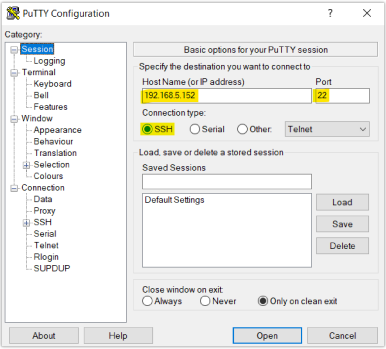
Secure Shell (SSH) provides both secure authentication and secure communications to the CLI. The first step to do is to run the SSH client application (PuTTY in our case) and set the following:
- Host Name or IP Address: GCC6000 series’s IP Address, (example: 192.168.5.152).
- Port: 22, this is the default port for the SSH protocol.
- Connection type: Set this to SSH
The settings should be similar to the following figure:
Once done, you can press Open to start the SSH session and open the console.
Once pressing Open to start the session, the login prompt will appear on the CLI. Enter the Username and the Password to log in.
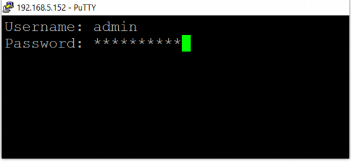
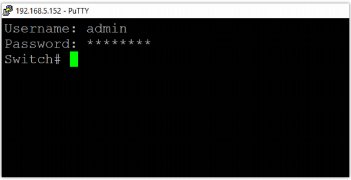
After clicking “Enter”, the user should now have access to the device.
Connect using the Console port
First, connect the GCC device with the computer using the console port on the device, then in device manager (example: Windows) under ports, check which Serial line (ex, COM3, COM7 …) has been used. Please refer to the figure below:
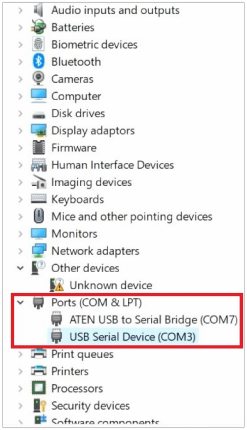
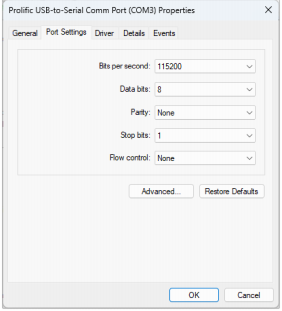
Then, left click on the port used (USB Serial Device (COM3)) → Properties → Port Settings and make sure to match the port settings as shown below:
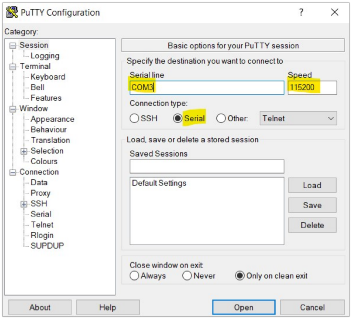
We can use PuTTY again to connect to the GCC device. Please use the following configuration:
- Serial line: Use the same serial line previously checked on the device manager.
- Connection type: select Serial.
- Speed: Set speed to 115200
Once finished, click on the “Open” button at the bottom to open the CLI.
SPECIAL FEATURE
Semi-Affair config system
When configuring the CLI in a sub-mode under global configuration mode, such as the vlan interface configuration mode, the wan interface configuration mode and etc, the detailed configuration changes will be applied as a whole unit for that sub-mode only when you exit that sub-mode.
In other words, the system attempts to commit all the configuration changes made within the sub-mode at once, upon exiting. Suppose any part of the configuration is incorrect or fails. In that case, the entire set of changes within that sub-mode will not be applied, ensuring consistency and preventing partial configurations from being activated.
This approach helps manage complex configurations effectively by grouping related settings and applying them together, thus minimizing potential errors and simplifying troubleshooting.
Basic Operation Guidance
| question mark<?> | Type in any location<?>key for detailed online help information. |
| Normal buttons | · If the matching keyword is not unique, press<Tab>key, and the system will cycle through all keywords that begin with the input string. |
| Backspace key<Backspace> | Delete the character before the cursor position and move the cursor forward |
| Left cursor key<←> | Move the cursor one character position to the left |
| Right cursor key<→> | Move the cursor one character position to the right |
| Up cursor key<↑> | Access the previous history command |
| Down cursor key<↓> | Access the next history command |
| <Tab>key | After entering an incomplete keyword, press the <Tab>key, and the system automatically completes the keyword: |
| · If the matching keyword is unique, the system will replace the original input with this complete keyword and display it on a new line. | |
| After entering an incomplete keyword, press the <Tab>key, the system automatically completes the keyword: | |
| · If there is no matching keyword, the system will not make any changes and will re-wrap the original input. |
OVERVIEW
Configure
Command: configure
Mode: Privileged Exec Mode
Parameter: none
Description: Enter global configuration mode
Example:
GCC6021 # configure
GCC6021(config)#
End
Command: end
Mode: none
Parameter: none
Description: Return directly to privileged EXEC mode in other configuration modes except user mode
Example:
GCC6021# configure

GCC6021(config)# interface Ethernet NET3

GCC6021(interface-Ethernet-NET3)# end

GCC6021#
Exit
Command: exit
Mode: none
Parameter: none
Description: Deploy the configuration of this view (if it exists) and return to the parent view
Example:
GCC6021# configure

GCC6021(config)#interface Ethernet NET3

GCC6021(interface-Ethernet-NET3)# exit

GCC6021(config)# exit

GCC6021#
System messages
Check the basic information of the device
Command: show system basic-info
Mode: Privileged Exec Mode
Parameter:
| Parameter | Description |
| System Name | device name |
| Device model | Production model(such as GCC6021) |
| Hardware Version | hardware version |
| Firmware Version | Software version/system version |
| MAC Address | MAC address |
| PN Series number | PN serial number |
| SN Series number | SN serial number |
| Uptime | run time |
| System Time | System time |
| LAN IP(Default) | The ip address of the default LAN. |
| Subnet Mask | Subnet Mask |
Description: Check the basic information of the device
Example:
View basic information
GCC6021# show system basic-info
    System Name        : GCC6021
    Device model       : GCC6021
    Hardware Version   : V1.1A
    Firmware Version   : 1.0.0.1
    MAC Address        : EC:74:D7:78:B6:14
    Part Number        : 9640014911A
    Series Number      : 3510539DA0
    Boot Version       : 1.0.0.2
    Uptime             :  3:03
    System Time        : 2025-03-14 04:51:01 CDT
ETHERNET SERVICE
Basic port configuration
Start port configuration
Command:
1. interface Ethernet ETH-IFNAME
Mode: global configuration mode
Parameter:
| Parameter | Description |
| ETH-IFNAME | Interface name(e.g. NET1) |
Description: Enter the Ethernet interface configuration mode.
Example:
GCC6021#config
GCC6021(config)# interface Ethernet
  ETH-IFNAME  Interface name(e.g. NET1)
     |name   |role
     NET1     LAN
     NET2     LAN
     NET3     LAN
     NET4     LAN
     NET5     LAN
     NET6     LAN
     NET7     LAN
     NET8     LAN
     NET9     LAN
     NET10    LAN
     NET11    LAN
     NET12    LAN
     NET13    LAN
     NET14    LAN
     NET15    LAN
     NET16    WAN
     NET17    LAN
     NET18    LAN
     NET19    WAN
     NET20    WAN
     NET21    LAN
     NET22    LAN
     NET23    LAN
     NET24    LAN
     SFP25    LAN
     SFP26    LAN
     SFP27    LAN
     SFP28    WAN
     HA1      HA
     HA2      HA
     MGMT     MGMT
GCC6021(config)# interface Ethernet NET3
GCC6021(interface-Eth-NET3)#
Open/close the port
Command:
1. No shutdown
2. shutdown
Mode: Ethernet interface configuration mode
Parameter: none
Description: Open/close the port
Example:
close port NET3
GCC6021# config
GCC6021(config)# interface Ethernet NET3
GCC6021(interface-Eth-NET3)# shutdown
GCC6021(interface-Eth-NET3)# exit
The command completed successfully.
open port NET3
GCC6021# config
GCC6021(config)# interface Ethernet NET3
GCC6021(interface-Eth-NET3)# no shutdown
GCC6021(interface-Eth-NET3)# exit
The command completed successfully.
Configure the port rate and duplex mode
Command:
speed-duplex MODE
Mode: Ethernet interface configuration mode
Parameter:
| Parameter | Description |
| MODE | Choose a speed/duplex combination to input |
Description: Configure port speed and duplex mode.
Example:
GCC6021# config
GCC6021(config)# interface Ethernet NET3
GCC6021(interface-Eth-NET3)# speed-duplex
  MODE  Choose a speed/duplex combination to input
     AUTO
     10M/HALF
     10M/FULL
     100M/HALF
     100M/FULL
     1G/FULL
GCC6021(interface-Eth-NET3)# speed-duplex AUTO
GCC6021(interface-Eth-NET3)# exit
The command completed successfully.
View port information
Command:
- show interface Ethernet brief
- show interface Ethernet ETH-IFNAME
- show interface Ethernet all
Mode: Privileged Exec Mode
Parameter:
| Parameter | Description |
| ETH-IFNAME | Interface name(e.g. NET1) |
Description: View port information
Example:
GCC6021# show interface Ethernet brief
Interface|Link status|Enable     |Phy-type|Role|Speed      |Flow control
NET1      Down        Yes         GE       LAN  AUTO        Auto
NET2      Down        Yes         GE       LAN  AUTO        Auto
NET3      Down        Yes         GE       LAN  AUTO        Auto
NET4      Down        Yes         GE       LAN  AUTO        Auto
NET5      Down        Yes         GE       LAN  AUTO        Auto
NET6      Down        Yes         GE       LAN  AUTO        Auto
NET7      Down        Yes         GE       LAN  AUTO        Auto
NET8      Down        Yes         GE       LAN  1G/FULL     Auto
NET9      Down        Yes         GE       LAN  AUTO        Auto
NET10     Up          Yes         GE       LAN  1G/FULL     Auto
NET11     Down        Yes         GE       LAN  AUTO        Auto
NET12     Down        Yes         GE       LAN  AUTO        Auto
NET13     Down        Yes         GE       LAN  AUTO        Auto
NET14     Up          Yes         GE       LAN  1G/FULL     Auto
NET15     Down        Yes         GE       LAN  AUTO        Auto
NET16     Up          Yes         GE       WAN  1G/FULL     Auto
NET17     Down        Yes         2.5G GE  LAN  AUTO        Auto
NET18     Down        Yes         2.5G GE  LAN  AUTO        Auto
NET19     Down        Yes         2.5G GE  WAN  AUTO        Disable
NET20     Down        Yes         2.5G GE  LAN  AUTO        Disable
NET21     Down        Yes         2.5G GE  LAN  AUTO        Auto
NET22     Down        Yes         2.5G GE  WAN  AUTO        Auto
NET23     Down        Yes         2.5G GE  LAN  AUTO        Disable
NET24     Down        Yes         2.5G GE  LAN  AUTO        Disable
SFP25     Down        Yes         10G SFP  LAN  AUTO        Auto
SFP26     Down        Yes         10G SFP  LAN  AUTO        Auto
SFP27     Up          Yes         10G SFP  LAN  1G/FULL     Auto
SFP28     Down        Yes         10G SFP  WAN  10G/FULL    Auto
HA1       Down        Yes         GE       HA   AUTO        Auto
HA2       Down        Yes         GE       HA   AUTO        Auto
MGMT      Down        Yes         GE       MGMT AUTO        Auto

GCC6021# show interface Ethernet NET16
Interface Ethernet NET16:
    Link status         : Up
    Enable              : Yes
    Physical type       : Gigabit Ethernet
    Speed/Duplex:       : 1 Gbps / Full Duplex
    Flow control:       : Auto
    POE info            :
        Supply mode         : Active PoE(802.3af/at)
        Voltage             : 53.90V
        Current             : 0.00mA
        Power               : 0.00W
        Temperature         : 45.00°C
        Supply status       : Off
    POE info            :
        Supply mode         : NONE
        Voltage             : 0.0V
        Current             : 0.0mA
        Power               : 0.00W
        Temperature         : 0.0°C
        Supply status       : Abnormal
    Network role:       : WAN
    WAN info            :
        Wan id              : wan2
        Wan name            : WAN3
        IPv4 address        : 192.168.103.161
        IPv4 netmask        : 255.255.255.0
        Gateway             : 192.168.103.1
        First dns           : 192.168.103.1
        Internet status     : Online
        Gateway status      : Online
VLAN
VLAN Basics
Configure Trunk mode VLAN( there is the default mode trunk, which is the only mode in CLI phase-A)
Command:
1. switchport trunk allowed vlan <add|remove> <VLAN-LIST|all>
2. switchport trunk native vlan <1-4094> Mode: Ethernet interface configuration mode
Parameter:
| Parameter | Description |
| add/remove | Configure the port link type as Trunk to add /remove vlan |
| VLAN-LIST/all | The range of the VLAN list is 1-4094 or all VLANs |
| <1-4094> | Configure the PVID range of the port to be 1-4094 |
Description:
1. switchport trunk allowed vlan command configures the VLANs added /removed by the trunk port
2. switchport trunk native vlan command configures the PVID of the trunk port
Example:
GCC6021# configure
GCC6021(config)# interface vlan 2
GCC6021(interface-vlan-2)# exit
The command completed successfully.
GCC6021(config)# interface Ethernet NET3
GCC6021(interface-Eth-NET3)# switchport trunk allowed vlan add 2
GCC6021(interface-Eth-NET3)# switchport trunk native vlan 1
GCC6021(interface-Eth-NET3)# exit
The command completed successfully.#
IP
VLAN interface
Create/delete VLAN interface
Command:
- interface vlan VLAN-ID
- no interface vlan VLAN-ID
Mode: global configuration mode
Parameter:
| Parameter | Description |
| VLAN-ID | (1-4094) VLAN interface number |
Description:
If the VLAN ID exists, use command no.1 to edit the VLAN interface.
If the VLAN ID is new, use command no.1 to create a VLAN interface.
Use command no.2 to delete an existing VLAN interface.
Note: use ‘’?’’ to display help information, input the exact VLAN ID, specify the configured VLAN interface.
Example:
GCC6021#config
GCC6021(config)# interface vlan
  VLAN-ID  (1-4094) VLAN interface number
     Configured vlans:
     |vlan-id|name
     1        Default
     2        TestVlan2Name
     3        VLAN 3
GCC6021(config)# interface vlan 3
GCC6021(interface-vlan-3)# exit
The command completed successfully.
GCC6021(config)# interface vlan 4
GCC6021(interface-vlan-4)# exit
The command completed successfully.
GCC6021(config)# no interface vlan
  VLAN-ID  (1-4094) VLAN interface number
     Configured vlans:
     |vlan-id|name
     1        Default
     2        TestVlan2Name
     3        VLAN 3
     4        VLAN 4
GCC6021(config)# no interface vlan 4
The command completed successfully.
Configure the firewall destination group of the VLAN interface
Command:
- forward-destination add <FIREWALL-ZONE|all>
- forward-destination remove <FIREWALL-ZONE|all>
Mode: Vlan Interface Configuration Mode
Parameter:
| Parameter | Description |
| FIREWALL-ZONE | Specify the firewall zone(s). e.g. zone0,zone1,zone3 |
| all | All zones. (If all zones are removed, permit forwarding to all WANs in default.) |
Description: Add and remove the firewall destination zone group of the VLAN interface.
Example:
GCC6021# configure
GCC6021(config)# interface vlan 2015
GCC6021(interface-vlan-2015)# forward-destination remove all
GCC6021(interface-vlan-2015)# forward-destination add zone1,zone2015,zone2020
GCC6021(interface-vlan-2015)# exit
The command completed successfully.
GCC6021(config)# exit
Set the name of the VLAN interface
Command: name NAME
Mode: Vlan Interface Configuration Mode
Parameter:
| Parameter | Description |
| NAME | Vlan name(0-64 bytes) |
Description: Set the name of the VLAN interface.
Example:
GCC6021# config
GCC6021(config)# interface vlan 2
GCC6021(interface-vlan-2)# name TestVlan2Name
GCC6021(interface-vlan-2)# exit
The command completed successfully.
GCC6021(config)#
Configure IPv4 address of VLAN interface
Command:
ip address A.B.C.D netmask A.B.C.D
Mode: Vlan Interface Configuration Mode
Parameter:
| Parameter | Description |
| A.B.C.D | Ip address |
Description:
Sets the management IPv4 address of the VLAN interface.
Example:
GCC6021# config
GCC6021(config)# interface vlan 2
GCC6021(interface-vlan-2)#
GCC6021(interface-vlan-2)# ip address 192.168.102.1 netmask 255.255.255.0
GCC6021(interface-vlan-2)# exit
The command completed successfully.
GCC6021(config)#
Disable the IPv4 configuration of the VLAN interface
Command:
no ip address
Mode: VLAN interface configuration mode
Parameter: none
Description: Disable the IPv4 configuration of the VLAN interface
Example:
GCC6021#config

GCC6021(config)#interface vlan 2

GCC6021(interface-vlan-2)#no ip address
Configure DHCP server pool of VLAN interface
Command: ip dhcp server pool
Mode: Vlan interface configuration mode
Parameter: none
Description: Enter the DHCP configuration mode, and start configuring DHCP server pool features.
Example:
GCC6021#config

GCC6021(config)# interface vlan 2

GCC6021(interface-vlan-2)# ip dhcp server pool

GCC6021(interface-vlan-2-dhcp)#
Disable the DHCP server pool configuration of the VLAN interface
Command: no ip dhcp server pool
Mode: vlan interface configuration mode
Parameter: none
Description: Disable the DHCP server pool configuration of the VLAN IPv4 interface
Example:
GCC6021#config

GCC6021(config)#interface vlan 2

GCC6021(interface-vlan-2)#no ip dhcp server pool
Set the gateway of the DHCP server pool under VLAN interface
Command: gateway A.B.C.D
Mode: DHCP configuration mode under the VLAN interface
Parameter:
| Parameter | Description |
| A.B.C.D | gateway address |
Description: Set the gateway of the DHCP server pool under VLAN interface
Example:
GCC6021#config
GCC6021(config)# interface vlan 2
GCC6021(interface-vlan-2)# ip dhcp server pool
GCC6021(interface-vlan-2-dhcp)# gateway 192.168.102.1
Set IPv4 address allocation range of the DHCP server pool under VLAN interface
Command: ip range A.B.C.D A.B.C.D
Mode: DHCP configuration mode under the vlan interface
Parameter:
| Parameter | Description |
| A.B.C.D | IPv4 address |
Description: Set IPv4 Address Allocation Range of the DHCP server pool, under the VLAN interface.
Example:
GCC6021#config
GCC6021(config)# interface vlan 2
GCC6021(interface-vlan-2)# ip dhcp server pool
GCC6021(interface-vlan-2-dhcp)# ip-range ip-range 192.168.102.1 192.168.102.254
Set the release time of the DHCP server pool under the VLAN interface
Command: lease (60-2880)
Mode: DHCP configuration mode under the vlan interface
Parameter:
| Parameter | Description |
| (60-2880) | minutes |
Description:
Set the release time of the DHCP server pool under the VLAN interface. The default value is 120(minutes).
Example:
GCC6021#config
GCC6021(config)# interface vlan 2
GCC6021(interface-vlan-2)# ip dhcp server pool
GCC6021(interface-vlan-2-dhcp)# lease 120
Set dns servers of the DHCP server pool under VLAN interface
Command: dns-list A.B.C.D [A.B.C.D]
Mode: DHCP configuration mode under the VLAN interface
Parameter:
| Parameter | Description |
| A.B.C.D | Preferred DNS Server |
| [A.B.C.D] | Alternative DNS Server(optional) |
Description:
Set dns servers of the DHCP server pool, under the VLAN interface.
Example:
GCC6021#config
GCC6021(config)# interface vlan 2
GCC6021(interface-vlan-2)# ip dhcp server pool
GCC6021(interface-vlan-2-dhcp)# dns-list 192.168.183.1 114.114.114.114
View VLAN interface information
Command:
- show interface vlan VLAN-ID
- show interface vlan all
Mode: Privileged Exec Mode
Parameter:
| Parameter | Description |
| VLAN-ID | (1-4094) VLAN interface number |
Description: View vlan interfaces information
Example:
GCC6021# show interface vlan 1

interface vlan 1
    Name                : Default
    IPv4 Enable         : Yes
    IPv4 Address        : 192.168.80.1
    IPv4 Netmask        : 255.255.255.0
    IPv4 Dhcp Server    : On
        Gateway             : 192.168.80.1
        Address range       : 192.168.80.2-192.168.80.254
        Lease               : 120
WAN interface
Create/delete WAN interface
Command:
- interface wan WAN-ID
- no interface wan WAN-ID
- interface wan new
Mode: global configuration mode
Parameter:
| Parameter | Description |
| WAN-ID | Specify by the WAN id.(e.g. wan0) |
Description:
Use command no.1 to edit the WAn interface.
Use command no.3 to create a WAN interface.
Use command no.2 to delete an existing WAN interface.
Note: Use ‘’?’’ to display help information, input the exact WAN ID to specify the configured WAN interface.
Example:
#edit WAN
GCC6021(config)# interface wan
  WAN-ID  Specify by the WAN id.(e.g. wan0)
     Configured Wans:
     |WAN-id |name (Eth-if-name)
     wan0    |WAN name (SFP28)
     wan1    |WAN1 (NET19)
     wan2    |WAN3 (NET16)
     wan3    |WAN4 (NET20)
  new     Create an new WAN.
GCC6021(config)# interface wan wan3
GCC6021(interface-wan-wan3)# exit
The command completed successfully.
GCC6021(config)# exit
GCC6021#

#delete WAN
GCC6021(config)# no interface wan
  WAN-ID  Specify by the WAN id.(e.g. wan0)
     Configured Wans:
     |WAN-id |name (Eth-if-name)
     wan0    |WAN name (SFP28)
     wan1    |WAN1 (NET19)
     wan2    |WAN3 (NET16)
     wan3    |WAN4 (NET20)
GCC6021(config)# no interface wan wan3
The command completed successfully.
GCC6021(config)# exit
GCC6021#

#create an new WAN
GCC6021# configure
GCC6021(config)# interface wan new
GCC6021(interface-wan-new)# interface Ethernet NET22
GCC6021(interface-wan-new)# name WAN5
GCC6021(interface-wan-new)# exit
The command completed successfully.
GCC6021(config)# exit
GCC6021#
Open/close the WAN interface
Command:
1. no shutdown
2. shutdown
Mode: WAN interface configuration mode
Parameter: none
Description: Open/close the WAN interface
Example:
#close interface wan wan1
GCC6021# configure
GCC6021(config)# interface wan wan1
GCC6021(interface-wan-wan1)# shutdown
GCC6021(interface-wan-wan1)# exit
The command completed successfully.
GCC6021(config)# exit
GCC6021#
#open interface wan wan1
GCC6021(config)# interface wan wan1
GCC6021(interface-wan-wan1)# no shutdown
GCC6021(interface-wan-wan1)# exit
orig ipv4 type 0, new ipv4 type 0
The command completed successfully.
GCC6021(config)# exit
GCC6021#
Set the name of the WAN interface
Command: name NAME
Mode: WAN interface Configuration Mode
Parameter:
| Parameter | Description |
| NAME | Wan name(1-64 characters) |
Description: Set the name of the WAN interface.
Example:
GCC6021# config
GCC6021(config)# interface wan wan3
GCC6021(interface-wan-wan3)# name WAN3test
GCC6021(interface-wan-wan3)#
Select the port of the WAN interface
Command:
interface Ethernet ETH-IFNAME
Mode: WAN interface Configuration Mode
Parameter:
| Parameter | Description |
| ETH-IFNAME | Interface name(e.g. NET1) |
Description: Select the port of this WAN interface
Note: use ‘’?’’ to display help information, input the exact name to specify the port.
GCC6021#config
GCC6021(config)# interface wan wan2
GCC6021(interface-wan-wan2)# interface Ethernet NET24
Configure the type of IPv4 address of the WAN interface
Command:
ip address-type <static|dhcp-client|pppoe>
Mode: WAN interface Configuration Mode
Parameter:
| Parameter | Description |
| static | Static address |
| dhcp-client | Obtain the address as a DHCP client |
| pppoe | Obtain the address through the PPPoE |
Description: Select the IP address type of this WAN interface, and continue to configure specific contents in the corresponding sub-mode.
Example:
GCC6021# config
GCC6021(config)# interface wan wan2
GCC6021(interface-wan-wan2)# ip address-type
  dhcp-client  Obtain address as a dhcp client
  pppoe        Obtain address through the pppoe
  static       Static address
GCC6021(interface-wan-wan2)# ip address-type pppoe
GCC6021(interface-wan-wan2-ip-pppoe)# exit
GCC6021(interface-wan-wan2)# ip address-type static
GCC6021(interface-wan-wan2-ip-static)# exit
GCC6021(interface-wan-wan2)# ip address-type dhcp-client
GCC6021(interface-wan-wan2-ip-dhcp-client)# exit
GCC6021(interface-wan-wan2)#
Configure static IPv4 address mode of the WAN interface
Set the static IPv4 address of the WAN interface
Command:
ip address A.B.C.D netmask A.B.C.D gateway A.B.C.D
Mode: ip static mode under the WAN interface
Parameter:
| Parameter | Description |
| A.B.C.D | IPv4 address |
Description: Set the static IPv4 address of the WAN interface
Example:
GCC6021# config
GCC6021(config)# interface wan wan2
GCC6021(interface-wan-wan2)# ip address-type static
GCC6021(interface-wan-wan2-ip-static)# ip address 192.168.102.107 nettmask 255.255.255.0 gateway 192.168.102.1
set static ipv4 dns servers of WAN interface
Command: dns-list A.B.C.D[A.B.C.D]
Mode: IP static mode under WAN interface
Parameter:
| Parameter | Description |
| A.B.C.D | Preferred DNS Server |
| [A.B.C.D] | Alternative DNS Server(optional) |
Description: Set dns servers of the DHCP server pool, under the VLAN interface.
Example
GCC6021# config
GCC6021(config)# interface wan wan2
GCC6021(interface-wan-wan2)# ip address-type static
GCC6021(interface-wan-wan2-ip-static)# dns-list 114.114.114.114 8.8.8.8
Configure dhcp client mode of WAN interface
Configure dns servers of dhcp client mode under WAN interface
Command: dns-list <dynamic|A.B.C.D [A.B.C.D]>
Mode: dhcp client mode under WAN interface
Parameter:
| Parameter | Description |
| dynamic | Dynamic server |
| A.B.C.D | Preferred DNS Server |
| [A.B.C.D] | Alternative DNS Server(optional) |
Description: Configure the DNS server as a DHCP client, either be dynamic DNS server or set static DNS server(s). The default is dynamic mode.
Example:
GCC6021# config
GCC6021(config)# interface wan wan2
GCC6021(interface-wan-wan2)# ip address-type dhcp-client
GCC6021(interface-wan-wan2-ip-dhcp-client)# dns-list 114.114.114.114 8.8.8.8
Configure PPPoE mode of WAN interface
Configure PPPoE authentication info of the WAN interface
Command: pppoe account ACCOUNT password PASSWORD
Mode: PPPoE mode under the WAN interface
Parameter:
| Parameter | Description |
| ACCOUNT | Account (1-64 characters) |
| PASSWORD | Password (1-64 characters)) |
Description:
Configure PPPoE authentication info of WAN interface
Example:
GCC6021# config
GCC6021(config)# interface wan wan2
GCC6021(interface-wan-wan2)# ip address-type pppoe
GCC6021(interface-wan-wan2-ip-pppoe)# pppoe account ACCOUNT password PASSWORD
Configure PPPoE service name of WAN interface
Command: pppoe service SERVICE
Mode: PPPoE mode under WAN interface
Parameter:
| Parameter | Description |
| SERVICE | Service (1-64 characters) |
Description:
Configure the PPPoE service name of the WAN interface
Example:
GCC6021# config
GCC6021(config)# interface wan wan2
GCC6021(interface-wan-wan2)# ip address-type pppoe
GCC6021(interface-wan-wan2-ip-pppoe)# pppoe service SERVICE
Configure dns servers of PPPoE mode under WAN interface
Command: dns-list <dynamic|A.B.C.D [A.B.C.D]>
Mode: PPPoE mode under WAN interface
Parameter:
| Parameter | Description |
| dynamic | Dynamic server |
| A.B.C.D | Preferred DNS Server |
| [A.B.C.D] | Alternative DNS Server(optional) |
Description:
Configure the DNS server of the PPPoE mode, either be dynamic DNS server or set static DNS server(s).
The default is dynamic mode.
Example:
GCC6021# config
GCC6021(config)# interface wan wan2
GCC6021(interface-wan-wan2)# ip address-type pppoe
GCC6021(interface-wan-wan2-ip-pppoe)# dns-list 114.114.114.114 8.8.8.8
GCC6021(interface-wan-wan2)# ip address-type dhcp-client
GCC6021(interface-wan-wan2-ip-dhcp-client)# dns-list 114.114.114.114 8.8.8.8
Configure the connection detection mode of WAN interface
Command:
- connection-detect
- no connection-detect
Mode: WAN interface Configuration Mode
Parameter: none
Description:
- Enable and configure the connection detection mode of WAN interface
- Disable connection detection of WAN interface
Example:
# Enable and configure connection detecting mode of WAN interface
GCC6021# config
GCC6021(config)# interface wan wan2
GCC6021(interface-wan-wan2)# connection-detect
GCC6021(interface-wan-wan2-connect-detect)#

# Disable connection detecting of WAN interface
GCC6021# config
GCC6021(config)# interface wan wan2
GCC6021(interface-wan-wan2)# no connection-detect
Configure track ip of connection detecting of WAN interface
Command:
tracking-ip <default|A.B.C.D [A.B.C.D [A.B.C.D [A.B.C.D [A.B.C.D [A.B.C.D [A.B.C.D [A.B.C.D]]]]]]]>
Mode: Connection detecting mode under WAN interface
Parameter:
| Parameter | Description |
| default | Default mode. |
| A.B.C.D | Tracking-ip format is A.B.C.D where (A/B/C/D = 0 ~ 255). Up to 8 ones can be specified |
Description:
Specify the tracking IP of the WAN interface. Either by default of the IP list.
Example:
GCC6021# config
GCC6021(config)# interface wan wan2
GCC6021(interface-wan-wan2)# connection-detect
GCC6021(interface-wan-wan2-connect-detect)# tracking-ip 192.168.122.1 8.8.8.8
View wan interfaces information
Command:
- show interface wan WAN-ID
- show interface wan all
Mode: Privileged Exec Mode
Parameter:
| Parameter | Description |
| WAN-ID | Specify by the WAN id.(e.g. wan0) |
Description: View the WAN interface’s information
Example:
GCGCC6021# show interface wan wan2
Interface wan wan2:
    Name                : WAN3
    Enable              : Yes
    Ethernet interface  : NET16
    IPv4 type           : DHCP-client
    IPv4 Status         : Connected
    IPv4 Address        : 192.168.103.161
    IPv4 Netmask        : 255.255.255.0
    IPv4 Gateway        : 192.168.103.1
    VRRP Enable         : Yes
    VRRP Name           : VRRP 200
    VRRP Id             : 200

GCC6021# show interface wan all
Interface wan wan0:
    Name                : WAN name
    Enable              : Yes
    Ethernet interface  : SFP28
    IPv4 type           : Static
    IPv4 Status         : Disconnected
    IPv4 Address        : -
    IPv4 Netmask        : -
    IPv4 Gateway        : -
    VRRP Enable         : No

Interface wan wan2:
    Name                : WAN3
    Enable              : Yes
    Ethernet interface  : NET16
    IPv4 type           : DHCP-client
    IPv4 Status         : Connected
    IPv4 Address        : 192.168.103.161
    IPv4 Netmask        : 255.255.255.0
    IPv4 Gateway        : 192.168.103.1
    VRRP Enable         : No

Interface wan wan1:
    Name                : WAN1
    Enable              : Yes
    Ethernet interface  : NET19
    IPv4 type           : DHCP-client
    IPv4 Status         : Disconnected
    IPv4 Address        : -
    IPv4 Netmask        : -
    IPv4 Gateway        : -
    VRRP Enable         : No

Interface wan wan3:
    Name                : WAN5
    Enable              : No
    Ethernet interface  : NET22
    IPv4 type           : DHCP-client
    IPv4 Status         : Disconnected
    IPv4 Address        : -
    IPv4 Netmask        : -
    IPv4 Gateway        : -
    VRRP Enable         : No

GCC6021#
SYSTEM
Restart and view the running configuration
Reboot
Command: Reboot
Mode: privileged EXEC mode
Parameter: none
Description: reboot device
Example:
GCC6021 # reboot
View running configuration
Command: show running-config
Mode: privileged EXEC mode
Parameter: none
Description:
View the running configuration of the current View.
Example:
GCC6021# show running-configDiagnose
Configuring Local Mirroring
Command:
1. mirror session Session-ID source interface Ethernet ETH-IFNAME
2. mirror session Session-ID destination interface Ethernet ETH-IFNAME
3. no mirror session Session-ID
Mode: System diagnose mode
Parameters:
| Parameter | Description |
| Session-ID | Mirror group, value range: 1-3. |
| source | Source port (mirrored port). |
| ETH-IFNAME | Switch port numbers, including Ethernet ports and aggregate interfaces |
| destination | Destination port (observer port). |
Description:
1. Specify the source interface of a mirror session.
2. Specify the destination interface of a mirror session.
3. Clear the mirror configuration of the specific mirror session
Only supported in GCC6021.
Example:
GCC6021#
GCC6021# configure
GCC6021(config)# system-diagnose
GCC6021(config-sysdiag)# mirror session
GCC6021(config-sysdiag)# mirror session 1 source interface Ethernet NET21
GCC6021(config-sysdiag)# mirror session 1 destination interface Ethernet NET22
GCC6021(config-sysdiag)# mirror show session
Session 1 Configuration
  Mirror Type : PORT MIRROR
  Source RX Port    : NET21
  Source TX Port    : NET21
  Destination port  : NET22
  Ingress State: enabled

Session 2 Configuration
  Source RX Port    : --
  Source TX Port    : --
  Destination port  : --
  Ingress State: disabled

Session 3 Configuration
  Source RX Port    : --
  Source TX Port    : --
  Destination port  : --
  Ingress State: disabled

GCC6021(config-sysdiag)# no mirror session 1
GCC6021(config-sysdiag)# mirror show session
Session 1 Configuration
  Source RX Port    : --
  Source TX Port    : --
  Destination port  : --
  Ingress State: disabled

Session 2 Configuration
  Source RX Port    : --
  Source TX Port    : --
  Destination port  : --
  Ingress State: disabled

Session 3 Configuration
  Source RX Port    : --
  Source TX Port    : --
  Destination port  : --
  Ingress State: disabled

GCC6021(config-sysdiag)# exit
GCC6021(config)# exit
GCC6021#
Viewing Mirror Group Configuration
Command:
mirror show session
Mode: System diagnose mode
Parameters:
| Parameter | Description |
| Session-ID | Mirror group, value range: 1-3. |
Description:
Check the configuration of the mirror group(s).
Only supported in GCC6021.
Example:
GCC6021#
GCC6021# configure
GCC6021(config)# system-diagnose
GCC6021(config-sysdiag)# mirror session
GCC6021(config-sysdiag)# mirror session 1 source interface Ethernet NET21
GCC6021(config-sysdiag)# mirror session 1 destination interface Ethernet NET22
GCC6021(config-sysdiag)# mirror show session
Session 1 Configuration
  Mirror Type : PORT MIRROR
  Source RX Port    : NET21
  Source TX Port    : NET21
  Destination port  : NET22
  Ingress State: enabled

Session 2 Configuration
  Source RX Port    : --
  Source TX Port    : --
  Destination port  : --
  Ingress State: disabled

Session 3 Configuration
  Source RX Port    : --
  Source TX Port    : --
  Destination port  : --
  Ingress State: disabled

GCC6021(config-sysdiag)# no mirror session 1
GCC6021(config-sysdiag)# mirror show session
Session 1 Configuration
  Source RX Port    : --
  Source TX Port    : --
  Destination port  : --
  Ingress State: disabled

Session 2 Configuration
  Source RX Port    : --
  Source TX Port    : --
  Destination port  : --
  Ingress State: disabled

Session 3 Configuration
  Source RX Port    : --
  Source TX Port    : --
  Destination port  : --
  Ingress State: disabled

GCC6021(config-sysdiag)# exit
GCC6021(config)# exit
GCC6021#
Show the status of packet capture
Command:
Packet-capture show status
Mode: System diagnose mode
Parameters: None
Description:
Show the current status of capturing packets.
Note: The result file is automatically saved with the ‘.cap’ extension.
Example:
GCC6021# configure
GCC6021(config)# system-diagnose
GCC6021(config-sysdiag)# packet-capture start test1602.cap network wan2 storage external sda limit none
The command completed successfully.
GCC6021(config-sysdiag)# packet-capture show status
  Packet capture status:
    Recent file name   : test1602.cap
    Started            : Yes
    Capturing          : Yes
    Limit              : None
    Storage type       : USB

GCC6021(config-sysdiag)# exit
GCC6021(config)# exit
GCC6021#
Start packet capture
Command:
packet-capture start FILENAME network CAPTURE-ZONE storage external EXTERNAL-DEVICE limit <(1-1440)|none>
[filter <{protocol CAPTURE-PROTOCOL|ip A.B.C.D|mac YY:YY:YY:YY:YY:YY}>] [size (1-128)]
Mode: System diagnose mode
Parameters:
| Parameter | Description |
| FILENAME | 1-64 bytes. The result file is automatically saved with the ‘.cap’ extension. |
| CAPTURE-ZONE | Network zone. |
| EXTERNAL-DEVICE | Specify protocol(e.g. tcp).Please input by help information. |
| (1-86400) | Seconds. |
| none | No limit |
| CAPTURE-PROTOCOL | (MB). The default is 20(MB). |
| A.B.C.D | IP Address format is A.B.C.D where (A/B/C/D = 0 ~ 255) |
| YY:YY:YY:YY:YY:YY | MAC address |
| (1-128) | (MB). Default is 20(MB). |
Description:
Start capturing packets.
Note: Only one packet capture can be performed at the same time.
The file name of the capture result would be automatically saved with the ‘.cap’ extension.
Example:
GCC6021# configure
GCC6021(config)# system-diagnose
GCC6021(config-sysdiag)# packet-capture start test1602 network wan2 storage external sda limit none
The command completed successfully.
GCC6021(config-sysdiag)# packet-capture show status
  Packet capture status:
    Recent file name   : test1602.cap
    Started            : Yes
    Capturing          : Yes
    Limit              : None
    Storage type       : USB

GCC6021(config-sysdiag)# exit
GCC6021(config)# exit
GCC6021#
Stop packet capture
Command:
packet-capture stop
Mode: System diagnose mode
Parameters: None
Description:
Stop capturing packets.
Example:
GCC6021# configure
GCC6021(config)# system-diagnose
GCC6021(config-sysdiag)# packet-capture stop
GCC6021(config-sysdiag)# packet-capture show status
  Packet capture status:
    Recent file name   : test1602.cap
    Started            : No
    Capturing          : No
    Limit              : None
    Storage type       : USB

GCC6021(config-sysdiag)# exit
GCC6021(config)# exit
GCC6021#
Show the output files of the packet capture
Command:
Packet-capture show files
Mode: System diagnose mode
Parameters: None
Description:
Start capturing packets.
Example:
GCC6021# configure
GCC6021(config)# system-diagnose
GCC6021(config-sysdiag)# packet-capture show files
    USB captured packet files:
      File name : GCC6021_Capture_20250328064901_0.cap
        Modified Time : Fri Mar 28 19:49:08 2025
        Size          : 1523 bytes (1.49 KB)

      File name : GCC6021_Capture_20250328071607_0.cap
        Modified Time : Fri Mar 28 20:16:08 2025
        Size          : 632 bytes (0.62 KB)

      File name : test01041056.cap
        Modified Time : Thu Apr  3 10:58:28 2025
        Size          : 36037 bytes (35.19 KB)

      File name : test1602.cap
        Modified Time : Fri May  9 16:03:40 2025
        Size          : 31844 bytes (31.10 KB)

--------------------------------------------------------------------------------
GCC6021(config-sysdiag)# exit
GCC6021(config)# exit
GCC6021#
Show the external device info that can be used for packet capture
Command:
packet-capture show external
Mode: System diagnose mode
Parameters: None
Description:
Start capturing packets.
Example:
GCC6021# configure
GCC6021(config)# system-diagnose
GCC6021(config-sysdiag)# packet-capture show external
    Device Name : sda
        Device type  : USB
        Mount Path   : /mnt/E631-6531
        Usable Size  : 9.098
GBGCC6021(config-sysdiag)# exit
GCC6021(config)# exit
GCC6021#
Change Log
This section highlights significant changes and updates in the GCC6000 series CLI Guide. Major feature additions and improvements are documented below. Minor updates for corrections or editing are not documented here.
Version 1.0.1.1
- This is the initial version.
Supported Devices
Supported Device | Fimrware |
GCC6020 | 1.0.7.32+ |
GCC6021 | 1.0.7.32+ |