

INTRODUCTION
SNMP (Simple Network Management Protocol) is an Internet-standard protocol for managing devices on IP networks. It is used mostly in network management systems to monitor network-attached devices for conditions that warrant administrative attention. SNMP exposes management data in the form of variables on the managed systems, which describe the system configuration. These variables can then be queried (and sometimes set) by managing applications. The variables accessible via SNMP are organized in hierarchies, which are described by Management Information Bases (MIBs).
Three significant versions of SNMP have been developed and deployed. SNMPv1 is the original version of the protocol. More recent versions, SNMPv2c and SNMPv3, feature improvements in performance, flexibility, and security.
SNMP COMPONENTS
Manager
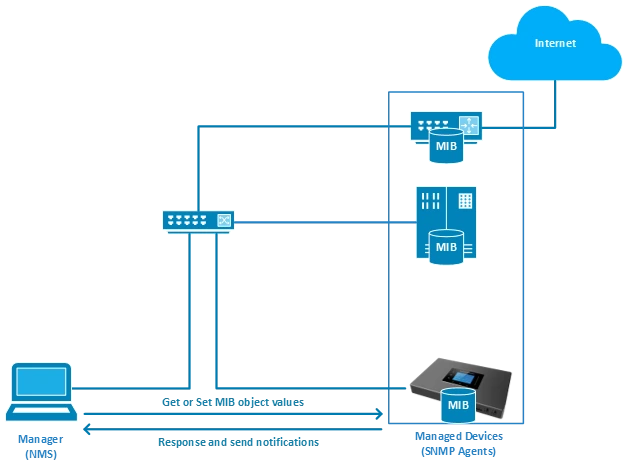
The Manager component is simply a piece of software that is installed on a machine (which, when combined, is called the Network Management System) that polls devices on your network, however often you specify for information.
The Manager has the correct credentials to access information stored by Agents (which is explained in the next section) and then compiles them in a readable format for the Network Engineer or Administrator to monitor or diagnose for problems or bottlenecks. Some NMS software suites are more complex than others, allowing you to configure Email or SMS messages to alert you of malfunctioning devices on your network, while others simply poll devices for more basic information.
SNMP Agents
SNMP Agent is a piece of software that is bundled with the network device (router, switch, IP phone, server, etc) that, when enabled and configured, does all the Heavy work for the Manager, by compiling and storing all the data from its given device into a database (MIB).
This database is properly structured to allow the Manager software to easily poll information and even send information to the Manager if an error has occurred.
Management Information Base
In short, MIB files are the set of questions that an SNMP Manager can ask the agent. The agent collects this data locally and stores it, as defined in the MIB. So, the SNMP Manager should be aware of these standard and private questions for every type of agent.
Agents, as explained above, maintain an organized database of their device parameters, settings, and
more. The NMS (Network Management System) polls/requests the Agent of a given device, which then
shares its organized information from the database it is made with the NMS, which then further translates it into alerts, reports, graphs, and more. The database that the Agent shares between the Agent is called the Management Information Base, or MIB.
SNMP VERSIONS
SNMP Version 1
Version 1 was the first version of the protocol defined in RFCs 1155 and 1157. This version is the simplest of the 3 versions of the protocol, and the most insecure, due to its plain-text authentication.
SNMP Version 2c
This is the revised protocol, which includes enhancements of SNMPv1 in the areas of protocol packet types, transport mappings, MIB structure elements, but using the existing SNMPv1 administration structure (“community-based” and hence SNMPv2c). It is defined in RFC 1901, RFC 1905, RFC 1906, and RFC 2578.
SNMP Version 3
Version 3 of the protocol has made greater strides in securing the protocol suite by implementing what is called “user-based security”. This security feature allows you to set authentication based on the user’s
requirements. The 3 levels of authentication are as follows:
- NoAuthNoPriv: Users who use this mode/level have No Authentication and no privacy when they send/receive messages
- AuthNoPriv: This Level requires the user to authenticate but will not Encrypt Sent/Received Messages.
- AuthPriv: Finally, the most secure level, where Authentication is Required and Sent/Received Messages Are Encrypted.
SNMP MESSAGES
Get
A Get message is sent by a manager to an agent to request the value of a specific OID. This request is
answered with a Response message that is sent back to the manager with the data.
GetNext
A GetNext message allows a manager to request the next sequential object in the MIB. This is a way that you can traverse the structure of the MIB without worrying about what OIDs to query.
Set
A Set message is sent by a manager to an agent to change the value held by a variable on the
agent. This can be used to control configuration information or otherwise modify the state of remote hosts. This is the only write operation defined by the protocol.
GetBulk
This manager-to-agent request functions as if multiple GetNext requests were made. The reply back to the manager will contain as much data as possible (within the constraints set by the request) as the packet allows.
Response
This message, sent by an agent, is used to send any requested information back to the manager. It serves
as both a transport for the data requested and an acknowledgement of receipt of the request. If the
requested data cannot be returned, the response contains error fields that can be set with further
information. A response message must be returned for any of the above requests, as well as Inform
messages.
Inform
To confirm the receipt of a trap, a manager sends an Inform message back to the agent. If the agent does
not receive this message, it may continue to resend the trap message.
Traps
The Trap messages are the main form of communication between an SNMP Agent and an SNMP Manager.
They are used to inform an SNMP manager when a significant event occurs at the Agent level.
What makes the Trap unique from other messages is that they are triggered instantaneously by an agent,
rather than waiting for a status request from the SNMP Manager.

OBJECT IDENTIFIER
Object ID or OID is an identifier used to identify the various components of networking equipment when receiving SNMP messages, since this type of equipment usually sends a wide range of messages related to different network layers. Therefore, these OIDs are used to exactly query the MIB for the exact component that we want to monitor. These OIDs are presented in a series of numbers separated by dots to indicate the path that has been queried in the MIB, since the data is stored in a hierarchical structure in the MIB.
The figure below shows the hierarchy of the OIDs starting with the standard OIDs.
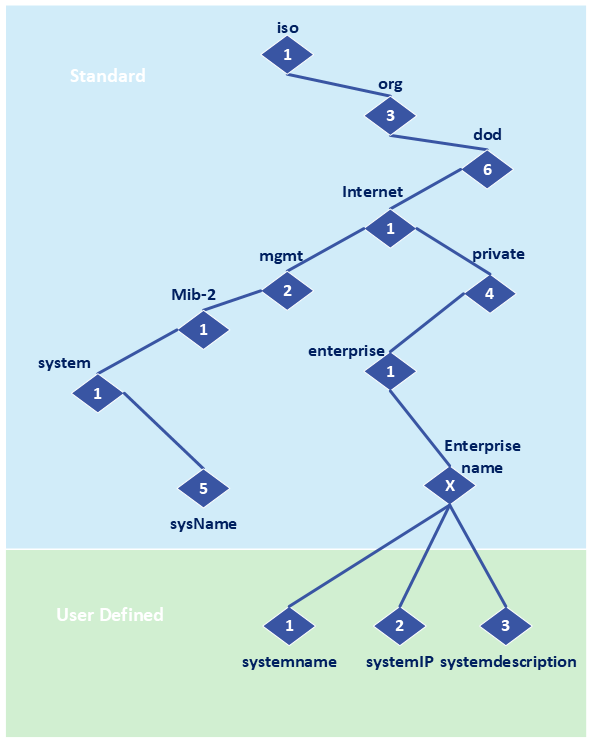
Grandstream PBXs extend this hierarchy with product-specific OIDs that expose operational statistics and system information. These identifiers can be queried directly by an SNMP manager.
The following sections list the available OIDs for each PBX platform, including the identifier, name, data type, and description of the value returned.
UCM63xx OIDs
This section provides the full set of monitoring OIDs supported by the UCM63xx series.
OID | Name | Type | Description |
1.3.6.1.4.1.12581.2.1.1.0 | sTotalCalls | integer | The number of total calls. |
1.3.6.1.4.1.12581.2.1.2.0 | sInternalCalls | integer | The number of internal calls. |
1.3.6.1.4.1.12581.2.1.3.0 | sOutboundCalls | integer | The number of outbound calls. |
1.3.6.1.4.1.12581.2.1.4.0 | sInboundCalls | integer | The number of inbound calls. |
1.3.6.1.4.1.12581.2.1.5.0 | sAnsweredCalls | integer | The number of answered call. |
1.3.6.1.4.1.12581.2.1.6.0 | sFailedCalls | integer | The number of failed calls. |
1.3.6.1.4.1.12581.2.1.7.0 | sBusyCalls | integer | The number of calls in busy state. |
1.3.6.1.4.1.12581.2.1.8.0 | sNoAnsweredCalls | integer | The number of unanswered calls. |
1.3.6.1.4.1.12581.2.2.1.0 | sProductType | string | The product type. |
1.3.6.1.4.1.12581.2.2.2.0 | sHardwareVersion | string | The hardware version of PBX. |
1.3.6.1.4.1.12581.2.2.3.0 | sFirmwareVersion | string | The firmware version of PBX. |
1.3.6.1.4.1.12581.2.2.4.0 | sSerialNumber | string | The serial number of PBX |
1.3.6.1.4.1.12581.2.2.5.0 | sUptime | string | The Uptime of PBX. |
1.3.6.1.4.1.12581.2.2.6.0 | sDiskUsage | string | The disk usage. |
1.3.6.1.4.1.12581.2.2.7.0 | sMemoryUsage | string | The Memory usage. |
1.3.6.1.4.1.12581.2.2.8.0 | sCpuUsage | string | The load average of CPU. |
1.3.6.1.4.1.12581.2.2.9.0 | concurrentCall | Integer | The number of concurrent calls. |
1.3.6.1.4.1.12581.2.2.10.0 | sHostName | string | The host name of PBX. |
1.3.6.1.4.1.12581.2.3.1.0 | sLanStatus | string | The LAN status. |
1.3.6.1.4.1.12581.2.3.2.0 | sLanMac | string | The MAC address of LAN. |
1.3.6.1.4.1.12581.2.3.3.0 | sLanIpaddress | string | The IP address of LAN. |
1.3.6.1.4.1.12581.2.3.4.0 | sLanSubnetMask | string | The subnet mask of LAN. |
1.3.6.1.4.1.12581.2.3.5.0 | sLanGateWay | string | The gateway of LAN. |
1.3.6.1.4.1.12581.2.3.6.0 | sLanMode | string | The network mode of LAN. |
1.3.6.1.4.1.12581.2.3.7.0 | sLanDns | string | The DNS of LAN. |
1.3.6.1.4.1.12581.2.3.8.0 | sWanStatus | string | The WAN status. |
1.3.6.1.4.1.12581.2.3.9.0 | sWanMac | string | The MAC address of WAN. |
1.3.6.1.4.1.12581.2.3.10.0 | sWanIpaddress | string | The IP address of WAN. |
1.3.6.1.4.1.12581.2.3.11.0 | sWanSubnetMask | string | The subnet mask of WAN. |
1.3.6.1.4.1.12581.2.3.12.0 | sWanGateWay | string | The gateway of WAN. |
1.3.6.1.4.1.12581.2.3.13.0 | sWanMode | string | The network mode of WAN. |
1.3.6.1.4.1.12581.2.3.14.0 | sWanDns | string | The DNS of WAN. |
1.3.6.1.4.1.12581.2.4.1.1.1.0 | sExternsionsIndex | integer | The serial number of extension. |
1.3.6.1.4.1.12581.2.4.1.1.2.0 | sExternsionsNum | string | The extension number. |
1.3.6.1.4.1.12581.2.4.1.1.3.0 | sExternsionsStatus | string | The extension status. |
1.3.6.1.4.1.12581.2.4.1.1.4.0 | sExternsionsVoiceMail | string | The voice mail of extension. |
1.3.6.1.4.1.12581.2.4.1.1.5.0 | sExternsionsType | string | The extension type. |
1.3.6.1.4.1.12581.2.5.1.1.1.0 | sTrunksIndex | integer | The serial number of extension. |
1.3.6.1.4.1.12581.2.5.1.1.2.0 | sTrunksName | string | The trunk name. |
1.3.6.1.4.1.12581.2.5.1.1.3.0 | sTrunksType | string | The trunk type. |
1.3.6.1.4.1.12581.2.5.1.1.4.0 | sTrunksStatus | string | The trunk status. |
1.3.6.1.4.1.12581.2.5.1.1.5.0 | sTrunksHostName | string | The host name of trunk. |
1.3.6.1.4.1.12581.2.5.1.1.6.0 | sTrunksUserName | string | The user name of trunk. |
1.3.6.1.4.1.12581.2.6.1.1.1.0 | sFail2banIndex | integer | The serial number of IP fail2ban. |
1.3.6.1.4.1.12581.2.6.1.1.2.0 | sFail2banIpAddress | string | The source IP address of fail2ban. |
1.3.6.1.4.1.12581.2.6.1.1.3.0 | sFail2banProtocol | string | The protocol that is used of fail2ban source. |
1.3.6.1.4.1.12581.2.6.1.1.4.0 | sFail2banTime | string | The fail2ban time. |
1.3.6.1.4.1.12581.2.7.1 | cpuUsageHighTraps | string | The the cpu usage is over than 90% |
1.3.6.1.4.1.12581.2.7.2 | memUsageHighTraps | string | The the mem usage is over than 90% |
1.3.6.1.4.1.12581.2.7.3 | diskUsageHighTraps | string | The the data disk usage is over than 95% |
1.3.6.1.4.1.12581.50.1 | gsProcessName | string | The coredump process name |
1.3.6.1.4.1.12581.50.2 | gsProcessCrash | string | Determine whether a crash occurs in a process. |
1.3.6.1.4.1.12581.50.3 | gsProcessCoreDumpName | string | The coredump file name. |
SoftwareUCM OIDs
SoftwareUCM follows the same OID structure, enabling identical monitoring behavior in virtual deployments.
OID | Name | Type | Description |
1.3.6.1.4.1.12581.2.1.1.0 | sTotalCalls | integer | The number of total calls. |
1.3.6.1.4.1.12581.2.1.2.0 | sInternalCalls | integer | The number of internal calls. |
1.3.6.1.4.1.12581.2.1.3.0 | sOutboundCalls | integer | The number of outbound calls. |
1.3.6.1.4.1.12581.2.1.4.0 | sInboundCalls | integer | The number of inbound calls. |
1.3.6.1.4.1.12581.2.1.5.0 | sAnsweredCalls | integer | The number of answered call. |
1.3.6.1.4.1.12581.2.1.6.0 | sFailedCalls | integer | The number of failed calls. |
1.3.6.1.4.1.12581.2.1.7.0 | sBusyCalls | integer | The number of calls in busy state. |
1.3.6.1.4.1.12581.2.1.8.0 | sNoAnsweredCalls | integer | The number of unanswered calls. |
1.3.6.1.4.1.12581.2.2.1.0 | sProductType | string | The product type. |
1.3.6.1.4.1.12581.2.2.3.0 | sFirmwareVersion | string | The firmware version of PBX. |
1.3.6.1.4.1.12581.2.2.4.0 | sSerialNumber | string | The serial number of PBX |
1.3.6.1.4.1.12581.2.2.5.0 | sUptime | string | The Uptime of PBX. |
1.3.6.1.4.1.12581.2.2.6.0 | sDiskUsage | string | The disk usage. |
1.3.6.1.4.1.12581.2.2.7.0 | sMemoryUsage | string | The Memory usage. |
1.3.6.1.4.1.12581.2.2.8.0 | sCpuUsage | string | The load average of CPU. |
1.3.6.1.4.1.12581.2.2.9.0 | concurrentCall | Integer | The number of concurrent calls. |
1.3.6.1.4.1.12581.2.2.10.0 | sHostName | string | The host name of PBX. |
1.3.6.1.4.1.12581.2.3.1.0 | sLanStatus | string | The LAN status. |
1.3.6.1.4.1.12581.2.3.2.0 | sLanMac | string | The MAC address of LAN. |
1.3.6.1.4.1.12581.2.3.3.0 | sLanIpaddress | string | The IP address of LAN. |
1.3.6.1.4.1.12581.2.3.4.0 | sLanSubnetMask | string | The subnet mask of LAN. |
1.3.6.1.4.1.12581.2.3.5.0 | sLanGateWay | string | The gateway of LAN. |
1.3.6.1.4.1.12581.2.3.6.0 | sLanMode | string | The network mode of LAN. |
1.3.6.1.4.1.12581.2.3.7.0 | sLanDns | string | The DNS of LAN. |
1.3.6.1.4.1.12581.2.3.8.0 | sWanStatus | string | The WAN status. |
1.3.6.1.4.1.12581.2.3.9.0 | sWanMac | string | The MAC address of WAN. |
1.3.6.1.4.1.12581.2.3.10.0 | sWanIpaddress | string | The IP address of WAN. |
1.3.6.1.4.1.12581.2.3.11.0 | sWanSubnetMask | string | The subnet mask of WAN. |
1.3.6.1.4.1.12581.2.3.12.0 | sWanGateWay | string | The gateway of WAN. |
1.3.6.1.4.1.12581.2.3.13.0 | sWanMode | string | The network mode of WAN. |
1.3.6.1.4.1.12581.2.3.14.0 | sWanDns | string | The DNS of WAN. |
1.3.6.1.4.1.12581.2.4.1.1.1.0 | sExternsionsIndex | integer | The serial number of extension. |
1.3.6.1.4.1.12581.2.4.1.1.2.0 | sExternsionsNum | string | The extension number. |
1.3.6.1.4.1.12581.2.4.1.1.3.0 | sExternsionsStatus | string | The extension status. |
1.3.6.1.4.1.12581.2.4.1.1.4.0 | sExternsionsVoiceMail | string | The voice mail of extension. |
1.3.6.1.4.1.12581.2.4.1.1.5.0 | sExternsionsType | string | The extension type. |
1.3.6.1.4.1.12581.2.5.1.1.1.0 | sTrunksIndex | integer | The serial number of extension. |
1.3.6.1.4.1.12581.2.5.1.1.2.0 | sTrunksName | string | The trunk name. |
1.3.6.1.4.1.12581.2.5.1.1.3.0 | sTrunksType | string | The trunk type. |
1.3.6.1.4.1.12581.2.5.1.1.4.0 | sTrunksStatus | string | The trunk status. |
1.3.6.1.4.1.12581.2.5.1.1.5.0 | sTrunksHostName | string | The host name of trunk. |
1.3.6.1.4.1.12581.2.5.1.1.6.0 | sTrunksUserName | string | The user name of trunk. |
1.3.6.1.4.1.12581.2.6.1.1.1.0 | sFail2banIndex | integer | The serial number of IP fail2ban. |
1.3.6.1.4.1.12581.2.6.1.1.2.0 | sFail2banIpAddress | string | The source IP address of fail2ban. |
1.3.6.1.4.1.12581.2.6.1.1.3.0 | sFail2banProtocol | string | The protocol that is used of fail2ban source. |
1.3.6.1.4.1.12581.2.6.1.1.4.0 | sFail2banTime | string | The fail2ban time. |
1.3.6.1.4.1.12581.2.7.1 | cpuUsageHighTraps | string | The the cpu usage is over than 90% |
1.3.6.1.4.1.12581.2.7.2 | memUsageHighTraps | string | The the mem usage is over than 90% |
1.3.6.1.4.1.12581.2.7.3 | diskUsageHighTraps | string | The the data disk usage is over than 95% |
GCC PBX OIDs
GCC exposes system, call, networking, and resource-usage metrics through the same enterprise OID tree.
OID | Name | Type | Description |
1.3.6.1.4.1.12581.2.1.1.0 | sTotalCalls | integer | The number of total calls. |
1.3.6.1.4.1.12581.2.1.2.0 | sInternalCalls | integer | The number of internal calls. |
1.3.6.1.4.1.12581.2.1.3.0 | sOutboundCalls | integer | The number of outbound calls. |
1.3.6.1.4.1.12581.2.1.4.0 | sInboundCalls | integer | The number of inbound calls. |
1.3.6.1.4.1.12581.2.1.5.0 | sAnsweredCalls | integer | The number of answered call. |
1.3.6.1.4.1.12581.2.1.6.0 | sFailedCalls | integer | The number of failed calls. |
1.3.6.1.4.1.12581.2.1.7.0 | sBusyCalls | integer | The number of calls in busy state. |
1.3.6.1.4.1.12581.2.1.8.0 | sNoAnsweredCalls | integer | The number of unanswered calls. |
1.3.6.1.4.1.12581.2.2.1.0 | sProductType | string | The product type. |
1.3.6.1.4.1.12581.2.2.2.0 | sHardwareVersion | string | The hardware version of PBX. |
1.3.6.1.4.1.12581.2.2.3.0 | sFirmwareVersion | string | The firmware version of PBX. |
1.3.6.1.4.1.12581.2.2.4.0 | sSerialNumber | string | The serial number of PBX |
1.3.6.1.4.1.12581.2.2.5.0 | sUptime | string | The Uptime of PBX. |
1.3.6.1.4.1.12581.2.2.6.0 | sDiskUsage | string | The disk usage. |
1.3.6.1.4.1.12581.2.2.7.0 | sMemoryUsage | string | The Memory usage. |
1.3.6.1.4.1.12581.2.2.8.0 | sCpuUsage | string | The load average of CPU. |
1.3.6.1.4.1.12581.2.2.9.0 | concurrentCall | Integer | The number of concurrent calls. |
1.3.6.1.4.1.12581.2.2.10.0 | sHostName | string | The host name of PBX. |
1.3.6.1.4.1.12581.2.3.8.0 | sLanStatus | string | The LAN status. |
1.3.6.1.4.1.12581.2.3.9.0 | sLanMac | string | The MAC address of LAN. |
1.3.6.1.4.1.12581.2.3.10.0 | sLanIpaddress | string | The IP address of LAN. |
1.3.6.1.4.1.12581.2.3.11.0 | sLanSubnetMask | string | The subnet mask of LAN. |
1.3.6.1.4.1.12581.2.3.12.0 | sLanGateWay | string | The gateway of LAN. |
1.3.6.1.4.1.12581.2.3.13.0 | sLanMode | string | The network mode of LAN. |
1.3.6.1.4.1.12581.2.3.14.0 | sLanDns | string | The DNS of LAN. |
1.3.6.1.4.1.12581.2.4.1.1.1.0 | sExternsionsIndex | integer | The serial number of extension. |
1.3.6.1.4.1.12581.2.4.1.1.2.0 | sExternsionsNum | string | The extension number. |
1.3.6.1.4.1.12581.2.4.1.1.3.0 | sExternsionsStatus | string | The extension status. |
1.3.6.1.4.1.12581.2.4.1.1.4.0 | sExternsionsVoiceMail | string | The voice mail of extension. |
1.3.6.1.4.1.12581.2.4.1.1.5.0 | sExternsionsType | string | The extension type. |
1.3.6.1.4.1.12581.2.5.1.1.1.0 | sTrunksIndex | integer | The serial number of extension. |
1.3.6.1.4.1.12581.2.5.1.1.2.0 | sTrunksName | string | The trunk name. |
1.3.6.1.4.1.12581.2.5.1.1.3.0 | sTrunksType | string | The trunk type. |
1.3.6.1.4.1.12581.2.5.1.1.4.0 | sTrunksStatus | string | The trunk status. |
1.3.6.1.4.1.12581.2.5.1.1.5.0 | sTrunksHostName | string | The host name of trunk. |
1.3.6.1.4.1.12581.2.5.1.1.6.0 | sTrunksUserName | string | The user name of trunk. |
1.3.6.1.4.1.12581.2.6.1.1.1.0 | sFail2banIndex | integer | The serial number of IP fail2ban. |
1.3.6.1.4.1.12581.2.6.1.1.2.0 | sFail2banIpAddress | string | The source IP address of fail2ban. |
1.3.6.1.4.1.12581.2.6.1.1.3.0 | sFail2banProtocol | string | The protocol that is used of fail2ban source. |
1.3.6.1.4.1.12581.2.6.1.1.4.0 | sFail2banTime | string | The fail2ban time. |
1.3.6.1.4.1.12581.2.7.1 | cpuUsageHighTraps | string | The the cpu usage is over than 90% |
1.3.6.1.4.1.12581.2.7.2 | memUsageHighTraps | string | The the mem usage is over than 90% |
1.3.6.1.4.1.12581.2.7.3 | diskUsageHighTraps | string | The the data disk usage is over than 95% |
PBX AGENT CONFIGURATION
This section applies to UCM63xx, SoftwareUCM, and GCC PBX module. The configuration workflow is the same across all PBXs, with differences only in UI layout depending on firmware version.
Configuring SNMP v1/v2c
SNMPv1 and SNMPv2c use community-based authentication. Once SNMP is enabled, both versions are available to the SNMP Manager without additional configuration.
Enable SNMP
To configure SNMP, the PBX administrator needs to navigate to System Settings→SNMP→SNMP Settings on the web UI.
The interface appears as shown below:
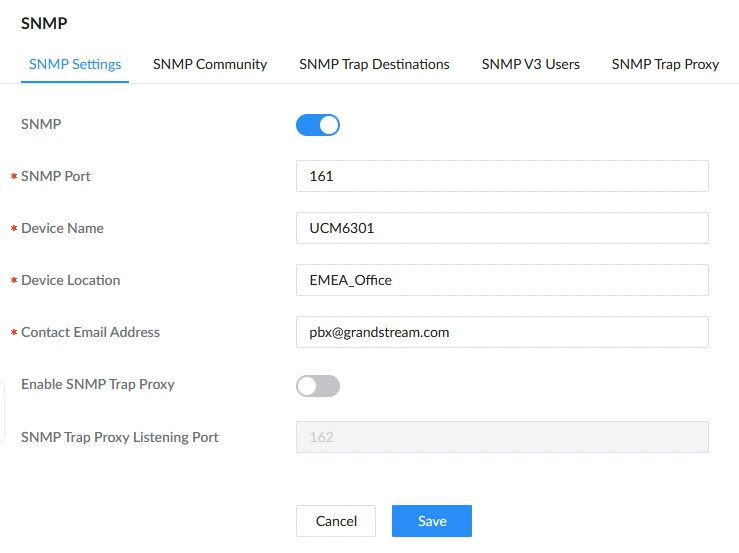
Enable SNMP by ticking the box in front of “SNMP” and configure the fields described below:
- SNMP Port: UDP port used by the agent (default: 161).
- Device Name: identifier shown in SNMP queries.
- Device Location: description of where the PBX is installed.
- Contact Email Address: administrator contact information.
- Enable SNMP Trap Proxy: option to forward received traps to another SNMP server.
- SNMP Trap Proxy Listening Port: port used by the proxy when enabled (default: 162).
After saving, the PBX begins responding to SNMP requests using the OIDs listed earlier in this guide.
Configure Community Access
Then, set up an SNMP Community. Please refer to the steps below:
- Navigate to System Settings→SNMP→SNMP Community tab.
- Click Add and enter the community string.

- Select the access level and click Save.
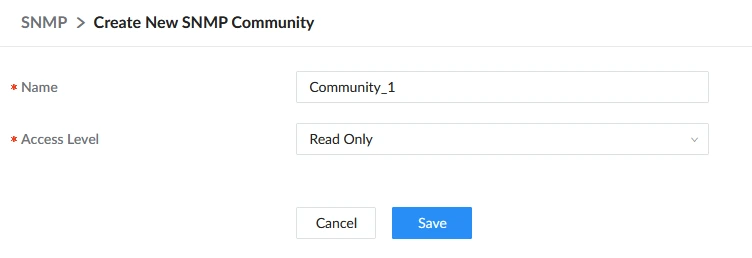
The same community string must be configured on the SNMP Manager when using SNMPv1 or SNMPv2c.
Browsing the PBX MIB
To query OIDs, an SNMP browser is required. The following tool is used in this guide:
https://www.ireasoning.com/download.shtml
After installing the MIB browser, please launch it and follow the instructions below to configure it properly.
- Open the MIB browser and go to File→ Load MIBs.
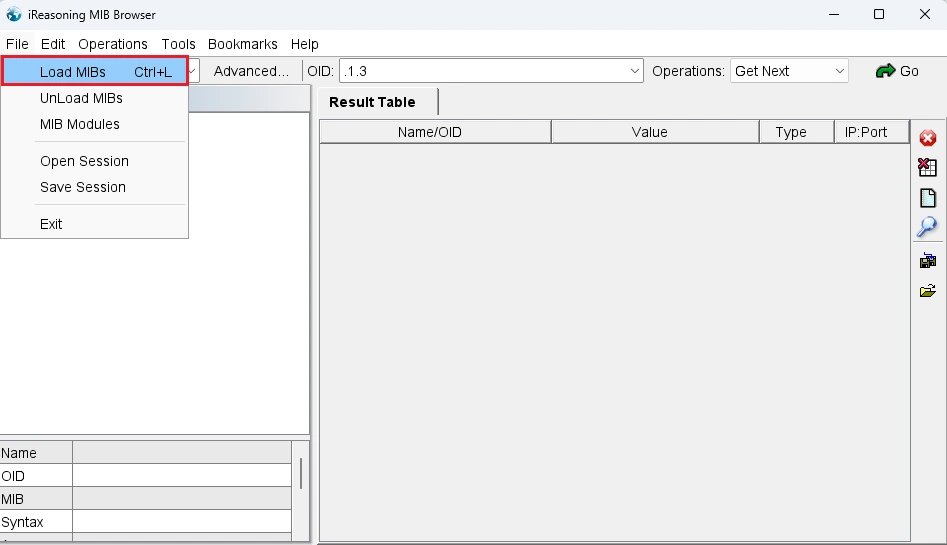
- Select the downloaded Grandstream MIB file and click “Open”.
- After loading, the Grandstream enterprise tree appears under: .iso.org.dod.internet.private.enterprises.gsobject
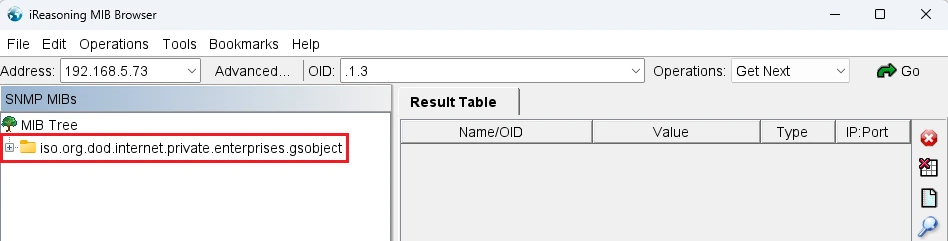
- Enter the PBX IP address in the “Address” field and click “Advanced”.
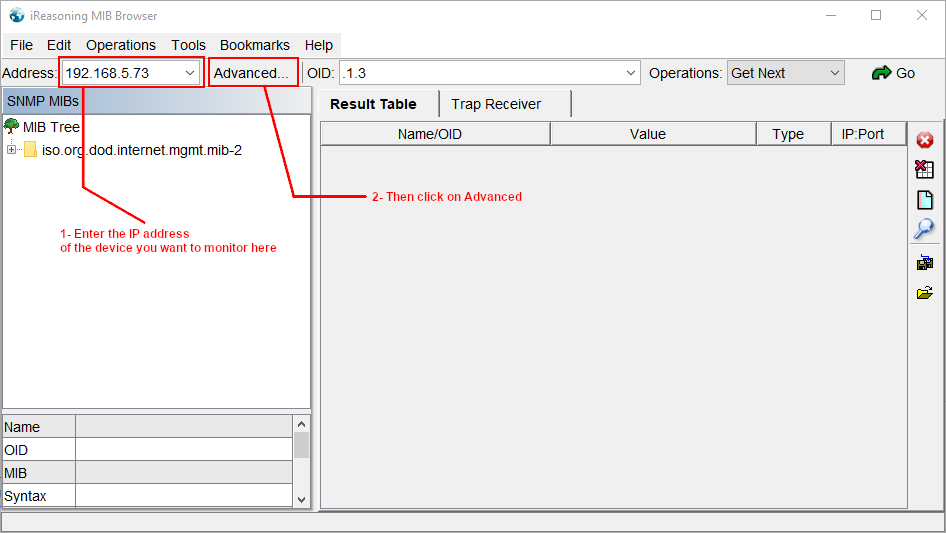
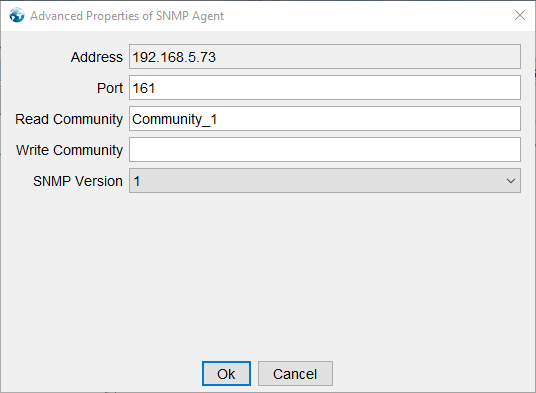
- Configure the SNMP agent according to the configuration set on the UCM (port and community string).
- Select SNMP version (v1/v2c), then click “Ok”.
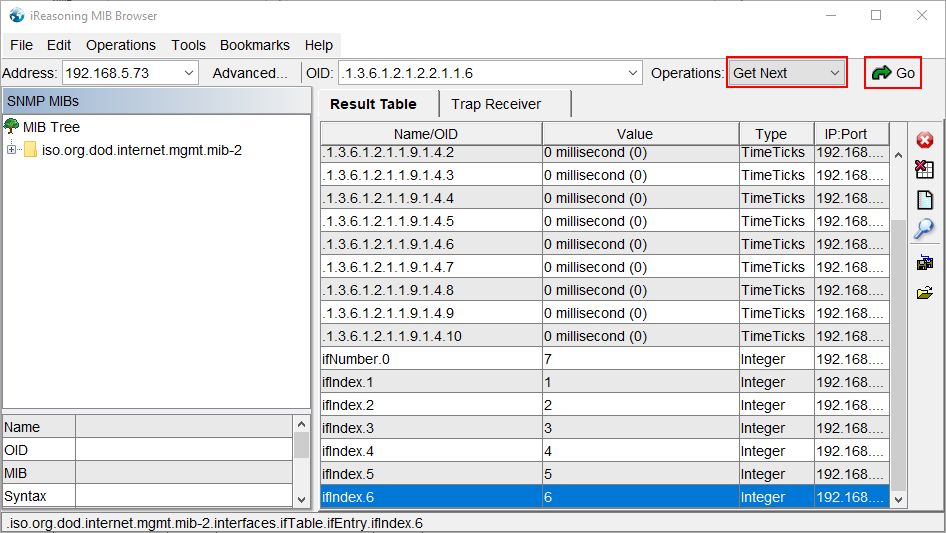
- To start getting SNMP messages, select the operation “GetNext”, then click on “Go” as the screenshot below shows.
SNMP Trap Destinations
Traps allow the PBX to notify a management system immediately when certain events occur, rather than waiting for querying.
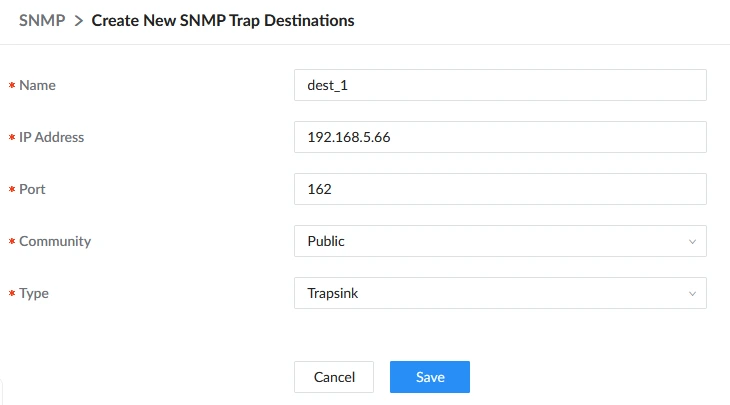
To configure SNMP Trap, we need to configure the destination on the UCM first. To do that, follow the steps below:
- Navigate to to System Settings→SNMP→SNMP Trap Destinations and click “Add”.

- Enter the destination name and specify the target IP address and port (default 162).
- Select the community.
- Choose trap type:
- Trapsink: SNMP v1
- Trap2sink: SNMP v2c
- Informsink: SNMP v3
- Save and apply to activate the destination.
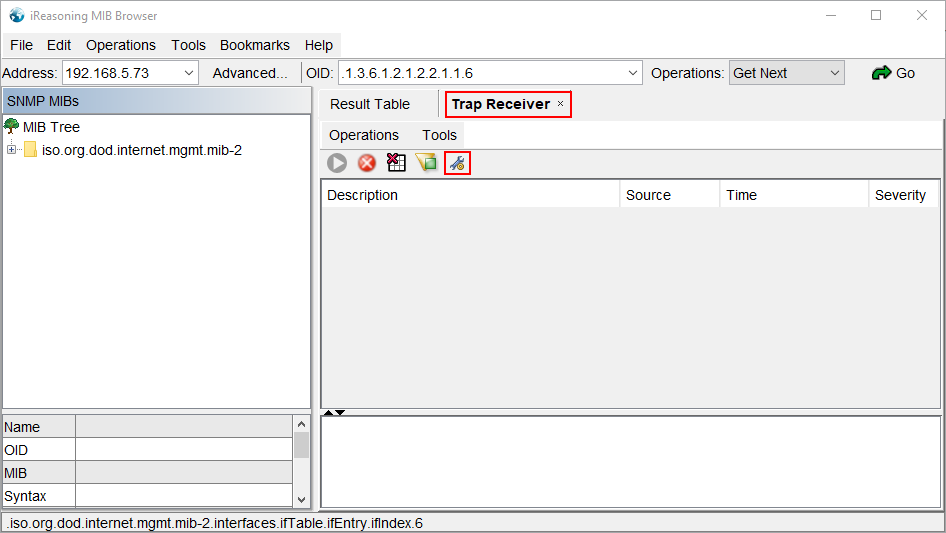
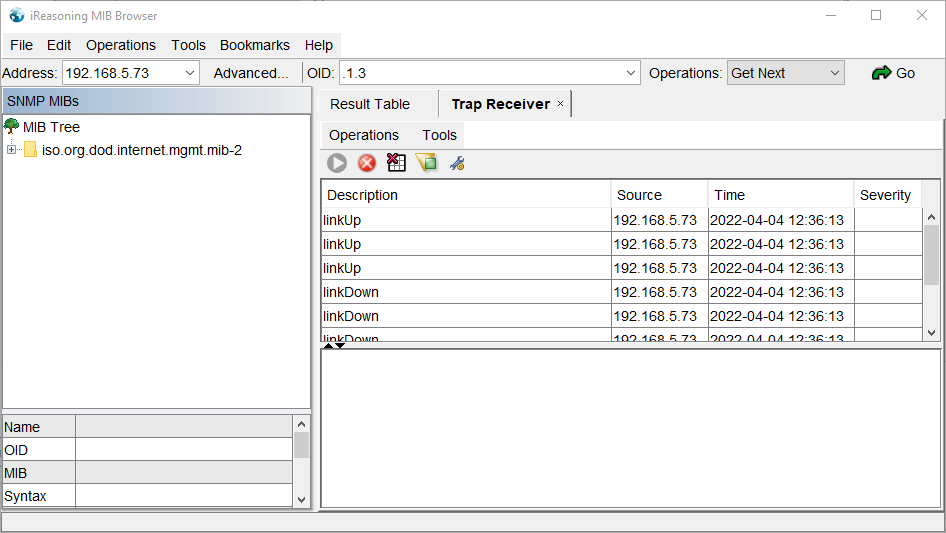
To test traps using iReasoning MIB Browser:
- Open the Trap Receiver as shown in the image below.
- Select the bind IP, which is the IP of the destination.
- Configure the port and select the transport protocol.
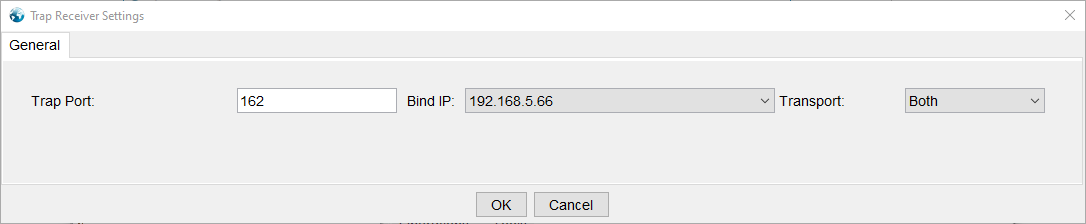
- Monitor incoming events. Trap notifications will appear automatically when triggered conditions occur.
Configuring SNMP v3
SNMPv3 provides authentication and optional encryption. OIDs remain the same, but access is controlled using user credentials instead of community strings.
To set up SNMP v3, please follow the steps below:
- Navigate to System Settings → SNMP → SNMP V3 Users, then click on “Add”.

- Create a user and configure authentication/privacy settings.
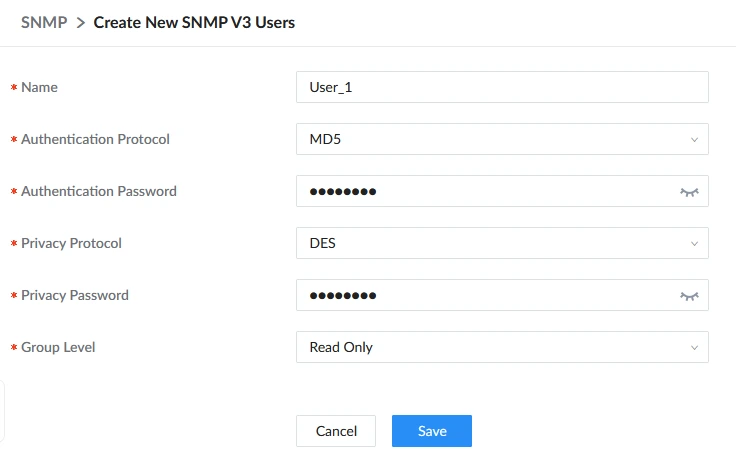
- Save the configuration and apply the changes.
To work with SNMPv3, use an SNMP manager with full SNMPv3 support. The tool below meets these requirements and can be downloaded from the following link:
https://www.manageengine.com/products/mibbrowser-free-tool/download.html
After installing the MIB browser, please launch it and follow these steps:
- On the toolbar, go to Edit→Settings.
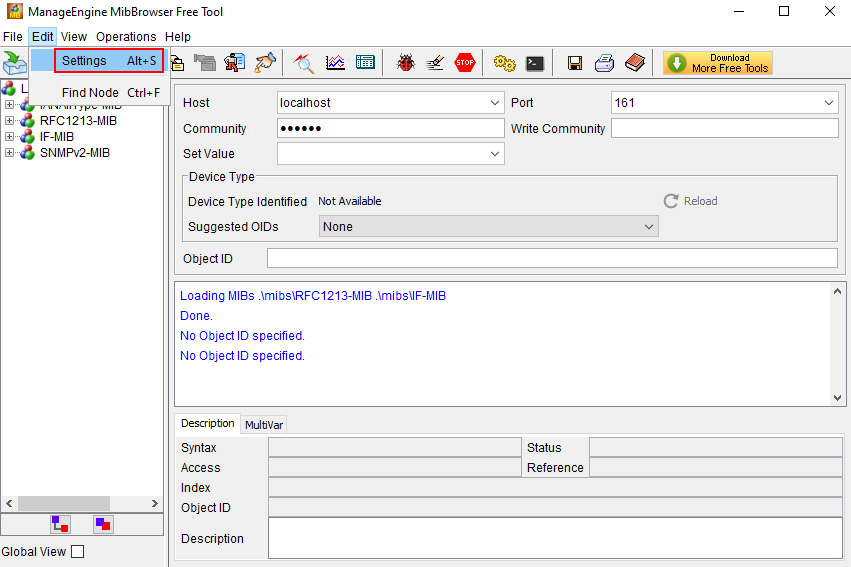
- Select SNMPv3 from the options, then click “Add”.
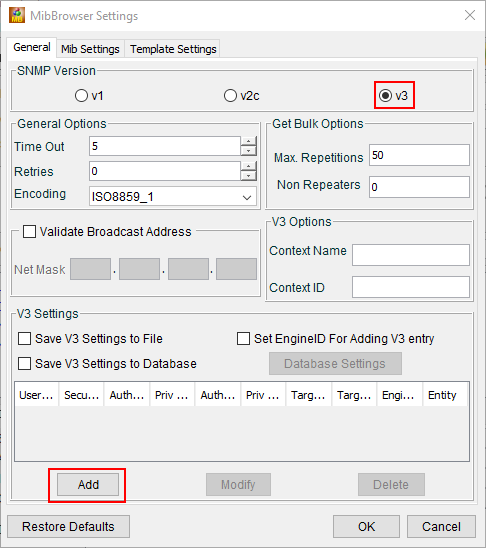
- Enter the same configuration that has been set on the PBX. After that, click “OK”.
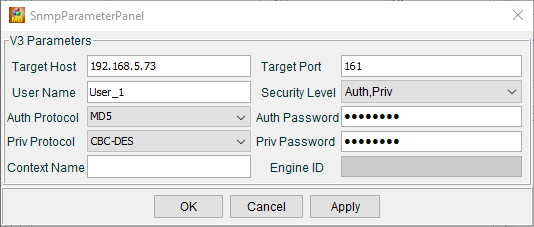
- If the settings are correct, no error message will be displayed. Click “OK” as the screenshot below shows.
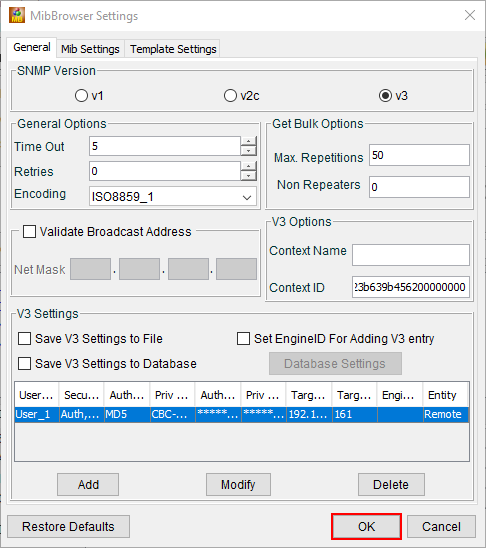
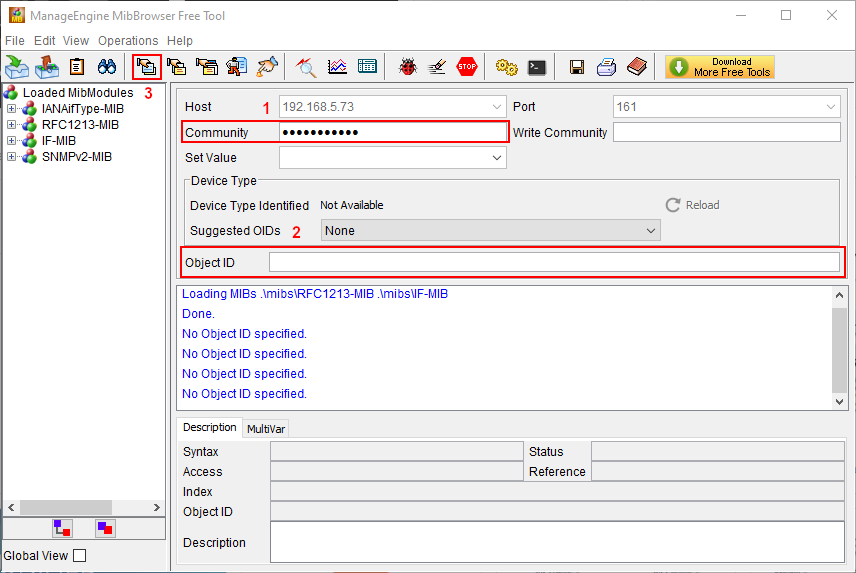
- Enter the community name in option 1 as indicated in the screenshot below, then enter the OID in option 2, then click on “Get SNMP Variable” (option 3) to receive the SNMP messages.
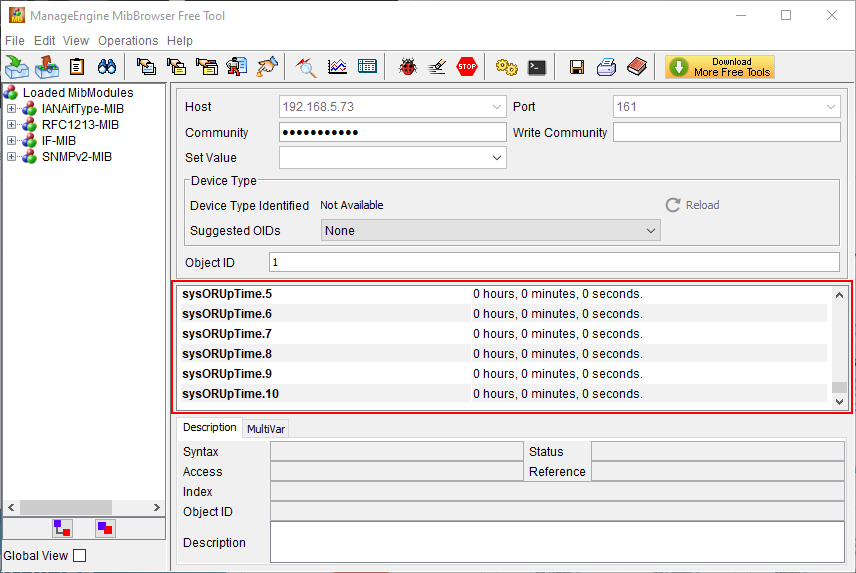
- The SNMP messages will be displayed as the figure below:
SUPPORTED MODELS
Model | Minimum Firmware Version |
UCM63xx | 1.0.29.19+ |
SoftwareUCM | 1.0.27.18+ |
GCC PBX | 1.0.27.90+ |