
ICE Feature Overview
The ICE (Interactive Connectivity Establishment) feature enables the phone to establish media connections across different network environments by collecting and exchanging candidate addresses during call setup. ICE behavior is configured per account and operates according to the selected media NAT traversal settings and the configured STUN and TURN servers.
The feature supports different candidate collection modes, call fallback behavior, and encrypted media, depending on configuration and network conditions.
Core ICE Functions
ICE Configuration
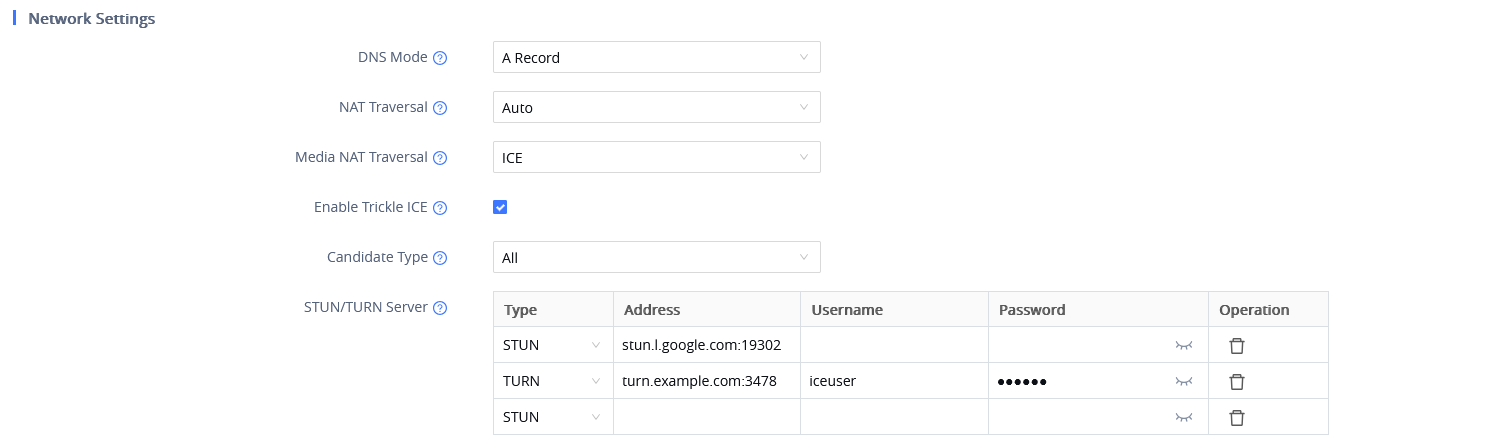
- ICE is enabled by setting Media NAT Traversal to ICE.
- ICE configuration is applied per account.
- Trickle ICE is enabled by default:
- When enabled, candidate addresses are sent in batches to speed up call setup.
- When disabled, all candidate types are collected first and then sent together.
- Candidate Type is set to All by default:
- When set to Relay Candidates Only, only relay-type candidates are used.
- Up to three STUN/TURN server groups can be configured.
Candidate Address Collection
Candidate address collection depends on the configured Candidate Type and STUN/TURN servers:
- All + no STUN/TURN
- Only host candidates are collected
- Calls work only within the LAN
- All + STUN only
- Host and server-reflexive candidates are collected
- All + TURN only
- Host, server-reflexive, and relay candidates are collected
- All + STUN + TURN
- Host, server-reflexive, and relay candidates are collected
- Incorrect or unreachable STUN/TURN servers
- Calls can still be established
- One-way audio or no audio may occur
- Relay Candidates Only + no TURN
- No relay candidates can be collected
- Call establishment fails
ICE Call Behavior
- ICE calls can be established normally once both endpoints are configured.
- ICE calls support:
- Mute
- Hold
- Transfer
- Multiple ICE calls and conferences are supported.
- If one endpoint does not support ICE, the call can fall back to a normal SIP call.
- If a network issue occurs during an active ICE call, restarting ICE may restore the call.
- ICE calls support DTLS and SDES media encryption.
Example
Example scenario where ICE can be used on two WP8x6 devices:
- Media NAT Traversal is set to ICE on both phones.
- Candidate Type remains set to All.
- A STUN server is configured.
- During call setup:
- Host and server-reflexive candidates are collected.
- Candidate addresses are exchanged using Trickle ICE.
- The call is established successfully.
- If one phone does not support ICE, the call falls back to a standard SIP call.
- Media encryption is applied using DTLS or SDES.