

Wi-Fi Analyze Feature Overview
The Wi-Fi Analyze feature allows the device to scan and analyze the surrounding Wi-Fi environment. It displays available wireless networks, their signal and channel information, and provides tools to filter, sort, and inspect detailed Wi-Fi parameters. The feature also evaluates channel occupancy and provides channel recommendations for the currently used frequency band.
Core Wi-Fi Analyze Functions
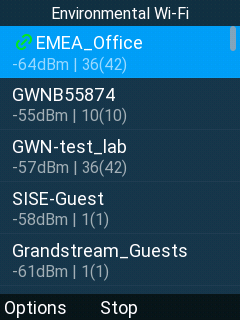
Environment Wi-Fi Scan
Under Settings → Diagnostics → Wi-Fi Analyze → Environmental Wi-Fi, the following actions can be performed.
- Displays a list of detected Wi-Fi networks with:
- SSID
- Signal strength
- Primary channel
- Center channel
- The currently connected SSID is displayed first.
- Other networks are sorted by signal strength.
- Hidden Wi-Fi networks are displayed in the BSSID list.
List Page Controls
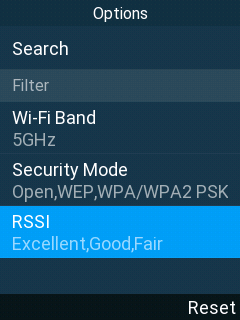
The Wi-Fi list page supports:
- Refresh and stop refresh
- Search
- Filtering by:
- Frequency band
- Security mode
- Signal strength
Detailed Wi-Fi Information
For each detected network, detailed information includes:
- MAC address
- Wi-Fi standard
- Signal strength
- Security type
- Frequency band
- Primary channel
- Channel center segment
- Bandwidth
- Center frequency
- Frequency range
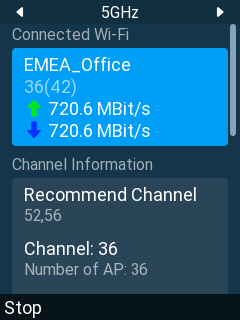
Channel Rating
- Displays primary channel occupancy for:
- 2.4 GHz
- 5 GHz
- Displays information for the currently connected SSID:
- Primary channel
- Center channel
- Upload rate
- Download rate
- Provides channel recommendations for the current frequency band.
- Supports refresh and stop refresh operations.
Example
The following example scenario illustrates how analyzing nearby Wi-Fi networks using the WP8X6 can help optimize wireless network performance.
- The user opens the Wi-Fi Analyze feature.
- The device scans the environment and displays nearby Wi-Fi networks.
- The currently connected SSID appears at the top of the list.
- Other networks are sorted by signal strength.
- The user selects a network to view detailed information such as:
- Wi-Fi standard
- Channel and bandwidth
- Frequency details
- The user opens the Channel Rating view to:
- Check channel occupancy on the current frequency band
- View upload and download rates of the connected SSID
- Review the recommended channel for that band